Categories B2B

Diving Deep Into Marketing in Construction (My Takeaways)

As the pandemic surged in 2020, people stayed home, and demand for home improvement services went through the roof. Construction companies swooped in and launched targeted marketing campaigns.

One example is Brett Landscaping, which sold almost its stock of higher-priced porcelain paving products.

Fast forward to 2024, people are at work. The economic outlook is grim, and interest rates and inflation are high. These factors have led to one outcome: declining interest in construction and home improvements.

Our yearly business recap shows the construction industry saw decreases in customer acquisition metrics. Inbound leads are down by 3.8%, web conversions by 0.65%, and web traffic by 6.84%.

Despite these challenges, now is the best time to double down on your construction company’s marketing efforts. As Warren Buffett famously said, “Be fearful when others are greedy, and be greedy when others are fearful.”

In this article, I’ll discuss 13 marketing strategies you can use to find and acquire clients for your construction company.

Download Now: Free Marketing Plan Template [Get Your Copy]

Construction Services Marketing Strategies

Below are 13 marketing strategies you can use to generate leads and clients for your construction company.

1. Create a helpful website that communicates your value.

A few months ago, I stumbled upon a Reddit post about a business owner who wanted to build a construction website. The person said, “I just want to show some pics of work I’ve done as well as a little contact me section.”
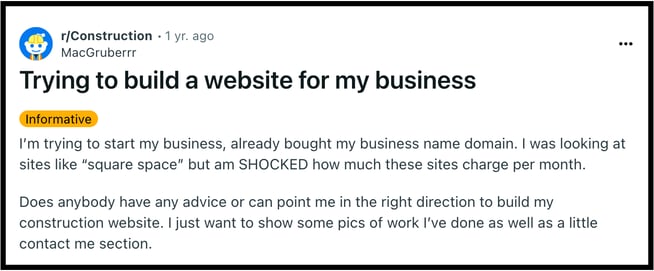
construction redditImage source

Pictures of work and a “contact me” section alone aren’t enough to make a construction website.

From my experience, sites like this don’t deliver the desired results because they don’t communicate your value effectively. Beyond your portfolio and contact info, your website should show your services, testimonials, and case studies.

Take Turner Construction, for instance. The elegantly designed website provides information about the company, services, projects, etc.

Image source

Besides its design, I like this website because of its performance and fast-loading pages, which let users quickly see the content they want.

Turner Construction also has superb site health.

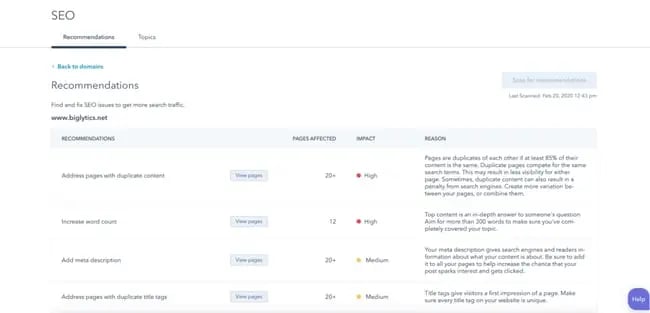
According to Ubersuggest, it doesn’t have a single SEO issue.

Image source

This means the website is SEO-friendly, uses proper meta tags, has well-formatted URLs, has no broken links, uses image alt text, etc.

Put these qualities of Turner Construction together, and you have a formidable site with great odds of ranking high in search engines.

Takeaway

Websites that work don’t have just pages. They have helpful web pages, social proof, attractive design, persuasive writing, and SEO implementation.

These qualities give leads a memorable user experience and can help bolster your conversion rates.


2. Build awareness with SEO content.

Author of Sticky Branding Jeremy Miller says, “Only 3% of your prospects are ready to buy now.”

The remaining 97% are not in purchase mode or don’t need your solution yet. Instead of considering them lost opportunities, a better strategy is to build brand awareness with SEO content.

Your goal? Educate your audience. Establish authority. Build trust. Win clients who search for information related to your services.

AFT Construction is one brand that milks its SEO content to build brand awareness. For instance, their article on Kerf door jambs ranks #1 for Kerf door jambs on Google.

Image source

But it wasn’t always this way.

According to Semrush, the article took about five months to take off and snag almost everyone who searched for Kerf door jambs.

Besides the organic visitors, this post ranks for 227 keywords.

What’s even more interesting is the $772 traffic cost that AFT saves monthly from this post.

If AFT has 100 other posts like this, they’ll save $77,200 in Google Ads costs. Add the leads that could come from these posts, and it’s easy to see why SEO content is immensely beneficial for construction companies.

Takeaway

A website is worth it only when people know it exists. One of the cheapest ways to give visibility to your site is by publishing SEO content. Remember to identify keywords that relate to your audience’s needs when creating SEO content.

Also, recognize that SEO content takes months to drive results and bring clients to your business.

3. Set up a Google Business Profile.

According to a Bright Local Survey, 98% of consumers use the Internet to find information about local businesses. One popular directory these consumers use is the Google Business Profile.

Creating or claiming your business on Google means you won’t lose revenue from people searching for you locally.

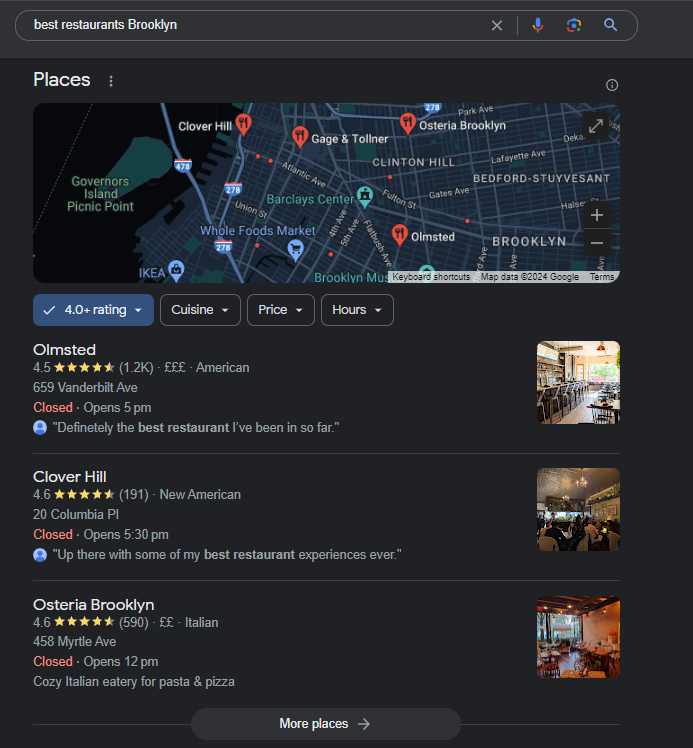
For instance, I searched for commercial construction service companies in New York, and here are the top results:

This result gives me an overview of three companies, including their address, reviews, phone numbers, business hours, and core services. I can decide who to call from this information without visiting their website.

Optimizing your Google Business Profile requires many moving parts, but here’s a snapshot of how to do it:

  • Create or sign in to your Google Business Profile with your Google Account.
  • Click “Add Location” and fill out your business information.
  • Verify your business by mail or phone.
  • Optimize your profile by adding high-quality photos of your projects and updating your business hours.

Takeaway

A Google Business Profile (GBP) increases the visibility of your business in your locality. It also helps prospects to find your contact info and make a quick call. However, one GBP element you must address is your reviews.

Many customers trust Google reviews, so encourage your clients to leave positive reviews on your GBP profile. Also, respond to both positive and negative reviews.


4. Join local directories.

Your Google Business Profile is one of many local directories like Yelp and Angie’s List. These platforms allow potential customers in your area to discover your construction company.

If I was a Yelp user, I could search for construction services in San Francisco and find several companies. With over 95 reviews and a 4.7-star rating, Prosper Construction Development stands out as a great company to work with.

Besides popular directories, Houzz, HomeAdvisor, and BuildZoom are specific for promoting construction businesses. After listing your business in a directory, you also need to optimize it to rank high in the search.

Here are some tips for doing that:

  • Submit your business information to many relevant directories.
  • Keep your listings complete, accurate, and up-to-date. Provide your company name, address, phone number, website, available hours, and services.
  • Include high-quality photos and videos of your work.
  • Get positive reviews from your customers.
  • Respond to all reviews, both positive and negative.
  • Engage with potential customers on online directories.

Takeaway

Leveraging local directories provides visibility to your business. Like your Google Business Profile, you must build reviews on these directories by providing excellent service. Also, respond to any negative feedback.

5. Be active on social media.

Many brands used to overlook social media. Today, the perception has changed. Founders and CEOs are now in charge of promoting their businesses and generating leads on social media platforms.

Brendan Bechtel, the Chairperson and CEO at Bechtel Corporation, excels at this. He uses his LinkedIn profile to share updates about the company’s projects. The example below has a massive 2,104 reactions, 56 comments, and 35 reposts.

This post can get the company a truckload of brand awareness.

Experience has taught me that the daily creation of fresh content for social media is difficult. For this reason, I’d advise you to repost your CEO‘s or employees’ thoughts on your company page — especially those going viral.

This will help you humanize your brand, build trust, and show expertise. Again, Bechtel Corporation does a great job with this.

Remember to tailor your content to different platforms when posting content on social media.

For instance, LinkedIn is great for sharing industry insights, blog posts, case studies, and testimonials.

Facebook and Instagram work well for showcasing your stunning projects, behind-the-scenes, how-to videos, and community service.

Twitter is great for joining relevant discussions, sharing tips, and engaging with industry professionals.

Takeaway

Social media marketing is all about building a connection with your audience by publishing thoughtful content. CEOs of various companies lead the charge, hoping their employees do the same.

If you’re over a one-person team, a great way to get your team in line is to incentivize them and publish content that drives the collective growth of employees and the company’s revenue.

6. Run Pay-Per-Click (PPC) campaigns.

Getting your company’s website on the coveted Google first page is a game-changer for attracting clients. The catch? SEO takes time to drive results. Remember the article about “Kerf door jambs?”

It took about five months before it became the first result.

I’d advise you to run PPC marketing campaigns like Google Ads to cover this time. This can help you rank at the top of Google’s sponsored search results.

For instance, while the keyword “construction service company” gets 90 searches monthly, its paid difficulty (32) shows it’s highly competitive to rank for. Also, it costs a whopping $9.18 per click.

It makes sense to bid for keywords in your local area to keep your costs low and targeting narrow. This improves your odds of getting a top spot when people search for your services.

For instance, a keyword like “construction service company in Boston” is easy to rank because it has a low search volume and CPC.

Takeaway

Google Ads is an excellent way to increase brand awareness quickly and get ready-to-buy leads for your construction firm. But to get more leads at lower costs, ensure you track, analyze, and optimize your ad campaigns.

7. Leverage email marketing.

Recent stats show email marketing generates $36 for every $1 spent. This makes it a cost-effective channel for developing and nurturing leads until they become paying clients.

Email-only works when you have a quality email list, i.e., a database of people who subscribed to receive communications from your company.

One effective way to build an email list is adding a form on your website — something I’ve noticed most construction websites don’t have. Newsflash: a bare form is not even enough.

To capture leads, you need to incentivize visitors with valuable freebies like an e-book, a guide, or a free consultation in exchange for their contact information.

This prevents you from losing potential customers who might leave without taking action. Here’s an example of an e-book I consider valuable from AFT construction:

Takeaway

Brilliant email marketing campaigns have the potential to transform your construction business. Pay attention to metrics such as open, click, and unsubscribe rates to gauge the success of your campaigns.

Also, while it’s tempting, buying an email list is never a good idea. Your best bet is to take the time to build your mailing list.

8. Ask for referrals from past clients.

Customers you satisfy will happily share their positive experiences and recommend your company to others.

A Nielson study reveals that 88% of consumers trust recommendations from people they know over other forms of advertising. Your referral network could also include other businesses.

Below are some referral marketing tips for your construction business:

  • Appreciate your clients for every referral they send.
  • Always ask for a referral after completing a project successfully.
  • Consider offering incentives like a discount on future services or a referral bonus.
  • Make it easy for your clients to provide referrals by suggesting how they can recommend your construction business.

Takeaway

Referral marketing is a powerful tool for growing your customers. But it can’t work if you don’t ask. As you consistently deliver exceptional service, ask your customers, “Think you might know someone interested in our product/service?”

9. Build social proof.

In the construction industry, showcasing your projects is vital to client acquisition. But beyond the pictures of fancy buildings, future clients want to know if you can deliver on time, on schedule, and within budget.

These are further proof of your expertise, and it’s where social proof shines.

Social proof is a great way to show prospective clients that your company can handle their projects based on stakeholder needs.

One way to build social proof is by creating case studies of successful past projects. Describe the challenges you faced, the solutions you provided, and the positive outcomes.

For example, Hoar Construction has over 20 completed project case studies on its website. They also include before and after images and videos to show the construction process from start to finish.

Other ways to build social proof include displaying positive reviews or testimonials and showing off industry awards and certifications on your website.

Takeaway

Building social proof requires time, patience, and consistent effort. Focus on delivering exceptional service, maintaining positive client relationships, and actively seeking testimonials.

Doing this helps your company attract more clients, stand out from competitors, and establish a strong reputation.

10. Create and promote more video content.

Video marketing has become increasingly popular in recent years. Wyzowl’s State of Video Marketing reveals that 91% of businesses use video as a marketing tool — an all-time high and a significant jump from previous years.

This data shows that creating video content, especially in the construction industry where visuals reign supreme, is an excellent way to increase awareness, engage your audience, and attract new clients.

Examples of video content you can create include:

  • Video testimonials of happy clients.
  • Behind the scenes of your staff at work.
  • Stunning and completed construction projects.
  • Time-lapse videos to capture an entire construction project.
  • Video case studies that highlight completed projects, challenges, and solutions.

I love how The Quorum Group uses high-quality videos to promote the company’s projects and employees. Blending innovation and storytelling, their eye-catching videos increase awareness and generate engagement.

For example, the Instagram video below has over 200k likes and 1400 comments.

Besides getting the attention of potential clients, it shows future employees that Quorum Group may be a great place to work.

Takeaway

Video marketing is a powerful tool for promoting your construction company. It helps you establish brand authority and stand out in this cutthroat industry. But creating video content isn’t enough.

Promote them across different online channels. That’s the optimum way to increase brand awareness, reach a wider audience, and attract potential clients.

11. Join relevant associations and groups.

Associations and groups let you connect with like-minded individuals in the construction industry. This can lead to new partnerships, collaborations, and business opportunities.

You also get exclusive access to industry resources, networking events, and workshops that could be valuable to your company.

Displaying your membership certificates also shows your commitment to professional standards and ethics. You can do this on your website, social media platforms, and marketing materials.


Image Source
Title: Membership certificates in a construction website

Some examples of U.S. construction associations include:

  • American Institute of Architects (AIA).
  • American Subcontractors Association (ASA).
  • National Association of Home Builders (NAHB).
  • Associated General Contractors of America (AGC).
  • National Association of Women in Construction (NAWIC).

Takeaway

Joining associations and groups and getting a membership certificate is half the battle. The other half is gaining visibility, networking opportunities, and referrals. You can do this by contributing to the body’s goals.

Another innovative way is to share your thoughts about the body on social media. How did you join them? Why did you join? What have you learned? What benefits have you gotten? You get my drift, right?

Doing these establishes you as a credible and active participant and makes you visible to notable industry players.

12. Consider influencer marketing.

Influencer marketing isn’t just for those in the fashion, beauty, and lifestyle industry. Construction businesses can also use it to reach a wider audience and generate quality leads.

When selecting influencers, look for those with ultra-specific characteristics: large following, engaged audience, similar audience to yours, and alignment with your brand values.

Partnering with influencers can take various forms, such as sponsored content or social media takeovers to promote your products, services, or projects.

Takeaway

Influencer marketing in the construction industry requires a more targeted approach. To make it work, you must identify influencers genuinely interested in construction-related topics and agree on specific campaign goals.

13. Attend local networking events and trade shows.

Local networking events and trade shows help you connect with potential clients, partners, and industry experts. These events also allow firms to showcase their portfolio, discover industry trends, and stay up-to-date on best practices.

Here are some tips to make the most out of participating in these events:

  • Join panels or presentations to share your expertise and establish authority as a thought leader in the industry.
  • Sponsor the event to gain increased visibility and brand exposure.
  • Use social media to promote your participation and engage with other attendees online.
  • Network with other industry professionals and potential clients and offer value.
  • Follow up with individuals you meet at the event and send personalized emails to maintain the relationship.

Some popular construction events in the U.S. include:

  • National Association of Home Builders (NAHB) International Builders’ Show.
  • Associated General Contractors of America (AGC) Annual Convention.
  • World of Concrete.
  • Greenbuild International Conference & Expo.

Takeaway

Events and trade shows are excellent ways to meet potential new clients.

Attending them also gives you a shot at boosting your brand awareness, getting referrals, networking, and growing your company. Making them a part of your marketing plan will be a plus.

Construction Services Marketing Ideas

The goal of any campaign is to position your company as a reliable and trusted choice for construction-related services. To market your product and services, you can explore four construction services marketing ideas.

Idea 1: Set up a lead generation campaign.

Relying solely on referrals and networking events to get clients won’t cut it. You need a targeted lead generation campaign that brings in a steady source of high-quality leads for your company. This way, your sales pipeline never runs dry.

How to Execute

  • Identify your target audience and their pain points
  • Create valuable content such as e-books, guides, whitepapers, or free consultations that address those pain points
  • Offer this content in exchange for their email address
  • Set up drip email marketing campaigns to nurture these leads with relevant, engaging content
  • Promote your lead generation campaign on your website, social media, and paid ads
  • Track and analyze the performance of your lead gen campaign
  • Optimize to achieve better results

Idea 2: Host a local event

Organize a local event to display your construction products and services to your targeted audience. It’s also a great way to increase awareness, reach a wider audience, and generate quality leads.

How to Execute

  • Plan the event logistics, such as choosing a location, date, and venue
  • Create materials like flyers, social media graphics, and emails to promote the event and attract attendees
  • Develop an event agenda, including presentations, live demos, and opportunities for attendees to interact or ask questions
  • Use landing pages to collect contact information from attendees
  • Follow up with attendees after the event with personalized emails, offering additional information, discounts, or exclusive offers
  • Nurture leads from the event to stay top-of-mind with potential clients

Idea 3: Partner with businesses in similar industries

Collaborating with businesses in similar sectors helps your company reach new audiences.

For example, you could join forces with an interior design or landscaping company. This way, you can create joint marketing campaigns, co-host events, or offer bundled packages that combine your services with theirs.

This partnership allows you to tap into each other’s customer base and cross-promote your products. It also adds value to your offerings, making them more appealing to potential customers.

How to Execute

  • Identify businesses in related industries that could complement your services.
  • Reach out to them and propose a partnership or collaboration
  • Create joint marketing materials and campaigns that highlight the synergy between your services
  • Offer special discounts or incentives for customers who use both of your services
  • Track the campaign’s performance and make adjustments as needed to optimize the results

Idea 4: Engage in community events and sponsorships

What better way to give back to your community than to participate in events or sponsor local initiatives? This helps to increase brand visibility and establish your company as a trusted community partner.

How to Execute

  • Research and identify community events and initiatives that align with your company’s values
  • Reach out to organizers or local organizations to inquire about sponsorship opportunities.
  • Promote events through digital and traditional channels to create more awareness.
  • Take part in the event and engage with attendees to build connections
  • Prominently display your brand materials at these events to increase awareness
  • Collect contact information from potential clients and follow up promptly
  • Evaluate the success of your sponsorship campaign and optimize for future community engagement

Remember to track and analyze the performance of your marketing campaigns and make adjustments as needed to optimize your results. You can try HubSpot’s marketing automation tool to get started today.

What I Learned: My Overall Assessment of Construction Marketing

Clients are the lifeblood of successful construction businesses.

But to get them, you need a marketing strategy that effectively promotes your construction services. While every tactic may not apply to you, it’s essential to determine the most effective ones for your business.
New Call-to-action

Categories B2B

How to Use Power Queries in Excel

Though tech tools offer a wide variety of data management solutions, consolidating information from multiple sources remains a challenge. Making sense of disparate datasheets often relies on manual effort.

Download 10 Excel Templates for Marketers [Free Kit]

This is where power query can help by wrangling data from various origins into an integrated view.

As a marketing consultant, I work with multiple teams across a client’s business. To get a true picture of what’s going on with a SaaS company’s revenue funnel, for example, I typically need data from marketing, sales, customer success, and product.

However, the data I need typically gets collected across multiple locations and in different formats. Piecing everything together means getting everything in one place, in the same format, and able to be manipulated in whichever way is needed.

So, power query has been very useful to me over the years, and it’s not as complicated as you might think.

With power query, you can import, clean, transform, and merge datasets from multiple sources. Once you know how to use it, gathering and interpreting data from diverse sources becomes a whole lot easier.

What is a power query?

Power query is essentially a technology you can use within Excel to connect datasets together within an Excel spreadsheet. You can use power query to pull data from a range of sources, including webpages, databases, other spreadsheets, and multiple file types.

Once the data is imported, you can also use the power query editor to clean and transform the data. Finally, you can import the transformed data into your existing spreadsheet.

Common actions you can use in the power query editor after importing data include filtering, removing duplicates, splitting columns, formatting data, and merging data.

The core benefit is that tasks that would take you hours to do manually can be performed in minutes with power query. Plus, you can repeatedly use the same cleaning or transformation actions again at the click of a button when the data sources are updated.

With any advanced feature in Excel, there is a bit of a learning curve. But while it might take you a couple of tries to get familiar with power query, it has a pretty user-friendly interface once you know where everything is.

How to Use Power Queries in Excel

When learning how to use something like power query, the most useful method is with an example. The steps below can be applied to any type of data set, and the functionalities highlighted can be replaced with other ways to use queries as needed.

In this example, I’m pulling together sales data from two different geographic regions for analysis. The data comes from the U.S. and the U.K., with formatting and currencies that are written differently and formatted differently across two spreadsheets.

My goal is to combine these data sets in one sheet, with the data cleaned and easily interpreted and analyzed in one place.

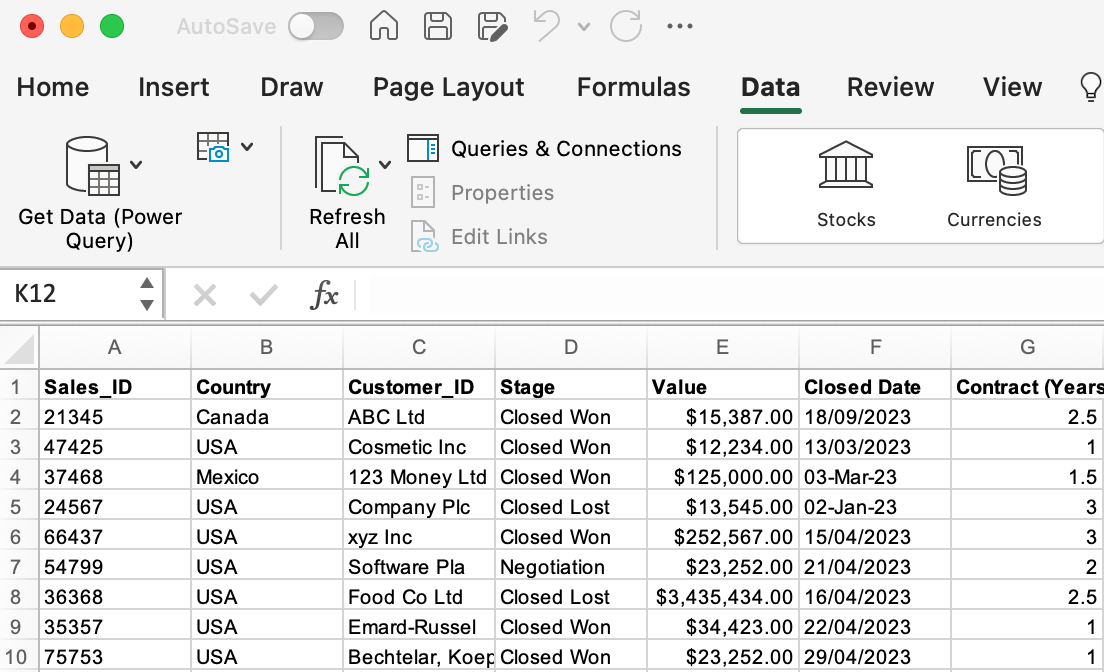
Step 1. Open Excel and access power query.

First things first, open the main spreadsheet you’ll be working from. In this case, I’ve opened my USA sales spreadsheet, as this is where I want to clean and combine data.

In the main ribbon, click on “Data.” You’ll see “Get Data (Power Query)” as the first item in the Data ribbon.

how to use power queries in Excel

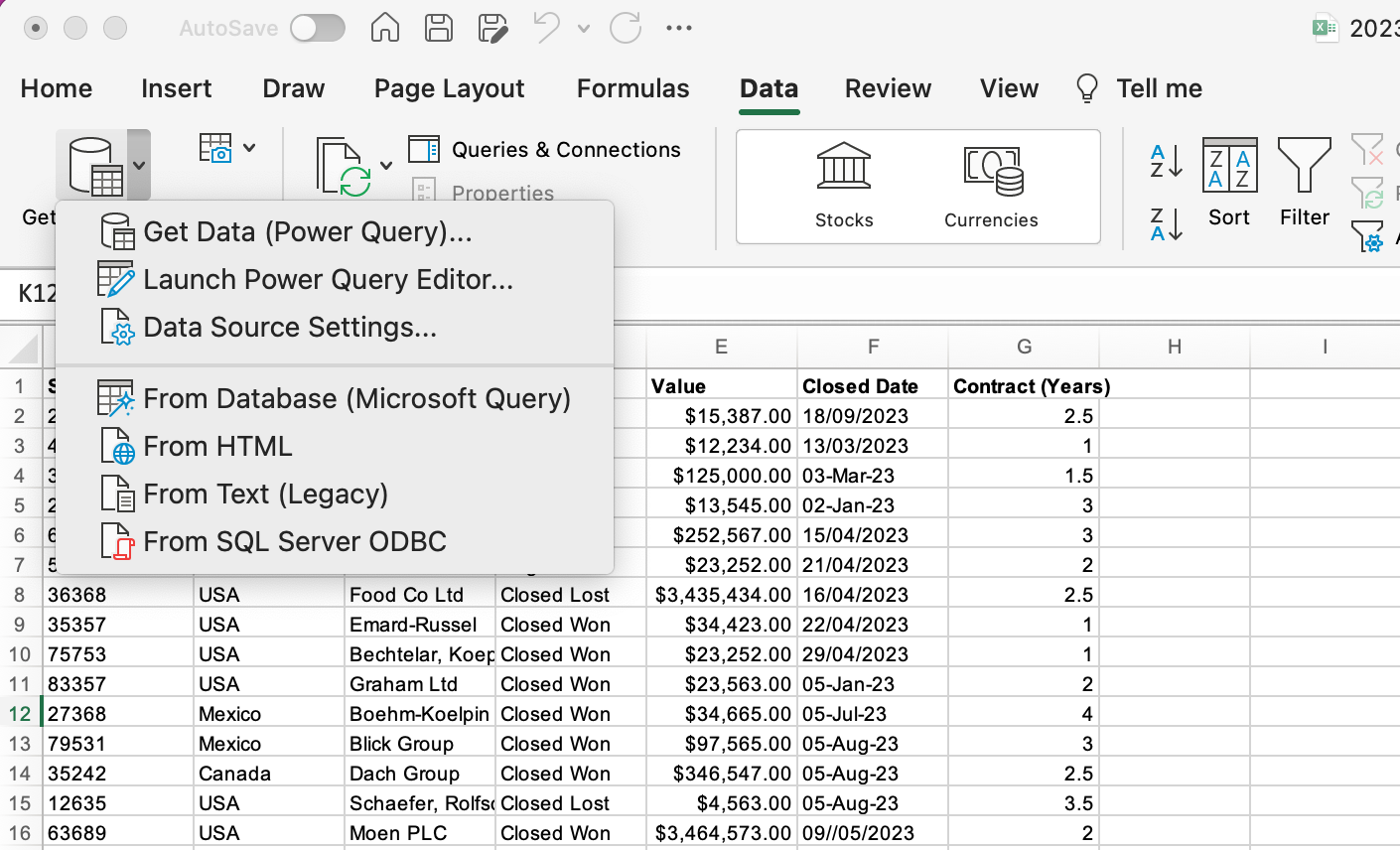
Step 2. Import your data.

Click on the dropdown to access your power query options.

how to use power queries in Excel

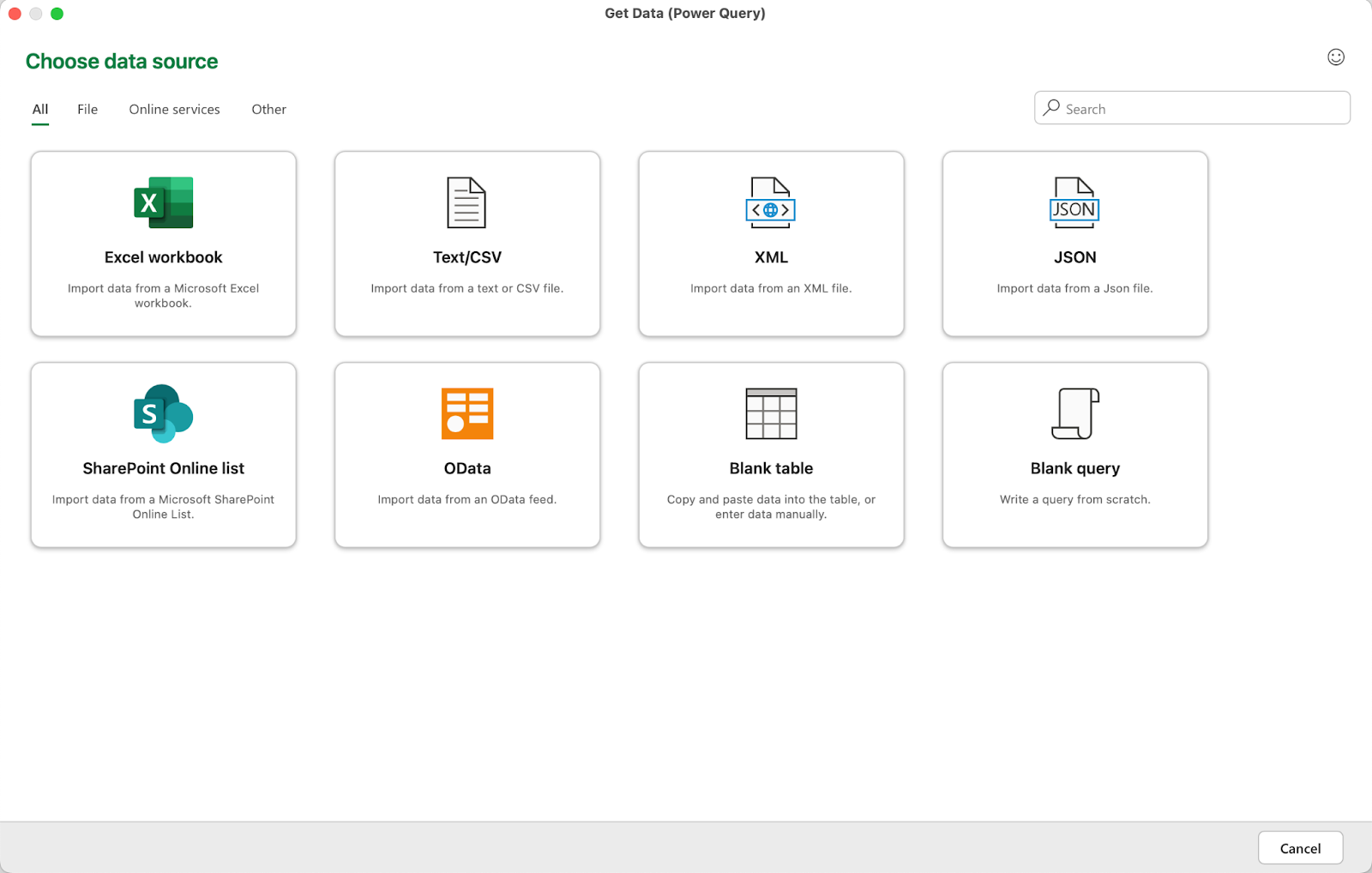
In this first step, we want to hit “Get Data,” so we can start a query using the data in the U.K. sales spreadsheet.

Clicking this option will open a window where you can choose a data source. As you’ll see, it’s possible to pull data from a wide range of sources, including shared SharePoint files.

how to use power queries in Excel

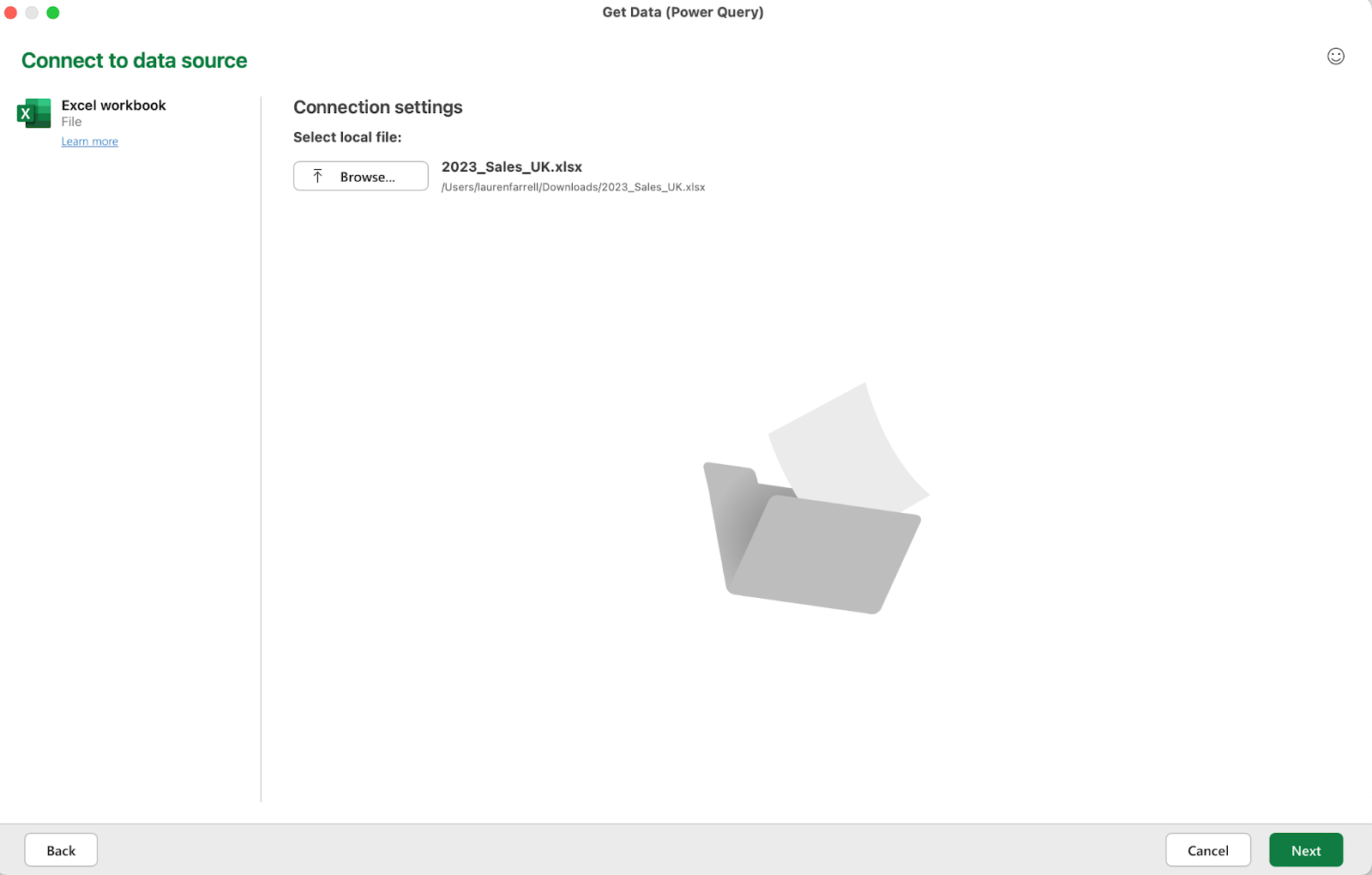
In this case, we’re selecting “Excel workbook” to access the file that is stored locally on my computer. After making this selection, you simply browse your files for the right spreadsheet and hit “Get Data.”

how to use power queries in Excel

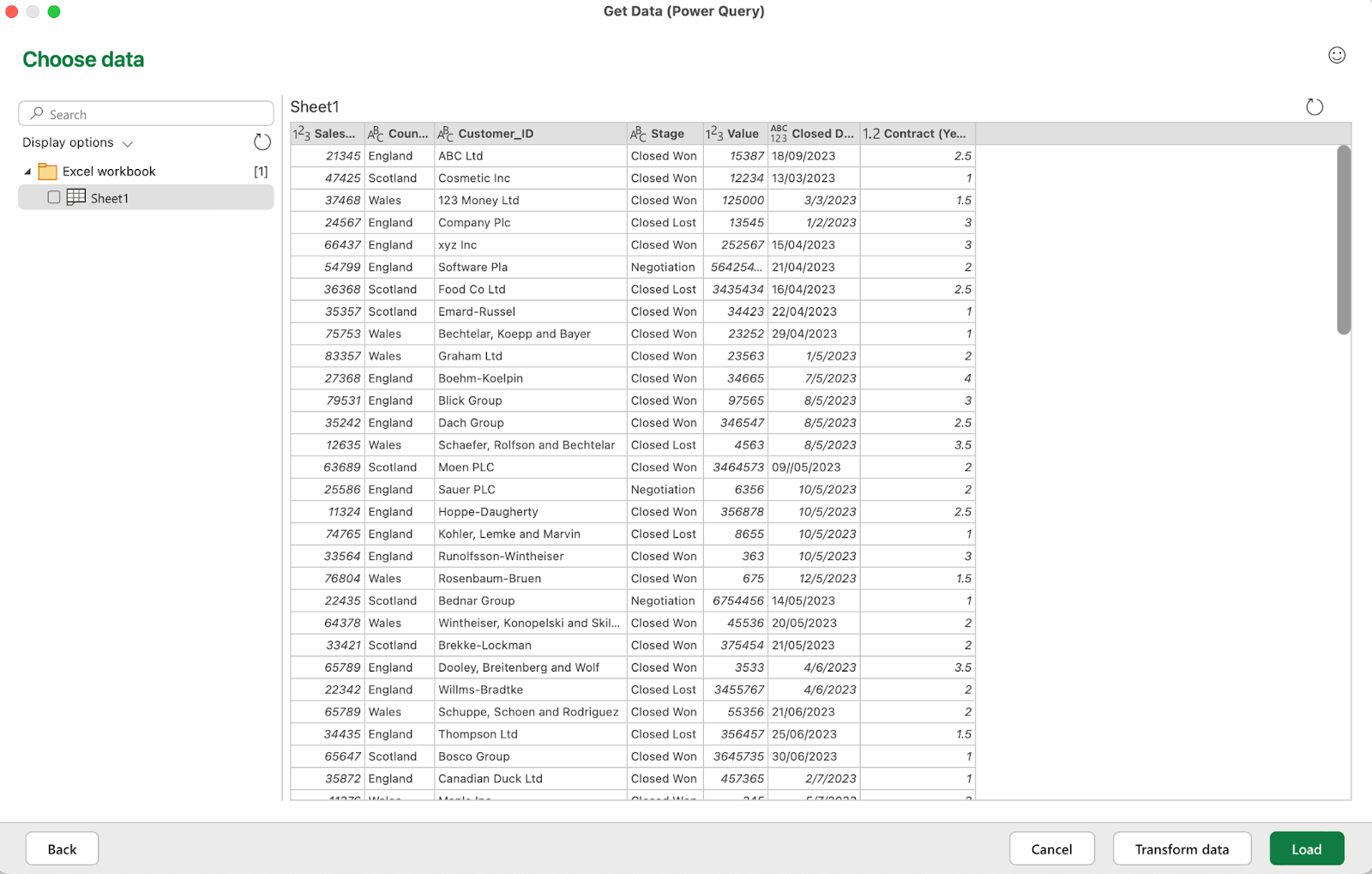
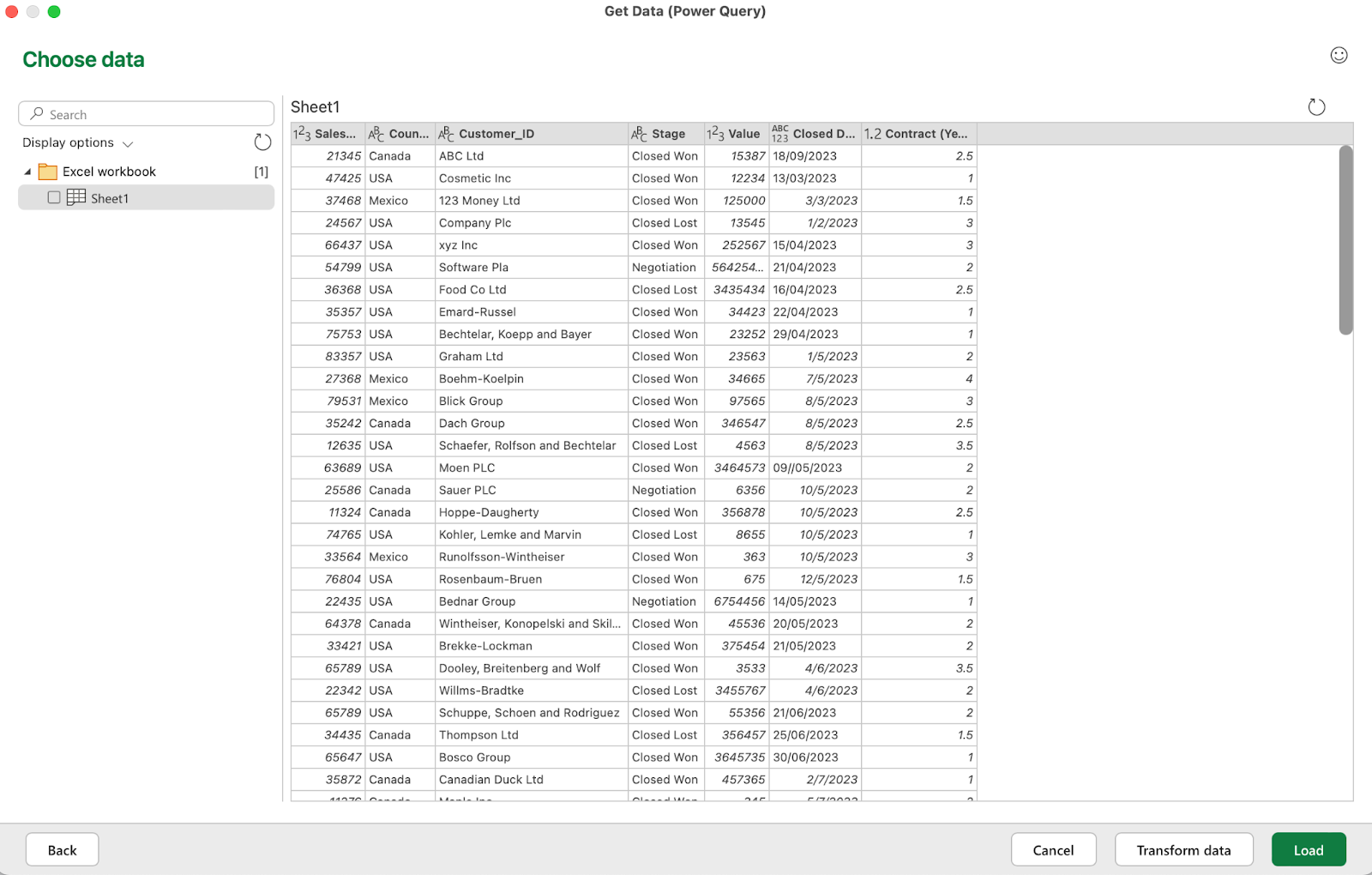
Then, on the following screen, hit “Next.” From here, you can select specific sheets that you want to import. You’ll be able to preview the data before hitting “Load” to finalize the import.

Power Query will import the data into a new tab on your existing spreadsheet

If you select “Load” at this stage, power query will import the data into a new tab on your existing spreadsheet.

From there, you can select “Data” and “Launch Power Query Editor” to perform mass cleaning or updating of the imported data.

launch power query editor

Step 3. Cleaning imported data.

If you prefer to clean your data before you import it, you can do so during the import stage.

Instead of selecting “Load” during the import process, you can select “Transform data,” which opens the Power Query Editor just like in the previous step.

how to use power queries in Excel

how to use power queries in Excel

For instance, the U.K. sales sheet contains the same data as the U.S. sheet, but it’s not formatted correctly. The currency format is not applied to the currency cell.

So, in Power Query Editor, I can select the “Transform” tab to edit the data before I import it (I could also do this if I imported the data first and then opened the Power Query Editor).

how to use power queries in Excel

how to use power queries in Excel

As you can see, there are tons of options available to you here. In this instance, I’m going to select the Currency column and selecting “Data type.”

how to use power queries in Excel

From there, I can select the Currency option and change the value to USD.

Step 4. Load your transformed data.

The final step is adding this cleaned and transformed data into my existing spreadsheet. In Power Query Editor, navigate back to the “Home” tab and click “Close & load.”

how to use power queries in Excel

Excel will now load this query into a new tab on your spreadsheet.

how to use power queries in Excel

This simple step-by-step process shows you how to get started with accessing and using power query.

The use cases for power query, however, are almost endless due to the wide variety of data you can import and clean, and the types of transformations and data manipulations you can perform.

So, let’s take a look at some examples of what you can use power query to do.

Power Query Examples

Consolidating Data From Multiple Spreadsheets

Whether you’re working with multiple workbooks of your own creation or having files sent your way from other people, the need to consolidate data into one sheet is a fairly common problem.

Power query makes this a pretty straightforward task.

First, make sure all the workbooks you want to consolidate are saved in the same folder. Where possible, make sure they all match in terms of having the same column headings.

Open up Excel to a blank workbook and access power query with the “Get Data” option.

Select your data source as “Excel workbook” and choose your first file. If your sheets are all formatted the same, you won’t need to do anything else here. Simply hit “Load.”

how to use power queries in Excel

Next, you’re going to import your other spreadsheets. But, instead of performing this first step the exact same way, you’re going to append the other sheets to this existing query that you’ve just created.

In the sheet, open power query again and select the second workbook from your list when importing a file. Instead of hitting “Load,” select the “Transform Data” option.

how to use power queries in Excel

Now, you should see both queries available in the Power Query Editor on the left side panel.

how to use power queries in Excel

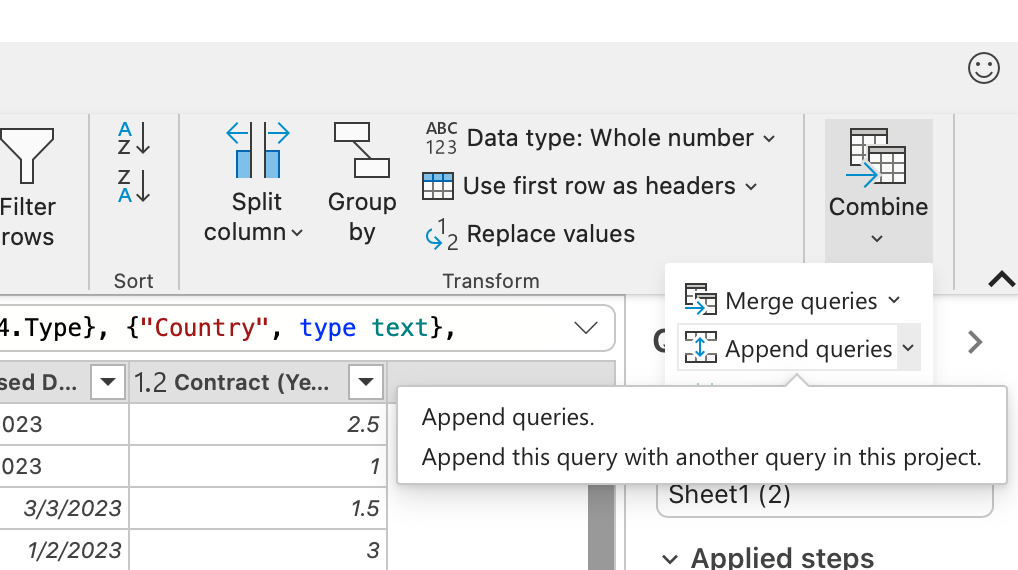
On the right-hand side of the ribbon in Power Query Editor, you’ll see a “Combine” button with a dropdown containing options to merge or append queries.

how to use power queries in Excel

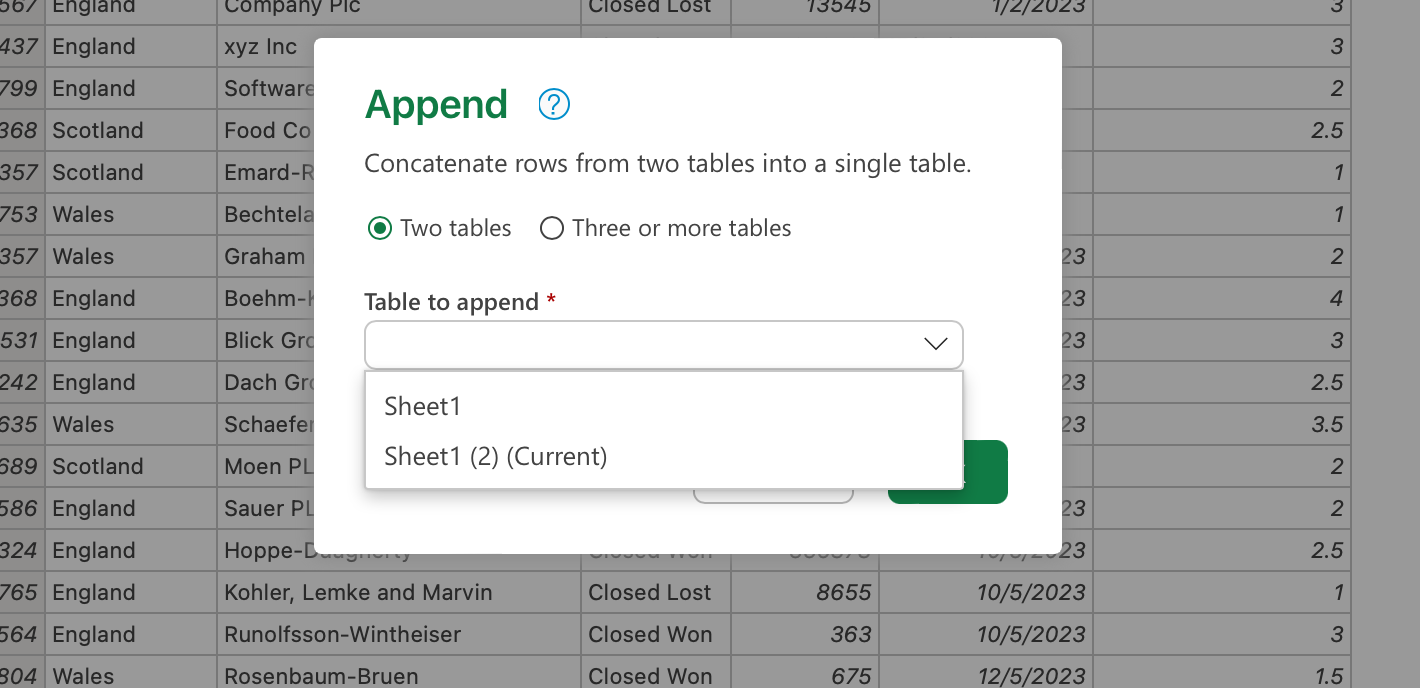
From the dropdown, select “Append queries as new.” Select the tables as you’d like to append one to the end of the other, and hit “Ok.”

how to use power queries in Excel

Power query will append the two tables together in one tab on your sheet. You can perform this action with two spreadsheets or multiple spreadsheets, depending on your needs.

Cleaning Up Data Before Importing

Sometimes, you can be dealing with a messy spreadsheet. Formatting and styling are all over the place, and you want to make sure it’s as clean and tidy as possible before importing.

Power query makes this an easy part of the process as you import data, so you don’t have to spend time manually cleaning things up afterward.

A simple example is a spreadsheet where some text is capitalized, and some is not. So, the goal is to convert everything into sentence case before adding it to your existing sheet.

Let’s say the sales team in France has sent us their sales report. It looks great, but some text in the Country ID column is in all caps, and some is not. Plus, random spaces have appeared in the country name that need to be fixed, too, or we’ll struggle to properly pull the data into pivot tables and other reporting.

In your sheet, open power query and import the file with the messy data. Click “Transform data” rather than importing it straight away.

First, find the column with the mixed-up capitalization and extra spaces. Right-click on the column and click “Transform column,” then “Text transforms” and, finally, “Trim.” This will remove any extra spacing that could interfere with manipulating the data.

how to use power queries in Excel

Right-click on the column again, and this time, click “Capitalize Each Word” from the options. You may need to first select “lowercase” to fix any All-Caps words and then use the “Capitalize Each Word” option.

Now, you can click “Load” for your cleaned data to import into your Excel sheet.

how to use power queries in Excel

Unpivoting/Pivoting Data to Improve Analysis Capabilities

Another common challenge with Excel is receiving data in a way that makes it difficult to manipulate and analyze, specifically when you want to switch around columns and rows — or “pivot” the data.

In this example, we have survey data where the columns are parsed out by respondents. Ideally, we’d like it parsed out with the columns as the survey questions.

First, open a blank Excel table and import your sheet using power query.

Like the previous example, instead of clicking “Load,” we first need to click “Transform data.”

how to use power queries in Excel

Now that Power Query Editor is open, navigate to the Transform tab in the ribbon. Select all the survey question columns together, and click “Unpivot columns” and then select “Unpivot only selected columns.”

how to use power queries in Excel

Power query takes the selected columns and parses out the data by the attributes and values of the questions. Navigate back to the “Home” tab and hit “Close & load” to use the unpivoted data in your spreadsheet.

how to use power queries in Excel

Get Experimental With Power Query

In the grand scheme of tools, Excel is amongst the most powerful when it comes to sorting, cleaning, and transforming the type of data that gets used in day-to-day business operations across multiple departments and teams.

While it can take a little while to get familiar with all the features and functionalities of something like power query, it’s well worth the effort.

Even with relatively simple spreadsheets that just contain a lot of data, power query can cut your cleaning and transforming time down significantly, so you can get into important analysis and decision-making much quicker.

excel marketing templates

Categories B2B

230 ChatGPT Prompts Marketers Should Use

ChatGPT is generating a lot of buzz in the marketing industry, and if you‘re a marketer, you’re probably wondering how to use the technology to its full potential.

Fortunately, I’ve compiled a list of 190 prompts to enter into ChatGPT to take the guesswork out of figuring out how to use the AI.

If you‘re unfamiliar with ChatGPT, here’s what you need to know.

Download Now: 100 ChatGPT Prompts for Marketers [Free Guide]

What is ChatGPT?

65 ChatGPT Prompts for Marketing

How to Use These Marketing ChatGPT Prompts

25 ChatGPT Prompts for Business

27 ChatGPT Prompts for Content Creation and Social Media

9 ChatGPT Prompts for Analytics

25 ChatGPT Prompts for Email Campaigns

25 ChatGPT Prompts for Resume

11 ChatGPT Prompts for Ecommerce

23 ChatGPT Prompts for Customer Service

20 ChatGPT Prompts for Sales

What is ChatGPT?

ChatGPT is a publicly accessible tool owned by OpenAI. It uses natural language processing to pull information from around the web to answer search queries and fulfill content requests.

ChatGPT’s answers are original and have not been copied and pasted from the web.

Aside from a paid subscription version called ChatGPT Plus, the tool is free.

ChatGPT is one of the latest developments in AI tools. Suppose you‘re looking for other ways to integrate AI into your marketing workflow.

In that case, you may be interested in HubSpot’s suite of generative AI tools to help you ideate, create, and share remarkable content quickly and efficiently.

Now, let’s get into the wide range of prompts you can use to get the most out of ChatGPT.

65 ChatGPT Prompts for Marketing

  1. “List [number] ideas for blog posts about [topic].”
  2. “Write a minute-long advertisement script about [product, service, or company].”
  3. “Create a three-month social media campaign calendar for our product to [insert goal] and mention the channels we should focus on.”
  4. “List [number] viral Instagram Reels ideas about [company, product, or service].”
  5. “Generate [number] of viral TikTok ideas about [company, product, or service].”
  6. “Create three call-to-action button ideas based on the contents of this blog post.” Then, paste in the content.
  7. “Create an advertising campaign about [company, product, or service] targeting [target audience]. Include key messages and slogans and choose the best media channels for promotions.”
  8. “Write [number] Google Ad headlines from [URL].”
  9. “List common challenges faced by [buyer persona description].”
  10. “List the key marketing segments in [industry]. Which segment has the biggest opportunity for our [company, group, organization, business]?”
  11. “Write marketing copy to make my marketing emails more engaging. The copy must be about our [product, service, or company].”
  12. “Write an email subject line convincing potential customers to switch our service.”
  13. “What are 10 main points crucial to marketers trying to acquire new customers?”
  14. “Generate an AIDA for [product or service].”
  15. “Write five tweets to generate interest in [product, company, or service].”
  16. “Write a promotional LinkedIn post about [product or service].”
  17. “Write three seconds of Facebook Ad copy about [product or service].”
  18. “Write a press release about our upcoming event. Include the event’s date, time, location, and purpose.” Make sure to give ChatGPT the necessary details.
  19. “Generate five different YouTube descriptions for our video about [topic].”
  20. “Generate questions for a Facebook poll about [topic].
  21. “What marketing channels have the highest ROI?”
  22. “List ways to market my brand on TikTok.”
  23. “How can influencer marketing generate leads?”
  24. “What marketing tactics should I leverage to reach my target audience.” Make sure to describe your target audience.
  25. “What marketing channels have the lowest ROI?”
  26. “This email is to [audience]. Please rewrite it with [another audience] in mind. Their pain points are [pain points.] Be sure to keep the tone similar.” Then, paste into the email.
  27. “Take this blog post and turn it into 10 Twitter posts and four LinkedIn posts.” Then, paste in the blog post.
  28. “Turn this LinkedIn post into an email to [audience].” Paste in post content.
  29. “How can I turn this blog post into an infographic. Please give me an outline.” Then, paste in the blog post content.
  30. “I’m writing an email about [topic] to [audience]. Give me five key talking points.”
  31. “I need to A/B test subject lines for this email. Give me 10 subject line ideas and 10 pre-headers.” Then, paste in the email. 
  32. “What are the biggest pain points of [audience] in [industry]?”
  33. “I am a [title] in a [describe company] that sells [product/service type]. We market to [audience] whose pain points are [list pain points]. What objections are they likely to have?”
  34. “Give me 5 blog titles for a post about [insert subject] for [audience].”
  35. “Write a 30-second script for an explainer video about [product] that [what the product does.]
  36. “Here’s a 30-second explainer video script for our [product] that [what the product does] for [audience type]. Please give me a list of some of the different shots or animations I should include.” Paste in the script.
  37. “Here’s our latest whitepaper. We primarily market using [channels]. Give me at least 15 ideas for how we can repurpose this and turn it into a multichannel campaign.” Then, upload the whitepaper.
  38. “We’re a [type of company] launching a new [what you’re launching] in three months and need to start building out the runway. Our audience is [describe audience]. Give me an outline for what we need to do for a successful launch.”
  39. “Here’s our launch outline. Please create a marketing calendar for the different stages and milestones we’ll need to reach.” Then, upload the launch outline.
  40. “We goofed. [Describe what happened.] Give me an outline for an email and social media posts to explain what happened, apologize, and share what we’re doing to fix it.”
  41. “These are our three strategic priorities for this year [list them]. What are some KPIs to consider as we measure success?”
  42. “These are our three strategic priorities for this year [list them]. What tactics can we use to reach these goals?”
  43. “Here’s a transcript of me talking about my onboarding process. Please help me outline a document I can share with clients to communicate it to them.”
  44. “I’m creating a re-engagement campaign. Give me six ideas for emails I can send to re-engage people who haven’t opened an email in the last nine months.”
  45. “My company is known for [value prop]. Give me 10 blog post ideas that can communicate this to our audience.”
  46. “My company is known for [value prop]. What are four ways I can communicate this expertise in our proposals?”
  47. “Most of my business comes from referrals. Help me create referral language I can give to past clients and referral partners that make it easy for them to send me business. I need three versions: 1. a single sentence; 2. an email; and 3. a social media post.”
  48. “I need to get more reviews. Please help me create a campaign that asks clients for referrals.”
  49. “Help me write a script for a 30-minute workshop on what parents need to know about helping their kids get scholarships.”
  50. “Here’s my script for my upcoming training. Help me turn it into a checklist I can use as a free giveaway.” Then, upload the script.
  51. “Here are the five key takeaways for this webinar I’m teaching. [List the takeaways.] Help me turn it into a marketing outline to get people to come to the webinar.”
  52. “I need to create a sales sequence for the people who attend my webinar. Please give me an outline for those emails so I can convert them.”
  53. “Give me six headline ideas for a landing page about [product name] for [audience].”
  54. “Write a conclusion for my blog post.” Then, paste in the blog post.
  55. “Help me write a creative brief for developing a new logo so I can hand it over to my designer.”
  56. “Here’s a transcript from a recent call about client experience. Please use it to outline two blog posts: one focused on benefits to clients, the other focused on teaching other people in my industry about the importance of building a client experience.” Upload the transcript.
  57. “What’s another way to say “feeling the pressure”? Give me email subject lines for [audience] that speak to those pain points.”
  58. “Help me plan a photo and video shoot for a hot tub and sauna company that emphasizes the lifestyle.”
  59. “Help me write an email to potential clients that draws parallels between March Madness and home building and urges them to contact us for a consult.”
  60. “Give me some playful marketing language for a May email and social media campaign for a gardening store that’s tied into seasonality. I’d like five campaign ideas.”
  61. “I’m creating a new coaching offer targeted to online businesses. Here are details on the program [insert details]. Please give me 10 name and tagline ideas.”
  62. “We’re closing our showroom for a few weeks due to a family medical emergency. Please give me some copy for emails, a door sign, and social media posts to communicate this.”
  63. “Here are our current mission and values statements [insert statements]. Help me develop four ideas for messaging I can use to bring this into our marketing campaigns and operational communications.”
  64. “You’re an HR professional stressing out about employee turnover who feels like you’re going through the motions. What are 10 of your biggest pain points?”
  65. “You often hear ‘it will calm down next week’ from your clients. What are 10 other things that busy and burned-out people might say? Please also outline how a [describe your company] can help them solve each of these problems.”

Once you have all the ideas, need help putting them together? HubSpot’s FREE AI Email Writer makes it easy to generate more emails in less time. Try it here.

How to Use These Marketing ChatGPT Prompts

ChatGPT is a fantastic tool, but it’s just that, a tool. So, like any tool, to use it effectively, you have to understand how it works and what you can do. Here are six tips for making these marketing ChatGPT prompts work for you.


1. Understand what kind of output you want.

Garbage in, garbage out definitely applies here. So before you even dive into any of these prompts, make sure you have a good understanding of what it is you even want to accomplish.

If, for example, you’re asking it to create a landing page, make sure you know what a good landing page should look like so you can be hyper-clear in the beginning. You can also be clear in your feedback to ChatGPT as you refine its responses.

2. Give it a job.

Make sure the ChatGPT knows what its role is and what you’re trying to create. Tell it, “You’re an expert ____ (role) creating a _____ (what you’re creating) for your audience of (describe audience).”

I’ve found that this approach provides the context and helps get the output you want. What’s more, because you understand the kind of output you want (step one), you can better describe the job you want ChatGPT to do.

3. Offer as much detail as you can.

When I say be as detailed as possible, I mean go overboard here. ChatGPT is a robot, a smart robot, but a robot. You have to spell out what you’re looking for. Things I always recommend people consider:

  • Any messaging or tone of voice guidelines.
  • Information you have about your target audience.
  • Specific outcomes you want it to provide, like “I need X versions of this headline or subject line.”
  • Anything you might include if you were tasking this to a team member.

Don’t be afraid to ask ChatGPT if there’s any additional information it needs. If anything seems missing, you can always add details later OR go back to the drawing board and start over.

If you’re providing a lot of information and hitting enter multiple times, consider including a note at the end, “Please don’t start yet. I’m dropping more information next. Please just say, ‘Got it,’ and I’ll add the next bit of information.”

4. Get granular and specific.

Ask questions that get right to the point. Don’t be generic here. Instead of asking, “What marketing tactics should I consider?” try a query that’s more specific.

You might consider saying, “My audience of _____ (describe your audience) has responded well to messages and campaigns about how to solve XYZ problem. My company does ______ (explain your value prop). What are some related ideas I could try?”

Let’s try another example. Granted, this isn’t marketing-focused, but it gives you an idea of the specificity.

“Give me a kid-friendly meal plan for five days” will give you five days of breakfast, lunch, dinner, and a snack based on foods you may or may not have or want to eat.

Instead, when you give it more context, it can help you create exactly what you’re looking for.

“I have chicken breast, salmon, and ground beef in the freezer and eggs in the fridge. I also have lots of veggies and a full dry pantry. Please give me a five-day dinner plan with Mediterranean-inspired, kid-friendly meals I can make in 30 minutes or less.”

The prompt above leads to five meal ideas, complete with ingredients and a recipe, which is much easier to use. You can use the same principles in your marketing.

5. Give helpful feedback.

If ChatGPT delivers a hot load of garbage, don’t say, “Nope, that’s not it. Try again.”

Give it the same context and type of feedback that you’d share with someone on your team. “The idea is right on, but your tone is far too formal. Try again, cutting the number of words in half and keeping things more casual yet professional.”

You can also say something like, “This completely misses the mark. I think we need to focus on ____ outcome instead.” Or you might say, “Let’s try that again. Can you give me a version that

Or if it’s spot on, say, “That’s spot on. I really like the tone, cadence, message, etc. Let’s keep going.”

6. Don’t trust it farther than you can throw it.

Because ChatGPT is designed to sound human, it often creates language that sounds good or seems logical or reasonable. The only problem? That means ChatGPT is also notorious for making up facts and statistics, so always double- or triple-check anything it spits out.

9 Statistics About AI and Marketing

Generative AI may be the new kid on the marketing block, but since GPT-4 dropped in March 2023, I’ve seen huge changes in how marketers use AI to improve and streamline productivity. And, based on HubSpot’s recent State of AI report, most marketers seem to agree.

  • 35% of marketers report using AI-driven tools in their day-to-day roles.
  • 90% believe that AI makes it easier to spend less time on manual tasks, with 88% agreeing that AI frees them up to focus on the most important parts of their roles.
  • 77% believe that AI helps pull insights from data that they otherwise wouldn’t be able to find.
  • 68% believe that people should use AI and automation but avoid becoming overly reliant on it.
  • Across the board, people say that AI and automation saves them 1 hour and 49 minutes every day.
  • The number 1 benefit marketers see in AI and automation is that it makes them more effective in their jobs. Increased productivity and less time on manual tasks make up numbers 2 and 3, respectively.
  • 89% of all marketers who use generative AI consider it effective for content creation.
  • 97% of all marketers who use generative AI consider it effective for data analysis.
  • The two most effective strategies for prompting generative AI are experimenting with different prompts to see what works best for your specific use case (#1) and providing relevant context or background information in your prompt (#2).

25 ChatGPT Prompts for Business

  1. “What are the top trends in [your industry] for 2023?”
  2. “What are the most important metrics to measure the success of our business?”
  3. “List ways to reduce cost and increase profitability.”
  4. “How can we use social media to increase brand awareness?”
  5. “How can we improve search engine optimization for our business?”
  6. “How can we improve our customer service experience?”
  7. “What are some ways we can boost productivity and employee engagement?”
  8. “What are the best tools for budgeting?”
  9. “How can A/B testing improve our website’s performance?”
  10. “How can we use automation to simplify our marketing and sales tactics?”
  11. “List the ways we can use a webinar to increase brand awareness and leads.”
  12. “What are the best practices for creating a strong company culture?”
  13. “Generate ways to use virtual tours to showcase products and services.”
  14. “List the benefits of using a digital asset management tool to organize and share company assets.”
  15. “List the benefits of using a customer journey mapping tool to improve the customer experience.”
  16. “Generate different ways to use augmented reality to enhance our [product or service].”
  17. “How can blockchain technology improve business processes and boost security?”
  18. “List the different ways we can implement a customer loyalty program to increase sales and retain customers.”
  19. “How can we use customer testimonials to boost our brand’s trust and credibility?”
  20. “What are some customer onboarding best practices?”
  21. “What are some employee onboarding best practices?”
  22. “What are common mistakes start-up companies often make?”
  23. “How can I boost employee retention?”
  24. “What are best practices in maintaining high morale within your organization?”
  25. “What are best practices for start-up businesses?”

27 ChatGPT Prompts for Content Creation and Social Media

  1. “Write an 800-word blog post about [subject], and include the following keywords in the headline, subheading, and body paragraphs.” Then, list the keywords you want ChatGPT to include.
  2. “Write a list of blog titles that include statistics on [topic].”
  3. “Write a YouTube video script about [product, blog, company, etc.].”
  4. “Write a 100-word Instagram caption about [topic] in an informative and friendly tone and include relevant hashtags.”
  5. “Write 10 YouTube headlines about [topic] and include the words [keywords].”
  6. “Generate a Twitter thread about [topic].”
  7. “Analyze this blog post for plagiarism.”
  8. “Check this blog post for spelling and grammar mistakes.”
  9. “Generate five ideas for YouTube videos about [topic, industry, company, service, product, etc.].”
  10. “Create a script for a web series that educates viewers about [topic].”
  11. “Write a script for an hour-long podcast episode about [topic].”
  12. “Write an engaging script for a virtual product launch.”
  13. Generate a simple, high-quality image for social media for a [type] company. The goal of the image must be to acquire new customers.”
  14. “Translate the following company into [language]: [copy].”
  15. “Write an outline for a blog post about [topic]. Include the keywords [keywords] in the headline and subheadings.”
  16. “Build a reader persona for [page description].”
  17. “Make the following copy more creative: [copy].”
  18. “Simply the following copy to make it easy for Grade 3 children to read.”
  19. “Rephrase the following copy.”
  20. “Write an engaging video script about [topic].”
  21. “What are YouTube marketing best practices?”
  22. “What are common mistakes marketers make in content creation?
  23. “What are best practices when marketing on Instagram?”
  24. “How can companies find influencers to collaborate with?”
  25. “What are the benefits of influencer marketing?
  26. “List five ways to generate leads from YouTube.”
  27. “List ways to convince customers to buy a product via Instagram.”

9 ChatGPT Prompts for Analytics

  1. “What are the most important KPIs for [industry].”
  2. “Write a SWOT analysis for our website traffic.”
  3. “What is a good bounce rate for our website?”
  4. “How do we boost leads on our website?”
  5. “What are the best website analytics tools?”
  6. “How can I track my company’s analytics on social media?”
  7. “How did I determine which channel generates the most web traffic for my brand?”
  8. “What social media platform generates the most leads?”
  9. “How can I optimize my website to rank higher in SERPs?


25 ChatGPT Prompts for Email Campaigns

  1. “Generate [number] subject lines for an email campaign about [product or service.].”
  2. “Write [number] holiday-themed subject lines about clothes shopping.”
  3. “What are the best subject lines to increase open rates?”
  4. “What are best practices for writing an engaging email subject line?”
  5. “Write 10 post-purchase email subject lines for [company].”
  6. “Write the body copy for a promotional email campaign about [company] spring sale. Write in an upbeat and friendly tone.”
  7. “Write a follow-up email for [your brand] with the subject line: [your subject line].”
  8. “Write an outline for a weekly email newsletter from [brand] to [target audience]. Include an intro, main point, conclusion, and call-to-action in the outline.”
  9. “What are best practices for writing engaging email copy for a marketing campaign?”
  10. “List five topics I should write about in my next email newsletter.”
  11. “How can I avoid my emails being marked as spam?”
  12. “How can I improve my sender reputation?”
  13. “How can I ensure my emails are easy to read and navigate on mobile devices?”
  14. “How can I make my emails load faster on mobile devices?”
  15. “How should I format my images and media to load properly on mobile devices?”
  16. “List the most common reasons emails are not delivered to the inbox.”
  17. “List the best practices for optimizing an email for mobile devices.”
  18. “What are the most common reasons customers unsubscribe from email lists?”
  19. “What are some of the best tools to manage marketing email lists?”
  20. “How can I boost email subscribers?”
  21. “How can I get off the email blacklist?”
  22. “How can I improve my business’ email list?”
  23. “What factors can decrease email open rates?”
  24. “What factors can boost email open rates?
  25. “List the top five email marketing tools.”

25 ChatGPT Prompts for Resume

  1. “Write a summary showcasing my skills and experiences relevant to a Social Media Manager role.”
  2. “Generate a summary highlighting my past achievements.”
  3. “Craft summary demonstrating my ability to [skill.”
  4. “Generate five bullet points highlighting achievements in [field].”
  5. “Create bullet points about my most recent [job title] role highlighting my achievements.”
  6. “Generate bullet points showcasing my ability to [skill.]”
  7. “How can I make my resume stand out against other candidates?”
  8. “What are common mistakes job seekers make on their resumes?”
  9. “What are some resume best practices to improve my job search?”
  10. “What are common formatting mistakes I should avoid in my resume?”
  11. “Copyedit my resume for any spelling or grammatical errors.”
  12. “What are some [industry] resume best practices?”
  13. “What resume design tools can I use to make my resume stand out?”
  14. “Review my resume and suggest improvement and edits.”
  15. “What are the most important keywords for applicant tracking systems to include in my resume.”
  16. “How can I make my resume more concise?”
  17. “What should I include on my resume if I’m applying in [specific industry].”
  18. “How do I tailor my resume to specific job postings?”
  19. “How can I make my resume more visually appealing?”
  20. “How can I make my resume more visually appealing?”
  21. “How can I get my resume directly to the hiring manager?”
  22. “How soon after submitting my resume should I follow up on a job posting?”
  23. “What should I include on a marketing resume?”
  24. “Based on this job description, what words should I include in my resume?”
  25. “How do I condense my [number] years of experience into a one-page resume?”

11 ChatGPT Prompts for Ecommerce

  1. “Write a description for a [product type] and include [product attributes] and [keywords].”
  2. “Generate a list of 20 audience demographics that would benefit from a [product or service].”
  3. “Think like an ecommerce expert and write 10 frequently asked questions for [your website name and URL.”
  4. “Think like an ecommerce SEO expert and write a meta tile for [your brand name] in the [inser industry] industry.”
  5. “Behave like an ecommerce SEO expert and write a meta tile for [ product name] from the [industry name] industry.”
  6. “Write a title page for [ecommerce website URL] and include [keywords].”
  7. “Write a meta description for [ecommerce website URL].”
  8. “Craft informative content for our ecommerce About Us page.”
  9. “Act as an ecommerce expert and craft a product collection description for the [product] from [brand].”
  10. “Act as an ecommerce merchandising specialist and draft a product title for [product] from [brand].”
  11. “Create an ecommerce campaign for [product, brand, or service].”

23 ChatGPT Prompts for Customer Service

  1. “What’s the best way to reach out to potential customers?”
  2. “Generate a list of ways to improve customer service?”
  3. “Create a template for an email response to customers inquiring about [product].”
  4. “Write a customer service email that addresses the following pain point.”
  5. “Generate five helpful suggestions for customers struggling with using [product].”
  6. “What are the most frequently asked questions about our [product, service, company, brand]?”
  7. “Generate a list of common issues customers have with [product name] and provide solutions for them.”
  8. “Write four personalized messages for customers asking about our [product] in a friendly tone.”
  9. “Generate 10 chatbot prompts related to our [product].”
  10. “Create a help page that explains how to use [product].”
  11. “List 10 phrases customer service agents can use to show empathy.”
  12. “Provide a template to explain standard retail return policy.”
  13. “Rewrite this paragraph to sound more friendly: [paragraph].”
  14. “Chat as if you’re a customer who can’t log into their account.”
  15. “Summarize the following knowledge base article to give step-by-step instructions.”
  16. “Write five questions for a customer experience survey.”
  17. “List the qualities of good customer service.”
  18. “What are customer service mistakes companies often make?”
  19. “How can I streamline the customer service process without losing customers?”
  20. “What’s a friendly way to respond to this message from a customer?”
  21. “Act as a customer service representative and answer the following question: [question].”
  22. “List five different ways a chatbot can greet customers.”
  23. “List five ways a chatbot can say goodbye to a customer.”

20 ChatGPT Prompts for Sales

  1. “What are cross-selling opportunities available for my [type] business?”
  2. “What are some creative ways to generate leads?”
  3. “Create a personalized sale email for potential customers. Include [topic, brand name, promo offers, etc.].”
  4. “What product customization would you recommend for this customer?” Include customer details in the prompt.”
  5. “List 10 keywords people might use when searching for our [product].”
  6. “Create five persuasive points to encourage customers to buy our [product].”
  7. “List three compelling reasons our customers should buy [product or service].”
  8. “List [number] personal branding types I can use for social selling.”
  9. “What kind of content categories and topics can I create for social selling on Instagram?”
  10. “Write a sales landing page description for [product].”
  11. “Write a cold email to a prospective customer introducing my [company or organization] and how it can benefit them using [selling points].”
  12. “Write a sales pitch about [product].”
  13. “Act as a salesperson and market [product or service] to me.”
  14. “Act as a salesperson and answer this question about [product or service].”
  15. “Write the text for a social media ad highlighting the [product or service]. Highlight paint-point-specific questions.”
  16. “Generate five buyer personas I should include in my cold outreach.”
  17. “List five personal branding archetypes I could use for social selling on LinkedIn.”
  18. “Generate a script to use when cold-calling start-up founders in my area.”
  19. “Craft an answer to this sales question.”
  20. “What questions should I ask potential buyers to uncover pain points and priorities to decide if they are a sales-qualified lead for my product?”

Using ChatGPT in Marketing

Generative AI tools like ChatGPT have the power to change everything about the way we market. I’ve already seen huge time savings when it comes to analyzing transcript and brainstorming.

And, I suspect we’re only seeing the tip of the iceberg.

However, a word of caution: ChatGPT has a ton of potential as a tool, but it’s still just a tool, which means you have to know how to use it. That’s why we’ve provided this article.

When you use the prompts here, you’ll have a leg up when it comes to knowing how to create a prompt to build out marketing campaigns, answer pressing sales questions, and free up time so you can focus on the more creative aspects of marketing.

Now that you know the prompts, it’s your turn. Time to dive in and experiment with ChatGPT to see how it fits into your marketing processes.

New call-to-action

Categories B2B

7 Best Free Website Builders to Check Out in 2024 [+Pros & Cons]

In my half-decade as an SEO content marketer, I’ve spent a good chunk of my time either testing or working with any number of free website builders: CMS Hub, WordPress.com, WordPress.org, Wix, Weebly, Webflow, you name it.

These website builder tools have been essential for me to publish content, either for my current employer or for my side projects. I’ve therefore been able to get well acquainted with their capabilities over time.

Learn More About HubSpot's CMS with Free Web Hosting

But if you’re new to the website builder game, you might be confused about where to start. What is the best choice if you don’t know how to code? And which is budget-friendly? I’m going to cover that and more. First, let’s go over the basics.

Table of Contents

If you’ve been considering building a website for some time, then you’re likely familiar with your options. The most common method is buying a web hosting plan and a domain name, and then installing your preferred CMS on your website, such as WordPress.org or Joomla.

From my experience, the problem with this option is that when you install WordPress or Joomla out of the box, it doesn’t come with a handbook or page content. With this method, my websites started as blank pages, which meant that unless I hired a developer or spent a lot of time building it, the result would look unfinished and unprofessional. 

When testing out free website builders such as CMS Hub or WordPress.com, I found that I could shorten my workflow considerably. For instance, the themes came with placeholder text and images making my website feel more complete than if I’d started with an out-of-the-box CMS.

How I Tested the Best Website Builders

When trying to find the best website builders for this post, I considered workflow to be the most important factor. Is it easy to set up a website from the start, or do you need extensive time and experience to do it?

Chances are, if you’re looking for a free website builder, you’d like the set up to be painless and seamless. For that reason, I chose tools that had:

  • The standard required features: placeholder content, blogging tools, SEO tools, mobile-optimized and responsive, and templates and themes
  • A fully free option with strong capabilities out of the box — no need to upgrade at every turn
  • A relatively easy workflow from signup to completion

With that, let’s go over the absolute best website builders I’ve used and tested before.

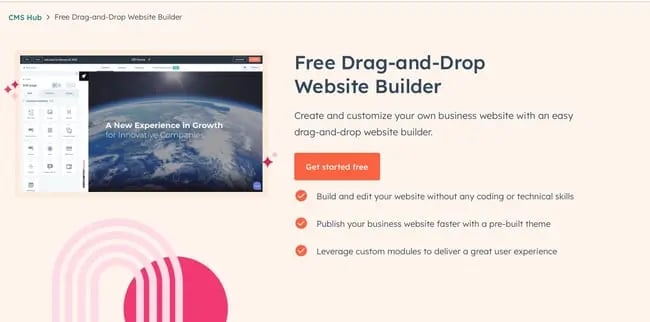
1. Best Free Website Builder for Growing Businesses: HubSpot Drag-and-Drop Website Builder

best free website builder: HubSpot

Get started with HubSpot’s free drag-and-drop builder!

I use HubSpot’s drag-and-drop website builder (inside CMS Hub) as a content marketer on the HubSpot blog team and have used it for two of my side website projects.

Hands down, this is one of the best website builders available for free — not only because of the ease of signing up, but also because it includes built-in tools for a handful of other functions, such as marketing and sales.

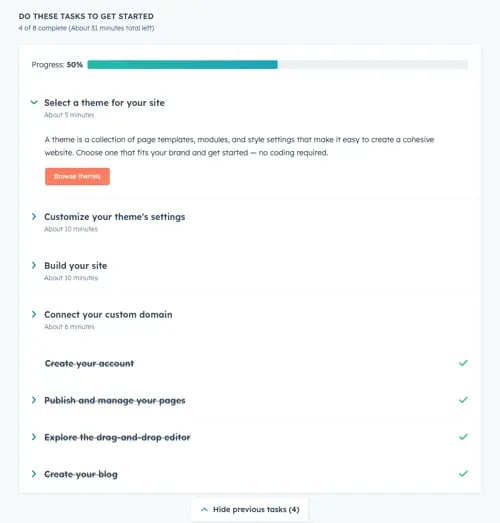
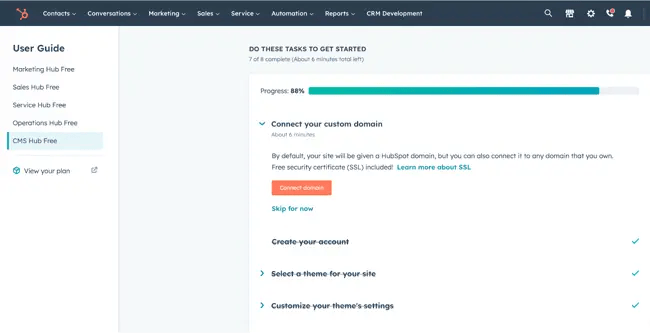
The website creation process is so easy, anyone could do it — mainly because the setup dashboard includes an interactive checklist for you to build your site step-by-step.

I loved this signup workflow when I was building a few side projects. It’s one of the best in terms of user- and beginner-friendliness.

best free website builder: HubSpot full checklist

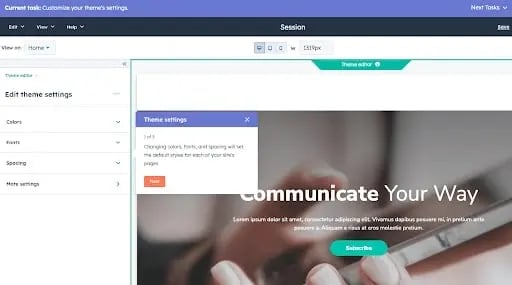
Once you install a free theme, you start customizing the site right away with your preferred colors and fonts.

The bar at the top of the page shows you where you are on the setup workflow, which is supremely useful for skipping between tasks. Note that this is only active during the onboarding phase.

best free website-builder: husbpot task

After you’re finished, you’re taken right back to the user guide, where you can begin exploring HubSpot’s suite of tools for business. You also have the option of connecting a custom domain, which is free.

All you have to do is buy the domain through a domain registrar such as GoDaddy, and then go through the domain connection process.

This might be the most difficult part of signup due to the verification step. But you can always move forward with a free HubSpot domain name, which looks like this:

[randomly generated token].hs-sites.com

It’s not beautiful and is definitely my least favorite feature, so I’d recommend moving forward with a custom-branded domain.

best free website builder: HubSpot checklist

Now, it’s time to edit our site. The website editing process is a little more compartmentalized than in other tools.

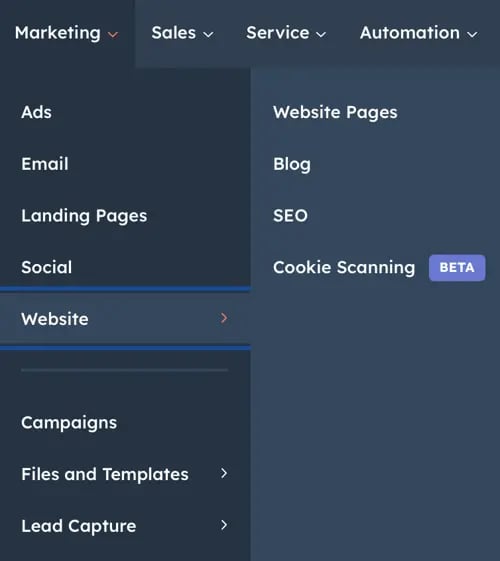
Others might take you to the page editor right away, but HubSpot takes you to the entirety of its suite dashboard, allowing you to access its marketing, sales, and service tools in addition to its website tools (located under the “Marketing” menu).

To access it, simply go to Marketing > Website > Website Pages.

best free website builder: hubspot menu

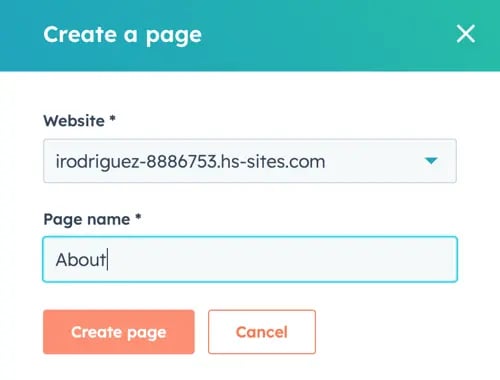
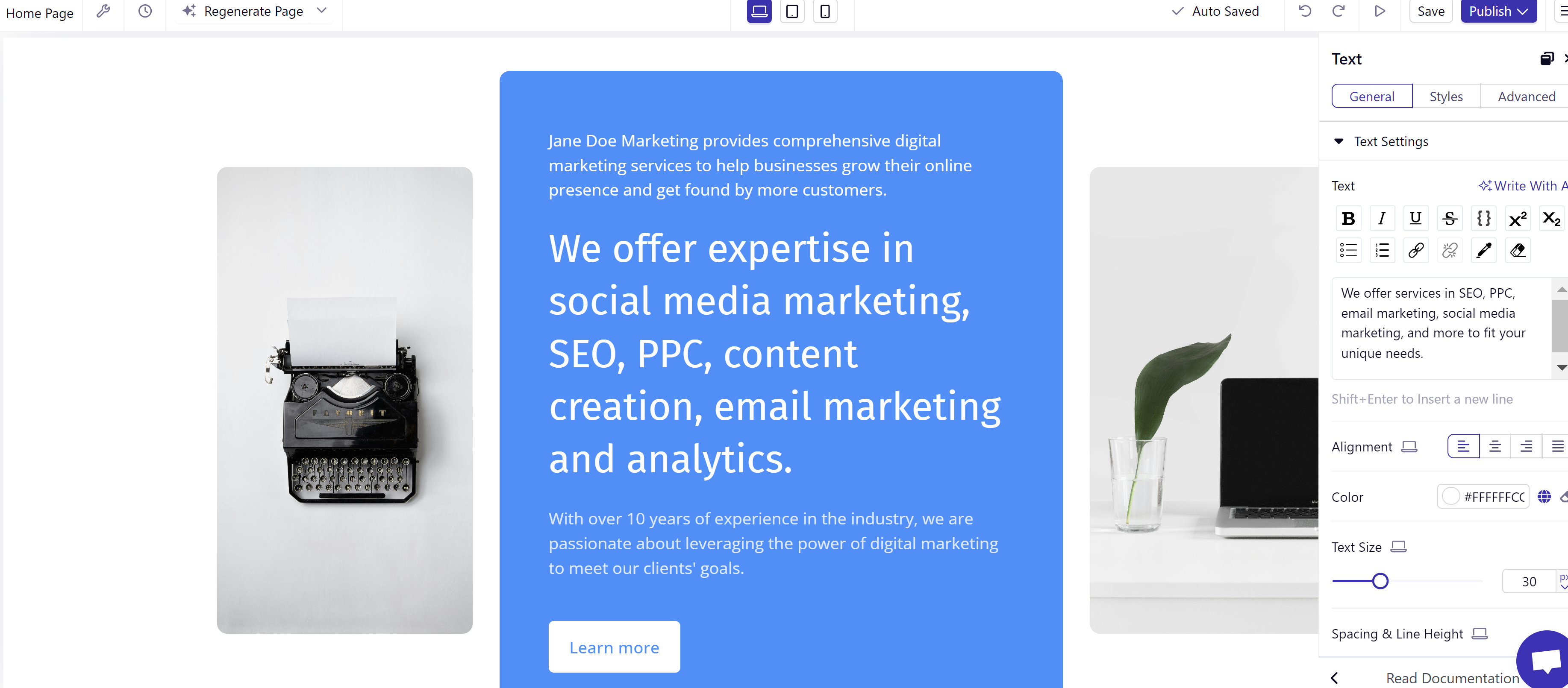
Then, click Create. Something I loved here was the option to create either a website page or a landing page. This makes HubSpot a great fit if you’re using your site to drive leads in any capacity.

best free website builder: creating a new page in HubSpot

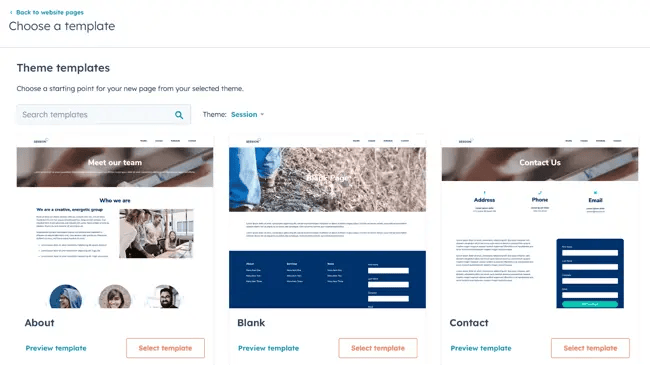
After you create your first page, the process is then easy and familiar. You can choose a template, but be sure to install a theme first (which is part of the setup workflow).

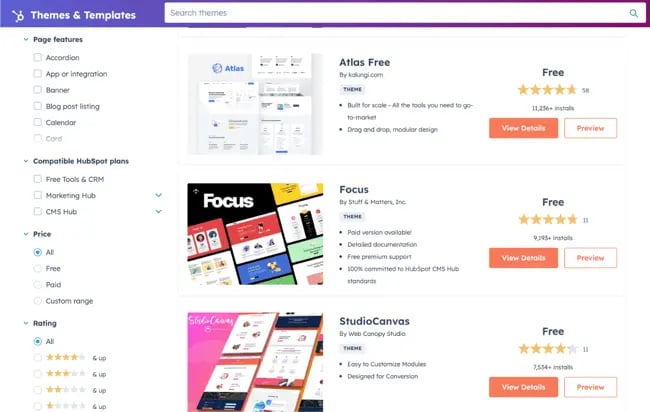
The free themes and templates are very good, and the HubSpot marketplace offers plenty of options.

That said, most themes are business-oriented; if you’d like to build an artsy or eclectic website, other website builders include more “fun” designs.

best free website builder: HubSpot themes

One thing I loved was that you can switch between themes and mix and match them. Other tools don’t allow you to use different themes on the same site, so CMS Hub is a great choice if you’re concerned about limited design options.

Once you’ve chosen your template, you’re ready to begin editing. CMS Hub pulls in demo content so you can see what your page will look like when you’re finished.

I can’t tell you the amount of times I’ve used a template on WordPress, only to get a fully blank page with the “Hello World!” heading. The demo content is a definite plus.

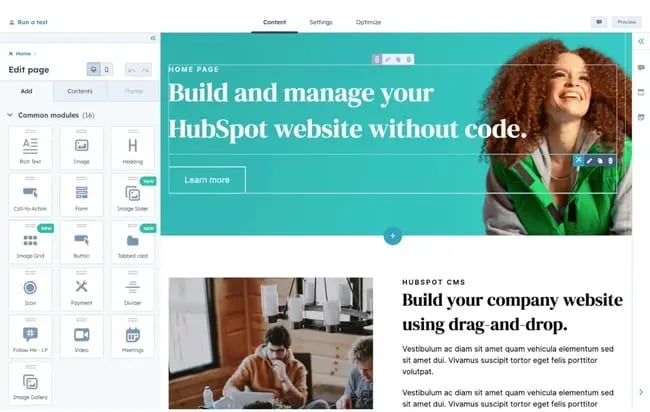
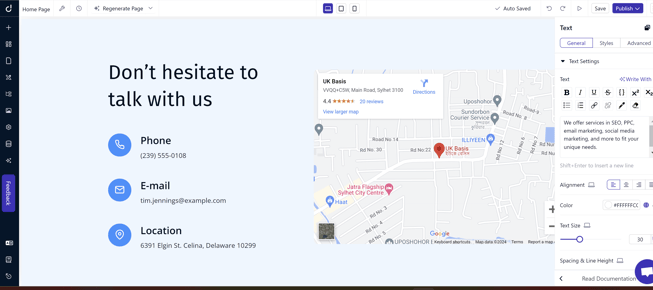
Finally, the drag-and-drop page builder is nothing to scoff at. The page builder works based on modules, which you drag onto the page.

It then creates a live element you can edit directly, allowing you to see your changes in real-time, instead of to having to open a preview tab.

best free website builder: HubSpot page builder interface

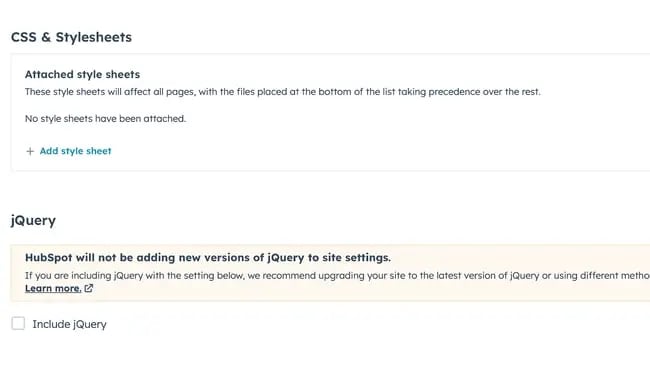
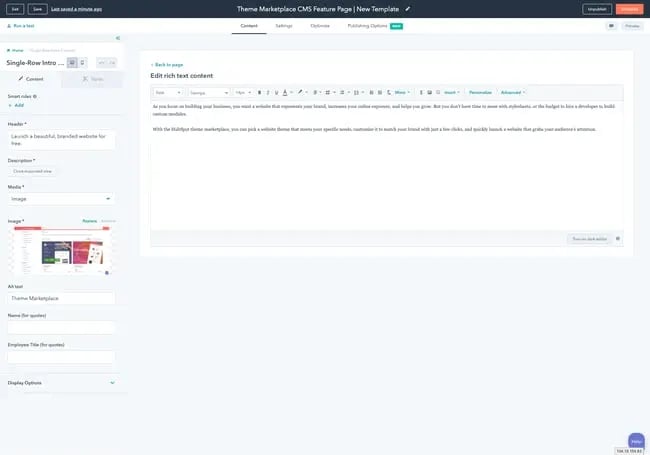
Another thing I loved is that it’s easy enough to use for a beginner but also gives developers the ability to create advanced custom modules and tinker with the site’s source code.

For instance, you can upload a custom CSS stylesheet in your settings.

best free website builder: HubSpot developer customization

Here’s the impressive part: For all of its simplicity and user-friendliness, HubSpot’s website builder is more than equipped to handle business-level demands, with marketing, sales, and service software already built-in.

Most of those are free to use at the basic tier, allowing you to send an email a month, for example, and use HubSpot CRM without paying a single cent.

Of course, it comes with everything you need to build a website, including content management system (CMS) tools, themes and templates, security features, and a built-in content delivery network (CDN) to ensure pages load quickly.

Overall, I can’t recommend this tool enough for any type of business that wants more than a basic website builder.

Core Features
Advantages
  • Includes web hosting
  • Personalization (thanks to HubSpot’s CRM)
  • Security
  • Responsive themes and templates
Disadvantages
  • The free version displays HubSpot’s branding
  • If you want to build custom modules and templates, you’ll need to learn HuBL, HubSpot’s templating language
Pricing

A limited free plan is available. The premium CMS plans with additional features start at $23 a month when billed annually.

Brands Using HubSpot

2. Best Free Website Builder for Beginners: WordPress.com

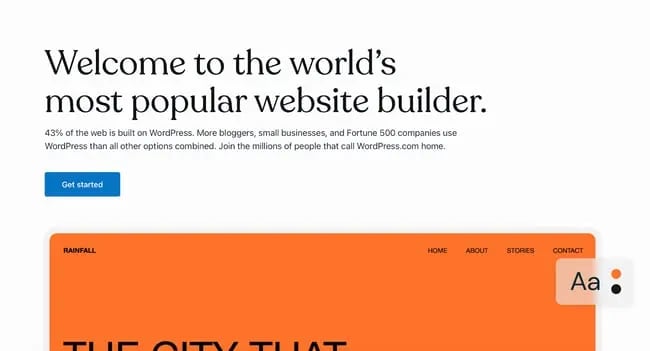
best free website builder: wordpress home page

I can’t count the number of WordPress.com sites I’ve built for fun. It’s easy to sign up, it’s free, and its included domain name is not as ugly (and more recognizable) than others on this list. “Brandname.wordpress.com” has a nice ring to it, right?

First, though, I’d like to point out that WordPress.com is different from WordPress.org. WordPress.com is a free, fully-hosted website-building service, whereas WordPress.org is a content management system you can install on your website.

If you’re looking for a simple free website builder, WordPress.com is the way to go. But if you have a little bit of website development knowledge and are willing to learn the ins and outs of WordPress hosting, WordPress.org is a great choice.

For this list, though, I recommend WordPress.com. Why? It’s an all-in-one option that doesn’t require you to buy separate WordPress hosting or test out different WordPress page builders.

It’s not as customizable as WordPress.org, but it’s more than sufficient for beginners, bloggers, and hobbyists. Due to the free tier’s limitations on bandwidth and lack of CDN, business owners should probably consider another tool.

Just like CMS Hub, setting up your website on WordPress.com is very easy. As it guides you through the setup process, WordPress will ask you about your goals and immediately prompt you to choose a free theme for your website.

best free website builder: WordPress themes

The themes are modern and mobile-optimized — I was surprised to find that I liked quite a few of the designs. When I’ve used WordPress in the past, I found the themes lackluster, but it seems to have updated its library.

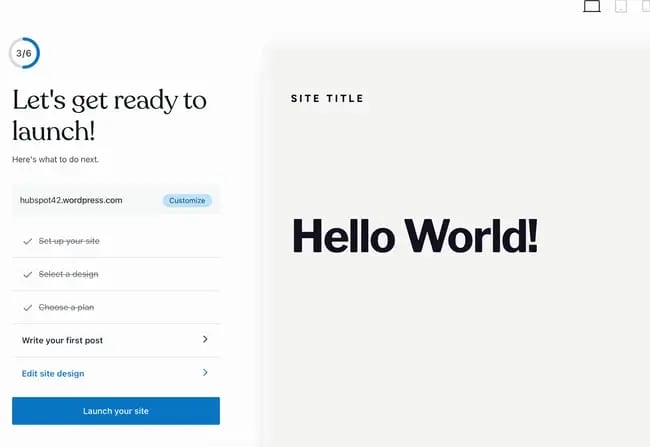
From there, WordPress will take you to an abbreviated checklist that’s similar to HubSpot’s. By the time you’ve picked your theme, you’ve already completed the first three steps.

All you have to do is publish your first blog post, edit the website’s design, and launch your site.

best free website builder: wordpress checklist

Keep in mind that the site is still in the bare minimum stages — you still need to go into the dashboard and add pages and content.

Unfortunately, on the free version, you can’t install plugins, including the HubSpot WordPress marketing plugin.

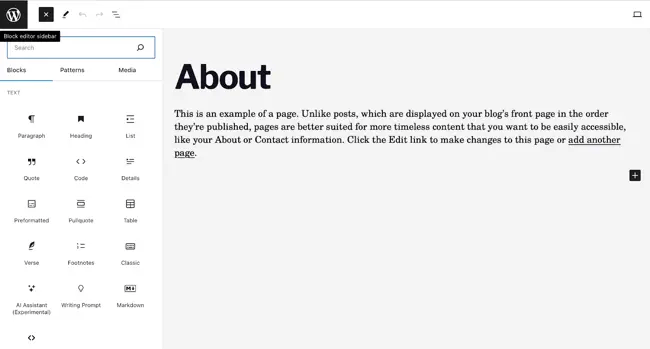
Now, let’s talk about the drag-and-drop page builder. WordPress.com’s is much more minimal than other options on this list, and that’s because it primarily includes plain content formats such as paragraphs, headings, lists, and tables.

A drawback for me is that it’s not a live editor, so you can’t see your changes on the page without previewing it on another tab.

If you want live changes and previews, I’d recommend looking into a free website builder with a WYSIWYG editor like Webflow (discussed further below).

That said, its simplicity makes it a great option for beginners just starting to build their first website — no need to fiddle with complicated modules.

best free website builder: WordPress editor interfaceIf you are looking for more built-out modules — such as banners, headers, pre-built sections, and more — you’d be better off with a website builder that offers these options on the free tier, such as HubSpot’s CMS Hub or Webflow.
Core Features
  • Large collection of themes
  • Mobile-friendly and optimized for SEO
  • Managed website hosting and security
Advantages
  • Customizable
  • Flexible
  • Mobile and desktop apps available
Disadvantages
  • The free version displays ads
  • More limitations compared to WordPress.org
  • Although intuitive, it’s more difficult to learn than other drag-and-drop builders
Pricing

A limited free plan is available. Premium plans start at $4 a month when billed annually.

Brands Using WordPress.com

3. Best Free Website Builder for Ecommerce Websites: Weebly

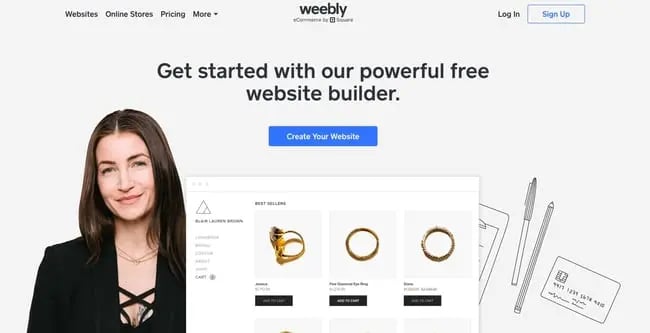
Weebly-Web-Builder

Weebly is a classic website builder that offers a unique bundle of web hosting, domain registration, web design, and built-in ecommerce functions.

This last feature is of note because, with other tools on this list, like WordPress, you’d have to install an ecommerce plugin to start a shop, and even on CMS Hub, you’d need a third-party integration.

On Weebly, you can open a store as part of the sign-up process. Because of this, I highly recommend it if you’d like to build an ecommerce website. This website builder already integrates with Square, a popular online payment gateway.

As part of my test, I created a website for an online store. What I liked about this part of Weebly’s setup is that it’s so simple — you don’t have to go on and on about your goals or the type of website you’d like to build.

During the next few phases, you’ll choose a name for your store and designate the type of products you’ll be sell. I’m not sure what this step is for — it must be for metadata or for Wix’s tracking purposes, but it’s good to fill out either way.

best free website builder: weebly store questionnaire

As with CMS Hub and WordPress.com, you’ll be prompted to choose a theme. If you’re setting up an ecommerce website, Weebly will automatically sort the themes so that you get storefront options first — no need to go hunting for them.

I found the theme selection a little less diverse than other options on this list, but the options are reasonable free ecommerce site builder.

best free website builder: weebly store themes

While testing this website builder, I also found that it offers a nifty product listing tool that allows you to set up your inventory for sale immediately.

I loved how easy and simple this was, and it’s a great fit for someone who’s trying out ecommerce for the first time.

best free website builder: weebly product builder

And, great news: Weebly, like the previous tools, includes a checklist to work through to set up your store correctly. 

best free website builder: weebly checklist

I’ve used Weebly before and have abandoned it due to a laggy page editor. During my test this time, I found that the drag-and-drop editor is still somewhat laggy but more serviceable than when I was using Weebly for fun.

best free website builder: weebly page builder interface

It includes the standard text, image, and rich content modules, with more variety and complexity than WordPress.com’s options.

It also features helpful SEO tools and resources to get you started with an SEO strategy, which is a crucial and unavoidable part of having a website because, without it, people might never know your page exists.

Core Features
  • Drag-and-drop editor
  • Integrated CMS solution
  • Free SSL certificate
  • SEO tools
  • Analytics and reporting
Advantages
  • Helpful SEO resource tools
  • Good selection of paid and free apps in the app center
  • The free plan has ecommerce functionality
Disadvantages
  • Limited choice of themes
  • The free and basic paid plans display ads
  • Limited SEO functionality
Pricing

A limited free plan is available. Premium plans start at $6 a month when billed annually.

Brands Using Weebly

4. Best Free Website Builder for Web Developers: Webflow

best free website builder: web flow

Webflow is a fantastic free website builder for those with more coding experience and who’d like a more customizable website builder tool.

Because of its ability to include multiple workspaces and multiple websites for clients, I especially recommend it for freelance web developers and agencies.

(And if you happen to be a fan of Adobe Creative Cloud, you’ll find that Webflow has a similar UX — another plus.)

Webflow is a winner when it comes to the setup workflow. Straightaway, you’ll have the option to build a website for your company, your clients, or yourself. I chose “Clients” to test its capabilities for freelancers and agencies.
best free website builder: webflow setup

Next, you’ll be asked to identify the type of website you’re building. Blog websites are an option, but if you’re planning to start a blog, I recommend CMS Hub or WordPress.com instead.

Both of those offer powerful blogging options and a much more beginner-friendly interface.

I was surprised to see that Webflow includes different workspaces, something I didn’t run across in other tools (except CMS Hub, which allows you to have access to different portals).

This makes Webflow an excellent choice for large teams where you might have different workspaces depending on permissions or job function.

best free website builder: webflow workspaces

The free theme selection in Webflow is, though limited, very good. I told the tool I wanted to create a portfolio website, and it automatically suggested a portfolio theme for me to try.

best free website builder: webflow themes

After you choose a theme, you’ll be taken straight away to the website builder. Webflow’s page builder is complicated and the learning curve is steep. While the tool includes a setup checklist, it’s not as simple as others on this list.

For instance, right away, you’ll be prompted to change CSS classes right away — which can be daunting if you’re new to web development.

best free website builder: webflow checklist

The actual page builder, though, is pretty familiar. You can add HTML elements such as sections, containers, divs, lists, buttons, headings, and so on.

The tool does include more technical language, so you’ll encounter terms such as “V Flex,” which refers to a vertical flexbox.

I can see this being difficult for beginners and even intermediate users, so if you identify as either, you might want to opt for another tool. (Or you can use Webflow to learn web development terms!)

best free website builder: web flow page builder interface

One thing I loved that does make Webflow a good fit for beginners is its inclusion of “Libraries.”

If you’re at all intimidated by the language and the learning curve, you can simply import pre-designed components and sections without needing to tinker excessively with the tool itself.

Webflow includes a free domain for you to use, but it only publishes to a staging environment — another reason this tool is such a great fit for developers.

The only thing you’ll need to purchase when using Webflow is a domain you can publish your site to.

best free website builder: webflow publication options

Core Features
  • A drag-and-drop website builder
  • Widgets to add features like maps and media
  • Third-party integrations
Advantages
  • Offers complete control over your site’s design
  • Drag-and-drop what-you-see-is-what-you-get (WYSIWYG) builder
  • Responsive interface
Disadvantages
  • After building a website on Webflow, you need to transfer it to a content management system
  • Requires some knowledge of HTML and CSS to access full features
  • It has a complex free and paid plan structure
  • You need to sign up for both a Site and Workspace plan
Pricing

A limited free plan is available. Premium plans start at $12 a month when billed annually.

Brands Using Webflow

5. Best Free Website Builder for Local Business Owners: Wix

best free website builder: wix

Wix is one of the most popular free website builders, and probably one of the first options you thought of when you started researching tools.

The easy-to-use, fully-hosted platform offers an easy drag-and-drop editor, an extensive collection of apps, and professional-looking templates.

I first used Wix in 2010-2013, when it was still just a simple website builder with a reputation for being laggy and poorly optimized. It’s now turned into one of the most robust options on the market.

Wix’s most noteworthy feature is its focus on providing all the tools necessary for business owners to get their businesses up and running online.

When setting up your site, you can choose the type of business you run.

Unlike on other website builders, where this information is used for internal cataloging purposes, Wix creates a customized dashboard depending on the type of business you choose.

I set up a blog, an online store, and a brick-and-mortar shop, and all three had different checklists and integrated apps on their dashboards.

best free website builder: wix setup website type

For this test, I chose to set up a local shop. Instead taking me to the website builder right away, the Wix setup assistant tried to get as much information about “my business” as possible.

I was thoroughly impressed by the effort to get my business information in a beginner-friendly questionnaire. The information would later be used for Wix’s Point of Sale tool and on my website.

This makes Wix an especially good fit for local businesses who want to set up an robust online presence but don’t want to mess with different tools to do so.

best free website builder: wix setup

Depending on your answers to some of the questions on the questionnaire, Wix will include different widgets, tools, and checklist items on your dashboard.

For instance, below, I told the tool I wanted to accept online and in-person payments, send automated emails, and more—

best free website builder: wix multiple options

—and when I went to my dashboard, Wix created a checklist that helped me through a step-by-step set up process, including signing up on its Point of Sale tool.

This is extremely convenient and seamless for a local business owner, but the list can be overwhelming to look at. 

best free website builder: wix checklist

I was maybe half an hour into the setup, and Wix had yet to prompt me to start designing my website. The first few steps in the checklist, in fact, all have to do with internal administration and finance.

That tells me that Wix wants to be the one administration portal for business owners to manage their online presence beyond designing a website.

When you finally begin to set up your site, Wix gives you the option of manually choosing a template or using Wix’s creation assistant.

This is a unique feature I’ve yet to run into in my tests, and it can be a game changer for local business owners that are short on time. 

best free website builder: wix creation assistant

I chose to have Wix to create a site for me. It then prompted me to pick a theme and began preparing home page designs based on my preferred aesthetic.

best free website builder: wix homepage generator

Since I chose “Fresh,” it delivered earthy and clean designs. The selection is limited, but good for a local business.

best free website builder: wix site creation assistant

After, you have the option of adding pages to your site with pre-imported demo content.

best free website builder: add a new page to wix

My least favorite aspect of Wix is the page builder itself. It’s cluttered, difficult to navigate, and overly complicated, which could potentially lengthen the learning curve for this tool.

best free website builder: wix page builder interface

Another aspect I found strange is that when you insert a new element, it doesn’t snap to the grid.

Instead, it stays right where you place it, meaning it might be difficult to reliably use the exact same amount of padding and margin to align elements on your page. 

But if you don’t need additional elements beyond the demo content, simply edit what’s already there, and it shouldn’t be much of a problem.

Core Features
  • A drag-and-drop editor
  • A large collection of apps and templates
  • Analytics and reporting
Advantages
  • Easy to use
  • Large collection of apps and templates
  • Optimized for mobile
Disadvantages
  • The free version displays prominent ads
  • The premium plans are pricey when compared to others on this list
  • The only way to change templates is by creating a new site and transferring your premium plan to it
Pricing

A limited free plan is available. Premium plans start at $16 a month when billed annually.

Brands Using Wix

6. Best Free Website Builder for No-Fuss, Short-Term Websites: Google Sites

best free website builder: google sites

Google Sites is Google’s proprietary website builder and absolutely worth a spot in this list, if only for its ease-of-use and for the fact that it’s 100% free — no upgrade required.

You can use it just as you would Google Docs, Google Sheets, or Google Slides. Simply go to sites.google.com, choose a template from the list, and start editing.

best free website builder: google sites home

Google Sites offers templates for employees, individuals, and students.

Even though you could use it for a business website, I wouldn’t recommend this website builder for any type of business, whether freelance, local, small, or enterprise, because of the limited features and lack of integrations.

Google Sites is simply too limited for a business’ demanding needs. 

If you’d like to build a website for any other reason, though — for a project, a personal update, or an FAQ — Google Sites is a fantastic choice.

For example, it’s a great option for a job seeker looking to create a simple portfolio to attach to job applications. Once you choose a template, you’re taken right to the editor, where you can start editing the demo content.

best free website builder: google sites interface

The interface is as seamless and familiar as you’d expect from Google. No overly complicated jargon and no overabundance of options, but still exactly what you need to build a strong site with a mild learning curve. 

(In fact, the learning curve is so mild that I would actually not recommend this as a learning tool for those building a site for the first time. To truly learn how to create a website, consider a more robust tool that includes traditional web design elements.)

As with any other Google tool, you can collaborate with others and limit permissions. That makes it a great option if you need to build a team site for any reason.

Once you hit publish, it will be published to a subdirectory of a subdirectory on Google’s domain. For instance, here’s the URL I published my site to when I was doing my test:

https://sites.google.com/hubspot.com/tinasmithphdtest/about

You can’t connect a custom domain through the Google Sites portal, but you can always purchase a custom domain (I recommend using Google’s own domain buying service, domains.google.com) and setting up a 301 redirect.

Core Features
  • A drag-and-drop editor
  • The traditional Google Workspace interface
  • Analytics and reporting (through Google Analytics)
Advantages
  • Very, very easy to use
  • Simple to set up for current Google users
  • Optimized for mobile
Disadvantages
  • This is a limited tool for any sort of business need
  • The templates skew toward outdated
  • Custom domains can’t be connected via Google Sites; 301-redirect needed
Pricing

Free.

Brands Using Google Sites

No brands that I know of use Google Sites — this tool is best for personal projects.

7. Best Free Website Builder for Solopreneurs: Dorik

Dorik

Dorik is a website builder that boasts users can create excellent websites in just minutes thanks to its myriad of features, including AI tools. Moreover, users don’t need any coding or design experience to design their site, according to Dorik.

I find Dorik’s AI features to be the most impressive and unique compared to other website builders. Dorik’s website says it can generate a complete website in seconds with a single prompt. So, naturally, I put it to the test.

Dorik AI

After clicking “Create New Site With AI,” I’m greeted with a pop-up showing I only have to enter the name of my website, type a prompt describing the site, and select the language. 

Jane Doe Marketing

This is the landing page Dorik’s AI tool designed for my “Jane Doe Marketing” website. I love how the page includes the following tabs in the top left corner 

  • Home 
  • About 
  • Blog 
  • Contact 

I also appreciate the imagery, which features 3-D figures of social media nad entertainment apps.

And though the opening sentence is a bit dry in terms of tone, it includes important marketing keywords and is a strong start to improve upon.

hello

I’m blown away by the details of this AI-generated website. As I continue to scroll down, I see a section explaining what Jane Doe Marketing is an how it works. There’s even a “Learn More” button. 

Learn More

If I scroll a little further, I’ll find a spot for our location and contact information. Of course, Dorik provides a sidebar complete with tools to customize and edit the site to my liking. 

location-Mar-18-2024-05-08-37-2053-AM

Based on the ease of its AI tool alone, I think Dorik is an excellent website builder if you’re a freelancer, content creator, or solopreneur who wants a beautifully designed website with all the fixings without having to design or code.

Core Features
  • AI website generator 
  • Robust blog editor with built-in SEO tools 
  • Airtable integration
Advantages
  • Easy for users without coding or design experience 
  • Comprehensive and easily customizable AI-generated website 
  • Intuitive interface 
Disadvantages
  • Very few e-commerce features
Pricing

Free features are available. Plans start at $15 per month.

Brands Using Dorik

I don’t know of any major brands using Dorik, likely due to its lack of e-commerce features.

Website Builder Features You Need

Choosing a website builder tool is easier when you know what you’re looking for. Here are the features to look out for.

1. Themes and Templates

website features: hubspot theme marketplace

The above drag-and-drop themes are available in CMS Hub — sign up for free.

Having an assortment of fully customizable themes and templates on the website builder’s theme marketplaces makes it easier for users to change their site’s look.

In that sense, website builders should have theme options that cater to specific niches so users don’t waste time creating new templates from scratch. For example, the website builders on our list have options for blogs, portfolios, ecommerce websites, and more.

Templates should be pre-structured and pre-populated with images, text, and other elements commonly found on websites. For example, every site needs a home page, about page, and contact page. All you need to do is pick one and replace the sample content with your own.

Themes and templates should be easy to customize — with multiple options for backgrounds, layouts, fonts, and colors.

2. Media (Video, Photo, Audio, and Graphics)

When browsing online, I find websites filled with text incredibly dreary and bad at grabbing my attention. Unless I’m on a text-based website, like a blog or, say, Wikipedia, I expect to see multimedia elements that break up text or at least make a website more interactive. 

Solely having text on your website can be monotonous, so including different forms of media helps break up text and can help information stick. I suggest filling your website with highly engaging multimedia content and graphics to support vital information and engage users.

You can easily bring your website to life using visual aids and mediums like stock photos, vector images, background images, stock video footage, sound effects, and video editing templates. There are tons of websites that provide media resources that are free to use for content. Freepik is a well-known website that provides illustrations and images.

Many sites also incorporate icons within the call-to-actions and resources sections. Flaticon is a great source of icons.

These resources will transform your website into something memorable and visually appealing, while also providing a user-friendly experience.

Some website builders offer more robust media capabilities, with multiple gallery layouts, customization options, and editing features.

3. WYSIWYG Editor

website WYIWYG editor: cms hub

Besides an assortment of themes and templates, I think the best website builder tools make it easy for users to customize their websites with drag-and-drop tools and what-you-see-is-what-you-get (WYSIWYG) editors.

It’s great for beginners because you don’t need to learn how to code — simply design your site in a few clicks by dragging and dropping elements onto your page and see how it will look. 

I also predict that you’ll spend a lot less time making changes after you publish your site by using a WYSIWYG editor because you can see how everything will look while you’re designing your site, so it’s an important feature to consider when choosing the best website builder for you, choosing a website builder that meets your needs.

4. Malware Scanning

Security is a top consideration when choosing a website builder.

Security features vary depending on the website builder tool you select, but consider it a keeper if it offers malware scanning. Automated malware scanning allows you to address threats before they progress into something catastrophic.

5. Web Application Firewall (WAF)

A web application firewall (WAF) is another must-have security feature.

WAFs sit between your web server and the internet to protect your website from common attacks. You’ll be able to avoid SQL injections (where a hacker gets the ability to view your site database and access secure data) and cross-site scripting (XSS) (when a hacker injects malicious code into your site) by filtering, monitoring, and blocking malicious traffic from entering the network.

WAFs can come in the form of software-as-a-service (SaaS), and you can customize them to meet your website’s unique needs. If you create your website with HubSpot, you’ll get access to 24/7 enterprise-grade security tools like malware scanning and WAF.

6. Content Delivery Network (CDN)

Besides site security, I strongly recommend optimizing for page speed.  The amount of time it takes for your site to load significantly impacts customer experience, conversions, and revenue, and whether your site is even usable on mobile devices.

According to Portent, a site that loads in one second has a conversion rate 5x higher than a site that loads in 10 seconds.

There are many ways to improve page speed, and a content delivery network (CDN) is one way to do so. CDNs store heavy and static content on distributed servers located worldwide and load the cached content from a location nearest to the user to speed up its delivery.

7. Web Hosting

What good are website builders when they can’t get your website online?

Some solutions only offer website builder tools to make your site. You have to pay separately for web hosting services to get your site online.

The best website builders make it convenient to start your websites by offering free web hosting. In some cases, you might need to provide your own web hosting for your platform or use something like WordPress hosting.Free website builders offer limited bandwidth and storage just for personal use. You can upgrade to shared, dedicated, or managed hosting for an additional fee.

8. Storage

Web hosting provides two services: bandwidth and disk space (or storage).

Most free website builders offer ample (limited) storage for a beginner site but require you to purchase additional storage should you need it.

9. Blogs

People often confuse websites and blogs with each other — they’re similar but not the same.

A blog is a type of website that contains information about different topics. They’re often updated with new articles or posts, while websites only receive updates when needed. In a nutshell, all blogs are websites, but not all websites are or have blogs.

Organizations build websites for different reasons: to sell, showcase a portfolio, or inform — and for those reasons, a blog can be helpful.

Blogs can help your website by:

  • Increasing visibility through SEO.
  • Generating new leads.
  • Building trust and loyalty.
  • Creating brand awareness.

Most free website builders come with basic blogging tools, like AI blog writers, and other content management features.

10. SEO Capabilities

website builder features: seo recommendations inside cms hub

According to our 2023 Web Traffic & Analytics Report, organic search is the second-highest driver of website traffic. With this, I can’t stress enough the importance of SEO optimization—

If you want to bring in more traffic and views, your website needs to be search engine- optimized.

Most website builders help with technical SEO by offering free SSL certificates and supporting schema markup and XML sitemaps. They also support on-page SEO by allowing you to enter and modify URLs, meta tags, and image alt attributes.

11. Customer Support

I ran into a few issues while testing the website builder tools listed above that I couldn’t troubleshoot on my own, which leads me to my next point: choose a tool that offers customer support

Customer support assists you with anything you need help with — technical, sales, billing, payments, or experiences. Depending on the website builder, assistance can come in any (or a mix) of the following channels:

  • FAQs.
  • Chatbot support.
  • Live support.
  • A knowledge base.
  • Video tutorials.

The best website builders keep a mix of channels and answer inquiries promptly.

12. Ecommerce Capabilities

Are you planning on selling physical or digital products in the future? Consider choosing a website builder with ecommerce capabilities.

There are dedicated ecommerce website builders, but these are often paid solutions with robust functionality such as apps for payment and shipping.

Free website builders often integrate with a third-party ecommerce application or support a simple built-in store.

13. Third-party Integrations

There’s nothing worse than realizing your existing tech stack doesn’t work with the website builder you chose. Thus, it’s crucial to consider whether a website builder allows third-party integrations.

Your website builder should integrate with external tools, such as email marketing, ecommerce, and social software, so you can add any functions you need, like live chat, to your website. HubSpot, for example, offers 1,400+ third-party apps and tools for integrations, and WordPress.com offers extended functionality for your website in the form of Plugins. 

14. Analytics and Reporting

Your website builder should also have a web analytics and reporting function to measure important metrics like the site’s popular pages, bounce rate, average duration per visit, and more.

Alternatively, you can track your website metrics in an analytics and reporting tool. When you bring your web analytics together with other key funnel metrics like trials or activation rate onto a dashboard, you give everyone on your team the ability to explore your data and uncover insights.

Picking Your Website Builder

There you have it! Since most of these website builders are free, try out a couple if you’re unsure of the best fit. In particular, take note of what you really want to get out of your site to ensure your needs will be met by one of these builders.

Editor’s Note: This post was originally published in November 2018 but has been updated for comprehensiveness.

content hub

Categories B2B

How to Give Productive Feedback, According to HubSpot Managers & Editors

Have you ever been in a situation where one piece of feedback changed your life? I have! For years, I worked as a full-time employee at startups and tech companies.

Then, one day, my boss discovered I did a few content marketing side gigs after hours (which wasn’t a secret). Initially, they were worried and asked me to choose between working for them or focusing on freelance work.

After giving it some thought, however, they told me that – from a career stance – it made sense to transition to a full-time content marketing freelancer, as many companies needed these kinds of services and had no one to work with.

Download Now: 5 Free Skill Development Templates

This reassured me that moving to freelancing was right, and I haven’t looked back since.

What I heard that day was productive feedback at its finest. In this article, I’ll tell you what it is, how to share it, and provide examples from managers who offer constructive advice to employees daily.

What is productive feedback?

How to Give Productive Feedback

Productive Feedback Examples.

Giving a High-Performer Productive Feedback

What is productive feedback?

Productive feedback acts as constructive criticism. It’s given to support growth and improvement in a specific area. The productivity aspect suggests that the feedback should be useful, actionable, and motivating.

To ensure the feedback is productive, it should include the following elements.

Specificity

Feedback should focus on specific behaviors or areas. Explain to the feedback recipient exactly what they should do to improve and how they should do it. The comments cannot be vague.

Actionability

Feedback must include clear guidelines, such as practical advice, resources, or examples of the next steps that the person should take to boost their performance.

Positivity

Feedback should be given positively to motivate someone to act rather than bring them down. Make sure to balance suggestions for improvement with someone’s strengths and achievements.

Timelines

Not all types of feedback can wait until an upcoming employee evaluation. ‘Timeliness’ means that the person you’re speaking to can recall the exact situation with details, so they can refer to it or present their perspective.

Relevance

Your feedback should relate to an aspect of their work – goal completion, work quality, or team communication. The employee might be confused if the link between your feedback and their work isn’t unclear.

Openness

Productive feedback isn’t a monologue; it’s a two-way street. Once you share your perspective, it’s important to hear the employee out and discuss how to proceed next.

Constructiveness

When the manager and employee end the discussion, they should feel that the feedback session was constructive and the goal was for the employee to improve their work, not to point out their shortcomings.

How to Give Productive Feedback

Step 1. Be clear on the intent.

While sometimes spontaneous feedback is a good thing, most of the time, it’s better to plan it. Before you approach someone to give them feedback, you must know its purpose. Here are a few questions that you can ask yourself to figure it out:

  • Does your team or company suffer from the behaviors or actions of a specific employee?
  • What mood are you in? Do you feel calm or stressed and angry?
  • Are you in a place where you can give feedback privately so both of you can feel comfortable?
  • Do you know exactly what you’d like to communicate?

Remember that productive feedback should always be helpful and given with empathy and respect. If you’re unsure of your intentions or feeling edgy, it’s best to keep whatever you want to say to yourself.

Step 2. Pick the right time and place.

Timing is crucial when offering productive feedback, as the employee needs to be in the right state of mind and have enough time to hear what you’re saying.

If possible, you should always schedule a meeting. Laura Grant, marketing manager at BlueSky Solutions, suggests having a semi-formal setting. That means the tone should be inclusive but on the formal side.

“You should set aside time for a proper discussion and allow all parties to plan and set objectives,” she says.

Katharina Larikka, performance marketer at Droppe, agrees and adds, “We have seen that most feedback is most productive when the recipient is open to it. In practice, this means sharing it in our quarterly review meetings, when everyone aims to give and receive feedback.”

If feedback needs to be more ad hoc, Larikka’s team asks if it’s a good moment to give feedback before doing so.

“If you want a colleague to improve, the first step is to make sure they hear you, and it’s not going to happen if they are in back-to-back meetings for a day and read your message in between,” Larikka says.

Step 3. Avoid accusations and calmly describe the situation.

The golden rule for offering productive feedback is to come into the meeting with “good faith.” While this applies to the manager and the employee, the former usually runs the meeting and sets the tone.

Since not all feedback meetings come with an agenda, remember that the person receiving feedback might be surprised and might be emotional.

“It is almost impossible to foresee how the recipient will reply. You should attentively observe and listen to their response to comprehend what they heard and how they felt about it,” says John Butterworth, CEO and founder at 10kschools.

If they become emotional, Butterworth says notice it, address it, and let it go before returning to the feedback discussion.

“If they aren’t answering or you feel a deeper issue is at play, ask open-ended questions to clarify,” Butterworth says.

He also points to an important aspect — acknowledging the time employees need to apply improvements.

“Changing behaviors is difficult. Give the receiver ample time, attention, and support. If you notice an improvement, provide positive feedback,” he says. “If there’s no progress, ask them how the action plan is doing and see what else you can do to assist.”

Butterworth does, however, also say that the tone of your feedback should change over time if the performance issues persist.

Step 4. Pause and give them a chance to respond.

After saying everything you wanted, you should give your employee a chance to present their point of view or version of events. You can ask: “What has it been like for you?” or “What do you think happened?”

Mark Damsgaard, founder of Global Residence Index, says constructive criticism becomes productive if you’re coming from a place of concern and genuinely want your employees to be better.

“Listening to their side of the story can help once you have already given the feedback. What was the reason for their errors? Why were they always late recently? Then, actively listening to their side and knowing where they’re coming from would allow you to provide help and suggestions,” Damsgaard says.

Damsgaard notes that these suggestions could make them feel more supported and that your workplace is a safe place.

Damsgaard adds that such an approach makes employees better moving forward. Being able to feel that they’re in a team that supports them encourages them to work harder and better.

You can also allow them to share upward feedback — you might learn about issues that you haven’t been aware of, which addressing will make your collaboration better.

Step 5. Discuss the next steps.

I mentioned that productive feedback should be actionable. That’s why before you end your meeting, you should give your employees a few suggestions on how to improve.

Alternatively, you can ask them if they have any ideas on changing their behaviors or enhancing their performance.

Productive Feedback Examples

Let’s take a look at some real-life examples to get a better understanding of what productive feedback is.

A Personal Story Shared on Quora

The first productive feedback example comes from a Life Coach, Sara Rosseel, who shared her experience on Quora.

In her story, she describes a job working for an international company where she managed several projects in Latin America and the Caribbean. She was the youngest person on the team and was happy to work 50-60 hours a week.

Rosseel says her boss was a “tough-as-nails, no-nonsense woman.”

During her performance review, Rosseel’s manager was concerned that Rosseel wasn’t challenged. Rosseel says she took on routine tasks the project managers didn’t want to handle.

“So, she asked me what kind of work I was most interested in and encouraged me to ask the project managers to get me involved. She explained that the experience would be not only valuable for my future career but also more fulfilling for me,” Rosseel writes.

The manager gave Rosseel her support and a six-month timeline to spread her wings.

“Not every manager in that organization — especially those in senior positions — takes an interest in young junior staff. I consider myself fortunate and since then have had the opportunity to pass on the same advice to others,” Rosseel writes.

What made this productive feedback?

  • First of all, it came from a senior person who had a lot of authority. She took an interest in a junior employee and clearly communicated to Rosseel that she saw a lot of potential in her and wanted to help her spread her wings.
  • The manager used the stick-and-carrot approach – she said that she would help Rosseel in her career development provided that she would give it her best. The manager also proposed a rough deadline (i.e., six months), by which Rosseel had to demonstrate significant improvement. Also, she told her exactly what she should do.
  • Additionally, instead of orchestrating Rosseel’s career, the manager made sure that her advice and career plans were in line with Rosseel’s objectives and aspirations.

Lastly, but most importantly, the feedback recipient considered the advice useful and valuable. Following it allowed Rosseel to progress in her work.

Receiving Productive Feedback – My Own Experience

In a past professional life, I worked as a project manager at a software consultancy. I came to the business with three years of experience in managing a digital product at a startup.

So, while I understood how project management tools like JIRA worked, I only used the tool’s basic functionalities.

However, when I joined the new company, I started managing about four or five projects simultaneously, with 20+ people involved. I quickly found that I needed to customize some of the project boards.

I asked a senior project manager for help, and they showed me how to use advanced rules to adjust the layout and functions to my needs.

The company puts a lot of emphasis on open, productive feedback. So, it wasn’t a surprise that I found a description of this situation in a spreadsheet my manager used to gather feedback for my monthly performance evaluation.

The senior PM mentioned that I wasn’t an experienced project manager yet, so I did not need to know advanced JIRA functionalities at this stage of my career.

But, if I wanted to make this my long-term career path, I would need to become proficient.

The reason why this was such a memorable piece of feedback is that the fellow PM underlined that they didn’t want me to feel like I was underperforming.

They brought this up to give me a heads-up for a skill I would be required to have in, say, six months.

This would give me plenty of time to start learning JIRA at my own pace.

They also made sure to provide a positive review of my ongoing work, which I saw as a nice pat on the back and encouragement to keep going.

Giving a High-Performer Productive Feedback

Know when to step away from the classic “sandwich method.”

In case you’re not familiar with it, the sandwich method is a technique where a piece of constructive criticism is offered between a positive start and an encouraging end of the feedback meeting.

While it’s very popular, some team managers have their own take, including Amit Raj, founder and CEO at The Links Guy.

“I find it effective to start and end the session with genuine appreciation and encouragement but to address areas of improvement in a separate, dedicated conversation. This separates positive reinforcement from constructive criticism, allowing team members to fully absorb both without feeling overwhelmed or confused,” he says.

For instance, Raj once had a team member who struggled with meeting deadlines.

Instead of sandwiching this critique between compliments, he scheduled a separate meeting to discuss time management strategies and provided actionable improvement steps.

“This method helped maintain a positive atmosphere while addressing performance issues constructively, leading to meaningful progress and growth for the individual and the team as a whole,” Raj says.

Choose the communication medium wisely.

Some of us learn from audio or images better, while others are best at synthesizing information in text form. Gary Gray, co-founder and CEO of CouponChief, says that we should also remember this while providing feedback.

In managing a remote team of over 30 employees, Gray found that dispersed team members respond a lot better to feedback when you switch up the mediums and consider their learning styles.

“Some of my team are audio-visual learners, yet others prefer text. So, I use ​​documents, emails, voice notes, and even asynchronous video messages to deliver feedback and give everyone time to digest the information at their own pace,” says Gray.

According to Gray, the company intentionally mixes up these communication mediums and chooses them depending on the context.

For example, he notes that voice notes in tandem with written feedback convey tone and emotion better than text alone. This is beneficial when dealing with sensitive topics or complex ideas.

“All this reduces the chances of misinterpretation while creating a useful reference that we can revisit to reflect on what worked and what didn’t,” Gray says.

Make sure your empathy shines through your conversation.

While managers are responsible for their department’s results, they must also advocate for their team members. This means that they should show empathy to the person they’re speaking to, even if they have a few sharp remarks to share.

Alex Freeburg, managing attorney and founder of Freeburg Law, says that, in his experience, empathy makes all the difference.

“I start by acknowledging an employee’s efforts and where they could use additional support. A simple sentence like, ‘I understand this project has been challenging, and I believe we can make it better together’ is much more powerful than jumping straight into criticism,” Freeburg says.

Through empathy, Freeburg says, you’re more mindful of how your feedback is being received — whether your employees are feeling overwhelmed and if they need some time to grasp what you’ve said.

“Revisiting the conversation allows for processing time and follow-up, helping the feedback process to have a meaningful impact,” Freeburg notes.

Provide the feedback privately.

Picking the right place to give feedback is as important as what you’re going to say. The feedback recipient must feel safe and comfortable; that’s why it’s not recommended to give it in public places.

James Wilkinson, CEO of Balance One Supplements, shares a story on how he gave feedback to an employee after a customer service failure.

Wilkinson recalls a customer service failure when the experience that the client was having was less than stellar.

“I chatted privately with a team member to give him feedback right away and in private,” says Wilkinson. “I shared what was working, broke down the miscommunications, and, together, identified strategies for how we could prevent these in the future.”

Wilkinson notes that the employee was not shamed publicly during the incident.

Instead, “I was also able to educate in more than just mistake-fixing: giving feedback shows your investment in their humanity and their development,” Wilkinson says.

Wilkinson mentioned that good feedback is never just a way to correct mistakes. It also makes the team believe in their potential and capacity to grow, as well as improves team collaboration.

Frame feedback from your own observations and experiences.

Avoid sounding like you are blaming them. You don’t want to antagonize your employees, but simply tell them they should do something different.

Lilia Tovbin, CEO and founder at BigMailer.io says, “Frame feedback from your observations and experiences, which you can achieve using the ‘I’ perspective. This avoids sounding accusatory and allows for a more constructive conversation.”

Tovbin says she recently used this technique while providing feedback to a team member who was constantly late to their virtual meetings.

“Instead of saying, ‘You‘re always late, and it’s disrespectful,’ I approached it by stating, ‘I’ve noticed that our meetings are starting a bit later than scheduled, and it sometimes affects our productivity. Can we discuss how we can ensure everyone is on time for our future meetings?’” she explains.

This approach opened up a dialogue without making the person defensive, allowing for a more positive and productive outcome.

Productive Feedback and Career Growth

Progress isn’t possible without feedback — whether it’s directed at the employee or the manager. The most important thing to remember is that your feedback needs to be actionable and empathetic.

Do the people you speak to know how to proceed? And do you feel that you’ve got their back if they need extra help?

Offering constructive feedback is what characterizes the best managers — those who know how to set expectations, all the while showing their readiness to support their staff in their career growth.

New Call-to-action

Categories B2B

The 7 Types of Social Media and Pros & Cons of Each (Research)

When it comes to social media, I‘m quite the expert. I had to tireless scrub through social media for potential stories back when I was a journalist.

Now, I’m HubSpot‘s go-to blogger for almost anything social media-related, so I’m always keeping up with the latest online happenings.

Plus, I‘m a younger millennial who grew up alongside social media. So if you’e a marketer trying to figure out the right social media platform to increase your brand’s awareness, generate leads, and improve traffic, you’ve come to the right blog.

To help you make the best decision for your brand, I’ve compiled a list of core types of social media, examples of platforms within each category, and the pros and cons that each type might present.

By the end, you should have a clearer idea of what social media strategy will work for your business. Let’s dive in.

Download Now: The 2023 State of Social Media Trends [Free Report]

The list of social media platforms is growing, and well-known platforms like Facebook are constantly evolving and adding new features.

With a greater and greater need for a social presence and an overwhelming amount of platform choices, it can be hard to pick which social channels to use.

You might not want to spread yourself too thin by managing a channel on every imaginable platform, but you don’t want to miss great brand awareness opportunities.


Social Networking

Examples of Major Platforms

Social networking is possibly the most traditional form of social media, and most social media platforms fall under the social networking category. So, you’ll likely see at least one of the aforementioned platforms (*cough, cough* X) pop up again later in this post.

Platforms like Facebook, X, and LinkedIn are often called “networking” platforms because they allow user accounts to interact (network) in various ways.

Professional Uses

Facebook

Many brands and businesses are leveraging social media direct messaging (DMs) for customer service.

In fact, our 2024 Socia Media Report shows 88% of marketers are increasing or maintaining their investment in social media DMs for customer service.

Facebook Messenger is a great platform for this strategy as it allows you to respond to messages from your brand‘s Facebook followers.

Plus, as a fellow consumer, I can assure you it leaves a great impression on your customers when you’re respond promptly to their DMs.

There have been many times when I‘ve slid into a business’ DMs because I needed an update on an order, more information about a product, or troubleshooting.

And when the business responds back with helpful information, I always made a note to keep buying from them.

If you’re a small business, like a restaurant, I recommend a platform like Facebook as a great place to start your social strategy. With Facebook, you can build a business profile with links to your website and details about your menu.

I‘m especially fond of Facebook’s community feature, which you can also leverage to create a community page for customers to ask questions or rave about your products and services.

In fact, we found that businesses that leverage social media communities will see excellent results in their marketing strategy.

According to our State of Social Media Survey, 90% of marketers say building an active online community is crucial to a successful social media strategy.

I’m not surprised, considering our Consumer Trends survey found 20% of social media users joined an online community in the past three months, and 22% actively participated in one.

LinkedIn

LinkedIn emphasizes career-related networking, and, for years, I only ever used LinkedIn when searching for jobs or to help friends find opportunities. It turns out, however that LinkedIn is very beneficial for businesses.

For companies looking to offer a professional service, such as B2B or publishing companies, LinkedIn is another excellent way to grow a following.

According to our Socia Media Marketing Survey, LinkedIn is among the top six social media platforms yielding the highest ROI for marketers.

Furthermore, of the marketers who currently leverage LinkedIn in their strategy, 90% plan to maintain or increase their investment in 2024.

Brands looking to build an audience of professionals from a particular industry can create a business profile there, categorize it with an industry type, and then use posts and messaging to publish updates.

They can also use messaging and comment features to interact with their audiences or users who comment on their posts.

X (The app formerly known as Twitter)

An X account could be helpful to companies in a broad spectrum of industries, from entertainment to e-commerce. This platform similarly allows you to create a profile where you can list and link company information.

You can then use X to post about company updates, tag companies or customers in posts, repost positive customer tweets, and respond to customer questions via posts or direct messages.

Like Facebook, you can also post content like photos or videos.

One of my favorite X features I think marketers should look into is Spaces, which allows users to create live audio chatrooms and talk amongst each other.

Companies will often use Spaces to host Q&As, interview thought leaders, or keep audiences informed about the latest happenings with the brand or industry.

On all three social networks, users can easily communicate with others through simple actions like tagging, hashtagging, commenting, private messaging, reacting to posts, and re-sharing content.

Aside from social interaction, feeds on common social networking platforms are designed to show off a mix of text and visuals rather than one primary content type.

This flexibility makes it easy to begin a social strategy on social networking platforms because you can experiment with different forms of content before branching out to platforms that require more specific content types.

For those who want to dabble in video or graphics, these platforms could be a great place to test this new content.

With the growth of video marketing, many have begun to launch more advanced features like Facebook Stories and X’s live streams.

Platforms like Facebook and X have also started encouraging native video and photo uploads more heavily.

Recently, Facebook adjusted its algorithms to favor live video and image uploads. This has caused these types of native content to gain greater user engagement.

If you’re unsure where to start, check out our beginner’s guides for Facebook, X, and LinkedIn.

I’ll be honest, the beginner guide for X was published before the platform rebranded from Twitter, however much of the information still applies today.

Pros and Cons

Pros

Cons

  • Those interested in posting links may have more difficulty getting engagement than uploading photos and videos.
  • Some platforms, like Facebook, put individual user posts higher than business posts in newsfeeds.
  • Facebook may not be the right platform for you business if you’re looking to target younger consumers like Gen Z, who are more likely to use TikTok, X, or Snapchat.

Photo Sharing

Examples of Major Platforms

Photo-sharing social media platforms are exactly as they sound — they’re platforms where sharing images is the name of the game. I remember the days when Instagram was the most prominent photo-sharing platform.

But that was then and this is now, so if you‘re wondering why Instagram isn’t mentioned here — don‘t worry! I’ll have more on that when I get to the video platforms.

Professional Uses

Pinterest

One of the biggest platforms that specialize in photo sharing is Pinterest. Pinterest is a “visual discovery engine” for users looking for cooking, style, home decor, and general visual inspiration.

Personally, I‘ve been using Pinterest for over 10 years and, like most users, I interact with other accounts on the platform through tags, likes, comments, or direct messages.

In the early days, Pinterest wasn’t as synonymous with brands and companies as it is now.

It was more so about crafting virtual vision boards based around aesthetics.

However, brands, companies, and creators find it useful whey they want to take photographs, display content, and update followers about their food, goods, or products.

Pinterest is well-suited for e-commerce companies, such as those that sell home goods and businesses that would like a place to share crisp standalone product images with links.

The platform offers a photo-based feed with posts that can include a photo and a short description.

In the last few years, Pinterest has also shifted to include more video content to compete with platforms like Instagram Reels and TikTok. However, the platform still remains a place for users to share their favorite photos.

Here’s little look at my Pinterest feed.

The platform also allows all users to link directly to websites or product landing pages in posts. I especially love Pinterest’s Explore page and can see a lot of opportunities for brands there.

The Explore page updates daily and operates almost like an old-school blog with how you can scroll to see the previous days’ themes as well.

The explore feed features boards curated by celebrities, creators, and brands sharing images their followers would be interested in. And, of course, there are opportunities for consumers to shop.

I clicked on the board called Pinterest Predicts: Spring 2024 Shopping Ideas, and was shown different trends expected to take over this season along with links to buy them.

Brands features on the board include Tory Burch, Nordstrom, and STAUD. Unrelated, but I‘m stil laughing at Tennis Aesthetic being the trend of the season because I don’t do sports.

Before starting on a platform like Pinterest, you’ll want to determine whether your goal is to gain brand awareness, or link-based or e-commerce traffic.

BeReal

If you haven‘t heard of BeReal, I don’t blame you. It’s a fairly new app that launched in 2020 and is pretty popular among Gen Z users.

The app’s main feature is that it allows users to share a photo of themselves and their immediate surroundings during a randomly selected two-minute window every day.

The idea of BeReal is to step away from the overly filtered and curated content users often see on other platforms. Just be real. Get it?

With the apps premise being candid and unfiltered, how can brands leverage BeReal? The best way I could think of is to use the app to build trust with your audience and only share behind-the-scenes candids.

However, that can be difficult given users are only given a random two-minute window to post.

Pros and Cons

Pros

  • These kinds of platforms help with brand awareness. Approximately 80% of Pinterest users say they’ve learned about products or services on the app.
  • Pinterest provides an outlet for showing off visual content or product shots.

Cons

  • Upkeep on these platforms might require a photo budget or dedicated production time.
  • Some platforms require you to post from a mobile app.
  • BeReal is starting to wain in popularity as its user base has dropped by 18% from its peak.
  • BeReal is most popular with Gen Z users and there is no opportunity for e-commerce or paid content on the app.

Video Sharing

Examples of Major Platforms

Video has been the dominant type of content marketing over the last few years and it has no sign of slowing down — especially short-form video.

53% of marketers whose companies are currently leveraging short-form video say they will increase their investments in 2024.

Adding a video platform to your social strategy could make your brand look relevant and keep you up to speed with your competitors.

Video can be helpful to a wide range of industries. While a restaurant could have a vlog with cooking tips, a technology company might focus its video strategy on product demos.

Professional Uses

There are many way businesses can leverage video sharing platforms like YouTube. YouTube offers both short-form and long-form capabilities.

Regarding short-form video uses, YouTube Shorts can be a platform your business uses to post product demos, explainer videos, and more.

If you want to get interactive, you can also host live-stream Q&As to answer consumer questions and build community.

When it comes to long-form videos, YouTube is one of the leading platforms. Compared to competing video-sharing platform like Vimeo, YouTube has an extensive audience base and better SEO capabilities.

YouTube also seems to have better opportunities for advertisers and monetization, while Vimeo offers viewers the perk of no pre-roll ads.

For a longer list of similarities and differences, check out this head-to-head piece where we compare the business capabilities of Vimeo and YouTube.

Along with YouTube and Vimeo, the more traditional social networking platforms have begun to aggressively embrace video marketing.

Instagram

Another top contender for video platforms is Instagram. You‘re probably thinking, “But isn’t Instagram a photo-sharing app like Pinterest?” Well, it used to be.

However, to compete with TikTok, Instagram has shifted away from being a photo-sharing app.

In fact, Head of Instagram Adam Mosseri clarified in 2021, “We’re no longer a photo-sharing app or a square photo-sharing app.”

While users can still post photos on Instagram, the platform mainly promotes reels and video stories. It’s also worth mentioning that Instagram video posts are more than twice as likely to generate engagement than image posts.

Like YouTube Shorts, Instagram Reels is a great platform for posting short-form content like product demos and explainers. However, YouTube, as a whole, still allows long-form video while Instagram does not.

TikTok

I‘m going to revisit TikTok again later in this post because it also falls under another category of social media platforms, however, it is still a video-sharing channel.

What I love about TikTok in regards to marketing is that it’s a very diverse app with many marketing opportunities.

Yes, you can post short-form demos and explainers like on Instagram Reels and YouTube Shorts, but TikTok has more opportunities to build community with your audience.

This because the app is a breeding ground for new viral trends any can take part in, and the app provides many ways for audiences to interact via liking, commenting, stitching, and repurposing sounds (the latter two really help the app stand out).

But we‘ll dive inter TikTok’s interactive opportunities in the next section.

Pros and Cons

Pros

Cons

  • Video content, particularly long-form, might take more time and money to create.
  • Vimeo and YouTube require more backend tasks like SEO.
  • Instagram does not have longform video capabilities
  • TikTok appeals to a younger audience known to distrust brands, so you will likely have to invest in influencer marketing to gain traction on the platform.


Interactive Media

Apps like Snapchat and TikTok allow users to share photos and videos and have various unique interactive and highly experimental features.

These two apps include AR/VR filters, musical overlays, and interactive games. Their audience bases are also predominantly Gen-Z.

Professional Uses

Snapchat

Brands with large followings might consider publishing Snapchat Stories or videos curated by fans.

Without a high-budget or giant online following, it might be difficult for a company just starting out on social media to leverage Snapchat.

Brands and influencers on Snapchat tend to cater their content to the platforms’ younger audiences. For example, on Snapchat, you might see stories that present beauty tutorials, wellness tips, news, or trendy new products.

If you’re interested in interactive media, there are still a few viable ways you could get involved with Snapchat.

While major brands, like VICE and BuzzFeed, have become Snapchat Discover partners, the average business can still create a Snapchat business account that users can search for and friend.

This account allows you to publish temporary stories like individual accounts. However, those with a business account can also purchase ad space.

If you’ve set up an account, check out this guide to getting started on Snapchat.

TikTok

When TikTok first rose to prominence in 2020, it mainly an app-based platform catering to a Gen Z market that wanted little to do with brands.

Since then, TikTok has grown to shift its focus to some longer-form content, and brands are much more aware of how to leverage the channel.

In fact, about a quarter of marketers in our Social Media Marketing survey say TikTok yields the highest ROI compared to other social media platforms.

The key to TikTok is to invest in influencer and creator marketing. Build a partnership with a creator who aligns with your brand’s values and can introduce your products and services to their audience.

Pros and Cons

Pros

  • These platforms are very creative and experimental.
  • They have young audiences, which can help brands better target Gen-Z.

Cons

  • Producing regular content could be expensive and time-consuming.
  • Business accounts aren’t promoted up-front on the Snapchat interface. You may want to promote your channel on your website or other social channels because users must search for you with your Snapcode or username.
  • Snapchat is limited to mobile and isn’t as easy to use as other platforms.
  • You will most likely have to invest in influencer marketing to gain traction on TikTok, and finding a creator aligned with your business may be difficult.

Pro-Tip: You should try to correctly estimate the time and money that might go into keeping these accounts up-to-date and relevant.

If you’re unsure how short video ads can benefit your business, remember that short-form videos have the highest ROI compared to other video formats.

Blogging/Community

Examples of Major Platforms

  • Tumblr
  • Reddit

Tumblr and Reddit allow users to post about exciting niche topics, like memes, events, politics, and pop culture.

When users publish a post, these platforms allow others to share it or add it to the conversation with their commentary.

Professional Uses

Both blogging and community-building platforms could be helpful to those who want to encourage discussion around very niche industries or topics.

For example, on these platforms, you might see discussions about anything from alternative health to machine learning.

By blogging, you can write posts about your company’s industry topics and link them to your product or site.

While many people have a blog on their website, platforms like Tumblr might be great to use if you haven’t set this feature up — or just want to see what others in your industry are blogging about.

With a discussion site like Reddit, you could share a link or a post about a specific topic on a discussion board related to your industry and see how users respond.

You could also start your board if a topic you’re looking to encourage discussion on doesn’t have one yet.

These two platforms specifically encourage web chatter and post shares from users who care about the same topics.

Both also allow users to follow you or subscribe to your blogs or Reddit boards so your content can appear on their feeds. Here’s an example of what Reddit’s feed looks like.

Other users can up-vote or down-vote when someone publishes something on Reddit. Up-voting makes a post show up higher in Reddit feeds, while down-voting does the opposite.

On Tumblr, the feeds are organized by time. However, a post can show up higher when it is re-shared by other users. When a user shares or interacts with your Tumblr content, they give it a note.

When they reshare, they can post a comment with the post that gets added to a thread.

Here’s an example of how notes and threads can be used to encourage discussion:

Pros and Cons

Pros

  • Both platforms allow you to share text posts, photos, and videos about your business, brand, or individual thoughts.
  • These platforms enable you to start conversations about a topic.
  • Both platforms allow linking to outside websites.

Cons

  • Longer blog posts might take time to craft or write.
  • Getting downvoted on Reddit or having no reaction from Tumblr users means your posts may go unseen.
  • Your audience might be too niche or limited to just those on the specific platform you use.
Microblogging

Microblogging refers to posting short blogs that are meant for quick audience interaction. Both Threads and X fall under this category as they allow users to post blog content with very limited character counts.

Professional Uses

For years, companies have used X to post quick updates regarding their products and services or to engage with their audience in a humorous or relatable way. For example, Wendy’s will often post content like below to humrously entice their audience.

The same can be said about Threads, though the platform has only been around since July 2023.

Both platforms allow users to upload mini blogs, photos, and videos to engage audiences. So, really the possibilities are endless in terms of how to use the platform.

Pros and Cons:

Pros

  • If you have a great sense of humor (like who ever runs Wendy’s social media) you have a great chance of entertaining audiences and raising brand awareness on microblogs.
  • Microblogs are very versatile in terms of the kind of content you can post.

Cons

Private Community

Few things are more frustrating and terrifying to me than when I post something on social media that is meant for my friends, followers, or my target audience and it “leaves the neighborhood.”

By that, I mean the post leaves its intended audience and takes on a life of its own.

Sometimes, as a marketer, you want to ensure your content is only being share amongst your audience. You also want to build community and foster trust, which will lead to longterm consumers.

Enter: Private social media community platforms like Discord.

Discord is a voice and chat platform where users join conversation servers, often through exclusive invites, and talk to other members about niche topics.

Professional Uses

Platforms like Discord are great because they allow you to speak directly with your consumers, share content that is more likely to stay with your target audience, and build community with your followers.

You can use Discord as virtual focus group where you can engage with your consumers directly to understand their habits, concerns, and needs.

For example, I have a Discord server I use a content creator to engage with my followers, keep up with the latest happenings in my niche, and build community.

Pros and Cons

Pros:

  • Like I said, private community platforms like Discord are excellent for community building with your followers and likeminded individuals. You can foster community and stay tapped into your audience.

Cons:

  • Discord doesn‘t have features for native advertising, and it’s only really helpful if you already have a stable audience who wants to be in community with you. So, you may have to focus on building your brand’s following before investing in Discord.

A Few Things to Consider

Before you start logging in and setting up your accounts on a bunch of platforms, be sure to consider these factors:

  • How much time do you devote to strategizing around a social platform?
  • Do you have resources for creating graphics or videos?
  • Do your goals involve boosting brand awareness or traffic and revenue?
  • Will you need an additional staff member to run this platform, or will it be easy to maintain?

Once you’re on a platform or two, be sure to stay aware of how it’s changing and what marketers are doing. Check out our Ultimate Guide to Social Media Marketing for a current outlook.

New call-to-action

Categories B2B

11 Social Media Trends Marketers Should Watch in 2024 [New Data]

The constant question on every social media marketer’s mind is, “What social media trends should I watch out for?

Download Now: Free State of Marketing Report [Updated for 2024]

To learn more about what brands can expect this year and beyond, we surveyed 1,528 marketers to discover which social media trends B2B and B2C businesses are paying attention to.

In addition to reviewing the research, I caught up with a few social media marketing experts to compare the data to what they’re seeing firsthand. So let’s dive into ten of the social media trends to watch, explore, and use in 2024.

1. Brands with engaged social media communities will win in 2024.

So many clients and companies I talk to think that social media is all about sharing content. But the truth is that’s only half the battle.

Social media is all about relationships and finding new ways to build trust and loyalty with your audience. I often tell people that it’s not enough just to “spray and pray.” You actually have to show up and engage. Otherwise, posting more content just means throwing more stuff out into the air and hoping some of it sticks.

That’s why when I say that creating and sharing content is only half the battle, I mean that building community is the second half. What’s more, I’d even argue that it’s the most important half.

Expert tip: Angela Russo, founder of DreamBuilder CRM shares, “The biggest trend I‘m seeing is longer nurture and conversion cycles, which is why it’s even more important to have a plan/system to be organized and follow up with people to create real connections and build community.”

But what does it mean to build community? In a nutshell, it’s simply connecting and engaging with your audience.

social media trends, community data

Image Source

How do you know if you have an engaged community? Here are some signs that I recommend keeping an eye out for:

  • Unprompted promotion of your brand. Do you have superfans who follow your every move and share your products with their friends? Some people might call these folks brand ambassadors.
  • Sharing of your content. Do people share your posts or articles? Does your content go viral either inside or outside of your community?
  • Communal celebration of brand milestones and successes. Do people in your circle celebrate your wins and those of everyone else?
  • Relationship building rooted in an interest in your brand and/or products. Did your community grow based on people with shared interests or a love of what you do or sell? Does it continue to thrive based on those beginnings?

While not every company with a great, engaged community will exhibit all of these, and there are always other factors, any one of these is a clue that what you’re doing is working.

According to our survey, 86% of social media marketers say building an active online community is crucial to a successful social media strategy in 2024 — and it’s one of their top priorities.

social media trends, community data

Image Source

Expert tip: Haley Gray, founder of Women’s Entrepreneur Network, a community of over 75,000 entrepreneurs, says, “I’ve found that building a community allows smaller businesses to make sales to businesses and customers that they wouldn’t otherwise have access to. Engaged communities also massively facilitate the sales process, shortening the time to close a deal and increasing the amount per deal.”

Looking at consumer data, it’s easy to see why. Our 2024 social media survey found that 20% of social media users joined an online community in the past three months, while 22% actively participated in one.

In light of this data, where should you build your online community?

Whereas in 2023, social media marketers split evenly between Facebook and Instagram, the importance of video is changing that significantly in 2024. Facebook still ranks highest, but with YouTube right on its heels. Instagram remains important, coming in third, with TikTok ranking a distant fourth place.

That means you have choices, and I always tell people to choose a platform based on where your audience hangs out. If there are a few options, start with the one where you’re most comfortable.

Then, as you diversify and show up in more places, you can use what you’ve learned about their preferences to inform your strategy on other platforms.

What do I mean here? If your target audience prefers to consume content on YouTube, start there and then apply what you’ve learned to the next place they’re likely to hang out.

Expert tip: Tamara Smith, founder of Studio Three 49, shares that what she’s seeing reinforces that we should define success on social by engagement, rather than vanity metrics.

“Between organic user images outperforming polished graphics and users craving community, authentic connection is key. The brands that win big this year will be those who recognize social media is about true connection. Make sure your audience feels seen and knows they matter most,” Smith says.

2. Social media is the future of e-commerce.

Shopping on social media really took off over the past few years. Platforms like Instagram and now TikTok have made it easy to make in-app purchases through shopping tabs, “save later” buttons, and more.

It starts with product discovery. For consumers ages 18 through 54, social media is the preferred channel for finding new products.

As for the purchases, over one in five Gen Z, Millennial, and Gen X social media users bought a product directly in a social media app in the past three months.

Social media marketers have also noticed an uptick in social shopping, with 47% of social media marketers surveyed also reporting in-app sales.

To take it a step further, it’s not just that people will be buying more from social apps. The numbers also show that consumers are increasingly likely to buy from social apps than other places, including a brand’s websites (82%) or third-party websites like Amazon (84%).

Despite these numbers, many consumers are still wary of purchases through social media. According to one HubSpot survey, only 41% of social media users feel comfortable making purchases on social media platforms, and only 37% trust social media platforms with their card information.

The three biggest concerns social media users reported having are:

  • The legitimacy of the brand (54%).
  • The ability to get a refund (48%).
  • The quality of the product (44%).

With platforms using payment integrations like PayPal designed to protect consumers from fraud, it’s getting easier to trust apps for shopping.

Among all the apps offering in-app purchases, Instagram is the one consumers say offers the best shopping experience. Social media marketers also believe it offers the best ROI and marketing tools. However, keep an eye on TikTok. As the TikTok Shop becomes increasingly well known, it’s likely to surge as well in popularity.

If there’s one place to start, the survey suggests that Instagram is the best call. 71% of social media marketers who sell products via social media apps report that Instagram has a high ROI, significantly more than other platforms (the next highest is Facebook, with 63% reporting a high ROI).

3. DMs will be consumers’ preferred customer service channel.

If your brand’s DMs aren’t already flooded with customer service requests, they might be this year.

social media trends, dm volume

Image Source

Around one in five Gen Z, Millennial, and Gen X social media users have contacted a brand through DMs for customer service in the past three months. And 88% of social media marketers predict that this will become consumers’ preferred customer service channel in 2024.

It seems like most brands have prepared for this, with 73% of social media marketers saying their company currently offers customer service via social.

Of those companies offering customer service through DMs, 72% say they have a dedicated customer service representative, 62% say it’s a primary responsibility of their job, and 44% shared that automated response tools like chatbots take on this role.

social media trends, customer service offer

With 20% of social media marketers stating that improving customer service and retention is one of their top goals for 2024, this is your sign to develop a plan for funneling customer service requests via social through the proper channels.

4. Search engines lose steam as consumers turn to social search.

According to our survey, 87% of social media marketers think consumers will search for brands on social media more often than through search engines in 2024.

Our survey found that 22% of consumers between 25 and 34 years old already search for brands on social media platforms more often than through a search engine. This shoots up to 36% among Gen Z.

social media trends, social search

Image Source

This trend was even confirmed in 2022 by Google’s senior vice president of Knowledge & Information, Prabhakar Raghavan. He said that social platforms were eating up Google’s core products: Search and Maps.

“In our studies, something like almost 40% of young people, when they’re looking for a place for lunch, they don’t go to Google Maps or Search,” said the Google exec. “They go to TikTok or Instagram.”

Raghavan explained that nowadays, young consumers are looking for more visual-rich results and steering away from search engines, which favor text.

So, the question is, how should you optimize your profiles for social search? Here are the top recommendations from social media marketers:

  • Including relevant keywords and hashtags in your posts and bio.
  • Making sure your username is easy to search for.
  • Having a consistent username across accounts.

The bottom line: With 86% of social media marketers sharing that social search is important to their social media marketing strategy, it’s important that every business optimizes its findability on social media.

Expert tip: Debbie Moran of RecurPost says they’re actively embracing social search, focusing on advanced analytics and better content optimization features.

“Our goal is simple: help businesses be seen in social search and also understand and use the helpful insights that come with it,” Moran says.

5. Influencer marketers are ditching celebrities for micro-influencers.

Influencer marketing isn’t going anywhere — 88% of companies using influencer marketing say it’s effective. What’s more, 55% of those surveyed said, “My company will invest more in influencer marketing in 2024.”

But, here’s something I found interesting in the study: 24% of influencer marketers work with small creators or nano influencers (1K to 9,999 followers/subscribers), and 67% work with micro-influencers (10,000-99,999 followers), while just 17% work with accounts over 1 million followers.

88% of companies using influencer marketing say it’s effective

So, what’s the biggest factor in choosing who to work with? In the earlier days of influencer marketing, follower count was the main allure. Today, it’s quite different — content quality outshines all other factors. Social media marketers who work with influencers said their top goals are:

  • Increasing brand awareness.
  • Reaching new audiences.
  • Improving brand reputation.

Working with smaller influencers is more affordable, establishes long-term partnerships, and offers access to engaged, tight-knight audiences with whom they have a great deal of trust — in part due to the quality of their content.

So, it’s clear that influencer marketing isn’t going anywhere. 84% of those we surveyed agree that most companies will have a creator or influencer as the face of their brand in 2024. What has shifted is which influencers hold the most value.

social media trends, influencer

Image Source

6. Short-form video is the highest ROI format and will see the most growth of any trend in 2024.

In 2021, we predicted TikTok would have a ripple effect on the social media landscape, and we would see the continued rise of short-form video. In 2024, that trend will continue.

92%  of social media marketers plan to increase or maintain their current investment in Instagram.

Image Source

Short-form video is Gen Z and Millennials’ preferred format to learn about new products, with 57% of Gen Z and 42% of Millennials preferring to learn about products and their features through short-form video.

As for social media marketers, it’s the most popular format used by 54% of marketers surveyed. In addition, 33% of social media marketers plan to invest more in it than any other format, the highest of any format.

Not only is it popular, but it’s also effective; 83% of those who use it say it’s the most effective format they leverage.

This is likely why 42% of social media marketers who don’t use short-form yet plan on trying it for the first time in 2024, the highest of any format.

7. Funny, authentic, and interactive content will stand out in 2024.

Remember when social media was all about aesthetics? You had to have the highest production value to stand out among the competition. Well, not anymore. While marketers in our survey were split down the middle about high-quality production vs. relatable content, they agree that creating content that is authentic to the brand and brand values matters most.

68% of consumers say social media content being authentic and relatable is more important than polished, high-quality content.

Expert tip: Social media strategist Hira Osama agrees, sharing, “Everyone knows that video is trending. But from what I’ve seen, raw and unfiltered videos are now being watched more often than heavily branded productions. In fact, my clients report that unscripted reels are getting more traction than scripted reels.”

In 2023, the focus was on funny content. And while funny content still remains important, driving the highest ROI, it’s no longer the biggest focus for social media marketers.

So what social media trends are marketers looking to in 2024?

Particularly with the advent of AI, which makes it easier to crank out bulk, impersonal content, marketers are more concerned with creating content that’s relatable, interactive, and reflects your brand’s values. If that can be funny, too, then all the better.

But, even if funny doesn’t always equal relatable, don’t count it out just yet. Most social media marketers aren’t. 59% are planning to increase their investment in funny content, and 38% plan to keep their funny content creation budget about the same.

8. Instagram is the highest ROI platform and will see the most growth of any social app in 2024.

Our survey found that Instagram will see the most growth in 2024, compared to other social platforms.

Wondering why? Well, if you ask social media marketers their favorite social platform, they’ll likely say Instagram. In fact, 92% say they plan to increase or maintain their current investment in Instagram.

They rank it #1 for ROI and quality leads. And it ties with YouTube for the highest engagement levels.

Social media marketers also say Instagram has the most accurate algorithm and the most promising potential for generative AI features, which are essential for brand awareness and reach.

On top of that, 39% of those not yet using it plan to leverage Instagram for the first time this year.

9. Data will drive social media marketing budget justification.

In 2022 and 2023, many marketers faced budget cuts with the threat of a recession looming. In 2024, most marketers don’t expect reductions. On the contrary, 55% say, “I expect my social media marketing budget to increase in 2024.” Another 34% say they expect little change to their budget this year.

55% of social media marketers expect a higher marketing budget in 2024

However, most of those surveyed indicated that they’re facing more oversight and a greater need to tie their activities to business outcomes.

34% say that it will become more important to use data to drive strategy, and another 33% share that using data to demonstrate ROI and business value of social media efforts will be a top priority in 2024.

Using data to drive decision-making has a place. Although measuring ROI and revenue attribution are challenges social marketers expect to face in 2024, they barely crack the top 10. (More marketers are concerned with creating engaging content, keeping up with algorithm updates, and finding new ideas for content.)

All that to say, the data is important — as is developing a first-party data strategy. However, as long as marketers have a method for tracking the ROI of their social media marketing activities, they’ll be able to identify which strategies are most effective, double down on them, and justify their efforts.

10. Re-sharing the same content across platforms won’t fly in 2024.

Our survey found that social media marketers manage an average of three platforms. Although the benefits of cross-posting are clear, many are starting to steer away from it.

32% believe that tailoring the tone of your content to fit the unique voice of each social media platform will become more important with another 34% placing a higher value on creating content specifically for your audience’s interests and needs.

Our survey found that only 19% of marketers are cross-posting the exact same content. Most are shifting away from a copy-paste approach and instead to a tailored one.

According to our survey, 47% are making tweaks to their content when sharing on various platforms. Meanwhile, over a third are starting from scratch each every time.

So, what types of content come with the highest ROI? Short-form videos ranked highest (according to 71% of those surveyed), with live videos (57%) and VR and AR content (56%) rounding out the top three.

content with highest roi

Expert tip: Lori Highby of Keystone Click says, “Video is still hot, hot, hot! We’re seeing a healthy mix of short form and long form video content, while also tying in live video streams.”

She goes on to explain that the beauty of video is that it can be repurposed into many alternative types of media. “By pulling the audio from your video, you can create a podcast. By pulling the transcript, you create a blog post, email, or even an infographic,” Highby says.

What’s more, with AI becoming increasingly prevalent, repurposing content gets so much easier. And that leads me to the 11th trend.

11. AI will become an increasingly integral part of social media marketing strategies in 2024.

For anyone who has been paying attention to generative AI, it comes as no surprise that over a third of social media marketers we surveyed say that using AI tools in your social media marketing strategy will become more important.

After all, 87% of the marketers already using generative AI believe it’s effective. As the capabilities become clearer, that number is likely to grow.

So how many people is that really? A whopping 73% of marketers are already aboard the AI train, with nearly half (49%) saying that AI tools are extensively integrated into their daily workflow.

And, the types of AI run the gamut, including AI chatbots like ChatGPT, AI assistants like Microsoft Co-Pilot, Visual AI tools for images and videos like MidJourney, and audio AI tools for voice and music.

49% of marketers using generative AI say that AI tools are “extensively integrated” in their daily workflow.

But it’s not just about writing copy, creating images, or repurposing content. Social media marketers are also using AI to brainstorm ideas and improve their concepts and content to fit the brand voice or the tone of different platforms.

Wondering about the most popular social media trends in AI? Short-form videos rank first — with 55% of social media marketers using generative AI to create them. Images, captions, and long-form video creation are close on the heels, used respectively by 48%, 41%, and 40% of those surveyed.

The bottom line on generative AI? Across the board, marketers agree that generative AI is a social media trend that’s here to stay — and will continue to make a significant impact on strategy, content creation, and efficiency.

The Constantly Changing Social Landscape

Although we think we know what to expect with social media, this list of trends is likely not exhaustive of what we’ll see in 2024. After all, world news is impossible to predict — and can make a dynamic impact on social media trends and marketing strategy.

As a social media marketer, the best thing you can do is to continue to research trends, online consumer behaviors, and your team’s social media data to determine which trends or strategies to lean into or how to navigate unprecedented online scenarios.state-of-marketing-2024

Categories B2B

The Worst Super Bowl Ads — Avoid These Blunders

There’s a lot to be learned from the Super Bowl.

While athletes gather new motivation and coaches pick up a few more techniques, the Super Bowl is also an excellent place for marketers to gain tips.

How?

The ads, of course.

Between 80 and 100 ads run annually during the Super Bowl. Companies pay millions to have their commercials aired for 30 to 60 seconds.

While many companies see success from their ads, others end the game, facing some alarming results.

So, what makes a bad ad?

I’ll highlight the basics of bad advertising and walk you through ten of the worst Super Bowl ads ever. These lessons apply to all forms of marketing, too, so whether you’re a blogger or a scriptwriter, you’ll gain some takeaways.

Download Now: Free Ad Campaign Planning Kit

What makes an ad flop?

Super Bowl ads are some of the year’s most widely discussed marketing materials. Some ads make a significant splash, while others are memorable for not-so-good reasons.

As a marketer and as a consumer, there are a few things that make an ad flop, including:

  • Offensiveness. While some argue that “all publicity is good publicity,” offensive ads can negatively impact a company’s bottom line. A reputation can affect between 3-7.5% of revenues annually.
  • Confusing messaging. Confusing ads don’t always face the public backlash that offensive ads do, but they aren’t very effective. If viewers don’t know what the ad is or who it’s advertising, it’s tough to take action.
  • Irritating. Annoying ads sometimes have jingles that get stuck in our heads, but it’s not always good. In fact, irritating ads can diminish a brand’s authority.

In my experience, ensuring clear and appropriate messaging should be a priority in all marketing areas, regardless of the ad format. When companies disregard clarity and appropriateness, they become vulnerable to a flop.

The Worst Super Bowl Ads of All Time

The Super Bowl has been a powerful platform for advertisers since its launch in 1968. Even in the very first year of the event, companies paid $150,000 for one minute of ad coverage.

With 58 years of commercials, there are some memorable Super Bowl ad flops. Let’s look at some of the worst Super Bowl ads ever and what made them a flop.

Pepsi x Kendall Jenner

This Pepsi ad, launched in 2017, featured supermodel Kendall Jenner giving a Pepsi to a police officer at a protest. After taking a sip of Pepsi, the officer smiled, and the protesters laughed and cheered in glee.

What Makes It a Blunder

This Super Bowl ad was criticized harshly for being “tone-deaf.” While the ad may have intended to bring awareness to social justice issues, viewers felt that the clip diminished activists’ struggles.

It wasn’t helped by the fact that the influencer they used had little to do with social justice and was a bit controversial herself. My experience as a marketer has taught me that you need to care about the message and the messenger.

Pepsi’s neglect of both created a guarantee that this ad would flop — and many took to Twitter to share their opinions.

Lifeminders

In 2000, Lifeminders.com paid for what is now known as the cheapest Super Bowl ad of all time. It starts with text on a yellow screen, reading, “This is the worst Super Bowl ad of all time.”

The ad goes on to describe the company, which offers personalized emails.

What Makes It a Blunder

While I think this ad was intended to be funny, it was somewhat off-putting. The ad confused audiences with unclear messaging because it didn’t provide much information about the company.

What it did say about the company also seemed in direct opposition to the ad’s style, which was exceedingly bland.

Despite the ad’s poor reception, Lifeminder said they saw 700,000 new customers in the weeks following their Super Bowl ad — so it wasn’t a total flop.

Sad Robot

The infamous GM Sad Robot ad aired in 2007. The ad begins with a robot being fired for making a mistake. Then, the robot tries to get a new job but fails. After failing a few new jobs, the robot leaps off a bridge, insinuating suicide.

Then viewers discover this is only a dream, and a message about GM’s 100,000-mile warranty appears.

What Makes It a Blunder

GM faced extreme backlash for this ad. At its surface, the ad is unsettling and disturbing, offending audiences. Super Bowl audiences vary in age; overwhelmingly, ads are lighthearted or positive.

This tone clash was jarring for viewers. As a marketer, I know the value of ensuring your tone aligns with your context.

GM’s ad was extremely poorly timed, as it was released amidst significant layoffs. The ad’s messaging spoke directly to this in an insensitive and offensive way.

5 to 9

In this 2021 Super Bowl ad for the website builder Squarespace, you can hear Dolly Parton singing a revamped version of her classic, “9 to 5.”

Instead of “9 to 5,” she’s singing “5 to 9,” highlighting side hustles that bring meaning to employees’ lives.

What Makes It a Blunder

Squarespace and Dolly Parton both received criticism for this Superbowl commercial. Many thought the ad was an offensive suggestion that individuals needed to be overworked to have value.

Additionally, the song isn’t catchy like the original, landing the ad in the irritating category.

Make Safe Happen

Nationwide’s 2015 Make Safe Happen ad featured a young child describing things they’d never do. They’d never get cooties or get married, for example.

At the end of the ad, the young child states that they wouldn’t get to do any of those things because they died in an accident. Then, it said that Nationwide cares about what matters.

What Makes It a Blunder

This ad is one of the most widely criticized ad campaigns ever. It’s a highly morbid ad, considered overly dark and unnerving. And the ad intended to sell insurance, which people found exploitative and offensive.

Overall, this ad flopped on more than a few marks.

Perfect Match

GoDaddy’s Perfect Match ad aired in 2013. It features a supermodel and a nerd, and the spokeswoman states that GoDaddy is both sexy and smart.

Then, as a representation of the fusion of those two attributes, the clip features 10 seconds of kissing — a third of the entire ad.

What Makes It a Blunder

This GoDaddy ad was criticized for making viewers extremely uncomfortable. While the intent was certainly playful, viewers felt the kiss lingered for far too long and became inappropriate for television.

Like many of the ads on this list, GoDaddy neglected to consider the context of its ad.

Ace Metrix, an ad ranking site, stated that this ad had the 2nd lowest rating for Super Bowl ads that year.

Sony Experia

Sony launched an ad for a new Android phone that contained gaming controls in 2011. The ad featured a man wandering through dark streets and ending up in a back room with surgery performed on an Android.

The Android received human thumbs and went out onto the streets, ready to game.

What Makes It a Blunder

The 2011 Sony ad made viewers extremely uncomfortable. The sight of human thumbs on the robot was visually jarring and, for some viewers, terrifying. Additionally, the messaging in the ad was fairly confusing.

While the end of the commercial clarified what was being advertised, there was little information about the product throughout the 60-second ad.

As a marketer, it’s vital to intentionally use all the space you’re given. Whether you’re writing an educational blog or a commercial script, you have to consider your goal: selling a product. Sony neglected to prioritize that goal in this ad.

MLK Dodge Ram

In 2018, Dodge Ram’s Super Bowl ad reinforced the brand’s motto, “Built to Serve.” The commercial featured powerful images of folks engaging in acts of community and service.

The ad was accompanied by an MLK sermon from precisely 50 years prior on servanthood.

What Makes It a Blunder

While some perceived the ad as powerful and inspirational, others found it a diminishing way to honor Martin Luther King, Jr. Critics were outraged by the use of an MLK speech to sell trucks.

Overall, the commercial was thought by many to be an exploitative use of Martin Luther King’s words.

Temu’s 2024 Ad

If you watched the Superbowl this year, you certainly saw Temu’s advertisements, which aired not once but four times. This ad features animated visuals of people’s lives being improved by Temu, with low prices for each item Temu provides.

It’s accompanied by brand audio and concludes with Temu’s motto: Shop like a billionaire.

What Makes It a Blunder

The Temu ad didn’t offend (though there are many critics of the brand itself). Instead, the frequency of the ad annoyed viewers and resulted in a significantly negative perception.

Viewers took to social media to lament their irritation with the Temu ad that really did play four times.

The brand likely spent tens of millions on this campaign, as four 30-second ads is no cheap deal — and the frequency turned out to be an issue.

Groupon’s Tibet Ad

Finally, we’ll take a look at Groupon’s 2011 Super Bowl ad. The first half of the ad featured a narrative about the people of Tibet and how the culture is “in jeopardy.”

Then, the ad cuts to Timothy Hutton sitting in a restaurant being served Tibetan food by a Tibetan man. Finally, Timothy explains that he got this delicious meal for a deal, thanks to Groupon.

What Makes It a Blunder

Groupon’s ad faced an exceeding backlash for offensiveness. The ad was criticized for racism and diminishment of the struggles facing refugees of Tibet.

It was a poorly timed, poorly executed ad — and a major flop. The ad was pulled promptly from television after viewer response.

What We Can Learn From Ads That Flop

As we wrap up our look at some of the Super Bowl‘s biggest ad mishaps, let’s shift our focus to what we can learn and how we can innovate.

The key takeaway? Stay authentic, positive, and aligned with your audience‘s preferences. Those ads that didn’t hit the mark are perfect examples of what not to do, offering valuable insights into crafting effective marketing.

We have a golden chance to transform these missteps into major wins. Aim to create messages that resonate well — be engaging, considerate, and reflective of your audience’s interests, backed by solid data for relevance.

Remember to prioritize clarity and your brand’s integrity regardless of your company or ad format. Even with bold content, ensuring it’s received well should be a top concern.

Keep it casual yet professional, and let’s make marketing that truly stands out.

Improve your website with effective technical SEO. Start by conducting this  audit.  

Categories B2B

What is a Letter of Intent? How to Write One for a Job [+ Examples]

Standard job applications have a standard set of practices. You turn in a resume and cover letter, and then, if selected, you move through a few rounds of interviews and get the job.

However, not all potential job opportunities start with an application. In fact, many begin with initiative from a job seeker.

Free Kit: Everything You Need for Your Job Search

Those job seekers will send in a letter of intent rather than a cover letter. In this article, we’ll take a look at what a letter of intent is and highlight some strategies for writing the best LOI you can. We’ve even included a template to help you get started. 

Here’s what you’ll find:

What is a letter of intent?

A letter of intent is a less common way of expressing interest in a company. It targets reasons you’re looking for opportunities with a specific organization.

A letter of intent does include elements of a traditional cover letter, such as relevant experience and skills, but it’s used in slightly different contexts. LOIs emphasize alignment between a job seeker and an organization.

letter of intent example for Publishing Now

Letter of Intent vs. Cover Letter

There are a few key differences between a cover letter and a letter of intent, including:

  • Context. While a cover letter responds to a specific job listing, a letter of intent targets an organization more generally. It may or may not have a specific job opening at the time that the LOI is sent in.

  • Focus. A cover letter explains why an applicant is a good fit for a specific role. An LOI, on the other hand, addresses an individual’s compatibility with an overall organization or more general role.

  • Initiative. A cover letter is a reactive document responding to a job opening. A letter of intent, however, demonstrates more initiative and provides information before an organization specifically requests it.

Letter of Intent vs. Letter of Interest

Letter of intent and letter of interest are often used interchangeably. While there are a lot of similarities between the two documents, there are also a few key differences:

  • Level of intent. Letters of intent have a high level of intentionality, while letters of interest are more exploratory. A letter of intent proposes action, while letters of interest are for information gathering.

  • Commitment level. A letter of intent is a high-commitment way of expressing interest in a company, while a letter of interest is a lower commitment. An individual is more likely to send out multiple letters of interest. 

  • Action orientation. A letter of intent always ends with a call to action, while a letter of interest is more laid-back and may not request anything specific from the recipient.

While both letters demonstrate initiative and are closely tailored to the company, they do serve slightly different purposes.

When to Use a Letter of Intent

There are lots of scenarios where a job seeker may want to send out a letter of intent. Here are a few examples: 

  • You have a high level of interest in a specific company, but there’s not an open role.

  • You are interested in networking with a company in a committed way.

  • You want to reach out with a formal follow-up after a networking event.

  • You’re applying to a highly competitive field.

  • You’re aware of a potential job opportunity with an organization that hasn’t been published yet.

Additionally, students or job seekers switching industries may use letters of intent to apply to educational opportunities like internships and apprenticeships — though those may also be called cover letters

when to use a letter of intent

How to Write a Letter of Intent

There are plenty of ways to approach writing a letter of intent for a job. Here’s a step-by-step process for writing your LOI draft:

1. Provide your contact information. 

At the top of your LOI, you’ll want to provide contact information so your recipient can contact you about future opportunities. This can include your phone number, email, and address.

2. Use an appropriate greeting.

For some opportunities, a formal greeting is appropriate. In other situations, a more informal approach may be ideal. If possible, address the specific recipient. 

3. Provide an introduction. 

In the intro paragraphs, you’ll want to tap into three specifics:

  • Who you are.

  • Why you’re reaching out.

  • How you got this company’s information.

Feel free to vary the order of this information. Your LOI intro may be formal or more playful, depending on who you are and the organization you’re submitting to.

4. Dive into your strengths and company alignment. 

An LOI is created to clearly convey why you’re a good fit for the organization. In the body paragraphs of your letter, you’ll want to explain:

  • Your strengths.
  • What you do.
  • How those things would fit with the organization.

5. Guide the conversation into the future. 

All LOIs end with a call to action, which is one of the things that differentiates it from a letter of interest or a cover letter. Map out potential next steps so it’s easy for the reader to take action. It could include:

  • A request to schedule a meeting.

  • Making a specific pitch.

  • Encouraging the recipient to send a follow-up email.

6. Write a thoughtful conclusion.

Conclude your LOI by reiterating your interest in the company. Make sure to thank the recipient for their time, too — there wasn’t a job opening request, so they took time out of their day to read your letter.

If you’re sending your LOI because of an internal referral, be sure to reference them within the letter. 

how to write a letter of intent

Letter of Intent Samples

Let’s go through a few different samples of LOIs and highlight what each does well. Refer to these samples as you draft your own letter of intent for guidance on incorporating the elements of an LOI seamlessly.

Internal Connection

Dear Mr. Waterhouse, My name is Jennifer Orlando, and I am an accomplished sommelier with a decade of experience. I recently enjoyed a glass at your wine bar, and I would love to chat with you more if you’re hiring soon. My colleague, Jackson Marymount, has worked at Italiano Wine Bar for several years and highly recommends working with your organization. I have a wine service background and a Wine & Spirit Education Trust (WSET) Level 3 certification. I’m passionate about Italian wines — Nebbiolos are my favorite! Jackson says you’re a fan, as well. My passion for Italian wines, combined with my experience, make me a great candidate for Italiano Wine Bar if you’re ever in need of an extra hand. I appreciate you taking the time to read my letter today, and if you’d like to chat further, please email me, and we can schedule a time to sit down together. Thank you again for your time. Warm regards, Jennifer

In this letter of intent, Jennifer leverages an internal connection. This is a great way to earn a few extra points when explaining how you know about the business. Beyond that, Jennifer’s experiences align well with the work that the wine bar does.

What I like: This letter of intent does a great job of personalization, weaving through the internal connection perfectly in a few different spots. A referral is a powerful aid to incorporate into an LOI, and Jennifer did a great job dropping hints of her connection.

Making a Pitch

Dear Elise, My name is Mark Morgan, and I’m a freelance graphic designer with a passion for bold marketing materials. I found your marketing company while on LinkedIn the other day, and I would love to collaborate with you in the future. As I read up on your company, I discovered a lot of similarities between my work and your organization. I, too, advocate for bright and forward advertising, and creating smart and attractive ads is my specialty. While I noticed you don’t have any posted project needs at this time, I was browsing your offerings and saw an opportunity to bolster your products. Your “Full-Stack Ad Copywriting” package covers strategy and copy, but it doesn’t offer graphic design. I’d love to bring my skills to the table to supplement your product. If you’d like to chat further, please shoot me an email, and we’ll set up a time to discuss potential collaboration. Thanks so much for taking the time to read my letter. Take care, Mark

What I like: In this letter, Mark is making a pitch. He still covers the bases of a great LOI — discussing his strengths and alignment with the brand. But instead of just calling for a meeting, he makes a pitch that is specific to the organization. This provides value to the recipient and makes Mark look like a strong collaborator. 

Mark could benefit from HubSpot’s CMS Hub to manage his pitches. Lead generation and content creation are important parts of freelancing, and Mark needs to stay organized in order to do it well. Learn more about HubSpot’s CMS Hub here.

Diving Into Alignment

Dear Michael, My name is Jordan, and I’m a non-profit manager. I’m reaching out today because I discovered your organization through one of my colleagues. I’d love to see if you’re in need of any managerial services. My values are in close alignment with the values of Trees 4 Life Canada. I’m dedicated to service and passionately believe saving the trees is one of the best ways we can save the world. I studied agriculture in college and have since dedicated my professional life to collaboration with tree nonprofits. If you’re seeking a manager in the near future, I’d love to be considered for the role. With my experience and alignment with your values, I’d surely be a great fit. Please feel free to send me an email at jordanlovestrees@example.com. Thank you for your time. Sincerely, JordanWhat I like: Jordan is in close alignment with the organization’s values and does a great job of highlighting that in her letter of intent. She’s thoughtful and well-researched, communicates her alignment clearly, and then closes with a call to action.

Letter of Intent Template

Letters of intent are standard documents, so you don’t need to worry about reinventing the wheel each time you send one. Use this template as a resource to ensure your letter includes all the important parts.

[Your name]

[Your contact information]


[Recipient’s Name]

[Recipient’s contact information]


Dear [Recipient or To Whom It May Concern],

My name is [Your Name][title/relevant information about yourself], and I heard about your organization through [how you know the organization]. I’m reaching out to connect. I would love to chat if your team plans on expanding.

I have skills in [skills] that I believe would be a great fit for your organization. Your values of [company values] are in close alignment with my strengths, and I believe I could make a great contribution.

I believe that my [abilities/skills/interests] would benefit your company, and I’d love to talk more about any potential opportunities that arise with [name of organization]. If interested, please reach out by [phone/email] to schedule a time to meet with me.

Thank you for taking the time to read my letter, and I hope to talk with you further in the future.

Best,

[Your name]

Of course, you’ll want to edit the template for tone and specifics related to yourself and the organization you’re contacting. 

Finding Success With a Great Letter of Intent

Sending a letter of intent can be vulnerable, but it’s a great way to make new connections and set yourself up for employment success.

Refer to these strategies, samples, and templates to make sure your LOI is going to be the most effective letter possible. Emphasize your alignment with the organization, and you’re sure to see success!

Apply for a job, keep track of important information, and prepare for an  interview with the help of this free job seekers kit.

Categories B2B

How to Create an SEO Strategy for 2024 [Template Included]

Here‘s a cliche among digital marketers: Search engine optimization (SEO) isn’t what it used to be.

Here‘s a true statement you don’t hear as often: Your SEO strategy shouldn’t focus on keywords.

These days, most businesses understand the basic concepts of SEO and why it’s important.

→ Download Now: SEO Starter Pack [Free Kit]

However,  when developing and executing a sound SEO strategy for your business, just creating content for the keywords your customers are searching for is both arduous and wrong.

In this post, we’ll explain an SEO strategy and how you can create your own to help you meet your content marketing goals.

Know precisely what you need? Jump to one of the following sections:

An SEO strategy is essential because it helps you stay on track when creating content. Instead of just making what you think people are looking for, your plan will ensure you create content people search for.

For content marketing, an SEO strategy is a critical piece of the puzzle because it is how your content will be seen in the first place, especially in search engine result pages (SERPs). If your content is scattered and unorganized, search engine bots will have more difficulty indexing your site, identifying your area of authority, and ranking your site pages.

Mobile SEO Strategy

Keeping mobile SEO in mind when creating your overall strategy is crucial. Mobile optimization ensures your site and content are available and accessible to visitors on mobile devices. (That means they can have the same experience and receive the same value as desktop browsers.)

Mobile optimization is also essential because Google practices mobile-first indexing. Instead of crawling a desktop site, the algorithm will use the mobile version of your site when indexing and ranking pages for SERPs.

Aside from mobile-first indexing, mobile SEO strategy also matters to consumers. According to HubSpot Blog’s 2023 Web Traffic & Analytics Report:

“54% of consumers use their phones most often when looking up a question on a search engine.”

Over half of online shoppers pick up their phones to ask questions that may lead to purchases. Optimizing your site to reach and capture that market share makes sense when all’s said and done.

While it’s not an entirely separate process, there are distinct considerations for mobile SEO, like monitoring page speed, responsive site design, local SEO, and creating high-quality content, regardless of the device it’s viewed on.

Expert Insight

I spoke with Mersudin Forbes, a portfolio SEO director and agency advisor with 15 years of experience in SEO.

“When it comes to thinking about a mobile strategy for SEO, it is important to think about how a user is seeking to complete their desired transaction and ensuring that this matches their expectations on mobile,” says Forbes.

Forbes explains that it’s not only Google that practices a mobile-first indexing system but most search engines. So, ensuring that relevant content and functionality is surfaced on mobile remains essential.

Pro tip: “You may also want to test your website speed by throttling page speed tests to 3/4G to ensure that user experience and page responsiveness don’t decline with less bandwidth,” says Forbes.

What is a search engine optimizer (SEO)?

Search engine optimizers (SEOs) optimize websites to help them rank higher on SERPs and gain more organic traffic. A search engine optimizer is a highly specialized content strategist who helps a business discover opportunities to answer people’s questions about their respective industries.

There are three types of SEO that an SEO strategist can focus on:

  • On-page SEO. This SEO focuses on the content on site pages and how to optimize it to boost the website’s ranking for specific keywords.
  • Off-page SEO. This SEO focuses on links directed to the website from elsewhere. The number of backlinks a site has from reputable sources helps you build trust with search algorithms.
  • Technical SEO. This SEO focuses on a website’s backend architecture, like site code. Google cares just as much about technical set-up as it does content, so this position is essential for rankings.

Bear in mind that every business has different objectives, so it’s an SEO’s job to examine their industry, determine what their audiences care about, and develop a strategy that gives them what they’re looking for.

Below, I’ll go over some steps you can take to ensure your SEO strategy sets you up for success.


SEO Strategy for Beginners

I’ve been an SEO for the more significant part of the past decade, and I can tell you that our industry has never seen anything like this before.

The search landscape is no longer the same in 2024. With the advent of search AI and AI-generated content, we must implement new approaches to keep our sites ahead of unprecedented competitive challenges.

The good news is that the basics of SEO remain the same. Focus on the user first, always. Focus on helping them, always, and not just gaming the algorithm. Your goal isn’t just to rank highly — it’s to get the right content in front of the right people.

I will walk you through a basic SEO strategy I would use to start a site in 2024 for the first time. Later, below, I’ll cover a more sophisticated SEO content strategy that has generated millions of organic traffic visits for the HubSpot blog.

Let’s get started.

1. Search for your company’s head term on Google.

If I were trying to start an SEO strategy in 2024, my first step would be to look for my company’s head term on Google.

“Head term” refers to the general word or phrase you’d use to describe your product, service, or even the topic you’d like to write about. If I were trying to launch HubSpot for the first time, I would look up “marketing software,” our product’s head term.

And if I were trying to start a blog about publishing, I’d look up “publishing blog.”

Head terms are usually high-volume, meaning many people search for the terms every month. That makes them more challenging to rank for.

What we’re trying to do with this step is not find keywords but rather build our awareness of the search landscape. Take note of everything you see, including the terms suggested after you type in your head term.

We don’t need to use any fancy tools yet, though you’re welcome to use them if you’re familiar with SEO tools. With Semrush, for instance, you can look at the exact number of searches a term receives and an estimation of how difficult it’d be to rank on the first page.

But I’d caution against using tools just yet. Looking directly at the SERPs as you create an SEO strategy is crucial because Google comes up with new SERP features daily.

I’m not just talking about AI-generated results. Featured snippets, local packs, image packs, knowledge packs, and “People Also Ask” boxes can be valuable sources of information that can help you optimize your website later.

2. Look at Google’s suggested searches and filters.

After looking up your head term, the most critical step is to look at Google’s generated filters, highlighted below.
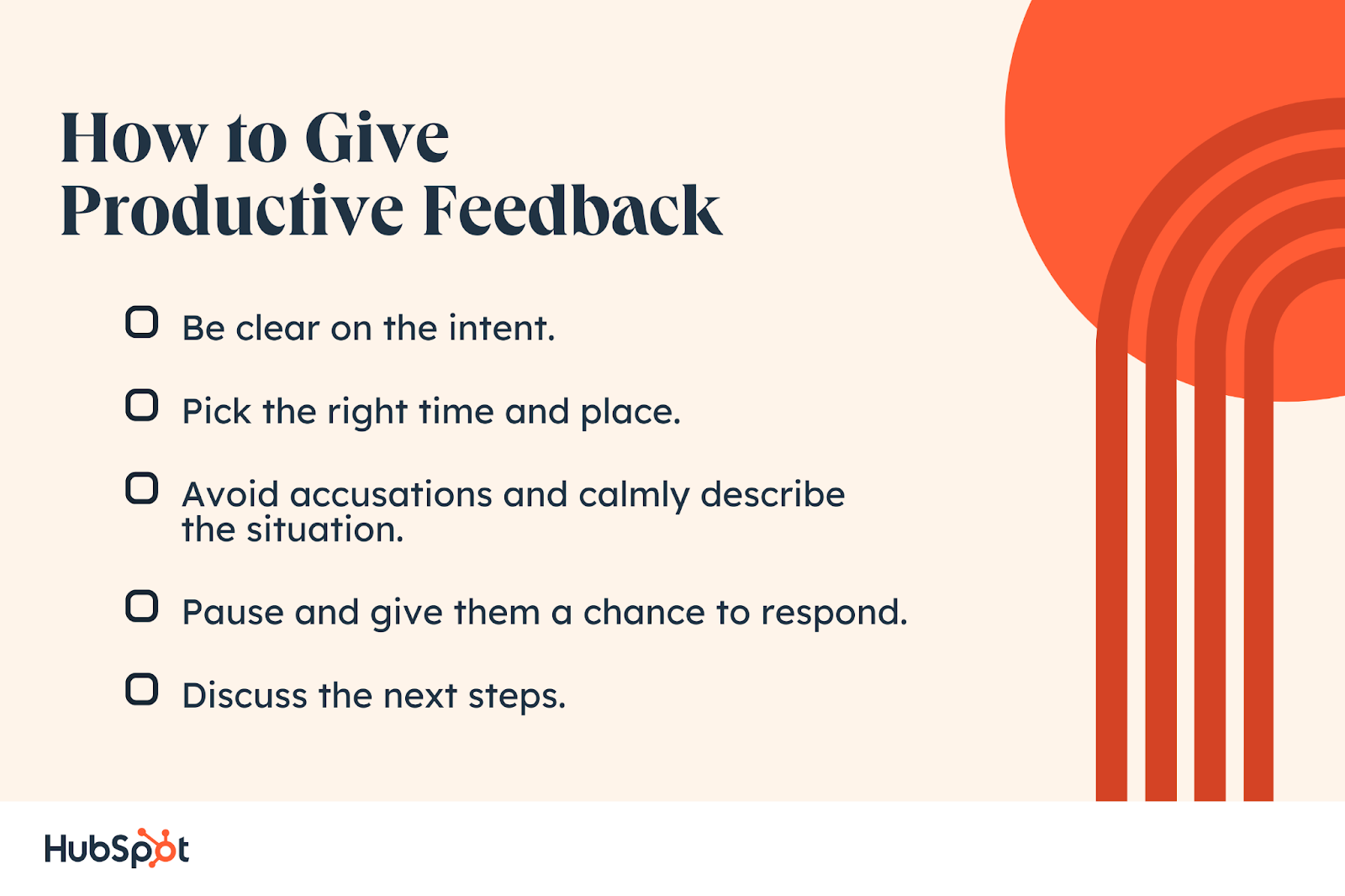
Don’t look at the standard filters, such as “Images, “Shopping,” “Maps,” and so on. You’re looking for the unique filters Google generated for your head term.
These filters are invaluable for answering several questions:

  • What are people looking for that’s related to your head term?
  • What would they find most useful?
  • Does your service or product match what people are looking for?
  • Can you offer a product page or article that people would find helpful?

If I were building a product page for Marketing Hub, I would be able to answer these questions favorably. Marketing Hub is free, small businesses can use it, and it’s useful for digital marketing.

That means I could probably address a person’s goal when they’re looking for this term. This is good strategic information to have. I wouldn’t execute it just yet because I haven’t considered how difficult it is to rank for this term.

Remember: Head terms are more difficult to rank for, so you’ll want to aim for longer keywords (also called “long-tail keywords”) in your SEO strategy. You can begin getting ideas on long-tail terms by clicking on the filters below your head term.

Now, for my publishing blog, I see that I could focus on the publishing industry or self-publishing, as seen by the filters below.

That’s good news — but later down below, I see that Google has included a “What to read” search feature.

That tells me that a blog could be a good fit for this term but that people are also looking for books on publishing. I would then revise my initial head term or revise my blog strategy to slant toward thought leadership.

3. Examine the SERPs.

Once you’ve found a good head term and perused the filters, take a look at the SERPs. I’d recommend going several filters deep so you can get an approximation of a long-tail keyword.

We’re looking for several pieces of information here:

  • How many people are trying to rank for this term?
  • What kinds of publishers and companies are ranking? Well-known publishers like the New York Times or Nerdwallet, or niche publishers and companies?
  • What is located “above the fold” (the area in the upper part of the page before the user scrolls)?
  • What SERP features is Google including?
  • What kinds of pages and articles are ranking?

For “marketing software for small business,” a relatively long-tail keyword, I saw that Google delivered 850M+ results.

Yikes. That’s a lot of competition.

But the truth is Google has excellent crawlers. It will find just about any website related to a term and rank it to answer a searcher’s query. Don’t be discouraged by large search results.

You should pay close attention to what’s happening in the results themselves. For instance, “marketing software for small business” has multiple SERP features:

  • Sponsored ads.
  • “From sources across the web” product panels.
  • A “People also ask” box.

Yikes again. All of these conspire to give us fewer chances for ranking for this keyword because the SERP features push us down, and we’re already competing against publishers like G2.

Even if we managed to rank on the first page, our click-through rates would probably be lower because this is such a competitive term. Click-through rate refers to the number of people who see your search result compared to the number of people who actually click on it.

I would do one of the two things below:

  • Search for an even longer long-tail keyword to try to rank for.
  • Continue examining the SERPs for opportunities related to the same search intent, like related searches and FAQs.

Search intent refers to what the user wants to do when they input a keyword in Google.

If I search “how to bake kale chips,” then I intend to not only bake kale chips but also stay “healthy.” As smart as it is, Google would deliver both recipes and related questions about kale chips’ “health value.”

The SERP features for “marketing software for small business” are all supposed to serve a single intent: A searcher who wants to market their small business using software.

Therefore, every SERP feature you see is an additional opportunity to serve content to the same searcher.

The “People also ask” box is a gold mine for finding related questions that the same user probably has, giving us an opportunity to answer those questions.

With SEO, what matters most is not just that your page ranks — but that the right user finds you and ends up becoming a customer (or signing up for your newsletter, subscribing to your YouTube channel, etc).

If I were creating an SEO strategy for Marketing Hub in today’s search landscape, the “People also ask” box is probably where I’d start for keyword and content ideas, and not the head term itself.

The questions, after all, serve the same user and are much less competitive.

You could also use a tool such as Answer the Public to find questions and related terms.

Image Source

Of course, don’t forget a classic: Looking at suggested searches at the bottom of the SERPs. These will give you alternative terms you could try to rank for and additional long-tails and hints about your top competition.

4. Analyze your competition.

When you find a keyword you’re happy with, it’s time to start looking at your competition.

I would say that with SEO, it’s less about what we do and more about what they do than beating them. The thing is, though, that how we beat competitors has changed. It’s no longer about who has the longest blog post or the most backlinks (although these are still important).

The Google search algorithm has gotten more complicated than ever. It’s important to take into account a wide variety of factors like website age, authority, user experience, and even website structure.

Looking at these elements can help you decide what you should put on your website and learn what Google is currently favoring.

When trying to rank for the term “publishing blog,” I found three top competitors: Selfpublishing.com, thatpublishingblog.wordpress.com, and janefriedman.com.

I would look at several things when trying to beat these competitors.

  • What kind of content do they publish?
  • What kinds of categories do they address?
  • What’s the publishers’ or owners’ personal and professional history? Jane Friedman, for instance, is a known industry veteran.

The first question, in particular, is essential for mapping out my SEO content strategy.

For instance, selfpublishing.com has the following categories:

Image Source

If you’d asked me years ago how I would approach beating this publisher, I would say that I would copy all of their categories and add three more just for kicks.

But Google is no longer the same. It values authority and expertise. It wants to know that you know what you’re talking about and that you’re not just gaming the system.

Therefore, based on my personal expertise, which is in children’s fiction, I’d probably choose two to three categories where I feel I could create a wealth of content: Writing, Children’s Fiction, and Publishing.

If I were trying to rank for “marketing software for small business,” I would ask:

  • What kinds of articles or pages are ranking?
  • Because this is such a competitive term, what kind of authority or history do I need to rank?
  • Could I create something similar?

Look at your competitors’ pages, and keep their qualitative attributes, such as their history in the industry, in mind. But don’t be discouraged by long-time industry players.

When I was an SEO at a transportation startup, we were competing against transportation companies that had been in the industry for 30+ years.

But with a strong content SEO and backlink-building strategy, we managed to get one of our transportation partners to the top of the SERPs.

Once you’ve scanned your competitors, it’s time to dive into a simple three-pronged strategy:

Authority, content, and backlinks.

5. Generate online authority.

If content is queen and backlinking is king, authority is the kingdom.

Authority, in fact, is everything.

These days, SEO isn’t just about writing SEO-optimized content and hoping the algorithm will discover you.

Once upon a time, you used to be able to include the keyword in the title, headings, and text and rank well.

Now, there are a wide variety of content quality factors that Google takes into account, such as:

  • Expertise.
  • Experience.
  • Authority.
  • Trustworthiness.

Collectively, these are called E-E-A-T, and they’re part of Google’s Search Quality Rater guidelines. Google wants to know that you’re qualified to deliver information to searchers. And if you’re selling a product, it wants to know that you’re legitimate.

Let’s go back to the publishing blog example. Jane Friedman, who ranks #3 for the term “publishing blog,” is a well-documented industry veteran. Her site ranks for 30K+ keywords, and she has more than two hundred thousand backlinks.

Her blog post, “How to Find a Literary Agent,” ranks #1 for the highly competitive head term “literary agent,” above top publishers such as Reedsy and even Wikipedia.

Image Source

Why?

Because Friedman has plenty of E-E-A-T — she’s an expert with experience, and therefore, she’s authoritative and trustworthy.

There are several ways to build your authority when creating an SEO strategy for a new site or company:

  • Include your credentials across several sources on the web: LinkedIn, Facebook, your personal website, etc.
  • Interview experts and include their insights in your pages and blog posts.
  • Hire freelance writers who specialize in your niche, and use their name, content, and insights on your website.
  • Publish guest blog posts in authoritative blogs and websites to slowly build a digital footprint.

The Google algorithm is smart. It can cross-reference hundreds of thousands of sources to determine whether you’re an authority in the field.

To make it a bit easier for the algorithm, you should also make your authority clear, as Jane Friedman does below in her biography.

Image Source

If I were launching Marketing Hub for the first time, I would:

  • Cite my nearly decades-long digital marketing experience on the “About” page.
  • Publish guest blog posts on marketing blogs and websites.
  • Start another media outlet, such as a podcast or blog, to publish my marketing opinions and insights.
  • Publish an ebook with my marketing expertise.
  • Hire software developers who’ve created proven products before — and publicize that Marketing Hub was made by the developers who made X.

As you foster authority, you should concurrently create content on your website, which I cover next.

6. Create search engine optimized content.

This step is probably what you thought of when I first started talking about an SEO strategy. And for good reason. According to the web analysts and SEO experts surveyed for HubSpot Blog’s 2023 Web Traffic & Analytics Report:

“Optimizing your on-page content around target keywords is the most effective strategy for ranking highly in SERPs.”

Remember all that research we did at the beginning? It finally comes into play because it’s time to create content that’s optimized for those long-tail keywords.

I recommend using a tool to help you find potential keywords, such as Ahrefs or Semrush.

Here’s a guide on keyword research to help you out.

I follow one simple rule when creating content I want to rank: Write for humans first, search engines second.

I like to think of it this way. I’m writing an article or page to help a person. But also to hold the algorithm’s hand a little bit. Google is smart, but not so smart to rank your page unless you give it a few hints.

Therefore, I like to stick to the basics.

1. Include the Keyword in the Page Title, H1, Text, Meta Description, and URL.

I generally include the keyword a few times on and off your page to give Google a hand.

As an example, our product marketing team optimized Marketing Hub’s page to a T.

What we like: They include the keyword in the page title (which is the text that appears in search results, pictured above), the H1, and the very first line of text at the top of the page.

And, it works: We rank #3 for the highly competitive term “marketing software.”

You’ll also want to include your keyword in the meta description and the URL.

2. Be helpful.

Be helpful with your content. Ask yourself: When a person lands on this page, what would they be looking for?

You can answer this question by examining the SERPs and your competition. You can also think through your reader’s thought process and their search intent.

For Marketing Hub, we included commonly asked questions, even those related to one of our competitors.

Image Source

And Jane Friedman includes information on what to expect from a good literary agent.

Image Source

What we like: Notice that this content is not necessarily beautifully formatted, nor does it target a specific keyword. It’s supposed to help the reader first and foremost — and by helping the reader, you help yourself.

After all, Google only wants to rank content that genuinely helps someone do or learn something.

3. Include alt text and compress images.

Image alt text still remains one of the most underrated ways to optimize your page.

Not only does it improve web accessibility, but it gives you a chance to rank in Google’s image pack and image results. That ultimately means more traffic to your website.

And if you don’t believe me: Here’s a traffic snapshot from HubSpot’s image pack rankings (look under the column titled “Traffic”).

Just from our position for “resignation letter example,” we’ve received more than 6K organic visits.

Not surprisingly, the image that ranks has the alt text “gracious resignation letter sample.”

In addition to describing what the image contains, you should include your keyword in the alt text to give you a better chance of ranking.

Lastly, don’t forget to compress your images so that your page loads more quickly.

4. Build Internal Links

After creating content, internal linking is paramount.

It creates a network for Google to follow. Remember, the Google algorithm is smart, but it still needs a hand here and there. How will it know certain pages are topically related unless you tell it?

So, by internally linking from one page to another, you’re giving the algorithm a pattern to follow.

At the HubSpot blog, we call this the pillar-cluster model, which helped us overcome a year-long traffic plateau.

By internally linking, you’re telling the algorithm that a number of your pages are interrelated. You’re also signaling that you cover specific topics at length and that you’re, therefore, an authoritative resource.

And authority is everything.

Expert Insight

I reached out to Nedim Mehic, who has 10 years of experience in SEO. He’s also the founder of Beki AI, an internal linking software.

“As an internal linking software founder, I might be biased, but I can confidently say that in 2024, internal linking remains a pillar of effective SEO strategies,” says Mehic.

Mehic explains that by strategically interlinking pages, we accomplish two major goals: “We guide users in navigating the site with ease and assist search engines in effectively understanding and organizing our content.”

Aside from achieving those two goals, internal linking can garner significant results in other areas. “I’ve seen so many websites find success after improving their internal linking strategy that they neglected for years,” says Mehic.

When I asked what “success” looks like in this context, Mehic cited a user in the beta test phase for Beki AI. The user reported an 800% click increase after adding relevant internal links to a page that was struggling with traffic.

7. Build backlinks.

Content is still queen — but she has to be accompanied by her king: Backlinks.

You could have the most beautiful, SEO-optimized website, but Google won’t rank it unless you receive “votes” from other sites.

We’ll cover backlinks again for your SEO content strategy below. However, I can’t underemphasize how important they are, so I’m going to repeat it again.

Backlinks are the most quantitative way to build authority in your industry. The more backlinks you have, the more authoritative you seem to the Google algorithm.

Why? Because a site wouldn’t link to you unless you were a legitimate, trustworthy source of information.

Here’s a selection of my favorite backlink strategies:

  • Publish guest blog posts on other publishers’ websites and link back to your site.
  • Write helpful content that other sites will want to link to.
  • Publish original research that other publishers will want to link to.
  • Partner with companies on co-marketing campaigns.
  • Join industry membership organizations with public profiles.
  • Sponsor events and conferences.

Here’s an example of some original research by Design Bundles that generated backlinks.

Image Source

What we like: The research isn’t just compelling but highly tailored to the company’s niche. That means it likely generated relevant backlinks, and thus relevant viewers, to the website. The research methodology is also sound. Plus, we love that Design Bundles repurposed the research and press coverage across its social channels. Here’s how The Calvert Journal featured the research.

Next up, I’m going to dive a little more deeply into the SEO content strategy that’s driven millions of visits to the HubSpot blog.

1. Make a list of topics.

To get your SEO content strategy off the ground, make a list of topics you’d like your content to address.

To start, compile a list of about 10 words and terms associated with your product or service. Use an SEO tool (Google’s Keyword Tool, SE Ranking, Ahrefs, SEMRush, or GrowthBar, just to name a few) to research these words, identify their search volume, and come up with variations that make sense for your business.

By doing this, you are associating these topics with popular head terms (or short-tail keywords, if you’d prefer), but you’re not dedicating individual blog posts to these keywords. Let’s go over an example of this process using the image below.

Let’s say a swimming pool business is trying to rank for “fiberglass pools,” which receives 110,000 monthly searches. This short-tail keyword can represent the overarching topic for creating their content, but the business will also need to identify a series of related keywords to include in their content. For example, they could opt to use the “fiberglass pool prices” or “fiberglass pool cost” to achieve additional rankings for the overall keyword of fiberglass pools.

Using search volume and competition as your measurement, you can create a list of 10-15 short-tail keywords that are relevant to your business and are being searched for by your target audiences. Then, rank this list based on monthly search volume.

Each of the keywords that you’ve identified are called pillars, and they serve as the primary support for a larger cluster of long-tail keywords, which we’ll discuss below.

2. Make a list of long-tail keywords based on these topics.

During this step, you’ll begin optimizing your pages for specific keywords. For each pillar you’ve identified, use your keyword tool to identify five to 10 long-tail keywords that dig deeper into the original topic keyword.

For example, we regularly create content about SEO, but it’s difficult to rank well on Google for such a popular topic with this acronym alone. We also risk competing with our own content by creating multiple pages that are all targeting the exact same keyword — and potentially the same SERPs.

Therefore, we also create content on conducting keyword research, optimizing images for search engines, creating an SEO strategy (which you’re reading right now), and other subtopics within the SEO umbrella.

This helps businesses attract people who have varying interests and concerns, and ultimately creates more entry points for people interested in what you have to offer.

Use your long-tail keywords to create blog posts or web pages that explain the specific topics within the pillars you’ve selected. Together, all of your long-tail keywords create a cluster around a pillar topic. Search engine algorithms depend on the relationships between clusters to connect users with the information they’re looking for.

Here’s a short video on this concept:

[Video: Topic Clusters: The Next Evolution of Content Strategy]

Think of it this way: The more specific your content, the more specific the needs of your audience can be, and the more likely you‘ll convert this traffic into leads. This is how Google finds value in the websites it crawls — the pages that dig into the inner workings of a general topic are seen as the best answer to a person’s query and will rank higher.

3. Build pages for each topic.

When it comes to websites and ranking in search engines, trying to get one page to rank for a handful of keywords can be next to impossible. But here’s where the rubber meets the road.

Use the pillar topics you came up with to create a page or post that gives a high-level overview of the topic using the long-tail keywords you came up with for each cluster in step two. These pillar pages can essentially be a table of contents, where you’re giving a description of the main topic and briefing readers on subtopics you’ll elaborate on in other posts.

Ultimately, the number of topics for which you create pillar pages should coincide with your business needs, like the number of products and offerings you have. This will make it much easier for your prospects and customers to find you in search engines no matter what keywords they use.

4. Set up a blog.

Blogging can be an incredible way to rank for keywords and engage your website’s users. After all, every blog post is a new web page and an additional opportunity to rank in SERPs. It’s no wonder, then, that marketers cite blogging as the top media format they aim to use for the first time in 2024. (HubSpot’s Ultimate List of Marketing Statistics for 2024)

Long story short? If your business does not already have a blog, consider creating one. As you write each blog post and expand on your clusters, you should do three things:

  1. Don‘t include your long-tail keyword more than three or four times throughout the page, as Google doesn’t consider exact keyword matches as often as it used to. In fact, too many instances of your keyword can be a red flag to search engines that you’re keyword stuffing to gain rankings, and they’ll penalize you for this.
  2. Second, always link out to the pillar page you created for your topics. You can do this in the form of tags in your content management system (CMS) or as basic anchor text in the body of the article.
  3. Once you publish each blog post, link to it within the parent pillar page that supports the subtopic. By connecting both the pillar and the cluster in this way, you‘re telling Google that there’s a relationship between the long-tail keyword and the overarching topic you’re trying to rank for.

5. Create a consistent blogging schedule.

Your blog should be a trove of information for your prospective customers. That means not every blog post or web page you create needs to belong to a topic cluster. There’s also value in writing about tangential topics your customers care about. Doing so will help you build authority with Google algorithms.

But it’ll take time to build that authority, so make it a point to blog at least once a week. Remember, you’re blogging primarily for your audience, not search engines, so study your target market and write about things that they’re interested in.

It may also be helpful to create a content strategy to stay consistent with your blogging schedule and focused on your goals.

Expert Insight

I spoke with Zoe Ashbridge, Senior SEO Strategist at forank. Ashbridge has nearly a decade of experience in digital marketing and SEO.

“Your blog will likely become your biggest traffic generator, providing you’re doing it properly,” says Ashbridge.

“Weekly blogging can feel like a lot, but if you’re starting out, content production is truly what you need. You want to become the most trusted resource within your niche so your users are served and Google prioritizes your site in SERPs,” Ashbridge explains.

Pro tip: A simple Google sheet helps manage blog production.

“At minimum, use a Google sheet to keep a record of the blogs you‘re posting, their keywords, the date published, the cluster they belong to, and the live URL. Refer back to this sheet when you’re monitoring performance or for internal linking,” she says.

6. Create a link-building plan.

The topic cluster model is your way forward in SEO, but it‘s not the only way to get your website content to rank higher once it’s been created.

While our first five steps were dedicated to on-page SEO, link-building is the primary objective of off-page SEO. Link-building is the process of attracting inbound links (also called backlinks) to your website from other sources on the internet. As a general rule, sites with more authority that link back to your content have a more significant impact on your rankings.

Dedicate some time to brainstorming all the various ways you can attract inbound links. Maybe you’ll start by sharing links with local businesses in exchange for links to their own sites, or you’ll write a few blog posts and share them on different social media platforms. You can also approach other blogs for guest blogging opportunities through which you can link back to your website.

7. Compress media files before uploading them to your site.

This is a small but important step in the SEO process, especially for mobile optimization.

As your blog or website grows, you‘ll undoubtedly have more images, videos, and related media to support your content. These visual assets help retain your visitors’ attention, but it’s easy to forget that these files can be very large. Since page speed is a crucial ranking factor, it’s important to monitor the size of the media files you upload to your site.

The bigger the file size, the more difficult it is for an internet browser to render your website. It’s also harder for mobile browsers to load these images, as the bandwidth on their devices is significantly smaller. So, the smaller the file size, the faster your website will load. But how do you compress images and still retain quality?

It’s worth considering the use of a compression tool to reduce file sizes before uploading images, videos, and gifs. Sites like TinyPNG compress images in bulk, while Google’s Squoosh can shrink image files to microscopic sizes. However, you choose to compress your media, keeping files in the kilobytes (KB) range is a good rule of thumb.

8. Stay up-to-date on SEO news and best practices.

Just like marketing, the search engine landscape is ever-evolving. Staying on top of current trends and best practices is an important strategy, and there are multiple online resources that can help you do so. Here are a few resources to check out:

9. Measure and track your content’s success.

SEO can take a lot of time and effort, and because of this, you’ll want to know if your strategy works. It’s important to track your metrics to understand the success of your overall process and identify possible areas for improvement.

Not sure where to start when it comes to metrics? According to 2023 HubSpot data, sales, leads, and conversions are the most important metrics tracked by web analysts. Next up are total monthly visitors, click-through rate, search traffic, and bounce rate.

You can monitor organic traffic using your preferred web analytics tool or create your own dashboard using Excel or Google Sheets. Also, tracking indexed pages, conversions, ROI, and your rankings on SERPs can help you recognize your success as well as identify areas of opportunity.

Creating an SEO Report

An SEO report is an overview of the SEO efforts you’ve enacted over a specific period of time. It essentially shows how successful you’ve been, as well as any areas that need improvement. Having a consolidated report also helps you present the data to relevant stakeholders to display why your SEO activities are important and how they drive growth for your business.

Your SEO report can contain metrics like organic traffic results, the SEO health of your website, inbound link generation, and also address any areas where growth has declined that need to be addressed for future improvement.

The image below is an example of an SEO report from Ahrefs, which has given an overview of the link-building progress of the SEO efforts.

Image Source

What we like: We love that the report is broken down across one, seven, and 30 days, so it’s clear to see the traction of link-building campaigns over a given period. You can then identify what’s working and what isn’t across these intervals.

In order to fuel your SEO report, you’ll actually need to have completed some SEO activities, and below, I’ll give some high-quality examples of successful SEO.

Best SEO Examples

As mentioned above, there are a variety of different things you can do for your business to enact your SEO strategy. Below, I go over some examples of what this looks like in practice that you can use as inspiration for your own processes.

There are a variety of different things you can include in your SEO strategy. Consider the following.

1. Writing Compelling Meta Descriptions

A meta description is the snippet of text below a title and link in search results. The description, well, describes the content of the page to the person conducting the queries so they know what to expect. The image below is the result of a search query for market research.

Image Source

What we like: This is a high-quality meta description because it lets Google know exactly what the page contains, helping your content surface in the correct search results and helping audiences understand exactly what they’re about to click on.

2. Getting Content Backlinks and Inbound Links

A backlink, also called an inbound link, is when another website links back to your website or blog content. It’s usually placed as a hyperlink on a string of text that relates to your content, and when clicked, they’re taken to your site.

Backlinks are an effective SEO tool because they show search engines that your content is authoritative and relevant, helping you rank higher in SERPs. The image below is an example of a blog post from the Content Marketing Institute that has a backlink to the HubSpot Blog post that you’re reading right now.

Image Source

Pro tip: You can use different paid tools like Ahrefs and SEMrush to find your existing content backlinks. But to find this one, I made use of Ubersuggest’s free backlink checker.

3. Optimizing Your Site Pages for Page Speed.

Page speed is how quickly the content on your website loads when someone visits a specific page on your website. Google began taking page speed into account for SERP rankings in 2018, making it a critical area of focus when you enact your strategy.

Pro tip: Try the “Compress media files before uploading them to your site” step I outlined above in your SEO strategy. This is a critical step in optimizing your site for page speed.

4. Local SEO

Local SEO is improving search engine visibility for your business’s location. An effective local SEO strategy will surface your content in search queries from customers in your local area, letting them know your business is there to meet their needs.

The image below is a SERP result example for “best restaurants Brooklyn,” showing local SEO in action.

Image Source

What we like: The three businesses that appear in results have an optimized Google My Business profile that contains information that helps it surface in results for Brooklyn-area restaurants. Having up-to-date information here doesn’t just help the restaurant’s wider SEO efforts. It also helps potential customers find the information they need.

Expert Insight

I contacted Christopher Levy, senior manager of SEO at Marketing Six, for comment. Christopher has ten years of SEO experience and specializes in local.

“While most SEOs have had to compensate for traffic erosion due to Google’s increasing use of rich features and paid ads on search engine result pages (or SERPs), local SEOs must compete with two of the most visually appealing and authoritative features that dominate local,” says Levy.

Christopher explains that local service ads (or LSAs) are one of these features. This ad format is exclusive to local businesses in fields such as plumbing, law, dentistry, preschools, childcare, and massage, to name a few.

The other is the local pack or Google Maps — this SERP feature takes up nearly the entire browser menu on mobile search. Google Maps often meets the searcher’s needs by providing geographic proximity, reviews, and an easy click-to-call feature.

“A business’s presence on Google Maps is managed via Google Business Profiles (or GBPs)… Administering a client’s GBP is an important skill set that a local SEO must learn,” Chris emphasizes. This skill set includes optimizing the listing to be up-to-date and accurate, with relevant and compelling visuals.

“You can also share content, updates, and offers on a GBP,” he offers.

Pro tip: “Soliciting and responding to reviews is another important role in managing a GBP that draws on skills needed for outreach. It would be best if you worked with your local clients on a strategy for soliciting reviews from their customers,” he says.

SEO Process

Once you’ve created your SEO strategy, you should also build a process to continue optimizing for new keywords and evolving search intent. Here are a few steps you can take.

1. Historically optimize your content.

Devote some time each month to updating old blog posts with new and up-to-date information to continue ranking in SERPs. You can also use this time to add any SEO best practices that weren’t initially addressed, like missing image alt text.

2. Look out for changing keywords and new search intent.

After a few months, track how your blog posts are ranking and which keywords they’re ranking for. This can help you adjust subheadings and copy to leverage new search intent that your audience may be interested in.

3. Add more editorial value to your old content.

Sometimes, you’ll find that a post is completely out of date. In this scenario, you should go beyond the average historical SEO update and give it a full refresh. You can do this by updating out-of-date information and statistics, incorporating new sections for added depth, and adding quotes or original data to give the post more referral traffic.

4. Create a monthly content plan.

To keep up with your SEO strategy, it can be helpful to create and refine a monthly content plan. You can place it into a spreadsheet, and your teams can track it accordingly. The list below is an example of a monthly content plan that takes the above steps into account.

With a monthly SEO plan like the one above, plus a tracking document like a search insights report, you can build out and execute an efficient SEO strategy. You can also identify and leverage low-hanging-fruit topics to discuss related to your industry.

Create A Strategy That Supports Your Business Goals

Ranking in search pages can be difficult. While it may seem enticing to create content that is centered around high-traffic keywords, that strategy may not help you meet your business goals.

Instead, opt to create an SEO strategy that helps you address your individual business needs, like increasing customer acquisition, for greater marketing success.

Editor’s Note: This blog post was originally published in April 2019 but was updated in January 2024 for consistency and freshness.

marketing