Categories B2B

AI Predictions that Could Impact Marketers in 2025 [Trending Data & Expert Insights]

AI has gone mainstream. 

Although the technology is still evolving, it’s already changing how we work. With the help of AI-powered tools, us workers can automate a variety of tasks, from drafting email subject lines to understanding search performance. 

Download Now: The Annual State of Artificial Intelligence in 2024 [Free Report]

If you’re curious about where AI is going — and how you can leverage it — I’ve listed 7 of my AI predictions for 2025.

1. Efficient and specific use of AI will give companies a competitive edge.

Our 2024 AI Trends Report found that 53% of respondents think fully implementing AI/automation at their company will bring unprecedented growth. 

I agree with this opinion, but to take it a step further, companies that will achieve this growth in 2025 will be the most strategic and efficient implementors of AI.

The AI-powered processes and tools they use will be specific to their business needs, which is a stark contrast to when the proverbial AI boom started, and many were using it in any way they could (which made sense because it was so new). 

How to Stay Current

There are so many AI tools out there, so how do you narrow your focus and choose what works best for you? Here’s my advice: 

  • Catalog the processes that help your business run and identify areas that can be streamlined and improved with AI, and areas where implementing AI will give your employees time back to focus on critical parts of their role. 
  • Give the tools you use a ‘testing period’ to ensure they work for the processes you want them to work for and that they’ll perform as you need if implemented.
  • Create clear use cases, outline where and how AI should be used, and provide general guidelines for usage so employees know exactly how to get the greatest benefit and use AI to their full potential. A great example of this is creating an AI prompt glossary.

2. Personality-driven and human-led content will win. 

I’m not surprised that AI has entered the search space; it’s helpful. AI-powered search engines and AI overviews (AIO) in Google results have already changed how search works. 

But while AI is helpful (and despite how I’ll later talk about AI as a secret weapon for SEOs), businesses in 2025 have to remember that people still want to hear from humans, and personality-driven content will win. 

Take me, for example. I read AI overviews, but I scroll past them for more information. I want a first-person perspective or experience to really help me make a decision.

How to Stay Current

I think this quote from Holly Bowyer and Julie Neumark, partners at Media & Marketing Minds, said it best: “Don’t get so seduced by [AI’s] shimmer that you neglect ‘human intelligence.’ You need to be at the helm in order to maximize the efficiency AI brings.” 

My best advice for meeting this need is to follow Google’s experience, expertise, authoritativeness, and trust (EEAT) framework to create content that AI tools can’t replicate. 

Understand the true intent behind consumer searchers, and use your subject matter experience and expertise to create helpful and useful content that answers what they’re looking for.

Your content should be filled with your personality and first-person perspective that can’t be found elsewhere (or replicated by AI). All of this helps you build trust, and trust inspires people to come back. 

Some other things to do: 

  • Conduct original research and offer thought leadership that establishes your site as a primary source for new information. 
  • Write for other websites to build up your authority
  • Create content around follow-up queries that dig deeper into subject matters so you can truly flex your expertise. 

3. AI will give content marketers a significant lift.

Artificial intelligence isn’t close to writing the next New York Times bestseller (although I feel we’re due for a scandal like this sometime soon), but it can streamline many content marketing tasks. 

Next year, I predict that content marketers will become even more empowered by AI, which will help them execute repetitive tasks like coming up with ideas, writing rough drafts, and summarizing large amounts of data.

For example, the algorithms behind AI tools can do a lot of the legwork in gathering, analyzing, and interpreting information from across the web.

How to Stay Current

My advice:

  • Use AI tools to research your market, target audience, and industry to make data-backed decisions about the type of content you should create and the channels you should create it for. 
  • Overcome the creative blocks that many of us content marketers are troubled with and use AI to find and brainstorm content ideas that align with your content strategy. 
  • Use AI-powered analytics tools to understand the performance and effectiveness of your content marketing. These data-driven insights will help you understand what went right and what to optimize for better results in the future. 

If you use AI as part of your content marketing strategy, don’t forget what I mentioned before: consumers still want a human perspective.

Using a gen AI tool to write a blog post and then publishing that post without any edits or personalized insight isn’t the best way to service your audience. Leverage it as a first-step tool, and always input your perspective and insight.

4. Consumers will demand more personalization, and AI will deliver.

78% of marketers say personalization has a “strong” or “extremely strong” impact on customer relationships.

Marketing AI Predictions: more personalization

While creating these experiences with older marketing techniques and technology was once extremely difficult, AI has opened the door to more pinpointed personalization opportunities. 

We’re already seeing heavy AI personalization in the marketing industry. For example, many tools allow brands to send marketing emails with names and personalized information based on contact list information.

In retail, consumers regularly get emails or e-commerce recommendations for certain products based on what they’ve recently viewed or purchased.

In 2025, businesses will use AI to take personalization a step further, especially for solid one-to-one personalization. 

How to Stay Current

AI is definitely used to help us “get things done,” but it can also help scale, personalize more, and find target audiences easily.

Here are some ways to stay up on this trend:

  • Use AI to build in-depth buyer personas and ideal customer profiles that help you understand exactly who your customers (and potential customers) are and how you can best reach them with outreach strategies, dynamic content suggestions, etc., that directly align with their interests and needs.
  • Process customer data with AI in real-time, such as pages visited or products viewed, and adjust marketing content, messaging, and recommendations based on these insights on a customer-by-customer basis for an individualized experience.

5. Responsible AI is a requirement.

Talking about using AI for personalization is a perfect segue into my next prediction for 2025: companies embracing responsible AI practices and prioritizing privacy. 

Marketing AI Predictions: responsible AI

AI systems rely on data to make decisions, and the data comes from various sources, such as social media posts, online databases, public records, and general online activity (e.g., posting a review on Yelp). Sure, this process seems harmless enough, but it reveals a lot about a person’s life. 

So, any time you collect customer data (especially individualized customer data), you need to be careful. Customers trust you to use (and store) it safely, responsibly, and exactly as you promised. 

The data these AI systems rely on can also be biased because society is biased. The data it has access to likely isn’t representative of entire populations, so it can produce results that uphold these biases. 

To boil it down, consumers are wary of AI, especially about how businesses use it to process their data, and you’ll have to stay aware of that sentiment. 

How to Stay Current

Things you can do include: 

  • Be transparent about how you use AI for your customers. If you use it to analyze their data, make that clear and easy to understand. If opting out is an option, make that clear. 
  • Be clear about how you’re using AI to service your customers. 
  • Train your AI tools with diverse data sets to ensure outputs are representative and inclusive. 
  • Prioritize customer safety and data protection to make sure any data you have about your customers is used and stored safely.
  • Educate yourself and your employees on responsible AI use and enforce your safety practices. When people know how to use AI, they’re more likely to do so safely.

6. AI will become a secret weapon for SEO strategists.

AI can automate necessary but time-consuming tasks for SEOs, like keyword research, competitor analysis, and website optimization

Those using it for this have already seen the benefits: Campbell’s Soup started to use AI-powered SEO automation to compress 75,000 images in a single day. This helped the brand rank on page one of SERPs for 4k keywords within a few weeks. 

Because it benefits web traffic and results, I expect investment in AI-powered SEO tools to grow. 

How to Stay Current

To stay current and use AI in your SEO strategy, you can use tools to: 

  • Monitor search data to uncover trends and topics
  • Conduct keyword research and understand search volatility, search volume, and level of ranking difficulty for keywords
  • Understand keyword success and pages with positions you can improve
  • Detect and fix technical issues to optimize page experience and UX (technical audits)
  • Analyze site metrics like page views, clicks, and bounce rate
  • Generate structured data and schema markup

A new element to SEO optimization is ensuring your site appears in LLM search engines and AIOs. Our new AI Search Grader can help you do exactly that by analyzing your site to see how visible it is in AI-powered search engines, how it’s being talked about, and where you can improve. 

7. AI will fit naturally into the daily lives of all workers, not replace them.

People were worried, and some still are, about AI leading to a reduction in human-led jobs. The more than likely reality, going into 2025, is that it will fit more naturally into the daily lives of all employees, not replace them.  

It will complement the work we do and supercharge the skills we already have. I’m not alone in this belief: 60% of our survey respondents say that, in marketing, they see AI working in conjunction with marketers and assisting them in performing most of their job duties. 

How to Stay Current

Those who embrace this technology — and integrate it into their workflow— can maintain a competitive edge while saving time in the process. Here’s how you can stay up in a world where AI is more embedded in our daily work requirements, 

  • Build a baseline understanding of how AI works and helps us do our jobs, regardless of industry. 
  • Learn from others’ experiences with AI and how they’re applying it at their jobs, or how similar businesses to the one you work at are adopting it. 
  • Think about how it will benefit you, specifically in your current role, and how you get things done.
  • Test out and try different AI tools and how you can leverage them in your day-to-day role to help you supercharge your abilities.

 As John McCarthy, one of the fathers of AI, once said, “As soon as it works, no one calls it AI anymore.”

Back to You

It’s 2024, and AI has gone mainstream. There’s no denying its potential to transform a variety of industries, and marketing is no exception. It can help companies create more, scale faster, and build more personalized experiences.

But to pull it off, marketers must stay agile as they embrace and innovate with AI.

Categories B2B

Real or AI-Generated? You Guess [Quiz]

Of all the real or AI-generated rounds so far, this one’s the toughest yet — I challenge you again to spot AI-generated content and select human-made pieces.

From text and images to videos and music, I’m throwing examples that will make you question everything.

Let’s see how many you can get right. The answers are at the bottom. But, no cheating, please.

Download Now: The Annual State of Artificial Intelligence in 2024 [Free Report]

1. Is this photo real or AI?

real or ai

2. Was this said by a real person?


3. Is this audio story narrated by a human or AI?


4. Is this bird image AI-generated or a National Geographic shot?

real or ai bird

5. Is this painting AI-generated?

real or ai painting

6. Is this passage human-written or AI?

They picked a way among the trees, and their ponies plodded along, carefully avoiding the many writhing and interlacing roots. There was no undergrowth. The ground was rising steadily, and as they went forward, it seemed that the trees became taller, darker, and thicker.

There was no sound, except an occasional drip of moisture falling through the still leaves. For the moment, there was no whispering or movement among the branches; but they all got an uncomfortable feeling that they were being watched with disapproval, deepening to dislike and even enmity.

The feeling steadily grew, until they found themselves looking up quickly, or glancing back over their shoulders, as if they expected a sudden blow.

7. Is this ad AI-generated or real?

8. Is this audio story narrated by AI or a human?


9. Which bike is AI-generated?

A

real or ai bike

B

real or ai bike 2

10. Is this video filmed by a real camera?

Answer Key

  1. AI — The photo is AI-generated with Gemini.
  2. REAL – The voiceover is by marketing expert Camille Moore. It’s taken from this TikTok video.
  3. AI – Generated by ElevenLabs
  4. AI — The image was made using AI, Gemini in particular.
  5. REAL – The painting called Noosphere was created by artist Emanuel Schulze.
  6. REAL – The passage is from The Fellowship of the Ring by J.R.R. Tolkien.
  7. AI — The soundtrack was generated by AI through Suno.
  8. AI — The ad was created by AI with Clipchamp.
  9. REAL – B is narrated by Victoria Gordon.
  10. A is AI-generated by ElevenLabs, while B is narrated by Victoria Gordon.
  11. REAL – The video was filmed by a drone. The creator is Andreas Eholst, and you can check it out here.

Categories B2B

Consumers Care About Brand Values: How To Communicate Them in a Way That Wins

Welcome to Creator Columns, where we bring expert HubSpot Creator voices to the Blogs that inspire and help you grow better.

As an inclusive marketing strategist and consultant, one of the things I talk about consistently with my clients is brand values.

Many of them want to win over a bigger and more diverse customer base, but I have to make it clear that those efforts won’t be successful or sustainable if they don’t practice what they preach since brand values are now an important part of consumers’ purchase decision strategy.Free Kit: How to Build a Brand [Download Now]

In fact, HubSpot’s Consumer Trends Report found that 82% of consumers want to engage with and buy from brands that share their values. I’ve even found that I use my credit card as a form of activism and intentionally buy from brands whose values are ones I believe in and want to reward.

My hot take is that, despite its importance, most brands don’t do a very good job of showcasing their values, but those that do it well do it well. Read on to find some high-quality examples from brands that stand out.

How Smart Brands Demonstrate Their Values to Consumers

Brand values are usually developed when leaders are building a brand and determining a mission, vision, and or purpose. When I work with clients on this, we often do it in the context of revisiting and revising their mission, vision, and brand values, to make them more inclusive.

In this episode of the Inclusion & Marketing podcast, I do a deep dive of why values are so important to building an inclusive brand, but the gist is that consumers care deeply about brand values because it signals whether or not a brand cares about the same things they do.

A recent study even found that ¾ of shoppers stopped buying from a brand based upon a conflict of values.

So, given its importance, how can brands make their values clear and speak to customers that share their same beliefs?

My top tip is to show, not just tell. Consumers can read your mission, but those words are just lip service if you don’t show how those values are lived. I recommend focusing the majority of your efforts on highlighting how your brand practices its values

The brands that do this well do it with content on their websites and social media channels. Below I’ll go through some examples of brands that I think do a stellar job of making their values clear to consumers.

1. Ben & Jerry’s lives values through activism.

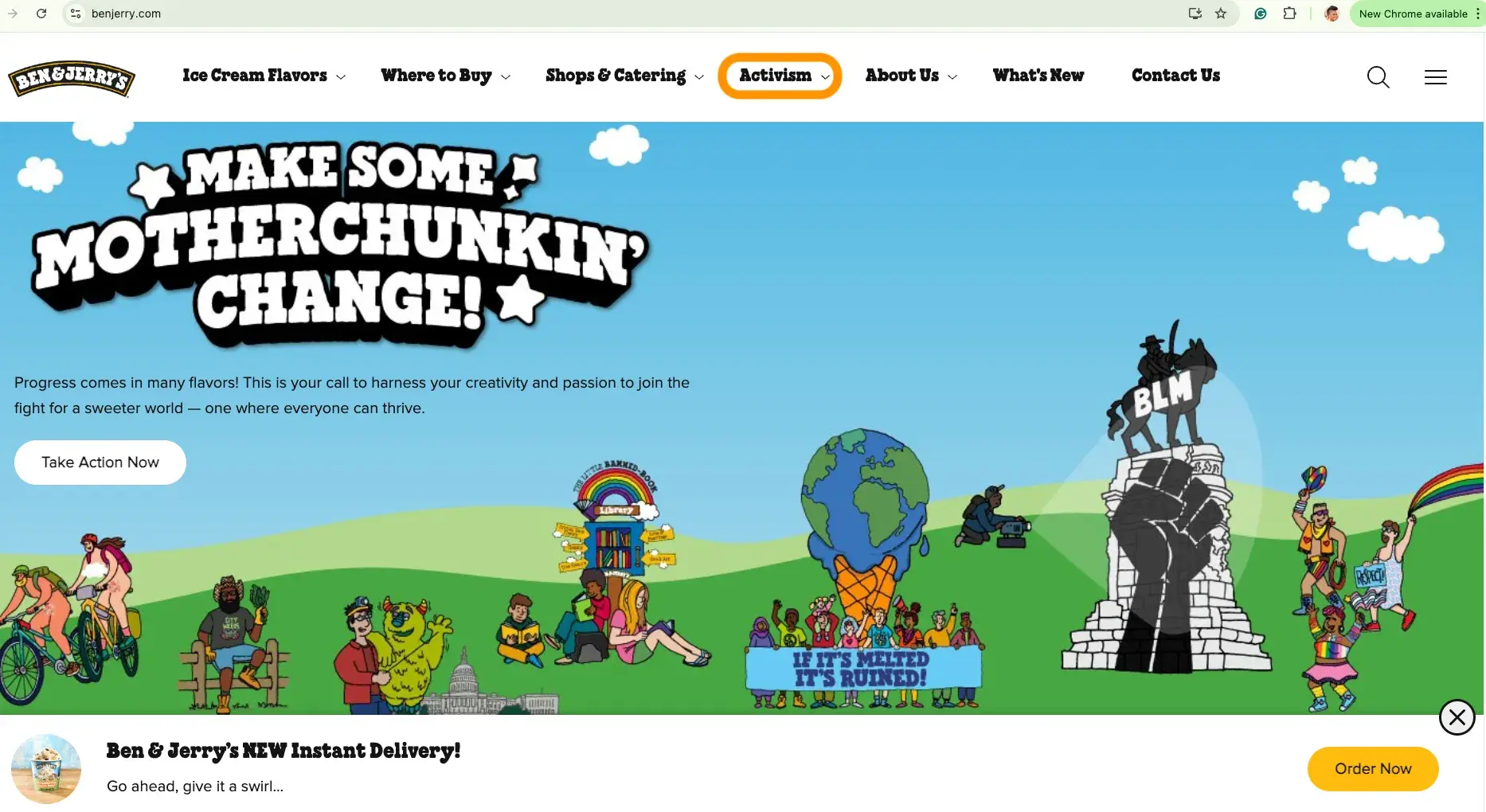
Ice cream maker Ben & Jerry’s makes it clear from first look on its website that it cares about a whole lot more than just selling ice cream. The brand leans hard into activism, and considers it core to achieving its mission of linked prosperity.

From its hero image, to the ‘Activism’ highlight on its Instagram profile and playlist on TikTok, the brand makes it clear to anyone engaging with its assets that it is very involved in the causes it cares about. It also encourages its customers to get involved in supporting those causes as well.

ben & jerry’s website homepage

Ben & Jerry’s values: human rights & dignity, social and economic justice for historically marginalized communities, and environmental protection, restoration, and regeneration.

2. Patagonia lives values through large scale donations.

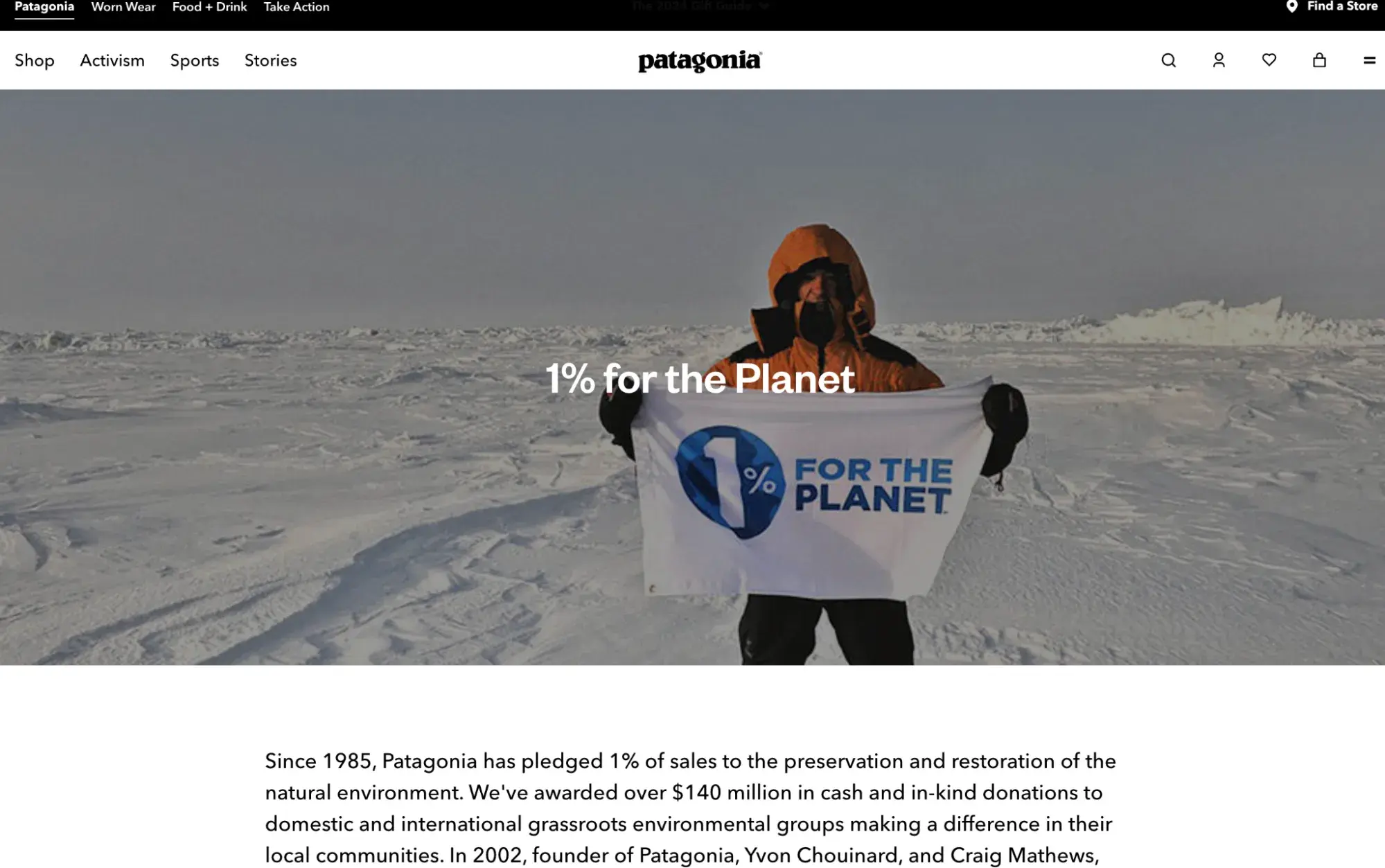
Since 1985, outerwear maker Patagonia has pledged to donate 1% of sales to the preservation and restoration of the natural environment..

In 2022, Patagonia founder Yvon Chouinard “gave away” the company by donating his majority stake (worth millions in profits every year) to an environmental charity, holding true to its values by touting that Planet Earth is its only shareholder.

It also features an “Activism” section in the main navigation of its website, which highlights how itgoes about achieving its mission to “Save our home planet.”

patagonia’s commitment to ecology

Patagonia’s core values are: quality, integrity, environmentalism, justice, and not bound by convention.

3. Seer Interactives lets consumers know they are a B Corp.

A B Corporation Certification is a designation that signifies a brand upholds standards of high social and economic performance, accountability, and transparency on important factors (like fostering an inclusive, equitable, and regenerative economy) related to a company’s social and environmental impact.

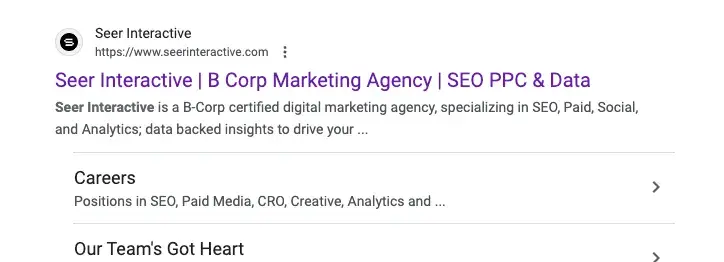
Seer Interactive is a marketing agency that leads with messaging around its B Corp status right in the description in search engine results.

Seer interactive meta description in SERPs

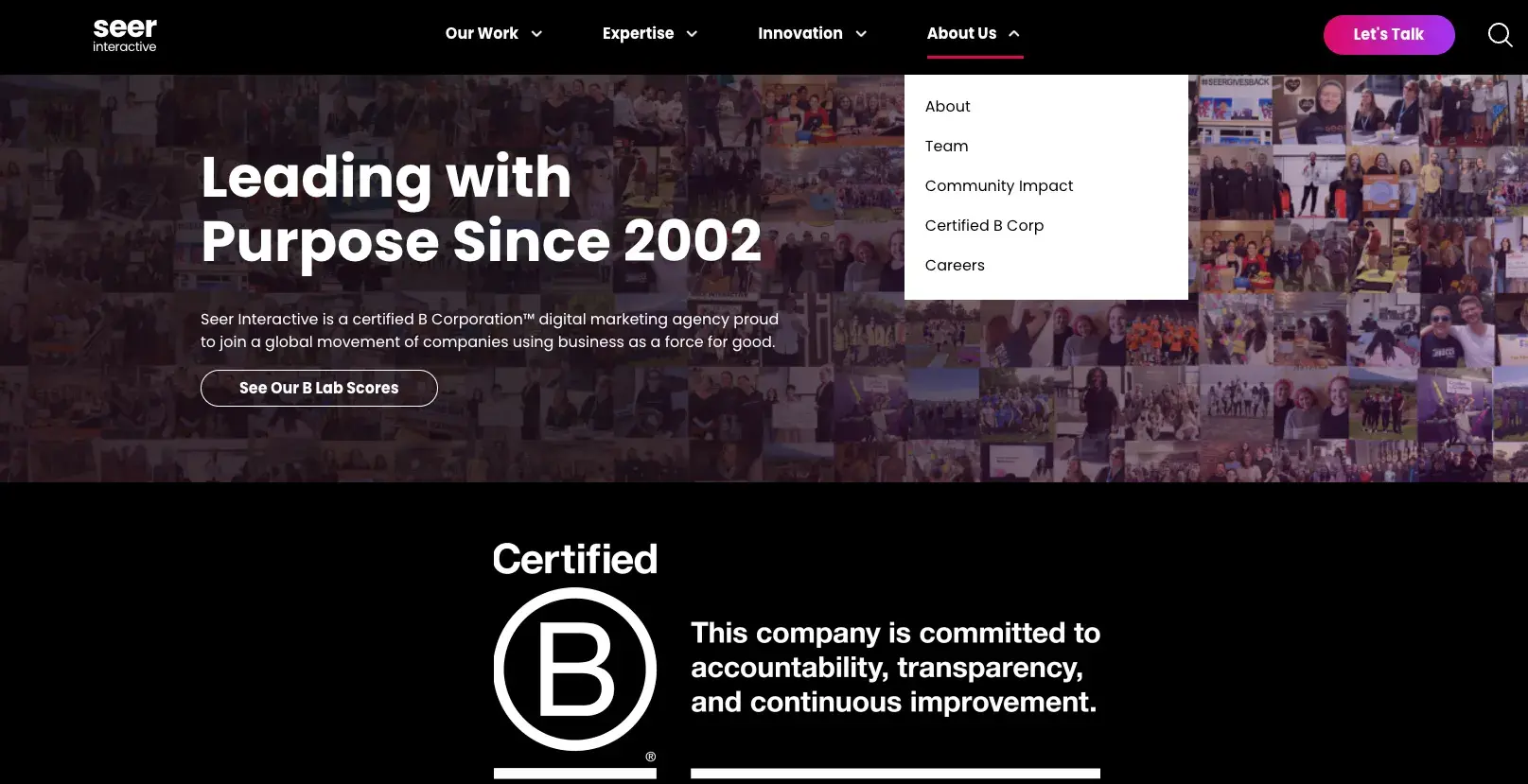
The brand goes deeper by sharing its B Corp status with a page clearly visible in the main navigation of its “About Us” page.

seer interactive B corporation certification

The brand also highlights some of the charitable work they do as part of its values on its social channels.

instagram post from seer interactive

Seer Interactive’s values: uplift others, pursue truth, and strive to be better than yesterday.

4. The Home Depot and Tory Burch highlight their support of communities.

Supporting the communities of the customers they serve is important to a lot of brands.

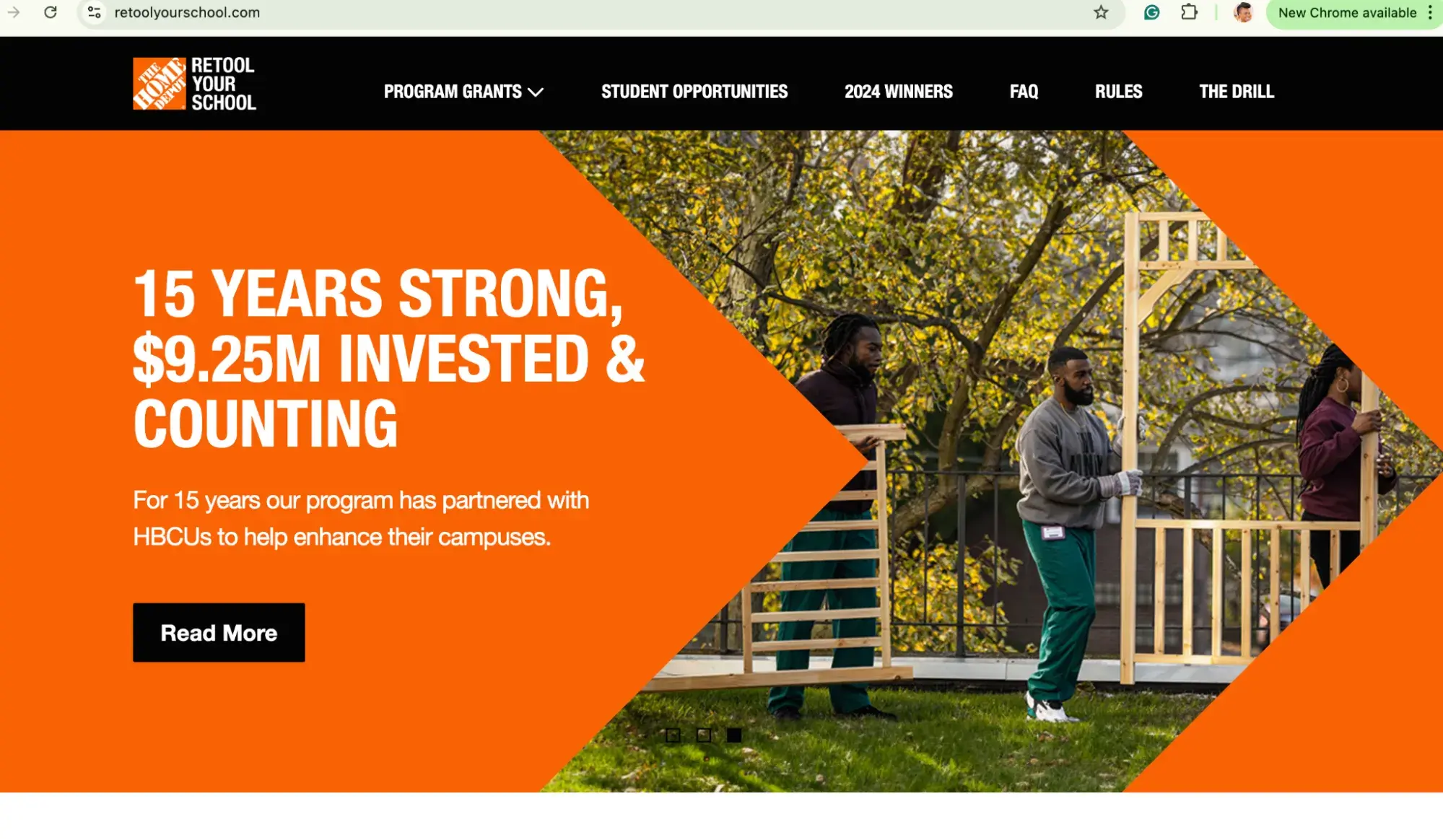
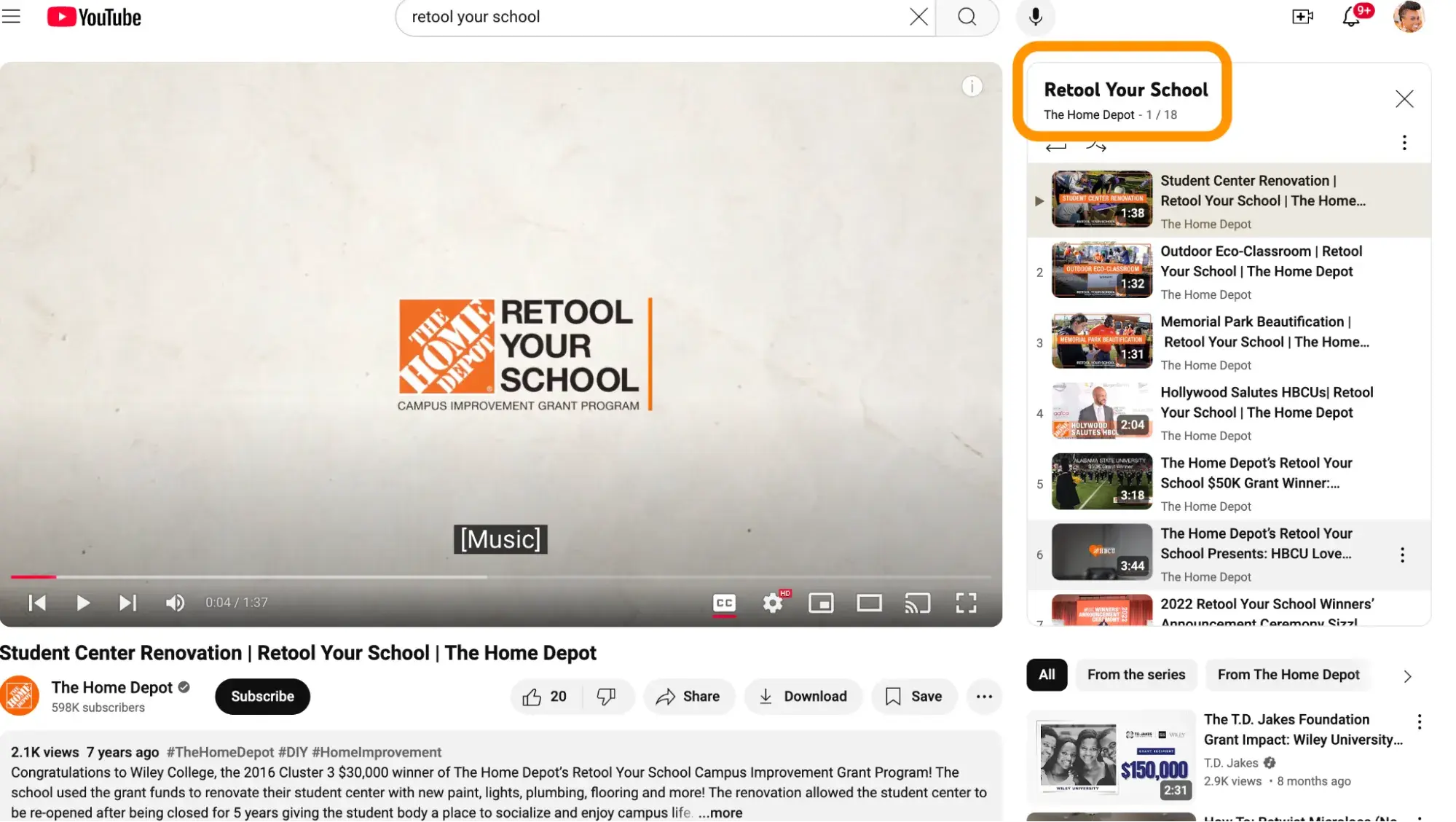
The Home Depot has a long history of investing in the Black community as part of its work to live its values. For example, its Retool Your School Program has provided grants to historically Black colleges and universities (HBCUs) for the past 15 years.

home depot commitment to HBCU website hero image

The program is featured prominently on its brand’s website (shown above), and with content on its YouTube channel (image below).

home depot youtube channel

The Home Depot’s values: creating shareholder value, entrepreneurial spirit, taking care of our people, respect for all people, doing the right thing, build strong relationships, giving back, and excellent customer service.

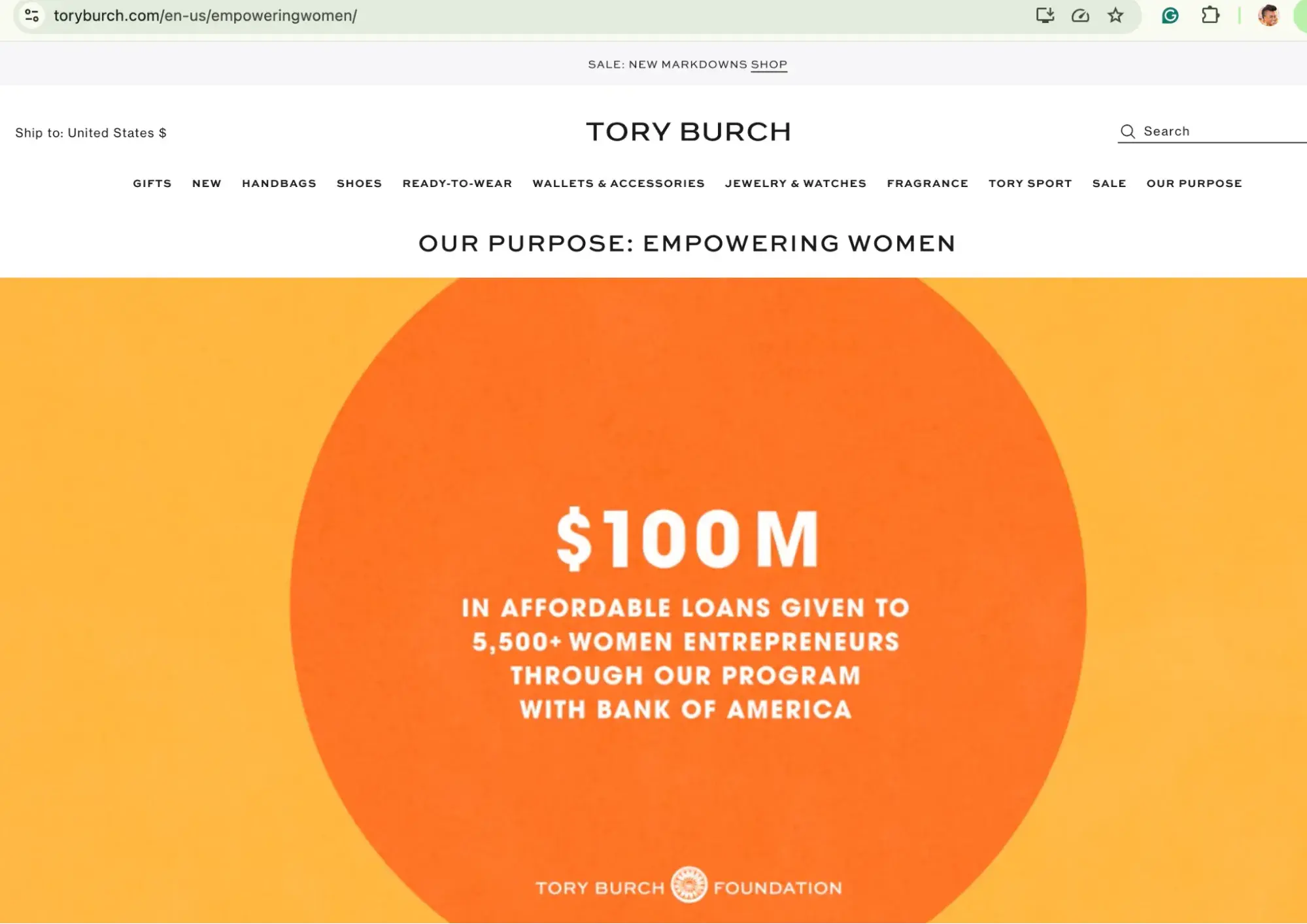
Fashion brand Tory Burch focuses on community and support through the Tory Burch Foundation, which has a number of programs designed to empower women entrepreneurs, including through a fellows program, providing access to capital, education, and other online resources.

tory burch website

On its Instagram account, you’ll find a direct link in the description to the Tory Burch Foundation account, where you’ll find lots of details about all the work the brand does.

tory burch instagram

Tory Burch’s values: empower women (expressed as the company’s purpose).

5. Warby Parker has baked its value of giving back into its business model.

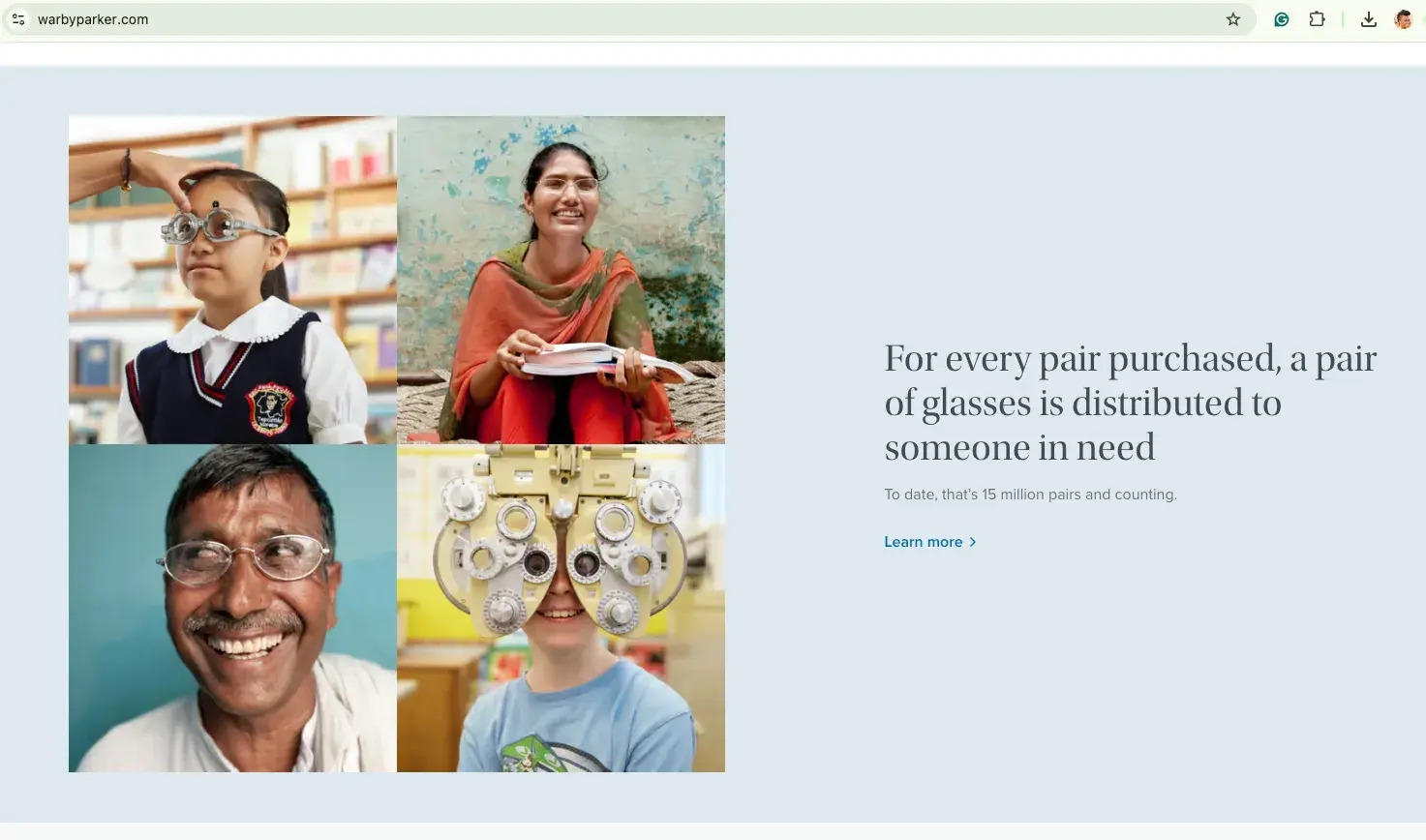
If you buy a pair of glasses from Warby Parker, a pair of glasses are distributed to someone in need. Because this aspect is core to its business model, it’s something the brand doesn’t hesitate to communicate about, hence why it’s featured on its homepage.

warby parker website

It also clearly highlights this in its social media profiles, especially on Instagram, as shown in the image below.

warby parker instagram

Warby Parker’s values: inject fun and quirkiness into everything we do, treat others the way you want to be treated, pursue new and creative ideas, do good, take action, presume positive intent, lead with integrity, and learn, grow, and repeat.

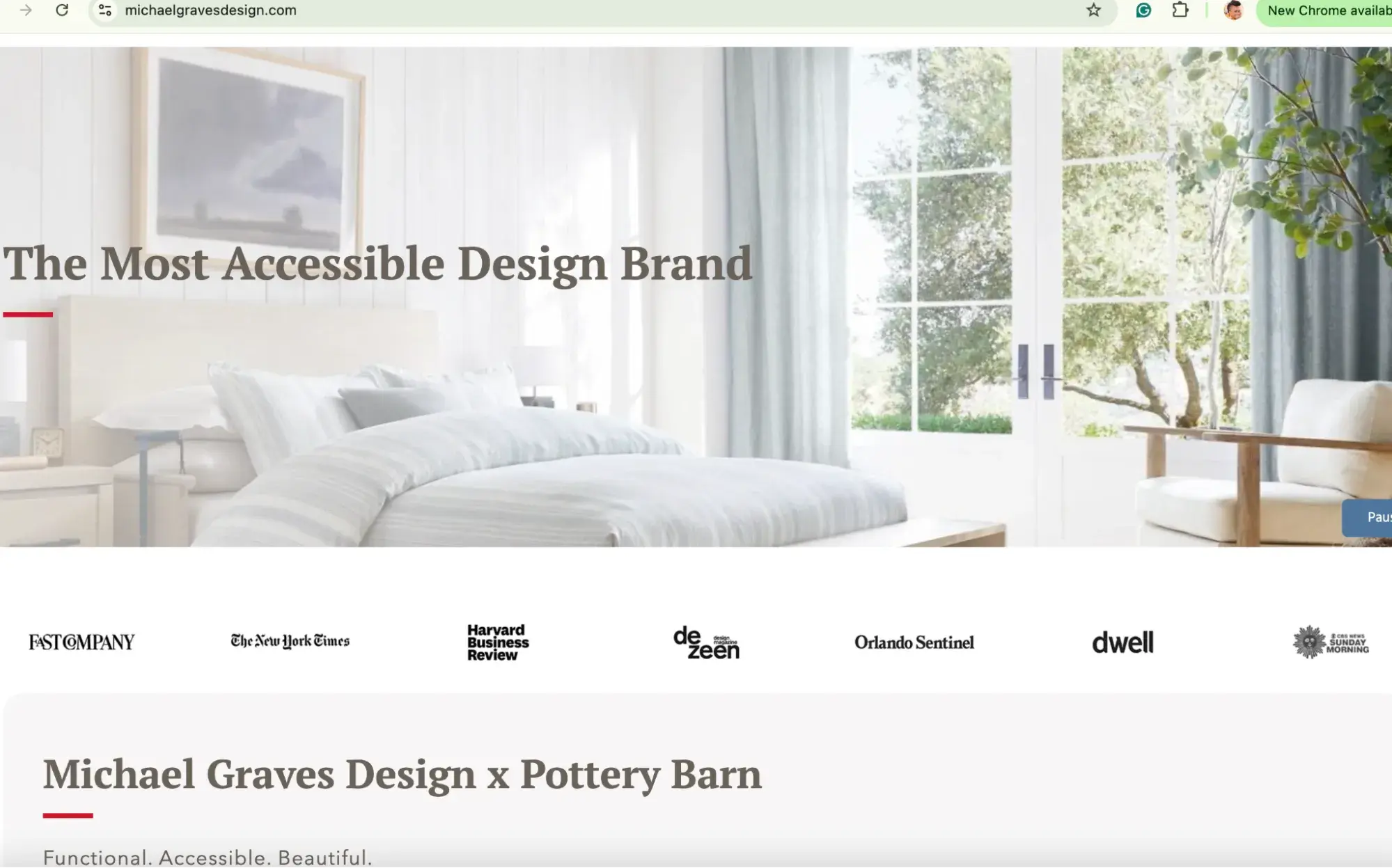
6. Michael Graves Design has baked accessibility and inclusion into its product offerings.

Michael Graves Design is known as the most accessible design brand, with its focus on designing for all and enhancing lives, regardless of age or physical ability.

Thus the mission and purpose of the brand is fulfilled with the actual product the brand produces. As such, with every product launch, collaboration, and promotion, it showcases how it is living its values and purpose because they are intertwined.

michael graves design website

The brand itself doesn’t necessarily talk a lot about inclusion on its website and social channels, because consumers know it because it is baked into the product. For many, that’s what attracted them to the brand in the first place.

michael graves design instagram

In this interview on the Inclusion & Marketing podcast, I spoke with Ben Wintner, CEO of Michael Graves Design. During our chat, we go deeper into how the brand is meticulous about living its values.

Michael Graves Design’s values: delightful, purposeful, pioneering, and extraordinary.

Tell Your Customers How You Live Your Brand’s Values

Customers won’t know what you stand for or the good you do if you don’t. It isn’t about being performative. Rather, it’s about highlighting the positive impact you are making in a way that inspires others, and helps the customers who share your values find you.

Categories B2B

How Consumers Responded to Black Friday Campaigns in 2024 [+ Holiday Marketing Tips]

I’m much more the “spend Black Friday at home in my pajamas” type, but I have a few family members who for some reason enjoy getting up at 4 a.m. to wait in lines for doorbuster deals.

Online or in-store, consumer or marketer, Black Friday and Cyber Monday are formidable forces.

Download Now: The State of U.S. Consumer Trends [Free Report]

HubSpot polled 250+ people to discover how shoppers and brands fared on Black Friday 2024. We last ran this survey in 2022, so we’ll take a look at how things have changed in the last two years.

(One note on our data: Our 2022 poll had 325 respondents, and our 2024 poll had 250 respondents.)

I’ve also got some marketing tips on creating Black Friday ads and some examples to get you thinking creatively about next year’s campaign.

Table of Contents

What We Learned About Black Friday Shoppers & Brands in 2024

You already know that the five days between Thanksgiving and Cyber Monday are some of the biggest shopping days of the year, but let me set the scene with a few quick stats:

  • $235: The average amount spent specifically on holiday gifts during Thanksgiving weekend (National Retail Federation)
  • $925: The average amount that Americans are planning to spend during the 2024 holiday season (NerdWallet)
  • 197 million: How many U.S. shoppers made purchases between Thanksgiving and Cyber Monday 2024 (National Retail Federation)
  • $13.3 billion: How many dollars U.S. consumers spent on Cyber Monday 2024 (Adobe Analytics)
  • 1950%: The increase in traffic to online retail websites from 2023 to 2024 (Adobe Analytics)

Here’s what we learned from our survey about Black Friday 2024:

1. The “Browse But Don’t Buy” effect has increased.

Virtual window shoppers are on the rise. According to our research, there’s an equal split (34% each) between people who purchase something after clicking an ad and those who click but don’t buy. That’s up from 2022 (27%), suggesting that consumers are evaluating deals more carefully.

We’re also seeing more passive deal-hunters this year, which might suggest that shoppers are more opportunistic and less strategic than in past years.

Graph: Did you engage with any online ads or promotions for Black Friday?

2. Digital advertising dominates — but don’t abandon social media.

We asked where respondents saw the Black Friday ads that they clicked on.

In 2022, social media (32%) and online ads (33%) were nearly equally effective at earning clicks. Our research shows a widening gap in 2024, with online ads pulling ahead.

Graph: Where did you see the Black Friday ad(s) you clicked on?

There’s a few possible reasons we saw this increase in our research.

Consumers may be more responsive to online ads; AI tools may be driving better personalization and segmentation, so consumers could be getting more relevant ads; it could be a combination of factors.

A 2024 Statista report that measured awareness of Black Friday and Cyber Monday (as opposed to evaluating clicks, as our study did) suggests that social media and online advertising are equally effective channels.

That study also showed some differences in age demographic, with 18- to 34-year-olds more engaged on both channels as opposed to 35+.

Social media remains an important marketing channel, and it’s certainly not going anywhere — U.S. marketers put a total of $72.3 billion into social media ads in 2023 — but it’s a good time to take a closer look at your playbook.

4. Store traffic has declined.

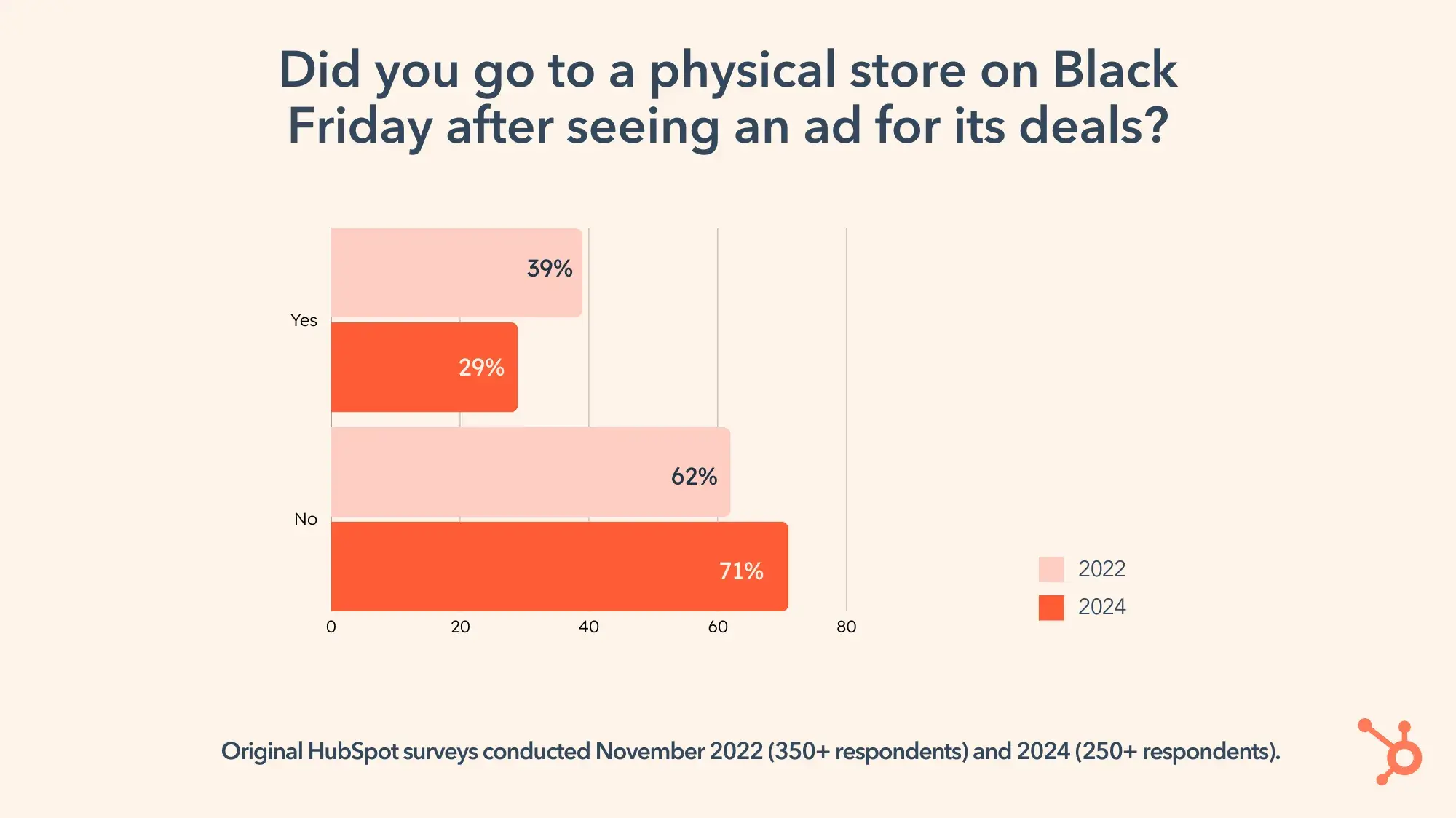
Our survey saw a dip in visits to brick-and-mortar stores, with 29% of respondents in 2024 saying that they visited a store as a result of a Black Friday ad, compared to 39% in 2022.

Graph: Did you go to a physical store on Black Friday after seeing an ad for its deals?

To be fair, it was cold over Thanksgiving weekend in 2024 (70% of people in the lower 48 got what the New York Times describes as “freezing cold” and what I describe as “miserable”).

But when you can get doorbuster deals without taking your house slippers off, retailers are offering fewer reasons to face Black Friday traffic and more reasons to shop from home.

5. Email marketing remains a challenge.

Have marketing emails hit their saturation point? My inbox, at least, says yes.

Although the number of people who responded positively to marketing emails hasn’t changed much (11% in 2022 and 10% in 2024), the consistently low percentage is noteworthy given just how many Black Friday email campaigns there are.

I searched my personal email for “Black Friday,” and I could practically hear Gmail groan under the weight of my request. The following emails all arrived within a two-hour window 48 hours after Black Friday ostensibly ended:

Screencap of the author’s inbox, flooded with Black Friday emails.

When you build your BFCM email marketing strategy, remember that every single one of your customers will have an inbox that looks very similar to mine. What will make your target audience click?

4 Tips for Creating Effective Black Friday Ads

1. Focus on online ad placement.

Our research showed an uptick in receptiveness to online ads versus ads on social media. AI tools can help you effectively segment and target your audience for a more sophisticated take on traditional online ad placements.

We also asked respondents an open-ended question about their overall impression of Black Friday ads, and then used sentiment analysis to determine how positive or negative their impressions were.

There’s a slight increase in neutral impressions from 2022, but overall, consumers are still solidly positive. That’s good news for marketers, whether you focus your digital efforts on social media, elsewhere, or both.

Graph: What was your overall impression about the Black Friday ads you saw this year?

2. Address virtual window shoppers and passive deal-seekers.

Shoppers are less decisive and less proactive when it comes to those sweet sweet BFCM deals. When creating a Cyber Week marketing strategy, consider how you’ll close deals and attract new customers.

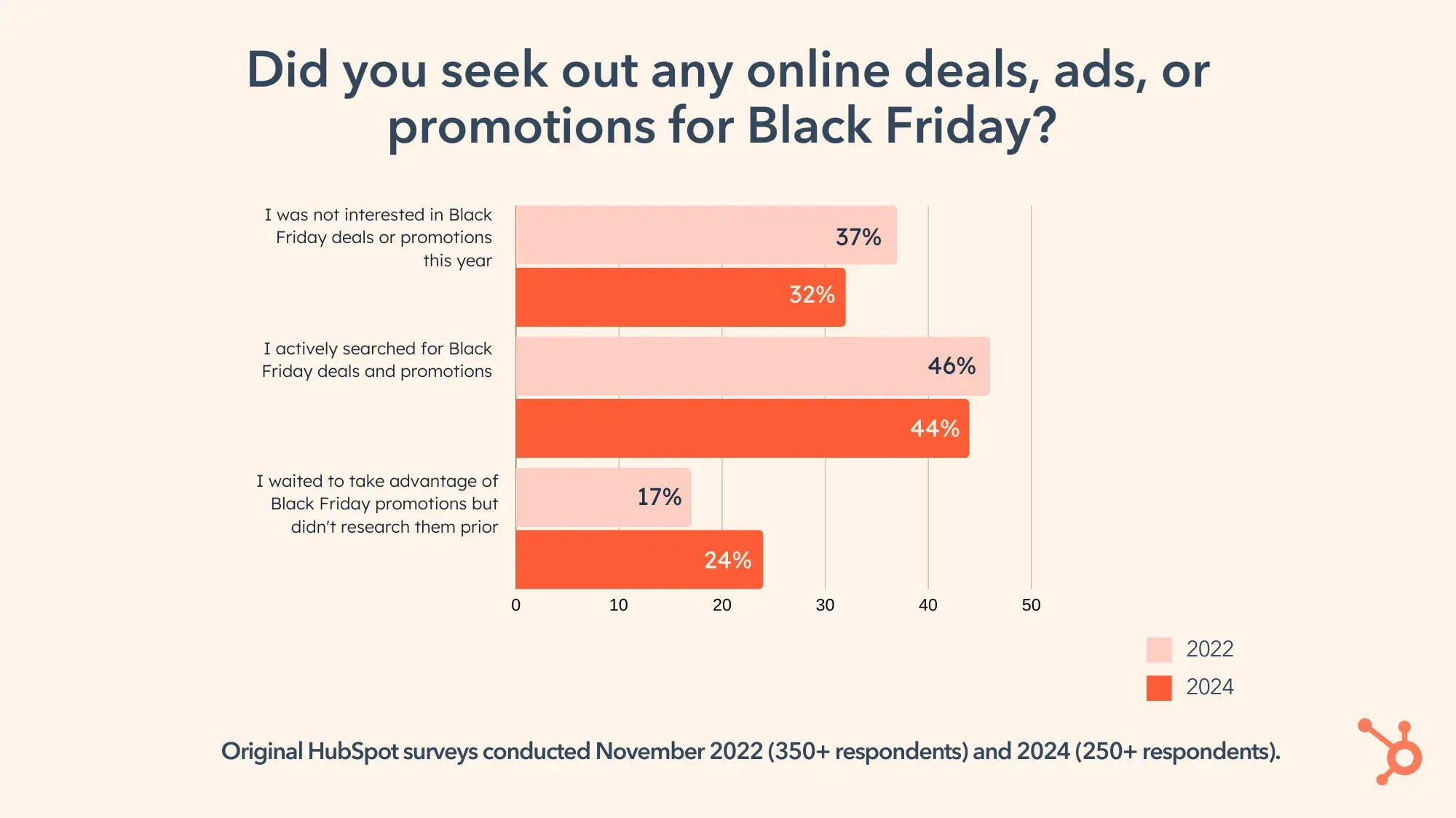
Although a substantial number of shoppers still actively seek out online Black Friday deals (46% in 2022 and 44% in 2024), a growing number are letting the deals come to them.

Graph: Did you seek out any online deals, ads, or promotions for Black Friday?

Twenty-four percent of our respondents in 2024, compared to 17% in 2022, said that they waited for Black Friday deals but didn’t research them beforehand.

That puts the burden of proof on marketers to get their campaigns in front of the right people — and those deals better be good if you want consumers to click.

3. De-emphasize in-store components.

Can you offer the same doorbuster-type deals online as you can in a brick-and-mortar store, and maybe throw in free shipping?

Unsurprising to anybody who knows the joy of spending Black Friday in their loosest sweatpants, we’re seeing more consumers shopping from home.

When asked if they went to a physical store after seeing a Black Friday ad, nearly three-quarters of our 2024 respondents said “nope.” Two years prior, that number was 62%.

4. Use positive, practical messaging that focuses on the customer, not the brand.

I asked a Slack channel full of content marketers what made for a losing Black Friday ad.

Pamela Bump, manager of HubSpot’s content innovation and research team, said that she saw a few brands whose “deals” weren’t really about the customer at all.

“We’re seeing the same TikToks we saw last year from big-box stores with thousands of unbought TVs. Customers are noting that the product stickers said 30% off — but the price isn’t that different from a few days before.”

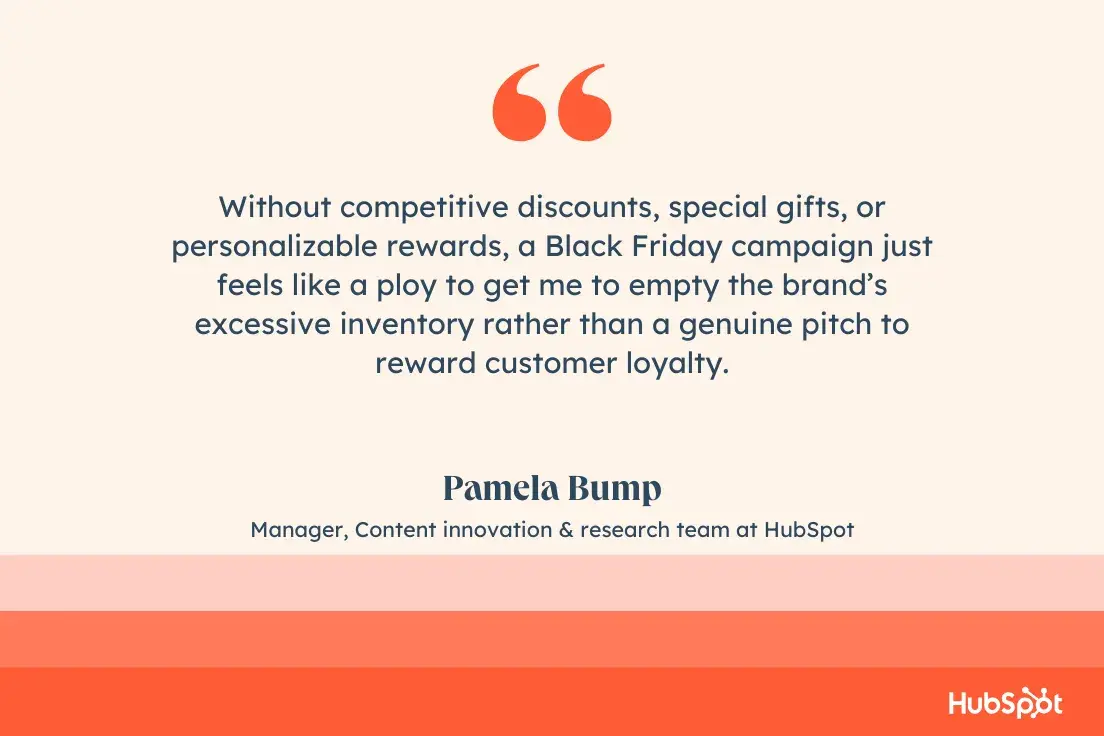
Bump says, “Without competitive discounts, special gifts, or personalizable rewards, a Black Friday campaign just feels like a ploy to get me to empty the brand’s excessive inventory rather than a genuine pitch to reward customer loyalty.”

“Without competitive discounts, special gifts, or personalizable rewards, a Black Friday campaign just feels like a ploy to get me to empty the brand’s excessive inventory rather than a genuine pitch to reward customer loyalty.”—Pamela Bump, Manager, Content innovation & research team at HubSpot

Black Friday Campaign Ideas

1. Anti-Black Friday Campaigns

The Green Friday movement began in 2015 as an environmentally friendly alternative to rampant consumerism.

That’s also the year that outdoor gear giant REI introduced its #OptOutside campaign, in which the retailer closes its real and virtual doors, postponing any online orders so its employees can enjoy a paid day off.

REI

Screencap of REI’s website. “Opt Outside. We can’t make more time, but we can make the most of it. See you out there.”

Source

More than purpose-driven marketing or brand awareness, REI is living its core values. Even the most hardened cynic would be hard-pressed to ignore the simple goodness at the core of REI’s message: Our employees are more important than Black Friday sales.

Plus, REI still offers BFCM sales and discounts — just a few days later.

Cards Against Humanity

Environmental awareness isn’t the only way to craft an anti-Black Friday campaign.

Back in 2015, I participated in CAH’s most infamous Black Friday stunt, which was either delightful or infuriating, depending on your sense of humor. The deal was this: Send them $5. You’d get nothing in return.

The company did exactly what it promised. Twelve-thousand three-hundred sixty-seven people, including yours truly, sent at least $5 to CAH, which split the cash among its 17 employees.

What did they do with the $4,185 each CAH employee earned overnight? I’m so glad you asked.

One person bought 760 pounds of cat litter; another blew $1,500 on a custom suit of men’s armor. All 17 employees listed how they spent their windfall on CAH’s website, calling the bluff of anybody who doubted in their unusual campaign.

I can’t recommend taking this approach with your own Black Friday campaigns, but sometimes a huge gamble pays off. CAH’s Black Friday games and pranks have become a tradition of sorts, with fans looking forward to the next year’s creative endeavor. There’s even a subreddit.

2. Upgrades, Bonuses, Freebies, and Novelties

Many online retailers offer freebies and bonuses like free shipping, extra points, free personalization, and other little luxuries.

Barnes & Noble

Barnes & Noble runs a special Black Friday deal on signed books — available online or in-store — that includes exclusive special editions.

Screencap of Barnes & Noble’s website. “Black Friday signed editions make great gifts.”

Source

Leuchtturm1917

I’m obsessed with my Leuchtturm notebooks, and usually have two or three going at any given time. I like to splurge and get them personalized with my initials, which costs me an extra $10. So seeing the words “free personalization” in an email subject line catches my attention every Black Friday.

Screencap of a Cyber Monday email from Leuchtturm1917 offering free personalization.

Source

I’ve also seen retailers offer free shipping on all orders, free expedited shipping, an extended return period, and other little luxuries that make customers feel appreciated.

3. Giving Back

Everlane

Online clothier Everlane began its Black Friday Fund in 2014, and each year it chooses a different non-profit partner. This year, it made a $50k donation toward regenerative agriculture.

Screencap of Everlane’s Black Friday Fund 2024, a partnership with Fibershed.

Source

National Park Service

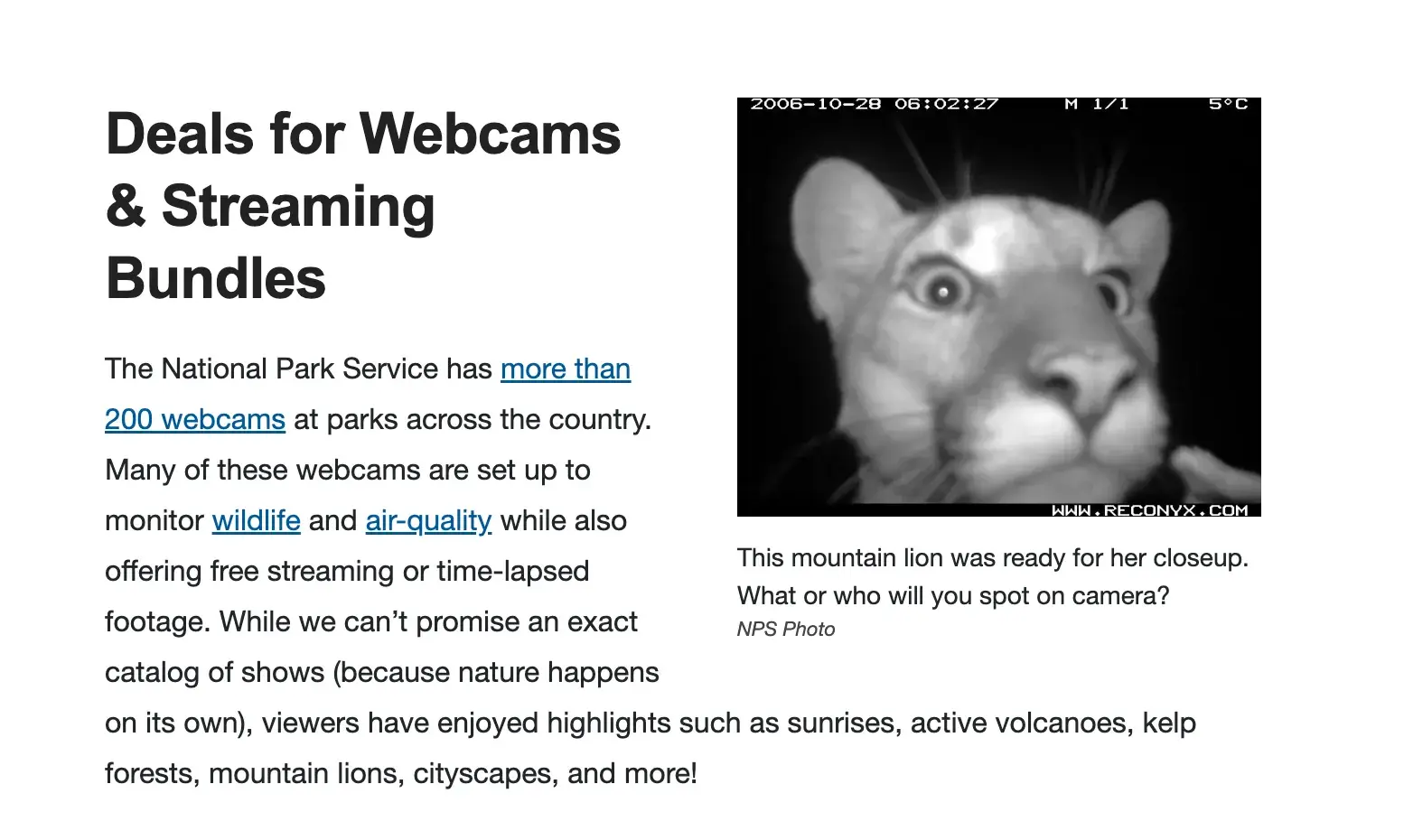
Retailers aren’t the only ones leveraging Black Friday deals. The National Park Service runs a very clever #GreenFriday campaign to get Americans off our La-Z-Boys and into the wilderness.

Modeled after traditional BFCM deals lists, NPS’ list includes “Deals for Phones” that promote its free NPS app to help you plan your visit.

And if you’re not near a national park (or just prefer your La-Z-Boy; no judgment), NPS offers a great deal on streaming bundles: a list of the 200+ webcams at parks around the country.

Screencap of National Park Service website’s “Deals for Webcams & Streaming Bundles” with a close-up webcam photo of a mountain lion.

Source

4. Real Deals

At the end of the day, shoppers like Black Friday because they want to save money. So if you’re offering real deals on items that your customers want, you’re already a step ahead.

Dyson

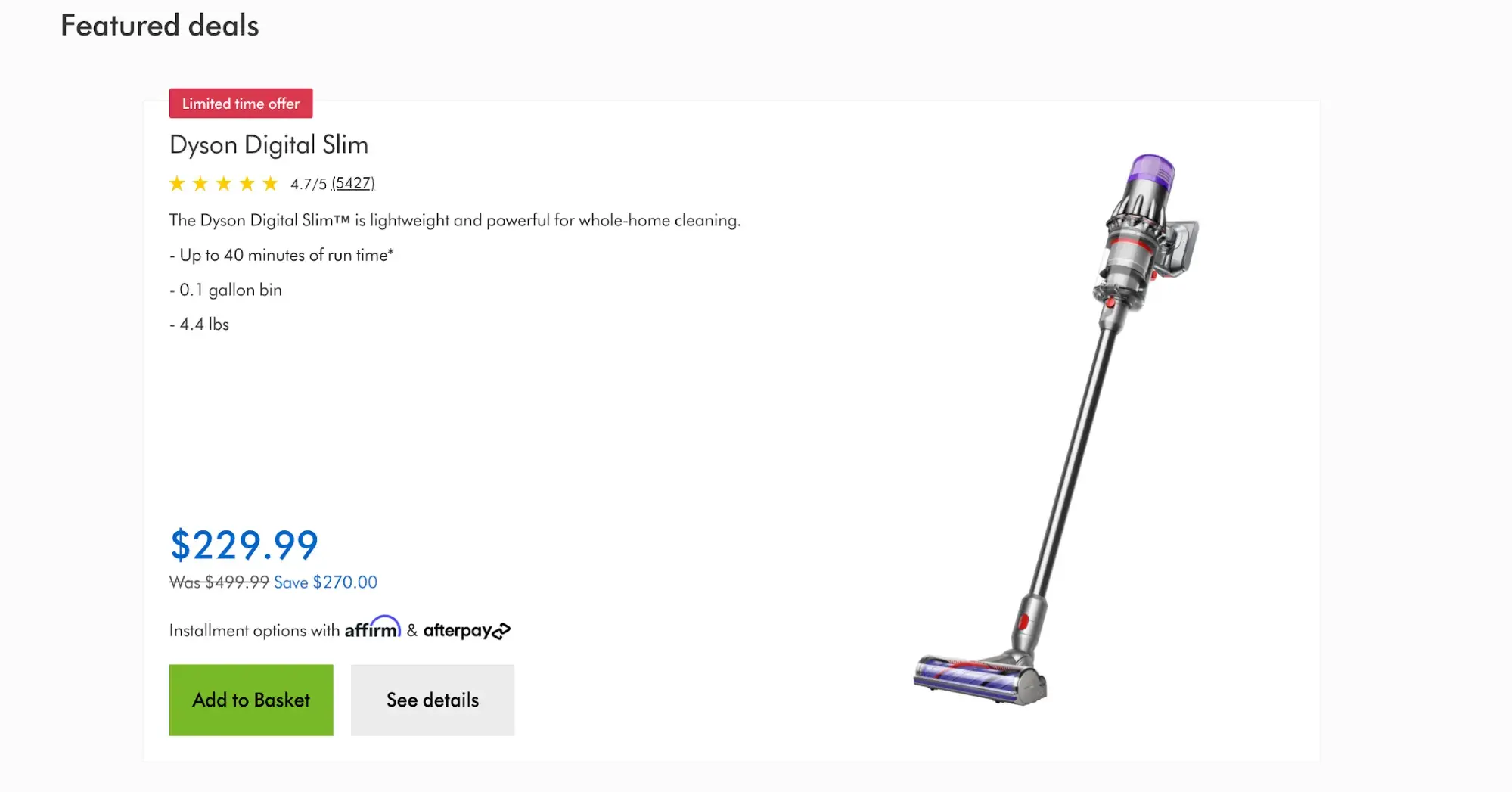
Dyson, the maker of heartbreakingly expensive vacuum cleaners, ran a BFCM deal of $270 off its $500 slim model. That’s 54% off, and it puts the vacuum within reach of a lot more customers.

Featured deals: Dyson Digital Slim for $229.99, down from $499.99.

Think big when it comes to discounts — it centers the customer experience, and the payoff might be an increase in new customers who otherwise couldn’t or wouldn’t splurge on your product or service.

Lessons in BFCM Marketing

Every Black Friday campaign is an opportunity to learn about your customers and target audience. Put them first — whether that’s with a traditional BFCM discount, doubling up on loyalty perks, or by giving back to your community.

Editor’s note: This post was originally published in December 2016 and has been updated for comprehensiveness.

Categories B2B

A Data-Backed Guide to Newsletter Content Strategy: 17 Formats & Topics Driving ROI for Hundreds of Newsletter Creators

Newsletters are having a moment. My inbox is near saturation point, and I still keep discovering more newsletters I want to subscribe to.

Based on a survey of 500+ newsletter operators and a handful of interviews with experts, I am sure of at least one thing: Newsletters aren’t going anywhere anytime soon.

Download Now: The Future of Newsletters [Free Report]

If you want to start a newsletter, whether on behalf of a large business or your personal brand, I’ve built you a guide filled with data, expert advice, formats, and topic ideas. Let’s get started.

Table of Contents

What is newsletter content strategy?

If you have, or are planning to start, a B2B newsletter, devote some time to your content strategy. It will evolve and change over time as you figure out what hits best with your audience, but a solid foundation will set you up for newsletter success.

B2B newsletters serve a very different purpose from email marketing or email promotions. Think of the latter like more traditional marketing, where you’re alerting existing customers to sales or other events and trying to get readers to click out of the email.

On the other hand, the value of B2B newsletters is typically self-contained — that is, your audience can read your B2B newsletter and get something out of it without having to click out.

That’s not to say that B2B newsletters never have external links — but the really good ones will curate those links for their audience and balance them with valuable content.

B2B newsletters are an exercise in trust-building, and they require long-term nurturing and planning.

It follows that your content strategy has to be reader-focused, not brand-focused.

I’ll use HubSpot’s Masters in Marketing newsletter as a frequent example throughout this guide, since I’ve been working on it for about six months now. (If you don’t subscribe yet, come join us! We have fun.)

Newsletter subscribers are arguably your most valuable audience. Every subscriber has opted in, demonstrating some level of trust in your expertise and/or your brand.

If you want to keep and grow that audience, you’ve got to meet and exceed their expectations for content that’s both enjoyable and useful.

Former HubSpotter and newsletter expert Brad Wolverton points out another benefit to newsletter subscribers. “You own the audience,” he says. “You control the message, but you can also learn a lot about that audience and how to cater to their needs.”

That feedback loop can inform other aspects of your marketing and content strategies.

If you take nothing else away from this article, let it be these guidelines:

  • Provide value within your email.
  • Stick to a regular publishing schedule.
  • Focus on educational content.

3 Critical Guidelines for Newsletter Operators. 1. Provide value within your email. 2. Stick to a regular publishing schedule. 3. Focus on educational content.

As you work through the outline below, be sure that you’ve identified and defined the roles of all stakeholders and provided space for discussion. (We love a responsibility matrix here at HubSpot; they’re incredibly useful during these discussions.)

Although you want to be confident in your answers to these questions, try to avoid rigidity. Newsletter trends come and go, audiences shift, even business objectives change. Revisiting and revising this outline post-newsletter launch isn’t a sign of failure, it’s a sign of adaptability.

1. Define your content objectives and voice.

Build a customer profile.

When we were developing the content objectives for the Masters in Marketing newsletter, HubSpot senior director of marketing Kyle Denhoff said, “Most of HubSpot’s customers are small- and mid-sized businesses that won’t have big-brand advertising budgets.”

Denhoff says that by talking to our customers and evaluating how our Marketing Blog performed, we determined that Masters in Marketing is speaking to digital marketers — “people who operate channels like websites, social media, email, SEO, and content marketing. And that helps us with editorial pillars and topic selection,” he says.

“We decided to focus more on stories about social media marketing than national TV ad campaigns, for example. It’s just too expensive for our target customer.”

Denhoff also suggests looking at demographic data and media diet to develop your customer profile. Here’s what ours looked like for Masters in Marketing subscribers:

Masters in Marketing Customer Profile. Role: Marketing Managers. Job Types: marketing manager, social media marketer, email marketer, seo manager, and content marketer. Company Size: Startup or scale-up (1 - 2,000 employees). Read: HubSpot Marketing Blog, eMarketer, Search Engine Land, Moz Blog, Social Media Examiner. Subscribes to: Marketing Dive, MKT1, Social Media Today, Future Social, Marketing Millennials. Listens to: Online Marketing Made Easy, Marketing School. Watches: ahrefs, Gary Vee, Neil Patel,

Describe your newsletter’s personality.

What are four words that describe your voice, and four words that describe what your voice isn’t?

There are fun ways to approach brand personality exercises: If your newsletter drove a car, what kind would it be? If it was a meal, would it be fine dining or fast casual? (Bonus tip: Duolingo’s style guide includes a section on brand personality, and it’s excellent for these types of questions.)

However you get there, I find that landing on a list of adjectives is the most useful. If your customer profile is 20-somethings, your voice might be youthful and irreverent. If you’re catering to C-suite execs, it might be more buttoned up.

It’s also helpful to define what your newsletter isn’t. For instance, we decided that Masters in Marketing was not arrogant, presumptuous, repetitive, or boring. These guidelines are just as helpful, especially with multiple writers involved.

Know how you want your readers to feel.

This isn’t as mushy or subjective as it sounds at first glance. Do you want your readers to feel energized and ready to spring into action? Do you want them to feel contemplative and introspective?

We want our Masters in Marketing readers to feel like what they do matters — marketers are often relegated to “sidekick” roles, and we wanted to build a newsletter that was empowering and energizing. When we research people to feature, we look for experts who can give our readers a “secret weapon” that helps them elevate their marketing.

As with users of HubSpot’s customer platform, we want our newsletter readers to be surprised and delighted. This is central to our editorial approach; we’re specifically looking for marketers who are doing things differently.

Sharpen your elevator pitch.

You know who you’re writing for, you know how your readers should feel, but … what exactly are you writing about? If you’re planning on launching a newsletter, you probably started with something like an elevator pitch. Has anything changed as you worked through the first part of this outline?

List the hallmarks of a great newsletter.

In other words, when you write a great newsletter, how do you know it’s great? Masters in Marketing is personality-driven, and even though it packs a punch, we keep the format light and skimmable. We decided on a lesson-based format that delivers on both of those promises.

Identify your niche.

I love SWOT analyses because they help answer the question of where your newsletter fits in against the competition. What are your competitors doing well? What can you do better, or what can you do that they can’t?

Don’t be afraid to go super niche. Depending on your other goals and strategies, a small but focused subscriber base can be as or more valuable than a large subscriber base with broad interests.

In an article I wrote on B2B newsletters, I found that the Ferrari Market Newsletter earns a reported $2 – $4 million in yearly revenue — with only about 5k subscribers.

Balance promotional and creative content.

If you have content offers, sponsorships, or other external links, how will that be balanced against the newsletter content itself?

Recall that readers don’t want to click out of your email. So if you’re including links, they better be darn good ones.

Develop and enforce editorial and brand guidelines.

What editorial or brand guidelines are in place, and how will those be implemented and enforced? You likely already have guidelines for your brand, but consider whether the newsletter will translate those into a more personable voice, who will edit the newsletter, and other practical concerns.

This could even include logistics like what day(s) of the week you’ll send your newsletter.

In a HubSpot survey of nearly 400 marketing and advertising professionals between October 2023 and May 2024, emails sent on Mondays and Tuesdays performed the best.

When to Schedule Marketing Emails. What’s the best day to send an email for highest performance? Based on an original HubSpot survey of nearly 400 professional marketers and advertisers, October 2023 - May 2024. Monday: 23%. Tuesday: 26%. Wednesday 16%. Thursday 15%. Friday 13%. Saturday 4%. Sunday 2%.

These are not absolutes. I once worked for an organization with many subscribers in a country where the workweek began on Sunday, which made Sunday one of our best-performing days for sending emails.

2. Define your editorial approach.

How will you achieve a personal, authentic voice?

I’ve spoken several times with Lia Haberman, the founder of the ICYMI newsletter and a recent master in marketing. She’s always emphasized this point: Hire creative writers. Readers don’t want to read marketing copy or comms-approved messaging.

Decide on content and format types.

Will you provide narrow focus, broad coverage, expert insights and interviews, etc.?

Even loosely defining the scope of your newsletter will help you maintain the consistency readers are looking for.

3. Identify monetization strategies.

How will your newsletter support existing business offerings? Will it be paid, freemium, and/or have ads or sponsorships? Will you promote it across other platforms?

Alexis Grant, who founded the newsletter They Got Acquired, told me that because she has an engaged, niche audience, she’s been very successful selling sponsorship space, even though her subscriber base is a relatively modest 7k+.

“When people think about media and content businesses, they’re often planning to monetize through advertising or sponsorships, which require having a massive audience to make it work.”

“When people think about media and content businesses, they’re often planning to monetize through advertising or sponsorships, which require having a massive audience. You don't have to do that with a B2B newsletter. And that's kind of why I love them. There's so many different ways to monetize.” —Alexis Grant, Founder, They Got Acquired newsletter

But newsletters are different, she says. “You don‘t have to do that with a B2B newsletter. And that’s kind of why I love them. There’s so many different ways to monetize.”

4. Use the anatomy of an effective newsletter.

Key Elements

There isn’t one single correct way of organizing an email newsletter, but there are a few key building blocks, according to HubSpot’s Ultimate Guide to Email Newsletters:

  • From Line. This includes both the “from” name you see in your inbox as well as the email address the newsletter is sent from.
  • Subject Line and Preview Text. This is your best shot at hooking readers. Keep it short, natural, and start a story that your readers want the ending to.
  • Eyebrow. The greeting before your main headline should draw people in. It also might reflect your main branding.
  • Body Copy. The bulk of your email should be easy to read — think short sentences and paragraphs, bullet points and bolding, and a personality-driven tone.
  • Images. Images can break up text, show off branding, grab readers’ attention, and even inspire them to share.
  • Calls to Action / Linked Text. Rein it in! Too many links can overwhelm, so use them carefully and strategically. Links should always benefit your readers.
  • Social Sharing. Make it easy for your readers to share with their friends and networks.
  • Request for Feedback. Asking readers for feedback builds a stronger relationship with them, and it helps you build a stronger newsletter.

Pro tip: This anatomy lesson comes from the HubSpot pros who produced the excellent free ultimate guide to newsletters. It has a lot more details and examples on the nuts and bolts of newsletter writing.

Newsletter Content Trends

In our survey of 500+ independent newsletter operators, we asked what formats drove the highest of five metrics: open rate, click rate, revenue or profit, driving website traffic, and conversion rate.

Two of the top-performing formats were expert Q&As or interviews and listicles, step-by-step guides, recipes, or tutorials.

Select Newsletter Formats that Drive ROI. Expert Q&As or Interviews: Open rate 17%. Click rate 17%. Revenue or profit 14%. Driving website traffic 14%. Conversion rate 17%. Listicles, Step-by-Step Guides, Recipes, or Tutorials: Open rate 21%. Click rate 20%. Revenue or profit 21%. Driving website traffic 24%. Conversion rate 22%.

We asked respondents about a total of 11 newsletter formats:

  1. Expert Q&As or Interviews
  2. Influencer Takeovers
  3. Listicles, Step-by-Step Guides, Recipes, or Tutorials
  4. Image-based Content or Infographics
  5. Video-based Content
  6. Mixed Media Content
  7. Long-form Articles or Deep Dives
  8. Two to Three Short- to Medium-Form Articles
  9. Quote or Stats Roundups
  10. Lists of Short Blurbs Followed by Related Links
  11. Interactive Content

There’s lots more where this came from — check out our free download on the future of newsletters — but here’s how every format drives open rates, according to 500+ newsletter operators:

Newsletter Formats That Drive Open Rates. Expert Q&As or interviews 17%. Influencer takeovers 20%. Listicles, step-by-step guides, recipes, or tutorials 21%. Image-based content or infographics 23%. Video-based content 21%. Mixed media content (text plus video or imagery) 22%. Long-form articles or deep dives 9%. 2 to 3 short- to medium-form articles 21%. Quote or stats roundups 7%. Lists of short blurbs followed by related links 10%. Interactive content like polls and quizzes 10%.

That doesn’t mean you should abandon your great idea for a newsletter that curates long-form articles or deep dives. You know your audience best, and open rates are just one metric.

Based on the survey results and the subject-matter interviews I conducted, here’s some trends in newsletter content strategy that we’re seeing:

5 Newsletter Content Strategy Trends. 1. Shift toward person-centric content. 2. Importance of niche targeting. 3. Creator-style, personality-driven content. 4. AI-driven segmentation techniques. 5. Metrics beyond traditional email marketing. Original HubSpot survey of 500+ newsletter operators + personal interviews. September - October 2024.

1. Shift Toward Person-centric Content

Remember that you’re writing for real people — other people like you — and tell the stories you’d want to read.

2. Importance of Niche Targeting

Developing a small but engaged audience may be more valuable to the future of your business. Build trust and loyalty by offering something that nobody else can.

3. Creator-style, Personality-driven Content

Personality and expertise are why you sign up for newsletters like Anne Helen Peterson’s Culture Study or John Paul Brammer’s ¡Hola Papi! — they’re good writers with smart, critical takes on culture, and they’re fun to read. Take a page from their notebooks, even if you’re writing about car gaskets.

4. AI-driven Segmentation Techniques

In the age of AI-powered personalization, there’s no excuse for treating your email subscribers like a monolith. Take advantage of technology to segment by geographic location, interests, or behaviors. Read more about AI segmentation tools.

5. Metrics Beyond Traditional Email Marketing

Click-through rates aren’t yet a KPI of the past, but marketers are recognizing the long-term value in metrics like:

  • Subscriber growth and health
  • Organic buzz and conversation
  • Social media mentions
  • Reader engagement and replies

Newsletter Content Ideas

1. Interview-based Content

Examples: Masters in Marketing (HubSpot), Lenny’s Newsletter (Lenny Rachitsky), Link in Bio (Rachel Karten)

Two screencaps of Lenny’s Newsletter. The expert and their area of expertise is immediately named and contextualized. The interview takeaways are summed up in bullet points, with links to listen to or watch the full interview.

Lenny’s Newsletter, which features lots of expert interviews, immediately names and contextualizes each expert at the top of the email (see above).

There’s a link to listen to or watch the full interview, but there’s also a skimmable list of bulleted takeaways for easy reading.

Pro tip: Identifying, reaching out to, and interviewing experts can take quite a bit of time, so give yourself a long lead for interview-based content. On the plus side: If you’re the sole newsletter writer, interviews are a great way to bring in new perspectives, opinions, and ideas.

2. Expert Insights and Case Studies

Examples: Newsletter Examples (Brad Wolverton), After School (Casey Lewis), Really Good Emails (Matthew Smith)

Screencaps of two Really Good Email newsletters. Each email has a different animation, making readers want to click “open” every time. RGE’s intros are grabby and full of personality

Really Good Emails is really good at two things: Sharing really good emails, and making really good GIFs.

Aside from the focused case studies, CEO Matthew Smith & co. are enjoying themselves, and it shows — which keeps it on my subscription list.

The intros are grabby and full of personality, which gets readers excited about case studies, which have a (perhaps unearned) reputation as being a bit dry.

Pro tip: If you have niche expertise, this is your time to shine. The best newsletters in this category provide expertise and commentary that you really can’t get anywhere else.

3. Personal Stories and Behind-the-Scenes Updates

Examples: Kayleigh Moore’s newsletter, Craft Talk (Jami Attenberg)

Kayleigh Moore’s Newsletter. Emails are personalized, and they immediately jump into a behind-the-scenes experience. (Plus a fun Gilmore Girls GIF.)

Kayleigh Moore’s newsletter, about all kinds of writing, starts with a personalized greeting. Moore then immediately launches into a behind-the-scenes experience — writing questions she gets asked — and promises a quick lesson just for you.

Pro tip: Even if the topics are outside your industry, I recommend subscribing to a few newsletters that indulge your own interests and hobbies, whether that’s pizza or pop culture or pottery. Regularly reading different writing styles on diverse topics will only make you a better newsletter writer.

4. Industry Trend Analysis

Example: ICYMI (Lia Haberman)

Screencaps of Lia Haberman’s ICYMI email. ICYMI’s 1-second summaries mean that Lia Haberman can get a lot of crucial information into a newsletter without sacrificing readability. The roadmap updates are organized by platform, so if you don’t care about Meta but want the latest Twitch update, you can find it instantly.

Lia Haberman, one of the experts I talked to for this article, does a particularly good job getting a lot of industry trend analysis and updates into one email.

Headings are clear and consistent from email to email, and she uses emoji, bullet points, and bold type to make sure her one-second summaries really do take one second to read.

Pro tip: Another category for the niche experts to strut their stuff, industry trend analysis has to be skimmable and fun to read. No matter how much you want to know about a particular industry, it’s unlikely you’ll have time for a deep dive on your morning commute.

5. Educational Content Tailored to Specific Audience Segments

Examples: They Got Acquired (Alexis Grant), The Freelancer’s Year (Lindy Alexander)

Screencaps of They Got Acquired’s email newsletter. Although most emails are stories about selling companies, it also provides additional educational resources. They Got Acquired takes advantage of its niche audience by catering to specific audience segments.

They Got Acquired founder Alexis Grant, who I also spoke with for this article, has a very specific focus: It “shares stories of companies that sell for $100,000 to $50 million, revealing insights that lead to life-changing exits.”

Having a captive niche audience means that even though Grant has a relatively small number of subscribers, they’re very valuable, both to her and to sponsors.

Pro tip: Alexis Grant uses an AI segmentation tool to make the most of her educational content. New subscribers are invited to take a survey that narrows down their demographics, and she can segment accordingly.

6. Actionable Resources (Reports, Guides)

Examples: SEOFOMO (Aleyda Solís), Work Life (Atlassian)

Screencap of Work Life’s introductory email. Work Life’s introductory email establishes a cadence of two newsletters a month, and sets expectations of the kinds of resources new subscribers can expect.

Atlassian, the makers of Trello, has a twice-monthly newsletter with announcements, tips for a more productive work life, and stories from its own playbook.

It’s a combination of several kinds of newsletters mentioned here, and that blend makes it more fun to read than just a report or guide.

Pro tip: These newsletters may be harder for a sole operator to maintain, particularly if you’re doing original research and/or creating robust reports or guides.

Build Your Own Newsletter Content Strategy

Now that you’re armed with knowledge (and a lot of data), it’s DIY time.

Remember the three critical guidelines, which every newsletter expert I’ve spoken to has reiterated: Provide value within your email, stick to a regular publishing schedule, and focus on educational content.

Here’s one more: have fun writing it.

Because if you’re enjoying it, chances are that your customers will, too.

Categories B2B

10 of the Coolest YouTube Banners I’ve Ever Seen

I‘m always inspired by the creativity that goes into YouTube banners. But if you’re anything like me, you’ve probably wondered how you can create one for your own channel.

Well, you’re in luck — I’m here to uncover some of the best-kept secrets about YouTube banners.

Download Now: 10 Free YouTube Image Templates

In this article, you’ll learn what makes the best YouTube banners so eye-catching, and how you can create your own gorgeous channel art.

To answer those questions, I’ve included some excellent resources for YouTube banner templates (spoiler alert: they’re free), as well as 10 creative channel banners that inspire us as content creators.

Table of Contents: 

What makes a good YouTube banner?

Some YouTube banners are eye-catching, readable, and convey the brand of the YouTube channel. Others choose to include a logo and channel name.

And, in a few cases, a great YouTube banner might include high-quality photos and graphics to create visual interest.

But the truth of the matter is that everyone’s banner looks different and its design identity is ultimately dependent on its creator’s niche.

However, if you’ve been anxious about what to do, where to look to make your own YouTube banner, and how to make yours one of the best of the best, I’m here to share some good news: It doesn’t take a whole lot, just a few staples.

Check out this quick checklist of banner must-haves if you’re stuck on where to start:

  • Your social media handles
  • Your name and/or the name of your brand
  • A channel tagline
  • Graphics that represent your overall brand identity

 a graphic showcasing a checklist of youtube banner musthaves

Still, no matter how good your YouTube banner looks, the last thing you want is for yours to look the same as someone else’s.

That’s why the guidelines I mentioned for great banner art are pretty simple. You can build the foundation of your design using those best practices, but your unique creativity is what will set your banner apart from the crowd.

At the end of the day, your banner is like an abbreviated version of an onboarding process to your channel and who you are, so you’ve got to make every glance count.

To see some design tips in action, take a look at some fun and creative YouTube channel art examples below

YouTube Channel Art Examples

1. Jillian Harris

youtube banner idea from jillian harris

Simple, chic, and feminine. Jillian Harris‘ YouTube channel art conveys exactly what her brand represents. Simple channel art works if you’ve got a core following already.

If you didn’t know this, Jillian is quite popular on other social networks, and she‘s successfully migrating her audience to YouTube.

The majority of people watching her videos are already familiar with who she is and the content she creates. If they’re not, there’s a welcome video right below the banner where she introduces herself to the new crowd.

What I like about this YT banner: Jillian’s banner photo keeps things simple and includes only two pieces of information: her name and the date she established her brand. With a banner like this, the typeface stands out and becomes the design.

2. Learn With Shopify

youtube banner idea from learn with shopify

Shopify understands that building an online business isn‘t easy.

So, the company offers new and experienced entrepreneurs a library of video content to help them scale to the next level. Learn With Shopify’s banner is straightforward and draws attention to the channel’s goal.

You might think that the YouTube banner dimensions don’t provide enough room to create a dynamic design, but Shopify shows some interesting possibilities in its channel art.

What I like about this YT banner: The name of the channel is prominent so the viewers know they’re in the right place for all things Shopify. Plus, the green gradient gives this banner depth and creates visual interest.

3. HubSpot Marketing

youtube banner idea from hubspot marketing

Maybe I‘m a little biased, but our YouTube channel has a pretty cool banner!

What we haven’t seen in the first two channel art examples are actual faces. HubSpot‘s banner features full-color images of the creators who present the video content on the channel.

Our signature brand art (aka the colorful blobs you see) are thoughtfully placed behind the creators’ photos so they pop on the banner.

What I like about this YT banner: Another fun feature of HubSpot’s channel art is the icon on the far right that points to our free digital marketing certification. If your brand offers more types of content, this is a great way to drive traffic to those other marketing offers.

4. Alphonso Dunn

youtube banner idea alphonso dunn

Alphonso Dunn is a talented and well-respected artist who‘s authored several art books. He’s transitioned his passion for educating students to the YouTube screen where he teaches aspiring artists how to hone their craft.

What I like about this YT banner: His banner includes samples of his art, his name, logo, and latest books with a link to purchase them. The composition of this banner fits everything in without overcrowding the space which allows the viewer to focus on the rest of his home page. He also includes a tagline that summarizes what sort of content he offers audiences: Art tutorials.

5. Justin Brown, Primal Video

youtube banner idea from primal video

Justin Brown is the creator of Primal Video on YouTube — a channel dedicated to teaching entrepreneurs how to amplify their businesses with video content.

If this is your first time seeing Justin Brown‘s YouTube home page, you’ll know exactly what to expect from his content after seeing the banner.

What I like about this YT banner: Justin’s banner clearly demonstrates that there’s dimension built into the image by stacking the blue and black blocks of color. However, it breaks that up with a color-graded photo in the middle. Its font sizing and colorful backgrounds create a cohesive feel while keeping the design clean and organized.

6. Bright Side

youtube banner idea from bright side

Bright Side provides more than 40 million people with the answers to questions that they never asked, but absolutely have to know.

If you take inspiration from Bright Side‘s banner, choose a vibrant color as your background and think carefully about your typeface.

If you choose to go the Bright Side route (aka those two design elements will be the only aspects of your banner), you’ll want to spend time finding the right balance that represents your brand and draws the viewer in.

What I like about this YT banner: Its YouTube channel art is bright, punchy, and bold — a perfect backdrop for inspirational, creative, and wonderful video content.

7. Epicurious

youtube banner idea from epicurious

Whether you’re looking for easy-to-follow recipes, food science education, or cooking comparisons, Epicurious is the channel to watch. The spotlight of this brand‘s content is always the food, and that goes for its banner, too.

To incorporate this banner style into your channel art, choose a subject that’s small enough to be recognized close up.

What I like about this YT banner: The use of a high-resolution, detailed photo of a common food — broccoli — creates a relevant and intriguing background for the brand name. This banner also has its website URL and social handles in the corner, which never hurts (especially when anyone could be browsing through your channel).

8. TripAdvisor

youtube banner idea from tripadvisor

TripAdvisor is a resource used by millions of travelers to discover and rate lodgings, restaurants, and much more information about endless destinations.

That’s represented in the YouTube banner by portraying what the site is all about — travel. This is a great YouTube banner to take inspiration from if you‘re just getting started. Simply choose a high-res photo that speaks to your personality and brand, and you’re done.

What I like about this YT banner: The banner features beautiful photography of different locations which puts the viewer’s focus solely on the type of high-quality content that TripAdvisor is committed to sharing: All-things-travel videos.

9. Refinery29

youtube banner idea from refinery29

Showcasing the people that make your brand amazing is a great way to form a connection with your viewers. That’s one thing that Refinery29 does well by frequently featuring its writers, editors, and content producers in its videos.

As it turns out, they’ve all become quite popular personalities — which is why the brand put them front-and-center in its banner art.

Creating a banner of this nature is two-fold.

First, find a way to incorporate your company’s talent into video content in a way that’s engaging and appealing to your target audience.

Then, once you’ve produced enough of that media consistently — and if it’s gaining the right kind of attention — you can use those personalities to promote your channels.

What I like about this YT banner: Refinery29 calls attention to its content (and the people who make it) right away by featuring screen captures of the channel’s most well-known talent within the letters of the brand’s name. It also includes a CTA (“See more at Refinery29”) to remind visitors that if they think their YouTube content is good, they should check out the great content on its actual website.

10. The Action Lab

youtube banner idea from the action lab

Physicists and high school science students alike come to The Action Lab‘s YouTube channel for DIY experiments performed by Dr. James J. Orgill.

On this channel, you’ll see everyday objects through a new lens thanks to his demonstrations.

What I like about this YT banner: Similar to HubSpot’s channel art, his photo stands out with a simple background, an image of Dr. James himself, and a core color — yellow — to help audiences associate that though his content is primarily concerned experimentation, there’s also some caution that he takes, too.

YouTube Banner Size

A YouTube channel banner will take on different dimensions depending on what platform is being used to view it. For example, a banner will have different dimensions when viewed on a TV, desktop, or mobile device.

The YouTube banner dimensions are:

  • Recommended “TV”: 2560 x 1440 px
  • Minimum for upload: 2048 x 1152 px
  • Minimum “Viewable On All Devices”: 1546 x 423 px
  • Maximum “Viewable On Desktop”: 2560 x 423 px
  • File size: 6MB or smaller

The recommended resolution seems pretty large for a single file, but think about how YouTube banners would appear on a 30″ smart TV or higher.

With a growing number of options to view YouTube videos in this way, you’ll want to make sure your channel art is large enough to display with quality on larger screens.

Here’s a helpful visual representation of those dimensions:

Take note of the “Viewable On All Devices” I alluded to in the first section.

Your banner is essentially the biggest branding opportunity when people land on your channel. You‘ll want to make sure your logo and supporting text is clearly represented in the channel art.

That’s why it’s a good idea to place your company name and logo in that center space.

If you’re not sure how to fill the entire frame with visual content, video production company MiniMatters suggests “build[ing] the image from the middle out,” putting the most important assets in the center, and expanding the design from there.

Finally, follow these best practices to create a professional YouTube banner:

  • Use a high-resolution image. A pixelated or blurry banner doesn‘t exactly signal that there’s a high-quality video to follow.
  • Keep your banner on-brand. While your channel art doesn’t have to be a carbon copy of your logo or tagline, it should incorporate visual elements that you want associated with your brand, like certain colors, fonts, or keywords.
  • Update your banner regularly. For example, if you run a bakery and you‘re gearing up for summer, an eye-catching banner might be a high-res photo of a brightly-colored work surface covered with flour and a rolling pin, along with accompanying text like, “April showers bring May flours,” but remember to update the banner once the season is over so viewers know you’re consistent.

YouTube Banner Template

Need some design help to get started on your own YouTube banner?

If Canva is already a graphic designer’s best friend, it could be yours, too (especially if you’re in a hurry to create your channel ASAP). Don’t be afraid to try out and customize Canva’s templates for YouTube banners.

Not only are there an array of designs to choose from but they’re already within the necessary dimensions, so you can skip the hard stuff and get right to making the banner of your dreams.

And, if you’re more on the skilled side of digital art, apps like ProCreate offer the flexibility to hand-draw your banner assets.

How To Make a YouTube Banner

By now, you might be thinking, “How the heck am I supposed to actually upload my banner … is it hard and difficult and scary?”

Before you settle into panic, I can tell you that the banner upload process is, 1000% percent, not hard and difficult, nor scary, especially when you have resources like HubSpot’s Free (yes, free) YouTube Business kit.

Check it out below:

But if you’re more of a visual learner (like me), you can use my upload process to help guide you through your own:

Step 1: Log in to your YouTube account and click on your profile photo. Then select Your channel.

screenshot of basha coleman demoing the youtube banner upload process

Step 2: Click the blue Customize Channel button. A new tab will open and you’ll see a Channel customization screen.

screenshot of basha coleman demoing the youtube banner upload process

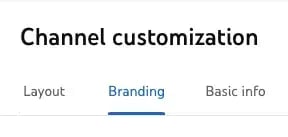
Step 3: Click Branding in the top menu.

screenshot of basha coleman demoing the youtube banner upload process

Step 4: Under the banner image section, select Upload.

screenshot of basha coleman demoing the youtube banner upload process

Then, you’ll see the option to upload a file for your YouTube banner photo.

screenshot of basha coleman demoing the youtube banner upload process

Step 5: Review the image preview to ensure that your banner image is displayed properly.

screenshot of basha coleman demoing the youtube banner upload process

Step 6: Click Publish and review your YouTube channel’s new banner image.

screenshot of basha coleman demoing the youtube banner upload process

screenshot of basha coleman demoing the youtube banner upload process

That’s it! Easy enough, right?

Channel Your Creativity

It’s important to note that cool YouTube channel art is just one part of a comprehensive video content strategy.

It doesn’t matter how beautiful your banner is if your channel lacks quality video, or hasn’t added anything new in several weeks.

So as you create your YouTube banner, go ahead and create two or three more that you can use throughout the year to keep things fresh and interesting.

And remember, you can always come back to these examples and tips for more inspiration. They’re not going anywhere any time soon. Pinky promise.

Categories B2B

What Is an Editorial Calendar? Your Guide to Building One [Examples + Templates]

I once worked for a digital publisher that kept its editorial calendar on a huge whiteboard in a tiny conference room. Cram a few too many people in there, and somebody’s sweater would inevitably wipe off a piece of content or three.

Fortunately, there are a great many tools available now that will let you build an eraser-proof editorial calendar.

Free Download: Marketing Editorial Calendar Template

Without a mutually agreed-upon system for planning, writing, and scheduling content every week, anyone can find themselves in a pile of missed deadlines, unedited blog posts, and a fair amount of team tension.

Table of Contents

There’s no such thing as a perfect editorial calendar — it all depends on your team’s needs and skill sets. Nonetheless, there are several questions you should ask yourself to determine what your editorial calendar should look like.

These include:

  • How frequently do you publish content? Do you have blog posts going live every day? Once a week? Perhaps multiple times a day? Determine how often you publish to figure out the best way to visualize your editorial calendar.
  • Do you create more than one type of content? If you upload as many videos to YouTube as you publish articles to your company blog, your editorial calendar will need to distinguish between the two.
  • How many people will use this editorial calendar? The best editorial calendars allow multiple people to brainstorm, collaborate, and offer feedback on assignments in real time — directly on the calendar.
  • What stages will the content go through before it’s published? How complex is your content pipeline? Is there a substantial review or approval process that each piece of content goes through? Make sure your calendar can distinguish between two similar assignments that are in different stages of creation.
  • How will you organize this calendar? You‘ll want to choose a system that best aligns with your goals and your team’s workflows.

Before building an editorial calendar, ask yourself: How frequently do you publish content? Do you create more than one type of content? How many people will use this editorial calendar? What stages will the content go through before it's published? How will you organize this calendar?

Put these points into practice by learning how to create your content calendar. Or, keep reading to learn how an editorial calendar can boost your business.

Editorial Calendar Benefits

I’ve never gotten an editorial calendar exactly right the first time — it takes time to organize, test, and put in place. But using one can take your content marketing from chaos to killer.

An editorial calendar:

Improves content quality and consistency.

Planning content in advance makes it easier to create consistent content an audience can rely on.

Plus, I can’t emphasize enough how an editorial calendar gives much-needed structure for creating batches of content.

This lets you focus on ideation and content creation separately, giving you more energy and focus to create quality content.

More chances to innovate.

Change is the only constant in marketing strategy. With an editorial calendar, you have a clear view of what content aligns with your evolving strategy and where you need to innovate.

This approach also gives you time and space to think of creative angles for each piece of content.

If you publish a mix of timely and evergreen content, sufficiently planning the evergreen content is the only way you’re going to free up the resources needed to create content pegged to industry news or other timely topics.

Supports accountability.

Content marketing has a lot of details. Not everyone needs to know what blog or hashtag gets posted when, but an editorial calendar can help every member of your team stay accountable for their pieces in the puzzle.

Streamlines processes.

As your business grows, you might find some processes will also grow more complicated and tasks that were once simple will take up more time.

But an editorial calendar can simplify these processes. It can give your team an easy overview of an entire project, quarter, or campaign from start to finish. This helps different departments and teams coordinate and streamline their efforts.

Better teamwork.

Simplified processes and better accountability mean that your team can work better together.

This lets each member of your team spend more time using their unique abilities to create great content for your business. It also simplifies training and retaining your best employees.

Improves your team experience.

According to a 2024 study by the U.K.-based Chartered Institute for Marketing (CIM), 56% of marketers are worried about burnout in their current role.

An editorial calendar creates a consistent plan and a better employee experience. This reduces the stress and uncertainty that can lead to burnout in marketing teams.

Offers clearer data insights.

Editorial calendars offer a clear record of:

  • Content types
  • Assets to include in published content
  • When to publish

This record makes it easier to track content performance. With this tracking in place, your team will be ready to optimize and improve your content to meet your goals.

Who should use an editorial calendar?

Honestly? Everybody — even if you’re not doing anything more complicated than planning your own weekly LinkedIn posts.

But here’s some industries that really need to leverage the benefits of an editorial calendar.

Public Relations

Editorial calendars are a must-have in the public relations industry because professionals in the field must keep track of and schedule materials such as press releases and promotional content.

It’s especially important because the materials are released through various channels such as social media, email, television, websites, radio, and more.

Newspapers/Magazines and Other News Outlets

“I used to write for a newspaper in my early career as a journalist,” says HubSpot blogger Erica Santiago. “I needed an editorial calendar to track when my work would get published or when I had to publish another contributor.”

Newspapers, magazines, and digital media websites are constantly fielding new content, and an editorial calendar helps ensure the right content gets posted at the right time and place.

Corporate Communications Teams

Corporate communications teams need editorial calendars for the same reason PR professionals need them. Editorial calendars keep the team organized and ensure content is posted timely and through the right channels.

Individuals and professionals who should use editorial calendars include:

Content Creators

Whether you’re a blogger, YouTuber, TikToker, or podcaster, you absolutely need an editorial calendar. Content creators use editorial calendars to plan and schedule their content in advance.

Social Media Managers and Coordinators

“A friend of mine is a social media coordinator for a streaming company, and he uses an editorial calendar to manage and schedule the different posts he needs to put out to promote various shows,” Santiago says.

“He manages at least five to 10 different TV show accounts. I can’t imagine how frazzled he’d be without an editorial calendar,” she says.

How to Create an Editorial Calendar

A successful editorial calendar is a living project that your business will change as you grow and scale your social media and content strategy. To begin creating your own, I have some resources to simplify the process.

Okay, time for me to give you what you came for. With all the different types of calendars you can create, let’s discuss the types you can choose and how to plan the rollout of your content.

How to create an editorial calendar. 1. Define your target audience and content themes. 2. Outline content goals and KPIs. 3. Choose a format for your editorial calendar. 4. Designate your main marketing channels. 5. Assign roles and responsibilities. 6. Study your competition’s posting frequency. 7. Plan your posts consistently. 8. Audit and adapt your editorial calendar as necessary.

1. Define your target audience and content themes.

Before you begin plugging content into your editorial calendar, be sure to review your content strategy. Scan for content topics, buyer persona needs, and training your team might need to create winning content.

HubSpot Buyer Persona Guide + Templates

Free Download

Trust me when I say you’ll need this information to schedule the right content at the right time. If you don’t know your audience, you’ll be creating content in a vacuum.

2. Outline content goals and KPIs.

For effective resource management, I strongly suggest using your goals and metrics as a jumping-off point for your editorial calendar. This can simplify reporting and make it easier to quickly gauge the performance of new strategies.

3. Choose a format for your editorial calendar.

In order to get buy-in (and hopefully enthusiasm), talk to your team about their preferences, work habits, and tools they’ve used before. If they’ve used something that they loved or hated, ask what worked and what didn’t.

Ask each team member:

  • Where they’re working from
  • What tools they’re using
  • How they organize their content creation
  • Collaboration needs

Types of Editorial Calendars

An editorial calendar is essentially a planning tool. Experience has taught me that there‘s no such thing as a perfect editorial calendar, but some formats will be better than others at helping you solve your team’s goals.

Here are some of the different ways to format your editorial calendar and what I see as the pros and cons of each format:

Editorial Calendar Spreadsheet

A spreadsheet is a simple way to organize your content.

Screencap of HubSpot’s blog editorial calendar template.

Source

Pros

  • Easy data aggregation and organization
  • Cost-effective
  • Short learning curve and highly accessible, making collaboration easy
  • Easy to customize
  • Integration with calendar apps and content management tools

Cons

  • Hard to visualize your calendar
  • Limited options for collaboration
  • Difficult to get a clear breakdown at a glance
  • Can be clunky for tracking multiple channels

Content Calendar

A content calendar is a more detailed version of the editorial calendar spreadsheet and helps users visualize content timing.

Screencap of editorial content calendar.

Source

Pros

  • Makes it easier to organize content details
  • The most straightforward way to know what’s going out and when
  • Can include keywords, color coding, tags, assignments, and content types

Cons

  • There’s more to project and content management than publishing dates
  • Can be time-consuming to put together
  • A calendar may not always be effective on its own

Project Management Tool

Tools like Trello or Asana can be helpful for complex or multi-channel editorial calendars.

Screencap of a colorful Kanban board.

Source

Pros

  • Presents a clear editorial workflow
  • Designed for complex project management
  • Customizable
  • Offer collaboration and visualization like a Kanban board

Cons

  • Can be overwhelming
  • Has a steeper learning curve for new team members

Editorial Calendar Applications

I love project management tools like Monday.com or CoSchedule that also offer mobile apps. This on-the-go access can help streamline editorial calendar creation and maintenance.

Screencap of Monday.com mobile app.

Source

Pros

  • Offers easy access to your editorial calendar
  • Has choices for content creation, planning, and assigning
  • Includes collaboration tools and analytics

Cons

  • Can be expensive
  • May be difficult to customize

Choose the best format and decide on how you’ll implement it. Pick the tool or platform that offers the features or interface your company needs most.

4. Designate your main marketing channels.

Most businesses will be creating distinct content and messaging for each marketing channel. So, choose carefully.

Once you’ve selected your top channels, make thoughtful decisions about organizing this content in your editorial calendar.

Editorial calendars are highly visual tools. If you’re not a visual thinker, keep in mind that 65% of people are visual learners, so other people on your team may be.

I also suggest making your editorial calendar easier to interpret with visual cues. Differentiating your calendar with a different color for each channel you post on can cut confusion for your team.

You can also divide post types or subject matter using visuals to ensure you schedule the right content at the right time.

5. Assign roles and responsibilities.

Roles and responsibilities can seem obvious when a content strategy launches, but this clarity can fade over time. That’s why I encourage including details like writing, editing, publishing, and image creation in your calendar.

This simple step makes processes, roles, and deadlines clear. It also creates accountability for every member of your team.

6. Study your competition’s posting frequency.

We all need a little inspiration — including me!

Look to other businesses posting in the same industry or niche as yours. Then, study which competitors are successful in capturing attention and how they got to that level of success.

Let me be clear, I am not at all suggesting copying others’ content subject matter or the exact dates or times they post.

Instead, pull inspiration and make your own editorial calendar to grab attention on the days or times competitors aren’t posting. This tactic can also help you find gaps in your content strategy.

7. Plan your posts consistently.

Content planning is an incredibly important component of any strong marketing strategy.

As Carsyn LeClere, former marketing strategist at Blue Frog Marketing, told me:

“Content planning helps provide a better view of all your marketing initiatives and how they play into each other. It’s important because it ensures you don’t duplicate content efforts, cannibalize a topic, miss any initiatives, or neglect any part of the buyer’s journey.”

Organizing your editorial calendar for posting on the same weekly schedule can drive exposure for your content and improve engagement.

Posting on a frequent basis keeps your followers coming back for more. Social media platforms reward profiles that drive this engagement with more visibility. And search engines reward content that searchers love to click.

After all, these platforms want to capture and maintain people’s attention, too.

When you create a patterned or consistent posting cycle, you’re optimizing your use of each channel.

For example, say you publish email tips on Tuesdays. Your audience will come to rely on those tips and look forward to them. If you publish the same useful tips at random, your target audience might miss that content.

So, regular posting keeps your audience engaged and builds a stronger connection with them.

Creating a content calendar that has a clear schedule of posts will help you stay consistent and maintain a steady flow of content. But remember that proper topic ideation is a key first step in building a content calendar that yields solid results.

Consistent content only works as long as the topics appeal to your audience’s interests and get them engaged. Again, take a look at your competitors. See what topic they target and the results they bring in to draw some inspiration.

You can also use AI-powered topic generators to help with brainstorming — simply type in a few details about your audience and content, and these platforms will generate a series of relevant topics you could target.

8. Audit and adapt your editorial calendar as necessary.

It may take some time to perfect your editorial calendar.

If you begin with low engagement in the first couple of months, run a content audit and adapt your content calendar to better engage your followers.

Screencap of content audit template.

Source

Then, schedule regular audits to measure your content performance and use your content calendar to track the value of any strategic changes.

This is how creating an editorial calendar will make your content marketing more streamlined, organized, and effective.

Editorial Calendar Examples & Templates

You didn‘t think I’d give you all this information and not include examples, did you? Of course, I’ve got you covered.

To help you implement an editorial calendar, here are examples and templates from popular content management apps.

Many of them use very similar templates; if you’re unsure where to start, ask your teammates what they’ve used in the past.

Familiarity can be a deciding factor, especially if you’re starting from scratch and need to get a new team onboarded and trained on a new tool.

Although most of these tools have free versions, budget will also be a consideration if you need a paid version to meet your needs.

1. HubSpot Editorial Calendar Template

Platforms: Google Sheets, Excel

Screencap of HubSpot’s blog editorial calendar template.

Free Download

The interactive HubSpot Editorial Calendar Template was built for writers and content strategists to outline their posting strategy.

Included are prompts for the content’s title, meta description, URL, CTA, and more. This template is completely free and can be used on both Google Sheets and Excel.

If you’re building your first editorial calendar, our template is a great place to start since it uses familiar tools like Google Sheets and Excel, which also makes it easy to customize without a big learning curve. (Plus, you’ve probably already got access to one or both of two platforms, so no budget needed.)

We’ve filled in a few rows for guidance, but unlike some platforms’ templates, you won’t have to clear a ton of data to start customizing. Our template is also just a calendar — not a workflow — which may be simpler if you’re a solopreneur or if you have stakeholders who simply need a high-level view of your calendar.

2. HubSpot’s Social Media Calendar Template

Platforms: Google Sheets, Excel

Screencap of HubSpot’s social media calendar template.

Free Download

Although it’s technically a social media calendar, I’m including this template because the monthly planning calendar and content repository tabs can easily be repurposed as an editorial calendar.

The monthly planning tab even has a color-coded system to distinguish between half a dozen content types, which is essential if you publish more than one type of content.

I like both of the HubSpot calendar templates for their ease of use. Since it doesn’t have as many moving parts as many other tools, it’s fast to customize and train new team members on.

3. Trello’s Editorial Calendar Template

Screencap of Trello’s editorial calendar template.

Source

Trello defaults to the Kanban-style board seen above, with each piece of content on its own card. As the content moves through the workflow, writers and editors move the card to the appropriate status column. Additional views like calendars and timelines are available with paid subscriptions.

I like how easy Trello is to use — there’s very little learning curve, and anybody can look at the board and easily see all the content in the pipeline. However, if you have a huge publishing volume and/or a particularly lengthy editorial workflow, this style of calendar could become unwieldy.

4. Asana’s Editorial Calendar Template

Screencap of Asana’s editorial calendar template, list view.

Source

Asana is another popular tool for editorial calendars. If you’ve used Trello before, you’ll find that Asana is pretty similar, though the latter has more bells and whistles. You can choose between Kanban, calendar, list, and other views, or cycle between them as necessary.

Asana lets you set up robust automations with paid subscriptions, which can be a lifesaver for complex projects involving lots of team members. If you go with Asana, I do recommend taking one or more of their free webinars to get you over the learning curve as quickly as possible.

Screencap of Asana editorial calendar template, Kanban view.

Source

5. AirTable Editorial Calendar Template

Screencap of AirTable editorial calendar template.

Source

AirTable is another one of my favorite tools, although, a word of warning: This one does have a steeper learning curve. Somewhere between a spreadsheet and a project management system, AirTable is great for complex calendars with larger teams and/or many content types.

6. Monday.com Editorial Calendar Template

Screencap of Monday.com’s editorial calendar template.

Source

Monday.com’s templates are set up a bit differently from Asana and Trello. Instead of providing an out-of-the-box template, it asks you several questions about your team, type of content, and other goals to quickly build a customized template.

Beyond that, it’s very similar to Asana and Trello — there are multiple views, and it’s set up to be both a workflow and a calendar.

7. Notion Editorial Calendar Template

Screencap of Notion’s editorial calendar template

Source

Notion is one tool I haven’t personally used at work, but I know it has a strong fan following.

One nice feature is that users can submit their own templates, which means there are dozens of editorial calendar templates available, both free and paid.

For instance, here’s one that Mailmodo made to keep all its marketing efforts easily accessible:

Screencap of Mailmodo’s marketing calendar on Notion.

Source

The calendar includes “events, dates, geographical targets, marketing angles, types of business, historical precedence, and email templates,” so if you have a lot of info you want to fold into an editorial calendar, this might be worth a look.

8. Hootsuite’s Content Calendar

Platform: Google Sheets

Here’s a real-life example of how a marketing team uses Google Sheets.

Hootsuite, another social media scheduling platform, has a ton of content to publish both daily and far out in advance. That makes its content calendar a major component of their production strategy.

Screencap of Hootsuite’s content planning calendar.

Source

Due to the volume, the Hootsuite team creates content far in advance using Google Sheets to plan and organize across channels.

Once the strategy is created and executed, posts that are ready to be published are represented on Hootsuite Planner.

Content Calendar Sample

Ready to make your own editorial calendar?

No matter which platform you ultimately want to work out of, a spreadsheet can help you take inventory of what content you have and how quickly it moves from start to finish.

Try our free Blog Editorial Calendar Templates.

Use the templates linked above to organize, categorize, and color code. These templates can help you target the right readers, optimize posts with the best keywords, and pair each topic with a killer call-to-action.

In this download, we’ve included three different templates for you to choose from.

Why three? Not all content teams are the same. While some feel most efficient with a centralized editorial calendar solution, others may need the gentle push of an upcoming deadline right on their calendar.

So, you’ll have access to all three templates in Microsoft Excel, Google Sheets, and Google Calendar.

Plan Out Your Editorial Calendar with Ease

I’ve built several editorial calendars at different workplaces, and my biggest takeaway is this: If your calendar doesn’t work for one person, it doesn’t work.

So no matter which format you choose, be sure that you’re fully aligned with all your stakeholders and that you’ve drummed up a little enthusiasm for this new organizational tool.

With a little customization, your blog calendar will be running smoothly, leaving you time to be the content-writing, lead-generating machine you strive to be.

Editor’s note: This post was originally published in January 2016 and has been updated for comprehensiveness.

Categories B2B

The Tiny Layout Tweak That Led to 20% More Conversions [Test Results]

One tiny little layout change netted us an almost 20% increase in on-page conversions.

They say a butterfly flapping its wings can cause a rainstorm on the other side of the Earth. Well, today’s story makes me think that maybe that’s true.

Conjurer of conversion, Rebecca Hinton, is back with another test you can try for yourself. This time it’s all about social proof and where it belongs on your page.

Free Download: A/B Testing Guide and Kit

But before you jump straight to the how-to, I’ll also cover why you shouldn’t run off and do this without testing it first.

Butterflies and Best Practices

It’s pretty non-controversial for both B2Cs and B2Bs to add social proof to their websites in order to boost conversion, right?

You know what I’m talking about. Testimonials from happy customers. The logos of your biggest clients. Photos of your legions of fans gleefully offering up their firstborn children. (Too far?)

So why is social proof always tucked away at the bottom of the page? Or hidden on its own page like some secret Victorian wife in the attic?

“While social proof is helpful, chances are it’s not what your visitors came for. And you don’t want to push what they came for right out of their radar.”

That’s Rebecca Hinton, the CRO strategist behind this and many other incredible conversion optimization successes at HubSpot. (If you’ve been following this column, you’ll know Rebecca’s also responsible for the test that boosted paid ad CVR by 11%. And I’m certain this won’t be the last one I share. She’s that good.)

But while her point makes perfect sense, it poses a conundrum: Visitors actually need to, y’know, see all those testimonials in order for them to work.

“According to heat maps, only 50% of users scrolled far enough to see the social proof,” Rebecca explains.

Heat map showing 50% less traffic down by the customer testimonial module

But work it does! Despite the fact that only half of our visitors saw them, the social proof sliders were still the second and third most-clicked elements on these landing pages.

So pop quiz, hotshot. If you move your social proof higher on the page, it pushes your marketing content down. But if you don’t, nobody sees it. What do you do? What do you do?

Split Testing the Split

Whenever we have a dilemma, Rebecca’s answer will always be: Test it and find out.

For the control group, she kept the page as it was, with a social proof module containing both customer logos and written testimonials near the bottom of the page.

For Variant B, our CRO team separated the two. The customer logos became a small and unintrusive slider tucked right up under the hero banner, while the testimonial portion stayed near the bottom of the page.

Screenshot showing the logo slider under the hero banner and the testimonial module at the bottom of the page

This would hopefully strike the best of both worlds: More visitors would see some form of social proof, but the slim line of logos wouldn’t push our marketing content down too far.

But is a small line of logos really enough to make a difference?

Turns out, the answer is not only “yes,” but a 19.5% increase in software signups that says “hell yes.”

Rebecca says it with a little more tact.

“Putting a band with customer logos lends an air of legitimacy. Oh, they have customers with logos that I recognize? That builds trust.”

Now, some number of you are ready to run off and slap some logos on your site just because “HubSpot said so.” So here’s where I share the scary part of the story to convince you to test it first.

The Mysterious Variant C

Rebecca had a hunch she could do even better, so she took a bigger swing with Variant C.

In this version, the logos still moved up to the top of the page, but she swapped the customer testimonials at the bottom for data points about customer success. Think of brief stats like “After 1 year, HubSpot customers closed 55% more deals.”

“And I thought, incorrectly, that this was going to outperform the testimonials,” she explains with grace and good humor. “Because when I read them, I find them to be very compelling. You attract 114% more website traffic. You generate 129% more inbound leads. To me, that’s compelling. That’s exactly what I want. Let me sign up!”

Turns out that the opposite was true. Variant C reduced conversion by nearly 10%. Oof.

Rebecca believes that the negative result is due to the fact that testimonials are from customers, while data points come from the company itself.

“People trust people more than they trust companies,” she says. “They have that healthy skepticism, which is totally fair. And that’s why we test, right?”

And that’s why you should test it, too.

Tiny Tweak Takeaways

If you’re ready to try this out, Rebecca’s got some tips for you to consider.

1. Start with an insight.

“I always think my ideas are good because they’re mine. But my idea was to add the customer stats, and that lost,” she shrugs. “What helps is to have an insight based on data, rather than a hunch.”

In this case, the data-backed insight for the test came from checking out heat maps. When Rebecca noticed that only 50% of our visitors saw the social proof module, the test she devised was a logical next step.

So instead of simply mimicking this test, take a look at your data and see what insights might inform a brand new test.

2. Consider visitor intent.

“If we were targeting a page that had a lot of returning traffic, or was deeper in someone’s customer journey, I would not expect social proof to be as effective.”

Part of the reason that this test worked was because it was on pages that targeted brand-new visitors. If your target page is talking to returning customers, they may not care about logos or the recommendations of other customers. That audience might actually be swayed by data points instead.

The only way to know is to consider what a visitor expects to encounter on a page like that, and then test, test, test.

3. Double-check your results after implementation.

“If we get a test win, we implement, then we wait two weeks,” Rebecca explains. “Then we find the data before the test launched (because you don’t want to include test data) and we compare the before and after period.”

Don’t think of this as a second test — it doesn’t need to be that scientific. This is more about making sure there are no unintended consequences.

“We’re not looking to match up with the original test results. That’s not realistic or reasonable. There are too many external factors. All we’re looking for is to see that your results directionally line up.”

Since your newly made changes will probably affect a wider range of pages than just your test, there could be room for unforeseen problems.

“If you don’t do that before and after check, issues can fester for months.”

How to Make a Logo Slider

Since we’ve already covered how to do an A/B test, I’ll show you how to add a logo slider and just trust that you’ll do the right thing by testing it first.

Obviously, the exact directions will depend on what CMS you’re using. (If you don’t know what that means, you should probably ask your web designer before touching anything further.)

I’ll show you how to do this in Content Hub, and you can tweak your steps accordingly.

  1. Navigate to Website Pages, Landing Pages, or Blog depending on what kind of page you’re working with.
  2. Hover over the page name and click “Edit.”
  3. In the editor, look for a button that says “+ Add” on the left sidebar.
  4. Expand the Media category, and then click on the Image Slider module, and drag it to where you want it. (You did test the location, right?)
  5. Back in the left sidebar, hover over an empty slide and click the “Edit” icon.

You can now upload the logos of your customers as images, and even add captions below them. Just be sure you use the same size image for each logo to keep your slider looking professional.

Don’t forget to hit “Apply changes” when you’re done, so you don’t have to upload them twice like me.

While the results might not be exactly the same for your audience, as long as you base your changes on insight-driven tests, you’re bound to find the butterfly that makes your breeze blow.

Categories B2B

Advertising Metrics: How to Track Impact for Sustainable Business Growth

Return on ad spend (ROAS) has become the default metric for many marketing teams. It’s clean, precise, and makes CFOs happy. Spend X dollars, get Y dollars back. Simple … right?

Not quite. Here’s the issue: The more exact a marketing metric is, the easier it is to manipulate. Want a 2x ROAS? You can get it. Want a 20x ROAS? That’s possible, too. Just toggle a few levers — increase retargeting, run more discounts, reduce spend — and watch that ROAS number climb.

The real problem is that ROAS only measures how efficiently you are at capturing existing demand — not creating new demand. It’s like fishing in an ever-shrinking pond and celebrating that you’re getting better at catching the remaining fish.

In a recent Marketing Against the Grain episode, Kieran and I discussed the solution. Don’t abandon ROAS entirely, but broaden your strategy with other measurements. That’s where the buckets model comes in: a framework for balancing short-term returns and long-term growth by breaking your ad strategy into three main categories.Download Now: Free Ad Campaign Planning Kit

Table of Contents

Download Now: Advertising Planning Kit

Download Now: Advertising Planning Kit

The Buckets Model: a Balanced Approach to Advertising

The Buckets Model: a Balanced Approach to Advertising

To get a clear view of your online advertising’s impact, you need to diversify beyond a single metric. The buckets model provides a simple, effective way to organize your ad investments into three main categories: direct ROAS, incrementality, and brand awareness. Each bucket has a distinct role in capturing returns and building future demand, creating a more sustainable growth model.

Bucket 1. Direct ROAS (Demand Extraction)

Your first bucket is your money machine. Here, you capture existing demand, aiming to get a direct return on every ad dollar spent. For example, if you’re seeing a 3-to-1 return on ad spend, then for every dollar you invest, you’re capturing three dollars back in sales.

The goal here is to maximize returns on measurable actions, like clicks and conversions, by targeting audiences who are already aware of and interested in your brand. You should almost always saturate this bucket first because you can directly track profit and efficiency.

Expert tip: Signs you're over-reliant on ROAS. Your ROAS is approaching 1:1, indicating market saturation. You can't efficiently increase spend on your platforms. You're only capturing existing demand rather than creating new demand.

Bucket 2. Indirect ROAS (Demand Extraction & Demand Creation)

The second bucket focuses on incrementality — the measure of new demand generated by your ads. Incrementality models track how your marketing reaches new audiences who wouldn’t otherwise engage with your brand.

Unlike ROAS, which captures existing demand, incrementality shows you the “extra” value your campaigns generate over time, especially in channels like video or display ads where conversions aren’t immediate.

Expert tip: Your incrementality bucket should help your first bucket grow over time. As you create new demand, you expand the pool of customers that your direct response advertising can capture efficiently.

Measuring Incrementality With Conversion Lift Studies

One of the best ways to measure incrementality is with conversion lift studies. Here’s how it works.

Split your audience by region (e.g., states in the U.S.), run your campaign in certain areas, and keep it dark in others. Then, track the performance difference. If conversions go up in ad-active regions, that difference is your incremental lift — the extra growth that wouldn’t have happened without the ad spend.

Caveat: The downside to incrementality models is they need regular updating. Plan to rerun your lift studies every three to six months (or a maximum of nine months) to maintain accuracy. This may mean temporarily going dark in some areas, but it ensures you stay on track with how your ads generate new demand.

Bucket 3. Brand ROAS (Demand Creation)

The third bucket focuses purely on demand creation through brand building. Think of this as your engagement bucket, where you’re not holding yourself accountable to ROAS metrics.

Instead, you’re investing in tactics that create familiarity and trust over time — billboards, podcasts, and other broad-reach activities that help you expand your total addressable market. In this bucket, success is often measured by reach or impressions, rather than conversions.

Checklist: How to Use the Buckets Together

The key to using the buckets model effectively is to fill each bucket in sequence. Here’s your step-by-step path.

  1. Start by saturating your direct ROAS bucket. Run burst tests — spending heavily on a platform to identify the maximum budget you can spend efficiently. This tells you exactly how much existing demand you can capture profitably.
  1. Watch for signs that your direct ROAS bucket is full. When your ROAS approaches 1:1 (spending a dollar to make a dollar), that’s your signal to expand beyond demand capture.
  1. Begin your incrementality testing. Set up conversion lift studies in specific regions while keeping others “dark.” This creates your baseline for measuring indirect impact.
  1. Calculate and monitor your indirect ROAS ratio from these studies. This ratio shows how many additional conversions you’re driving indirectly. Update these measurements every three to six months to stay accurate.
  1. Layer in brand awareness spending. Focus on broad-reach channels like billboards and podcasts, knowing these investments will feed back into your other buckets over time.
  2. Keep cycling through all three buckets. Adjust your spend as markets evolve. And remember: As your brand awareness grows, you create more opportunities for incrementality, which generates more customers for your direct ROAS efforts to capture.
    Checklist: How to Use the Buckets Together

The Bottom Line for Choosing Sustainable Advertising Metrics

The path to sustainable growth isn’t about choosing between measurable and unmeasurable marketing — it’s about building a framework that accommodates both. By following this roadmap and filling your buckets in sequence, you’ll create a balanced strategy. This lets you capture today’s demand and create new opportunities for tomorrow.

To learn more about advertising tactics and metrics, check out the full episode of Marketing Against the Grain below:

This blog series is in partnership with Marketing Against the Grain, the video podcast. It digs deeper into ideas shared by marketing leaders Kipp Bodnar (HubSpot’s CMO) and Kieran Flanagan (SVP, Marketing at HubSpot) as they unpack growth strategies and learn from standout founders and peers.

bottom-cta-advertising-planning-kit

Categories B2B

How B2C Companies Leverage AI Marketing [Examples & Tips]

Want to know what‘s really working in AI marketing right now? I’ve been tracking the real impact of AI across different B2C companies, and the results have blown me away.

Competera’s real-time pricing helps retailers recover an average of 6% in gross profit. Jasper AI, on the other hand, cut content creation time by 40% and boosted response rates by 3% across 10 campaigns for a Turkish bank in just three months.

Download Now: The Annual State of Artificial Intelligence in 2024 [Free Report]

This is just a tiny glimpse of what’s actually out there.

Ready to transform your B2C marketing? Keep reading for actionable tips, real-world success stories, and a curated list of AI tools that are delivering measurable results for businesses just like yours.

Table of Contents

Why use AI for B2C marketing?

Although it might seem contradictory at first, AI is making B2C marketing way more personal. It helps brands understand what customers want, when they want it, and the best way to reach them.

Here’s how:

  • Personalized recommendations. Suggests products tailored to each customer’s past browsing and purchases, driving up engagement and sales.
  • Predictive analytics. AI can read patterns to predict what customers are likely to do next — are they ready to buy or might they need a nudge?
  • Chatbots and instant support. Gives customers quick, round-the-clock help, answering questions or guiding them through product choices.
  • Dynamic pricing. Adjusts prices in real time based on demand and competition.
  • Smart content. Crafts targeted ads, social media posts, and emails designed for each audience, boosting engagement across different platforms.

How to Use AI for B2C Marketing: 8 Cherry-Picked Use Cases

There’s almost no part of marketing today where AI can’t jump in and lend a hand, so I picked out my top eight favorite use cases.

1. Customer Segmentation & Targeting

AI sifts through all your customer data — from basic demographics to shopping habits and online behavior — to group similar customers together.

It goes way beyond just sorting people by age or location, looking at how customers actually behave and what they care about.

Example: Sephora

Sephora’s Beauty Insider program uses AI to analyze behavior from their massive 34-million-member base, looking at everything from what people buy to how they shop in stores.

In fact, they attribute 80% of transactions to program members, who were grouped with AI.

They are focusing on how customers engage with various products and price points. For instance, their AI can spot customers who splurge on skincare but hunt for makeup deals or track which samples actually lead to purchases.

What I find particularly clever is their tiered approach with Insider (free), VIB (spending $350+ annually), and Rouge ($1,000+).

Members earn points for purchases, with rewards to redeem. VIBs get exclusive events, while Rouges enjoy additional perks like free shipping and early access to sales.

Sephora’s Beauty Insider Benefits

Source

This kind of structure is perfect for delivering personalized experiences based on how much people spend and what they like.

2. Predictive Analytics

Machine learning algorithms can predict future customer actions based on historical data patterns.

The AI analyzes past purchase behaviors, browsing habits, and engagement metrics to forecast buying intentions, enabling brands to engage customers proactively before they make a purchase decision.

Example: Amazon

Amazon leverages AI for predictive analytics to optimize inventory placement and improve delivery efficiency.

Historical purchasing data, customer behavior, and other external factors help AI algorithms predict demand for specific products in different regions. This lets Amazon figure out the best places to store inventory so that popular items are closer to where customers are likely to order them.

For example, if spring hits and everyone suddenly wants gardening tools, Amazon’s AI can spot that trend early on. They’ll move those tools to fulfillment centers in areas where they know they’ll sell fast.

This way, they can offer quicker shipping options like same-day or next-day delivery, which keeps customers happy.

Same-day delivery by Amazon

Source

In March, 60% of Amazon Prime orders in major U.S. metros were delivered the same day or the next day, and they’re banking on AI to further boost that number.

3. Content Personalization

Content personalization is about customizing marketing messages and experiences for each customer based on their likes and actions.

It gathers data from website visits, purchase history, and social media to create customer profiles. Then, businesses group customers by demographics and interests for targeted marketing.

With AI and machine learning, brands analyze this data to guess what products or content customers will enjoy, letting them update their offerings in real time.

Example: Siterice HR

Siterice HR is a Croatian platform that connects families with caregivers, cleaners, babysitters, and pet sitters.

Here’s how they use AI content personalization to improve user experience:

  • User profiles. Families create profiles outlining their specific needs, preferences, and any special requirements (like allergies, pets, or preferred caregiving styles). This information helps Siterice HR tailor its services.
  • Personalized matches. The platform uses AI to analyze family profiles and match them with suitable caregivers or sitters based on factors like location, availability, skills, and user ratings. For example, if a family prefers a sitter who has experience with infants, the system prioritizes those candidates.

Siterice.hr platform

Source

Example: Netflix

Netflix personalizes content by analyzing your viewing history, ratings, and what similar users enjoy to recommend shows, movies, and games that match your tastes. It factors in details like genres, actors, and categories, as well as when, where, and how you watch, to make recommendations tailored to your habits.

Netflix uses AI to tailor content recommendations

When you sign up for Netflix, they ask you to select a few favorites to help kickstart their suggestions. As you use the service, every interaction updates the system, with recent views impacting recommendations more than older ones.

On your homepage, Netflix organizes and ranks titles to showcase what you’re most likely to enjoy, continually updating its system with your feedback to keep recommendations fresh and relevant.

4. Chatbot Customer Service

AI-powered chatbots provide round-the-clock support, handle common questions, and help with purchase decisions.

And no, they don’t have to sound like robots. Today’s chatbots use natural language processing to pick up on context and tone, making conversations feel smoother and more real.

Example: Lemonade

Lemonade is a digital insurance company offering policies for renters, homeowners, and pet owners. Their chatbot, Maya, is a virtual guide that makes navigating the insurance process easy.

Maya uses a welcoming avatar and clear, conversational style to help customers explore coverage options, complete forms, and receive personalized recommendations.

Lemonade’s chatbot Maya

Source

AI-driven support eliminates the need for brokers and reduces wait times.

Today, Maya manages about 25% of the company’s customer inquiries. It lowers operational costs while providing quick, accessible service.

Since the launch, Maya has processed over 1.2 million policy transactions, showing its significant role in Lemonade’s customer experience and growth.

AI Maya helped Lemonade sell over 1.2 million policies

Source

5. Automated Email Marketing

AI optimizes email campaigns by personalizing content, subject lines, and send times for each recipient. It also analyzes open rates, click-through rates, and conversion data to continuously improve performance.

Example: Airbnb

Airbnb’s AI personalizes emails based on a guest’s interests and past bookings, and models identify patterns that help predict what might interest a user.

For example, if someone usually books mountain cabins in winter, their next email will feature ski lodges or cozy winter rentals. This keeps emails relevant and helpful.

The AI also adjusts content in real time based on location and booking trends. If someone prefers city stays, the AI includes last-minute urban deals nearby. It’s automated, so each email stays targeted without manual effort.

One of the standout aspects of Airbnb’s messages is their personalized backup plans, as mentioned in one of Jimmy Daly’s pieces for Vero. Airbnb understands that not everyone will book immediately, so they offer other options based on your interests. This keeps you engaged and gives you more choices.

Airbnb mail – alternative listings

Source

6. Visual Search & Recognition

AI-powered visual search lets you find products by uploading images instead of typing text descriptions. It can spot objects, recognize faces, and improve image searches.

You’ll see this tech often popping up in e-commerce, security, and social media, making it easier and more fun to find what you’re looking for.

Example: Pinterest

Pinterest uses AI to improve visual search through its feature called Pinterest Lens. It allows users to search for ideas by simply pointing their camera at an object.

For example, if I’m out and about and see a pair of shoes that catch my eye, I can point my camera at them, and Lens will show me similar styles or outfit ideas.

Pinterest Lens

It looks at patterns, colors, and objects, which means I get results that really match my style.

Pro tip: Motivate customers to share images of their purchases on social media, tagging your brand. This can create a visual database that can be used for visual searches by other customers looking for similar styles.

7. Pricing Optimization

Another power of AI algorithms is the ability to analyze market conditions, competitor pricing, demand patterns, and customer behavior to set optimal prices in real time.

This is particularly useful for promotional pricing and discount optimization.

Example: Kosmo

Kosmo, an Eastern European health and beauty retailer with over 100 stores, partnered with Competera to improve pricing strategies. In a nine-week test, they used demand-driven pricing for toothpaste while sticking to traditional methods for toilet paper.

Results showed an 8.1% revenue increase, 1% profit margin savings, and a 15.9% boost in sales items, along with a 9.8% rise in gross profit. This collab improved Kosmo’s pricing flexibility and reduced reliance on competitors.

Kosmo x Competera collab – results

Source

8. Voice Commerce Integration

And here we come to one of the coolest aspects of AI. If someone had told me a few years ago that we’d have AI voices sounding totally human, I wouldn’t have believed it. But here we are.

AI-powered voice recognition systems let you shop using smart speakers and voice assistants, without even lifting a finger.

Have we become so lazy that even typing and clicking feels like too much work? I’ll save that topic for another time, but I have to admit, this is pretty fun.

Example: Walmart

Walmart’s voice assistant lets you shop easily through Siri. By linking your Walmart account with Siri Shortcuts, you can quickly add items to your cart, schedule deliveries, and reorder with just your voice.

Walmart voice assistant

Source

For Google Assistant users, Walmart’s voice shopping is still available on Android devices, but integration with other Google devices ended in June 2023.

To use it, say, “Hey Google, talk to Walmart,” or give specific commands to add items to your cart. This setup makes shopping hands-free and convenient on compatible devices.

Now, let’s explore the best AI marketing tools to help you bring these use cases to life.

8 Best AI B2C Marketing Tools

1. Breeze

Breeze is HubSpot’s AI-powered suite designed to streamline marketing, sales, and customer service.

It brings together tools like Breeze Copilot for personalized assistance, Breeze Agents for automated workflows, and Breeze Intelligence for enriched, actionable insights — all within a unified platform.

HubSpot Breeze homepage

It helps teams boost productivity and improve customer engagement without technical expertise.

Key features:

  • Breeze Copilot: AI assistant that taps into CRM data to help prepare for meetings, research companies, and generate content ideas across HubSpot.
  • Breeze Agents: Automates key workflows with AI-powered specialists for content creation (blogs, case studies), social media, sales prospecting, and customer support — boosting productivity across teams.
  • Breeze Intelligence: Enhances CRM with enriched data from over 200 million profiles, identifies buyer intent on your site, and uses autofill for smoother form conversions.
  • Platform-wide tools: Embedded in HubSpot’s Content, Marketing, Sales, and Service Hubs, making content creation, sales insights, and customer engagement faster and easier.

Pricing: You can start using Breeze Copilot and select Breeze features for free in HubSpot. Breeze Agents and advanced AI features are available in HubSpot’s premium editions.

👍 What I like: Breeze boasts a variety of pre-made prompts for different use cases to jump-start a task’s execution.

For example, I wanted to write a LinkedIn article and picked this template:

Breeze Copilot

I just had to fill in the red fields:

Copilot’s pre-made template for crafting LinkedIn article

Here’s the result:

Breeze Copilot wrote the LinkedIn article on AI in marketing strategies.

As always with AI, it’s not flawless, but it’s a solid foundation. Add in some juicy tips, your unique perspective, and a bit of data — and you’re ready to publish.

2. Jasper

Jasper is another AI tool marketers adore for a reason. Whether you need marketing copy, product descriptions, blog posts, or even an image, just choose it, pick a tone of voice, and watch Jasper work its magic. It simplifies the whole process from idea to execution.

Jasper AI homepage

Source

What I love most is the variety and the endless capabilities beyond just text.

Key features:

  • Company knowledge & brand consistency: Centralizes your brand voice, knowledge base, and style guide.
  • Templates: Over 50 customizable templates (for blog, social media, email, and more) help overcome writer’s block, making content creation efficient in 30+ languages.
  • Document editor: A user-friendly editor allows for free-form writing and structured templates (Boss Mode).
  • SEO capabilities: Integrates with Surfer SEO aids in optimizing content for search visibility. A real gem!
  • AI image generator: Create high-resolution, royalty-free images using DALL-E 2 based on your prompts.

Pricing:

  • Creator: $39/month/seat — includes AI tools for content creation, including 1 user seat, 1 Brand Voice, and access to Jasper Chat and SEO mode.
  • Pro: $59/month/seat — includes advanced features for multiple brands and collaboration, including 1 seat (add up to 5), 3 Brand Voices, and AI Image generation.
  • Business: Custom pricing — includes personalized features with added security and support, including unlimited usage and advanced admin controls.

👍 What I like: Jasper has a bunch of great templates for different needs, from social media posts to long-form content. But what really impresses me right now is its image generator.

I know it’s already popular in other software like ChatGPT, but I can’t get over how amazing Jasper’s AI image results are. When I checked out Mat Philie’s video on the Elegant Themes YouTube channel, I was totally blown away.

With the prompt asking about creating a superhero in the street, he got these results:

Superhero images generated by Jasper

Source

Impressive.

3. Albert AI

AI tools like Albert AI test different ads elements — like colors and fonts — to find what works best for each audience. Ideal for removing personal biases that can affect creative choices.

Albert AI homepage

Source

For example, one e-commerce company saw an 800% increase in ROAS after using Albert. By constantly optimizing ads and suggesting when to refresh them, Albert helps marketers create more effective and cost-efficient campaigns.

Key features:

  • Comprehensive marketing support: Covers all stages of advertising, including planning, building, optimizing, and reporting.
  • Planning assistance: Helps with ad variations, keyword group management, and strategic planning.
  • Ad creation tools: Provides features for creating effective ads while optimizing targeting, scheduling, bidding, and budgeting.
  • A/B testing: Enables testing of different ad creatives and features to enhance campaign performance continuously.
  • Advanced analytics: Tracks various metrics to optimize ad strategies, including site performance, budget allocation, real-time attribution, historical performance data, touchpoint effectiveness, and consumer behavior insights.

Pricing: Custom.

👍 What I like: Based on user feedback, Albert’s biggest strength lies in its effortless integration into a marketer’s existing tools. It smartly allocates budgets based on market changes, always pushing toward your business goals while strictly adhering to the rules you set.

4. Lyro AI Chatbot

Lyro AI Chatbot changes how online retailers connect with customers by providing instant support and shopping assistance around the clock.

It uses your support content to give human-like answers, ensuring that customers get relevant and accurate responses every time.

Lyro AI Chatbot

​​Source

Key features:

  • Multiplatform & multilingual: Engages customers across various channels and speaks many languages, including English, Spanish, French, German, and Portuguese.
  • Reduced repetitive questions: Allow Lyro to handle up to 70% of customer questions instantly. It responds in under 6 seconds on average.
  • Lyro tasks: Automate tasks like checking order statuses and creating tickets.
  • Analytics and insights: Access real-time data on Lyro’s performance to understand customer interactions and optimize the chatbot’s effectiveness.

Pricing: To use Lyro AI Chatbot, you must first create a Tidio account. Tidio offers various subscription packages tailored to different business needs.

After choosing your plan, you can select how many conversations you want each month for Lyro.

  • Starter: €29/month — includes 100 conversations, basic analytics, live visitor list, operating hours, live chat support, and 50 Lyro AI conversations.
  • Growth: €59/month — includes up to 2,000 conversations, advanced analytics, Tidio power features, and 50 Lyro AI conversations with no branding.
  • Plus: €749/month — includes a custom quota of conversations, a dedicated Success Manager, custom branding, and up to 5,000 Lyro AI conversations.
  • Premium: €2,999/month — includes unlimited conversations, a guaranteed 50% Lyro AI resolution rate, priority service, and up to 10,000 Lyro AI conversations.

👍 What I like: Instead of just spitting out the same old responses, Lyro generates answers based on the context of each interaction. I asked for use cases for small businesses and certain examples — and received pretty solid answers.

Lyro Chatbot’s human-like interactions

5. Competera

Competera is an AI-powered pricing platform that transforms retail pricing strategies. It lets businesses make informed pricing decisions, optimize profits, and increase customer trust.

Competera homepage

Source

Key features:

  • Demand-based pricing: Uses AI to analyze customer behavior and willingness to pay for real-time pricing optimization.
  • Unified multichannel platform: Integrates online and offline channels, plus various data sources.
  • Customer-centric pricing: Focuses on buying behavior to boost AOV and CLV.
  • Granular SKU-Level pricing: Offers targeted pricing strategies at the SKU level for better precision.
  • Real-time competitive data: Provides accurate market data to protect margins and maintain price perception.

👍 What I like: Competera’s product relationship management feature is on point. It lets you establish both linear and hierarchical links between products.

You can easily keep track of repriced items, run pricing campaigns, and synchronize adjustments across related products. This level of control allows you to improve your pricing strategy effortlessly.

Product relationship management in Competera

Source

6. Brand24

Brand24 is an AI social listening tool that provides real-time updates on online mentions across social media, blogs, and news.

It helps businesses track performance, understand customer insights, and connect with their audience.

Brand24 homepage

Source

Key features:

  • Comprehensive monitoring: Track mentions from over 25 million online sources, including social media, news articles, blogs, forums, and podcasts.
  • Advanced sentiment analysis: Automatically categorize mentions as positive, negative, or neutral to gauge public perception of your brand.
  • Market research: Gather insights on market trends and customer behavior to inform business decisions.
  • Customer insights: Access honest feedback from online conversations to better understand what customers like or dislike about your brand.
  • Hashtag tracking: Measure the reach and engagement of your hashtag campaigns, and track metrics for various hashtags.

Pricing:

  • Individual: $149 — 3 keywords, 2,000 mentions/month, 1 user, 12-hour updates, and basic AI features.
  • Team: $199 — 7 keywords, 10,000 mentions/month, unlimited users, hourly updates, and basic AI features.
  • Pro (Most Popular): $299 — 12 keywords, 40,000 mentions/month, unlimited users, real-time updates, and advanced AI features.
  • Enterprise: $499 — 25 keywords, 100,000 mentions/month, unlimited users, real-time updates, and advanced AI features.

👍 What I like: I had the opportunity to work with Brand24 when I was the social media manager for a company that sold macramé dolls, and honestly, it was a fantastic experience.

We had a unique hashtag for our products, and Brand24 made it incredibly easy to track all the conversations and mentions around it.

The platform’s user-friendly interface allowed me to see real-time feedback, and I loved how I could catch untagged mentions that might have slipped through the cracks. It really helped us engage with our audience and understand how our brand was perceived.

7. Influencity

Influencity helps brands and agencies manage their influencer relationships, run effective campaigns, and improve communication.

Find the right influencers, track their performance, and see real results. Whether you’re in beauty, tech, gaming, or DIY, Influencity connects you with the creators your audience loves.

Influencity homepage

Source

Key features:

  • Influencer discovery: Pinpoint ideal influencers based on authentic metrics, ensuring you find creators that truly align with your brand.
  • Real-time metrics: Access fast, unbiased statistics without relying on influencers for data, allowing you to make informed decisions quickly.
  • Influencer relationship management (IRM): Organize and manage all your influencers in one place, optimizing collaboration and tracking negotiations.
  • Comprehensive reporting: Analyze campaign performance with detailed insights to connect marketing efforts to business growth and sales.
  • Customizable influencer database: Create a tailored database to meet your unique needs, moving away from static spreadsheets.

Pricing:

  • Basic: $198/month — Essential search engine and influencer management features, allowing for 5,000 monthly results and management of 100 stored influencers.
  • Professional: $398/month — Advanced campaign management and reporting tools, offering 10,000 monthly results and support for 600 stored influencers.
  • Business: $998/month — Comprehensive solution with extensive features, providing 25,000 monthly results and management of 2,000 stored influencers.
  • Enterprise: Custom pricing — Tailored tools and features to meet the unique needs of your growing business, with customizable results and influencer management capabilities.

👍 What I like: I haven‘t had a chance to test the tool yet, but based on user feedback and the tutorials I’ve watched, I’m eager to try it out. One feature that “bought me” is a side-by-side comparison tool.

Compare influencers’ profiles in Influencity

Source

It lets you analyze different influencers and their posts in one snapshot, comparing key metrics like engagement rates, reach, impressions, click-through rates, and conversions.

For example, if one influencer has a high engagement rate but lower conversions, you can look into how their content style differs from another influencer who drives more sales.

This comparison can guide your future partnerships and content strategies, so you can wisely invest in influencers for your brand.

8. Optimove

Optimove helps businesses achieve measurable growth by facilitating the planning, orchestration, measurement, and optimization of numerous personalized CRM marketing campaigns.

Focused on creating customer-centric journeys, the platform equips marketers with the tools necessary to engage across different channels and improve overall campaign performance.

Optimove

Source

Key features:

  • Real-time customer data platform (CDP): Ingests and processes customer data into a unified view, making it accessible to non-technical users and providing insights for deeper customer understanding.
  • Multichannel decisioning: Orchestrates impactful multi-channel communications, allowing marketers to combine custom messaging strategies with a real-time decision engine.
  • OptiGenie AI: Integrates AI for advanced personalization, offering insights, personalized messaging, and self-optimizing campaigns to enhance customer journeys.
  • Native marketing channels: Supports various channels, including email, mobile push notifications, in-app messaging, web push notifications, and pop-ups, along with digital advertising platform integrations.

Pricing: Custom.

👍 What I like: People rave about Optimove’s real-time content recommendation engine. It delivers personalized recommendations on websites, apps, and marketing channels without the hassle of guesswork.

From the moment a visitor lands on your site, you can offer tailored content based on their behavior and intent. Plus, the ability to control what customers see with smart configuration rules makes it easy to align recommendations with your business goals — driving engagement and conversions.

However, some users do express concerns about the platform’s reliance on “uplift” metrics for reporting, indicating a desire for easier access to raw campaign data.

Still, many agree that the automation and personalization features significantly outweigh this drawback.

Companies Using AI for B2C Marketing

Now, with real examples from different companies, I want to show you all the ways you can use AI in marketing and make it work for you.

Second Spectrum cuts hosting costs by 90% using AWS.

Second Spectrum is a great example of how to use AI in the B2C space, particularly in sports broadcasting.

By migrating to Amazon Web Services (AWS), specifically Amazon EKS and AWS Load Balancer Controller, Second Spectrum achieved impressive results.

The fewer arrows in the second example show how much smoother it works now:

Old vs. new AWS setup for Second Spectrum

Source

They reduced their Kubernetes hosting costs by 90%, freeing up resources to develop innovative features that fans love. This shift also improved application response times by 5 milliseconds per request and cut errors by up to 75%, minimizing human mistakes.

With this new AWS setup, Second Spectrum can easily scale its operations, allowing it to support larger audiences during peak events.

Bayer’s predictive model boosts CTR by 85%.

Bayer’s consumer health marketing team has created a forecasting model to predict cold and flu trends.

The goal? To connect consumers with the right products at the right time.

Launched in Australia before the cold and flu season, this initiative combines Google Trends and external data to anticipate seasonal spikes in interest.

The model identified a 50% increase in flu cases, enabling Bayer to refine its marketing strategy with real-time insights and automation.

As a result, they achieved an impressive 85% boost in click-through rates and a 33% reduction in cost per click.

Predictions for cold and flu peaks with Google Cloud machine learning model

Source

Bayer plans to enhance and expand this model to other regions and product categories, like allergies, while focusing on a data-driven mindset.

Goosehead Insurance boosts website traffic by 87% with Jasper AI.

Goosehead Insurance needed to increase its marketing output without losing quality in a competitive market. To address this, the agency turned to Jasper.

Thanks to it, the marketing team published 44 new articles in one quarter, five each week. This efficiency allowed them to create social media content and engage in performance analysis. And the best part — to meet their marketing goals without feeling overwhelmed.

The results were impressive:

  • Email campaigns saw a 22% increase in CTR.
  • Tailored content led to a 20% revenue jump between Q3 and Q4.
  • A complete website overhaul with Jasper resulted in an 87% rise in visibility for franchise pages.

“Jasper enables me to create at a pace that ensures I can attend to the variety of my responsibilities and still achieve our goals. I have time to analyze performance, rather than spending it all on the creation itself,” says Leslyn Felder, a marketing associate at Goosehead.

6 Tips for AI B2C Marketing

Yes, AI is amazing and can indeed ramp up B2C marketing, but you have to be careful when choosing and implementing AI tools. If you’re not cautious enough, AI could end up doing more harm than good.

1. Be careful about data privacy.

Protect user data by obtaining explicit consent and staying compliant with regulations. Always ensure that you have explicit consent from users to collect and process their data. Stay informed about laws like GDPR and CCPA, which dictate how personal data should be handled.

2. Watch out for over-personalization.

Balance personalization to avoid making customers feel uncomfortable or “too targeted.” While personalization can boost engagement, overly targeted messages can feel invasive.

Maintain a balance to avoid alienating customers, and be cautious about how much data you collect for personalization — more isn’t always better.

Focus on information like names, email addresses, and preferences relevant to your products or services.

3. Monitor algorithm bias.

AI systems can unintentionally perpetuate biases present in training data. Regularly review your AI outputs to ensure fair and unbiased messaging, and aim for inclusivity in your marketing strategies to avoid excluding any demographic.

If an AI chatbot is trained predominantly on data from one demographic, it might struggle to understand or respond appropriately to customers from different backgrounds or regions.

For example, slang or regional dialects might confuse the bot, resulting in a poor customer experience.

4. Don’t neglect customer experience.

While AI boosts efficiency, make sure a “human touch” is always available for customer interactions, especially in sensitive situations.

The chatbot can give shipping status updates, but if a customer needs to change their shipping address because they recently moved, they might feel stuck if the bot can’t help.

In this case, having the option to connect with a human representative right away is a must and will reduce customers’ frustration.

5. Pay attention to content quality.

AI-generated content lacks depth and authenticity, no matter which tool you use. It’s inevitable for you to have a strong copywriter or editor in your team who will turn a basic AI outline into a worth-sharing piece of content.

6. Evaluate cost vs. ROI

AI tools can be pricey, so you need to see if they’re really worth it.

Keep an eye on how well these tools align with your business goals, too. If a chatbot is speeding up response times but not improving customer satisfaction or sales, it might be time to rethink that investment.

Two years ago, I paid for Jasper to spit out simple articles about customer experience. It inherited my tone of voice, but the content quality was disastrous. I couldn’t keep it for the article’s writing.

That said, the tool is fantastic for SMM and quick, punchy copywriting.

AI in B2C: Better Marketing, Happier Customers

From visual to voice search, predictive analysis, automated emails, and nearly perfect content, I’ve discovered so many ways AI can significantly contribute to B2C marketing.

Probably the best thing is that it not only streamlines your workflows but also makes customers happier and more satisfied.

Every personalized message makes them feel closer to you. Every quick reply builds their trust. They wait less and get more. They feel more special, selected, like they matter more.

And once they feel that way, it means your marketing efforts are paying off and that you’re doing a good job.