Categories B2B

Profound vs. AthenaHQ AI: Which AEO platform fits your growth stack?

AI-referred traffic has increased by 600% since January 2025, and marketers are racing to understand what that means for brand discovery. For teams seeking clarity on how AI impacts brand and pipeline means investing in new tools like Profound or Athena AI for Answer Engine Optimization (AEO). Free AEO Grader: See How You Rank on AI Search Results

This guide provides a comprehensive comparison between Profound and AthenaHQ, covering what each platform does and how they differ in practice. For SEO strategists building out a new AEO practice, marketing ops leaders evaluating AI search tooling, or agencies scaling visibility programs across multiple clients, this comparison breaks down which tool fits which growth stack.

Table of Contents

Profound vs. AthenaHQ AI for AEO: At a glance

Profound vs. AthenaHQ compared

Here’s a breakdown of some key features of both Profound and AthenaHQ, and how each GEO tool handles the feature.

Monitoring vs. Action

One of the biggest differentiators between Profound and Athena AI in the AEO comparison is the primary problem each tool solves.

Profound is an AEO platform for monitoring and analytics. It includes a visibility intelligence command center where data from multiple engines gets synthesized into competitive insight.

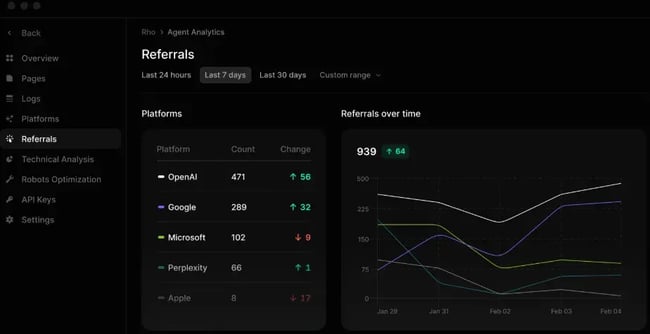
Here’s a screenshot showing what the monitoring analytics looks like. The screenshot shows a graph with referral traffic from AI systems in one place. SEO experts can use this graph to identify the AI agents working best for the business, and those with the greatest opportunity:

screenshot from profound showing what the monitoring and analytics look like for referral traffic from key ai systems. the monitoring and analytical dashboard is something that sets profound apart in a profound versus athena ai for aeo comparison.

Source

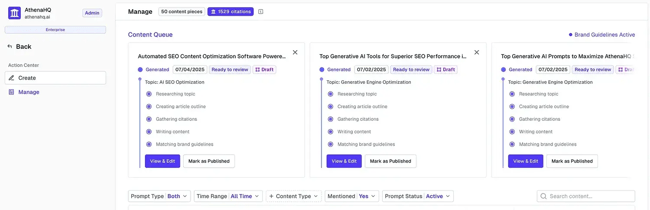
AthenaHQ AI is an AEO and GEO platform focused on automation and workflow integration. It’s built to close the gap between insight and execution through its Action Center, automated content production, and outreach tools.

The screenshot below shows the Action Center:

athena hq action center.

Source

Which platform wins? Both platforms are excellent for monitoring, but AthenaHQ offers the added value of the Action Center, which helps teams turn insights into actions. The best tool depends on team needs and existing capabilities. Teams whose SEO staff can identify actions from analytics will find Profound a strong fit. Teams that need support with briefs and next steps will find AthenaHQ the more guided option.

AI Engine Coverage

Profound supports ChatGPT, Perplexity, Google AI Overviews, Copilot, Gemini, and Claude, and extends coverage to 10+ AI engines, including DeepSeek, Grok, Meta AI, and Google AI Mode.

Athena AI supports ChatGPT, Perplexity, Google AI Overviews, Copilot, Gemini, and Claude, covering the core engines with additional platforms available on request. It also covers Google AI Mode and Grok.

AI Agents Covered by AthenaHQ vs. Profound

Plan

AI Engine Coverage

Price

Capabilities with custom plans

Profound’s Growth Package

ChatGPT

Perplexity

Google AI Overviews

$399/month for the Growth package

Google Gemini

Microsoft Copilot

Meta AI

Grok

DeepSeek

Anthropic Claude

Google AI Overviews

AthenaHQ

ChatGPT

Perplexity

Google’s AI Overviews

Google’s AI Mode

Gemini

Claude

Copilot

Grok

$295/month

Additional models available on request

Which platform wins? Athena covers more AI engines in its plan than Profound, but with custom plans, both solutions cover many AI engines.

Analytics and Visibility Tracking

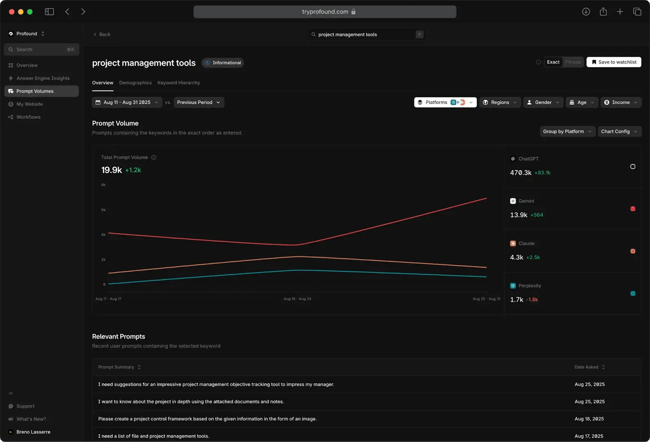
Profound offers analytics for agent tracking, conversation analysis, and shopping visibility. Its Answer Engine Insights monitors AI responses and citations across AI engines. Profound users can track up to 100 prompts (depending on the plan) and can change them at any time.

Here’s a view of what the Prompt Volume tool looks like, exploring conversations around “Project Management tools”:

Prompt Volume tool in action, exploring conversations around Project Management tools.

Source

AthenaHQ’s analytics are built around its proprietary Query Volume Estimation Model and real-time trend tracking. Its advanced tier includes real-time trends, unlimited monthly response analysis, and full data history with custom export options. It’s more accessible for teams without dedicated analysts, surfacing prioritized recommendations rather than raw data.

Which platform wins? For teams going deep on AI SEO, Profound‘s analytical depth is unmatched. For teams that need a clearer “here’s what to fix” for an AI best-practice workflow, AthenaHQ helps them output faster.

Content Optimization and Workflow Tools

Profound‘s workflow layer surfaces gaps between current content and what’s needed to increase citation frequency, using its AEO Content Score built from millions of top-cited pages. It’s powerful, but assumes teams have the capacity to act on detailed, data-heavy briefs.

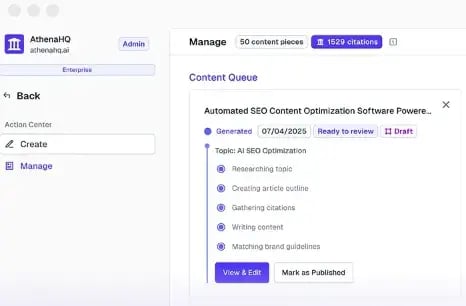
Athena AI offers content brief creation, optimization suggestions, and automated outreach. Its Action Center combines automated content production, unlimited outreach to influential third-party sources, and operational recommendations. Within the Action Center, content teams can manage their workflow:

content workflow in AthenaHQ’s Action Center. The Action Center is a key differentiator in any Profound vs Athena AI for AEO comparison.

Source

Who wins? Profound helps teams understand what content will win. AthenaHQ helps them produce it faster. Both AI tools will help content teams create the best content for Search Generative Experiences (SGE)

Brand Sentiment and Reputation Monitoring

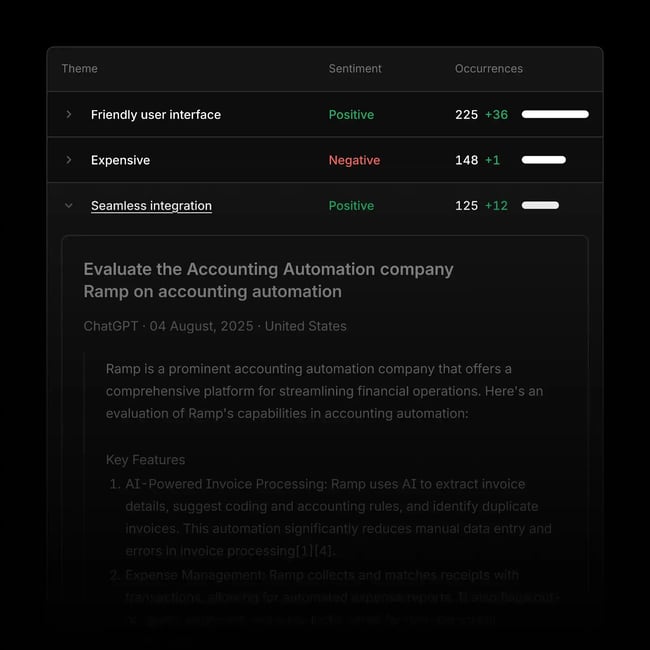
Profound’s advanced sentiment analysis and brand accuracy scoring are designed to identify misinformation, especially important for enterprise brands where AI hallucinations about products or pricing can cause real reputational damage. Its timestamped screenshot archive also creates an evidential record useful for compliance and reporting.

Profound shows the sentiment analysis solution with “positive” and “negative” sentiment labels alongside a timestamped screenshot

Source

AthenaHQ measures brand sentiment, analyzes market trends, compares share of voice, and identifies trending topics. It also monitors brand reputation across news and social channels through its intelligent PR search.

Who wins? For brand protection and compliance, Profound’s accuracy scoring is the stronger solution. For growth and comms teams looking for AI sentiment integrated with PR and social in one view, AthenaHQ is more intuitive day-to-day.

How to Evaluate Profound vs. AthenaHQ for Your Growth Stack

When choosing between any tools, leadership should clarify the evaluation criteria that actually matter for the team and business goals. Here are three factors to consider when deciding whether either platform becomes a core part of a growth stack or an expensive subscription that the team stops logging into.

Integrations and Tech Stack Compatibility

Both platforms integrate with CRM, CMS, and analytics tools, but in different ways. Profound’s integrations are primarily at the server and infrastructure levels, connecting to Vercel, AWS, Cloudflare, and Google Analytics for data collection, rather than providing a direct connection to marketing workflows like a CRM. This makes Profound powerful for technical teams managing AI crawler data, but less plug-and-play for marketing ops teams who live in their CRM day-to-day.

AthenaHQ takes a more workflow-native approach to integration. Its platform includes unlimited seats, SSO/SAML, and white-glove onboarding — signals that it’s built for multi-team deployment within larger martech ecosystems.

For HubSpot-led growth teams specifically, it‘s worth considering what’s already built into the stack.

HubSpot Content Hub offers:

  • SEO recommendations
  • AEO website building capabilities
  • Content suggestions

Content Hub is equipped with integrated AI through the Breeze content assistant, which can draft, expand, and adapt copy for both clarity and conversational tone, while automated SEO recommendations help ensure every asset is ready for both search and AI engine consumption. When marketing teams combine Content Hub with HubSpot’s Smart CRM, Marketing Hub, and Breeze AI Suite, they get a native AEO execution layer that works alongside whichever monitoring platform in the tech stack. HubSpot provides AI search grader, Smart CRM, Marketing Hub, Content Hub, and Breeze AI Suite for operationalizing AEO.

For teams evaluating the broader AEO tools landscape, the integration question often comes down to this: does marketing need a platform that feeds data into an existing stack, or one that replaces parts of it?

Pricing and Accessibility

Pricing is a key differentiator in the Profound versus Athena AI for AEO comparison. The cost of AI could easily help decide because if the budget simply isn’t there for more expensive tools, then decisions are made.

Profound‘s pricing starts at $99/month for ChatGPT only, but for brands that are serious about AI, the Growth package is $399/month. The platform’s most valuable features, including full AI model coverage and API access, are reserved for the Growth plan.

AthenaHQ’s pricing starts at $95/month for the first month, then $295/month, and there’s a credit-based system. The credit model offers flexibility, but it can add up quickly as more prompts and AI answer engines are enabled beyond the base 3,500 credits.

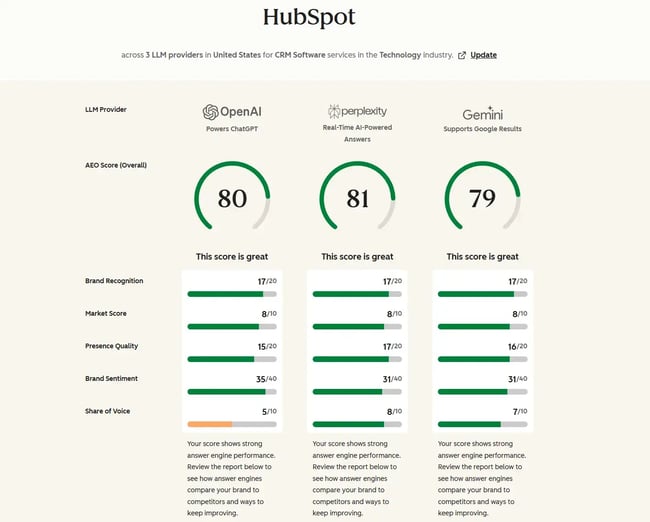
For teams not yet ready to commit to either platform, HubSpot’s free AEO Grader is a strong starting point. It analyses a brand’s AI visibility, sentiment, and competitive positioning across leading AI platforms — including GPT-4o, Perplexity, and Gemini. The analysis reveals how generative AI characterizes a brand when users ask questions about an industry, products, or services. It won’t replace a full AEO platform, but it gives teams a clear baseline before investment.

Ease of Use and Learning Curve

User feedback on Profound frequently describes the interface as data-heavy and unintuitive. Without a dedicated analyst, teams can easily find themselves overwhelmed by the volume of data the platform surfaces. Multiple reviewers also note recurring technical issues and a steep onboarding curve, both of which should be factored into the total cost of ownership beyond the subscription fee.

AthenaHQ is more accessible by design. Its Action Center surfaces prioritized recommendations rather than raw data, and its AI-generated suggestions are tailored fixes, content restructuring, additional FAQs, schema changes, or strategic outreach, saving marketers from manually evaluating prompts and responses. For growth teams without dedicated data analysts, that guided workflow makes a real difference to adoption and time-to-value.

The honest summary: teams with analysts comfortable interpreting layered data sets will find that Profound’s depth rewards that investment. Teams that are leaner and need to move from insight to output quickly will find AthenaHQ has the lower-friction path.

Which should you choose for AEO: Profound or AthenaHQ?

The right platform depends heavily on where an organization sits and what it needs AEO to do for the business right now.

Startups should start lean. AthenaHQ’s lower entry price and guided workflow make it more accessible for small teams with limited analyst capacity. The HubSpot AEO Grader is also worth running first as a free baseline before committing to any paid platform.

Mid-market teams with a growing content operation and moderate analytics maturity will find AthenaHQ’s balance of visibility tracking and workflow automation a strong fit. It connects insight to execution without requiring a data engineering layer, which is exactly what most mid-market growth teams need from their AI agent types and tooling.

Enterprise organizations with compliance requirements, global audiences, and dedicated analytics resources are where Profound earns its premium. Profound is purpose-built for enterprise brands that need cross-engine monitoring, programmatic AEO content workflows, SOC 2 compliance, and dedicated support with SSO. Its HIPAA compliance certification also makes it one of the few viable options for healthcare and life sciences brands operating in regulated environments.

Agencies have a strong case for Profound’s Agency Growth plan, which includes pitch workspaces and consolidated billing, purpose-built for agencies selling AEO services, with 10 pitch workspaces per month for prospecting and client workspaces for ongoing management. AthenaHQ is also a viable agency option, particularly for those running mid-market client programs that prioritize action over deep analytics.

International teams should weigh engine coverage heavily. Profound’s broader roster, including DeepSeek, Meta AI, and regional LLMs, gives it a material advantage for brands with meaningful audience share outside English-language markets.

It’s also worth flagging Xfunnel here, suitable for any organization. HubSpot recently acquired Xfunnel, an innovative platform that helps businesses monitor, test, and optimize AEO performance across LLM ecosystems, signaling a clear strategic direction toward native AEO capabilities within the HubSpot platform itself.

For teams already deeply embedded in the HubSpot ecosystem, Xfunnel’s integration with the platform may reduce the need for a standalone AEO tool over time, particularly at the mid-market level.

Frequently asked questions about Profound vs. AthenaHQ for AEO:

How do Profound and AthenaHQ differ in their approach to measuring AI search visibility?

Profound measures visibility through deep, multi-engine data — tracking share of voice, citation rate, and prompt volume across 10+ AI platforms for teams who want to interrogate the numbers. AthenaHQ tracks the same core metrics but surfaces them as prioritized recommendations, making it faster to act on but less granular in its raw output.

What are the unique features that set Profound apart from AthenaHQ?

Profound’s standout differentiators are its Conversation Explorer (drawing on 400M+ real user prompts), Agent Analytics with GA4 integration, Shopping Analysis for AI commerce visibility, and SOC 2 Type II compliance. These features have no direct equivalent in AthenaHQ and are purpose-built for enterprise teams with technical depth and compliance requirements.

Which tool is better for tracking brand sentiment across AI-generated responses?

Profound’s sentiment layer focuses on brand accuracy and misinformation detection — particularly for regulated industries or brands where AI hallucinations pose a real risk. AthenaHQ connects sentiment to PR and social monitoring in a single view, making it more practical for day-to-day comms and growth teams.

Do Profound and AthenaHQ support integration with existing marketing technology stacks?

Both integrate with CRM, CMS, and analytics tools, though Profound skews toward infrastructure-level connections like GA4, Cloudflare, and AWS, while AthenaHQ offers easier multi-team deployment with SSO/SAML and unlimited seats on a single plan. For HubSpot users, both can complement Content Hub and Breeze AI — but neither replaces the native AEO capabilities already inside the HubSpot stack.

Choosing the Right AEO Platform for Your Growth Stack

Choosing between Profound and AthenaHQ for AEO comes down to one core question: does the team need depth or speed to act? Profound delivers unmatched analytical rigor for enterprise teams with the resources to act on detailed data. AthenaHQ delivers faster time-to-value for growth teams that need insight and execution in one place. For teams already in the HubSpot ecosystem, the native AEO capabilities in Content Hub, Breeze AI, and the recently acquired Xfunnel platform offer a compelling third path — one that may reduce the need for a standalone tool over time.

Categories B2B

Is AI Killing Web Traffic? How AI Overviews Impact Organic Website Traffic

Every few years, marketing headlines announce the demise of one foundational strategy or another. First, email; then blogging; then search engines. Now, with the rise of AI comes the question, “Is AI killing web traffic?” — But the curiosity is actually warranted.

Download Now: HubSpot's Free AEO Guide

As of December 2025, AI Overviews chop organic click-through rate (CTR) for position-one content by an average of 58%, and that’s no coincidence. We’re in the middle of a huge shift in how search engines surface information, and it’s rewriting the rules for marketers and content teams across every industry.

One, Google’s AI Overviews are answering queries directly on the results page, intercepting searches that previously drove clicks to websites. And two, a growing portion of searchers are skipping Google entirely and turning to AI engines like ChatGPT and Perplexity for answers.

Both trends slice the traffic search engines send to your site, but it’s not gone entirely. I’ve spent the last year navigating the ebbs and flows of traffic with HubSpot, and fine tuning to balance AI behavior and website traffic expectations. Here’s what you need to know.

Table of Contents

TLDR: Executive Summary

AI Overviews change how users interact with search results by reducing CTR for some informational queries and redistributing clicks rather than eliminating all website traffic. Simple fact-based queries are more likely to trigger zero-click results, while more detailed, branded questions like comparisons are more likely to earn clicks when users need depth and validation.

Marketers and brands that invest in AEO to help capture AI overviews rather than ignoring them are the brands that will stay competitive. Original research improves citation potential in AI answers, structured data improves machine-readability of page content, and concise Q&A sections help answer engines extract and cite content. Learn more about how to improve your AI search performance in HubSpot’s free AEO guide.

What AI Overviews Change on the SERP

AI Overviews are generated summaries that appear at the top of Google’s search results, above both paid ads and organic listings. When one appears for your target query, it answers the user’s question, pushing all of the blue links we’re used to seeing farther down the page.

And we all know what happens the further you appear down a SERP.

If you’re the site mentioned in the overview, impressions stay up (or grow), but clicks drop. Even if you rank well, clicks drop because users likely already got their answer in the overview.

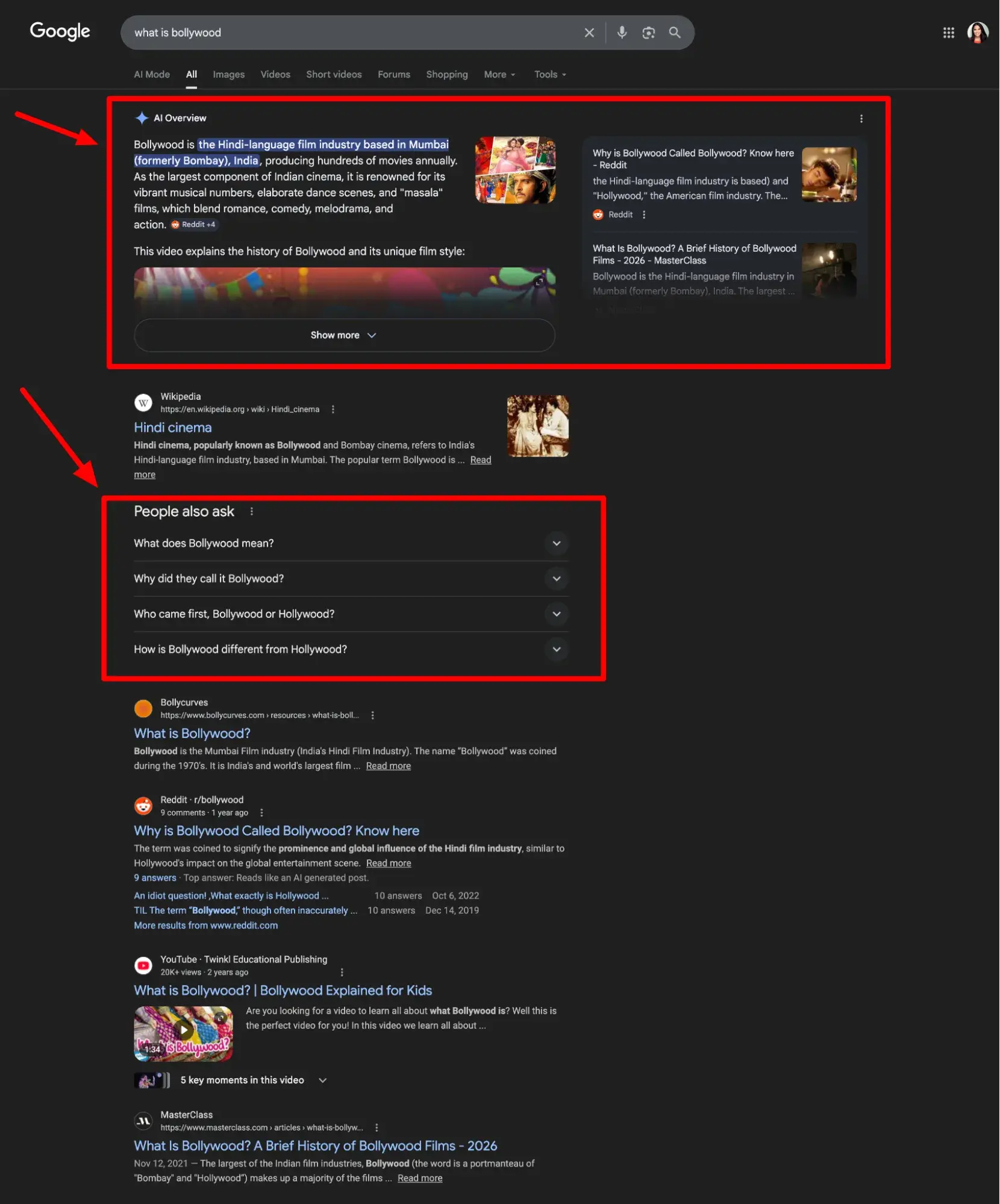
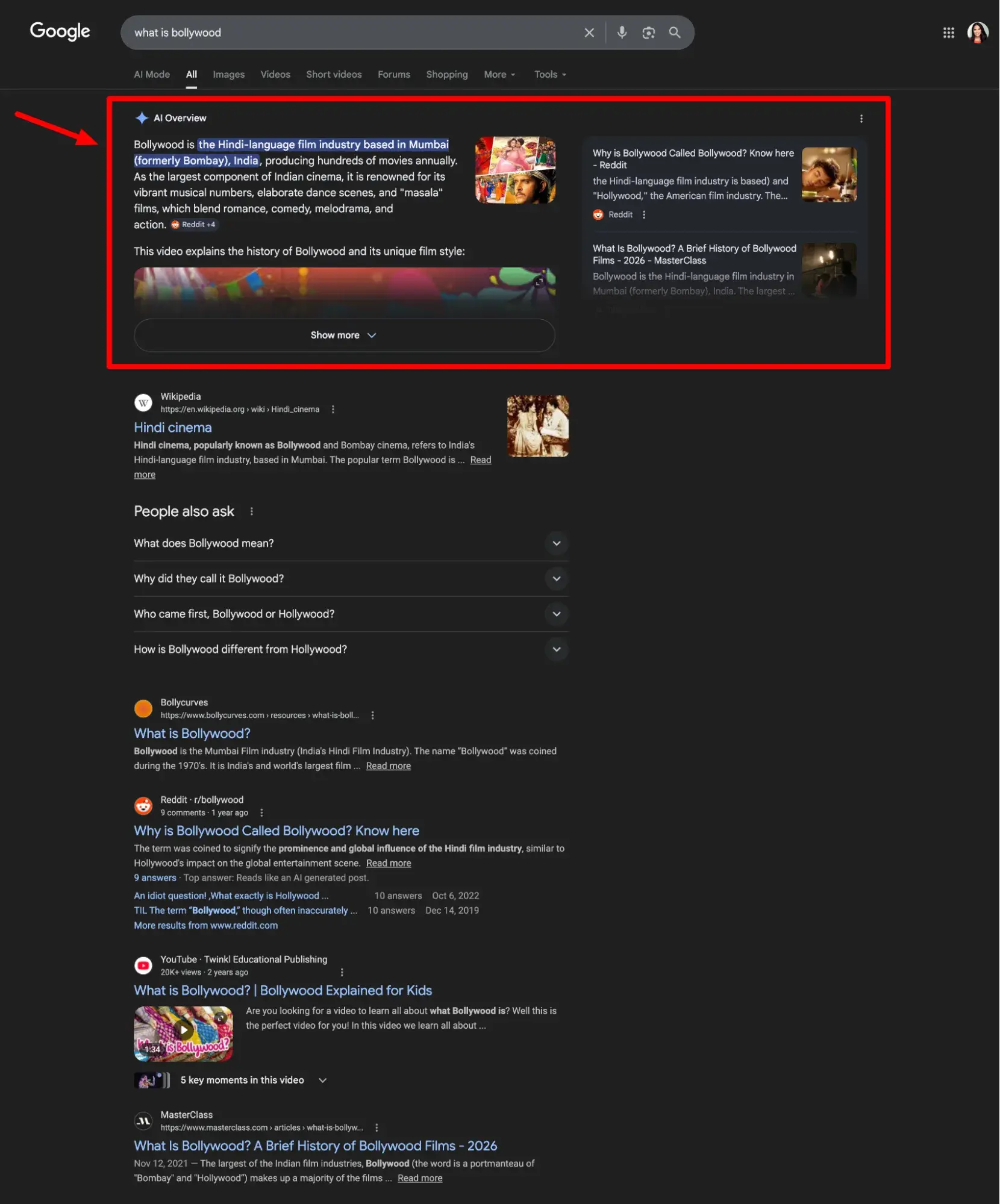
In my example, “What is Bollywood?” notice how even big names like Masterclass and popular media like YouTube videos can push multiple scrolls below the fold.

ai overviews answering questions like “what is bollywood” are potentially killing website traffic

According to McKinsey, half of Google’s results already feature AI-powered features like overviews, and trends predict that number will reach 75% by 2028. And thanks to those features, Google itself reports that over 27% of searches now end without a click.

If you’re looking at your traffic reports and asking, “Why did my website traffic drop after ai search?” — this is the “zero-click” reality.

A study by Seer Interactive found that organic CTR for AI Overview queries dropped by 61% from June 2024 to September 2025. Even more alarming: the CTR of queries without AI Overviews also fell by 41% in the same period.

This suggests broader behavioral changes are at play. In other words, users are turning to search engines less frequently as search behavior on social media and AI engines increases.

But let’s bring all this big-picture talk back down to earth and what it means for your business.

Pro tip: Use HubSpot’s free AI Search Grader to check how visible your brand is in AI-powered search engines. This will give you a reliable baseline for seeing where you can improve, along with the rest of the advice we’ll share.

How to Measure AI Overviews’ Impact on Your Traffic

The measurement problem is real. Google Search Console currently does not offer a direct way to isolate or filter data for AI Overviews.

All performance metrics from AI Overviews are aggregated with standard web search data. For instance, when your content is cited in an AI Overview, Search Console doesn’t tell you. Your impressions and clicks are logged, but merged with everything else.

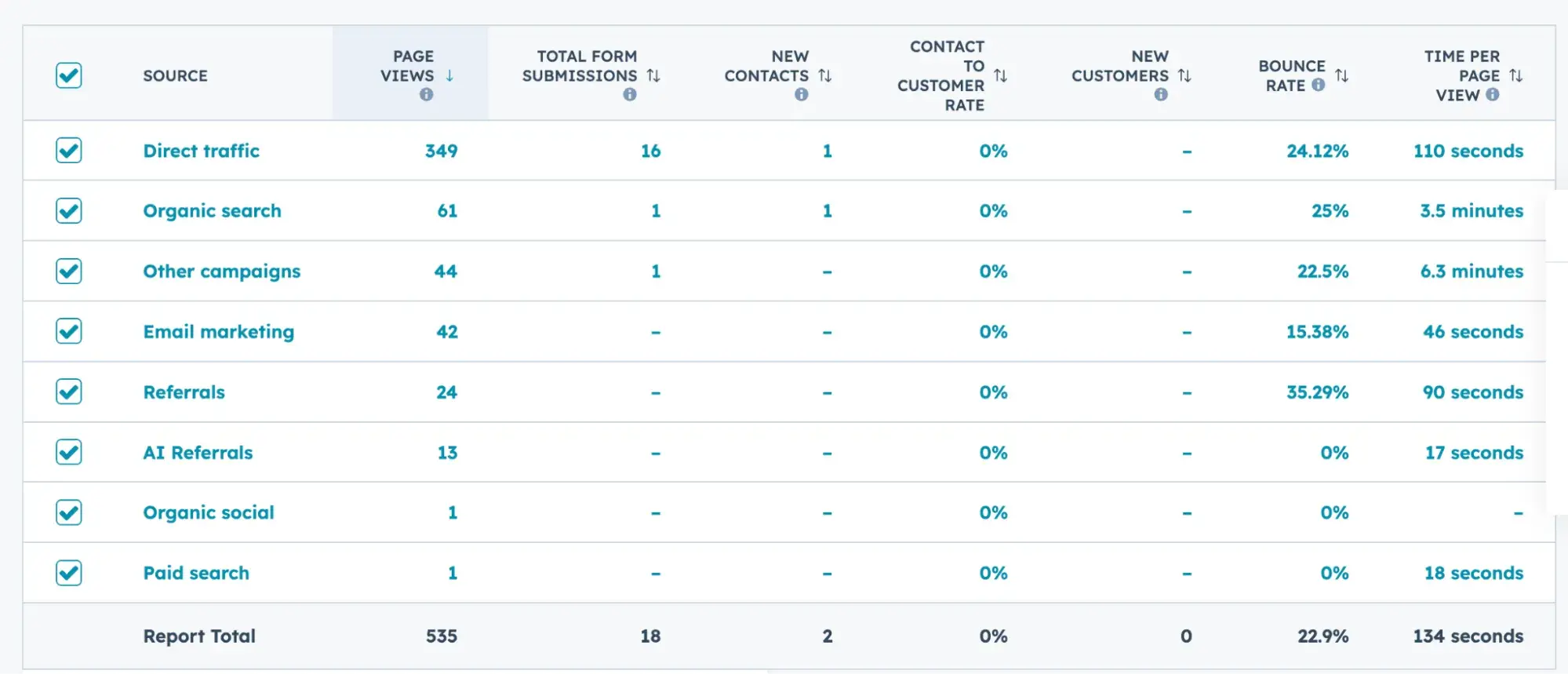
is killing website traffic; ai referrals as traffic source in hubspot

HubSpot recently added “AI Referrals” to its list of traffic sources (which is great), but it currently refers only to AI assistants and chatbots like ChatGPT, Claude, and Perplexity. It also includes visitors who click links provided in AI-generated responses.

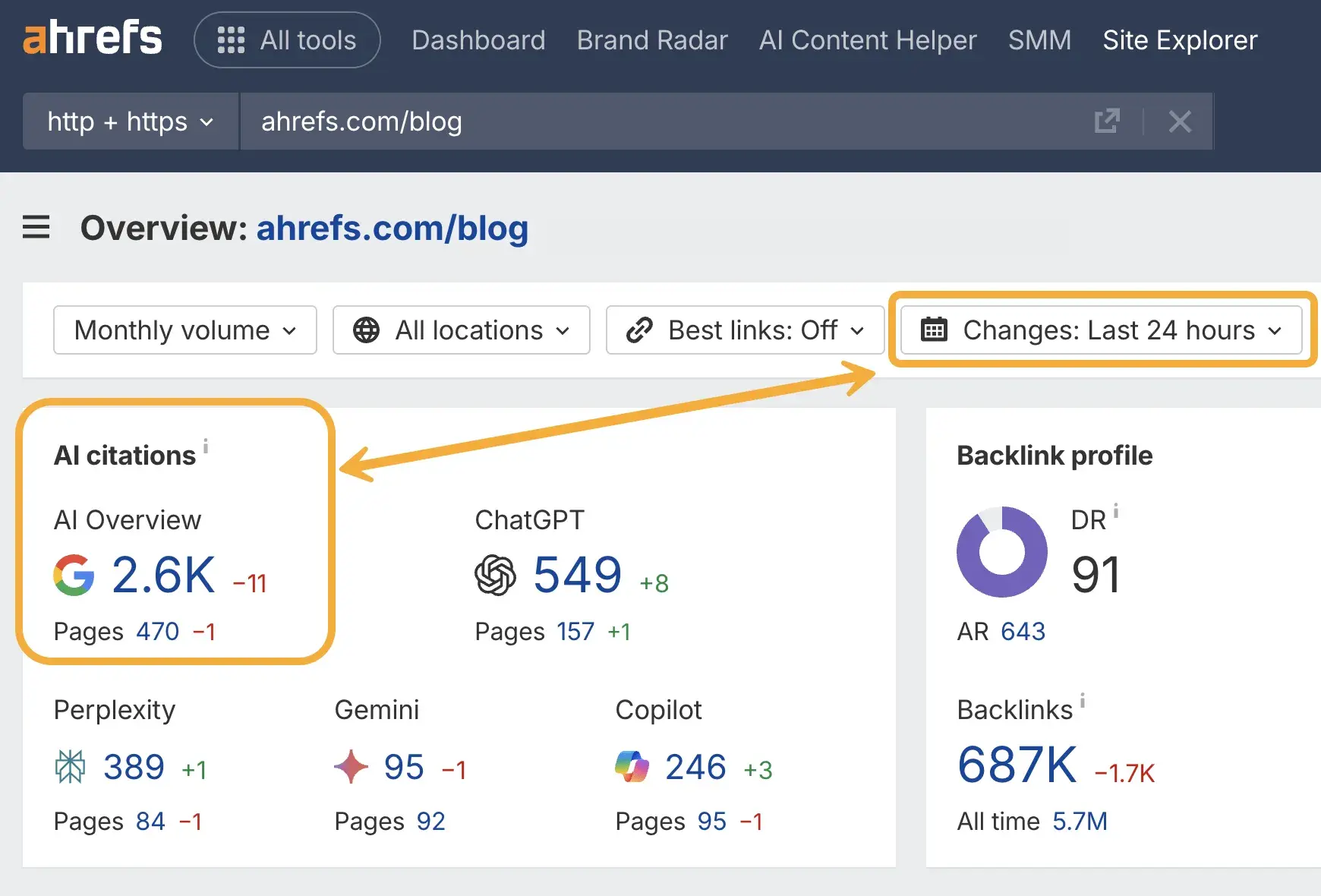
You can, however, make educated predictions with third-party data. For example, Ahrefs provides estimates on which keywords have AI Overviews, whether your brand was cited, and how much traffic that equates to, approximately.

is killing website traffic; ai overviews being tracked in ahrefs

Source

What is the best way to forecast traffic under AI Overviews?

I spoke with Amanda Sellers, HubSpot’s blog growth manager, about the best ways to forecast traffic under AI overviews.

She recommends using linear regression, a mathematical method that uses past data to simulate a trend into the future. A linear regression assumes that nothing big — like an algorithm update or increase in SERP features like AI Overviews — will disrupt that trend.

“You and I both know that Google likes to throw a wrench into things,” explains Sellers.

“At one point, AI Overviews showed up for less than 10% of the HubSpot blog’s keywords, most of them being informational definition intent. Today, nearly 50% of the keywords the HubSpot blog ranks for have an AI Overview at the top.”

For this reason, Sellers frequently checks AI Overview exposure in Ahrefs and performs CTR curve analysis using data from Google Search Console. That way, multiple scenarios can be forecasted on top of the baseline linear regression, such as “what if AI Overviews increase by 20%” or “what if we get impacted negatively by an algorithm update.”

How do you attribute changes to AI Overviews vs seasonality?

Linear regressions also allow you to quantify seasonal changes, determining patterns in historical data.

For example, there might be a historical pattern of low traffic in December compared to November due to holiday seasonality. A linear regression can help marketers and SEO strategists create seasonality modifiers that adjust the traffic baseline according to the average pattern.

She continues, “If we take the baseline traffic, December usually lands 65% below the baseline because fewer people are searching. January tends to be one of our stronger months at around 135% above the baseline. Adding these fluctuations into our model can help us understand if there is unexpected performance in one direction or another.”

If a traffic forecast already factored in seasonality in this way, any performance anomalies in one way or another would mean seasonality is not the culprit. From there, an SEO strategist can use Ahrefs to determine whether Google increased the visibility of AIOs or whether another factor was at play. However, it’s not always that simple.

“Keywords rise and fall, AIOs appear and disappear, algorithm updates come and go… and there are internal technical factors that can impact performance. In reality, attributing performance is so much more complex.”

For instance, after a particularly tough algorithm update, Sellers found 46.7% of a subsection of HubSpot’s keywords lost positioning and gained an AI Overview. It’s much more difficult to attribute how much of the performance change was the AI Overview siphoning traffic versus a decrease in CTR from simply a lower SERP position.

For this reason, it’s best to let the data speak for itself. Sellers split the keywords into different buckets:

  • Position Decreased AND AIO Present
  • Position Decreased NO AIO Present
  • Position Gain/Flat AND AIO Present
  • Position Gain/Flat NO AIO Present

By comparing the performance of these buckets against each other and swapping CTRs, Sellers was able to get an estimate of how much performance change came from positioning changes vs. AIOs.

(Spoiler alert: AIOs were the much bigger culprit.)

By comparing, Sellers found that even keywords where we didn’t lose positioning still had significant CTR losses. This means there was less traffic, even when we were performing well. Meanwhile, by swapping CTAs and multiplying by impressions, we could estimate the traffic decline.

Is AI Killing Web Traffic More for Certain Queries?

Not all queries are affected by AI Overviews. Thankfully, the data is becoming clearer about which types feel the greatest zero-click impact and which can still drive website traffic for your business.

Queries most vulnerable to zero-click:

In 2025, Semrush reported that nearly 95% of keywords triggering AI Overviews have little to no paid ads or commercial value. In other words, Google seems to be deploying AI summaries mainly for informational searches, with transactional content (i.e pricing pages, demo pages) staying in the traditional SERP format.

That means the website traffic most at risk is top-of-funnel educational content that typically grabs a lot of clicks for businesses and builds brand awareness.

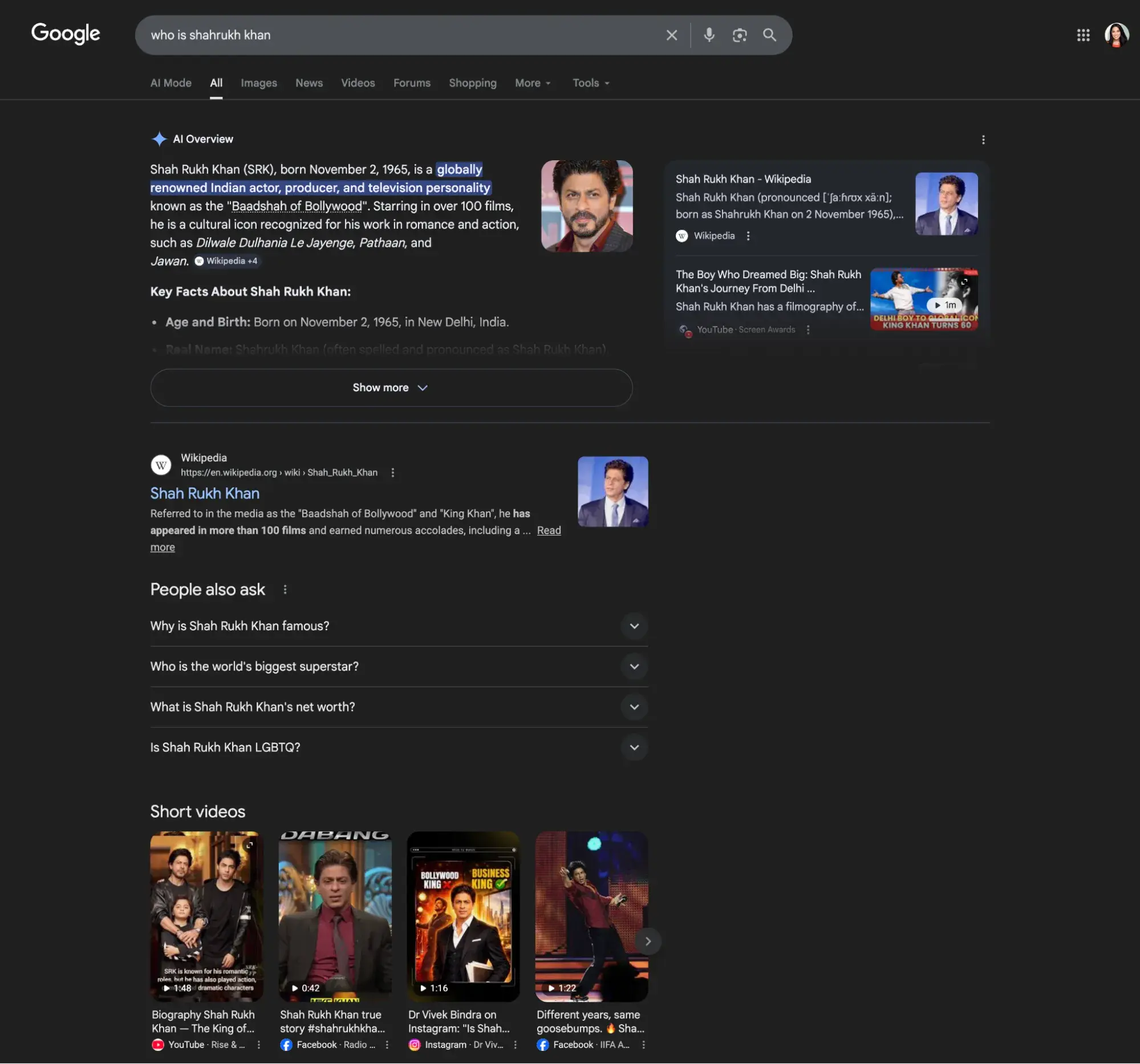
Think simple right-or-wrong lookups (“what is [concept]”, “how to” explainers, definition queries, and single-source informational questions), like this example: “Who is Shahrukh Khan?”

is killing website traffic; who is shahrukh khan answered in ai overview

This question is answered by Google in an AI overview so there’s less need to continue on to the other results.

Queries that still earn the click:

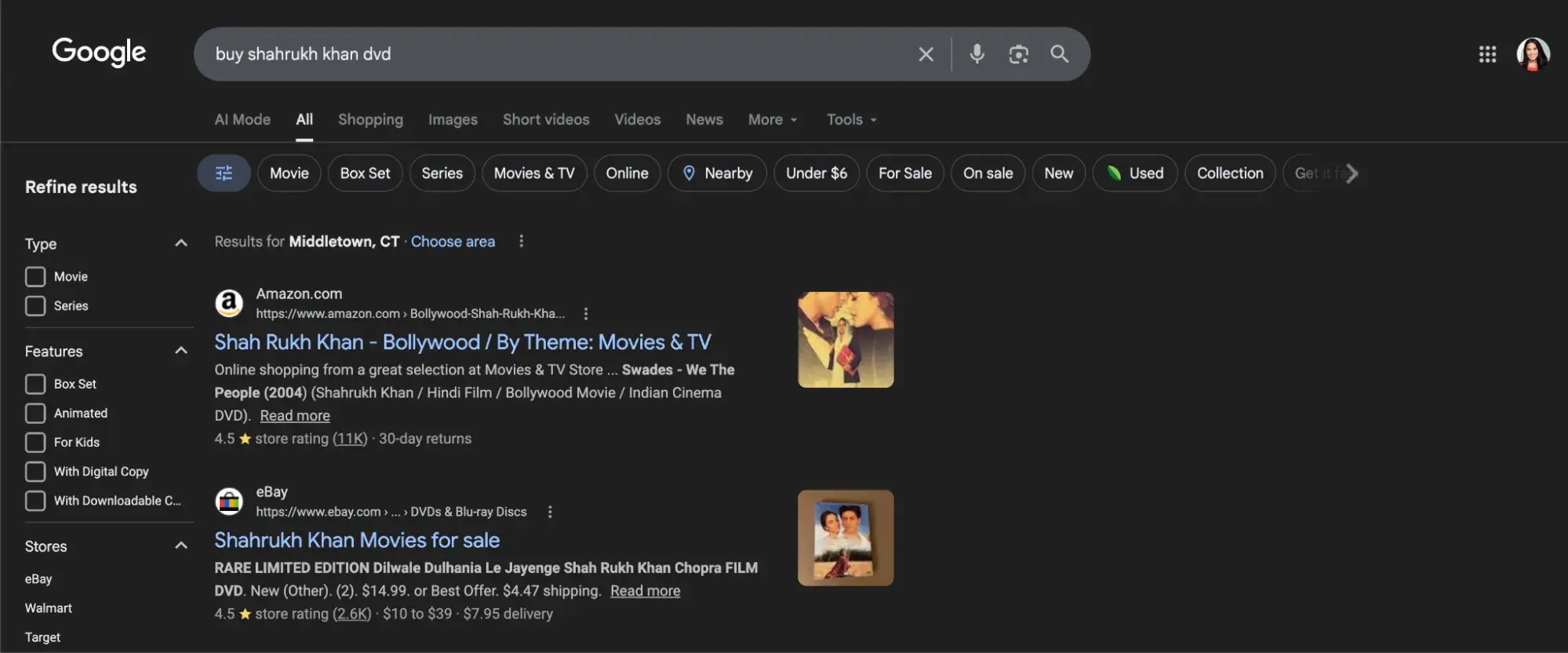
The same study found that transactional keywords like “buy,” “compare,” and “near me” tend to have higher CTRs because AI typically doesn’t complete transactions. Continuing our example, look at the results of “Buy Shahrukh Khan DVD.” (A DVD for my younger folks is a “digital video disc,” what we used to watch movies before streaming.)

is killing website traffic; conversion-focused query buy shahrukh khan dvd doesnt return ai overview

Comparison queries like “X vs. Y for [use case]” also continue to drive clicks, because users want depth and validation that a two-paragraph AI summary can’t fully provide. The same is true for queries that require local, real-time, or highly specific information.

Overall, the best content for generating clicks and website traffic is currently bottom-funnel content (pricing pages, comparison guides, case studies), local service queries, niche technical queries, and original research that AI can’t synthesize from elsewhere.

Is AI Killing Web Traffic, or Do You Get Traffic from AI Citations?

Ok, so here’s where the picture shifts from bleak to nuanced: being cited in an AI Overview may slash your top-of-the-funnel, awareness website traffic, but those who do visit are arguably more qualified.

Recent studies found that brands cited in AI Overviews earn 35% more organic clicks and 91% more paid clicks than brands not cited in the same queries. Whether this is due to greater awareness or other factors is hard to say, but it’s still encouraging.

Sure, you can’t control whether an AI Overview appears for your target query, but you can work to earn the citation when it does.

Optimizing for AI Overviews

To improve your chances of securing AI overviews, you need to learn how to write for AI search and invest in answer engine optimization (AEO). Here’s what that entails:

  • Write in clear semantic blocks. Structure content in 200–400-word sections with explicit headings, summary boxes, and logical Q&A formatting. AI systems use retrieval-augmented generation (RAG) and favor content that’s chunky and scannable in this way.
  • Lead with the answer. AI doesn’t read your entire article. Instead, it identifies answer-like structures (short paragraphs after questions, numbered steps, comparison tables). So, lead every key section with a 40-60-word direct answer that fully addresses the question, similar to how you’d typically go after “featured snippets” in Google.
  • Use structured data. Schema markup (FAQ, HowTo, Article) improves machine readability and increases the likelihood that your content is parsed and surfaced.
  • Cite primary sources inline. Verifiable, dated claims with source links are the hallmark of citable content. Vague assertions don’t get picked up.
  • Publish and refresh frequently. Fresh content outperforms stale content in AI citations — update timestamps and material regularly to signal recency.
  • Build topical authority. AI wants to know that you know that it’s citing trustworthy, reliable experts to users. So, make sure to establish proof of your expertise extensively in your online presence. That means both sharing your knowledge through content on and off your site, but also getting quoted and cited by others, having good product reviews, etc.

HubSpot Content Hub can help you templatize these patterns and schema, streamline content briefs, and maintain editorial governance at scale as your team produces more AEO-optimized content.

Optimizing for Generative AI Engines (GEO)

Even Google aside, a growing share of users are starting their search journey with AI through ChatGPT, Perplexity, or other AI engines.

BrightLocal research shows that Google still drives 61% of all general searches, but more importantly, AI referral traffic tends to convert at a dramatically higher rate.

To earn that high-intent traffic, you need Generative Engine Optimization (GEO):

  • Create citation-ready content. Structured, authoritative content with specific, verifiable claims is what AI engines pull from. Data-heavy articles and definitive guides consistently outperform opinion pieces.
  • Build cross-platform presence. Mentions and backlinks from credible third-party publishers act as authority signals for AI systems. LinkedIn, Reddit, and industry publications are among the most-cited domains across AI platforms.
  • Answer specific, multi-word queries. AI engine users phrase queries conversationally and at length — average AI query length is 23 words versus 4 words for traditional search. Optimize for those long-form questions explicitly.
  • Keep information consistent across properties. AI models skip citing brands with conflicting data across their website, LinkedIn, review sites, and Wikipedia. Audit your entity information for consistency.
  • Target bottom-funnel queries. Bottom-funnel content like case studies and pricing pages receives the highest AI referral traffic, while top-funnel “what is” content has seen the steepest drop. Position Digital

HubSpot’s AEO tools help marketers track AI citation performance and optimize content for visibility across AI Overviews and answer engines — so you can measure the channel that traditional analytics still misses.

FAQs About AI Overviews and Web Traffic

How can I tell if my pages are being used as sources in AI Overviews?

Google Search Console does not surface this natively and tools like HubSpot group things into a general “AI referral” bucket.

Your best approach is to manually search your top target queries in an incognito browser and note whether your site appears as a cited source in the AI Overview. Then, use a linear regression to simulate a trend into the future. For systematic tracking at scale, third-party tools like Semrush, Ahrefs, and Authoritas can monitor which of your URLs appear in AI Overviews and track citation frequency over time.

Do AI Overviews affect branded and non-branded traffic differently?

Yes, significantly. non-branded informational queries are where AI Overviews most commonly appear and where CTR losses are steepest. Branded traffic tends to be more resilient because navigational and branded queries trigger AI Overviews at a lower rate.

Try using Google Search Console’s new branded/non-branded filter to track both segments independently.

Should I change my keyword strategy because of AI Overviews?

Partially, but don’t abandon informational content entirely. Factual, educational content is still valuable for building topical authority and earning AI citations. But you should rebalance your investment toward comparison content, bottom-funnel queries, and original research that AI can’t fully synthesize.

The goal is to be the source AI cites, not to avoid the queries AI covers. Shift your success metrics from pure click volume to share of voice, citation frequency, and branded search growth.

When should you shift budget toward owned channels?

At the risk of sounding dramatic, now. If more than 50% of your traffic currently comes from non-branded organic search, you’re overexposed.

Email lists, communities, newsletters, and direct audience relationships are immune to AI Overview cannibalization, algorithm updates, or shifts in Google‘s rendering. The value of owning your audience compounds over time; it’s the one distribution channel where your results are entirely yours.

Publishers with high branded and direct traffic, like the Daily Mail (whose over 60% of traffic is direct) have proven significantly more resilient to AI Overview disruption than sites reliant on non-branded organic search.

Website Traffic is Reincarnating

AI is not killing web traffic — it’s redistributing it. Clicks are declining for informational queries, especially non-branded ones. But traffic from AI citations, for the brands that earn it, converts at rates that dwarf traditional organic search.

The marketers who win in the battle against AI impact on website traffic are the ones who stop measuring success purely in clicks and start experimenting with measuring visibility, citation frequency, and audience ownership. The structural change is real, and it isn‘t reversing. What changes is whether you’re on the right side of it.

Categories B2B

Best workflow automation software: How to choose the right tool for your growth stage

Workflow automation tools automate repetitive business tasks across systems using defined triggers and logic. These platforms link apps, CRM data, and communication channels to execute multi-step processes without manual handoffs — routing a new lead through email nurture, scoring it, and assigning it to a rep in a single automated sequence. Learn More About HubSpot's Enterprise Marketing Software

By replacing manual if/then steps with automated workflows, teams boost efficiency and accuracy, free up time for creative work, and gain visibility into performance across marketing, sales, and service functions.

According to McKinsey & Company, up to 60% of occupations could automate at least one-third of their activities using existing technologies. As B2B teams scale across marketing, sales, and service, workflow automation tools have become essential for eliminating repetitive tasks and orchestrating processes across systems.

Table of Contents

What are workflow automation tools?

Workflow automation tools are software applications that streamline manual, repetitive processes by executing predefined actions when certain events occur. For example, a marketing workflow system might automatically send a series of follow-up emails when a prospect downloads a white paper, or a sales workflow might route a new demo request to the right rep based on geography.

These tools typically operate on “if/then” rule-based logic – “if X happens, do Y” – so that tasks like lead distribution, data entry, or ticket updates happen reliably and consistently. The result is that teams spend less time on busywork and more on strategy, since common tasks are handled by the automation system.

In practice, workflow automation platforms connect CRM data, marketing campaigns, and service systems, triggering actions across multiple tools whenever a record meets certain criteria. (For example, a form submission might add a contact to an email drip and notify a sales rep simultaneously.) Modern workflow solutions are often cloud-based and integrate widely, so they can orchestrate end-to-end processes across marketing, sales, service, and operations.

How to Choose The Best Workflow Automation Software

Selecting a workflow automation tool is best done by matching organizational maturity to required capabilities: choose simple, no-code workflow builders for early-stage needs; add orchestration, templates, and CRM-integrated automation for growth-stage teams; and adopt enterprise-grade governance, cross-system APIs, and AI agents for complex scale.

Startup: Fast Value, Low Friction

Small teams need fast time-to-value and minimal maintenance, and predictable rule-based automations (welcome drips, form-to-lead routing) can deliver that quickly. Thus, lightweight workflow software and built-in email automation (no-code) is recommended as a best fit.
  • AI automation guidance: Keep workflows rule-based; introduce AI (content drafting or subject-line suggestions) only as an augmentation.
  • Recommended HubSpot fit: HubSpot Marketing Hub Starter/free email tools + basic workflows.

Teams can start with a free trial of HubSpot Marketing Hub to test workflow automation in real campaigns.

Scaleup: Orchestration + Performance

For companies at this stage, typically multiple teams need shared automations, segmentation, and measurable funnel impact. And orchestration across marketing, sales, and service is needed to reduce handoffs and improve SLA adherence. Hence, a full-featured workflow system with templates, cross-object workflows, and analytics fits best.

  • AI guidance: Introduce AI agents to enhance personalization and prospect prioritization (like Breeze agents for prospect research, AI-assisted copy for multi-variant campaigns). Use AI to recommend next-best-action while leaving critical routing decisions to rule logic.
  • Recommended HubSpot fit: HubSpot Marketing Hub Professional (workflows, sequences, behavioral triggers) + Sales Hub Professional for lead routing.

Teams can start with a free trial of HubSpot Marketing Pro + Sales Hub Pro to test workflow automation in real campaigns.

Enterprise: Governance, Extensibility, and AI at Scale

Complex account models, multiple buying committees, and compliance require robust governance, auditability, and the ability to orchestrate automations across external systems at an enterprise level. Thus, the best-fit for companies at this stage is enterprise workflow management with APIs, advanced governance, predictive scoring, and AI agents that operate across systems.

  • AI guidance: Deploy AI agents for unstructured decisioning (content triage, intent inference, next-best-action). Use AI to surface signals, then codify repeatable decisions back into rule-based workflows where appropriate. For example, Breeze AI agents can analyze unstructured signals and enable personalized outreach at scale.
  • Recommended HubSpot fit: HubSpot Marketing Hub Enterprise + Sales Hub Enterprise + Breeze AI Agents (with Enterprise-level credits subscriptions).

Teams can contact the HubSpot Sales team to get a tailored demo.

HubSpot Workflow Management Tools

HubSpot provides multiple built-in automation tools for every part of the customer journey. These include but are not limited to Marketing Hub’s workflow builder, Marketing Email automation, Sales Hub sequences & lead routing, AI agents like Breeze, Lead Scoring, and Customer services automation. Each tool handles a different type of process and scales with team needs.

We explain each below, including core features, pricing, and the kinds of teams they suit.

Marketing Workflow Automation Tools

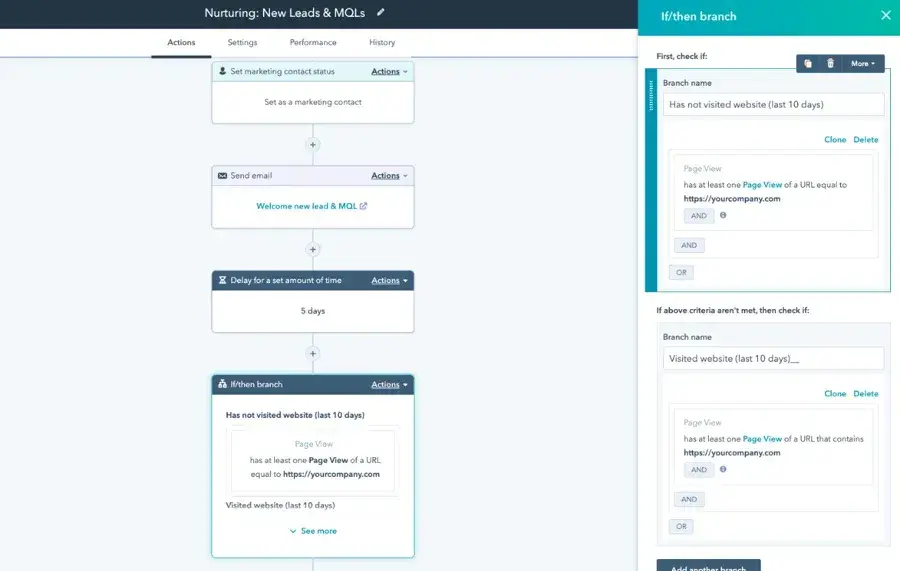
HubSpot Marketing Hub includes a visual workflow builder that can automate email campaigns, lead nurturing, segmentation, and more. Marketing workflows can send follow-up emails, update contact properties, assign leads, split branches by behavior, and trigger internal notifications. Teams can use any combination of email actions, delays, if/then branches, and webhook/API calls. The workflows integrate with website forms, ad campaigns, CMS content, and other channels.

Pricing: Included with Marketing Hub Professional and Enterprise. Starter plans offer limited “simple automation.” More advanced branching, event-based triggers, and cross-object workflows require Pro/Ent.

Best for: Mid-market and enterprise marketing teams that want to centralize and automate entire campaign flows. (Starter businesses often rely on simple drip sequences instead.)

HubSpot automated workflow tools dashboard for lead nurturing

What we like: It unifies campaign automation, so you can plan a full nurture campaign from a single workflow. HubSpot’s native CRM integration means data flows automatically, so Marketing workflows have full context on each contact and company. Additionally, the recent integration with HubSpot’s AI agents and model context protocol (connecting with external tools) brings AI-ready marketing automation to marketers.

Pro Tip: Use HubSpot’s Marketing Studio to plan campaigns and create assets alongside your workflows. And leverage Breeze AI content tools to quickly draft email copy for your workflow.

Email Campaign Automation Tools

HubSpot’s Email Marketing tool (part of Marketing Hub) lets you automate email sends and set up drip campaigns easily. Marketers can create email templates and then use workflows to schedule a series of sends to specific contacts.

For example, a new blog subscriber can be automatically enrolled in a welcome email series, with each message triggered by time delays or user actions (like clicking a link). HubSpot Email includes best-practice features like subscription types, automatic unsubscribe handling, and performance analytics.

Pricing: Available at all paid Marketing Hub levels. (There is a free email marketing tool with limited sends and features for very small teams.) Professional/Enterprise unlock unlimited sends, custom templates, advanced automation/nurturing, and analytics.

Best for: Any marketing team using HubSpot’s CRM. Small teams can use free email sends and simple drip, while larger teams use HubSpot email in complex workflows.

Workflow automation software Hubspot lead nurturing and scoring dashboard

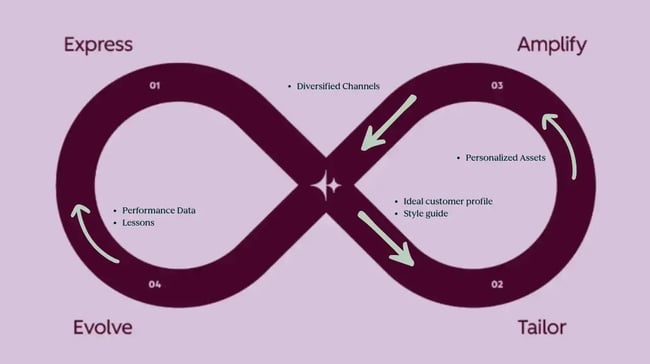
What we like: HubSpot’s email marketing tool’s analytics feed directly into contact records (opens, clicks, etc.), bringing advanced visibility into the drip campaign automation. HubSpot’s Loop Marketing framework calls out email as a key channel in the “Amplify your reach” stage, which also highlights the importance of automated distribution in email marketing.

Pro Tip: Combine Email with Workflows and AIs: use AI-enabled workflows to personalize send times, outreach topics, drafted messages, and dynamic follow-ups.

Sales Automation Tools

HubSpot offers Sales Automation mainly through Sequences and workflow use cases such as Lead Routing. Sequences let sales reps create personalized multi-step email cadences that automatically enroll and outreach to leads. Lead Routing (via workflow) automatically assigns new leads to reps based on criteria such as territory, round-robin, or account owner rules.

Best for: Sales teams looking to accelerate prospecting at scale and ensure leads don’t fall through cracks. Smaller teams can use sequences to standardize follow-ups. Larger teams typically use more customized routing workflows.

HubSpot automation tools new sequence summary dashboard

What we like: HubSpot’s sequences let reps personalize at scale thanks to Breeze AI. Pairing sequences with workflows means handoff tasks (like notifying marketing of a demo scheduled) are automatic.

Pro Tip: Pair Sales Hub sequences and workflow automation with HubSpot’s buyer intent features to automatically trigger tailored outreach when target accounts show high intent signals, e.g., researching relevant topics or visiting key website pages. This allows sales teams to prioritize outreach based on real engagement data instead of static lists.

Breeze AI Agent Tools

Breeze is HubSpot’s AI layer embedded across the customer platform, designed to enhance marketing, sales, and service workflows. One of its most impactful capabilities for revenue teams is the Breeze Prospecting Agent.

The Breeze Prospecting Agent analyzes CRM records, account engagement signals, and publicly available business data to help teams identify, prioritize, and personalize outreach at scale.

Rather than replacing workflow automation, Breeze enhances it by adding intelligence to structured processes. Workflows execute predefined actions, whereas Breeze identifies who should enter those workflows and how messaging should adapt.

Best for: Growth teams focused on outbound prospecting who want to scale lead generation without extra headcount. Also useful for busy sales reps who want quick, high-quality research.

breeze workflow automation tools for prospecting

What we like: Breeze automates one of the most time-consuming sales tasks: prospect research and initial message drafting. Instead of manually sourcing and vetting contacts, reps receive prospects enriched with contextual insights and draft personalized outreach copy.

Pro Tip: Pair Breeze Prospecting Agent with HubSpot workflows and buyer intent signals to trigger outreach when target accounts demonstrate active engagement (such as repeated page visits or content downloads).

Consider leveraging complementary Breeze capabilities, such as Breeze Data Agent, to maintain clean CRM records and strengthen segmentation. Together, these tools can function as a scalable, AI-augmented SDR motion.

Lead Scoring Tools

HubSpot’s Lead Scoring automates the process of ranking contacts and/or companies based on how well they align with the ideal customer profile and active engagement behavior. Teams define attributes (company size, industry) and behaviors (email opens, page views) that indicate a hot prospect.

HubSpot then automatically calculates a score for each contact/company and stores it in a set of scoring properties. These scores can be used in workflows: for example, any lead scoring above a threshold can automatically create an MQL and alert Sales.

workflow automation tools hubspot lead scoring fit groups dashboard

workflow automation software hubspot engagement score dashboard

Best for: B2B marketing and sales teams that need to prioritize leads efficiently. When dozens of new leads come in daily, automated scoring ensures reps focus on those most likely to convert.

What we like: It offloads one of the most critical marketing tasks — lead qualification — to an automated system. AI-powered lead and company scoring continuously evaluates fit and engagement, helping sales teams focus on high-probability opportunities.

Pro Tip: Regularly refine your scoring model by comparing which scores actually convert. HubSpot allows you to adjust the point values for each criterion. We recommend reviewing scoring performance each quarter as part of the “Evolve” stage of your Loop Marketing.

Other Workflow Softwares

Other workflow solutions in the market include standalone workflow management tools, project-based automation platforms, and integration-focused systems such as Asana, Monday.com, Zapier, and Atlassian. These platforms often focus on task orchestration, project workflows, or cross-app integrations.

However, many B2B revenue teams prioritize workflow software that integrates natively with a CRM system to ensure marketing, sales, and service automations operate from a unified system of record.

AI workflow vs Rule‑Based Automation

Rule-based workflows execute predefined logic and ensure consistent operational execution. AI agents analyze patterns across structured and unstructured data and enable adaptive decision-making. Modern effective workflow systems strategies combine both: workflows handle predictable volume, and AI agents optimize performance within those workflows. Remember that AI agents augment workflow solutions, not replace them.

  • Rule-based workflows and AI-powered automation each have their place. Workflows use explicit if/then triggers. They excel at high-volume, predictable tasks – for example, “If a contact submits form X, then send Email Y” or “Round-robin assign leads by region.” These structured workflows provide consistency and are easy to audit.
  • AI agents, by contrast, handle unstructured inputs and decision-making. They analyze data and choose actions on their own. For instance, instead of following a pre-defined email sequence, an AI agent might read a lead’s background and generate a personalized email to outreach.

AI Agents vs Rule-Based Workflows in Workflow Automation Tools

To summarize:

  • If your process is highly structured and repeatable, stay rule-based.
  • If you have unstructured inputs (like free-form responses) or need the system to learn and adapt, start introducing AI agents.

In today’s AI-powered marketing environment, that definition expands. It’s not just about removing repetitive tasks from marketers’ daily workloads. It’s about augmenting your workflows with AI to make them more predictive and personalized.

How to Roll Out A Workflow Automation System Without Chaos

Step 1: Start simple and align on goals.

Identify a high-impact process (e.g., lead routing or email follow-ups) and automate it first. Over-engineering multiple workflows at once can cause confusion and delayed impact. Be clear about what success looks like.

Step 2: Ensure data quality.

Workflows are only as good as your CRM data. Clean up HubSpot CRM properties and deduplicate contacts before building new automations. Consider using HubSpot’s Breeze data agent capabilities to help keep CRM data governed, enriched, and consistent across marketing and sales systems. Breeze can automatically surface missing information, standardize records, and support cleaner segmentation for downstream automation.

Step 3: Document and govern.

Record each workflow’s purpose and logic. Assign an owner (often the marketing or ops manager) to each automation to ensure accountability. Enforce access controls: only trained users should create or edit workflows.

Enterprise tools (like HubSpot Pro/Ent) offer audit logs to track version changes and log activities. These governance steps help to prevent “shadow automations” and ensure processes don’t conflict.

Step 4: Test and iterate.

After launching an automation, monitor its impact and look for exceptions. For example, check that lead assignments didn’t overload any rep, or that emails are reaching prospects’ inboxes.

Also, make sure to schedule periodic reviews of key metrics (defined by workflow goals). If noticeable metrics shift, consider tweaking the workflow (e.g., adjusting delays or criteria).

Treat each automation as part of a continuous improvement cycle – in HubSpot’s Loop Marketing terms, use the Evolve” stage to refine and optimize over time.

Step 5: Train and scale up.

Finally, educate your teams on the new processes.

Simple training docs or demos can show marketers and salespeople how workflows work, and empower them to spot gaps and suggest new automations. Typically, start with a few well-governed workflows, then gradually add more to avoid chaos as usage scales.

Frequently Asked Questions About Workflow Automation Tools

When should I switch from rules to AI agents?

Stick with rule-based workflows for predictable, structured tasks (e.g., sending standard follow-ups). Introduce AI agents when workflows involve unstructured inputs or require adaptive decision-making. As HubSpot notes, most successful organizations use both: automate routine steps with workflows and let AI refine decisions dynamically. A good rule of thumb is: use AI when conditions change frequently, or personalization is paramount.

How do these tools connect to my CRM data?

The platform should sync bi-directionally with the CRM so that workflow actions update records. HubSpot is an example of a unified platform: its Marketing Hub, Sales Hub, and Service Hub all share the same Smart CRM record. This means any workflow automatically has the latest contact and deal data. In general, when evaluating a tool, ensure it syncs bi-directionally with your CRM so that workflow actions update records (and vice versa) in real time.

What’s the best way to govern automations across teams?

Establish clear ownership and controls: define who can create, edit, or publish workflows. Use role-based permissions and require approvals for major automations. Maintain an inventory of active workflows (what they do and who owns them). Enterprise workflow tools offer audit logs and version history – use these to review changes. For example, HubSpot Enterprise includes workflow change logs and permissions that prevent unauthorized edits.

Do I need a workflow system or a workflow management tool?

A “workflow system” usually means an automation engine (like HubSpot Workflows) that runs the processes. A “workflow management tool” might refer to a broader platform that helps teams plan workflows. In practice, many teams use both: a PM tool (or even a whiteboard) to design processes, and an automation tool to execute them. For teams focused on software, prioritizing an automation platform for execution is the stronger approach.

How fast can a small team launch its first automation?

Very fast! With modern no-code tools, a small team can often build a simple workflow in hours or days. For instance, a marketer might set up a basic email drip in a few hours by using a template and connecting it to a form. The speed depends on complexity: the first automation (like a welcome email) can be done in a morning, while a multi-branch lead routing system might take a week to perfect. The key is to start simple and expand. Even a single automated email can start saving time immediately, building confidence to tackle more complex workflows over time.

Workflow Automation as a Growth Lever

Workflow automation tools have become essential for modern marketing and sales operations. The strongest implementations combine rule-based workflows for high-volume, predictable tasks with AI agents for adaptive, personalized decisioning. Throughout, the CRM system should serve as the single source of truth, with every workflow pulling from and writing to that shared database.

Clean data and governance form the foundation of any successful rollout. Teams that start simple, assign clear ownership, and iterate based on performance data build automation programs that scale without adding operational complexity.

The right automation strategy can double or triple campaign throughput without adding resources. Teams that pair workflow automation with AI agents can move from manually sending one newsletter per month to running daily signals-triggered personalized outreach. Even a small team can launch effective automations quickly and build on them gradually to scale go-to-market efficiently.

Categories B2B

AI-driven email personalization strategies that actually work

Email personalization drives measurable revenue impact. According to HubSpot’s 2026 State of Marketing report, 93.2% of marketers say personalized or segmented experiences generate more leads and purchases, and nearly half are exploring AI to scale those efforts. Start using HubSpot's free marketing tools

Many teams still rely on static merge tags or broad segments for personalization, which limits relevance and downstream conversion.

This guide breaks down what AI-driven email personalization is, how it works with unified CRM data in HubSpot, and how to implement it without sacrificing trust or deliverability.

Table of Contents

What is AI-driven email personalization, and how does it work?

AI-driven email personalization uses artificial intelligence and unified CRM data to generate dynamic, one-to-one email experiences at scale. Rather than relying on static merge tags, it analyzes structured CRM data such as lifecycle stage, firmographic attributes, website behavior, and engagement history to automatically tailor subject lines, body copy, offers, and timing.

Two types of AI make this possible.

Generative AI creates the message.

It drafts subject lines, email content, and calls to action based on prompts and CRM context, enabling marketers to produce segment-specific variations without rewriting each version manually.

Predictive AI determines targeting and timing.

It evaluates behavioral patterns to identify which contacts should receive a message, what content aligns with their journey stage, and when delivery is most likely to result in engagement.

When these capabilities operate within a unified platform, personalization becomes systematic. HubSpot’s email marketing automation tools connect Smart CRM segmentation, AI-generated content, dynamic personalization tokens, and send-time optimization within one environment. CRM data informs segmentation, segmentation guides content generation, and predictive systems refine delivery timing. Reporting then ties outcomes back to lifecycle progression and revenue.

Personalization works at scale when content, data, and delivery logic share the same source of truth.

What foundations do you need for AI email personalization?

AI personalization depends on reliable data and disciplined email practices. Without them, automation increases volume without improving relevance.

Teams need structured CRM records that include lifecycle stage, company attributes, engagement history, and subscription status in one system. Clean property definitions and accurate contact data allow segmentation and AI-generated messaging to reflect real context rather than assumptions. Tools that support data sync and quality help maintain that integrity.

Pro Tip: Audit lifecycle stage accuracy before turning on AI drafting. If lifecycle fields are inconsistent or outdated, AI-generated messaging will amplify those errors across segments.

They also need clear personalization boundaries and healthy, permission-based lists. Define which fields are appropriate to reference, respect consent and subscription preferences, maintain suppression lists, and authenticate sending domains. When governance and deliverability standards are established, AI personalization can be scaled without compromising trust.

How to Launch AI Email Personalization Using Unified CRM Data

AI-driven email personalization becomes practical when segmentation, dynamic content, and AI-generated copy operate within a single workflow. HubSpot Marketing Hub connects Smart CRM data, dynamic email modules, and AI Email Writer so teams can build, personalize, and measure campaigns without exporting lists between tools.

The process follows three steps.

Step 1: Build Smart CRM segments.

Smart CRM segmentation groups contacts using lifecycle stage, firmographics, and behavioral signals. Active lists update automatically as contact properties or engagement data change, ensuring campaigns reflect current intent.

For example, a team might target:

  • Marketing Qualified Leads who viewed the pricing page in the last 14 days
  • Subscribers who opened recent campaigns but did not convert

Segmentation directly affects performance. Marketing data shows segmented emails generate 30% more opens and 50% more click-throughs than unsegmented campaigns. Structured audience grouping gives AI the context it needs to tailor messaging.

The same logic applies to sales outreach. Even in cold email scenarios, grouping contacts by reliable business attributes improves relevance before personalization.

Pro Tip: Start with one high-intent behavioral segment — such as pricing-page visitors — before layering in firmographics or predictive scoring. Clear intent signals outperform complex segmentation logic in early experimentation.

Step 2: Connect segments to dynamic email content.

After defining segments, marketers apply dynamic modules and personalization tokens to adjust messaging by audience context.

Instead of swapping a single name field, dynamic email content personalization allows entire sections of an email — value propositions, proof points, and calls to action — to change based on lifecycle stage or company type.

Because all properties live inside Smart CRM, personalization references verified data rather than external spreadsheets. Segmentation determines who receives emails. Dynamic modules determine what changes inside them.

Step 3: Generate segment-specific copy with AI Email Writer.

AI Email Writer drafts subject lines, body copy, and calls to action directly inside Marketing Hub. Marketers can prompt the tool to adjust tone, emphasize specific features, or generate multiple variations aligned to a selected segment.

For example, the same campaign can produce different versions for pricing-page visitors and long-term customers without manual rewrites.

Because the AI operates within the CRM, engagement data automatically flows back into contact records. Segmentation, content generation, and reporting remain connected.

When Smart CRM segmentation, dynamic modules, and AI Email Writer operate together, personalization becomes repeatable and measurable rather than manual and fragmented.

Watch how AI Email Writer works in HubSpot:

How to Personalize Send Times and Subject Lines With AI

Subject lines and send timing determine whether a personalized email even gets opened. AI can improve both without adding manual workload. AI-assisted subject line generation reduces drafting time and enables structured experimentation across segments without requiring manual rewrites for every variation.

HubSpot’s AI email writer enables marketers to generate subject lines directly inside Campaign Assistant and the email editor. Teams can input campaign goals, audience context, and tone, then generate multiple subject line variations without starting from scratch. Marketers can adapt those drafts to align with specific segments, such as MQLs evaluating pricing or customers nearing renewal. This structure makes subject line experimentation more manageable at scale.

HubSpot’s email marketing automation tools also support predictive send-time optimization for individual contacts. When enabled, the platform analyzes prior engagement patterns to estimate when each recipient is most likely to open an email. Instead of sending every message at a single scheduled time, delivery occurs within a defined window based on that optimization.

Subject line variation and send-time optimization influence whether a message is opened at all. Teams should validate both with controlled holdouts, comparing open and click performance before scaling changes across campaigns.

Pro Tip: Test one lever at a time. If subject line structure, preview text, and send-time optimization all change simultaneously, isolating performance drivers becomes difficult.

How to Personalize Marketing and Sales Emails Responsibly Using AI

AI makes personalization easier to scale. It does not remove the need for judgment.

When AI tools generate content from CRM data, marketers can tailor messaging to more segments and lifecycle stages than manual workflows allow. That speed increases output. It also increases responsibility. Personalization should reinforce trust and clarity, not create discomfort or compliance risks.

Responsible AI-driven email personalization balances performance, consent, and context.

Marketing vs. sales: Different rules for emails.

Marketing emails and sales emails operate under different expectations.

Marketing emails typically go to subscribers who have opted in. In that environment, AI can personalize messaging based on lifecycle stage, engagement history, and stated preferences. Segmentation improves relevance by aligning content with behavior, which is why subscriber segmentation remains one of the most effective email strategies for marketers.

Sales emails — especially cold outreach — require more restraint. When recipients have not opted into marketing communications, personalization should rely on professional context such as industry, role, or company information. Effective cold outreach relies on segmenting contacts by professional attributes such as industry, company size, or role before layering in personalization.

AI can assist with drafting and structuring those messages. It should not imply familiarity with personal details that were never shared.

Legal considerations and data boundaries.

Personalization must align with current privacy standards and platform policies.

Data-driven marketing depends on responsible data use. Regulations such as GDPR and CCPA require transparency, consent management, and clear opt-out mechanisms. Responsible data-driven marketing requires transparency, consent management, and clearly defined opt-out mechanisms as regulatory standards develop.

Teams using AI for email personalization should:

  • Use data collected through explicit consent
  • Maintain accurate subscription preferences
  • Provide visible unsubscribe options
  • Avoid scraping personal or sensitive information

Pro Tip: If a personalization variable cannot be explained in one sentence (“You’re receiving this because…”), reconsider using it. Transparency protects both trust and deliverability.

Use CRM context to personalize email sequences.

Effective personalization reflects signals recipients recognize.

Lifecycle stage, prior engagement, and stated interests provide reliable context. An email referencing a recent pricing-page visit or a downloaded guide feels aligned because it connects to observable behavior.

That alignment becomes more durable inside structured sequences. Drip campaigns perform best when they define a clear objective, segment audiences by lifecycle stage or behavior, and automate progression based on engagement signals. AI can support monitoring and iteration, but the structural logic must come first.

Personalization should clarify why a message was sent. When context feels expected, AI strengthens relevance. When it feels unexpected, it weakens trust.

A/B test intros and calls to action.

AI makes it easy to generate multiple versions of subject lines, introductions, and calls to action. That flexibility supports experimentation, but testing should remain structured rather than reactive.

Teams can A/B test subject lines for open impact, intros for engagement lift, and calls to action for downstream conversion. Sequence pacing also matters — adjusting send frequency or spacing between emails can influence reply behavior and list health. Monitoring reply patterns alongside click-through and unsubscribe rates helps clarify whether personalization strengthens conversation or simply drives short-term interaction.

As AI personalization expands across segmentation, timing, and content, attributing incremental impact becomes more complex. Define clear KPIs and compare performance against controlled variations to isolate what drives results. If a personalization tactic improves clicks but damages engagement quality or list health, it is not sustainable.

Responsible experimentation protects both performance and long-term trust.

How to Measure and Optimize AI Personalization for Growth

AI-driven email personalization should improve measurable business outcomes, not just surface-level engagement. Smart CRM segmentation, AI-generated content, and send-time optimization influence different stages of the funnel. A clear measurement framework ensures systems drive pipeline and revenue rather than isolated metrics.

Align metrics to the funnel stage.

AI personalization affects the funnel in layers. Measurement should reflect that structure.

Top of Funnel: Engagement

Engagement metrics show whether AI-generated content and timing align with audience expectations.

Key indicators include:

  • Open rate (subject line and timing effectiveness)
  • Click-through rate (message relevance and clarity)
  • Time to first open (delivery alignment)

If segmentation and AI copy properly align with lifecycle stage and behavior, engagement metrics should reflect that precision.

Mid-Funnel: Conversion

Conversion metrics show whether personalization drives meaningful action.

Relevant indicators include:

  • Form submissions
  • Demo requests
  • Trial activations
  • Sales email replies
  • Offer redemptions

If click-through rates rise but conversions do not, the issue may lie in offer alignment, landing page experience, or lifecycle targeting rather than AI content quality.

Bottom of Funnel: Revenue

Revenue metrics confirm whether personalization supports growth objectives.

Teams should monitor:

  • Marketing-influenced pipeline
  • Revenue per campaign
  • Revenue per email sent
  • Customer lifetime value over time

Research from McKinsey shows that effective personalization can lift revenue by 5%–15% and increase marketing ROI by 10%–30%. Results vary by implementation maturity, which makes controlled measurement essential.

Evaluating performance across these three levels prevents overemphasizing open rates while ignoring revenue impact.

Build a simple scorecard.

AI-driven personalization requires consistent oversight. A weekly scorecard creates accountability without encouraging reactive decision-making.

A practical scorecard should include:

Performance Metrics

  • Open rate
  • Click-through rate
  • Conversion rate

Quality and Deliverability Metrics

  • Unsubscribe rate
  • Spam complaints
  • Bounce rate

Rising unsubscribe rates or spam complaints, alongside declining engagement, signal that personalization is crossing relevance boundaries. AI should increase clarity and value for recipients, not create friction.

AI-driven email personalization scorecard

Tracking both performance and quality metrics ensures that personalization efforts improve results without harming domain reputation or subscriber trust.

Run controlled experiments.

AI personalization introduces multiple variables at once: segmentation logic, dynamic content, subject line variations, and send-time optimization. Without controlled testing, it becomes difficult to isolate the impact.

Marketers should run structured experiments to measure incremental lift.

Practical testing approaches include:

  • Sending an AI-personalized version to one segment and a static version to a matched control group
  • Testing send-time optimization against a fixed delivery time
  • Comparing dynamic content modules against uniform messaging

Define KPIs before launching the test. Establish a sufficient sample size and run campaigns across multiple cycles to reduce noise.

HubSpot’s reporting tools allow marketers to compare performance across segments and campaign variants directly within the CRM. Measuring incremental lift — rather than absolute performance — clarifies whether AI personalization creates meaningful improvement.

Because personalization often affects multiple touchpoints simultaneously, controlled testing prevents misattributing gains to a single feature.

Iterate before results plateau.

AI reduces drafting time, but it does not eliminate the need for strategic refinement.

Performance can plateau for several reasons:

  • Segments become too broad or outdated
  • Content fatigue reduces click-through rates
  • Engagement patterns shift because of seasonality
  • Personalization logic no longer reflects customer priorities

A practical cadence keeps personalization sharp:

Monthly

  • Review segment-level performance
  • Refresh AI prompts and messaging angles
  • Rotate offers where appropriate

Quarterly

  • Audit segmentation criteria inside Smart CRM
  • Re-evaluate send-time performance
  • Review personalization boundaries and compliance standards

AI-driven email personalization performs best when segmentation logic, messaging strategy, and governance grow alongside audience behavior.

Should you use native AI or standalone tools for personalization?

AI-driven email personalization depends on where data, segmentation, and automation intersect. Many standalone AI tools can generate email copy or suggest subject lines. The strategic question is whether those tools operate within or outside a marketing team’s CRM.

When AI operates separately from customer data, marketers must export lists, manually reconcile segmentation logic, and re-import performance metrics. That fragmentation increases operational overhead and weakens measurement clarity.

The table below compares native CRM-connected AI with standalone tools across the dimensions that most affect personalization accuracy, operational efficiency, and measurement clarity.

Native CRM AI vs. Standalone AI Tools

HubSpot’s Marketing Hub embeds AI directly inside Smart CRM. Segmentation, dynamic content, AI Email Writer, send-time optimization, and reporting operate within the same environment. AI Email Writer drafts subject lines and body copy in the context of lifecycle stage and engagement history, and campaign performance connects back to pipeline reporting without requiring external tools.

This structure keeps personalization logic, delivery timing, and performance measurement connected, reducing operational friction. Marketers can move from audience definition to revenue analysis without having to rebuild context in separate systems.

Pro Tip: Evaluate AI tools based on where performance data flows. If campaign results require manual reconciliation across systems, personalization insights will degrade over time.

Standalone AI tools may support specialized drafting workflows. But for teams executing ongoing marketing automation, native AI inside HubSpot keeps personalization operationally aligned and analytically measurable.

Frequently Asked Questions About AI-driven Email Personalization

How do I avoid “creepy” AI personalization?

Avoid referencing data that recipients did not knowingly share or expect you to use. Personalization should reflect professional context and observable behavior — such as lifecycle stage, recent downloads, or product interest — not inferred or sensitive information.

Clear boundaries prevent discomfort. Define which CRM fields are appropriate for messaging, respect subscription preferences, and avoid implying familiarity beyond prior interactions. When personalization reflects context, the recipient recognizes that it feels relevant rather than invasive.

What data do I need to start personalizing with AI?

At a minimum, teams need structured CRM records that include lifecycle stage, company attributes, engagement history, and subscription status. Even a small set of reliable fields — such as industry, role, and recent website activity — can support meaningful segmentation.

AI-driven email personalization does not require dozens of custom properties to begin. It requires clean, centralized data and clear segment definitions. As engagement history grows, predictive timing and content variation become more precise.

Can I use AI personalization for cold email?

Yes, but with restraint. Cold outreach should rely on professional, business-relevant data such as industry, company name, or job function. Segmenting contacts by shared characteristics improves relevance without referencing personal details. AI can assist with drafting tailored messaging for those segments, but should never imply prior consent or familiarity that does not exist.

How do I keep deliverability strong with AI personalization?

Deliverability depends on infrastructure and list hygiene, not just content quality. Teams should maintain authenticated sending domains, suppression lists, clear opt-in records, and consistent engagement monitoring. Many deliverability breakdowns trace back to basic list hygiene and engagement neglect rather than subject line wording or AI use itself.

Test AI-generated messaging carefully. Monitor unsubscribe rates, spam complaints, and bounce rates alongside engagement metrics. If personalization increases clicks but also increases complaints, adjust the strategy before scaling.

Should I use a standalone AI tool or HubSpot’s native AI?

Standalone AI tools can help draft email copy or generate subject line ideas. However, when personalization operates outside the CRM, segmentation logic and reporting often become disconnected from the data that informs them.

HubSpot’s native AI tools operate within Marketing Hub and Smart CRM, where segmentation, dynamic content, send-time optimization, and reporting share a single data source. For ongoing marketing automation, keeping personalization within a unified system reduces fragmentation and simplifies measurement.

AI-driven Email Personalization Works When Strategy Leads

AI-driven email personalization delivers impact when segmentation, content, timing, and reporting operate from a shared data foundation. Unified CRM records provide audience context, strategy translates that context into lifecycle-specific messaging, and predictive systems adjust delivery timing based on engagement patterns.

HubSpot’s Marketing Hub supports this model by bringing segmentation logic, AI content generation, delivery controls, and reporting into a single environment — so teams can move from audience definition to revenue analysis without rebuilding context across disconnected systems.

The strongest teams treat AI as an augmentation layer. Trust, positioning, and long-term relationship building require deliberate human oversight. When AI expands a team’s ability to respond to real customer context, personalization strengthens both performance and credibility.

Categories B2B

How AI improves email deliverability beyond send times

Email deliverability is cumulative, and AI email deliverability optimization works by reinforcing the sending behaviors that mailbox providers already measure over time. Mailbox providers evaluate authentication alignment, complaint rates, engagement patterns, and unsubscribe behavior across domains. In 2024, Gmail and Yahoo formalized stricter requirements for bulk senders, reinforcing a core principle: inbox placement depends on authentication, permission, and recipient behavior working together. Learn More About HubSpot's Enterprise Marketing Software

According to HubSpot’s 2026 State of Marketing report, 22% of marketers cite email as a top revenue driver. AI strengthens that infrastructure by improving segmentation discipline, identifying reputation shifts earlier, maintaining cleaner lists, and stabilizing engagement patterns — without overriding provider policies.

This guide explains what AI-powered email deliverability optimization is, how it applies to content, reputation, list quality, and timing, and which platforms support those workflows.

Table of Contents

What is AI-powered email deliverability optimization?

AI-powered email deliverability optimization uses machine learning to increase the likelihood that emails reach the inbox instead of the spam folder or rejection queue. It works by analyzing the same signals MBPs evaluate: content structure, sender reputation, engagement behavior, and list quality.

Major providers like Gmail rely on machine learning systems that score senders. These systems assess authentication alignment, spam complaint rates, bounce trends, engagement patterns, and sending consistency. A single word or formatting issue rarely triggers filtering decisions; they reflect cumulative sender behavior.

In 2024, Gmail and Yahoo formalized stricter expectations for bulk senders — defined by Google as domains sending roughly 5,000 or more messages per day to personal Gmail accounts. Requirements include:

  • Valid SPF and DKIM authentication
  • A published DMARC policy with alignment
  • Spam complaint rates below 0.3%
  • One-click unsubscribe functionality for marketing messages
  • Encrypted TLS delivery

These standards reinforced a core principle: inbox placement depends on authentication, permission, and recipient behavior working together.

AI becomes relevant because inbox providers already use predictive models. Instead of reacting after complaint rates spike or engagement declines, AI systems analyze patterns early and surface risks before filtering intensifies.

In practice, AI-powered deliverability optimization focuses on four signal categories that MBPs weigh heavily:

Content Analysis

AI evaluates an email’s structure before sending it, including subject line patterns, link density, promotional tone, and rendering stability. Mailbox providers respond to recipient behavior, not isolated “spam words.” By flagging content patterns that correlate with lower engagement or higher complaints, AI helps teams adjust messaging before performance declines.

Reputation Monitoring

Sender reputation reflects authentication alignment, complaint rates, bounce rates, and sending consistency. AI tracks these signals continuously and surfaces early shifts, such as rising complaints within a specific segment. That visibility allows marketers to adjust targeting or cadence before filtering tightens.

Engagement Modeling

Inbox placement increasingly depends on clicks, replies, and sustained interaction patterns, especially as open rates become less reliable. AI analyzes responsiveness across contacts and cohorts rather than relying on static inactivity windows. Stronger engagement stability supports more consistent deliverability outcomes.

Predictive Analytics for List Quality

List quality influences both engagement and complaint risk. AI identifies inactive clusters, risky acquisition sources, and segments with declining click-through rates. Behavior-based suppression helps maintain healthier engagement ratios and reduces unnecessary exposure.

Two forms of AI support this framework:

  • Generative AI assists with content iteration and personalization.
  • Predictive AI detects behavioral and reputation trends before they escalate.

Defining limits matters. AI does not override failed authentication, neutralize purchased list damage, or compensate for sustained spam complaint rates above provider thresholds. Authentication, consent, and frequency discipline remain foundational.

AI-powered email deliverability optimization is truly an operational layer that aligns sender behavior with machine-learning-driven filtering systems. When content, reputation, engagement, and list quality are analyzed together and sending behavior is adjusted in response, inbox placement becomes more consistent.

How to Use AI to Improve Email Deliverability

AI supports deliverability when applied across four interconnected areas: content structure, sender reputation, list quality, and send timing. Content influences engagement, engagement shapes reputation, and reputation affects inbox placement. The goal is coordinated optimization rather than isolated fixes.

Use AI to score and optimize email content.

Email content influences deliverability indirectly through engagement behavior. Modern filtering systems evaluate patterns — not isolated words — and those patterns often reflect how recipients interact with a message.

AI can analyze structural elements before sending, including:

  • Subject line repetition across campaigns
  • Promotional intensity relative to segment intent
  • Link density and tracking domain consistency
  • Image-to-text balance
  • HTML stability and rendering integrity

Understanding traditional spam triggers remains helpful, but static word lists are insufficient. Context matters. AI evaluates tone and structure relative to lifecycle stage and engagement history rather than applying blanket restrictions.

Rendering consistency also affects engagement. Emails that display poorly across clients reduce interaction, which weakens performance signals. Optimizing emails for different clients supports stable engagement by reducing technical friction.

HubSpot’s Breeze AI, available within Marketing Hub, powers tools like AI Email Writer to generate subject lines and body variations aligned to segment intent. When content personalization reflects CRM data and lifecycle stage, engagement stabilizes and complaint risk declines.

Content optimization strengthens deliverability by improving relevance and preserving structural consistency. It does not replace authentication or list governance.

Use AI to monitor and protect sender reputation.

Sender reputation reflects cumulative behavior across complaint rates, bounce rates, authentication alignment, and engagement consistency. MBPs enforce clear expectations, including complaint thresholds and authentication standards.

AI supports reputation protection by tracking trends across:

  • Spam complaint rate by segment
  • Hard and soft bounce spikes
  • SPF, DKIM, and DMARC alignment stability
  • Engagement decay within lifecycle stages
  • Abrupt volume or frequency changes

Foundational concepts like sender score still apply; the difference is speed. Instead of reviewing monthly reports, AI surfaces anomalies as they emerge, allowing teams to adjust segmentation or frequency before domain-level trust erodes.

Effective reputation management requires continuous monitoring across technical compliance, behavioral engagement, and sending discipline rather than periodic cleanup after problems surface.

Use AI to identify and prevent issues with email list quality.

List quality directly affects engagement rates and the likelihood of complaints. Inactive or improperly acquired contacts dilute positive signals and increase the risk of filtering.

Traditional hygiene rules often rely on static inactivity windows. That approach is less reliable as privacy protections further distort open rates. AI models broader behavior, including click activity, conversion history, purchase recency, and unsubscribe patterns.

Effective list-quality monitoring focuses on:

  • Hard bounce clusters tied to acquisition sources
  • Role-based or low-intent addresses
  • Segments with declining click-through and rising unsubscribes
  • Newly added contacts with no engagement history

Maintaining a clean list remains fundamental. Re-engagement campaigns allow teams to confirm interest before automatically excluding disengaged contacts from future promotional sends.

Frequency discipline also intersects with list health. Over-mailing low-intent segments accelerates fatigue and increases complaint risk. AI ties suppression and cadence controls to engagement scoring, preserving stronger signal integrity within active segments.

Deliverability stabilizes when suppression is proactive rather than reactive.

Use AI to personalize send times for maximum engagement.

Send-time optimization influences engagement consistency, which influences reputation stability. Timing does not override poor segmentation or weak list hygiene, but it can reinforce positive engagement patterns.

Industry benchmarks for email send times offer directional insight, but they flatten behavioral differences across segments. AI analyzes contact-level behavior, like:

  • When recipients typically click
  • Engagement speed after delivery
  • Interaction patterns by campaign type
  • Frequency tolerance across cohorts

Instead of broadcasting to an entire list simultaneously, predictive systems stagger delivery within a defined window based on those patterns. When emails consistently arrive at moments aligned with recipient behavior, click stability improves, and complaint exposure often declines.

Send-time optimization functions best as a refinement layer. Combined with segmentation discipline and list hygiene, it supports sustained engagement rather than isolated spikes.

Best AI Tools to Improve Email Deliverability

The best AI tools for email deliverability embed machine learning directly into segmentation, timing, and list governance workflows. The platforms below differ in how deeply AI connects to CRM data, automation, and engagement reporting — a distinction that affects long-term inbox placement consistency.

The following comparison provides a high-level overview of how each platform’s AI capabilities support inbox placement before diving into detailed breakdowns.

HubSpot Marketing Hub (Email)

HubSpot’s email tools operate inside its Smart CRM, which connects contact data, lifecycle stage, automation, and reporting in a single system. That integration supports consistent segmentation and frequency control across campaigns.

ai email deliverability optimization dashboard with hubspot’s subject line generator

Deliverability-relevant AI capabilities include:

  • AI-assisted subject line and email drafting via Campaign Assistant
  • CRM-powered segmentation based on lifecycle stage, deal activity, and behavioral engagement
  • Automated suppression rules tied to inactivity and subscription preferences
  • Send-time optimization driven by historical contact-level engagement
  • Unified reporting across bounce rate, complaint rate, and segment performance

Because AI-generated content pulls directly from CRM properties and lifecycle data, personalization reflects actual contact behavior rather than static templates. That alignment supports stronger engagement consistency and lowers complaint risk over time — influential signals for inbox placement.

The structural advantage is alignment. Segmentation, suppression, and performance monitoring operate from the same dataset. When engagement declines within a specific audience segment, marketers can adjust targeting and frequency rules systematically instead of rebuilding them manually.

Pricing: HubSpot Marketing Hub uses tiered pricing (Starter, Professional, Enterprise) based on features and contact volume. Advanced automation and AI-driven segmentation are available only in the Professional and Enterprise tiers.

Best for: Mid-market and enterprise teams that want deliverability tied directly to CRM lifecycle management, not just campaign-level optimization.

Klaviyo

Klaviyo’s AI capabilities are built into its e-commerce-focused customer data platform. The emphasis is on predictive targeting based on purchase behavior and churn risk.

AI email delivery optimization Klavio email deliverability score

Source

Deliverability-relevant AI features include:

  • Predictive segmentation (customer lifetime value, churn forecasting, next order prediction)
  • Natural-language audience building
  • Smart Send Time for contact-level timing optimization
  • AI-assisted email and subject line generation
  • Deliverability monitoring and performance alerts

Predictive churn modeling helps teams reduce the frequency of outreach to disengaged contacts before complaint rates rise. Contact-level send-time optimization supports stronger engagement visibility.

Pricing: Pricing scales based on active profiles (contacts). AI capabilities are included in paid plans, with enterprise orchestration available in enterprise-level plans.

Best for: Ecommerce brands with strong transactional data that want predictive targeting to manage engagement and reduce send fatigue.

Mailchimp

Mailchimp’s AI tools operate under Intuit Assist and focus on predictive segmentation and send timing. The platform prioritizes usability and automation over deep CRM complexity.

ai email deliverability tools Mailchimp send day optimization

Source

Deliverability-relevant AI features include:

  • Predictive segmentation based on purchase likelihood and customer value
  • Send Day and Time Optimization
  • Automated email journeys (welcome, abandoned cart, re-engagement)
  • AI-assisted subject line and content generation
  • Built-in A/B testing

Mailchimp positions AI around performance improvement and workflow efficiency rather than direct deliverability claims.

Pricing: Advanced predictive and optimization features are typically available in Standard and Premium tiers. Pricing scales based on contact count and feature access.

Best for: Small to mid-sized teams that want AI-driven targeting and timing without building a complex CRM infrastructure.

ActiveCampaign

ActiveCampaign is a marketing automation platform that combines behavior-driven email workflows with contact-level send timing to improve engagement consistency. ActiveCampaign centers its AI capabilities on automation depth and engagement-based timing.

ai deliverability tools predictive sending and segmentation

Source

The most deliverability-relevant feature is Predictive Sending, which:

  • Uses historical open activity per contact
  • Sends within a 24-hour window at the predicted optimal time
  • Recalculates timing weekly
  • Uses exploratory sends to refine the model
  • Requires sufficient engagement data to function

Additional AI capabilities include:

  • Dynamic content personalization within automation flows
  • AI-assisted subject line and body copy drafting
  • Behavior-driven workflow automation

Deliverability improvements stem from replacing broad batch campaigns with targeted, engagement-aware sends.

Pricing: Predictive Sending and advanced AI capabilities are typically available in Professional-tier plans and above. Pricing scales based on contact volume.

Best for: Automation-focused SMBs that want contact-level send timing and behavior-driven lifecycle campaigns.

Across these platforms, AI supports deliverability by enabling more precise segmentation, timing, frequency controls, and suppression of disengaged contacts. None bypasses mailbox provider rules; they influence the behavioral signals that shape reputation.

HubSpot integrates AI most deeply with CRM lifecycle data, Klaviyo emphasizes ecommerce targeting, Mailchimp prioritizes accessible automation, and ActiveCampaign focuses on workflow depth and predictive sending. The right choice depends on data maturity and how tightly email must connect to broader marketing systems.

How to Measure AI’s Impact on Email Deliverability

AI email deliverability optimization produces measurable impact only when performance signals improve consistently over time. The goal is stronger engagement, lower risk, and a more stable sender reputation.

To evaluate impact, establish a baseline across several comparable campaigns, introduce one AI-driven change at a time, and compare sustained trends rather than single-send spikes.

Focus on the following metrics:

  • Inbox placement rate (if measurable): The clearest deliverability indicator. Track placement consistency across Gmail, Outlook, and Yahoo — especially after authentication updates or segmentation changes. Not all platforms provide direct inbox placement data, so third-party seed testing may be required.
  • Spam complaint rate: MBPs treat complaints as direct negative feedback. Gmail’s bulk sender guidance recommends keeping complaint rates below 0.3%. If AI-driven segmentation and frequency controls are working, complaint rates should remain consistently low even as volume scales.
  • Hard bounce rate: Permission-based lists typically maintain bounce rates under ~2%. These rates matter for sender reputation. For example, HubSpot’s Deliverability Protection System automatically triggers at a 5% hard bounce rate to help prevent reputational damage. Effective suppression logic and acquisition filtering should reduce invalid sends and stabilize bounce trends across campaigns.
  • Click-through rate (CTR) and click-to-open rate (CTOR): Privacy protections like Apple’s Mail Privacy Protection increasingly distort open rates. Click-based metrics better reflect engagement quality. AI-assisted personalization and timing should lift clicks within targeted segments — not just across the overall list.
  • Unsubscribe rate: Stable unsubscribe rates alongside rising clicks suggest healthy targeting and frequency discipline. Spikes often show over-mailing or misaligned segmentation.

AI strengthens deliverability when engagement indicators trend upward while risk indicators trend downward. Sustained balance — not isolated improvements — demonstrates meaningful impact.

Frequently Asked Questions

Does AI-generated email content hurt deliverability?

AI-generated email content does not inherently hurt deliverability. Inbox placement problems typically stem from permission issues, authentication failures, high complaint rates, or poor list hygiene. AI can introduce risk if it enables over-sending, produces repetitive templated messaging at scale, or ignores segmentation discipline. When used within proper suppression and targeting controls, AI-generated content can perform similarly to human-written campaigns.

How much does AI-powered email deliverability cost?

AI-powered email deliverability costs vary by platform tier, contact volume, and feature access. Most marketing automation platforms bundle AI content generation, predictive sending, and segmentation tools into mid- or higher-tier plans. Additional costs may apply for dedicated deliverability monitoring tools, inbox placement testing, or enterprise-level infrastructure. Pricing scales primarily with database size and sending volume.

Can AI deliverability tools integrate with my existing platform?

Most modern email platforms offer AI capabilities natively or through API integrations. However, effectiveness depends on data access. AI models require unified CRM, engagement, and suppression data to make accurate predictions. If engagement signals and list controls exist in separate systems, limited optimization may occur.

How quickly can improvements appear?

Improvements depend on the underlying issue. Authentication corrections and list cleanup can produce measurable improvements within a few campaigns. Reputation recovery from elevated complaint rates typically requires sustained positive engagement over weeks or months. Deliverability stabilization is cumulative rather than immediate.

Will AI replace deliverability specialists?

AI automates monitoring, anomaly detection, segmentation scoring, and predictive analysis. It does not replace strategic oversight. Deliverability specialists remain essential for interpreting mailbox provider policies, managing infrastructure changes, resolving blocking events, and guiding compliance decisions. AI reduces manual workload but does not eliminate expertise requirements.

AI strengthens — not replaces — deliverability infrastructure.

AI strengthens email deliverability by reinforcing disciplined sending behavior. It sharpens segmentation, automates suppression before risks compound, surfaces reputation shifts earlier, and aligns send timing with demonstrated engagement patterns.

Deliverability, however, remains structural. Authentication, consent management, and governance are foundational. AI does not override mailbox provider policies; it operates within them.

For teams working inside a unified CRM ecosystem, deliverability becomes less about individual campaigns and more about lifecycle consistency. When segmentation logic, engagement history, and suppression rules share a single source of truth, inbox placement often stabilizes because sending behavior stabilizes.

The actual risk with AI in email marketing is not poor writing but acceleration without restraint. When tools make it easier to generate more campaigns and variations, the temptation is to increase volume rather than precision. That is how inbox fatigue turns into spam complaints.

The teams that benefit most treat AI as an optimization engine, not a megaphone. They use it to analyze engagement trends before increasing volume, adjusting suppression, and segmentation based on performance signals. They let performance data dictate expansion.

Email deliverability rewards restraint, relevance, and consistency. AI can help execute those principles faster and with greater visibility. It cannot replace the discipline required to follow them.

Categories B2B

Page Authority: How to Build Pages That Rank

When I first started working in content and weaving SEO into my strategy, I treated Page Authority like a report card: the higher the score, the better I was doing. It took a few humbling ranking losses to a competitor with a lower PA score to make me reconsider.

Download Now: HubSpot's Free AEO Guide

Turns out, Page Authority is more of a compass than a finish line. In this post, I‘m breaking down what it actually is, how it’s calculated, what a good score looks like, and what you can do to improve it — so you can use it to guide your strategy, not just grade it.

Table of Contents

What Is Page Authority?

Page Authority (PA) is a third-party metric created by Moz that estimates the relative ranking potential of a specific webpage on a 0-100 scale. A higher score suggests the page is more likely to rank competitively in search engine results pages (SERPs).

moz example of page authority

Source

PA is scored on a 0-100 logarithmic scale, which means improvements become progressively harder to achieve the higher the score climbs. Moving a page from a PA of 20 to 30 takes far less effort than moving it from 70 to 80.

Moz calculates Page Authority using a machine learning model trained on thousands of search result data points. The primary input is the quality and quantity of inbound links pointing to a given page. Other signals, including linking root domains and MozRank, also factor in.

Pro Tip: Because PA is logarithmic, focus your energy on winning relevant backlinks rather than obsessing over moving the score a few points. The links drive the movement, not the other way around.

One important clarification: PA measures a single page, not an entire website. If you want a domain-level signal, that is what Domain Authority (DA) is for. I’ll cover the distinction in detail in the comparison section below.

Is Page Authority a Google Ranking Factor?

No. Page Authority is not a Google ranking factor. Google doesn‘t publish a Page Authority score, and it doesn’t use Moz’s PA metric in its algorithm.

Google has its own internal PageRank algorithm, which is historically associated with link analysis. PageRank is a different system entirely, and Google stopped publishing public PageRank scores in 2016. The name similarity between “PageRank” and “Page Authority” causes ongoing confusion in the industry, but they are unrelated.

So why does Page Authority still matter? Because it correlates with rankings. Pages with strong PA scores tend to have strong backlink profiles — something Google does care about. PA is a proxy, not a cause. When a page has a high PA score, it typically signals that the page has earned credible links, which is a signal Google respects.

What We Like: Using PA as a comparative benchmarking tool rather than an absolute target. If your competitor‘s ranking page has a PA of 55 and yours is 30, that gap tells you something actionable about your link-building opportunity. It’s the delta that matters, not the raw number.

My experience has taught me that the most dangerous thing a team can do is set a PA target as a KPI. When PA becomes a goal rather than a diagnostic, teams start chasing score improvements through shortcuts, like acquiring low-quality links, that can harm long-term performance. Treat PA as context, not a scoreboard.

Page Authority vs Domain Authority vs PageRank

These three terms are frequently conflated. Here is a clear breakdown of each, when to use them, and what distinguishes them.

Page Authority (PA): Created by Moz. Estimates the ranking potential of a specific page. Scored 0-100. Updated regularly based on Moz’s link index.

Domain Authority (DA): Also created by Moz. Measures the relative strength of an entire domain rather than a single page. A site’s DA score is influenced by the combined link equity across all of its pages. Learn more about Domain Authority here.

PageRank: A Google algorithm historically associated with link analysis. Google uses PageRank internally, but it has not published public PageRank scores since 2016. PageRank is not a tool for practitioners to use; it is an internal Google signal.

Here is a side-by-side comparison to make the distinctions clearer:

When to use page vs domain metrics:

  • Use Page Authority when you are analyzing a specific URL, such as a blog post, landing page, or product page.
  • Use Domain Authority when you are evaluating a site-level link-building strategy or comparing your overall domain strength against a competitor.
  • Neither metric is superior; they answer different questions.

Pro Tip: When evaluating link-building targets, check both PA and DA. A page with low PA on a high-DA domain is often a great acquisition target because the domain has strong equity but the specific page has room to grow.

What Is a Good Page Authority Score?

There is no universal answer, because Page Authority is a relative metric. A PA of 40 might be excellent for a niche B2B service page and completely insufficient for a highly competitive keyword in the finance or health space. Context determines what counts as a good score.

That said, here is a general reference guide for interpreting PA scores:

I have seen pages with PA scores in the 20s outrank pages with PA scores in the 50s because the lower-authority page was a significantly better match for search intent. This is why PA is a signal, not a guarantee. A well-targeted, technically sound page with strong on-page optimization can punch above its PA weight.

The most important benchmark is competitive, not absolute. Use tools like Moz’s Link Explorer, Ahrefs, or Semrush to analyze the PA scores of pages currently ranking in the top three for your target keyword. That range becomes your practical target. You can also use HubSpot’s Website AEO Grader to assess your overall site performance and surface gaps that could be affecting your pages’ authority.

How to Check Page Authority

Checking Page Authority doesn’t require any single tool. The goal is to assess ranking potential and link profile strength at the page level, and several platforms offer this data. Here is a tool-agnostic process:

  1. Identify the specific URL you want to evaluate. Copy the exact URL, not just the domain. PA is page-specific.
  2. Open a link analysis tool. Options include Moz Link Explorer, Ahrefs Site Explorer, Semrush Backlink Analytics, or Majestic. Most offer free limited queries or trial access.
  3. Enter the URL. Paste the full page URL into the tool’s search bar and run the analysis.
  4. Record the PA score and note the number of linking root domains. The linking root domains count is often more useful than PA alone because it shows how diverse the link profile is.
  5. Repeat for competitor pages ranking for the same keyword. Run the same analysis on the top three results for your target keyword and note their PA and linking domain counts.
  6. Calculate the gap. If your page has a PA of 28 and the top-ranking pages average PA 48, you now have a directional link-building goal.
  7. Document and track over time. PA fluctuates as Moz refreshes its index. Track month-over-month rather than reacting to day-to-day changes.

For ongoing SEO performance tracking, HubSpot’s Marketing Hub SEO tools let you monitor on-page optimization, keyword rankings, and content performance in one place, giving you the context to pair PA data with real ranking outcomes.

Best For: Teams doing competitive content analysis should build a simple tracking spreadsheet that logs the PA, DA, and linking root domains of the top three ranking pages for every target keyword. Run this audit quarterly to identify which content gaps have grown and which pages are gaining ground.

How to Increase Page Authority Without Gaming the System

Chasing shortcuts is the fastest way to undermine a page‘s long-term authority. Buying links, joining link schemes, or overloading pages with exact-match anchor text might bump your PA in the short term, but they’re also the kind of tactics that tend to attract algorithmic flags or manual penalties. Here is what actually works, based on SEO best practices and durable signal improvement:

1. Earn high-quality backlinks from relevant sources.

PA is primarily a link-based metric. The single most effective way to increase it’s to earn links from pages and domains that are themselves authoritative and topically relevant to your content.

Tactics that work include original research (data studies, surveys, proprietary reports), creating genuinely useful reference content, building tools or calculators your industry will cite, and proactive outreach to sites that link to similar content from competitors.

What We Like: Original data that makes your page a primary source. When a piece of content becomes the reference that others cite, the links compound over time without additional outreach effort.

2. Strengthen your internal linking structure.

Internal links distribute link equity across your site. A page buried without internal links receives none of the authority flowing through your higher-PA pages. Conduct a review of your ranking metrics alongside a crawl of your internal link structure to identify pages that deserve links but are not receiving them.

The ideal internal linking strategy connects your highest-equity pages to the pages you most want to rank. If your homepage or cornerstone content has strong PA, make sure it links to your target pages with descriptive, keyword-relevant anchor text.

Pro Tip: Run a site crawl using tools like Screaming Frog or Ahrefs and filter for pages with strong organic traffic but few internal links pointing to them. These are your quick wins for internal link equity transfer.

3. Produce content that matches search intent.

A page that earns clicks, reads, and return visits signals quality to Google even if its PA is modest. Content that genuinely matches what searchers want tends to attract more organic links over time, which then drives PA upward.

Before optimizing for authority, confirm the page is doing the basic job: satisfying the query. A page with excellent intent alignment and a PA of 35 will often outperform a page with mediocre relevance and a PA of 55.

4. Keep technical health in order.

Page Authority cannot do its job if the page has technical problems. Crawl errors, slow page speed, broken links, and poor mobile performance all suppress a page’s ability to rank, regardless of its PA score. Audit pages for technical issues before investing in link building.

  • Check for crawl errors and redirect chains
  • Ensure the page passes Core Web Vitals thresholds
  • Confirm the page is indexable (not accidentally blocked by robots.txt or noindex)
  • Fix broken internal and external links on the page

5. Update and improve existing pages.

Refreshing content signals freshness and often earns new links as updated statistics or insights get cited. I’ve discovered that some of the fastest PA gains come not from new pages, but from significantly upgrading existing pages that already have some link equity. Adding new data, deeper analysis, or better multimedia can prompt existing linkers to update their references and new linkers to discover the page.

6. Build topical authority around the page.

Pages rarely rank in isolation. A single page on “email marketing” will rank more effectively if it’s part of a cluster of related, well-interlinked content on email marketing broadly. Building a content cluster around a core topic distributes authority from supporting pages to the pillar page and signals to Google that your site has deep expertise in the area.

Best For: Content Hub by HubSpot is built for this approach, enabling teams to create interconnected content clusters with clear pillar pages, topic coverage, and internal linking at scale.

7. Prioritize link diversity, not just volume.

Ten links from ten different relevant domains are more valuable to PA than ten links from the same domain. Moz’s model rewards linking root domain diversity. When building links, prioritize reaching new domains over accumulating additional links from sites that already link to you.

Frequently Asked Questions About Page Authority

How often should you check page authority?

Monthly tracking is a reasonable cadence for most teams. PA fluctuates as Moz refreshes its link index, which happens regularly. Checking daily or weekly creates noise and can lead to reactive decisions based on index crawl variations rather than actual link profile changes. For competitive tracking, a quarterly deep-dive audit is usually sufficient.

Does internal linking increase page authority?

Internal linking can help page authority, but not directly. When you link from one page to another, some link equity transfers to the linked page, which can raise its PA slightly. With that said, external backlinks are what actually drive PA in a meaningful way. Internal linking helps you get more out of the authority your site has already earned — it doesn’t create new authority on its own.

Can a page with low page authority still rank?

Yes, frequently. PA is one signal among many. Pages with low PA regularly outrank higher-PA pages when they are a better match for search intent, have stronger on-page optimization, or face low competition. In niche topics with few authoritative pages, a PA of 15 or 20 can be more than sufficient to rank on page one.

Should I compare page authority across industries?

Comparing PA across industries is not particularly useful. A PA of 50 in the technology space may be competitive, while the same score would be below average in the news or finance sectors where major publishers dominate. Always benchmark PA within the actual SERP you are trying to compete in, not against some abstract industry average.

Why is my new page’s page authority so low?

New pages start with a PA near 1 because they have not yet earned any backlinks, and PA is primarily a link-based metric. This is expected and normal. A new page won’t improve its PA through on-page optimization alone. Earning the first few relevant backlinks, building internal links from established pages, and giving the page time to be indexed and crawled will all contribute to gradual PA growth over weeks and months.

Ready to Build Pages That Rank?

Knowing your Page Authority score is just the beginning — the real work is matching content to intent, building links with purpose, and keeping your technical foundation solid. HubSpot’s Content Hub and Marketing Hub SEO tools give you the infrastructure to do all three at scale.

Start improving your pages today: Download the AEO Guide to learn how to build content that answers questions, earns authority, and ranks.

Categories B2B

NetLine and Demandbase Are Teaming Up to Help Close ABM’s Greatest Gap

It is no longer enough to show that you can identify the accounts that matter. Plenty of platforms can do that. The harder and more important task is turning account-level intelligence into buyer-level engagement in a way that sales can actually use.

That is exactly what the NetLine and Demandbase integration is built to do.

NetLine and Demandbase Have Partnered to Turn Account Intelligence Into Buyer Engagement

Through a dynamic sync of Demandbase ABM account lists directly into NetLine campaigns, marketers can move from account prioritization to buyer engagement without the manual list uploads and targeting guesswork that typically slow that transition down. 

Enriched, permissioned lead data flows directly into CRM and martech platforms, including Salesforce and HubSpot, quickly enough to support follow-up while interest is still fresh.

Confidence Is Not the Same as Clarity

Account-based marketing has always been good at telling marketers where to look. That is not the same as knowing who is actually ready to buy.

It is one thing to identify a high-fit account, spot a surge in activity, and feel reasonably confident that something is happening inside a target organization. It is another thing entirely to reach the right people within that account, understand what they care about, and do it quickly enough for the moment to still matter.

B2B marketing has spent years getting better at signal. 

  • We can identify fit. 
  • We can model intent. 
  • We can prioritize accounts with impressive precision. 

But even with all of that sophistication, teams still run into the same question at go time: now that we know where to focus, how do we find the people? Not anonymous activity. Not inferred curiosity. People.

That stretch between account-level confidence and buyer-level action is where many ABM programs start to feel more theoretical than operational. This integration is designed to close it.

  • Demandbase gives marketers the account intelligence to focus their efforts.
  • NetLine extends that effort into buyer engagement by helping brands reach permissioned contacts based on real content consumption and declared interests—not modeled behavior or lookalike patterns, but verified engagement with actual content.

MORE: Add Account List to NetLine

Speed + Precision = Decisions

A buyer who raises a hand this morning is far more valuable than one whose activity surfaces two days later, after routing delays, list clean-up, or platform lag have done their quiet damage. Speed, in this context, is not about operational vanity. It is about preserving relevance.

Precision, at least the kind revenue teams actually care about, is the ability to align the right account, the right buyer, and the right timing in a way that creates action. When those two things compound each other—fast and accurate lead delivery—it changes what sales teams can actually do with the information they receive.

That sequence (identify the account, activate against it, engage buyers within it based on real content engagement, and deliver that signal into the CRM and martech systems GTM teams already use) is what this integration is built to support.

Scale Without Sacrifice

Marketers should not have to choose so sharply between account precision and reach.

With Demandbase handling account prioritization and NetLine operationalizing that strategy at the buyer level across 15K+ premium B2B sites—analyst sites, trade publications, and professional communities—teams have a more direct path from target account identification to real buyer engagement, without sacrificing the quality that makes that engagement worth having.

It is a response to a very real market need: helping marketers translate account intelligence into buyer-level action without losing speed, relevance, or reach in the process.

ABM IS B2B Marketing

ABM has matured quite a bit in the 20+ years it has been around, and expectations have grown with it. Today, it is difficult to describe a company’s marketing approach without describing its ABM strategy. The two have become inseparable.

NetLine GM David Fortino recognized this evolution years ago:

“Account-based marketing is, effectively, just…marketing now. It has evolved to the point where ABM is no longer a separate entity from the rest of your marketing programs or tactics. Teams now begin with their ABM plans and everything else falls in line.”

That is precisely the context in which this partnership makes sense. When ABM is the foundation everything else is built on, closing the gap between account intelligence and buyer engagement is not a nice-to-have. It is the work.

Categories B2B

Brand optimization: What it is and why your AI visibility depends on it

Consistency is key to achieving any goal.

Want to learn to play the piano? Practice consistently. Trying to get in shape for a sibling’s wedding? Exercise and eat healthily consistently. Want your brand to be seen and positioned as the premier choice in its industry by both your target audience and AI? Enter brand optimization.Free Download: How to Create a Style Guide [+ Free Templates]

While the phrase may sound new and exciting, brand optimization has been around for years. It’s all about brand consistency, a topic I first wrote about in my second-ever blog article back in 2013. However, though the idea is age-old, the strategies and tactics we use to optimize a brand have evolved.

In this article, we’ll dive into what brand optimization is, how you know when you need it, how it differs from a rebrand, and more.

Table of Contents


TLDR Executive Summary

Brand optimization is an ongoing practice to improve positioning, messaging, and customer experience across channels and teams. It differs from rebranding by focusing on small, iterative improvements instead of a full identity reset. Brand optimization is usually triggered by events that hurt brand perception, competition, and overall performance with your target audience.

Brand optimization focuses include, but are not limited to, visual consistency, message clarity, customer experience alignment, team and channel alignment, and AI visibility. HubSpot and Breeze AI offer a host of tools to help you with brand optimization, including its free AEO Search grader, Brand Voice tools, and content/document templates.

What is brand optimization?

Brand optimization is the ongoing, data-driven practice of refining how your brand is perceived, experienced, and communicated across every channel and team to improve sales and marketing, all without overhauling your core identity.

Unlike a rebrand, which typically transforms a brand’s identity, logo, voice, name, or core positioning, brand optimization works within your existing brand framework to find and fix the gaps between your brand’s potential and its actual performance.

Think of it this way: Rebranding is cosmetic surgery, and brand optimization is a fitness routine. Rebranding is a one-off reconstruction, but optimization restores function and builds long-term strength through consistent, intentional work.

Brand optimization focuses on a few key areas:

  • Messaging clarity: Is your offering accurate and clear? Does your value proposition resonate with your ideal customer? Is it consistent across marketing, sales, and customer service?
  • Visual and voice consistency:  Does your brand look and sound the same across your website, ads, emails, social media, and sales decks?
  • Customer experience alignment: Does the brand promise you make in marketing match the experience customers actually have?
  • Team and channel alignment: Are your marketing, sales, and service teams aligned on the brand narrative? Are they all promising the same things?
  • AI and search visibility: Is your brand being accurately represented and cited in AI-powered search tools?

It’s a continuous improvement cycle driven by data from brand health surveys, conversion analytics, customer feedback, competitive analysis, and increasingly, AI citation monitoring.

Brand optimization vs. digital marketing optimization

To anyone outside of the marketing industry, brand optimization and digital marketing optimization may sound like the same thing. They may use the words interchangeably, but the strategies are actually dramatically different, and mixing them up can lead to misaligned priorities and murky measurement.

Simply put: Brand optimization focuses on how your brand is perceived and experienced across all touchpoints, while digital marketing optimization focuses on how your channels and campaigns perform.

You need both, but they need different strategies, owners, metrics, and cadences.

The simplest way to think about it: brand optimization asks, “Are we saying the right things?” Digital marketing optimization asks, “Are we saying them in the right places, at the right times, to the right people?”

But what about marketing campaign optimization?

Brand optimization vs. digital marketing optimization vs. marketing campaign optimization

Once again, these three concepts are closely related, but are used at different scales and serve different purposes.

  • Brand optimization differs from digital marketing optimization by focusing on brand clarity and consistency, not just channel performance
  • Marketing campaign optimization focuses on improving the performance of specific campaigns, creatives, and channels.
  • Brand optimization guides marketing campaign optimization by defining the message, promise, and proof to test.

The easiest way to explain it is that brand optimization guides digital marketing optimization and marketing campaign optimization.

Brand optimization defines the what — the message, the promise, and the proof points. Digital marketing optimization then defines where those elements are communicated, and campaign optimization tests and refines how to express them most effectively across those specific channels and audiences.

Without a solid brand foundation, you’re optimizing tactics on top of a shaky base.

Do you need brand optimization?

Ok, so brand optimization, digital marketing, and marketing campaign optimization aren’t the same thing. But how do you know when you need one over the other?

Brand optimization is most valuable when triggered by a specific condition. Before investing time and resources, check whether any of these apply to your organization.

Common triggers that signal it’s time to optimize your brand include:

  • Unclear brand perception: Customers, prospects, or even your own team struggle to describe what your brand stands for or what makes it different.
  • New or Shifting Competitors: Your competitive landscape has changed, and your positioning no longer clearly differentiates you.
  • Strategic Direction Changes: You‘ve launched new products, entered new markets, or adjusted your ICP, but your brand messaging hasn’t caught up. For example, think about Spotify expanding into podcasts and audiobooks, or Netflix doing in-person pop-ups.
  • ICP or Persona Drift: The customers you‘re actually attracting don’t match the customers you’re trying to attract, or you’re seeing increased churn from misaligned expectations.
  • Stagnant brand performance: Key brand health metrics such as brand recall, net promoter score (NPS), and share of voice have plateaued or declined.
  • Negative brand events: A PR issue, product failure, leadership change, or customer service breakdown has created brand perception damage.
  • Inconsistent customer journey: Marketing, sales, and service are each telling a slightly different story to the same buyer, creating friction or confusion.
  • Invisible in AI search: Your brand isn’t appearing or is being misrepresented when buyers ask ChatGPT, Perplexity, Gemini, or other LLMs about your category.

Bottom line: If three or more of these apply to your organization, you‘re likely leaving revenue on the table. Brand inconsistency isn’t just a marketing problem; it lengthens sales cycles, increases churn, and makes pipeline harder to build.

How to Optimize Your Brand: Brand Optimization Checklist and Strategy

brand optimization checklist with 8 steps from audit to iteration, branded with hubspot logo

A strong brand optimization initiative follows a clear workflow:

  • Audit where you are
  • Define where you need to be
  • Align your team
  • Iterate based on real data.

Here’s how to do it.

Step 1: Conduct a brand audit

A brand audit is the foundation of any optimization effort. You can’t set a goal or destination unless you know where you currently stand, and many organizations are surprised by how inconsistent their brand has been when they actively look.

Your audit should cover:

  • Messaging consistency: Collect your website, sales deck, email sequences, paid ads, social profiles, and support documentation. Does your core value proposition sound the same across all of them?
  • Visual identity: Are your fonts, color palette, logo usage, and imagery consistent? Are your brand guidelines actually being used?
  • Brand perception: Run a short survey with customers, prospects, and churned accounts. Ask them to describe your brand in their own words. Compare their answers to how you describe yourselves. You can also check your brand mentions across social media and forums to evaluate how your audience candidly describes and discusses you.
  • Competitive positioning: How does your messaging compare to your top three to five competitors? Where do you sound the same? Where do you have a real point of difference?
  • Team alignment: Interview your sales and customer success teams. What words and stories do they use to describe your brand? Do they match marketing?

Pro Tip: Tools like HubSpot Marketing Hub can help you centralize brand assets and audit email and landing page consistency at scale — especially useful for larger teams managing multiple campaigns simultaneously.

Step 2: Sharpen your positioning/messaging and visual guidelines.

The audit will surface gaps. Step 2 is about fixing the underlying messaging foundation before you push new content out the door.

Positioning and Messaging

Your messaging should include:

  • A clear, differentiated positioning statement and brand narrative (not just a tagline — the full strategic logic of why you win)
  • A value proposition ladder organized by audience segment or persona
  • Proof points and customer evidence for each key claim (i.e., usage statistics, testimonials, case studies)
  • Consistent language for your core products, features, benefits, and outcomes.
  • Understanding of your brand architecture

This step is also where you should audit your brand’s alignment with customer trust signals.

According to the 2025 Edelman Trust Barometer Special Report on Brand Trust, 80% of consumers trust brands they use more than most institutions these days (i.e., business, media, or government), and trust has become just as important a purchase driver as quality or price (88% naming each a major consideration).

edelman 2025 bar chart showing brand optimization trust data — 80% of consumers trust brands they use more than government or media

Take note of trust signals you want to be consistent in your messaging, such as customer reviews and ratings, security badges, certifications, or industry awards.

Overall, messaging should reflect what your brand actually delivers, not just what sounds appealing.

Pro Tip: Our AI Brand Voice feature can help keep your voice and tone consistent across all your assets and touchpoints by analyzing and documenting your unique style. It will use this information to generate content for you with Breeze Assistant, or you can upload it to other tools like ChatGPT, Grammarly, or Claude.

Visual Guidelines

Visual brand guidelines can be rightfully detailed. For the case of marketing, make sure you have at least clear directives on:

  • Logos and product/services images: Should your product only be shown in particular scenarios? Are there specific ways your logo can or cannot be displayed or used? Provide files and examples of correct and incorrect uses.
  • Acceptable brand colors: Share approved color codes and combinations for your brand.

Apple does a great job of showing how it wants its branded badges to be used in its media kit.

apple app store media kit showing brand optimization badge usage guidelines for app developers

Source

Step 3: Align sales, marketing, and service on brand narrative

Research from Capital One Shopping found that approximately 95% of companies have brand guidelines, but only about 30% say they are widely used and recognized throughout their organization. That means the problem isn’t documentation, it’s adoption.

Once you’ve defined your messaging and brand narrative, you’ve got to make sure your team is using them.

Inconsistent messaging across teams is one of the most common and costly brand issues teams can face. Marketing says one thing and a sales rep says another; buyers notice. It erodes confidence, extends sales cycles, and can even cause churn if buyers feel like they were misled during the sales process.

I mean, consider how you’d feel if a sales rep drastically overshot the mileage on a car he was trying to sell you. That happened to me once, and it still grinds my gears to think about it.

These inconsistencies are often unintentional, but still harmful.

To avoid them, make sure to align your teams on your brand narrative by:

  • Developing a shared brand narrative document (not a lengthy style guide, but a concise, practical reference for how to talk about the brand). This is another place HubSpot Brand Voice can help.
  • Running brand narrative workshops with your entire company, not just marketing.
  • Creating modular message blocks and templates that sales reps can use and adapt without going off-brand.
  • Building brand consistency checkpoints into your review process. Again, inconsistency can easily happen by accident. A quick QA can help stop it in its tracks.

Pro Tip: HubSpot’s Sales Hub enables marketing and sales teams to share approved content, sequences, and messaging templates, making it easier to maintain brand consistency at the moment of actual customer interaction.

Step 4: Optimize brand consistency across every touchpoint

With the team trained, it’s time to execute and ensure your brand is applied consistently wherever a buyer encounters it.

Map your customer journey from first awareness through post-purchase, and audit the brand experience at each touchpoint. This can include, but is not limited to:

  • Paid Ads
  • Social Media Content
  • Organic Content (i.e., website copy, blog articles)
  • Landing Pages
  • Emails
  • Sales Calls
  • Proposals
  • Onboarding Materials
  • Support Documentation
  • Renewal Communications

Pro Tip: Pay special attention to the transitions between marketing, sales, and service. These handoffs are where brand consistency tends to break down and where buyer trust is most easily lost.

Step 5: Optimize for answer engine optimization (AEO)

Ok, this step is new territory for most brand teams, but it’s quickly becoming essential.

Edelman found that 91% of consumers who use generative AI and LLMs (ChatGPT, Perplexity, Gemini, Claude, and others) use it for shopping, including researching brands, comparing products, and summarizing reviews.

That’s not niche behavior. That’s a mainstream buyer journey.

That said, how your brand appears (or doesn’t appear) in AI responses is as critical as it can impact your brand awareness, credibility, and even sales. It also relies heavily on brand consistency, not just on your website, but across the internet.

To optimize your brand for AI visibility or AI search:

  • Create authoritative, well-structured content. Directly answer common questions your buyers are asking LLMs. Think conversational, specific, and comprehensive.
  • Use structured data (schema markup) on your key pages. This helps AI systems evaluate and attribute your content easily.
  • Earn third-party mentions and citations from high-authority sources. Think trade publications, analyst reports, industry roundups, and review platforms.

Research shows brand search volume is the strongest predictor of LLM citations, with a 0.334 correlation coefficient outperforming traditional backlink metrics.

  • Maintain consistent social and database profiles. Consistent profiles on Wikidata, LinkedIn, Crunchbase, G2, social media, and relevant review platforms make your brand easy to recognize as a real entity.
  • Support your claims. Include data-backed statistics and original expert quotes in your content. Research shows these elements can increase AI visibility by 22–37%.

Learn more about each of these tactics and brand consistency in our articles:

Pro Tip: HubSpot’s free AI Search Grader and AEO Grader tools allow you to audit and track your brand’s visibility and representation in AI-powered search — a critical measurement gap for most marketing teams in 2026.

Step 6: Manage your brand’s reputation in AI ecosystems

Optimizing for AEO isn‘t just about appearing in LLM responses — it’s about controlling how you‘re represented by them. AI systems can perpetuate outdated, inaccurate, or competitor-favoring narratives about your brand if you’re not actively managing the signal landscape.

So, stay vigilant. 77% of go-to-market leaders admit they lack a clear AI engine discovery strategy. That’s a significant competitive gap — and an opportunity for teams willing to move first.

To manage your AI brand reputation, follow these practical steps:

  1. Run regular brand audits using AI tools: Query ChatGPT, Perplexity, and Gemini with the questions your buyers are most likely to ask. Are the answers accurate? Is your brand being mentioned? What competitors appear alongside you?
  2. Update and consolidate your Wikipedia presence, if relevant. Wikipedia is one of the highest-cited sources by LLMs and serves as a key entity signal.
  3. Monitor and respond to reviews: G2, Capterra, Trustpilot, and other review platforms are regularly cited by AI systems.
  4. Proactively publish and distribute original data. Don’t just cite others‘ data; be the source others link to. Invest in original research, case studies, and thought leadership that reinforce your brand’s key narratives and make ownership clear like HubSpot’s 2025 State of Marketing Report.

Step 7: Activate brand personalization at scale

Personalization and brand consistency can seem like opposing goals, but it’s really not. Let me explain.

Brand personalization at scale means delivering content and experiences that feel tailored to the individual while staying unmistakably on-brand. In other words, it’s creating value and experiences unique to each individual that only your brand can.

Turning to Spotify again, Wrapped is a perfect example of personalization and brand optimization coming together.

spotify wrapped 2025 playlist page — an example of brand optimization through personalized user experience at scale

But there are also simple and thoughtful ways smaller brands can execute this as well. For instance:

  • Use dynamic/personalized content. Develop segment-specific messaging variations that share the same positioning foundation but adjust emphasis, proof points, and language for different industry verticals, buyer personas, stages of the funnel, or lifecycle stages.
  • Use AI to generate personalized content. AI can help you quickly create content variations at scale without sacrificing brand voice consistency. Breeze AI can help you do this right in HubSpot.
  • Build content templates and AI-assisted workflows. These give your team the flexibility to personalize while locking down core brand design elements and experience.
  • Train your AI tools on your brand voice guidelines. With these guidelines known, AI-generated content can stay on-brand even at speed.

Step 8: Measure, iterate, and repeat

Brand optimization is not a project with an end date; it’s a regular improvement practice. Step 8 is about building the measurement and review cadence that keeps your brand sharp over time.

This timeline is subject to the conditions or trigger events we talked about earlier, but all those held constant, review your brand performance at least quarterly. Review should include:

  • Brand health survey data
  • Messaging consistency audits
  • AI visibility monitoring
  • Competitive positioning assessments.

Use findings from each cycle to prioritize the next set of optimization efforts. See the next section for the specific metrics and tools to track.

How to Measure Success from Brand Optimization

Vanity metrics like impressions, follower counts, and page views can be exciting to look at, but for most businesses, they don’t really offer any insight into whether brand optimization is working. Here are some metrics that do and how you can track them.

1. Brand health and perception metrics

To get an overall pulse on how your brand is viewed by your audience, track:

  • Unaided Brand Awareness (or Brand Salience). This is how often your brand comes to mind unprompted in your category. For example, if someone asks, “When you think of CRM software, which companies come to mind?”

Record which brands are mentioned spontaneously and in what order (first mention, called “top of mind awareness,” is the most valuable). You can run these through tools like Qualtrics, SurveyMonkey, or TypeForm, or conduct your own focus groups.

  • Brand Favorability. Measured this by asking respondents who are aware of your brand to rate how favorable their impression of it is (typically on a scale of 1-5) and tracking the percentage rate you favorably (top two box — “favorable” or “very favorable”).
  • Net promoter score (NPS). This is how likely a customer is to recommend your brand to a friend on a scale of 0-10 (Promoters (9–10), Passives (7–8), Detractors (0–6)).

HubSpot Service Hub has a native NPS survey functionality — you can send surveys via email (seen below) or embed them on web pages, and responses are tracked in an Analyze tab per survey.

hubspot service hub nps customer loyalty survey builder showing brand optimization measurement via email survey customization

Source

You can’t add a calculated NPS score to a custom dashboard in HubSpot. But with an integration like Delighted or Retently, you can sync scores back to HubSpot contact records for better reporting.

All of these metrics are only valuable if you track them regularly and pay close attention to how they rise or fall. Benchmark them quarterly to track their trajectory. A rising NPS, along with a rising close rate and unaided brand awareness, is a strong signal that brand optimization is working.

Free Download: 5 Free Customer Satisfaction Survey Templates

2. Messaging consistency score

Audit your key brand touchpoints (like website homepage, sales deck, top emails, and paid ad copy) quarterly and score them against your messaging architecture.

How many use the agreed-upon value proposition? How many go off-script? This internal metric becomes a leading indicator of brand health over time.

3. Revenue and pipeline attribution

Organizations that consistently maintain strong brand presentation report 10–20% revenue growth attributable to brand consistency initiatives, with some studies placing the figure as high as 33%. But how do you measure this?

Look specifically at direct traffic (a proxy for brand demand), branded search volume in Google Search Console, and deals sourced from brand-building activities like thought leadership, events, and PR.

HubSpot’s Marketing Hub and Content Hub can also measure and track attribution across the full customer lifecycle using a variety of models and interactions.

hubspot marketing hub attribution report tracking asset type by contacts created to measure brand optimization impact

Source

Learn how to set up and use attribution in HubSpot in our free online course, “Attribution Reporting in HubSpot.”

4. AI brand visibility and share of voice

You’ve likely heard a lot about brand visibility and share of voice in the rise of AEO and GEO. They evaluate how often your brand appears in LLM responses for your category’s key queries, but why do these even matter?

Semrush data shows that users from LLM referrals convert at 4.4x the rate of traditional organic search visitors. So, you want to be visible in AI systems.

To monitor how you’re doing, track how often your brand appears in AI-generated responses for the queries your buyers are most likely to ask. There are two main approaches:

  • Manual querying — run a set of 10–20 target prompts in ChatGPT, Perplexity, Gemini, and Claude on a regular cadence (weekly or monthly), screenshot or log the results, and track whether your brand appears and where in the response it falls. Low-tech but gives you direct visibility into what buyers actually see.

hubspot media checklist graphic showing 5 steps to start tracking ai search visibility for brand optimization

  • Dedicated AEO/LLM tracking tools — Tools like HubSpot’s AI Search Grader, as well as third-party platforms like Semrush’s AI Visibility Index, allow you to systematically track brand mentions, citation frequency, share of voice against competitors, and which of your pages are being cited.

hubspot ai search grader dashboard showing brand optimization aeo scores across openai, perplexity, and gemini

Pro Tip: Not sure what questions your customers are asking? Chat with your sales and customer service reps to learn which concerns or questions they tackle most frequently. You can also check out AnswerThePeople to see what your target audience is asking at large.

Be sure to build a simple brand KPI scorecard to track these metrics quarterly. Include benchmarks from your previous quarter and note any brand optimization activities that may have driven movement. Over 12 months, this becomes one of the most valuable strategic assets your marketing team owns.

Frequently asked questions about brand optimization

When should you optimize a brand vs. rebrand?

Brand optimization differs from rebranding by focusing on iterative improvements instead of a full identity reset.

So, it’s best to optimize your brand when your core identity — your name, your fundamental positioning, your visual system — is still sound, but execution is inconsistent, or your messaging hasn’t kept pace with business changes.

Rebrand when your identity itself is the problem. Maybe your name creates confusion, your visual identity is irrecoverably dated, you’re entering an entirely new market, or a significant reputation crisis requires a clean break.

Most organizations that believe they need a rebrand actually just need brand optimization. Rebranding is expensive, disruptive, and takes 12–18 months to show results. Optimization is faster, more targeted, and often delivers stronger short-term impact.

How long does brand optimization take to show results?

The brand optimization timeline depends on what you‘re optimizing and what you’re measuring.

  • Internal alignment improvements (sales team messaging consistency, brand guidelines adoption) can show measurable results within 30–60 days.
  • Brand perception metrics like NPS and unaided awareness typically move over two to three quarters.
  • Revenue attribution tied to brand investment typically occurs over a six-to-twelve month horizon.
  • AI brand visibility is newer and harder to generalize, but initial improvements in LLM citation frequency can appear within four to six weeks of content and AEO strategy changes, with significant share-of-voice gains taking three to six months of consistent effort.

What’s the best way to align sales and service with a new brand narrative?

Don’t send them a document. Alignment and adoption require engagement.

The most effective approaches combine live workshops (where teams can ask questions, surface their own language, and see why the new narrative matters to them) with practical tools: modular message blocks, battlecard updates, updated talk tracks, and reinforcement from leadership. If the VP of Sales isn’t using the new narrative in pipeline reviews, neither will the reps.

HubSpot’s Sales Hub makes it easier to distribute and track adoption of brand-aligned content and sequences, so marketing can see whether the new narrative is actually being used — not just downloaded.

Can small teams optimize their brand without an agency?

Absolutely. Brand optimization is a mindset and a process more than a budget line. A small team can execute a meaningful brand optimization initiative by:

  • Running a low-cost brand perception survey (even a five-question survey to 50 customers is valuable)
  • Auditing their top 10 brand touchpoints against a simple messaging checklist
  • Running regular LLM queries to audit their AI brand visibility
  • Using HubSpot’s Content Hub and Breeze AI to streamline brand-consistent content production

Agencies can accelerate the process, but they’re not a prerequisite. The most important input is honest, structured self-assessment — and the discipline to act on what you find.

How do you keep personalization on-brand at scale?

The key to maintaining consistency while personalizing at scale is having a well-defined brand voice and messaging architecture before you start. That way, whether it’s AI or a team member doing the work, they have something to evaluate their language based on.

Practically, this means establishing brand guidelines and building brand-trained content templates, using AI tools like HubSpot’s Breeze. These resources give both AI and humans clear guardrails for what they can and cannot do. Adding a careful review of personalized content against brand standards should also be a part of your QA process as a safety net.

Stay optimized. Stay relevant.

Brand optimization is one of the highest-leverage activities available to a marketing leader, but also one of the most underrated.

Unlike its flashy cousin, the rebrand, optimization doesn’t require a new name, a new logo, or a six-month agency engagement. It requires honesty about where your brand is falling short, a structured process for closing those gaps, and the discipline to measure what matters.

In 2026, that work includes making sure your brand is shown correctly and visible to the AI tools buyers use every day. The teams that treat AI brand visibility as a core brand management responsibility will have a meaningful and compounding competitive advantage.

Start with the audit. Build the messaging foundation. Align your teams. And then track it — because a brand that isn‘t measured can’t be optimized.

For a head start, download HubSpot’s free Brand Style Guide template to document and distribute your brand standards across every team.


Categories B2B

AI content optimization: How to get found in Google and AI search in 2026

I’ve spent most of the last 10 years writing, managing, and improving content to reach internet audiences. But even for an ol’ marketer like me, AI content optimization was hard at first. Thankfully, I’ve done a lot of the work, so it doesn’t have to be for you.

Download Now: The Annual State of Artificial Intelligence in 2025 [Free Report]

AI content optimization is the practice of structuring and improving online content so it performs well and gets seen in traditional search, AI-generated answer summaries, and the LLMs that synthesize answers for millions of people every day.

Google ranks aren’t the end-all, be-all anymore. Let’s explore what AI content optimization is, why it matters, and the best practices every marketer should know, and more.

Table of Contents

TLDR Executive Summary

AI content optimization improves content performance across search engines and AI answer engines. In other words, AI search optimization includes both AEO and GEO tactics. While traditional SEO focuses on ranking signals like relevance, crawlability, and on-page optimization, answer engine optimization (AEO) optimizes on-page answers for extraction in AI summaries and Q&A results, and generative engine optimization (GEO) optimizes content strategy to increase citations and inclusion in generative answers.

Marketers can put their best AI content optimization efforts forward by focusing on authority, structure, and freshness. Write thorough content around your the topics you want to get found for, cite credible sources, offer original data and research whenever possible, format answer blocks to be self-contained and extractable, and keep content updated.

HubSpot’s Free AI Search Grader will help you see how your brand and website currently perform in AI systems, while HubSpot Content Hub can help you publish and structure the content you need to improve your performance.

What is AI content optimization?

AI content optimization (or AI-driven content optimization) is the process of creating and structuring content so it ranks in traditional search and gets cited or surfaced in AI-generated answers from platforms like Google AI Overviews, ChatGPT, Perplexity, and Gemini.

It sits at the intersection of two disciplines: conventional SEO and newer practices called Generative Engine Optimization (GEO) and answer engine optimizations (AEO).

Traditional SEO focuses on ranking signals like keywords, crawlability, backlinks, on-page structure, and EEAT, to attract clicks and website traffic from search results pages.

GEO, first formalized in a 2024 paper from Princeton and Georgia Tech researchers, optimizes to appear in AI-generated responses as citations or recommendations, while AEO works to appear in AI overviews, featured snippets, etc.

They all work together. Strong SEO builds the technical foundation — accessible, authoritative, well-structured content — that AI engines draw on when deciding what to cite. But ranking #1 in Google doesn’t guarantee visibility in AI answers.

A page can rank #1 in Google but never get cited by ChatGPT if it lacks the structural elements AI engines prioritize. This article will help you avoid that, but I also recommend digging deeper specifically into AEO and GEO with these resources:

Why AI content optimization matters for growth

Search engines still matter, but they’re no longer the only things that matter. Let me explain.

AI’s influence on consumer behavior is immense, stretching into how they search for information and make purchases. And the numbers support the urgency for marketers to adapt.

Google says that almost 60% of searches now end without a click. Users get what they need directly from AI Overviews, featured snippets, or knowledge panels. And research from Semrush predicts that LLM traffic will pass traditional Google search by the end of 2027.

one goal of ai content optimization is to help you appear in ai overviews in google

But if you get that placement or citation, your organic click-through rate (CTR) is 35% higher than non-cited competitors on the same query.

AI referral traffic is also growing at a rate that’s hard to ignore. According to Previsible’s 2025 AI Traffic Report, total AI-referred sessions jumped from 17,076 to 107,100 between January and May 2025 alone — a 527% increase.

ChatGPT alone grew from roughly 600 monthly visits in early 2024 to over 22,000 monthly visits per site by May 2025.

The audience driving that traffic is growing fast, too. A June 2025 Pew Research Center survey of 5,123 U.S. adults found that 34% have used ChatGPT, roughly double the share from 2023, including 58% of adults under 30.

For brands targeting younger buyers or early-adopter professionals, the competitive window is still open, but it won’t stay that way for long. Early movers are accumulating citation share while most competitors are still measuring success in blue-link clicks.

How to do AI content optimization: AI content optimization techniques

Step 1: Audit your AI visibility baseline

Before optimizing anything, you need to know where you stand. Manually query popular AI tools like ChatGPT, Perplexity, and Google AI with the questions your customers ask most. Take note of:

  • If your brand appears
  • How it’s described
  • Which competitors are or are not getting cited.

Pro Tip: Use HubSpot’s free AI Search Grader to benchmark your brand‘s current performance in AI answers. Traditional analytics tools like Google Analytics won’t capture this — they only see post-click behavior.

Step 2: Build topical authority through content clusters

AI engines favor sources that demonstrate deep, sustained expertise on a topic.

A single well-written article scratching the surface on a subject isn’t enough. You need to prove you understand it thoroughly by providing consistent, comprehensive coverage. This tends to happen naturally after a few years of regular content creation, but if you’re just getting started, organize your content around topics or content clusters.

Topic clusters build topical authority. It all starts with a pillar page — one, detailed page on that acts as the hub on the topic. It links to all related posts that address specific questions, sub-topics, and use cases and they all link back to it.

Internal links help users and crawlers find similar content. They not only show expertise, but also help with traditional SEO keyword optimization, by showcasing topic density.


Step 3: Structure pages for AI extraction

AI systems don’t read content the way humans do. They scan for clear, citable passages with direct answers to what a user asked for.

To cater, marketers should structure each page with skimming in mind:

  • Lead with the direct answer. Put the key definition or conclusion directly under the H1, before any preamble.
  • Write answer blocks of 75–150 words that are self-contained. A reader (or AI) should be able to lift the passage and understand it without surrounding context.
  • Use clear H2 and H3 headings. Mirror the questions your audience actually asks.
  • Keep sentences direct and fact-first. Avoid hedged, fluffy language that LLMs struggle to cite confidently.
  • Implement schema markup where relevant.

A February 2026 Search Engine Land analysis of ChatGPT citation patterns found that 44% of all citations come from the first 30% of a page’s content, and that cited passages were nearly twice as likely to use definitive language (“X is,” “X refers to”) versus vague framing.

So, don’t sleep on structure.

Step 4: Add citations, statistics, and verifiable claims

This is one of the most supported findings in GEO research. It was also a personal standard I held as a content director.

Wherever you make a claim, back it with a linked, reputable source — ideally a primary source like a peer-reviewed study, analyst report, or first-party research.

The original Princeton/KDD GEO study found that including citations, quotations from credible sources, and statistics can boost source visibility in generative engine responses by over 40%. In other words, AI engines want to cite content they can trust and verify, and content that cites its sources signals exactly that credibility.

Pro Tip: Whenever you can, share original research. Original data and expert opinions give AI and audiences something they can’t find anywhere else. This also gives AI systems and competitors something to talk about. Look for information gaps in your industry and fill them.

Step 5: Conduct a content gap analysis

Speaking of gaps, look at what questions your target audience is asking AI tools that your content doesn’t currently answer well.

Content gap analysis applied to AI means identifying which queries trigger your competitors as cited sources and which ones surface nothing reliable at all (an even bigger opportunity). Fill those gaps with dedicated, well-structured content.

Step 6: Make your content technically accessible to AI crawlers

According to a 2025 Search Engine Land investigation, 46% of ChatGPT bot visits begin in “reading mode.” That’s a plain HTML version of a web page stripped of images, CSS, JavaScript, and schema markup. After landing, 63% of ChatGPT agents leave immediately, often due to HTTP errors, slow load times, CAPTCHA, or bot-blocking settings.

Make sure your website and content are technically optimized:

  • Check your robots.txt to ensure you’re not blocking AI crawlers.
  • Fix 4XX and 5XX errors.
  • Keep page load speeds fast.

If your content can‘t be read, it can’t be cited. (But be careful not to tread into over-optimization.)

Step 7: Refresh content regularly and timestamp updates

In an Ahrefs analysis, AI-cited content was 25.7% fresher on average than content cited in traditional organic Google results. Similarly, 76.4% of ChatGPT’s top 1000 cited pages had been updated within the previous 30 days. Both of these points certainly suggest that new information performs better with AI, so, lean into it.

Add a visible “Last updated” timestamp to cornerstone content, and schedule regular refreshes that add new data, update statistics, and reflect the current state of your topic.

ai content optimization means keeping your content up to date and accurate. be transparent by adding last updated dates to your content.

Step 8: Build your brand entity across the web

AI doesn’t always just take your word for it. They looks for confirmation of your expertise and authority. What does this looked like exactly?

AI systems synthesize from many sources, weighing your presence on things like social media and YouTube, but also independent mentions from earned media, third-party reviews, community discussions on Reddit and Quora, and coverage in industry publications.

When multiple independent sources discuss your brand in relevant, positive contexts or cites you, AI systems have clearer signals to interpret your credibility.

This is where digital PR and GEO converge in a way: press coverage isn‘t just for awareness anymore; it’s a citation signal.

A great way to get started with expanding your digital footprint is by repurposing your content for different platforms. For example, turning blog articles into posts for social media or turning podcasts into video scripts or voiceover. Explore other creative ways to repurpose content here.


AI SEO Optimization Checklist

  1. Create pillar pages.
  2. Write thorough content around your the topics you want to get found for.
  3. Cite credible sources.
  4. Offer original data and research whenever possible.
  5. Format answer blocks to be self-contained and extractable.
  6. Keep content updated.
  7. Establish expertise. Get mentions and cited on other reputable third-party sites.
  8. Ensure search engine robots can crawl your website.

Best AI Content Optimization Tools

Now, here’s the meta part of our guide. While you’re optimizing content to get found by AI, there are also AI tools to help you do that. For AI content optimization, you’ll want tools that cover four distinct needs. Here are some tools I recommend to help you in each area:

  • AI visibility tracking: Monitoring how often and accurately your brand appears in ChatGPT, Perplexity, and AI Overviews. HubSpot’s AI Search Grader is a strong free starting point; enterprise options include Semrush’s AI Visibility Toolkit and Ahrefs Brand Radar.
  • Content research and gap analysis: Identifying the questions AI tools are answering in your space and where coverage is thin. TAhrefs and Semrush both offer keyword and topic research that can be applied to AI-first query patterns. You can also use AnswerThePublic to see what your audience at large is searching.
  • On-page optimization and structure: Tools like Clearscope and MarketMuse help ensure your content covers a topic comprehensively and is structured for extractability. HubSpot’s Content Hub and Breeze Copilot, however, can help streamline content production workflows at scale with content generation, template development, and SEO suggestions.

hubspot’s seo recommendations help make ai content optimization easier

  • Technical crawlability: Google Search Console remains essential for catching the technical errors (4XX codes, crawl blocks) that prevent both Google and AI crawlers from reading your content.

Note: the AI SEO tool landscape is evolving quickly, and there’s a separate post covering AI SEO tools in depth.

Frequently Asked Questions About AI Content Optimization

Is AI content optimization different from SEO?

They’re related but not the same. Traditional SEO optimizes for search engine (i.e. Google) rankings and clicks. AI content optimization adds a second goal: getting cited and surfaced in AI-generated answers.

GEO builds on SEO fundamentals rather than replacing them — strong SEO creates the technical foundation that AI systems rely on when deciding which brands to reference. Think of AI content optimization as SEO expanded to cover the full modern search landscape.

How can I appear in AI Overviews and LLM answers?

Focus on three things: authority, structure, and freshness. Write comprehensive content that covers a topic deeply, cite credible sources, offer original data and research whenever possible, format answer blocks to be self-contained and extractable, and keep content updated.

Per Ahrefs’ citation research, content depth and readability matter more for securing AI citations than traditional metrics like backlinks.

When should I use the FAQ schema versus on-page FAQs?

Use both when possible, but prioritize the on-page FAQ content first. Structured schema markup helps search engines understand your content, but the actual question-and-answer text is what AI systems extract and cite. Write FAQs that directly answer the question in the first sentence, keep answers to 75–150 words, and ensure each one is self-contained.

How can I prevent AI hallucinations in my content workflow?

The best defense is source hygiene. Link every factual claim to a verifiable primary source. Include a publication date on all statistics. Avoid vague, unverifiable assertions that AI tools might confidently repeat in distorted form. When using AI tools in your own drafting process, treat the output as a first draft. Fact check everything before publishing.

What is the best way to measure AI visibility without separate analytics?

Start with manual sampling: run your target queries in ChatGPT, Perplexity, and Google AI Overviews regularly and note your brand’s appearance. From there, GA4 can identify referral traffic from AI platforms (look for traffic sources tagged to chatgpt.com, perplexity.ai, etc.). Server log analysis is the most accurate method as it reveals when AI crawlers pull your content, which GA4 misses entirely.

Dedicated tools like HubSpot’s AI Search Grader, Semrush’s AI Visibility Toolkit, or Ahrefs Brand Radar are also worth adding as this channel becomes increasingly important to your pipeline.

Optimize for the future

AI content optimization isn‘t a single tactic you check off a list — it’s a shift in how you think about content performance altogether. The goal is no longer just to appease Google; it’s to be the source AI systems trust, cite, and surface when your customers are asking questions that matter.

The good news: the fundamentals haven’t changed as much as the headlines suggest. Great content — thorough, well-sourced, clearly structured, and regularly updated — is exactly what both Google and AI engines want. The difference now is that the form your content takes matters more than ever. Lead with answers. Back up claims. Stay fresh. The brands investing in this now will own the citation share their competitors are still ignoring.

Categories B2B

Seed Keywords: The Starting Point for SEO Research

Every successful content strategy starts with a short list of simple words. Before I ever open a keyword research tool, I write down a handful of phrases that describe what my business does or what my audience searches for. Those phrases are seed keywords, and they do more work than most marketers realize.Download Now: Keyword Research Template [Free Resource]

In this guide, I will walk through what seed keywords are, why they matter, exactly how to find them, the best tools to use, and how to turn a seed list into a full content plan.

Table of Contents

What Are Seed Keywords?

Seed keywords are broad, short phrases (typically one or two words) that represent the core topics your business operates in. They are the starting point for keyword research, not the finish line. Think of them as the seeds you plant before a topic cluster grows around them.

For example, if you run a project management SaaS, your seed keywords might be “project management,” “task tracking,” and “team collaboration.” From each of those seeds, you can grow dozens of long-tail keywords, supporting blog posts, and pillar pages.

Think of seed words as the simplest, most direct description of a topic your audience cares about. They carry broad intent and high search volume, which is why they serve as anchors for the rest of your strategy.

Pro Tip: Don’t confuse seed keywords with target keywords. Seed keywords are the raw material. Target keywords are the specific, refined phrases you actually optimize each page around.

I’ve found that teams who skip the seed keyword phase tend to build scattered content libraries with no clear thematic structure. Defining the seeds first aligns writers, strategists, and subject matter experts before anyone writes a single word.

Why Seed Keywords Matter for Content Strategy

Seed keywords form the foundation of topic clusters. A topic cluster typically includes one pillar page that targets a broad theme and multiple supporting pages that address related long-tail queries. Without a clear seed keyword to anchor the pillar, the cluster has no center of gravity.

Here is why a strong seed keyword set improves your entire program:

  • Reduces the blank-page problem. A strong seed keyword set gives writers and strategists a defined universe to work within. Instead of brainstorming from nothing, the team starts with a map.
  • Improves content planning consistency. When everyone agrees on five seed keywords, editorial calendars, content audits, and gap analyses all use the same vocabulary.
  • Connects you to buyer intent. Seed keywords help generate long-tail keywords, which express more specific search intent. Long-tail keywords that express more specific search intent than seed keywords are often easier to rank for and convert better.
  • Supports scalable organic growth. A well-chosen seed grows into dozens of rankable pages. One seed keyword can become your next quarter of content.

I think about it this way: if my content strategy were a tree, seed keywords are the root system. You can see the leaves (published posts), but the roots determine what can actually grow. For more on how buyer journey keywords connect to this model, HubSpot has a useful breakdown of how intent changes at each stage.

How to Find Seed Keywords

Finding seed keywords is part research, part listening. The best seeds come from understanding how your customers actually talk, not just how you describe your product internally. Here is the process I use.

Step 1: Start with what you know.

Write down five to ten phrases that describe your business from your customer’s point of view. Not your marketing tagline. Not your internal jargon. What would someone type into Google at 11 p.m. when they have the problem your product solves?

If you sell accounting software to freelancers, your customer is not searching “financial management SaaS.” They are searching “how to invoice clients” or “freelance tax tips.” Start there.

Pro Tip: Ask your sales team what phrases prospects use in discovery calls. That vocabulary is a great foundation for seed keyword research.

Step 2: Mine first-party data.

First-party data includes CRM notes, sales call transcripts, chat logs, support tickets, and on-site search queries. These sources reveal the exact words your buyers use before they become customers.

Customer language helps identify seed keywords that match real buyer vocabulary. I’ve pulled seed lists directly from support ticket subjects and discovered entire content gaps the team never knew existed.

Check your site search logs if your site has an internal search. Every query is a data point about what visitors could not find. Those are seeds.

Step 3: Analyze competitor topics.

Look at what your top competitors are ranking for and writing about. You are not copying them, you are mapping the landscape. Tools like Ahrefs and Semrush let you see which broad topic categories drive the most traffic to a competitor domain. For a deeper look at identifying competitor traffic patterns, HubSpot’s guide covers the best approaches.

Step 4: Use Google’s own suggestions.

Type a broad topic into Google and pay attention to autocomplete suggestions, “People also ask” boxes, and related searches at the bottom of the page. These are seeds handed to you by the largest search dataset in the world.

I also look at SERP features as clues. If a topic consistently triggers featured snippets or image packs, the query has well-defined informational intent — which makes it a strong seed candidate.

Step 5: Validate with search volume data.

A seed keyword should have enough search volume to justify building a cluster around it, but not so much that ranking is impossible for your domain authority. Use a keyword tool to check monthly search volume and keyword difficulty for each candidate seed.

The goal at this stage is not to find the highest-volume terms. It is to find terms where you can realistically compete and where there is room to build supporting content. Understanding what keywords your potential customers are using is the foundation for making this judgment well.

Step 6: Group seeds into themes.

Once you have a list of 15 to 30 candidate seeds, look for patterns. Words that belong to the same buyer problem or product category should be grouped together. Each group becomes a potential topic cluster.

For example, seeds like “content calendar,” “editorial planning,” and “blog scheduling” all belong to the same cluster. You don’t need three separate pillar pages — you need one strong pillar and several supporting posts, each targeting a variation.

Step 7: Pressure-Test with AI.

I run my shortlisted seeds through a large language model and ask it to generate related queries, common questions, and adjacent topics. This surfaces angles I had not considered and helps identify which seeds have the richest long-tail potential.

This is not about outsourcing your strategy to AI. It is about using AI to stress-test your list and catch blind spots before you commit to a quarter of content.

Best Seed Keyword Tools

The right seed keywords tool depends on where you are in the process. Some tools are better for initial ideation; others shine for expansion, clustering, or validation. Here is a comparison of the best options.

1. Google Search Console

best seed keyword tools: google search console

If your site is already live, Search Console shows you what queries are bringing people to your pages. Filtering by impressions rather than clicks reveals topics you are close to ranking for but have not fully addressed. Those near-miss queries are excellent seed candidates.

Best for: Teams with existing traffic who want to expand around proven themes.

2. Ahrefs Keywords Explorer

best seed keyword tools: ahrefs keyword explorer

Ahrefs lets you enter a broad term and immediately see keyword difficulty, search volume, click potential, and a list of related terms grouped by parent topic. I use it to validate seeds and quickly estimate cluster size before committing resources.

For context on helpful keyword identification tools, HubSpot has covered several solid options worth bookmarking.

What we like: The “parent topic” feature in Ahrefs automatically groups related keywords, making cluster planning much faster.

3. AnswerThePublic

best seed keyword tools: answerthepublic

AnswerThePublic visualizes the questions, prepositions, and comparisons people search around a given seed. It is one of the fastest ways to move from a single seed keyword to a long list of long-tail angles.

Best for: Content ideation sessions and FAQ development.

4. Google Keyword Planner

best seed keyword tools: google keyword planner

Free with a Google Ads account, Keyword Planner gives you monthly search volume ranges and competition data. It is not as precise as paid tools, but for validating whether a seed has meaningful demand, it is more than sufficient.

Best for: Bootstrapped teams or early-stage research where budget is a constraint.

5. Semrush Keyword Magic Tool

best seed keyword tools: semrush keyword magic tool

Semrush’s Keyword Magic Tool is particularly strong for clustering. You can enter a seed keyword and group the results by topic, question type, or intent, which maps almost directly to a topic cluster architecture.

What we like: The intent filter makes it easy to separate informational seeds (blog content) from transactional ones (landing pages).

6. HubSpot’s SEO and Content Tools

HubSpot’s AI content tools within Content Hub connect keyword research directly to your content creation workflow. You can track topic cluster health, identify content gaps, and publish without switching between a dozen tabs. For teams already in HubSpot, this integration reduces the friction between seed research and actual publishing.

Best for: HubSpot users who want keyword research and content production in one place.

If you’re looking for a keyword research template to help you track based on business goals and opportunities, click here to use it for free.

free keyword research template for identifying seed keywords

How to Build Your Content Plan From Seed Keywords

Having a list of seed keywords is not a content plan. It is the raw material. Here is how I turn seeds into a structured, publishable plan.

1. Choose three to five anchor seeds.

Don’t try to plant all your seeds at once. Pick three to five that represent your most important buyer problems or product categories. These become your pillar page topics. Each pillar page targets a broad theme related to multiple long-tail keywords.

For reference, long-tail keywords are specific, lower-volume phrases that branch off your seed. They are usually three or more words and express a defined intent. Long-tail keywords express more specific search intent than seed keywords, which is why supporting pages targeting them tend to convert better than broad pillar pages.

2. Build a cluster map for each seed.

For each anchor seed, generate a list of 10 to 20 related long-tail keywords using your chosen tool.

These become the supporting pages in your cluster. A topic cluster typically includes one pillar page and multiple supporting pages, each targeting a specific long-tail variation. Look at the following example: if your business sells men’s jeans, think of all the queries or thoughts customers have when they visit your site.

how to build your content plan from seed keywords: build a cluster map

Source

Coming up with long-tail keywords is easier than you think when you consider all the different ways people can navigate a cluster map.

3. Assign intent to every cluster page.

Not every keyword in a cluster belongs in a blog post. Some belong in landing pages, product comparison pages, or FAQ entries.

Sorting by search intent before writing prevents creating content that ranks but never converts. Consider dividing yours like the following categories:

  • Informational intent: educational posts and how-to guides.
  • Commercial intent: comparison and review content.
  • Transactional intent: product and trial pages.

4. Map internal links between cluster pages.

Pillar pages should link to every supporting page. Supporting pages should link back to the pillar. This internal link structure signals to search engines that the cluster is related and that the pillar page is the authoritative source on the topic.

For guidance on tracking and improving your SEO strategy once your clusters are live, HubSpot’s breakdown walks through the key metrics to watch.

5. Set a publishing cadence and governance process.

A content plan isn’t useful if it lives in a spreadsheet no one updates.

Assign ownership to each cluster, set a publishing cadence your team can sustain, and schedule quarterly reviews to audit performance and refresh seeds that have shifted in demand.

Pro Tip: Brand consistency across content compounds over time. Teams that maintain consistent messaging and topic ownership across their clusters tend to build authority faster than those that publish sporadically across broad topic areas.

6. Track rankings at the cluster level.

Don’t just monitor individual keyword rankings — track the cluster as a whole. If your pillar page is ranking but supporting pages are not being indexed, that is a signal of an internal link structure or crawl budget issue. If supporting pages rank but the pillar does not, you may need to strengthen your pillar content or consolidate weaker posts.

Pro Tip: Use the Early-Signs Guide to AEO from HubSpot to understand how answer-focused content optimization affects visibility in AI-powered search results. Seed keywords that trigger featured snippets or AI Overviews are worth prioritizing.

Frequently Asked Questions About Seed Keywords

How many seed keywords should I start with?

Start with three to five seed keywords. That is enough to build meaningful clusters without spreading resources too thin. Once those clusters are established and performing, you can add more seeds. Starting with too many seeds leads to shallow coverage across all of them rather than deep authority in any of them.

Can branded terms be seed keywords?

Yes. Branded seeds, such as your company name or product names, are valid starting points for a cluster around your brand. However, non-branded seeds almost always have more strategic value because they capture buyers who have not yet heard of you. I treat branded and non-branded seeds as separate workstreams.

What’s the difference between seed keywords and long-tail keywords?

Seed keywords are broad, short phrases used as the starting point for keyword research. Long-tail keywords are specific, multi-word phrases derived from seed keywords. Seed keywords help generate long-tail keywords. Long-tail keywords express more specific search intent than seed keywords and are typically easier to rank for on newer or smaller-authority sites.

How often should I refresh my seed keywords?

Review your seed list quarterly. Markets shift, products evolve, and buyer language changes. A seed keyword that drove strong results a year ago may now face more competition or declining search interest. I run a seed refresh at the start of each quarter, cross-referencing search volume trends with changes in product direction.

Do seed keywords change by market or language?

Absolutely. Seed keywords are grounded in how real buyers talk, and that language varies significantly by region, culture, and language. A seed keyword that works in American English may not translate directly to British English, let alone Spanish or Japanese. For international SEO, I would build separate seed lists for each target market rather than translating directly from one language to another.

Take Your SEO Research Further

Seed keywords are where all good content strategies begin, but the landscape is changing fast. AI-powered search is reshaping how answers surface, and optimizing for answer engines is becoming as important as optimizing for traditional rankings.

The seeds you plant today determine what your content program can grow into. Start small — and with discipline — you can build clusters that earn authority over time.