Categories B2B

38 Account-Based Marketing Stats to Know in 2021

As marketers, we become experts in our target audiences. We know their typical demographic, what they like, the platforms they spend time on, and what they value in a product.

But unlike sales reps — who talk to and learn from their biggest prospects each day — we don’t always know tiny, but crucial, details about the brands or people we most want to sell to. So, how do we bridge the gap to better help our sales teams sell to high-priority clients? The answer to this question could be account-based marketing (or ABM).

While inbound marketing is vital for pulling general audiences and demographics to your site, service, or store, account-based marketing can help you to reel in prospects or qualified leads that are most likely to buy your product.

To show you just how beneficial account-based marketing can be, while also informing you of the challenges it comes with, here are 38 stats you should know in 2021.

Free Access: Strategic Account Planning Template

37 Account-Based Marketing Stats to Know in 2021

General ABM Stats

  • In 2021, 70% of marketers report using ABM, up 15% from 2020.
  • 67% of brands leverage account-based marketing.
  • “Researching Accounts” and “Identifying Target Contacts” are the top two tactics used by marketers within an ABM model.
  • In 2019, the top five account-based tactics were sales development rep outreach, digital advertising, direct mail, marketing email, and events.
  • Additionally, marketers strongly agree that personalized content (56%) and advanced data management (43%) are keys to ABM’s success.
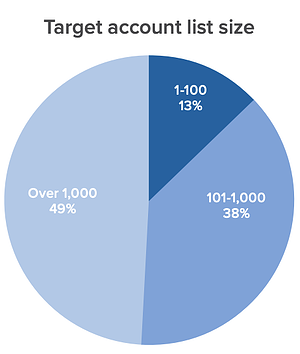
  • 57% of professionals say their companies target 1,000 accounts or under with ABM. target account list size average for account-based marketing

Image Source

Image Source

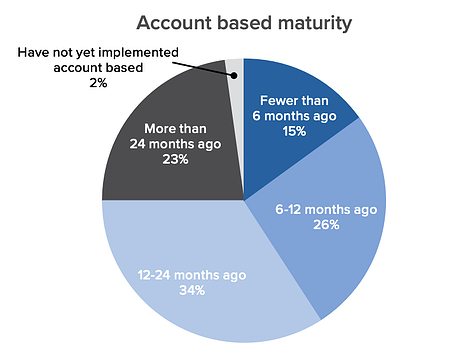
average maturity of account based marketing tactics

Image Source

Benefits and Challenges of ABM

Top challenges marketers face with Account-Based Marketing

Image Source

ABM Technology

Smarketing Benefits and Challenges

Create an Effective ABM Strategy

As a marketer, it’s important to know what makes ABM techniques successful and how they differ from other target audience marketing tactics.

Additionally, you’ll want to learn about the companies you’re interested in marketing to, similar to how you learn about a target audience. For example, before creating an ABM campaign, you’ll want to learn about the pain points of companies in your industry, company missions, and what their top decision-makers value in a product or service.

Once you discover valuable data about the accounts you’d like to market to and feel ready to create a campaign, check out our account strategy templates below.

Editor’s note: This post was originally published in May 2020 and has been updated for comprehensiveness.

account plan template

Categories B2B

The Top Business Podcasts You Need to Be Listening To

Love learning about business and how some of today’s most successful entrepreneurs and companies are operating? Business podcasts serve as a great way to stay informed (and inspired) on the happenings.

All you need is your smartphone and a pair of headphones to tune in to everything from one-on-one interviews with today’s top leaders to recaps of the day’s most pressing business news.

So whether you’re a seasoned executive looking for something to listen to during your commute or just someone who’s always itching to learn something new, this list of the best business podcasts is for you. From Kai Ryssdals’ Marketplace to Tim Ferriss’ self-titled collection of wisdom, the following seven business podcasts will teach how to strategize, lead, and grow your business. 

Listen to the Shows in HubSpot's Podcast Network Now

12 Best Business Podcasts

1. iDigress Podcast

Troy Sandidge, host of iDigress Podcast, has a track record of generating over $100M for various business ventures. He’ll use his experience to expertly guide you through the world of marketing, moving you away from confusion and towards the techniques and tools that will help you forge a path to business success. iDigress is a great fit for all marketers seeking across the board advice, from how to identify a business direction to finding clarity in your messaging. 

Episodes are 30 minutes or less, making it a great snackable podcast for on-the-go listening. 


2. Radical Candor

Radical Candor is all about how to succeed at work without sacrificing your humanity and happiness. Amy Sandler hosts discussions about why it’s important to have honest communication when working (with yourself, management, and coworkers), and how honesty will help you build relationships that will lift you up and help you succeed. 

Topics discussed on the podcast include how to have candid conversations at work, how managers and business leaders can create a culture of guidance and feedback, and how to stand up for yourself in the workplace. 

3. Duct Tape Marketing Podcast

Duct Tape Marketing Podcast features interviews with expert authors and thought leaders who share actionable business marketing tips and resources. As a listener, you’ll learn about various topics like how to maintain happiness at work and best-practices for retaining customers. Fast Company named this podcast “One of the Best Podcasts for Business-Savvy Listeners.”


4. The Goal Digger Podcast

Jenna Kutcher, host of The Goal Digger Podcast, is an experienced educator and digital marketer. Described as a live workshop, the show helps businesspeople learn first-hand about how to define their own personal success and chase after their dreams. 

Topics covered include productivity hacks, creating business pitches, improving your website’s SEO, social media tips, and how to build the job of your dreams. Kutcher is often joined by notable guests and industry experts, like entrepreneur Lori Harder.


5. CodePen Radio

CodePen is an online tool for web developers to test HTML, CSS, and JavaScript code snippets. Hosted by CodePen employees, CodePen Radio contains personal stories about successes and failures they’ve come across when scaling their company. It’s great for professionals in the software industry, as you’ll gain valuable insight into everything involved in starting and maintaining a web software business. 


6. Choose Inclusion

Three hosts, Mike Hess, Nina Baliga, and UB Ciminieri, have authentic and honest conversations about the different ways diversity, equity, and inclusion impact businesses. It’s a great listen for all professionals as they discuss everything from developing a DEI program at your own business to being an active participant in workplace events. 


7. The MarTech Podcast

The MarTech Podcast, hosted by Benjamin Shapiro, shares the stories of marketers and the different ways they use technology to achieve growth and business success. Each episode features a different business leader and marketing professional, making it suitable for listeners in all industries. All guests provide insight into MarTech best practices through real-life experiences and recommend tools and tips for success. 


8. Brown Ambition

Brown Ambition Podcast features financial advice from two professional finance reporters, Mandi Woodruff-Santos and Tiffany Aliche. Listeners can leverage the host’s experience and learn how to make smart career choices that contribute to financial success personally and in business. 

The hosts also tackle issues commonly faced by communities of color, acting as a resource for groups often left out of financial wellness conversations. They also have entire Q&A episodes dedicated to answering listener questions, helpful for those with a unique situation they want advice about. 


9. Happiness At Work

Happiness At Work is an interview-based podcast featuring authors, entrepreneurs, coaches, and leading industry experts that discuss, well, happiness at work. 

It is great for business professionals looking to create a better work-life balance or those simply looking to maintain their happiness levels on the job. As a listener, you’ll learn actionable tips for creating a positive and uplifting workplace culture and the benefits it brings to the workplace. The best summary of the show comes from the creators themselves — “We believe that happiness at work should be the ‘norm’ and not the exception.”


10. Inclusion Works

Inclusion Works focuses on discussing the importance of creating a workplace culture that is inclusive to all communities. Hosts speak to seasoned DEI business professionals, like Jiquanda Nelson and Margot Slattery, who provide actionable advice on DEI strategies that work and help businesses thrive. 


11. HBR IdeaCast

HBR IdeaCast is a weekly podcast that features notable leaders in business and business management. Rotating hosts give listeners a different experience, and topics range from workplace innovation and productivity to creating a better work-life balance to managing employees. Running between 20 and 30 minutes, episodes are snackable and easy to consume on-the-go, or during work breaks where you’re looking to decompress. 


12. TED Business

TED Business is a great podcast for high-quality snackable business content. Host Modupe Akinola talks listeners through getting a promotion, setting realistic goals, and forming positive workplace relationships. You’ll leave with actionable tips for forging your path, as, at the end of every show, Akinola gives a mini-lesson on how to apply the tips discussed within the episode. 

Ready to Listen?

Select the show that best fits your needs, and start listening from wherever you are, whenever you want.

hubspot podcast network

Categories B2B

150 of the Best Email Subject Lines We’ve Ever Seen

I’d venture to guess you get tons of emails in your inbox every day.

From coupons to daily deal sites, from newsletters to your mother wanting to know when you plan to visit — it’s a lot to sift through, never mind actually open. The average click-to-open rate is a slim 14.1%, so you’re not the only one.

Download Now: 100 Email Subject Line Examples

What does it take for someone to actually open an email? Often, it’s the subject line. After all, it’s your very first impression of the email. From that first impression, you’ll do your best to judge the content inside.

So what makes a good email subject line? It’s a message that conveys urgency, curiosity, personalization, and so much more. But it’s up to you to make that distinction of which fits best in your business offer and appeals to your audience.

Let’s take a look at a few examples that, old or new, we’re crazy about — plus what makes them so great. We have 100 awesome subject lines to offer you already, but read on for 50 more that we found eye-catching.

(While you’re at it, check out our Out-of-Office Email Generator to make your email address even more delightful to your contacts.)

Subject Lines for Retargeting

1. “We Saw You Checking Us Out 😏”

Sender: DollsKill

A clothing brand like DollsKill uses cookies to monitor what its customers have been eyeing. By sending an email subject line reminding them of items they admired can reel customers right back into their next purchase. The statement itself has a playful and conversational tone that comes off flirty, a reflection of its company branding.

The emoji also adds more fun and temptation to the message — reiterating that “you know you want to” feeling regarding items they have already clicked on before.

2. “Uh-oh, your prescription is expiring”

Sender: Warby Parker

Not too long ago, a HubSpot alum received this email two weeks before he needed to renew his prescription — talk about great timing. And when your eye prescription is expiring, it happens to be an excellent time to upgrade your glasses. By sending an email at the right time, Warby Parker increased its chances of this email getting opened.

But timing isn’t the sole reason we included this example. This subject line is brilliant because it appeared at the right time and with the right tone. Using conversational words like “uh-oh,” keeping the subject line sentence case, and leaving out the period in the end, the subject line comes across as helpful and friendly — not as a company trying to upsell you.

3. “The timer’s going off on your cart!”

Sender: King Arthur Flour

Similar to Warby Parker, this subject line makes use of urgency. If I don’t take action on my King Arthur Flour shopping cart — like actually buying the items — it will be cleared, and I’ll have to start all over again.

Okay, so maybe this is a low-risk scenario. But when it comes to my baking goods, I personally don’t like to take any chance of forgetting what I was going to buy. That’s where the personalization aspect of this subject line comes in: King Arthur Flour — especially its online shop — tends to attract both professional and home bakers who take all things culinary a bit more seriously than, say, someone who only buys flour on occasion from the supermarket. And wouldn’t you know? Those are the same bakers who probably don’t want to spend time building their shopping carts from scratch.

The moral of the story: Know your audience when you’re writing email subject lines. Is there something that they take seriously more than others? If so, incorporate that into your copy.

4. “What Did You Think? Write a Review.”

Sender: REI

I received an email with this subject line about a week after buying a portable stove at REI. I had just gotten back from a camping trip, too. It was perfect timing for them to ask me what I thought of it.

Companies ask satisfied customers to write reviews of their business all the time. But when you specifically send these requests to the people who just purchased something from you, you’re being smart with your mailing list and reaching recipients whose interest is still warm.

Another reason this subject line works? It’s not expecting a good review. REI is genuinely asking me what I thought of the stove I bought. Maybe I hated it (though I didn’t). The company just wanted me to speak up.

5. “A Sneak Peek for VIPs Only.”

Sender: Serena & Lily

Loyal subscribers can preview clothing collections via email, as seen here with Serena & Lily. By offering a “sneak peek”, customers know they have more exclusive access and will want to click open the email to see what they want before the general public can see it.

This concept keeps the customer relationship alive and coming back for more if the email marketing is done right.

Straightforward Email Subject Lines

6. “👗 Free (Cool!) Clothes Alert 👖”

Sender: Clover

First of all, we have a not-so-secret love for emojis in email subject lines. Personally, I’m partial to turquoise — so when I see an email implying that I might somehow be able to obtain free turquoise clothes, chances are, I’m clicking.

That’s part of what makes this subject line work. It draws the recipients’ eye by using visual content (emojis), and it hints at an offer of something free. That hint is an incentive to open the email because there’s something to gain inside.

7. “🐶 Want a Custom Emoji of Tullamore & 6 Months FREE Walks? Book a Walk Today for Your Chance to Win!”

Sender: Wag!

For reference, Tullamore is the name of my colleague Amanda Zantal-Wiener‘s dog. And the subject line she received, written above, is another winning example of perfect emoji placement — especially when it’s a cute dog.

Here’s a great example of how personalization goes beyond the email recipient’s name. Wag!, an on-demand dog-walking app, includes the names of its customers’ pets in a portion of its email subject lines. But this type of personalization is more than just a first-name basis. If there’s anything my colleague Amanda loves more than free stuff and baking goods, it’s her pup. Wag! knows that, and by mentioning Tullamore by name in the subject line — in tandem with an offer, no less — it caught her attention and piqued her interest.

8. “Best of Groupon: The Deals That Make Us Proud (Unlike Our Nephew, Steve)”

Sender: Groupon

It’s hard to be funny in your marketing, but Groupon’s one of those brands that seems to nail it again and again. After all, who can forget this classic unsubscribe video?

This subject line is no exception. The quip, “(Unlike Our Nephew Steve),” actually had us

laughing out loud. Why? It’s completely unexpected. The first part of the subject line looks like a typical subject line you’d get from Groupon, highlighting a new deal. The parenthetical content? Not so much — making this one a delightful gem to find in your inbox.

9. “Rock the color of the year”

Sender: Etsy

In six words, Etsy was able to promote a product solely by its color, and inform you that there is apparently a “color of the year.” The email is truly too intriguing not to open.

Etsy is an e-commerce website for user-created marketplaces, and the reason we were impressed by its subject line was because of the way it uses mystery to drive value into a suite of products. This email isn’t an invitation to buy clothing or jewelry; it’s an invitation to find out what the color of the year is.

10. “How to live at home 24/7”

Sender: Feather

If you’re anything like me, the COVID-19 pandemic had you wearing PJs from day to night, only changing when you had Zoom meetings at work. As a social distancing precaution, you likely used delivery services instead of going out and getting food on your own — which means that you were effectively living at home 24 hours per day, seven days a week.

This email from Feather, a furniture rental store, perfectly encapsulates a frustration many of us faced: How do you live at home 24/7 without feeling like you’re going crazy? With this subject line, Feather promises to help you find a solution by using furniture that makes it easier to stay at home for extended periods.

Try it: Use a “How To” subject line to tell recipients what they can achieve with your products. Then, in your email, include links to the products that will help them achieve those goals.

11. “Take $20 off your order of $25 or more”

Sender: UberEats

You don’t always have to make your email subject line flashy. In this case with UberEats, just the offer alone is good enough to make any hungry customer click.

Your product offering, if it’s appealing, can speak for itself in your subject line. Customers know they can take advantage of the opportunity in the body of the email, as I will for dinner tonight.

12. “Where to Drink Beer Right Now”

Sender: Eater Boston

Okay, you caught me: I’m a beer lover. But that’s not what hooked me here. The subject line arrived in my inbox just at the time I needed it: at 6:45 on a Wednesday evening. Absolutely. Genius.

Think about it: You’re just over hump day and want to decompress with a few coworkers after work. Right as you’re about to head out, you get a notification on your phone that says, “Where to Drink Beer Right Now.” Perfect timing makes this subject line something you can’t help but click on.

For your own emails, think about how timing will affect how people perceive your emails. Even if you send an email in an off-peak hour, you could get higher engagement — if you have the right subject line.

13. “1,750 points for you. Valentine’s flowers & more for them.”

Sender: JetBlue

It’s such a specific number … 1,750 … of course you’re going to open this.

Coming from an airline, an offering of “points” might as well be gold to someone who likes to travel. And, if that recipient also has a significant other, sending this email leading up to Valentine’s Day is a home run.

The best part about the subject line above is how particular JetBlue was about the number of points available. Instead of, say, “20% your next return flight of 1,000 miles or more,” this subject line gives it to you straight: 1,750 points, and all you have to do is buy flowers for your loved one. You’re already wondering how far you can fly with 1,750 points, I can tell.

14. “Free Oversized V-Neck.”

Sender: Los Angeles Apparel

I don’t know about you, but free is my favorite price when it comes to apparel. This brand has a simplistic and straightforward approach to its subject line by letting customers know what they can get in their next order.

And by keeping it short, it makes the subject line even more effective because the only other context the customer can see — is when they click open the email.

15. “Here’s that discount you wanted”

Sender: LAMODA

This subject line almost feels like it’s reading my mind. When I scroll through my endless emails, considering the businesses I want to buy from, I’m waiting for a discount or sale to be announced.

It’s straightforward and knows exactly what its customers want — key to getting clicks.

16. “3 ways to improve your Pins”

Sender: Pinterest

For those who love to curate their social feed, Pinterest is one of the best places to do it. For those trying to grow their following, they’re probably looking for all the advice they can get from the website itself.

Providing a numeric list of strategies to use in the ever-changing algorithm, it can prove useful to click on Pinterest’s emails periodically. This uncomplicated messaging in a subject line presents users with exactly what they’re looking for, right in their inbox.

Attention-Grabbing Email Subject Lines

17. “*Don’t Open This Email*”

Sender: Manicube

Ever been told to not do something? Being asked to refrain from something can actually have the opposite effect — you now want to do that thing even more.

That’s the strategy behind Manicube’s subject line. It’s a simple but effective way to make people curious enough to open your email. (Just be sure that the contents of your email have something worthy of that subject line.)

18. “Important Weather Advisory”

Sender: RCN

Any time we see a weather-related alert, our ears perk up. In RCN’s case, it isn’t just a way to lure recipients into opening an email. The subject line above is RCN’s way of updating its customers to potential power outages and driving attention to the brand that provides them with cable and Wi-Fi — even during inclement weather.

If you can hitch your email marketing campaign to an event you know people pay attention to, and have something helpful to offer in response, you’ll see your email open rate soar.

19. “What Can You Afford?”

Sender: Zillow

Imagine getting this subject line in your inbox from a website showing apartments for rent. It’s both exciting and encouraging (“Here are a bunch of apartments right in your budget. Yay!”), but also kind of competitive — pitting your cash against what the market offers. Would you click it? I certainly would.

Personalizing emails to cater to your audience’s emotions — for which there’s a broad spectrum when it comes to real estate — is key to getting people to open your emails. You don’t have to be a psychologist to know how to take advantage of them, either. In addition to principles like urgency, crafting an email subject line that implies scarcity is another great way to increase your conversion rates.

20. “As You Wish”

Sender: UncommonGoods

When writing emails, you should also think about the recognizable names and references that make people tick. For example, take this subject line from UncommonGoods forwarded to us from HubSpot’s Content Director, Corey Wainwright, who happens to be a die-hard fan of The Princess Bride. Apparently, “As You Wish” is a pretty big reference to that movie, so when she saw this subject line in her inbox, she just HAD to click.

Even though she knew the email was part of a larger-scale send, it almost seemed like it was tailored for her personally — after all, why else would it include a reference to Princess Bride in the title?

UncommonGoods knows its buyer persona like the back of its metaphorical hand. While it may not send emails to individual subscribers with references to their favorite movies in the title, it does have a general understanding of its subscribers and their interests.

21. “Not Cool, Guys”

Sender: BuzzFeed

We love BuzzFeed. If nothing else, its staff knows how to write great copy — and that sentiment includes an exceptional email marketing team. Many of my colleagues have signed up for BuzzFeed’s daily emails, and pretty much any day of the week, itwins for best subject line in their inboxes.

While there are a few of BuzzFeed’s subject lines here and there that aren’t anything to write home about, it’s the combination of subject lines and the preview text that is golden. They’re friendly, conversational, and, above all, snarky.

Here’s the text that followed the subject line above: “Okay, WHO left the passive-aggressive sticky note on my fridge. Honestly, who acts like this?” That conversational tone and snark pull us in over and over again — and it’s the preview text that completes the experience for me.

We’re not all equipped to be snarky writers, but most email platforms have the preview text easily available to edit. How can you use that little extra space to delight your customers (oh, and probably improve your email metrics)? Maybe you could use the subject line as a question, and the preview text area as the answer. Or maybe it’s a dialogue: The subject line is one person, and the preview text is another.

You get the idea. By using that space, you have more opportunities to attract new subscribers.

22. “DO NOT Commit These Instagram Atrocities”

Sender: Thrillist

No matter how humble people are, most don’t like to do things wrong … so why not play on that natural human tendency in an email subject line, especially if you’re in the business of helping clients (or prospective clients) succeed? Thrillist certainly does in the subject line above, and it makes the language even more vibrant by using do not — a great takeaway for B2B marketers.

Instead of using the typical contraction “don’t,” Thrillist spells it out and adds the all-caps for effect. That way, you’ll notice the subject line in your inbox, and then find it harder to resist clicking on it.

Think about how going negative in your marketing might be a good thing. For example, many of us have anxiety about looking silly and stupid, so figure out how you can play to those emotions in subject lines. Of course, it’s important to back up that subject line with encouraging, helpful content, so that you’re not just ranting at people all day.

Getting negative can get your subscribers’ attention — this subject line certainly caught mine.

23. “Everything you wanted to know about email copy but were too afraid to ask”

Sender: Copy Hackers

Here’s another great example of leveraging your audience’s full plate to your email marketing advantage. Who hasn’t refrained from asking a question out of fear of looking silly or out of the loop? Excuse me while I sheepishly raise my hand.

” … but were too afraid to ask” is one of those phrases that, to us, probably won’t go out of style for a long time. People seek insights from Copy Hackers — an organization dedicated to helping marketers and other professionals write better copy, as the name suggests — because, well, they have questions. They want to improve. And when that audience is too afraid to ask those questions, here’s Copy Hackers, ready to come to the rescue with answers.

What does your audience want to know, but might be too embarrassed to ask? Use that information to craft your content — including your email subject lines.

24. “Abra-cord-abra! Yeah, we said it.”

Sender: Quircky

This punny email subject line from Quirky is plain fun. We’re suckers for puns in the right situation.

What we like most about it is the second part: “Yeah, we said it.” The pun in the beginning is great and all — it refers to a new invention featured on Quirky’s site to help everyday consumers detangle their numerous plugs and cords — but the second sentence is conversational and self-referential. That’s exactly what many of us would say after making a really cheesy joke in real life.

Many brands could stand to be more conversational and goofy in their emails. While it may not be appropriate to go as far as Quirky’s subject line, being goofy might just be the way to delight your email recipients.

25. “🔥 Hot freebie alert! 15 free gifts, you pick 5.”

Sender: Shutterfly

Shutterfly, a company that allows you to print your photos on interesting products or other frames, gets visual with its subject lines by occasionally using an emoji. Due to the company’s nature and creative audience, the fire emoji in this subject line draws the eye without feeling desperate.

The email subject line also pops because it has a lot of buzzwords, including “hot,” “freebie,” “gifts,” and “alert.” In just one line, it can give the potential reader a good reason to open it, especially if they love using Shutterfly.

The content inside the email aligns perfectly with the subject line by announcing a freebie promotion. This strong alignment between the subject line and message keeps people from skimming the email.

26. “From chaos to calm ✨🏡”

Sender: Open Spaces

If you’ve ever had a cluttered home, you know how chaotic it can feel. Open Spaces takes advantage of that by suggesting how you’ll feel after you use the company’s products.

Its emoji choices also indicate how your home will look and feel: Sparkling clean. I’m not a huge fan of cleaning, but Open Spaces promises to make it easy in the simplicity of their subject line. The brand also proves that it knows its target customer exceedingly well — if you want to create “open spaces,” you likely won’t tolerate chaos in your home.

In the same way, try to allude to the feelings that your target customers want to feel, as well as their goals and inner desires. You can also let emojis speak for you. For instance, if Open Spaces had used the subject line “From chaos to calm: Get a sparkling clean home,” the focus would be off of the “from chaos to calm” piece, which is what readers most care about.

27. “Welcome Gift! Offer Inside 👀…”

Sender: EyeBuyDirect

When you subscribe to a business you’re new to, you’d hope you can get a perk before your first purchase. EyeBuyDirect makes its statement in a subject line that makes the prospect feel like subscribing was a good choice, and strikes curiosity.

Without specifying what the offer is, the customer has no choice but to click and see what they can take advantage of.

Now that we’ve covered the best subject lines in general, let’s dive into the best newsletter subject lines.

28. “Colorful things for colorful homes”

Sender: Baggu

I can’t speak for you but I’m a sucker for all things bright in color. And what makes this an attention-grabbing email subject line is that this brand is known for making reusable bags (hence the name).

This email makes its customers imagine a new type of product they could be revealing, and when I clicked, I was surprised to see all new items like towels, bedsheets and more.

Newsletter Subject Lines

Newsletter subject lines must work harder to get the recipient’s attention because they allude to information only. In contrast, a subject line offering a discount will automatically make the recipient want to click.

Newsletter subject lines must hook the reader and get them to click. The examples below do an excellent job at it.

29. “China Falls, Sleepy Unicorns, And The Deals Aren’t Bigger In Texas”

Sender: Crunchbase

The Crunchbase Insights email has an interesting way of wrapping details about all the stories it will present you in one subject line. This is eye-catching because it seems like an odd mashup of words, but gets to the point about three complicated stories at the same time.

When it comes to email, Crunchbase is known for its longer, text-based emails. They all read like a more conversational letter to the email recipient and casually discuss and hyperlink Crunchbase’s top stories. While the subject lines feel interesting and eye-catching, the emails often report deeper business news that cut right to the chase.

This subject line shows how you can be punchy, but also fun and creative when trying to pull in your audience.

30. “Watch Out for This Amazon Phishing Scam.”

Sender: WIRED

In this subject line, WIRED includes Amazon, a large company name. Including the name of a big brand can be a great way to boost open rates because people who enjoy or use products from big brands might click into a subject line that discusses them.

Additionally, when a brand name is combined with negative words like “phishing” or “scam,” people might open the email much more urgently so they can learn how to avoid running into the issue being discussed.

WIRED also lists the story last in its newsletter. This is an interesting way to get your readers to scroll through the entire email and see the other stories before they get to the story that led them to click into it.

31. “Buffer has been hacked — here is what’s going on”

Sender: Buffer

Next is a subject line from Buffer. A few years ago, Buffer got hacked — every tech company’s worst nightmare. But Buffer handled it exceptionally well, especially on the email front.

What we admire about the subject line is that it’s concise and direct. In a crisis, it’s better to steer clear of puns, snarky comments, and emojis. People want to see that you’re taking the situation seriously and be reassured that the world isn’t ending.

Because of the way the subject line is worded and formatted, you feel like Buffer is calm and collected about the issue, and is considering your personal safety. That’s pretty hard to do in just a few words.

32. “Google sees smartphone heroics in Oreo. It’s The Daily Crunch.”

Sender: TechCrunch

If you’re subscribed to a newsletter from a publication like TechCrunch, chances are, you signed up because you’re either interested in or want to learn more about technology. To reflect that, the media outlet crafts its daily email roundups (“The Daily Crunch”) with a subject line that reflects one of the latest, most compelling news items in the industry.

Here’s the thing: Staying on the cutting edge is hard, especially with something that evolves as quickly as technology. So, by writing email subject lines that reflect something recent and relevant, TechCrunch is signaling to email recipients that opening the message will help them stay informed and up-to-date on the latest industry news.

Think about the things that your audience struggles to keep up with — then, craft an email roundup and matching subject line that reflects the latest news in that category.

33. “Black Friday shoppers are the worst customers”

Sender: LinkedIn

This subject line is likely the boldest of the Black Friday emails you’d see in your inbox in the days before Thanksgiving. Yes, it’s a bit judgmental, but it actually came in a LinkedIn Pulse newsletter, promoting an article one of its users wrote on the topic of holiday marketing.

And there’s no doubt the title resonates with how some people feel during the most hectic holiday shopping day of the year.

LinkedIn has nothing to sell on Black Friday, so the subject line above does little harm to its business. Nonetheless, commenting on a popular cultural observation can show your confidence and help you relate to your community.

34. “New recipe alert 🚨”

Sender: Hello Fresh

While Hello Fresh is a food service that delivers meal packages to its customers, it also provides customers with home kitchen tips and tricks in email newsletters. These extra resources encourage home cooks to try new things, and being offered new recipe ideas is an exciting opportunity.

Using an emoji here is simple and draws the customer’s attention, while the offer itself can only be viewed in full when clicked — an easy way to draw in more aspiring home cooks.

35. “Tips to increase remote collaboration”

Sender: Asana

This simple subject line from Asana, a project management platform, gets straight to the point: If you open the email, you’ll find remote work tips and beyond. The subject line also effectively capitalizes on an increasingly common trend that rose during and after the COVID-19 pandemic. Its simplicity and trendiness ensure that you’ll want to open the email.

And chances are that if you’re using Asana, you’re likely using it to collaborate with colleagues whom you might not see every day, even if you’re not fully remote. Asana effectively appeals to a wide range of potential users and buyers with this subject line.

36. “I got Botox — & THIS is what it looked like”

Sender: Refinery29

Okay, so maybe your business doesn’t involve Botox. But still — are you intrigued? I am, and despite my better judgment, I clicked.

That’s the power of leading your emails with a story: It sparks curiosity, which works in two ways. There are times when our natural curiosity can pique our interest without context, such as the example above. But in this case, the subject line implies that there’s an intriguing story ahead. Why the heck did this person get Botox? And what did it look like? As the saying goes, “Inquiring minds want to know.”

Think of the stories behind your industry, then find ways to include them in email newsletters and frame them within the subject line in a way that piques your recipients’ collective curiosity.

37. “Improve Your Website from Concept to Code 💻”

Sender: Namecheap

Want people to open your newsletter? Tell them how they’ll benefit straight away like in this newsletter subject line by Namecheap. It used this subject line for Inspire, its monthly newsletter, and like in the WIRED example, it left the subject line story last so users would scroll through the entire email.

Like many examples on this list, it uses an emoji to draw the eye and keeps the tone of the conversation more casual and fun. In contrast, the subject line “Improve Your Website from Concept to Code” feels much more wooden and unfriendly.

38. “The best options for grocery delivery”

Sender: Wirecutter

Simple, right? But effective. This newsletter’s subject line from Wirecutter gets straight to the point and solves one of the biggest challenges we faced during the pandemic: How to get groceries while social distancing. If you’d never used grocery delivery services up until that point, you’d likely be at a loss for what services to use.

Wirecutter realizes that and immediately invites you to open the email with a simple and actionable subject like.

39. “Mark your calendar for these key dates!”

Sender: Omaze

Omaze is known for raising money for charities across the globe in the form of raffling once-in-a-lifetime opportunities with each donation. Contributors love to learn more about the charities at hand, and the sweet prizes they could win along with them on a monthly basis.

By announcing its upcoming opportunities, it can help people choose which causes they’ll want to give toward, and be excited to contribute when the time comes.

40. “‘I didn’t realize architecture was so dangerous’”

Sender: Dezeen

Dezeen is an architecture and design publication whose newsletter subject lines always feature a comment from a user. Only one comment is chosen every week.

This approach is brilliant for various reasons: 1) It makes you wonder why the user made that comment and will make you click through. 2) It makes you want to comment on the publication’s posts to potentially get featured. And 3) It takes the work out of writing a subject line. Indeed, Dezeen doesn’t have to write a subject line at all, because its readers do it for them.

Here are a few comments that have been featured of late:

  • “Absolute garbage”
  • “The cardboard box aesthetic”
  • “Meet The Flintstones”
  • “Does it come with a smoke machine?”

If you have a publication that’s often commented upon, consider using one of the comments as your subject line.

HubSpot Email Marketers’ Favorite Subject Lines

Above are some of the best subject lines we’ve gathered, but we asked both former and current marketers on our team to give some additional favorites and what makes them so good:

41. “Show them what you’re made of”

Sender: Canva

“Using empowering, positive, and defiant language to leverage the use of Canva tools — love it.”

— Lucy Reddan

42. “Drooling over email designs 🤤”

Sender: Really Good Emails

“Emojis always catch my eye amongst the 100+ emails I receive daily. As an email geek myself, this subject line matched my interests and piqued my curiosity.”

— Ashley Riordan

43. “Can you help me name this dance, [First Name]?”

Sender: Marie Forleo

“It’s personalized and piques my interest because A) I’m being asked for input and B) I want to be in the know about this mysterious dance (#fomo).”

— Christina Perricone

44. “Who you gonna call?”

“If you can make a pun, include a social reference, or even just a familiar phrase, it’ll catch people’s attention.”

— Clint Fontanella

45. “Shoes You Can Wear All Damn Day”

Sender: Everlane

“Swearing is controversial in email marketing, but I think it worked really well in this email from Everlane. Not only was it a clever and concise way to introduce their new line of footwear called ‘The Day Collection,’ but it also aligned with the brand voice they use in other emails and across their website.”

— Anna Fitzgerald

46. “You were on point last week 🎯”

Sender: Grammarly

“Grammarly is so good about rewarding you and making you feel good about your writing.”

— Jordan Pritikin

47. “Hmm…No writing activity last week?”

Sender: Grammarly

“If or when you turn their plugin off, Grammarly’s retention strategy is great. They reach out with subject lines like these that immediately drive me to click through and turn their plugin back on. Very well done.”

— Jordan Pritikin

48. “‘Not intended for swimming’”

Sender: Dezeen

“I’m a sucker for architecture, and Dezeen’s weekly newsletter tells me the top new projects that come up, as well as their reader’s responses to them. My question is: What’s not intended for swimming? And if it’s not intended for swimming, why did the architect build it? Boom, you’ve got my interest. And my click.”

— Ivelisse Rodriguez

49. “Our #1 most asked question…”

Sender: Supergoop

“What an easy way to get me to click — by trailing off and leaving the rest of the content in the email. Nicely done, Supergoop.”

— Ivelisse Rodriguez

50. “[First Name]! You’re One of HubSpot’s Top Blog Readers 🎉”

Sender: HubSpot

“No one actually likes taking feedback surveys. Not unless you earn money, and not many of them offer that. When I received the above email from our very own HubSpot blog, I clicked straight through, and voila! There it was: A feedback request. Turns out, flattery does work.”

— Ivelisse Rodriguez

The Best Email Subject Lines are Simple and On-Brand

When writing subject lines for your emails, keep it engaging, simple, and on-brand. Don’t forget to appeal to the emotions and needs of your target buyers, and most importantly, have fun — include emojis, puns, or references to pop culture. Your emails will get opened, guaranteed.

Editor’s note: This post was originally published in November 2013 and has been updated for comprehensiveness.

New Call-to-action

Categories B2B

How Advertisers are Navigating iOS 14’s Mobile Tracking Changes

It’s been several months since Apple’s iOS 14 update went into effect and the dust has begun to settle. One of the main questions has been, “How are advertisers handling the mobile tracking changes?”

Earlier this year, we talked about how this change could impact advertisers, but now, we want to follow up. Have any new strategies evolved? What have advertisers been doing to reach their target audiences?

In this post, we’ll discuss how advertisers have navigated the iOS 14 mobile tracking changes and give you a few tips on how to have continued success with social media and online advertising.

Download Now: State of Marketing in 2021 Report

Wait, what happened with the iOS 14 update?

To summarize, at the beginning of 2021 Apple released a new update that would impact the way that advertisers reach their audience. With the iOS 14 update users needed to opt-in, or give permission, to an app to track their activity outside of the platform.

So, why were advertisers and marketers concerned? Well, a lot of ad campaigns target audiences based on their behavior online. If an app can’t track that information, ads will become less personalized, and in turn, could be less effective.

The concern for marketers was that they wouldn’t be able to deliver their ads to people based on certain activities, like if they’d visited their website, for example. This meant that ads would likely have smaller audience sizes and less accurate reporting.

Additionally, with this update advertisers are only allowed to use up to eight conversion events from a single website domain. This means if you run a campaign and track several different conversion types (like Lead, Landing Page Views, Purchase) you’ll now be capped at eight at any given time.

Now, you might be wondering, “What have advertisers been doing?” Let’s discuss it below.

How Advertisers are Navigating the iOS 14 Mobile Tracking Changes

While the iOS 14 update has made advertisers jump through some more hoops in setting up their ad campaigns (getting domain verification and aggregated event management), the update ultimately hasn’t been the death of retargeting or Facebook ads.

Of course, there have been changes. So far, it looks like more than 90% of users are opting out of data tracking. This is more than industry experts were predicting.

So, what have advertisers been doing?

1. Diversifying ad spend.

The main story of how advertisers are navigating the latest iOS tracking update is diversifying ad spend.

This means companies have shifted some ad spend that was previously allocated to Facebook to other platforms like Google because of the remarketing features and the ability to target users based on search intent.

2. Reporting Facebook success with Google Analytics.

While some money is still being used to advertise on Facebook, there are different ways of reporting.

Companies have begun using UTM parameters on their site’s URLs to generate data tracked by Facebook to Google Analytics. This means you can use Google Analytics to track some of the activity on your Facebook ad campaigns.

3. Using owned data for lookalike audiences and retargeting.

Strategies such as using lookalike audiences or retargeting an email list have continued to drive results. With privacy updates becoming a norm for the big tech companies, marketers will need to begin focusing on owned data to inform their campaigns.

With your owned data (such as an email list), you can target lookalike audiences or retarget those very people.

Keep in mind, you can still use the old method of retargeting campaigns because not all of your audience is on iOS devices. You can still use the channel as a cost-effective way to see some return on ad spend (ROAS).

4. Using other Facebook advertising options.

Besides these new ways of approaching ad campaigns, some advertisers are investing in other ways to reach audiences on Facebook.

For example, you can use the messaging objective to create a lead-generating chatbot on Facebook Messenger. There are options to retarget users who reach out to you on messenger and start conversations with new leads who click on an ad of yours.

Additionally, Facebook has another strategy that advertisers have explored: the Facebook lead ads (in-app lead form).

While using your own landing pages is definitely the preferred method, in a cookieless world, using lead forms on Facebook can help you generate leads and capture first-party data.

The iOS 14 mobile tracking changes have made Facebook ads less effective, but there are still ways for advertisers to target their audience and generate leads on the platform.

state of marketing

Categories B2B

How Google’s Head of Startups LATAM Helps Brands Globalize Their Business [+Tips for Marketers]

Nike. McDonald’s. Airbnb.

What do these three brands have in common?

All three have developed a strong global presence. It’s why you hear about the Whopper in Spain, or spot Nike Jordan’s on the streets of Indonesia.

Fortunately, global marketing isn’t just for big corporations anymore — nowadays, technology has significantly shrunken the ‘cost per entry’ when it comes to developing an international brand.

With social media and search engines closing the information gap between countries, I’m willing to bet some international consumers have already stumbled across your business’ website.

But the question remains: How can you properly market and sell to international audiences? And how can you ensure product-market fit with communities outside your own?

To investigate how startups and small businesses can scale their marketing efforts for a worldwide audience, I sat down with André Barrence, Head of Google for Startups LATAM.

Keep reading to learn Barrence’s tips for how startups can effectively sell to international audiences.

Let’s dive in.

Access Free Resources to Help Your Company Scale

4 Tips for Globalizing Your Marketing Strategy

1. Start with an understanding of your global user.

When developing a global brand, you want to start by identifying the most important factor: To whom are you marketing?

Your user(s) might vary in preferences or lifestyle from country to country, but their challenges — and how your product can meet those challenges — will remain consistent cross-globally.

In other words, how your product can help a user in the U.S. likely mirrors how your product can help a user in Europe or Asia.

As Barrence points out, “What is always a good first solution is to start understanding who your user is, and who your user is everywhere, you know?”

Barrence adds, “I think that startups begin building a product with a specific user in-mind — and startups operate on this idea of serving on a match need, or serving some particular challenge that hasn’t been sold yet. And I think the beauty of technology is that you can basically serve the entire world at this point.”

andre quote on how to globalize your marketing efforts

At this stage, using highly effective analytics tools is key to ensuring you understand your global target persona.

Additionally, you’ll want to use data to determine which region(s) seem most interested in your products or services. This information will help you select a few countries for which you want to create a targeted, localized marketing strategy.

2. Figure out which stories appeal to different audiences globally.

While your product might serve the same needs across the globe, the stories you tell to highlight your product’s key benefits will vary significantly.

As Barrence puts it, “Once you’ve formed a hypothesis on who your user is and why they’re searching for your product, you’ll want to build a marketing strategy that is locally relevant, because the worst experience is when you’re trying to solve for a local need of yours, and for something you’re facing in your own country — but the product that you’re searching for is built for a different experience entirely.”

This is where it’s vital to build credibility in local regions.

Credibility, Barrence adds, is a critical component that is oftentimes forgotten in the hustle of scaling a startup. Startups are often driven by performance — such as traffic, or user acquisition — and building a brand is usually an afterthought.

This is a mistake, particularly when globalizing your business.

“Startups are great at a performance mindset,” Barrence says, “but each time you’re attempting to reach new markets, you want to make sure you’re building a brand, as well.”

Barrence adds, “Once you test a few ways to position your brand in a local market, you’ll want to start developing a more robust strategy for acquiring those users or creating stronger relationships with them.”

3. Pay attention to local flavors when taking your product to the market.

There are a few key factors Barrence encourages every startup to take into consideration before expanding into new, international markets.

First, it’s critical your marketing team understands how to position your product in a new regional space.

As Barrence told me, “It’s very hard for a startup to easily take a position in the [Latin American] market, for instance, because startups in LATAM already understand the user, and they know how to communicate with them and position themselves in the market … So ignoring the local flavors in how you take your product to the market is a big mistake.”

andre interview answer

While he acknowledges this doesn’t have to be perfect, Barrence does tell me the bare minimum requirements when marketing to new international audiences includes:

  • Designing a localized version of your product — including language, user interface, and experience.
  • Translating your materials into the local language, and using more relevant, local examples or references in your marketing messages.
  • Offering support in the local language so users can access help easily when they have questions.

If you don’t have the time or resources to follow the above tips, you might want to reconsider whether it’s a good idea to globalize — since without these fundamentals, your users will have a poor user experience and your brand value will suffer.

Which leads me to my next point …

4. Know when globalizing isn’t a good idea for your business.

There are plenty of startups and small businesses that likely have untapped potential in markets outside of their native countries … but there are still others who should focus their efforts locally, at least for the time being.

So — how do you know which category your business falls into?

Ultimately, Barrence says it comes down to whether or not you have a strong foundation. As he puts it, “One big mistake startups make are scaling prematurely; and the second big mistake is ignoring the signs that you haven’t found product-market fit.”

If you try scaling prematurely, he warns, you risk compromising your existing user’s experience and the health of your entire company. So it’s better to be cautious here.

He continues, “I think testing the waters and making sure you know how to navigate not only the market, but also how to navigate your product and operations within that market, is key.”

Barrence advises, “Not having enough strong evidence for product-market fit is the potential dark side of globalizing your marketing efforts … [If that’s the case], you should focus on building a successful business within your own country first.”

As the world becomes increasingly connected, you’ll want to dive deeper into your analytics to determine whether there is already a demand for your product or service outside of the U.S. — and, if there is, how you can address that demand with fresh, localized content or even revamp your marketing messages to ensure they’re global-first.

Ultimately, the decision to globalize your marketing efforts isn’t an easy one, but it could have big pay-offs in the long run. Among other benefits, globalizing your marketing materials expands your consumer-base and provides you with more opportunities to reach — and sell — to more customers. 

scaling showcase

Categories B2B

278 Social Media Holidays for Your 2021 Content Calendar [+Template]

Do you celebrate International Cat Day, Pizza Day, or Talk Like a Pirate Day?

There are a plethora of observance days worldwide during which marketers can share content relevant to their industries, get involved in a movement, or simply generate more awareness. But odds are, you probably don’t acknowledge these days until you see your favorite brand posting about it.

→ Free Download: Social Media Calendar Template [Access Now]

These social media “holidays” are a fun way to connect with new and existing followers who share an affinity for a specific food, fictional character, or pet.

While we don’t suggest sharing content on social media and then adding an irrelevant holiday hashtag to it, these holidays can be a chance to promote your brand in a relevant way. Not doing so could cause you to miss valuable opportunities where your brand can join the conversations taking place among members of your target audience.

To help you plan for trending holidays, we created a list that you can bookmark, as well as a downloadable calendar so you can receive automatic reminders.

Downloadable Holiday Calendar

To help you keep track of all these unique holidays, here’s a Social Media Holiday Google Calendar.

Aside from 2021 holidays, we’ve also set dates on the calendar to repeat annually — either on the exact date they occur or the weekday they occur within the month.

Want to finish out your 2021 calendar with some upcoming holiday posts? Tap the + symbol in the lower right-hand corner of the calendar below to add it to your own Google calendar.

social media holiday calendar templateUse the Above Template to Plan Out Your Social Media Holiday Posts

National & Global Holiday Calendar: 2021

The list isn’t exhaustive (there are a lot of food-specific holidays out there), and these dates and hashtags may still be subject to change. But this is a great starting point for social media marketers who want to learn more about what’s trending and how they can plan their content in a way that will be fun and engaging on social platforms.

January 2021 Social Media Holidays

iowa state athletics national sticker day social media holiday tweet

Image Source

February 2021 Social Media Holidays

zach covey national weather persons day social media holiday tweet

Image Source

March 2021 Social Media Holidays

national park service national day of unplugging social media holiday tweet

Image Source

April 2021 Social Media Holidays

christina alexandria national siblings day social media holiday tweet

Image Source

May 2021 Social Media Holidays

violet the Newfy world password day social media holiday tweet

Image Source

June 2021 Social Media Holidays

Alex bowman National Donut Day social media  holiday tweet

Image Source

July 2021 Social Media Holidays

Stadium Give Something Away Day Social Media Holiday Tweet

Image Source

August 2021 Social Media Holidays

Wienerschnitzel National Lemonade Day Social Media Holiday Tweet

Image Source

September 2021 Social Media Holidays

Gaeilge @ Colaiste Naomh Caoimhin EDL 2021 Social Media Holiday Tweet

Image Source

October 2021 Social Media Holidays

The Beatles 4ever World vegetarian Day Social Media Holiday Tweet

Image Source

November 2021 Social Media Holidays

Nickelodeon STEM day Social Media Holiday Tweet

Image Source

December 2021 Social Media Holidays

Nobel Prize Day Globalnews.ca Social Media HolidayTweet

Image Source

Sources: National Day Calendar, Sprout Social, TrackMaven, Holiday Insights, Brownielocks, National Peace Corps Association, Sparkflow, There’s a Day for That

Editor’s Note: This post was originally published in January 2017 but is updated annually for comprehensiveness. The most recent update of this post was March 2021.

social media content calendar

Categories B2B

The Best Free Business Budget Templates

Whether you’re a solopreneur or running a massive corporation, you need a business budget to understand where your money is coming from and going. A business budget template can help keep the numbers organized, making it easy for you to track revenue, plan for expenses, and save for future growth.

Click here to download 8 free marketing budget templates.

You don’t have to be an accountant to organize your business budget. There are thousands of business budget templates out there to make the process easy. Once you understand what a business budget is and how it can work for you, you can use one of the following free templates to start organizing your finances.

The business budget follows a set template, which you can fill in with estimated revenues, plus any recurring or expected business expenses.

For example, if you run a digital marketing business, you might know that you typically make about $10,000 for your work creating campaigns, plus an extra $5,000 for your digital courses. You’d list the estimated revenue from all of your business’ revenue streams as incoming money for the business.

Then, you have your recurring expenses, which you would list as outgoing money. This could include employee salaries, office expenses, and software and technology costs.

How to Create a Business Budget

Creating a business budget is a straightforward process, but it can be more complex for larger companies. Here are the basic steps to creating a business budget.

1. Find a Template or Make a Spreadsheet

There are many free or paid budget templates online these days, so you can either use one of those to start, or make a simple spreadsheet with custom rows and columns based on your business. We list a few helpful templates below.

2. Fill in Revenues

Once you have your template, you’ll start by listing all the sources of your business’ income. With a budget, you’re planning for the future, so you’ll need to estimate this based on previous months’ or years’ revenues. For a new small business budget, you’ll rely on your market research to estimate the first revenues for your company.

3. Subtract Fixed Costs for the Time Period

Fixed costs are the recurring costs you have during each month, quarter, or year. Examples include insurance, rent for office space, website hosting, and internet.

4. Consider Variable Costs

Variable costs will change from time to time. Examples include utility bills, advertising costs, office supplies, and new software or technology. While you may always need to pay some variable costs, like utility bills, you can also shift how much you spend toward things like advertising expenses when you have lower-than-average estimated income.

5. Business Budget Planning

Unexpected expenses might come up, or you might want to save to expand your business. Either way, you need to review your budget after including all expenses, fixed costs, and variable costs to find out how much money you can save. It’s wise to create multiple savings accounts for emergencies and for money meant to go back into the business to drive growth.

How to Manage a Business Budget

There are a few key components to managing your business budget to keep it healthy.

Budget Preparation

The process all starts with properly preparing and planning the budget at the start of each month, quarter, or year. You can also create multiple budgets, some short-term and some long-term. During this stage, you will also set spending limits and create a system to regularly monitor the budget.

Budget Monitoring

For larger businesses, you might delegate budget tracking to multiple supervisors, but even if you are a one-person show, you need to regularly monitor the budget. That means setting a time in your schedule each day or week to review the budget and track actual income and expenses, then compare the actual numbers to the estimates.

Budget Forecasting

With regular budget tracking, you can always know how your business is doing. Check-in regularly to determine how you are doing in terms of revenue, where you have losses, where you can minimize expenses, and how you can move more money into savings. You can use well-tracked budgets to create more accurate budgets for future time periods.

Why is a Budget Important for a Business?

A budget is crucial for businesses. Without one, you could easily be drowning in expenses or unexpected costs compared to incoming money.

The business budget helps with several operations. You can use a business budget to keep track of your finances, save money to help you grow the business or pay bonuses in the future, and prepare for unexpected expenses or emergencies.

You can also review the business budget to determine when to take the next leap for your business. For example, you might be dreaming of a larger office building or the latest software, but you want to make sure you have a healthy net revenue before you make the purchase.

Best Free Business Budget Templates

1. Marketing Budget Template

HubSpot Marketing Budget Template

Image Source

Knowing how to manage a marketing budget can be a challenge, but with helpful free templates like this marketing budget template bundle, you can track everything from advertising expenses to events and more.

This free bundle includes eight different templates, so you can create multiple budgets to help you determine how much money to put toward marketing plus the return on your investment.

2. Small Business Budget Template

Small business budget template

Image Source

For small businesses, it can be hard to find the time to draw up a budget, but it’s crucial to help keep the business in good health.

Capterra offers a budget template specifically for small businesses. It works with Excel, and you input projections for the year. Then, the spreadsheet will project the month-to-month budget, and you can input your actual revenue and expenses to compare and easily see profits and losses.

3. Startup Budget Template

Startup budget template

Image Source

What if you don’t have any previous numbers to rely on to create profit and expense estimates? If you are a startup, this Gusto budget template will help you draw up a budget before your business is officially in the market. This will help you track all the expenses you need to get your business up and running, estimate your first revenues, and determine where to pinch pennies.

4. Free Business Budget Template

Business budget template

Image Source

You might be familiar with Intuit, as many companies big and small rely on Intuit’s services like Quickbooks and TurboTax. Even if you don’t use the company’s paid financial services, you can take advantage of Intuit’s free budget template, which works in Google Sheets or Excel.

It features multiple spreadsheet tabs and simple instructions. You enter your revenue in one specific tab and expenses in another. You can also add additional tabs as needed. Then, like magic, the spreadsheet uses the data in the income and expense tabs to summarize the information and even determine net savings and the ending balance.

5. Department Budget Sheet

Department Budget TemplateImage Source

A mid-to large-size company will have multiple departments, all with different budgetary needs. These budgets will all be considered into a massive, company-wide budget sheet, but having a specific template for each department can help teams keep track of spending and plan for growth.

This free template from Template.net works in either document or spreadsheet formats and can help different departments keep track of their income and spending.

Create a Business Budget to Help Your Company Grow

Making your first business budget can be daunting, especially if you have several revenue streams and expenses. But once you get it set up, it’s easy to replicate regularly, and it’s even easier to get started if you have a business budget template to follow.

With a helpful business budget template, a little planning, and regular monitoring, you can plan for the future of your business, including bonuses, new product or service offerings, and expansions.

New Call-to-action

Categories B2B

12 Gantt Chart Examples You’ll Want to Copy

Gantt charts. Love ‘em, hate ‘em, or can’t live without ‘em, they’re a reality of a marketer’s life. But how do you make yours stand out from the rest?

I’ve gathered some of the best examples around, along with some free templates to get you started. Dive in below and find your favorite. But first …

→ Download Now: Free Gantt Chart Template

The elements within a Gantt chart can be grouped into four categories: resources, milestones, tasks, and dependencies.

  • Resources: Project managers must have insight into what resources are needed for tasks outlined in a Gantt chart, in order for each to be completed on time.
  • Milestones: Along your timeline, there will likely be milestones, both small and large, that must be hit in order to keep your project on track. A milestone for a blog launch might be, “Blog post draft due on 5/30.
  • Tasks: There are specific things that need to be completed along the way of your project. In our blog post example, a task might be, “Edit blog post.
  • Dependencies: Tasks on your Gantt chart will be related to each other, for example, the editor won’t be able to complete her task of editing the blog post until the writer has met their milestone and submitted their draft on 5/30. These are dependencies and should be noted in your chart.

Benefits of Using a Gantt Chart

The main goal of a Gantt chart is to track the timeline and completion of a project. It’s beneficial for project managers who need to keep team momentum on campaigns with many moving parts, like product launches or marketing events. Here are some additional benefits of using Gantt charts: 

  • Visual tracking gives an overarching view of projects and their timelines, helping DRIs understand progress and assign responsibility accordingly. 
  • Clear project timelines aid with resource planning, as you’ll know which tasks require which tools and exactly when DRIs will need those tools.  
  • Visual understanding of which project elements rely on each other for completion so PMs can inform responsible individuals of high-priority tasks. 
  • Increased transparency, as all involved parties are aware of expectations and how individual progress impacts team progress.

You can create Gantt charts in Excel, PowerPoint, Google Sheets, and more, and this tracking method can be used in a variety of industries, from marketing to construction, and even design.

So, what does that look like? Let’s dive in with some beautiful Gantt chart examples, below. Prepare to geek out.

Gantt Chart Examples

1. Gantt Chart in Excel

Creating Gantt charts in Excel is a common practice and one you’ll likely come across in your work. Excel doesn’t have a predefined Gantt chart, but the “Stacked Bar” feature is your friend, once more, allowing you to show project progression. Here’s an example of an Excel Gantt chart. Download it free, here. gantt chart excel template

 Image Source

And here’s a helpful “how-to” video for the excel-challenged among us <raises hand>.


2. Gantt Chart in PowerPoint

Want to include a Gantt chart in your next PowerPoint Presentation? Use this PowerPoint example as your guide. PowerPoint doesn’t have a built-in Gantt feature, but you can build and edit a chart inside of the platform using their “Stacked Bar” feature.

gantt chart powerpoint template exampleImage Source

How to Make a Gantt Chart in PowerPoint

When using the above template to make a Gantt chart in PowerPoint, consider these pro tips: 

  • Leverage the task bars to your advantage and adjust their length in accordance with your plan. This template is also flexible, so you can shorten or increase the length of tasks if things come up during your project execution process. 
  • Make unique color-codes for each specific task so you can place a corresponding milestone image when completed so you can monitor your progress and immediately understand what color means what. 

3. Gantt Chart in Word

What’s that? You’re not familiar with Microsoft’s “Stacked Bar” feature yet? Well, if you’re getting friendly with Gantt charts, you’ll be using this go-to feature quite a bit.

If you’re creating a Gantt chart in Microsoft Word, you’ll stack bars once more. But if you’ll be updating and tweaking your Gantt chart regularly, Excel or PowerPoint may give you better flexibility. gantt chart microsoft word template

Image Source

How to Make a Gantt Chart in Word

When using the template above, leverage the stackable bars feature to create an interactive Gantt chart to clearly demonstrate task progress and monitor your accomplishments. 

In addition, create a daily check-ins schedule on your chart so you can move the “Today” line forward as each day goes on, helping you stay on track and understand what’s to come.

4. Gantt Chart in Google Sheets

If Google Sheets is where you spend most of your time, this is the Gantt chart for you. G-Sheets makes it easy to build customizable Gantt charts you can edit as needed — all using a few simple formulas.

gantt chart google sheets templateImage Source

How to Make a Gantt Chart in Google Sheets

If you’re creating a Gantt chart in Google Sheets, use the above template and circulation table for automated chart creation. Simply input the information specific to your business, and the chart will be created automatically. 

You have less creative freedom with this chart, but it is great for those hesitant to create a chart from scratch.

5. Gantt Chart in Google Docs

Want a Gantt Chart you can share and collaborate on with colleagues? Consider creating your chart in a Google Document. Save it to your Google Drive and share as normal. Google offers “Stacked chart” options in their “Chart Editor,” so getting started is a breeze.

gantt chart google docs templateImage Source

How to Make a Gantt Chart in Google Docs

In Google Docs, use the timeline template documents to your advantage and give yourself an overview of your project progress. It’ll help with visualization, staying on track, and allowing you to see how you’re progressing over time so you can share information with relevant stakeholders, internal and external.

6. Gantt Chart for Editorial Calendar

Take your editorial calendar up a notch with a Gantt chart. Include publication dates as your milestones, add subgroups for each phase of content creation, and add tasks to your chart.

gantt chart example: editorial calendarImage Source

7. Gantt Chart for Project Management

Project management is one of the most common verticals relying on Gantt charts. These charts help project managers identify the tasks involved in each project, create a timeline for each task, and assign dates, tools, and progress updates for each of the tasks within the project.
gantt chart example: project managementImage Source

8. Gantt Chart for Marketing Campaign

There are many tools available that help marketers create Gantt charts especially for marketing campaigns. This example, from GanttPro offers ready-made campaign templates with predefined tasks, subtasks, and milestones. gantt chart example: marketing campaign gantt chartImage Source

9. Gantt Chart for Design Projects

Designers, you can use Gantt charts, too. Plan design launches, track brainstorming, and share draft progress with a carefully organized chart, like the example below. gantt chart example: design projects

Image Source

10. Gantt Chart for Product Launch

Product launches have many moving parts. Keep track of research, budgets, team roles, and even risk assessment in a customizable Gantt chart like this one. You can even set dependencies and assign tasks to certain people.

gantt chart example: product launchImage Source

11. Gantt Chart for Social Media Campaign

When you’re mapping a social media marketing campaign using a Gantt chart, make sure to include the tools you’ll need, the content you’ll be sharing, and the assets used on each channel. We loved this example, from Fabrik. gantt chart example: social media campaign

Image Source

12. Gantt Chart for Event Marketing

From outreach prior to the event to “Thank you” emails once it’s over, planning an event requires high levels of organization. Use a Gantt chart like this one to keep track of your strategy, team progress, and key actions before, during, and after your event.
gantt chart example: event marketing

Image Source

When you’re ready to begin creating your own Gantt chart, refer to the high-quality examples on this list and download our free Excel template to get started. 

New Call-to-action

Categories B2B

20 Tips to Write Catchy Email Subject Lines [+ Examples]

No matter what they say, people do judge emails by their subject lines.

In fact, 47% of marketers say they test different email subject lines to optimize their emails’ performance. That’s why it’s so important to craft subject lines that are compelling enough to get people to click through.

While they may seem like a small part of your message, they’re one of the very first impressions you have on your email recipients. And, they’re a marketer’s ticket for standing out in a crowded inbox.

Do you want your email content opened, read, and clicked? It all starts with the subject line. Read on for some tried-and-true tips to help jazz up your subject lines and boost your email engagement.

Download Now: 100 Email Subject Line Examples

What makes a good email subject line?

Before we get to our tips, let’s go over some fundamentals of what makes a great subject line. Regardless of your goals, these are the essential elements that your subject line should possess:

1. Urgency

Creating a sense of urgency is an efficient way to get people to take action. You can create a similar effect in your subject lines strategically.

By communicating a known start and end date to a special sale or promotion, viewers scrolling through their inbox will click to see what they can get in that window of time. This is also a good practice when done in a small series of emails counting down the window of opportunity — as long as you’re not flooding their inbox and coming off spammy.

2. Curiosity

Sometimes, subject lines work because of their ability to send the message, “You will benefit from opening this email.” But other times, it’s good to maintain some sense of mystery — especially if it pique’s the recipient’s natural curiosity and interest. Because they require opening the email to get more information, they can result in, well, a higher open rate. But make sure the subject line, while enigmatic, still aligns with your brand. Too obscure, and it could end up being seen as spam.

3. Offers

Here’s where that benefit of opening a given email comes in. At the end of the day, people love new things and experiences — especially when they’re free, or at least discounted. Open with that by including it in your subject line. Personally, I’m much more inclined to open my daily newsletters when there’s an offer or allusion for “free stuff” directly mentioned in my inbox.

4. Personalization

No two email subscribers are the same — and, sometimes, that means the emails you send to them shouldn’t be, either. At this point, marketers have never had more ways to learn about their subscribers’ preferences, jobs, or general (dis)likes. So when you send them content, on occasion, make it catered toward the individual.

5. Relevance and Timeliness

When we subscribe to an email list, it’s usually because we want to be kept informed, or at least learn more about a given topic (more on that later). Similar to piquing your audience’s curiosity, crafting email subject lines that incorporate trending topics or timely headlines can help you establish your brand as an authority within your industry — and can compel people to click to read.

6. Name Recognition

Let’s face it: We all have famous people who, at some point, we presently or previously have admired. And when you understand your audience’s preferences and interests, you can pique their interest by including the names of these admired, recognizable individuals by including them in your content — and mentioning them in your email subject lines. But take heed: This tactic really only works when it aligns with your brand, product, or service. So keep it relevant, rather than just throwing out a name for the sake of recognition.

7. Cool Stories

At the risk of sounding like a broken record, here’s another place where curiosity comes into play. By front-loading your email subject line with a compelling allusion to a story — but can only be read if opened or clicked — your audience is likely to become intrigued, and want to learn more. Again, make sure the story is relevant to your brand. Otherwise, it might just confuse your readers and prevent them from opening the email.

Now that you know the fundamentals, let’s dive into email subject line best practices.

Email Subject Line Best Practices

1. Learn from successful email subject line examples.

Whenever we’re scratching our heads wondering what to make our subject line, we often look to examples for inspiration. Seeing clever use of wordplay or emojis on one of our favorite newsletters can help us think of new ways to approach our subject line.

To help you do the same, we’ve compiled a list of 100 email subject lines from real businesses. We hope you’ll be just as inspired.

email subject lines examples

Download the Free Email Subject Lines Examples Guide

2. Keep it short and sweet.

Email subject lines will get cut off if they’re too long, particularly on mobile devices. And with up to 46% of email opens taking place on mobile, we recommend using subject lines with fewer than 50 characters to make sure the people scanning your emails read the entire message.

If you’re struggling to keep your subject lines short, think about which words matter less and where you can remove a frivolous detail. For example, if you’re sending an order confirmation, doesn’t “Your order is being processed” look better than “Order #9435893458358 is being processed”?

The same goes for your regular emails: Don’t waste your time including the word “update” or “newsletter” in the subject line. Some studies even suggest these words can decrease the message’s open rate since it tells readers the email is associated with a series, and therefore they can catch the next one.

3. Use a familiar sender name.

That name recognition we mentioned earlier doesn’t just apply to the famous — it applies to the familiar. When setting your sender name, be as human as you can. [email protected] is both inviting and unintimidating to people when they open their inboxes.

If you’ve already met your recipients from a previous conversation, use your own name as the sender’s address — even if the email is technically coming from the company as a whole. The best impression you can make on your customers is that they’re working with you, the individual — not the entire business.

“If the ‘from’ name doesn’t sound like it’s from someone you want to hear from, it doesn’t matter what the subject line is,” explains Copy Hacker‘s Joanna Wiebe. Ultimately, people are busy, and they simply don’t bother with you if you don’t sound like someone who would make for an easy (or at least friendly) conversation.

4. Avoid the ‘no-reply’ sender name.

Thanks to the amount of spam people get these days, most people hesitate to open emails from unfamiliar senders. And, even fewer people like talking to a robot. Think about when you call a company and can’t get a hold of an actual person. It’s frustrating, right? This goes for email, as well.

Never use “[email protected].” I repeat: Never use this email address. Not only does it make it look less personable, but it also stops people from adding your email to their address book.

Instead, avoid using a generic email address and send the email from a real person. For instance, we once found that emails sent from “Maggie Georgieva, HubSpot” performed better in terms of opens and click-through rate than emails sent from just “HubSpot.” (HubSpot customers: Learn how to personalize the “From” name and email address here.)

5. Use personalization tokens.

Remember the personalization we mentioned earlier? Using personalization tokens — like name or location — in the subject line adds a feeling of rapport, especially when it’s a name. Everyone loves the sound of their own name. Plus, it increases clickthrough rate: In fact, research has shown that emails that included the first name of the recipient in their subject line had higher click-through rates than emails that did not.

One example of how brands affix this information to subject lines is the dog-walking company, Wag! who does this with dog names. Here’s one such email that a HubSpot writer received:

Email newsletter by Wag dog-walking service with pet name in the subject line

That’s great personalization and great timing.

Another personalization tactic that works is to tailor subject lines to the recipient’s location — things like lists of their respective cities’ best outdoor bars and restaurants.

Just don’t go overboard with the personalization here. That can be a little creepy. But little personalized touches show that you know more about your recipients than just their email address. However, if you can’t (or don’t want to) use personalization tokens in the subject line, use “you” or “your” so it still sounds like you’re addressing them directly.

6. Segment your lists.

While email blasts that go out to your entire list might be relevant and helpful to some people, it won’t be to others — and could cause confusion or frustration. Why is this restaurant sending me a list of the best local steakhouses when I’m a vegetarian? Why is this company sending me case studies when I just signed up for its email list yesterday?

Personalize the experience using information from the actions your customers have already taken — from which forms they’ve filled out, to which industries they’re in, to what their personal preferences are. In email marketing, you can personalize your recipients’ experience using a little thing called list segmentation.

7. Don’t make false promises.

Your email subject line is making a promise to your reader about what you will deliver in your message. Make sure that you make good on that commitment — and do not try to get your email opened by making false promises. This will irk your audience, and they’ll learn not to trust your subject lines, resulting in a lower open rate and a higher unsubscribe rate.

8. Do tell them what’s inside.

Speaking of making promises, if your visitor has downloaded an offer and you’re delivering it via email, it’s a great idea to use a subject line that says something like, “Your new ebook inside!” or, “Your guide awaits!” This works better than a simple “thank you” in the subject line because it makes it clear that something is waiting inside the email.

9. Time it right.

Sending an email at the right time with the right subject line can make a huge difference in open and click-through rate. A prime example? When food publication Eater sends at 6:45 P.M. on a Wednesday evening that said, “Where to Drink Beer Right Now” — just in time for happy hour. Nailed it.

Another favorite example is a classic email from Warby Parker with the subject line, “Uh-oh, your prescription is expiring.” It was sent two weeks before the recipient needed to renew his prescription. By sending an email at the right time, Warby Parker increased the chances of their email getting opened — and included a relevant call-to-action about getting a glasses upgrade, too.

10. Use concise language.

Keep in mind that people scan their inboxes very quickly — so the more clear and concise your subject line is, the better. It’s usually a lot better to be concise than it is to use complex and flowery language — unless you’re going for an elusive subject tone to entice your recipients.

When you’re going for a concise subject line, think about how your email will benefit your recipients. You’ll want to make that benefit very clear. For example, “Increase your open rates by 50% today” is more appealing than “How to increase open rates.”

11. Start with action-oriented verbs.

Subject lines are similar to calls-to-action, in that you want the language to inspire people to click. Subject lines that begin with action verbs tend to be a lot more enticing, and your emails could be drastically more clickable by adding a vibrant verb at the beginning.

Actionable subject lines will inspire people to click on your email by instilling urgency and excitement. For example, in an email inviting people to a hockey legend dinner, the email subject line might read, “Dine with Bruins legend Bobby Orr,” rather than a more generic (and less actionable) “Local Boston Sports Legend Meal.” The former email uses “Dine” to help the reader envision themselves at a dinner table.

12. Make people feel special.

The psychology of exclusivity is a powerful thing. When people feel like they’re on the inside, it gives them a sense of belonging which builds loyalty and compels them to convert on your emails.

The right phrasing can make your recipients feel special — and the effect can be magical. A few ideas for phrasing include:

  • “For our beloved customers only”
  • “An exclusive offer for you”
  • “My gift to you”
  • “You’re invited!”
  • “Private invite”

13. Create a sense of importance.

There’s a phrase that, for many of us, is reminiscent of classic infomercials: “Act now!”

And while we wouldn’t encourage using that exact language in your content, we do agree that communicating urgency and scarcity in an email subject line can help compel readers to click (or act) — when phrased creatively and strategically.

But because you don’t want to be known as “the brand that cried wolf,” use these subject lines sparingly, and try to limit them to when the occasion genuinely calls for immediate action.

14. Use numbers.

A lot of businesses send emails with vague statements in their subject lines — which is why using data and numbers is a great way to get your emails noticed, demonstrate a clear and straightforward message about your offer, and set the right expectations.

Just like with blog titles, using numbers in your subject line is an effective email marketing best practice. You might use numbers to refer to the title of your listicle, the page length of an offer, a specific discount, or the numerical benefit of a particular resource you’re providing — like “Join more than 750 others at this event!”

15. Pose a compelling question.

Asking a question in your subject line can also draw readers in — especially if you’re asking a question you know is relevant to your recipients’ buyer persona. This is just one way to pique that curiosity we mentioned earlier. For example, you might try the following: “Are you making these SEO mistakes?” or “Do you know what your website is doing wrong?”

Zillow once sent an email with the subject line, “What Can You Afford?” that linked to a website showing apartments for rent. A subject line like this is both encouraging and a touch competitive: While it gives hope that there are apartments out there that’ll fit within your budget, it also pits your cash against what the market offers.

Another example comes from DocuSign. It sent an email late in the lead nurturing process, with the subject line, “What are your customers saying?” The body of the email contained a bunch of case studies that were meant to help the recipient move closer to actually purchasing DocuSign. This was a smart move: Folks who are further down the funnel are likely more receptive to hearing customer testimonials.

16. Don’t be afraid to get punny.

Most people love a good pun. It’s a great way to delight your recipients and spice up your emails. Some of the best punny email subject lines come from JetBlue, with subject lines like “Land wander-ful low fares now!”

Quirky — a community-led invention platform — worded one of its email subject lines like this: “Abra-cord-abra! Yeah, we said it.” That second part is conversational and self-referential — and exactly what most people would say after making a really cheesy joke in real life.

If you’re the least bit punny, think about small ways you can slip them into your emails when it’s appropriate. Just don’t overdo it. And remember the rule: When in doubt, ask a coworker.

17. DON’T USE ALL CAPS or overuse exclamation points!!!

A subject line that says, “OPEN NOW AND RECEIVE A FREE TRIAL” or, “50% off coupon today only!!!!!!!!” isn’t going to get your email opened. If anything, it’ll probably get your email ignored.

Why? People don’t like to be yelled at, and using all caps and/or a lot of exclamation points can rub people the wrong way.

Not only are these tactics disruptive, but they look spammy. So instead of using disruptive tactics like these to stand out in people’s inboxes, try personalizing your emails, establishing relevance, and using catchy and delightful language.

18. Don’t include a question and exclamation in the same subject line.

Here’s a subject line that can automatically wind up in a recipient’s spam folder: “Want a solution fast? Act now!”

The fast solution isn’t the problem in the example above. It’s also not “act now” — although those are known email marketing spam words. It’s both phrases together. This is a classic email saboteur, and it comes in many forms. All you need is to ask and yell at the same time.

Oftentimes webservers flag emails as spam if they contain both a question mark and an exclamation mark in the subject line. The example above is a common one. A good solution? Don’t do that!

Not only is this format overdone, but it’s alienating to your audience. Open-ended questions are a show of ignorance; any good marketer knows their leads better than that.

19. Use engaging preview text.

While preview text isn’t technically part of your subject line, it does appear right near the subject line — and it certainly deserves your attention.

Preview text provides recipients with a peek at the content inside your email, which email clients like the iPhone Mail app, Gmail, and Outlook will display alongside the subject line. (The exact amount of text shown depends on the email client and user settings.)

email preview text in inbox

When you don’t set the preview text yourself, the email client will automatically pull from the body of your email. That can look messy depending on your email content, and it’s also a wasted opportunity to engage your audience. (HubSpot customers: Click here to learn how to set the preview text of your emails.)

20. A/B test your subject lines.

Although these tips and best practices are a great place to start, what works best for some companies may not work as well for others. It’s all about figuring out what works best for your specific audience. That’s where A/B testing comes in.

While it can be tempting to use your intuition to predict what subject line language will make people click on your emails, you should always A/B test your highest-stakes subject lines, and tweak the wording according to your results. What works best for your audience: Long or short subject lines? Including numbers or not including numbers? Questions or statements? (HubSpot customers: Learn how to A/B test emails in HubSpot here.)

Now that we’ve gone through our best practices, let’s review the steps to creating good email subject lines.

How to Write Good Email Subject Lines

Step 1: Identify the purpose of the email.

Why is the email being sent and how does that inform the subject line? Identify the true purpose or intention of the email and use that as the foundation to build upon when brainstorming your subject line idea.

Step 2: Determine the call to action.

What will make the user click on the email? A discount? Something free? Important information? What is enticing enough to make them want to see or learn more about your offer? Having a call to action with an incentive yet to be seen is tempting.

Step 3: Draft multiple subject lines.

Write similar subject lines that use varying words and tones. You want to have a few ideas to choose from, so you’re not stuck stewing over the same sentence for long.

Step 4: Get feedback.

Have colleagues review the subject lines to give their feedback on which they preferred. Having a second opinion can help you see it from a different perspective.

Step 5: Test your subject line.

As mentioned earlier, perform an A/B test to see which subject line performs best. After you’ve conducted the test, take the most effective email subject line and use it in your upcoming email marketing campaign.

Now that we’ve gone through the steps to create a good subject line, let’s examine some effective examples.

Examples of Catchy Email Subject Lines

To give you some added inspiration, here’s a quick list of the most intriguing subject lines we’ve seen recently.

EF Tours: “👻 Trip or Treat!”

examples of catchy email subject lines: EF Tours

This subject line from EF Tours has tasteful use of a quirky emoji, coupled with a sense of urgency from a time-bound sale. These two tricks create an email subject line that would stand out from the rest of your inbox.

Chanel: “Smoldering Red Lipstick”

examples of catchy email subject lines: Chanel

This example from Chanel is simple but effective. Viewers can visualize a beautiful red lip, and feel enticed to click to see if the product really achieves a “smoldering” look.

Wish: “Electrify your night out.”

examples of catchy email subject lines: Wish

Wish helps the reader to see how much more fun their night could be in one of its dresses. With this imagery, they’ll want to see how fun their selection of dresses could be — especially if it’s discounted.

Drizly: “…here’s $5 to stay in.”

examples of catchy email subject lines: Drizly

This subject line is more unique than others — it makes you question what Drizly means by the first half and explicitly gives you an incentive to open the email.

Shutterfly: “Claim your UNLIMITED free photo book”

examples of catchy email subject lines: Shutterfly

While we mentioned earlier to be careful with CAPS lettering, it doesn’t overwhelm this Shutterfly subject line and makes an interesting offer.

Mediabistro: “Generous PTO and Summer Fridays”

examples of catchy email subject lines: Mediabistro

The viewer can envision themselves taking advantage of work perks like these from Mediabistro, and will feel inclined to read more on the subjects presented.

Catch more Clicks with Catchy Subject Lines

At the end of the day, if your emails aren’t getting opened, they’re not getting seen. By using some of our tips, we hope you can come up with creative and engaging subject lines of your own. You already have great content to share — now, prove it in your subject line.

Editor’s Note: This blog post was originally published in July 2018 but has been updated for comprehensiveness.

New Call-to-action

Categories B2B

5 Email Unsubscribe Button Ideas That Could Save Subscribers

Do you ever wish you could unsubscribe from a conversation? As an introvert, I do, quite often. Though unsubscribing from a conversation with another person isn’t always possible (and could potentially be seen as rude), unsubscribing from emails is perfectly acceptable behavior.

As a consumer, the unsubscribe button can feel like a gift from the divine when your inbox is overflowing. As a marketer, the unsubscribe button can be standing between you and your email marketing goals if your list undergoes a mass exodus faster than you’re able to bring in new leads.

Download Now: 28 Free CTA Templates

However, the unsubscribe button in your emails doesn’t have to be feared. In fact, when leveraged wisely, the unsubscribe button can be a powerful tool that helps you curate an engaged email list of your ideal customers who are ready and willing to hear your message.

Let’s break down the ins and outs of the email unsubscribe button, and how to set it up in a way that helps your business.

What is an unsubscribe button?

An unsubscribe button is a link or button module typically found at the bottom of a marketing email that gives email subscribers the chance to opt-out of future messages with one simple click.

Why Have An Unsubscribe Button

I know, the idea of subscribers leaving your list may prompt a bit of panic, especially if you have aggressive list-building goals. However, having an unsubscribe button or link can be to your benefit. One of the most important email marketing metrics you should measure is your open rate or the percentage of people on your list who actually open (and likely read) your emails.

If you have a large number of subscribers who are on your list but don’t want to be, that can significantly drive down your open rates (and negatively impact your click-through rate). Having a large email list isn’t valuable if your audience doesn’t actually want to engage with your emails, because that could indicate they are even less likely to buy your products.

Having an unsubscribe button makes it easy for those who are uninterested to opt-out of communication, freeing up space for potential subscribers who are genuinely interested in your message and product.

Do you have to have an unsubscribe button in your emails?

You may be wondering, “Do I have to have an unsubscribe button in all of my emails?”

The short answer is yes, yes you do.

In the US, the CAN-SPAM Act requires all businesses using email to include clear instructions on how to opt-out on all email communications and these opt-out requests must be honored by law. Businesses that violate the CAN-SPAM Act can face hefty fines for each email violation, so it’s in your best interest to make sure you give your subscribers a chance to opt out in every email communication you send.

Beyond the CAN-SPAM Act, there are global email marketing regulations that are designed to protect consumers and ensure they’re able to opt out of communications they no longer want to receive. People unsubscribe from emails for a number of reasons, and it’s important for businesses to honor that decision.

Unsubscribe Button Best Practices and Ethics

Now let’s cover unsubscribe do’s and don’ts.

1. Make sure your unsubscribe button uses clear language.

Avoid using confusing language or making your unsubscribe button or link difficult to understand. Doing so can be a CAN-SPAM violation. Your unsubscribe option should be clear and easy to understand for the average person.

2. Don’t hide your unsubscribe options or make them difficult to see.

Your unsubscribe button or link should be visually accessible for readers. Companies that purposefully hide or make the unsubscribe feature difficult to see can also be subject to fines and legal repercussions so avoid using fonts or colors that make your unsubscribe options hard to find or visually inaccessible.

3. Offer the option to update email preferences.

If your email service provider gives you the option, allow subscribers to update their email preferences. Perhaps they don’t want to opt out of all communications but would prefer to receive messages about specific topics or want to hear from your company less often. Doing so can help spare unsubscribes while fostering trust with your readers.

4. Avoid using negative language.

Though it may not violate any laws, having rude or whiny language in your materials when people unsubscribe can come across as needy and unprofessional, and can be a big turn-off. Honor your contact’s decision to unsubscribe, and focus on those who want to engage with your content and products.

5. Don’t require a login to unsubscribe.

Ideally, the ability to unsubscribe should be one to two simple clicks away for most users. Requiring contacts to retrieve login information or gating the unsubscribe process creates friction and can lead to frustration.

6. Include links to your company’s social media profiles.

While having a user on your email list gives you more control over when and how your company is able to communicate with them, having contacts unsubscribe doesn’t mean that’s the end-all-be-all of them interacting with your company. Make sure your emails include links to your company’s social media profiles so users who would rather keep in touch on those platforms can easily follow along.

Unsubscribe Button Examples

Looking for unsubscribe button inspiration? Check out these options.

Marketing Brew

Unsubscribe button example from The Marketing Brew

Marketing Brew is an email newsletter by The Morning Brew that focuses on marketing-related news and content. In this email footer, subscribers can easily edit their email preferences to specify how often they’d like to receive emails or unsubscribe altogether.

The Hustle

Unsubscribe button example from The Hustle

The Hustle, a HubSpot media company, has a daily tech and business newsletter where readers can offer real-time feedback about that day’s issue. The footer of each daily email has a cheeky unsubscribe button that’s easy to understand and may make the reader think twice before unsubscribing.

The Skimm

Unsubscribe button example from The Skimm

The Skimm has several variations of its popular newsletter. The Skimm Money newsletter has easy-to-understand language in the footer to empower readers to take control of their email preferences. Again, the reader could see they have subscription options that could better suit their needs which could prevent them from unsubscribing.

Lavendaire

Unsubscribe button example from Lavendaire

Self-care content and stationery company Lavendaire has a gentle message for those looking to unsubscribe, emphasizing the importance of having an engaged list.

HeyDay

Unsubscribe button example from HeyDay

HeyDay, a company that offers skincare services has an unsubscribe message that is incredibly on-brand, comparing clogged pores to full inboxes. This brand also provides a great example of giving readers the option to modify their subscription or unsubscribe completely.

When it comes to email marketing, having users unsubscribe is a natural occurrence. By making the process as straightforward and simple as possible, you can create a better experience for your contacts and brand.

New Call to action