Categories B2B

59 Focus Group Questions for Any Purpose

Market research is an overarching term for gathering information from you customers about your business, and focus groups are one way to conduct market research.

Whether your focus group’s goal is to give feedback on a product or service or help you assess how your brand stands out in your competitive landscape, thought-provoking, open-ended questions are essential to a productive discussion.

Focus group questions should dive into the mind of a consumer. What do they think? How do they make their decisions? You want more than a yes or no answer, and your questions need to generate them. However, it is easier said than done. What can you ask beyond “What do you think of our product?” to provoke the most fruitful answers?

→ Download Now: Market Research Templates [Free Kit]

Here, we have compiled the most insightful questions you can ask in your next focus group to get the best insights from your participants.

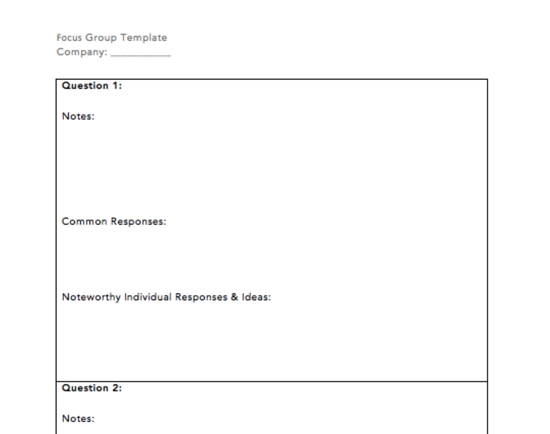
Copy-and-paste the questions you like below into this note taking template for a ready-to-go, printable document you can bring to the session.

Featured Resource: Market Research Focus Group Template

Download the Template

For a free template for note taking during focus groups, a guide on conducting market research, and several other templates, download our Market Research Kit.

Focus Group Question Examples for Building Trust Among Focus Group Members

Before diving into deeper questions, it’s best to warm up the group with a couple of open-ended questions that allow participants to get to know each other a little bit. Participants should have the liberty to decide how much they want to share with the group. Don’t force anyone to share something they may not feel comfortable sharing.

By including a question that allows people to talk about something tangential to the topic of the focus group, your participants will begin to build empathy for each other. That empathy can grow into trust, which is essential for eliciting honest insights out of your group.

Here are a few questions you might ask to build trust:

  • “Share an aspect of your work or life experience that has brought you here today.”
  • “Why did you decide to join our focus group today?”
  • “When and how did you first come across our brand/product/service?”

Focus Group Question Examples to Encourage Follow-up and Continuation of Ideas

The most helpful insights that come from focus groups are often the most specific points. Challenge your participants to reflect on their comments if something sparks your curiosity. For instance:

  • “That’s a fascinating point that [name] just said — what do you all think of that?”
  • “Do you agree or disagree with [name]’s statement, and why?”
  • “[Name], you’ve been a bit quiet recently. Did you have any thoughts on this topic that you wanted to share?”

Focus Group Question Examples for Understanding Customer Perception of Your Product or Service

These questions will help you understand how people truly feel about your brand, product, or service. The focus here is on your company — not the larger industry landscape or your competitors.

Avoid stopping conversation here unless the group gets sidetracked. Open-ended questions can be daunting at first. Participants may not know where to start. However, hearing from the other participants will spark reflection on various aspects of your product or service. Be sure to allow each group member who has something to say to speak up before moving on to the next question.

  • “How would you describe our company to other people?”
  • “How would you describe our product/service to other people?”
  • “What words or feelings come to mind when you think about our company?”
  • “How likely are you to recommend our product/service to a friend?”
  • “How well do you feel we incorporate feedback from you, our customers, into our service/product?”
  • “What ultimately pushed you to purchase this product/service?”
  • “Where would you buy this product/service?”
  • “What do you like about this product that you may not find in a similar one?”
  • “When you think about our industry, which brands come to mind first?”
  • “Which other brands in our industry did you consider when you were shopping around?”
  • “Why didn’t you go with one of our competitors?”
  • “What other products/services come to mind when you look at this one?”

Focus Group Question Examples to Learn What Your Leads and Customers Want to See From You

Listening to your customers’ feedback and suggestions for improvement is crucial to retaining customers and turning them into promoters of your brand. It may be difficult to hear the answers to these questions, but turning customer pain points around will elevate your product or service to the next level.

Avoid defending your product or service or setting any limitations on these questions. Instead, frame them in a way that allows anyone to voice their feelings. Recognize that it can be daunting for anyone (especially people with whom you’ve built relationships) to share negative feedback, so thank them for their candor.

  • “If you could wave a magic wand and change one thing about our product/service, what would it be?”
  • “What would you most like to add to or improve about this product?”
  • “What do you envision is the lifespan of this product/service before you upgrade or replace it?”
  • “Is there anything we haven’t touched on today that you would like us to know?”

Focus Group Question Examples for Understanding Your Buyer Personas

The following questions will help you understand the motivations of your target buyer persona, their habits, their responsibilities and decision-making power, and their preferences.

These questions will spark discussion about topics other than your company, product or service, and the competitive landscape.

Don’t worry if the conversation seems to stray far from your brand. The insights that people share will likely reveal what they find significant in their life and work. However, you must keep the group focused on the specific question you ask.

  • “Describe your job title and your day-to-day responsibilities.”
  • “What is one task where you feel you spend way too much time?”
  • “How do you define success in your role/your life?”
  • “What is the biggest challenge you face when it comes to the problem that this product is supposed to solve?”
  • “When you browse online, on which websites do you spend most of your time?”
  • “What are the first three apps you open on your phone in the morning?”
  • “How do you prefer to receive communications from our company? (Specify what type of communication here — product updates, renewal notices, product/service coaching, meeting reminders, urgent alerts, etc.)”
  • “Would you be the one using this product/service most in your household/job? If not, who would be?”

Focus Group Question Examples for Competitor Research

These questions should spark discussion about the brands in your industry that are top-of-mind for consumers. It helps remove any biases that your team might have as people who work in the industry and know various players very well.

To encourage honesty, avoid agreeing with disparaging comments made about your competitors. Instead, use the opportunity to ask follow-up questions about what the participants don’t like about a specific product or brand.

Competitive research helps you identify competitors while also evaluating their strengths and weaknesses. This information allows you to compare how your products align within the industry and pinpoint any industry trends you may have overlooked.

  • “What companies come to mind when you think of our industry?”
  • “Which company do you consider first when shopping in our industry and why?”
  • “What are these companies doing well?”
  • “What do these companies need to improve?”
  • “What products/services do they have that you’d like to see from us?”
  • “What would it take for another company to beat out your top choice in our industry?”

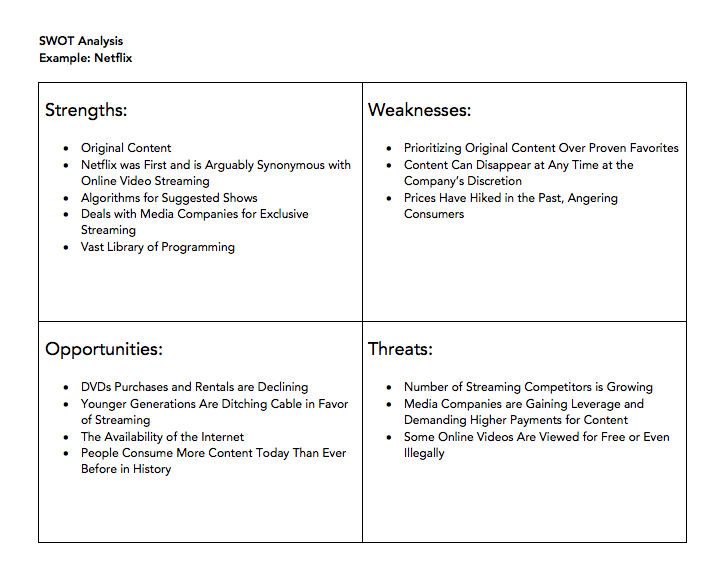
To conduct a complementary research-based analysis of your competitors, download our Market Research Kit to access a S.W.O.T. analysis template.

market research kit S.W.O.T. analysis template

Download the Template

Focus Group Question Examples for Generating Content on Your Industry

You might be looking to develop a content strategy for your brand, branch out into a new content medium, or generate new content ideas. Any successful content strategy prioritizes what your target buyer persona finds most engaging. A focus group is an effective way to ensure that you produce material on the right topics in the medium that your audience wants to consume.

  • “What is one recent trend you have noticed in our industry?”
  • “What is one strategy or tactic you think is underrated in our industry?”
  • “Where do you go to get a pulse on the things going on in our industry?”
  • “Who are the people in our industry who you look to as experts?”
  • “What format of content do you consume to keep up with our industry? Social media posts? Blogs/long-form posts? Podcasts? News outlets?”
  • “Which specific sources do you go to for information on our industry?”
  • “What gaps do you see in the content about our industry online? What are the topics on which you would like to see more education?”

Focus Group Question Examples for Understanding Product Demand for Something You Haven’t Yet Put Out in the Market

These eleven questions will help you understand the demand for a new product or service. These questions will uncover buying habits for a product you envision and whether there is a true product-market fit.

  • “What was your first reaction to the product?”
  • “How often do you/would you use this type of product?”
  • “Would you be the one deciding to purchase this product/service? If not, who would be?”
  • “When and where do you use our product?”
  • “When you think about the product, do you think of it as something you absolutely need, something you could do without, or something that’s somewhere in the middle?”
  • “How much would you be willing to pay for a product like this?”
  • “How would you ideally like to buy this product? Would you talk to a sales rep, or would you prefer to purchase it on your own?”
  • “What do you think this product is missing?”
  • “How would you describe someone you think would use this product/service?”
  • “If you ended up liking your experience with this product, could you see yourself repurchasing it? If so, how often?”
  • “If you could either have this product/service or the equivalent dollar value for you/your business, which would you choose? Why? (Specify the dollar value of your product/service when asking this question.)”

Focus Group Question Examples for Branding

The following questions help run word association brainstorms and generate potential names for a new product or company.

  • “What words come to mind when you think of our product category? (Example: “What words come to mind when you think of food delivery?”)”
  • “What words come to mind when you think of [insert a word that symbolizes the main value prop of your product/service here – for example, ‘efficiency,’ ‘speed,’ ‘health’]?”

If you have candidate names already:

  • “What is your initial reaction to this name?”
  • “What words come to mind when you hear this name?”
  • “How would you pronounce this? (Spell out the name on a piece of paper or whiteboard.)”

Ask, and you shall receive.

In your business, your consumer is the most important person. What they think is central to your business strategy — how they view your company and industry, what drives them to make a purchase, what their interests are. The answers to the above focus group questions will shape how you approach your business. You now have dozens of questions to get the conversation started, and you didn’t even have to ask.

Editor’s note: This post was originally published in November 2020 and has been updated for comprehensiveness.

New Call-to-action

Categories B2B

Why Your Brand Needs A Strong Visual Identity [+ 5 Examples to Inspire You]

Take a second to think about one of your favorite brands. A logo, storefront, color, or memorable ad campaign will likely pop into your mind. That’s because a brand’s visual identity is a powerful tool for telling a company’s story, building customer affinity, and increasing revenue.

If done effectively, visual identity can communicate a particular feeling or message without words. But a poorly-designed identity can confuse customers with lackluster messaging and disjointed graphics. So it’s no surprise that consistent brands are 3.5x more likely to have strong brand visibility than inconsistent brands.

Download Now: Free Brand Building Guide

Visual identity plays an essential role in branding, so it’s important to understand what makes up an identity and how to create one. We’ll cover all of that and share examples of successful brands that have developed a strong visual identity.

What is a visual identity?

A visual identity is the visible representation of a brand, from the logo and colors to the website and design of physical stores. It encompasses everything you can see in connection to a company.

elements that create a brand identityVisual identity can be made up of many elements:

  • Graphics
  • Animations, icons, buttons
  • Typography
  • Logo
  • Color palette
  • Imagery
  • Store design
  • Packaging
  • Uniforms
  • Flyers
  • Brochures
  • Billboards
  • Digital and print ads

Developing a strong visual identity comes with a number of benefits. It helps create an emotional connection with customers, which leads 57% of customers to increase spending. Consistent visuals unify a brand’s messaging so people instantly recognize the company across all channels.

They can build brand trust by informing potential buyers about products or services. And a well-designed visual identity can boost brand awareness and make people more likely to purchase, especially since 64% of people want brands to connect with them.

Although visual identity sounds similar to brand identity, its unique benefits and elements set it apart.

Visual Identity vs Brand Identity

If brand identity is the personality of your business, visual identity is the visible expression of that personality. Think of a person who’s outgoing and creative (brand identity) and is known for wearing eccentric outfits and jewelry (visual identity).

Brand identity gives customers the feelings they associate with your company, and it’s made up of everything that creates the brand as a whole. It includes your values, mission statement, tone and voice, style guides, brand persona, unique value props, visual assets, and more.

Visual identity is a part of brand identity, but its focus is on how a brand is visually represented. It requires a separate approach from brand identity, yet it needs to complement the brand. This is why designers and creatives are usually in charge of visual identity, whereas marketers and branding teams are in charge of brand identity.

5 Companies with Strong Visual Identity

When a brand takes the time to craft a strong visual identity, it becomes easier to attract customers and drive the business forward. As you look through the following examples, consider how every element works together to form a cohesive visual language.

Headspace

On a mission to improve the health and happiness of the world, Headspace takes a quirky approach to visual identity. The meditation app is full of charming characters, bright colors, and memorable moments that aim to establish its unique identity in the world of wellness. Even the animations add a sense of connection and humor while explaining mindfulness concepts.

Meow Wolf

The art collective Meow Wolf is out to inspire creativity through art, and their visual identity is chock full of imaginative graphics, installations, and images. The psychedelic color palette instantly draws you in, and the extraordinary characters hint that you’re in another world. It’s easy to get lost in a realm of fantasy and immersive art just by scrolling the brand’s Instagram.

Meow Wolf visual identity example

Airbnb

From flexible dates to unique stays, Airbnb’s visual identity highlights the brand’s willingness to embrace adventure. Their pink logo, playful graphics, and incredible imagery encourage people to explore places beyond conventional options, which is exactly what you can do by booking or hosting a homestay through their platform.

Air BnB visual identity example

Spotify

Listening is everything to Spotify, and it’s clear through the brand’s visual identity. A bold color palette and clever ad campaigns, like #SpotifyWrapped, showcase the company’s passionate and playful brand across the app, online platforms, and print ads.

Spotify visual identity example

Yeti

Visual identity is more than logos and ad campaigns — it’s the feeling people get when they see your brand. Yeti is a great example of how to make brand and visual identity work together to create a specific feeling for customers, which the brand does with Yeti Presents. These short films inspire adventure in a way that’s more authentic than other outdoor brands and fits the company’s laidback, active identity.

How to Create a Visual Identity

Creating a strong visual identity shows people who you are, why they should interact with you, and helps establish an emotional connection to your brand identity. Whether you’re creating a visual identity system for the first time or looking to revamp your identity, just follow these steps to come up with an eye-catching visual language.

1. Define your brand identity.

Your brand identity is the core of your company personality, and it informs your visual identity. If you don’t have all the aspects of your brand laid out, your visual identity can flounder from a lack of direction and cohesion. Before designing your visual identity, make sure to have the bare minimum brand requirements decided, such as values, voice and tone, persona, and mission statement.

2. Understand the principles of design.

When starting my own business, I decided to create my logo and website. But when getting feedback on my visual identity from a graphic design friend, it was clear I wasn’t trained in the principles of design. Visuals play a major part in how people perceive your brand, so it’s important to get them right. You can learn the six elements of design yourself, or hire a graphic designer to help bring your visual identity to life.

3. Create a story.

People remember stories more than facts, which is why visual identity must focus on telling a great story. You can draw people in with characters and conflict, or incorporate your values into your visuals. The Swiss paragliding company, Advance, uses storytelling to highlight the quality of its products and the adventures that are possible because of them. The key is to show, not tell.

advance visual identity example

Image Source

4. Stay consistent.

Consistency is simple when your company is small and you review every asset before it goes live. But the bigger the brand, the less likely it is to stay consistent. From ad campaigns and conference decks to social media posts or sales one-pagers, it’s easy to let visual style slip. But creating a brand style guide, and outlining the specific visual identity systems and styles, can help your team combine existing visuals with new elements as the company grows.

5. Keep the medium in mind.

Visuals look different on every channel — a printed logo can appear darker than on a screen. So it’s crucial to cater your visuals to the medium you’re using to promote your brand. A graphic designer or branding designer will understand how to adjust visual assets for each medium to ensure all elements, from colors and fonts to images and animations, appear consistent across channels.

sonos visual identity example

Image Source

Once you outline your visual identity and create graphics, you’re ready to share your visual language with the world. With time and consistency, people will be able to recognize your brand at first glance.

brand consistency

Categories B2B

How to Create an Editorial Calendar [Examples + Templates]

If you’re anything like me, you’re consistently working out of at least 20 browser tabs, four journals, a yellow legal pad or two, and a myriad of Post-it notes stuck around your computer monitor.

To the average overseer, it’s nothing short of chaos. To the blogger, it’s evidence of a (desperate) need for an editorial calendar.

Free Download: Marketing Editorial Calendar Template

My muddled system transforms dramatically when I work with a team. I realize the need for organization and structure, and this could not be more necessary than managing a blog. Without a mutually agreed-upon system for planning, writing, and scheduling content every week, you can find yourself in a pile of missed deadlines, unedited blog posts, and a fair amount of team tension.

There’s no such thing as a perfect editorial calendar — it all depends on the needs of your team. Nonetheless, there are several questions you should ask yourself to determine what your editorial calendar should look like. These include:

  • How frequently are you publishing content? Do you have stuff going live every day? Once a week? Perhaps multiple times a day? Finding out how often you publish can tell you how best to visualize your editorial calendar regularly.
  • Do you create more than one type of content? If you upload as many videos to YouTube as you publish articles to your company blog, your editorial calendar will need to distinguish between the two.
  • How many people will use this editorial calendar? The best editorial calendars allow multiple people to brainstorm, collaborate, and provide feedback on assignments in real-time — directly on the calendar.
  • What are the various stages content goes through before it’s published? How complex is your content pipeline? Is there a substantial review or approval process that each piece of content goes through? Make sure your calendar can distinguish between two similar assignments that are in different stages of creation.
  • What format will you use to organize this calendar? You’ll want to choose the system that best aligns with your goals and your team’s workflows. The next section discusses the most common formats.

Let’s take these points and put them into practice to create your perfect editorial calendar.

How to Create an Editorial Calendar

A successful editorial calendar is a living project that your business will change as your grow and scale your social media strategy. To start the process of creating your own, we have some resources to simplify the process.

With all the different types of calendars you can create, we’ll discuss the different types you can choose, and how to plan the rollout of your amazing content with them.

1. Choose a format for organizing your editorial calendar.

There’s no such thing as a perfect editorial calendar, but some formats will be better than others at helping you solve your team’s goals. Once you choose a format, you’ll also want to decide on how you will implement it — picking a tool or platform that offers the features or interface your company needs most.

Here are some of the different ways to format your editorial calendar:

Traditional Calendar or Calendar App

editorial calendar format: traditional calendar app

Image Source

Whether you’re tracking deadlines on a big paper calendar on your desk or through an app like Google Calendar, this is one of the most straightforward ways to know what’s going out and when.

The disadvantage, though, is that there’s more to project and content management than publishing dates, and a calendar may not always be effective enough on its own.

Spreadsheet

editorial calendar format: spreadsheet

Image Source

Spreadsheets have always been a favorite for content management. There’s something so satisfying in seeing all your necessary data points aggregated in one place and organized neatly into rows and columns. With Microsoft Excel and Google Sheets, spreadsheets are easily accessible and don’t have a high learning curve.

One advantage of using spreadsheets is that they can be easily paired with calendar apps and content management tools. By importing a .csv file, you can load the information into multiple places as needed for the tasks at hand (see the Google Sheets and Hootsuite Planner combination in the next section for inspiration).

Kanban Board or Other Project Management Tool

editorial calendar format: kanban board

Image Source

Kanban is a visual system for project management that involves moving cards through different stages of a project. It’s popular in editorial management because it can be easily used to represent an editorial workflow no matter what your quality assurance process is or how many hands touch a piece before it’s published.

This means that a Kanban board can easily accommodate your content calendar if you require more planning and management to push things live. Popular options for this type of system include Trello, Airtable, and Meistertask.

Content Calendar (and Management) Apps

editorial calendar format: content calendar apps

Image Source

Taking the calendar concept a little further, there are apps and software platforms that have been designed specifically for content management. They include both the calendar and the project management aspects that are required to get the job done along with other helpful features for high-volume content marketing teams. Examples of these platforms include CoSchedule, Contently, and Loomly.

2. Designate your main marketing channels.

Editorial calendars are highly visual tools, and differentiating your calendar using color coordination for the different channels you post on can eliminate confusion amongst your marketing team members.

Make your editorial calendar easier to interpret by dividing the types of posts or subject matter using different visual cues to ensure you schedule the right content at the right time.

3. Plan your posts consistently.

Organizing your editorial calendar to be posted on the same weekly schedule can drive your pages to have more exposure via social media algorithms and potentially raise your engagement as a result.

You see, when you post on a frequent basis and use a social media platform often, you’re in turn keeping your followers coming back to the platform as well. Platforms reward profiles that drive this engagement with more visibility, and after all, these platforms are after capturing and maintaining people’s attention.

Social media channels favor profiles that use their website often, and when you add a patterned or consistent posting cycle to it, you’re using the platform in an optimized manner.

4. Study your competition’s posting frequency.

Look to other businesses posting in the same industry or niche as yours, study which are successful in capturing that attention and how they got to that level of success.

By no means should you copy others’ content subject matter or the exact dates or times they post, but instead pull inspiration and make your own editorial calendar that could possibly garner attention on the days or times competitors aren’t posting.

5. Audit and adapt your editorial calendar as necessary.

It’s all a matter of trial and error when making your calendar. If you begin with low engagement the first couple of months, you should run a company content audit and adapt your content calendar to better engage your followers.

Above all, creating an editorial calendar will make your marketing team work in a more streamlined, organized manner. With that being said, let’s look at some pre-existing calendars that’re optimally organized.

Editorial Calendar Examples

To help you implement an editorial calendar, we’ve also included real examples from a few of the most successful content teams out there. Check them out below and find out what makes their calendar so useful.

1. HubSpot Editorial Calendar [Template]

Platform: Excel

editorial calendar examples: google sheets

Free Download

The interactive HubSpot Editorial Calendar Template was built for writers and content strategists to outline their posting strategy. Included are prompts for the content’s title, meta description, URL, CTA, and more. This template is completely free and can be used on both Google Sheets and Excel.

2. Buffer’s Editorial Calendar

Platform: Trello

Buffer's editorial calendar examples: Buffer on blue Trello board

This is the actual editorial calendar of Buffer, a social media content scheduling platform. Naturally, the company’s content is supported by an editorial calendar that describes an assignment’s author, title, publish date, and where it is in the company’s editorial workflow (content can be in the “Ideas” stage, in the “Pipeline,” “In Progress,” or “Editing”).

Each rectangular tile shown above represents an individual piece of content — whether it’s a blog post, video, or even a podcast episode.

As you might be able to tell, Buffer’s editorial calendar is built on Trello, a common project management tool. And although you can use Trello more than one way, Buffer uses most of its available features so everyone has the information they need within a few clicks — regardless of what they do for the company and how the calendar affects their work.

“An editorial calendar should be a resource for your whole team, not just content creators,” says Ash Read, Buffer’s editorial director. “It should be something anyone can easily access to see what’s coming up and also suggest content ideas. Sometimes the best content suggestions will come from people outside of your marketing team.”

key-information-in-one-place

In the next screenshot, above, you can see what’s inside each rectangular tile. When you click on an assignment, Buffer logs feedback as the content is created and reviewed. Says Ash: “It’s not just a calendar, but a place to share feedback, editing notes, pitches, ideas, and more.”

3. Unbounce’s Editorial Calendar

Platform: Google Sheets

Editorial calendar example by Unbounce in Google SheetsThis is the editorial calendar of Unbounce, a creator of landing pages and related conversion tools for marketers, as well as a HubSpot integration partner. Unlike Buffer, this company uses Google Sheets to manage their entire content production, and the way they’ve customized the spreadsheet above would be pleasing to the eyes of any content creator.

In addition to organizing their projects by month, what you might notice from the screenshot above is that Unbounce also sorts their content by the campaign they’re serving — as per the first two columns on the left hand side. This allows the business to see what multiple assignments — listed vertically down the third column — have in common, and track content that extends beyond the Unbounce blog.

Shown below, the Unbounce blog has a separate editorial calendar in Google Sheets that allows the blog to work alongside the larger company initiatives. Nonetheless, using spreadsheets for both content workflows has proven to be the best choice for the company’s growing operation.

editorial calendar examples: spreadsheet

“We’re a small content team, so other platforms would likely overcomplicate things,” says Colin Loughran, editor in chief at Unbounce.

Ultimately, this editorial calendar keeps Colin’s team in sync. “While we try to lock dates a few weeks in advance,” he explains, “the reality is that sometimes we need to make changes very quickly. A product launch might move into a slot we’d planned for something else, for instance, or a guest contributor will be delayed in delivering a revised draft. When that’s the case, having a centralized resource that everyone can check is a necessary safety blanket.”

4. Digital Authority’s Content Calendar

Platform: CoSchedule

Digital Authority, a marketing agency that specializes in content and social media, distinguishes between its big-picture content goals vs. smaller content-related tasks.

Digital Authority's content calendar on CoScheduleImage Source

Digital Authority uses CoSchedule to plan out timelines for pieces such as blogs and social media posts. The advantage of this is the color categorization, calendar and task views, and the ability to create social posts across platforms from within one portal.

There are also features to keep the team actionable, on the same page, and agile with drag-and-drop features.

5. Hootsuite’s Content Calendar

Platform: Google Sheets and Hootsuite Planner

Hootsuite, another social media scheduling platform, has a ton of content to publish both daily and far out in advance. That makes their content calendar a major component of their production strategy.

Hootsuite's content calendar in Google SheetsImage Source

Due to the volume, the Hootsuite team creates content far in advance using Google Sheets to plan and organize across channels. Once the strategy is created and executed, posts that are ready to be published are represented on Hootsuite Planner.

Hootsuite's content calendar in Hootsuite Planner

Editorial Calendar Template

Ready to make your own editorial calendar? No matter which platform you ultimately want to work out of, a spreadsheet can help you take inventory of what content you have and how quickly it moves from start to finish. Try our free Blog Editorial Calendar Templates.

Editorial Calendar Templates

Using the templates linked above, you’ll be able to organize, categorize, and color code to your heart’s content. Use these templates to target the right readers, optimize posts with the best keywords, and pair each topic with a killer call-to-action.

In this download, we’ve included three different templates for you to choose from. Why three? We recognize that not all content teams are the same. While some feel most efficient with a centralized editorial calendar solution, others may need the gentle push of an upcoming deadline right on their calendar. Therefore, you’ll have access to all three templates in Microsoft Excel, Google Sheets, and Google Calendar.

Plan Out Your Editorial Calendar with Ease

With a little customization, your blog calendar will be running smoothly, leaving you time to be the content-writing, lead-generating machine you strive to be.

Editor’s note: This article was originally published May 2020 and has been updated for comprehensiveness.

marketing editorial calendar templates

Categories B2B

A Look Back at 30+ Years of Website Design

Web design has come a long way since 1991, when the first ever website was published. Exclusively text-based, this site marked the beginning of what would become a digital revolution.

And while recollections of “under construction” GIFs and blinding background colors make me thankful for just how far the web has come, there are some historical web design choices that actually demand a nod of respect.

Websites like this one haven’t been lost to time, either. If you want to see what a website looked like at any period since its launch, enter its domain name into the Wayback Machine and choose a date. In this post, let’s take a look at how web design has evolved, from text-only interfaces up through the sleek, modern designs we see today.

Free Download: 77 Examples of Brilliant Web Design 

Early 1990s: Antiquity

The early 90s marks the start of our website design timeline. At this point, there was no such thing as a high-speed internet connection. It was dial-up modems, or it was nothing. Therefore, websites needed to be built for less-than-stellar connection speeds. They mostly looked like walls of text — what we now take for granted as “design layout” did not exist.

history of web design: an examle of an early html website

While later versions of HTML allowed for more complex designs, they were still very basic compared to today, consisting mainly of tags for headers, paragraphs, and links. Visual elements and styling like typography, imagery, and navigation were things of the not-too distant future.

Takeaways for Today’s Websites:

While the function of these early sites was purely informational, we can see some design elements that apply today. These old web pages were very lightweight and optimized for a slow internet connection we all still experience from time to time. These design considerations took the user experience into account, something today’s websites don’t always do, even with faster speeds.

Yes, today’s internet can handle media-rich websites … but it still has some limits. Large media files, heavy graphic design, and excessive animations can all contribute to higher bounce rates when load speeds aren’t as fast as we want. Keep your user in mind when considering complicated design, and remember to K.I.S.S. (Keep It Simple, Superhero).

Mid-1990s: The Middle Ages

The middle ages of web design were plagued by on-site page builders and spacer GIFs. (Better than an actual plague though, right?) By the mid-90s, web design had evolved both in terms of structure and appearance. Designers began using table-based layouts to organize content, allowing for greater flexibility and creativity. Sites were still quite text heavy, but text could now be divided into columns, rows, and other navigational elements for better readability.

Graphical design elements also quickly grew in popularity. Page hit counters, animated text, and dancing GIFs are just a few of the graphical elements that mark this period in web design.

history of web design: the early version of apple's website

Takeaways for Today’s Websites:

Today, there are plenty of reasons why table-based design is not the best choice for your website — the extensive markup, slow load times, and visual inconsistency are just a few of the pitfalls.

Regardless, this development was key in the evolution of web design: It was the first move toward non-linear page structure. Different elements could now be positioned in different sections of a web page, and designers had to consider the best way to present information to the user.

Page structure remains critical when thinking about navigation and content. It largely determines how the user experiences and interacts with your site. While these considerations might not have been at the forefront during the middle ages of web design, they are certainly at the forefront today.

Late 1990s: The Renaissance

Renaissance. Rebirth. Web design has had its fair share of reimaginings, but one of the first occurred with the introduction of Flash. Introduced in 1996, Flash opened up a world of design possibilities that weren’t possible with basic HTML. It was the marriage of virtual graphics and interaction.

While many of the same design elements from previous periods were still present, they were enhanced with animations, tiled background images, neon colors, 3D buttons, splash pages, and other multimedia.

Flash marked the beginning of visitor-focused design — structure and navigation became important considerations and designers began to hone in on appearance and usability over pure content.

history of web design: a website with flash elements

Takeaways for Today’s Websites:

Flash was a game-changer, but it wouldn’t stick around forever. Flash is hardly ever used today and is deemed one of the biggest SEO sins of all time. Today, it’s the norm to opt for alternative methods such as CSS and JavaScript animations to get similar effects, or to embed videos from video hosting sites.

Early 2000s: The Enlightenment

The early 2000s were a period when usability and flexibility really came to the forefront of web design.

Leading the charge was CSS, a coding language that allowed developers to store visual rules in files separate from HTML, effectively separating content and style. This gave greater creative freedom to both web designers and content developers — content could now be developed exclusively from design, and vice versa. CSS made websites easier to maintain (less code and complexity), more flexible (div tags are independent of one another), and quicker to load (smaller files).

Better understanding of color psychology also led to increased use of whitespace and the decrease of garish colors, like neons. Links started being added to icons rather than just text, resolution and pixelation became more important concerns, and strategic placement of content also gained traction.

history of web design: an early website for the company polaroid

Takeaways for Today’s Websites:

People typically scan websites looking for the information they need, so any site that makes this job easier gets a giant check-mark. Savvy web designers know that most users don’t read everything on a website, and understand how readers take in information.

Therefore, intuitively placed information, visually accentuated links, and straightforward navigation are just a few best practices today’s websites should adhere to. Always design with usability in mind!

Mid- to Late-2000s: The Industrial Revolution

The Industrial Revolution of web design begins with the birth of Web 2.0. It’s at this time that things really began to move toward the modern web. The growth of multimedia applications, the rise of interactive content, and the advent of social media are a few definitive features of this period.

Moreover, these changes largely dictated the way web design was … well, done. Aesthetic changes included better color distribution, increased use of icons, and greater attention to typography.

Most importantly, however, design became about content, and content became about search engine optimization. With the user now firmly at the center of design, selling products (at least explicitly) became the secondary function of websites — now it was all about getting found.

history of web design: a mid-2000s website for the company lulu lemon

Takeaways for Today’s Websites:

As mentioned, the evolution of Web 2.0 saw the growth of SEO as a consideration. While these techniques have been adapted over the years, thinking about your website in terms of SEO is still a top priority for most thriving business websites.

SEO demands content, and content largely became the focus of web design during this era. Keyword optimization, inbound and outbound linking, authoring, tagging, and syndication technology such as RSS became natural design elements. While link spamming and keyword jamming soon exploited these techniques, these methods are no longer effective and (I hope) have largely fizzled out.

2010 to Now: The Modern Era

Today, over two decades after the publication of the first website, web design has firmly established itself as an irreplaceable component of every good marketing strategy. Recent research found that 50% of today’s consumers think website design is crucial to a business’s brand.

In terms of modern aesthetics, we have seen the proliferation of minimalism: sparse content, flat graphics (so long, 3D buttons!), simpler color palettes, and big and bold visuals. In addition, UX has taken center stage, giving way to such design features as infinite scrolling and single-page design.

You may have noticed that our website has embraced all these features with its latest design:

history of web design: a modern website for the company hubspot

One more key step in the evolution of web design is the mobile web. Since the launch of the iPhone in 2007, there has been a re-evaluation of the way websites are structured to accommodate for the growing number of mobile web users. This includes several mobile frameworks that take a “mobile-first” approach, and an even greater focus on mobile speed optimization, since phones usually lack the processing speed or connection strength of your typical desktop.

This digital revolution has also given rise to responsive design, in which page elements automatically adjust to the width of the browsing window, allowing websites to look good on any device or screen. Today, responsive design is necessary to ensure a pleasing mobile user experience, given over half of global website traffic comes from mobile devices.

Where will websites go next?

If there’s one factor that has informed every single one of these developments, it’s content. Every design element here has been adapted in such a way to bring the most relevant content to the user in the most efficient and effective way. Notions of accessibility, adaptability, and usability truly define this era of web design.

Though there’s much more we can do with web design today, it’s fun to take a look back at where we came from. Looking at how web design has progressed thus far, it’s exciting to think about where it will be in the next 20 years.

Editor’s note: This post was originally published in July 2013 and has been updated for comprehensiveness.

examples of brilliant homepage, blog, and landing page design

Categories B2B

Revenue Marketing: What It is and Why It Matters

91% of marketers are confident that their making marketing decisions will positively impact revenue. Are you one of them?

As marketers, we’re well-versed in the main goals of internet marketing: to generate leads and new business. Revenue generated from online marketing justifies why we include online channels in our marketing efforts.

→ Download Now: Free Marketing Plan Template

How then, do marketers come up with a winning online marketing strategy that directly ties to their revenue goals?

If you’re unsure of the answer, we’ve got you covered. In this article, we’ve outlined the steps that you can take to plan successful revenue marketing campaigns.

Let’s explain revenue marketing a little bit more.

If you were to implement a revenue marketing plan, you would look at your revenue goals first instead of your business goals. For example, if the business has a goal to attract 10,000 new customers, but the revenue goal is to make $150,000 more than last quarter, a revenue campaign would strategize all the ways the team could generate $150,000 — ideally from 10,000 (or more) new customers.

Benefits of Revenue Marketing

Marketing efforts are typically broken down into four broad categories: Traditional marketing, lead generation, demand generation, and revenue marketing.

Many companies move through marketing efforts in this order. Traditional marketing comes first and includes a focus on building your brand — generating name and product recognition in the hope of driving sales later on.

Lead generation comes next. Here, marketing teams look to pinpoint high-value leads that are likely to take action and drive sales. Demand generation follows, and sees marketing and sales teams working in tandem to create multi-channel campaigns that bring interested B2C and B2B buyers to your site or sales platform.

Revenue marketing looks to scale up lead and demand generation processes by tying them to specific metrics and making them both reliable and repeatable. Effectively implemented, revenue marketing offers three key benefits.

Increased Customer Focus

Traditional marketing efforts are all about finding ways to boost demand by making products or services more appealing at scale. Revenue marketing flips the script to focus on what customers want.

What do customers want from the product? What would make them likely to buy more? Buy less? What non-product areas — such as speed of customer service response or the ability to easily navigate websites — have an impact on the likelihood of conversion? By focusing on the cultivation of long-term customer relationships, revenue marketing can help drive sustained sales.

Enhanced Team Alignment

Marketing and sales teams are often at odds. Where marketers look to positively raise brand profiles at large, sales teams are more concerned with the specifics of individual conversions. As a result, efforts from these two teams may work in opposition rather than tandem, in turn frustrating both outcomes.

Revenue marketing, meanwhile, helps put these teams on the same page with a singular focus: The customer. By getting everyone on board up-front — from sales and marketing team members to C-suite sponsors and even IT if needed — companies can align goals and outcomes across their organization.

Improved Goal-Setting

Speaking of goals, revenue marketing prioritizes — you guessed it — revenue, rather than leads, prospects, or potential demand. By tying success metrics to the generation of revenue from specific sources, it’s possible to create goals rooted in the reality of current sales volumes rather than predicated on predictions of potential customer action.

1. Customer Data Acquisition

First up? Data acquisition. Here’s why: The more businesses know about their customers, the better they’re able to create marketing and sales strategies capable of driving action. Effective acquisition starts with permission — make sure customers know what’s being collected, and why — and gets up to speed with data analysis tools capable of deriving patterns from real-time data sets.

2. Stakeholder Alignment

Given the scope of revenue marketing efforts, it’s also critical for companies to ensure stakeholder alignment. This means taking the time to sit down with relevant team members and create a strategy that gets everyone on board. Not only does this provide a roadmap moving forward, but sets a tone of collaboration from the outset.

3. Process Definition

Process comes next: What does the big picture revenue marketing campaign look like, and what specific processes will help achieve the goal? This often involves discussions around demand management, targeted marketing efforts, and the use of customer data to drive personalized campaigns.

4. Technology Implementation

From email newsletters to mobile apps and social media sites, technology is instrumental in effective revenue marketing. As a result, it’s worth looping in IT staff as soon as possible to identify services and software — such as in-depth big data programs and powerful CMS platforms — that can help companies reach their revenue marketing goals.

5. Results Management

Last but not least? Effective results management. This includes pinpointing the key metrics you’ll use to measure success — such as total number of sales over a specific period or revenue growth year-over-year — and how these metrics will inform revenue marketing efforts moving forward.

Developing an Effective Revenue Marketing Strategy

It’s not enough to know that you need a revenue marketing plan — you need a strategy to achieve this goal. Not sure where to start? We’ve got you covered with our 4-step process.

How to Develop a Revenue Marketing Plan

1. Set SMART revenue goals.

To reach your revenue goals, you have to make them! If you’re a little confused on how to start making them or unsure of how to set them so they’re effective for marketing campaigns, let’s talk about how you can set measurable goals.

Before you set out to conduct online marketing strategies, your goal should be clearly defined and understood by the team working on the campaign. The easiest way to do that is to make sure your goal(s) is SMART: Specific, Measurable, Attainable, Relevant, and Time-based.

For a little refresher on SMART goals and how they pertain to setting revenue goals for marketing campaigns, let’s walk through an example.

Let’s say a marketing team for a company is generating $10,000/month in revenue through online and traditional marketing efforts, but wants to generate more revenue through beefing up digital campaigns. They have decided on a goal to double their revenue.

While doubling revenue is a fantastic goal, it doesn’t have any basis for how to get there. To make this goal SMART, the team can add some terms to make their path a little more clear.

So, instead of the marketing teams’ goal being “Double revenue,” it can be restructured to, “Through an online marketing campaign, the goal is to double revenue in six months by using channels chosen based on previous ROI data.”

This goal gives a time span, is specific, relevant to the task, and measurable. While doubling revenue is a high goal, SMART goals can change; they’re merely a guide to making sure your goals are reachable.

Begin by planning out your revenue goals. If you are still shaky on SMART goal making, HubSpot offers a free template you can download to guide you while writing them.

2. Audit your current website and marketing ROI.

Marketing analytics software can be used to measure the number of visits, leads, and generated sales you earn for each of your marketing channels. For example, HubSpot’s Marketing Hub offers the tools marketers need to measure the success of their digital marketing campaigns, such as website metrics.

When you want to determine the initial ROI of online marketing efforts, using analytics tools is extremely critical. These tools have customizable settings that you can configure, so the platforms only track the metrics you care about.

If you want to use your revenue goals to inspire your internet marketing plan, the metrics that will be useful may vary based on your business goals, but here are a few that are especially helpful: SEO metrics, ROI from pay-per-click (PPC), your blog’s conversion rates, and social media engagement.

Those metrics will tell you how your marketing efforts are ranking on Google, how many people are clicking on your ads or campaign offers, how helpful your content is to readers, and how your brand is perceived by its audience.

In general, if you intend to make money from a marketing channel, it’s important you continue to measure and iterate your strategy based on that channel’s core metrics. Once you know your analytics, you can use that data, paired with monthly revenue data, to estimate the conversion rate you aim to earn with your next campaign.

3. Conduct research to determine actionable steps.

If you’re unsure of how to determine actionable steps in your plan, it’s always helpful to do some research.

I know, I know: you might not have the time to devote to copious amounts of research. However, by seeking out some information, you’ll be able to uncover actionable steps that work for similar companies’ revenue marketing efforts.

For instance, we’ve talked about how leveraging data can help build your online marketing strategy. Before you start planning, if you’re unsure of where to begin, refresh your memory of must-haves when writing a marketing plan. This post is a good place to start.

You can also look into downloading a report from a company that used revenue marketing. For instance, HubSpot offers this study, which details how revenue marketing worked for a campaign, and provides highlights of the report for those strapped for time.

Additionally, you can look at a case study to get an understanding of how a revenue marketing plan looks from a bird’s eye view. This directory of case studies is organized based on industry, company size, and company goals, so you can easily find a case study that illustrates the plan you’re considering for your own business.

Don’t forget to look into how using SEO can help make smarter marketing decisions. If you are confident in your SEO efforts, look at keyword and competitive data to figure out how much time and money you should invest in pay-per-click to hit your goals.

Finally, research can help you determine if you’re following the best practices for lead generation and tracking. You can find new ideas for converting leads into customers using online marketing channels, such as blogging and email, as nurturing tools.

To gain an understanding of how your marketing efforts help one another, and how to structure a chronological plan, a little research is necessary.

4. Put it all together.

Once you’ve got an idea of your current return, have set reasonable revenue goals, and know a bit more about the channels and methods you want to use, it’s time to put it all together.

When you’re building your internet marketing campaign, keep in mind that every step in your plan should be based on revenue goals. If you’re going to use Facebook Ads as part of your campaign, for example, it should be understood by the team why that method will help you reach your revenue goal.

Spend some time ensuring the content you want to create for the campaign will resonate with its audience, as well. Blog posts need to be valuable to readers (Keyword research helps you figure out what readers are searching for) and social media content needs to engage followers, for example.

During your internet marketing planning process, outline how you’re going to measure success. Revenue is the obvious metric to measure, but what software will you be using? How are you going to interpret the revenue you earn?

Once you’ve worked through your marketing plan, you should have all the resources in place to write a marketing report or case study from your findings on your own. Who knows — your report could even turn into a valuable content offer for your next revenue-based campaign.

Realizing Revenue Goals

Revenue marketing combines sales and marketing efforts to create campaigns that go beyond lead and demand generation to link campaigns with reliable and repeatable ROI.

Best bet? Start with a clear strategy to help identify sales opportunities, pinpoint conversion-ready leads, and create metrics that effectively align campaign efforts with revenue outcomes.

Editor’s note: This post was originally published in March 19, 2020 and has been updated for comprehensiveness.

New Call-to-action

Categories B2B

Cross-Posting in 2022: What Is It & Why You Should Use It

Every year, a new digital platform emerges. In the last year alone, Discord, Twitter Spaces, and Twitch have all become very popular with consumers all around this world.

→ Free Templates: How to Use YouTube for Business [Download Now]

Now, social media marketers are faced with this issue: Should you curate content for each platform and its audience or should you save some time and cross-post on multiple platforms?

In this article, we’ll discuss the do’s and dont’s of cross posting, the benefits of this strategy, and some tools to help you leverage it.

Who can get the most out of this strategy?

  • Small brands with a limited marketing budget
  • New brands that haven’t produced much content
  • Social media marketers that want to focus on strategy instead of posting

Benefits and Drawbacks of Cross Posting

Cross posting is a time-saving measure that allows you to share your content with a wider audience without having to put in the extra effort.

The main benefit of cross-posting is that it saves you time. Instead of creating separate pieces of content for each social media platform, you can just share the same content on all of them.

This is especially helpful if you’re short on time or if you’re managing multiple social media accounts.

Another benefit of cross-posting is that it allows you to reach a wider audience. By sharing your content on multiple platforms, you’re increasing the chances that people will see it and engage with it.

cross posting example

While cross posting has many benefits, there are also a few drawbacks to consider.

The first is that not all platforms are created equal. What works on one platform might not work on another.

That’s why many marketers prefer to tailor their content to each platform and its specific audience.

Another drawback of cross posting is that if some users follow you on multiple platforms and see the same content, they may get bored and stop paying attention to what you post.

As with every strategy, you have to be flexible in your approach.

Cross Posting Mistakes

Now that you know what cross posting is and how to do it, let’s take a look at some mistakes you should avoid.

One mistake to avoid is reposting the exact same content on every social media platform. Just because you can cross-post everywhere doesn’t mean you should.

Your followers on each platform are likely to be different, so it’s important to customize your content for each audience. More on that in the next section.

Another mistake I often see on social media is brands posting content featuring watermarks from other platforms.

For instance, when you upload a video to TikTok and save it, the brand’s logo will automatically appear on the video. Instagram recently announced that it would deprioritize videos with the TikTok watermark to avoid recycled content from its competitor.

This practice also compromises your video quality while signaling to audiences that you’re focusing on other social platforms.

Here’s an easy solution: Edit and prep your content on a third-party platform like Canva or iMovie then upload to the respective platform to add additional elements like filters, sounds, and captions.

That will not only keep you from getting shadowbanned but also preserve the quality of your content, as it’s only being uploaded once.

Best Cross Posting Practices

When it comes to cross posting, the most important factor is the quality of your content. This might seem obvious, but it’s important. If your content isn’t good, people won’t want to read it or share it, no matter what platform it’s on.

cross posting example 2

Once you have great content, the next step is to tailor it to each specific platform. Now you might be thinking, “Is the whole point of cross-posting that I don’t have to tailor content to the platform?” The truth is that while cross posting takes the bulk of the work out, you’ll still have to do some customizing.

This means seeing which platforms deserve which approach. For instance, TikTok and Instagram Reels are both short-form video platforms. This offers an easy cross-posting opportunity.

However, posting a TikTok video on Twitter may not work as well since the latter is mostly text-based. As such, maybe Twitter and Facebook could be a better match-up.

On Facebook, you might want to include a photo or video along with your update whereas you could use the copy only for Twitter.

The key is to make your content engaging and interesting based on audience behavior on each platform.

And finally, to make cross posting easy, consider using software. There are a number of options available, let’s cover that next.

Cross Posting Software

Now that we’ve discussed the benefits of cross posting, you may want to look for tools that will facilitate this process.

First, here are key features you’ll want to look out for:

  • Scheduling – The best cross posting software will allow you to schedule your content in advance so you can set it and forget it.
  • Customization – As we mentioned before, it’s important to tailor your content for each social media platform. The best cross posting software will allow you to do this with ease.
  • Analytics – It’s also key to track the performance of your cross-posted content. You’ll need software with advanced analytics so you can see what’s working and what isn’t.

Let’s take a look at some tools that will help you do it.

Hootsuite

best cross posting app hootsuite

Hootsuite is one of the most popular social media management platforms. It allows you to schedule and publish content, track who’s talking about your brand, and measure your performance.

It also has a feature that lets you cross-post content to multiple social media accounts with just a few clicks.

Buffer

best cross posting app buffer

Another tool you can use is Buffer.

Like Hootsuite, Buffer lets you schedule and publish content, track your brand mentions, and measure your performance.

It also has a cross-posting feature that makes it easy to share your content.

Sprout Social

best cross posting app social

Sprout Social is a third option for those looking for a social media management platform. It has all of the features you’d expect, like the ability to schedule and publish content, track your performance, and engage with your audience.

It also has a cross-posting feature that lets you share content on multiple social media platforms.

When done correctly, cross posting can be an effective way to grow your online presence. Just make sure to avoid the mistakes we discussed and use one of the tools we mentioned to make the process easier.

New call-to-action

Categories B2B

What Will Content Planners Budget For in 2022 [HubSpot Blog Research]

If you ask marketers about their 2020 content plans, most will tell you they had to pivot because of the pandemic. In 2021, many said the same thing, as the world adjusted to this new normal.

Click here to download 8 free marketing budget templates.

We surveyed over 600 media planners this year and 99% of marketers who have ever pivoted their content plan did so in 2021, with 39% of them pivoting three times that year.

So how are they budgeting in 2022? Let’s find out.

How much are marketers spending on content marketing?

According to HubSpot Blog Research, 39% of marketers surveyed say they allocate 31-50% of their total marketing budget to content marketing.

This tells us that brands are leveraging content marketing above many other marketing strategies, as they put at least a third of their funding in it.

marketers' quarterly content marketing budget in 2022

Wondering exactly how much? Most marketers surveyed (26%) said their quarterly content marketing budget ranged between $40K to $80K.

The second-highest figure was $100K-200K, reported by 16% of marketers surveyed, then $201K to $300K by 14% of respondents.

The specific amount tells us less about how much importance brands place on content marketing and more about the cost of this strategy.

It would be easy to think that all you need to do is write a few blog posts and that’s it. The truth is there’s so much that goes into content marketing, from copywriting and designing to research and media buying.

If you don’t invest time and money into it, you won’t get much back.

What Content Planners are Budgeting For in 2022

Before we can understand where marketers’ content budgets are going, it’s important to first review their goals.

When asked their top goals for their media planning strategies, 33% said it was to engage and grow new audiences.

The second highest answer was maximizing the return on investment (ROI) of their content.

The remaining goals are as follows:

  • Understanding which channels/platforms their audience spends the most time on (30%)
  • Analyzing the effectiveness of their content marketing strategy (29%)
  • Measuring KPIs across media channels (28%)
  • Understanding which channels or platforms are most effective for sharing their content (27%)

With this in mind, it makes sense that roughly 53% of content planners said conducting market research was their number one media planning investment in 2022 – either to find the most effective channel to reach their target audience or understand the demographics of their target audience.

Because so many marketers want to expand their audience base, conducting market research is the most fitting strategy. How can you market to an audience if you don’t know them?

Running an audit of their content to inform their media planning strategy is another popular investment for this year, revealed in our HubSpot Blog Research. One of the biggest challenges marketers face is understanding the impact of their content marketing efforts.

An audit allows a marketer to review their content, analyze performance, and determine high and low performers.

Which media channels are content marketing focusing on?

With so many channels and channels to consider, marketers say the biggest challenge of media planning is determining the most effective media mix.

Based on HubSpot Blog Research, we know that 84% of media planners leverage a mix of organic and paid media.

In the past year, many marketers have also dipped their toes in new social media platforms and features when pivoting their strategy – two in three media planners specifically.

Instagram Shops and Facebook Shops were the top platforms they tried. With Meta adding so many advanced shopping features to these popular social media platforms, it’s no wonder marketers want to leverage them and increase their revenue.

When asked “Which media channels do you plan to invest the most in this year? ” 14% said paid social media content, which marketers surveyed say, offers the highest ROI and the best engagement of any channel.

Top media channels marketers plan to invest in this year

The second biggest investment in terms of media channels is organic social content, which is used by 43% of media planners. In addition, 9% plan to invest in it more than any other channel in 2022.

Email marketing came out on top as the most leveraged media channel, used by one in two media planners, and offers the third-highest ROI. Its use is also forecasted to grow this year, with 22% of content planners planning to use it for the first time this year.

In the past two years, we’ve faced so much unpredictability, which has kept marketers on their toes, to say the least. This year, it seems content planners are cautiously optimistic and equipped with strategies that will help them grow their audience.

New Call-to-action

Categories B2B

The State of Content Marketing in 2022 [Stats & Trends to Watch]

Content marketing is the process of planning, creating, and sharing content with your target audience. It helps you generate brand awareness, convince customers to take action, and drive revenue.

There are various types of content marketing, like social media and blogs, but new trends and techniques emerge every year that change the ways businesses reach their audiences.

As a marketer, it’s essential to know what your competitors are focusing on, so you can create a strategy and stand out from the crowd. In this post, discover important stats to know about the state of content marketing in 2022 and trends to look out for throughout the year.

Download Now: HubSpot's Annual State of Marketing  [Free Data Report]

Content Marketing Stats to Know

  • 90% of marketers using content marketing plan to continue investing the same amount in the channel in 2022.
  • 66% of marketers expect their 2022 content marketing budget to increase more than their 2021 budget. 
  • Over 60% of marketers measure the success of their content marketing strategy through sales.
  • Marketers’ primary goals for running marketing campaigns are brand awareness, increasing sales, and increasing engagement.
  • The top three goals marketers achieve through successful content marketing are generating brand awareness, building credibility and trust, and educating audiences. 
  • The top challenges marketers face with content marketing are creating content that generates leads, finding ideas for new content, and creating content that receives high levels of online engagement.
  • Google’s search algorithms are trying to transcend text to images, voice/podcasts, and videos.
  • Video is the number one format marketers used in their content strategy in 2021. 
  • The top four formats marketers leverage in their content strategy are videos, blogs, images, and infographics.
  • The top technologies B2B organizations use to supplement content marketing are analytics tools, social media publishing, and email marketing software.
  • The top three owned mediacontent distribution channels for B2B marketers are a personal website, blog, and email newsletter..

Content Marketing Trends to Watch in 2022

1. Short-form video takes center stage.

The amount of online video watched per person per week has almost doubled since 2018, according to Wistia. As of 2021, it’s at 18 hours per week

graph displaying that the average hours of video watched online per week is 18 hours

Image Source

This consumer behavior has made video, short-form specifically, the primary form of media used within any content strategy for the third year in a row. As such, 89% of marketers plan to continue investing the same amount in the channel or increase their investments in 2022.

The videos you decide to create and the places you choose to share them depends entirely on your individual business needs, but your efforts will be worthwhile, as Wistia found that shorter videos have the highest engagement rates. 

Engagement rate by video length copyImage Source

2. Strategic SEO tactics.

In 2020, HubSpot VP of Marketing Matthew Howells-Barby said he wanted to see the number of marketers actively investing in SEO go up. His wish came true — 69% of marketers reported investing in SEO in 2021, a 5% increase from 2020. Marketers are continuing to make SEO investments in 2022 to create tailored experiences for website users. 

However, content marketers are moving away from SEO optimization in general, as 83% of marketers say that their main area of focus is the use of strategic keywords in their content. Businesses are looking for a way to simply appear in SERPs and create in-depth content that is unique, valuable, and different from what competitors offer on those same result pages. 

Marketers also report that their SEO content marketing efforts will involve optimizing for mobile (64%), and backlinking and link building (64%). 

3. Podcasting upholds its reign.

Podcasts continue to hold court in content marketing strategies in 2022. This is not surprising, considering that U.S. consumers alone listened to 15 billion hours of podcasts in 2021

As a result, 

  • 51% of content marketers who already leverage podcasts or other audio content will invest more in 2022, and 43% plan to continue investing the same amount.
  • 53% of content marketers who do leverage podcasts and other audio content say it’s the most effective format they use, despite low ROI.

So, why are podcasts so popular? On the consumer side, there is something for everyone. With 72,000 new episodes per day (as shown in the graph below), the likelihood of finding a show that appeals to their interests is incredibly high, whether it’s a mystery tale or a real-life story about how their favorite business was built.

Businesses are investing in podcasts because they bring significant benefits: “Podcasts have the ability to drive real results and pay off in terms of leads and revenue,” says Zachary Bellinger, CRO at Casted. 60% of podcast listeners searched for a product after hearing about it in a podcast. 

It’s also worth noting that 44% of content marketers are branching out into a new form of audio in their content marketing strategies in 2022 — audio chat rooms. 

While a newer concept, the investment in audio chat rooms makes sense, as they create a space for businesses to connect with audiences for genuine conversation and engagement. You can read this article about Clubhouse and this one about Twitter Spaces to learn more about the emerging channel and how other brands are using them in 2022. 

4. Championing social responsibility.

Social responsibility will become a critical priority for content marketers in 2022, as customers care now, more than ever, about brands sharing their same values and speaking authentically and empathetically about things like social justice issues or the fair treatment of their employees. 

Marketers are recognizing how much customers care, and 82% are investing the same or increasing their investment in social responsibility in 2022. 

It’s important to be aware, though, that if you leverage social responsibility in your content marketing efforts, your entire business must champion social responsibility as well, and be genuine about it. 

Take Glossier, for example. In June of 2020, the company regularly shared content on its Instagram page that centered people from different communities. However, in August of 2020, an Instagram account called Outta The Gloss posted an open letter to Glossier from former employees that made light of instances of unfair treatment while working at Glossier’s flagship store. 

glossier

Image Source

The former employees weren’t hoping to drag Glossier through the mud, but more so call attention to the fact that, if it champions social responsibility in its content, it must also uphold similar values in its business practices. 

It boils down to this: consumers want businesses to be socially responsible, but they want the social responsibility reflected in all areas of business, from the content you post on social media to the ways you support and uplift your employees.

5. Virtual and hybrid events.

A webinar is a video presentation, seminar, lecture, or workshop delivered to an audience digitally. Despite once being declared outdated, webinars and virtual events have become extremely popular over the last three years, and, as COVID-19 restrictions cease, they welcome hybrid models into the mix. 

Attending events digitally allows consumers to continue to interact with their favorite businesses and derive value from presents and industry leaders. Hybrid offers the same benefit, as consumers can pick what works best for their needs, and businesses can ensure that all of their audiences can participate in what they offer. 30% of Content Marketing Institute survey respondents say that their investment in hybrid events is expected to increase, and 40% of marketers plan to increase their investment in virtual events, webinars, and conferences in general in 2022. 

HubSpot’s annual INBOUND conference is a great example of a hybrid-modeled event, offering the option for attendees to attend in-person, or online. 

inbound 2022

Image Source

6. Infographics.

Infographics are graphics that explain a concept or provide a visual for a piece of data. Marketers typically use them to quickly communicate important, stand-out information, and 45% of marketers who leverage content marketing use it. The image below is an example of an infographic used within a blog post. 

infographic-1

Image Source

Here are some additional stats from recent HubSpot Blog Research:

  • 56% of content marketers who use it say that it is their most effective marketing content type
  • 52% of marketers plan to invest the same amount in infographics throughout the next year
  • 38% of marketers plan to increase their infographic investments within the next year. 

Its popularity is because infographics are shareable, are visually appealing, informative, and provide beneficial information to the reader. As they say, a picture is worth a thousand words, so it makes sense that infographics are significant for content marketing. 

Stay Up-to-date On Your Industry

It’s always important to stay up-to-date on what is happening in your industry, and being aware of these trends is a way to do so. Should you choose to leverage one of these trends in your marketing strategy, ensure that it’s relevant to your business needs and will help you achieve your goals.

state of marketing

Categories B2B

How Apple iOS 15 is Impacting Email Marketers [New Data]

Back in September 2021, the announcement of Apple’s iOS 15 data privacy changes triggered a mass hysteria among email marketers, with some even proclaiming that email marketing as we know it could come to an end. 

Considering that Apple Mail and Apple mobile devices make up over 35% of the global email provider market share, those fears didn’t seem too far-fetched.

But the question remains – were these fears well-founded or were they false alarms? 

Now that enough time has passed to see the impact of data privacy changes, I surveyed 300 email marketers to understand how iOS 15 and GDPR changes have affected their marketing strategies and the steps they took to adapt.

Get Started with HubSpot's Email Marketing Software for Free

The Impact of Data Privacy Changes

Change can be scary for all of us, but when that change includes reduced visibility into email analytics, it’s no surprise that email marketers were shaking in their boots when iOS15 was announced.

Surprisingly, my survey shows that the changes, while definitely impactful, were not all bad.

While two-thirds of email marketers surveyed report a moderate-to-significant impact on their email marketing strategy, whether the impact was positive, neutral, or negative, is not as clear-cut as you might assume.

Screen Shot 2022-03-28 at 12.38.03 PMFor starters, 47% of email marketers say the impact of data privacy changes was neutral on their email marketing strategy. Admittedly, 29% said the changes had a negative impact, but 24% said the contrary, claiming data privacy changes had a positive impact on their marketing strategy.

How is this possible?

To answer this, let’s break down our survey data on the specific ways data privacy changes affected email marketers, and the strategies they took to adapt. 

This will help us understand how some marketers made the most out of the situation and came out on top, while others weren’t able to keep up.

How Are Data Privacy Changes Affecting Email Marketing Strategies?

In the survey, I found that 65% of email marketers say they’ve been impacted by both Apple’s iOS 15 updates and GDPR. 

I also asked them to share how their email marketing strategy has been affected by each, and interestingly enough, the results were very similar.

Email marketers in both camps were most impacted by the same factors, in the same order:

Screen Shot 2022-03-28 at 12.39.37 PMSo what can we take away from this?

For one, these changes have a similar impact whether you are affected by Apple iOS15, GDPR, or both. 

More importantly, data privacy changes clearly have a meaningful impact on certain functions that have been core to email marketers’ jobs. 

With location-based targeting, click-through rates, open rates, and A/B testing taking a hit, many email marketers have no choice but to adapt. So let’s explore how exactly they did that.

4 Ways Email Marketers Are Adapting to Data Privacy Changes

After the initial panic, email marketers began finding creative ways to reach their target audience and measure the impact of their marketing efforts. These are the most popular strategies they used:

Screen Shot 2022-03-28 at 12.40.44 PM

1. Prioritizing Different KPIs

At #1, 62% of impacted email marketers started prioritizing different KPIs to measure the effectiveness of their marketing efforts. 

To HubSpotters, this isn’t surprising. In fact, it’s one of the first strategies our own email team used when navigating the changes.

So let’s take a closer look at which KPIs became more and less important in a post-iOS15 and GDPR world.

The KPI hit the hardest by iOS 15 is email open rates. With the update, users can prevent email marketers from seeing when and if they opened a marketing email.

But don’t worry, this just means it’s time to turn to other KPIs like clicks, click-through rates, web traffic, click maps, unsubscribe rates, and audience surveys:

Clicks, Click Rate, and Clickthrough Rate

Ultimately, KPIs like clicks and click-through rates can tell you how engaging your content is. And, aside from those metrics, features like click maps, let you see exactly where people are clicking in your email, offering you a glimpse of what portions of your email are most (and least) engaging.

In a previous blog post, Jordan Pritikin, who leads HubSpot’s Email and Growth Marketing teams, similarly explained, “[Focusing on clicks, click rates, and conversions] is the right course of action. Looking at clicks and conversions is much more closely tied to how your database is engaging with your email programs,” 

Website Traffic and Leads

For email marketers, engagement isn’t their only goal. For example, while HubSpot’s acquisition team might send emails with goals of landing page conversion, our Blog team sends emails filled with blog posts to encourage traffic to our blog. 

That’s why website traffic and even conversions from your marketing emails can be tracked when sending through software like HubSpot. High email traffic indicates your email content is succeeding at getting recipients to visit your site. Meanwhile, high lead counts from emails indicate that you’ve successfully nurtured contacts to a landing page. 

Unsubscribe and Spam Rates 

Spiking unsubscribe rates can indicate that the content you are sending, or the frequency, has caused you to lose more of your audience than usual. On the other hand, a low unsubscribe rate means you are retaining your readers.

Similarly, getting one spam report here and there doesn’t necessarily mean everyone dislikes your content – but seeing a rise in spam rates could mean that subscribers suddenly see no value in your content, find it annoying, or aren’t getting what they signed up for. 

Open Rates (with a Grain of Salt)

As Pritikin wrote, “Open rates will not be going away. They will just be — different.” 

And, while you could say, “We will never look at open rates again,” you could still be doing yourself a disservice by ignoring them completely. At this point, you should continue to monitor your average open rate (and how it changes). This way, you can create a new Open Rate benchmark for your team that’s adjusted to meet new tracking standards. 

While an adjusted open rate benchmark won’t be 100% accurate, it will still tell you when you’ve successfully gotten a large chunk of subscribers to open an email, and when your subject line might need work. It can also be used as backup evidence if you’re using all of your KPIs to determine the success of a new strategy or email campaign. 

Surveys or Feedback Forms

Each time the HubSpot Blog tests a major email experiment or a new type of content in our emails, we try to include a feedback survey where readers can let us know what they thought. Meanwhile, The Hustle and other HubSpot emails offer a rating scale where you can rate your email experience and give feedback. 

While this doesn’t always lead to make-or-break data, surveying, polling, or seeking feedback from your audience can also be a great way to understand their interests and what they want to see more or less of in the future.

2. Gaining User Data From Other Sources

The second most popular strategy is leveraging user data from sources unaffected by data privacy changes, used by 52% of impacted email marketers.

An example of this would be analyzing email data coming from non-Apple users, which can still give you a clear idea of an email’s open rate, among other metrics.

3. Expanding on Messaging Channels

Coming in at #3, 37% of impacted email marketers started leveraging channels other than email marketing, like SMS.

Before you scoff at the idea, consider these facts. 3.8 billion people currently carry a cell phone with them everywhere they go and 48 million opted in to receive marketing messages over text in 2020. 

Still not convinced? Here’s the kicker – SMS has a 98% open rate, while our survey shows that only 3% of marketing emails have an open rate above 50%. Furthermore, 65% of marketing emails have an open rate that falls in the 16-35% range, significantly lower than the open rate of SMS correspondences.

If you’re ready to add SMS to your marketing strategy, you can find 30 SMS templates here

But there are plenty of channels marketers can lean on. In our recent media planning survey, we found that while email marketing is the most popular channel marketers leverage, it comes in #3 for ROI, and doesn’t see high engagement.

Paid social media content, however, has the highest ROI and engagement of any marketing channel, followed by organic social media content at #2 for both ROI and engagement. Organic search (SEO) also has comparable ROI and engagement levels when compared to email marketing.

which media channels have highest ROI

4. Improving Email Deliverability

Lastly, 28% of email marketers responded to privacy changes by focusing on improving email deliverability. 

That means leveraging strategies like maintaining a healthy email list, providing easy unsubscribe options, personalizing emails, using engaging subject lines and preview text, and making sure your emails and mailing list are GDPR compliant.

While this data on how email marketers adapted to privacy changes tells us which strategies are most popular, we also want to know which are most effective. 

The Email Strategy Pivots That Help Most

So let’s compare these strategies by splitting our data by those who say privacy changes had a positive impact on their email marketing strategy vs. those who report a negative impact:

Screen Shot 2022-03-28 at 12.41.42 PMLooking at the data above, we can see that those who say the data privacy changes had a positive impact on their email marketing strategy are:

  • 9% more likely to prioritize different KPIs to measure the effectiveness of email marketing
  • 7% more likely to leverage channels other than email for marketing
  • 21% less likely to focus on improving email deliverability
  • 5% less likely to leverage user data from sources unaffected by data privacy changes.

While the differences between these groups can give you an idea of where to get started, remember that these strategies can all be effective, and every situation is unique. 

For example, if a majority of your customers use Apple mail, it may not be as effective to study email data of the handful of your clients who use Gmail or Outlook. 

Navigating Email Privacy Impacts

All in all, email privacy protection is not even close to “the end of the world” for email marketers. That said, it does and will continue to require some creative pivoting. 

Like any major online marketing strategy, email marketers must learn how to adapt to a changing world that continues to prioritize consumer privacy. And, although privacy features will continue to evolve and pose new challenges for brands, companies that navigate them successfully will still be able to create experiences that feel personalized, memorable, and – importantly – secure for online audiences. 

Ultimately, that’s good for everyone.

Want to learn more about Apple iOS 15’s email privacy protection updates? Get the backstory here, learn how HubSpot’s email team has responded, or this Community thread if you’re a HubSpot user.

Looking to find a tool that offers transparent email data estimates and can help you optimize your messaging for the most engagement possible? Check out HubSpot’s own Email tools

email marketing free

Categories B2B

The Content Marketer’s Guide to Thought Leadership

Oprah. Dave Ramsey. Seth Godin.

Besides being highly successful in business, these people are considered thought-leaders – or experts — in their industry.

Download Now: Free Content Marketing Planning Templates

Similarly, as a marketer, being an expert in your field is crucial. To do that, you have to drive traffic to your site, nurture and convert leads, and build brand authority and reputation. That’s where thought leadership comes in.

Below, let’s review what thought leadership is and how to use it in your marketing strategy. We’ll also explore the best examples and types of content you can consider creating.

A person or company might use thought leadership as a content marketing strategy because providing value to your audience demonstrates your brand helpfulness. Then, down the road when someone is seeking a product or service like the ones you provide, they’ll turn to you first.

If you’re good at it, you’ll increase awareness among your target audience, generate more leads, improve social proof, and boost engagement online.

For instance, Brian Dean is a thought leader in the SEO space. By regularly posting content related to his expertise, he’s proven his value as a content marketer worth following. More on him later.

But first, how do you incorporate thought leadership into your marketing strategy? Here, we’ll analyze the top thought leadership marketing tips.

Thought Leadership Marketing

Now that we’ve covered what thought leadership is, let’s review some best practices before you get started.

1. Know your audience and continue learning about them.

Knowing your audience is the key to succeeding with any marketing strategy, and thought leadership is no different. It starts with your buyer persona. What motivates or inspires your audience? What are their pain points? What questions are they asking? 

To figure this out, look on social media or conduct customer interviews. Once you know these things, you can begin answering their questions with thought leadership content.

Additionally, it’s important to continuously check-in and reevaluate your buyer personas. Are your customer’s questions changing over time? Do their pain points look the same today as they did when you first began as a company? People evolve, and so will your audience.

2. Be active on social media.

Social media is an effective vehicle to build your brand and authority. First, social media keeps you active and engaged with your community. Second, you can use it to comment on industry news and ensure your brand voice is heard in conversations regarding relevant industry trends.

Plus, you can use social media to promote thought leadership content in an organic way without seeming too promotional.

3. Publish a variety of content — in a variety of places.

Creating thought leadership content doesn’t just mean posting on your blog. It also means being active on social media, guest posting on other sites, and speaking at events or on podcasts.

It’s important to mix it up with owned media versus other media sources. Consider having a combination of written, video, and audio content, like podcasts.

Ultimately, thought leadership content should show up wherever your audience is.

4. Analyze what your competitors are doing.

If your competitors are creating thought leadership content, analyze what they’re doing. How often are they posting? Where are they posting? Don’t be afraid to get inspiration from your competitors.

On the flip side, you can also look and see what your competitors are missing. Perhaps you can fill in gaps in the content they’re putting out.

5. Create valuable content.

In order to truly succeed at thought leadership, you need to create valuable content. Show that you’re an expert in the industry by speaking intelligently on specific issues in the industry. It’s important to dig deep and show off your expertise in one subject area at a time.

For instance, it can be tricky to prove yourself an expert in marketing as a whole (at least in the beginning), but you can have the director of SEO at your company create content for your blog or LinkedIn to demonstrate your brand’s specific expertise in SEO.

6. Be genuine.

We can’t say it enough, but being too promotional doesn’t connect with your audience. In fact, it’ll probably annoy them. You should produce content that is genuine and authentic to your brand.

Additionally, you want to make sure your content makes sense to everyone, offers perspective, and is supported with market-backed research that’ll help inform your audience’s opinions or decisions. Using examples, facts, and quotes will go a long way.

Once you’ve thought about adding thought leadership to your marketing strategy, it’s time to dive into the type of content you’ll want to create.

So, how do you come up with content ideas to talk or write about?

To start, you could do some keyword research to see what people are asking. This goes back to understanding your audience so you can create content that answers their questions.

You’ll also want to keep in mind industry news. Is there anything pressing going on? Are there any issues being discussed in your field? If so, address those and forecast the future of your industry.

Additionally, you can’t go wrong with articles using formats like tips, how-tos, or best practices. You’ll just want to ensure you’re producing long-form, educational content that your audience wants to read.

After you’ve considered the format and type of content you want to produce, it’s time to dive deep into the strategy.

Thought Leadership Strategy

Before you jump into thought leadership, you’ll want to have a strategy and a game plan for how you’re going to move forward.

Here’s a simple step-by-step process you can use as a starting point:

Step 1: Set a SMART goal. SMART goals are specific, measurable, attainable, relevant, and timely goals. Before you begin working on thought leadership, have a goal for what you want to get out of it, whether it’s increased traffic to your site or lead generation.

Step 2: Brainstorm content ideas. Think about your personas. Is your content focused and strategic to what they want to read or watch? What are they searching for and asking on social media? Answer these questions during your brainstorming session.

Step 3: Analyze competitors. To kickstart more brainstorming ideas, answer questions like, “Who is my audience currently going to for answers?” Again, you’ll want to fill in the gaps in their content and talk about what they aren’t.

Step 4: Create and distribute content. Once you’ve decided what content to create, make sure you have a point of view and personality. Your content should be easy to consume and easy to share.

Step 5: Measure results. Track your results in order to see if your thought leadership content has been effective. Use your SMART goals to determine what metrics you’re tracking.

1. Oprah Winfrey

Oprah Winfrey, former talk show host and media mogul, spoke at the USC Annenberg School for Communication and Journalism commencement ceremony in 2018.

She took some of her time to speak on the role of journalists today. She said, “You will become the new editorial gatekeepers, an ambitious army of truth-seekers who will arm yourselves with the intelligence, with the insight and with the facts necessary to strike down deceit. You’re in a position to keep all of those who now disparage real news — you all are the ones who are going to keep those people in check.”

Throughout the years, Oprah has earned her title as a media expert. Her advice and opinions on the industry are considered thought leadership because of her expertise, which she spent her career cultivating.

2. Dave Ramsey

Dave Ramsey is a personal finance expert. He has a degree in Finance and Real Estate, and is known for counseling people on paying off their debts. Ramsey became a thought leader when he continued to produce content in the industry, including hosting a radio show, writing books, and podcasting.

One of the best examples of his thought leadership content is his podcast, the Ramsey Show. He posts episodes almost every day on topics such as personal finance, leadership, and career growth.”

You can also follow his Twitter where he shares bite-size financial tips and advice. 

Dave Ramsey TwitterImage Source

3. Seth Godin

Seth Godin is an entrepreneur turned business mogul. He’s written books addressing marketing, advertising, and leadership. He’s also in the Marketing Hall of Fame, launched by the American Marketing Association of New York. He became a thought leader because of the successful content he delivers, including speaking engagements, books, and his blog.

Let’s do a deep-dive on his blog. Here, he regularly writes about his areas of expertise, including marketing and business. For instance, in this blog post, he writes about the difference between reassurance and encouragement. He says, “Reassurance always runs out. Reassurance implies that the only reason to go forward is because it’s certain to work. Encouragement means that someone sees us, understands us and believes in us. Even (especially) when things don’t turn out as we hoped.

4. Marie Forleo

Marie Forleo is a life coach, speaker, author, and host of her own YouTube channel She is known for creating and selling online courses, especially in regards to entrepreneurship. She became a thought leader because of her expertise in business coaching.

One example of thought leadership content she’s produced is this video on her YouTube channel:

Here, she speaks on her expertise in content by discussing how to find fresh content ideas every week. She delivers three strategies her viewers can use to generate content ideas for their blog, podcast, or videos.

5. Brian Dean

Brian Dean is an SEO expert. After he created a successful online business, he decided to create a blog – Backlinko — that chronicled the lessons he learned along the way. Essentially, he created a thought leadership site meant to boost his credibility.

He uses long-form content that is educational and valuable to his audience, such as “17 Untapped Ways to Find New Content Ideas.”

Additionally, he also uses social media to share articles and comment on SEO trends.

Brian Dean TwitterImage Source

6. Sallie L. Krawcheck

Sallie L. Krawcheck, CEO and co-founder of Ellevest, a digital advisor for women, is an expert in finance. Before she started her company, she was the president of Global Wealth and Investment Management at Bank of America.

Throughout her career she’s become a thought leader because she is widely published both on social media and traditional media such as television shows.

One example of thought leadership content she’s created is on LinkedIn. Here, Krawcheck proves her expertise in finance by publishing articles and organic posts about finance. This boosts her company’s value and brand awareness.

Thought leadership is a great strategy that every content marketer should be thinking about, particularly since it allows you to prove expertise in your industry while simultaneously expanding your reach and helping your readers and customers grow.

Blog - Content Mapping Template