From P&G’s “Thank You, Mom” to American Express’s “Small Business Saturday” to Dos Equis’s “Most Interesting Man in the World,” marketing campaigns have a way of sticking with us long after an impression or purchase.
Why is that? Well, campaigns make companies memorable. They promote a focused effort that guides consumers towards a desired action. They also give brands identity, personality, and emotion.
Marketing campaigns can do the same for your business. That’s why we’ve compiled this guide — to provide a clear, concise approach to your next campaign.
Keep reading to get started or use the links below to jump ahead.
Marketing campaigns don’t include all marketing efforts for a brand. In fact, the word “campaign” is defined as “a connected series of operations designed to bring about a particular result.”
That’s why politicians campaign for a specific election and militaries campaign for a specific battle.
Great marketing campaignsfollow a consistent theme and promote a single or focused idea or goal (as we’ll discuss).
For example, every Nike advertisement you see or hear on the way to work probably isn’t part of a campaign. But, if you see a Nike billboard, scroll past a Nike sponsored Instagram post, and receive a Nike email all promoting the same product … you’ve definitely witnessed a marketing campaign.
You’ve also probably heard the word “campaign” used for both marketing and advertising. What’s the difference?
Marketing Campaigns vs Advertising Campaigns
Advertising is a component of marketing. Marketing is how a company plans to raise awareness of their brand and convince customers to make a purchase, while advertising is the process of creating the persuasive messages around these broad goals.
In terms of campaigns, an advertising campaign might be a facet of a bigger marketing campaign strategy. For example, if Nike were campaigning about the release of a new product, their advertising would be one piece of their broader marketing efforts, which might also encompass email, social media, and paid search.
So, campaigns are focused, acute marketing efforts to reach a singular goal. Despite their simple definition, marketing campaigns can take a lot of work. Keep reading to learn how to create and promote a successful one.
Marketing Campaign Components
Multiple components go into the planning, execution, and benefiting from a stellar marketing campaign.
- Goals & KPIs: Identify what the end goal of your campaign is, quantify it, and explain how you’ll measure this result. For example, your content creation campaign might be measured by organic traffic, with each post goaled on driving 1,000 views per month and 10 new contacts, and metrics being measured in Google Analytics and Looker.
- Channels: Where will your content and messaging be distributed? For example, if you’re running a social media marketing campaign, you might specifically prioritize growing the channels most relevant to your audience and omit those where you’re least likely to grow a loyal following.
- Budget: Not all marketing campaigns require an incremental budget, but many still do. Factor in agency, advertising, and freelance costs, if appropriate, and factor these numbers into any ROI analysis for your campaign.
- Content Format(s): Determine what kind of content you will be creating to fuel the campaign. It’s common for marketers to include multiple content formats in a singular campaign. For example, a branding campaign could include video ads, press releases, and guest blogs.
- Team: Who are the individuals you’re relying on to get the job done? Before kickstarting your campaign, make sure you have a roster of people who can help you with copywriting, website building, design, budget planning, video, or whatever elements you’re employing in the campaign.
- Design:Lastly, a great marketing campaign has a noteworthy design. Whether it’s a sleek website design, a logo at the end of a video commercial, or an interactive infographic, make sure your design is professional and fitting for the purpose of the campaign.
How to Create a Successful Marketing Campaign
Creating an entire campaign might be complex, but it’s a pretty straightforward process — if you do it correctly. Planning your campaign is just as important as designing the fun stuff, such as the creative advertisements and conversion assets.
Before you create what your audience will see, you must consider what you want them to do when they see it … or read it or hear it. (You get the gist.)
I’ve organized this section as a marketing campaign template of sorts. All you need to do is answer the questions — as accurately and in-depth as possible — to ensure a thorough, successful approach to your next marketing campaign.
Also, don’t skip ahead! Your responses to previous questions will guide your ideas and answers as you move along.
Planning Your Marketing Campaign
This step is crucial to the effectiveness of your marketing campaign. The planning stage will determine how you measure success and will guide your team and campaign when things (inevitably) go awry.
Featured Resource
1. Set a purpose and goal for your campaign.
Let’s start simple. Why are you running this campaign? What would you like your campaign to accomplish for your business?
If you’re having trouble defining your campaign purpose, start broad. Take a look at the goals below. Which one is most aligned with your own?
- Promote a new product or service
- Increase brand awareness
- Gather customer feedback or content
- Generate revenue
- Boost user engagement
- Advertise an upcoming event
This is hardly a definitive list, but it gives you an idea of some general business goals that a campaign could help reach.
For the sake of demonstration, I’m going to move forward with the third goal: Gather customer feedback or content. We’ll use this example throughout this guide.
Now, let’s take our broad campaign purpose and turn it into a SMART goal. To classify as “SMART”, a goal must be Specific, Measurable, Attainable, Relevant, and Timely. SMART goals keep you accountable and provide you with a concrete goal for which to aim.
Continuing with our example from above, turning our broad purpose into a SMART goal would look like:
“The goal of my marketing campaign is to gather customer feedback or content.” vs.
“The goal of my marketing campaign is to gather user-generated content from 100 customers via a branded hashtag on Instagram featuring our new product line by December 31, 2020.”
The goal is Specific (user-generated content), Measurable (100 customers), Attainable (via a branded Instagram hashtag), Relevant (featuring the new product line), and Timely (by December 31, 2020).
See how my broad campaign purpose instantly transforms into an actionable, attainable goal? Determining such distinct measures for your campaign is tough — I get it. But making the hard decisions now will make your life — and campaign — much easier in the future.
Featured Resource
2. Establish how you’ll measure your campaign.
This will look different for everyone. You might measure “email open rates,” “new Facebook Page likes,” “product pre-orders,” or all of the above.
These answers will depend on your overarching campaign goal. Here are a few examples of metrics based on the campaign objectives I mentioned above.
- For promoting a new product or service: Pre-orders, sales, upsells
- For increasing brand awareness: Sentiment, social mentions, press mentions
- For gathering customer feedback or content: Social mentions, engagement
- For generating revenue: Leads, sales, upsells
- For boosting user engagement: Blog shares, social shares, email interactions
- For advertising an upcoming event: Ticket sales, vendor or entertainment bookings, social mentions
If your campaign involves multiple marketing efforts (such as social media, direct mail, and radio ads), it’s wise to define how you’ll measure your campaign on each medium. (Read more about these channel-specific metrics below.)
For example, let’s say I was running my user-generated content (UGC) campaign on social media, email, and on our blog.
First, I’d define my key performance indicators (KPIs) for each medium, which may look like:
- Instagram engagements (likes and comments) and profile tags
- Email open rates and click-through rates
- Blog views, click-throughs, and social shares
Then, I’d define my primary campaign KPI: Instagram branded hashtag mentions.
While the above KPIs indicate how well my campaign is reaching and engaging my audience, my primary KPI tells me how close I am to reaching my SMART goal.
Lastly, let’s think about another question: What does “success” look like for your company? Sure, it’s exciting to reach a predetermined goal, but that’s not always possible. What (outside of your goal) would constitute success for you (or serve as a milestone)? What would make you feel like your campaign is worthwhile if it doesn’t involve meeting your goal?
When determining how you’ll measure your campaign, consider setting up some checkpoints along the way. If your campaign involves boosting brand awareness and your goal is to reach 50 PR mentions by the end of the year, set up some benchmark notifications at 10, 25, and 40 mentions.
Not only will it remind you to keep pushing toward your ultimate goal, but it’ll boost morale within your team and remind you that your time and money investments are paying off.
3. Define your target audience.
Ah, the beloved “target audience” section. This is one of my very favorite things to talk about because your alignment with your audience can make or break the success of anything marketing or sales-related … especially a campaign.
Imagine constructing a bulletproof marketing campaign only to be met with crickets. *chirp* *chirp*
In that case, you might think you chose the wrong marketing medium or that your creative wasn’t witty enough. Regardless of what it might be, all of those decisions come back to one thing: Your audience.
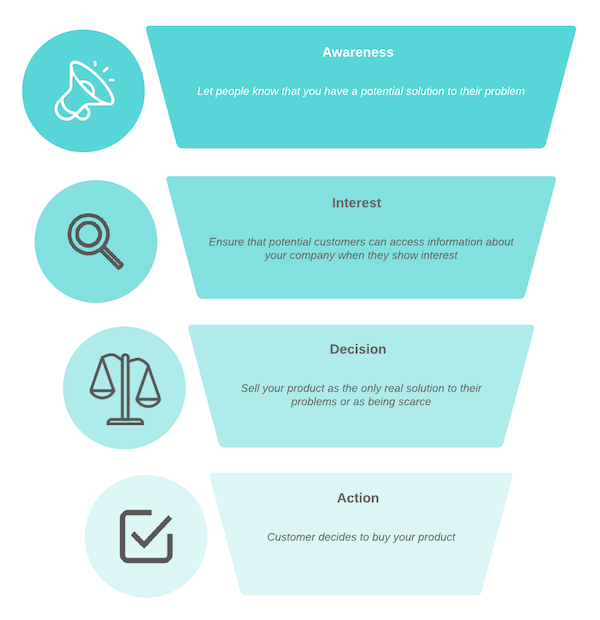
The first step to answering this question is figuring out what stage of the buyer’s journey your campaign is targeting. Are you trying to bring in new customers, or are you attempting to gather feedback from existing clients? Are you marketing your brand to those who recognize it, or are you introducing a new brand identity altogether?
Your marketing message will vary depending on whether your campaign audience is in the Awareness, Consideration, or Decision stage. It’s important to note that a marketing campaign can include collateral for people in various stages of their journey. For example, while your campaign might target current customers, it might also bring brand awareness to new consumers.
Next, identify your audience interests and pain points. Here are some questions to ask yourself and your team to better understand your audience.
- What are my audience’s general interests? What magazines do they read? What TV shows do they watch? How do they spend their free time?
- Where does my audience hang out online? For what purpose do they use Instagram, Facebook, and other networks? Do they engage or merely browse?
- What kind of content gets my audience’s attention? Do they respond to straightforward sales messages, or would they rather consume witty, humorous content? What cultural references would they understand?
- What kind of problems do they have that my product, service, or brand could solve?
Becoming well-acquainted with your campaign audience will help you confidently answer these questions and any others that may arise during the campaign.
Featured Resource
4. Set a concept for your campaign and get in contact with the right team.
It’s time to talk about the campaign itself. At this point, you know why you’re running a campaign, how you’ll measure it, and who it’s targeting. Now, let’s talk about what the campaign will look like … literally.
Marketing campaigns are like their own brand. They require a mission, a vision, and a visual identity. Great campaigns are an offshoot of their parent brand, both visually and creatively — they stay consistent with the business brand but maintain their own identity.
When creating their campaign assets, some businesses use an in-house team while others opt for an agency. Another alternative is hiring a freelancer or contractor to complete a specific portion of the project, such as the copy or design.
Depending on your specific campaign goals, I’d recommend starting with your in-house team and moving forward from there. They are likely the experts on that portion of your business and can speak to what your campaign needs to succeed.
Following the example of my Instagram UGC campaign, I’d start by consulting with my social media team. They’d be the most familiar with what Instagram content performs well and what our Instagram audience likes to see. From there, I could assign the campaign to them, or outsource the creative part to an agency or freelancer.
This step will likely take the longest since you’ll be creating your campaign concept from scratch. Next, we’ll dive into how you’ll distribute your campaign assets and connect with your audience.
Featured Resource
Distributing Your Marketing Campaign
This stage is all about the public-facing part of your campaign, including what your audience will see and when. If you’ve combed through the previous section, you should have all the answers you need to guide you through this step.
5. Choose the channels you’ll run your campaign on.
Let’s think about what type of marketing your campaign will use. This choice depends on your audience preference, budget, and brand engagement levels, among other factors.
Take a look at the current media channels you use to promote your company. Which perform the best? Which allow you to pay for advertisements? Which have the best engagement? Most importantly, where are your customers hanging out?
Also, while using multiple media is highly recommended, it probably wouldn’t be wise to publish your campaign on a brand new medium on which your business has no presence. So, stick to those marketing channels on which you’re already killing it.
Need a few ideas? Take a look at the PESO model, which breaks up distribution channels into Paid, Earned, Shared, and Owned.
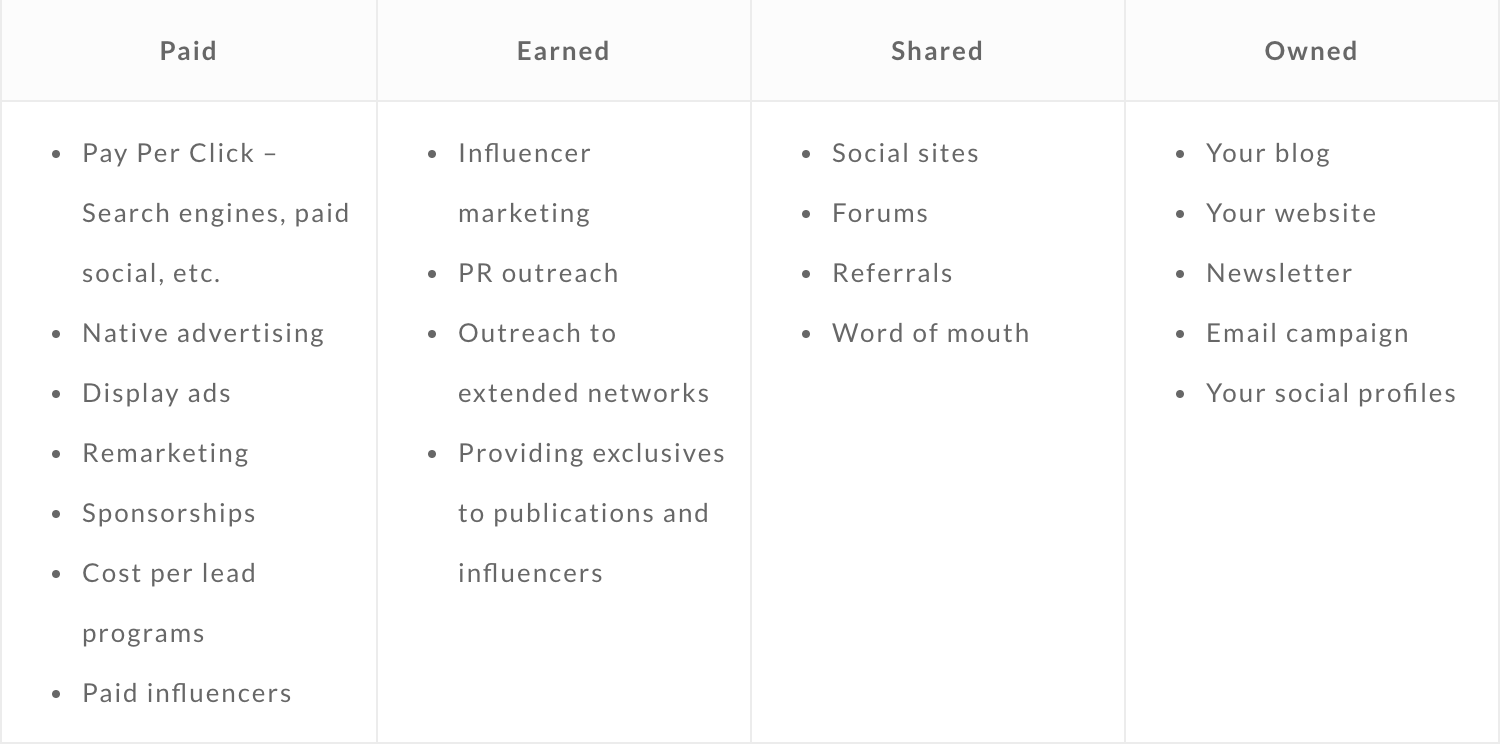
Image Source
Start by choosing two or three channels for your campaign. For example, I might promote my UGC Instagram campaign via social media (on Instagram, of course), email, and through my blog. I’d then pay to boost my social media campaign posts so they’re viewed by more of my audience.
Depending on your campaign goal, certain channels might not make sense. In terms of my UGC campaign, it wouldn’t make sense to invest in print advertisements or direct mail since the campaign is purely digital and my audience is mostly online. On the other hand, multinational product launch campaigns would probably involve most (if not all) of the media choices above. They’d want to reach the widest audience, both in-person and online.
Remember that you’ll need to alter or expand your marketing assets to fit whichever media channels you choose. Your campaign images, video, and copy might vary between social media, email, print, etc.
Lastly, even if you choose not to actively promote on a certain medium, you can always optimize it to at least mention your campaign. For example, you can update your social media bios, change your email signature, install a website header notification bar, add small calls-to-action (keep reading for more on these) at the bottom of blog posts, and more. These efforts don’t require much extra work or resources but they promote your campaign nonetheless.
6. Set a timeline for your campaign.
This section is all about timing. Establishing a deadline for your campaign (the Timely part of your SMART goal) gives you a much better idea of when, how, and how often you’ll promote it.
First, build a general campaign timeline. On a calendar, mark your campaign start date and deadline. This gives you parameters to work within.
Next, take a look at your marketing assets and chosen promotional marketing channels. Based on your people and financial resources, how often can you afford to post and promote your campaign content? Create a promotional calendar for each marketing channel. Decide on a cadence for each channel and map out your scheduled posts, emails, etc. on your calendar.
Why should you map your campaign visually? It’ll help you evenly disperse your campaign promotions and publish equally on each medium. It’ll also give you an idea of where your time and energy is going so that you can look back when assessing the effectiveness of your campaign.
If your promotional calendar seems very, very full, don’t fret. Social media and email scheduling tools can alleviate the pressure of posting daily. Check out tools like HubSpot, Buffer, and MailChimp to help you schedule and manage your campaign promotions.
The promotional stage is all about getting your campaign in front of your audience. But, how are you supposed to get your audience to follow the purpose of your campaign? Next, we’ll discuss how to optimize your campaign to convert customers.
Converting Customers Through Your Marketing Campaign
So, campaigns are a connected series of operations designed to bring about a particular result. We’ve talked about the “connected” part, and we’ve covered the “operations” part. This stage — the conversion stage — is all about how your campaign can lead to that “particular result.”
7. Ensure your campaign is driving users toward a desired action.
Even if your campaign is effective and drives a ton of traffic, it still needs to complete its desired action. By “the desired action,” I’m talking about that SMART goal you initially defined. Let’s take a moment and reiterate that goal.
For my sample campaign, my SMART goal was “to gather user-generated content from 100 customers via a branded hashtag on Instagram featuring our new product line by December 31, 2018.”
This step is all about calibrating your marketing efforts and channels to lead your customers to complete your desired goal. This is done through conversion assets like calls-to-action, landing pages, and lead forms.
These assets can be used separately or in conjunction with one another, such as featuring a lead form on a landing page, or creating a call-to-action asking your audience to fill out a form.
Calls-to-Action
A call-to-action (CTA) is a direct ask of your audience. It’s an image or line of text that prompts your visitors, leads, and customers to take action, and it’s absolutely crucial to your campaign success.
CTAs cut through the noise of today’s marketing and advertising world and give your audience a clear directive. But, there’s no one-size-fits-all for CTAs, especially in the case of marketing campaigns.
Your campaign CTA can’t simply ask them to complete your goal. You must also consider how your audience would benefit from completing your action and include that in your CTA.
If my UGC campaign CTA was “post a picture of our product with this #hashtag,” my campaign would seem uninspired and a tad bossy. CTAs might be direct, but they’re also meant to encourage, inspire, and convince.
In this case, a better CTA would be “Share a photo featuring our product and this #hashtag, and you might be featured on our Instagram page and next promotional video!”
The same benefit-driven CTA applies to product launches, brand awareness campaigns, upsell efforts, and other types of campaigns. Your audience won’t complete your “desired action” unless they understand how it benefits them, too.
Featured Resource
Landing Pages
Landing pages give your campaign a home, a destination. They are a dedicated space for your audience to visit and learn more about what your campaign consists of and why they should participate. It also sets your campaign apart from the rest of your website and content.
Your landing page should be ripe with benefits for your audience, especially the unique value proposition (UVP) of your campaign. Don’t forget to repeat your CTA and make it clear how your audience can engage (i.e. with a download or by filling out a form).
High-converting landing pages also contain social proof and a variety of marketing assets like images, strong copy, and video.
High-converting landing pages also contain social proof and a variety of marketing assets like images, strong copy, and video.
Featured Resources
Lead Forms
Lead forms are web forms dedicated to capturing information about a visitor. By filling out the form, the visitor then turns into a lead. Lead forms are not necessary for all campaigns (they wouldn’t do much good for my UGC Instagram campaign, for example), but they can be great assets for most others, such as product pre-orders and content offer downloads.
Lead forms transform anonymous website visitors into hard data you can use to make sales and learn more about your audience. They put your landing page to work. Try our Free Online Form Builder to build out your campaign form.
8. Monitor the right metrics.
The campaign effectiveness metrics you’ll monitor will depend on what type of marketing campaign you’re running and what channels you’ve chosen. This section merely serves as a baseline list to give you an idea of what to watch.
Also, it’s tempting to focus on vanity metrics like generated traffic, click-through rate, and impressions. A bump in these is definitely a good thing, but since they don’t necessarily indicate a bump in revenue, they can’t be the only metrics used to measure the effectiveness of your campaign.
Here’s are some metrics to watch per marketing channel.
Email Metrics
- Click-through rate
- Bounce rate
- Conversion rate
Social Media (Paid) Metrics
- Click-through rate
- Conversion rate
- Cost per click
- Cost per-conversion
Social Media (Organic) Metrics
- Passive engagements (likes and shares)
- Active engagements (comments)
- Follows
- Click-through rate
Lead Magnet/Content Offer Metrics
- Opt-in rate
- Cost per opt-in
- Follow-up email open rate
- Opt-in conversion rate
Display Ads/Paid Media Metrics
- Cost per thousand impressions
- Click-through rate
- Conversion rate
- Cost per conversion
Direct Mail Metrics
- Response rate
- Cost per conversion
- Average revenue per conversion
Content/SEO Metrics
- Click-through rate
- Bounce rate
- Time on page
- Page scroll depth
- Conversion rate
This may seem like a lot of metrics (depending on your campaign), but keeping an eye on these numbers can help you assess your campaign accurately and better understand how to improve.
Assessing Your Marketing Campaign
The post-campaign stage determines your success just as much as the planning stage. Measuring and analyzing your campaign data can provide unique insight into your audience, marketing channels, and budget. It can also tell you exactly how (or how not) to run your next campaign.
9. Establish success numbers and metrics.
Well, it depends on how you define “worked.” The easy answer to this question is whether or not your campaign met your initial SMART goal. If it did, great! If it didn’t, it can still be considered successful.
For example, if your goal was to increase organic blog views by 100K, any bump in views would be considered successful. But there’s a difference in a campaign that works and a campaign that’s worthwhile. A worthwhile campaign gives you an ROI that’s proportionate to the time and energy you put into it.
While it’s okay to celebrate any bump in pre-orders, leads, views, or engagements, don’t assume that’s enough. There’s a reason the very first thing to do is set a campaign goal. Sticking to that goal and calibrating your investment will ensure your campaign is worthwhile.
10. What will you do with the campaign data?
This step helps maximize your campaign’s business impact. When you analyze and apply your data, its value increases tenfold — not only did it help you measure and assess your campaign results, but it’ll also give you direction and clarity on your audience, marketing methods, creative prowess, and more.
Let’s return to my UGC Instagram campaign. Of course, images shared by my customers are helpful because they help me gather user content for my social channels and they promote my product to my audience’s followers. But this “data” also provides insight into who my audience is, when and how often they post on Instagram, what language they use, and how they use my product (assuming it’s the same as in the shared photo).
See how my campaign “data” provides more value than simply reaching my campaign goal? The same can go for your data. Whether you collect lead information, pre-orders, social engagements, or offer downloads, your data can equip you to not only meet your campaign goal but also expand your marketing efforts as a whole.
Lastly, spend time with your team reviewing your campaign. Ask yourselves questions like:
- What could’ve been done differently?
- How could we have saved money?
- For anything that went wrong, why do we think it went wrong?
- What did we learn about our audience or marketing channels?
- What kind of feedback could we gather from participants or customers?
Final Thoughts
So, marketing campaigns involve a lot of information, decision-making, ideas, and observation. But the process of creating and running one isn’t as scary as you thought, was it?
If you’re not sure where to start, take a look at some great campaign examples below. Now that you know what goes into each one, you might have a better idea of how to build one for yourself.
Great Marketing Campaign Examples (and Why They’re So Great)
This wouldn’t be a HubSpot Ultimate Guide if I didn’t show you some examples from the pros. Sometimes it’s helpful to see concepts at work, and that’s why I collected some of the best below.
If you’re looking for more excellent campaign examples, check out these other HubSpot blog posts:
1. Cheerios’s #GoodGoesRound
General Mills ran a non-profit campaign called Good Goes Round via their Cheerios brand, lobbying to raise enough money to fund one million meals. The campaign featured its own landing page, video marketing assets, and hashtag (#GoodGoesRound), separating it from its “parent” brand and making it shareable among its audience. They also paid to promote the Good Goes Round URL on Google.
2. Apple’s “Shot on iPhone”
Apple’s “Shot on iPhone” series highlights the high-quality videography and photography that customers can capture on the iPhone X. It’s a product launch campaign that focused on one specific feature of the new Apple smartphone. This campaign was unique, because it’s similar to a user-generated campaign but was also promoted heavily by the brand itself. Apple launched its own Instagram account to share the #ShotoniPhone content, collaborated with professional photographers and videographers, and ran official TV advertisements.
3. Metro Trains’ “Dumb Ways to Die”
“Dumb Ways to Die” was Australia’s PSA campaign that took the advertising world by storm. Created in Melbourne, the campaign was Metro Trains’ effort to encourage railway safety. The campaign was initially shared on social media in 2012 but went viral soon after.
According to CampaignLive, “The musical video, which shows animated characters dying in amusing circumstances, has already racked up 50m views on YouTube, over 3.2m shares on Facebook, been retweeted over 100,000 times on Twitter and become the third most viral ad of all time. The music track was popular, too, charting on iTunes in 28 countries.”
The campaign also has its own Wikipedia page and live website on which visitors can play games or shop for toys and apparel.
4. Pepsi’s “The Pepsi Challenge”
During the height of the infamous cola wars, Pepsi cemented its place as the only alternative to Coca Cola with The Pepsi Challenge. With a series of commercials pitting these two beverages against one another, Pepsi was able to gain substantial market share in its market – which is why the debate still goes on today.
5. Hess’ “The Hess Truck’s Here”
Is it really the Holiday season if you don’t hear “The Hess Truck’s back, and it’s better than ever!”?
An ongoing Christmas campaign, The Hess Truck commercial hooks viewers in with its familiar jingle before introducing them to the new design and features of each year’s addition. It’s the perfect mix of looking back and ahead – and why we look forward to Hess’ new commercial heading into each December.
6. Paranormal Activity’s “Test Screening”
The promotion for this found footage horror film switched the camera from the audience’s perspective to the audience itself. By highlighting actual reactions from a test screening and promising a terrifying theatrical experience, turning an initial $15,000 budget into a $193 million box office success. It became the most profitable movie ever made.
7. Coca-Cola’s “Share a Coke”
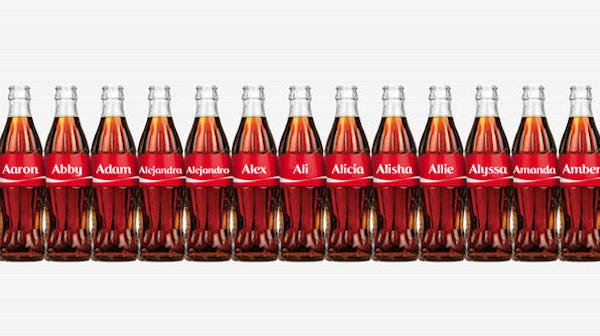
Ever gone into a grocery store and looked for a Coca-Cola bottle with your name? That was a marketing campaign — and it’s so effective that looking for a bottle with our name was almost automatic for some of us. It’s one of the best-known campaigns in the world. It has been written about in Wikipedia, dissected by news outlets, and turned into a valuable lesson for marketing students.
8. Airbnb’s “Made Possible by Hosts”
In the face of the COVID-19 pandemic, travel companies such as Airbnb saw unprecedented losses in profit. Well, how did Airbnb respond? It created a series of videos called “Made Possible by Hosts” that shows appreciation for the hosts who have continued to accept guests on the platform. What’s most curious about the campaign is that it doesn’t put Airbnb customers at the center. Instead, it spotlights the hosts who accept customers in the first place. In doing so, Airbnb focuses on the human aspect of its platform. You’re not renting an Airbnb property; you’re renting someone’s home.
Over to You
Marketing campaigns aren’t easy, but they’re valuable and integral to growing a successful brand and business. Campaigns set apart certain deliverables from general promotional efforts and touch your audience in creative and exciting ways. If you’re not sure where to start, consider what would be valuable to your audience … and go from there. Your audience is, after all, the lifeblood of your campaigns and company.
Editor’s note: This post was originally published in August 2017 and has been updated for comprehensiveness.



















![→ Free Download: 4 PowerPoint Presentation Templates [Access Now]](https://i4lead.com/wp-content/uploads/2021/10/2d0b5298-2daa-4812-b2d4-fa65cd354a8e.png)
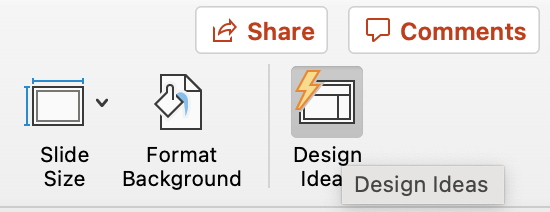
 As you browse and select from the themes shown above, the Design Ideas pane to the right will interpret them and come up with layouts. Below, we’ve included some of our favorite ones.
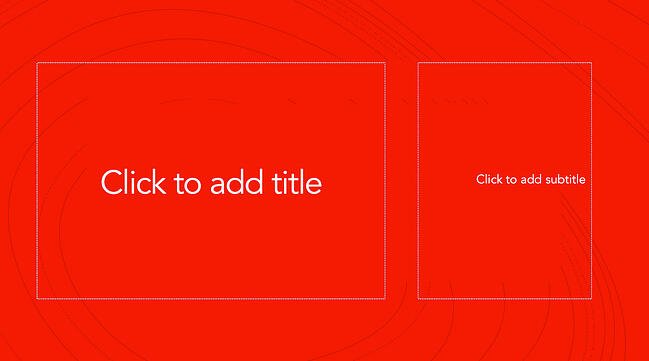 Covering a more creative subject for a younger or more energetic audience? On behalf of PowerPoint, might we suggest the cover slide design above? Its vibrant red background and fun lines will appeal to your audience.
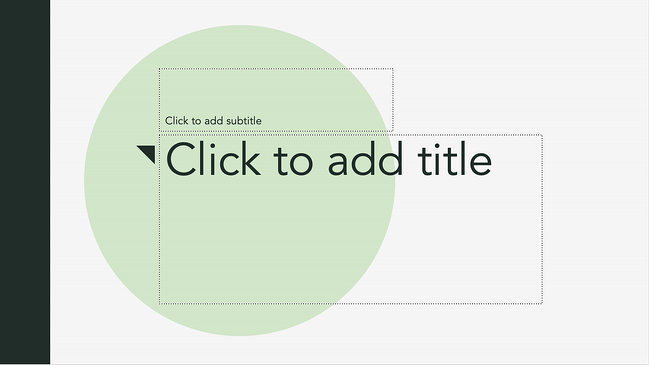 This design doesn’t have the intensity of the first slide on this list, but it maintains a sense of informality that all PowerPoint presentations benefit from.
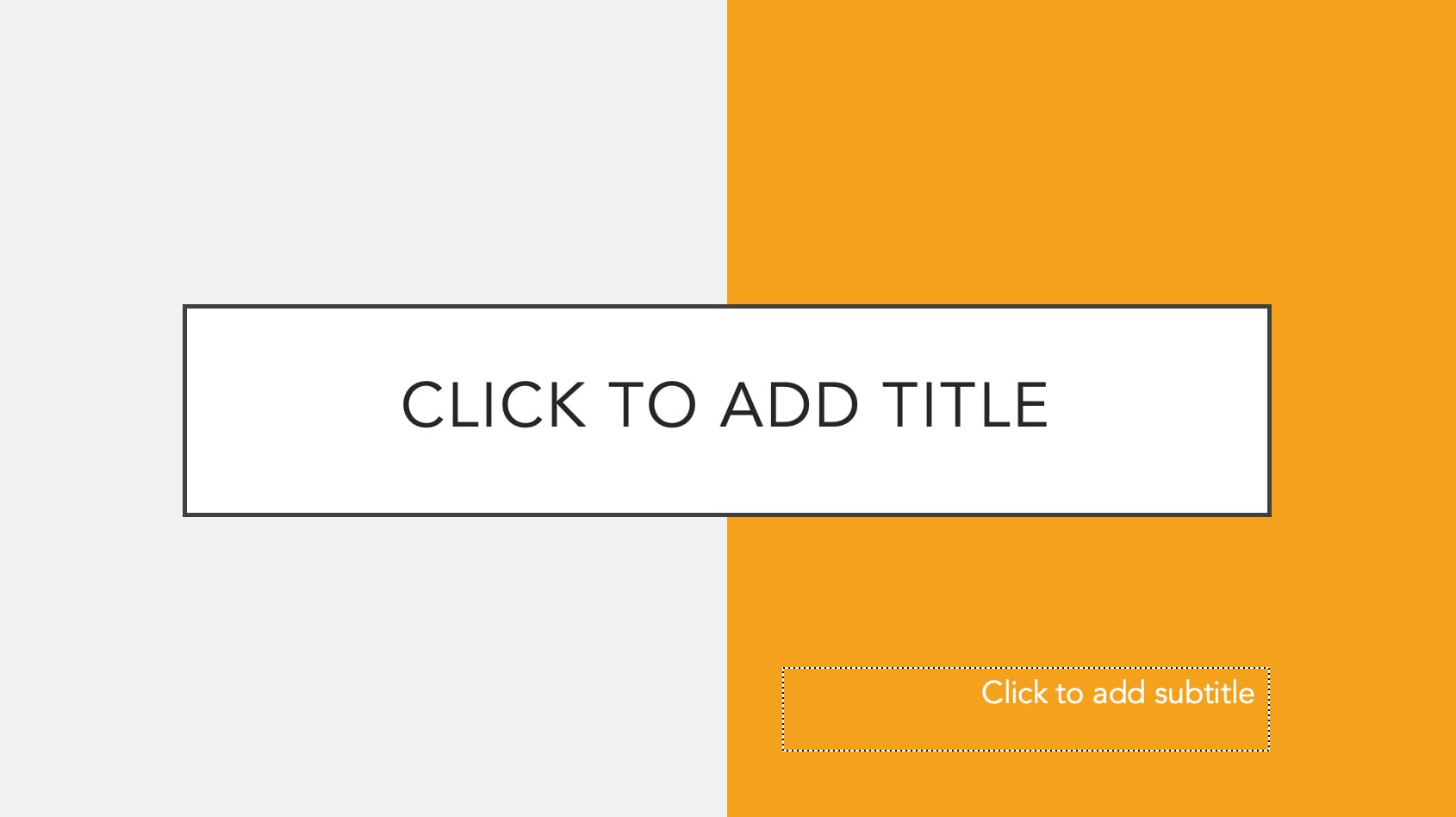 The color-blocked look in the design above sets a fun but relaxing tone for the audience.
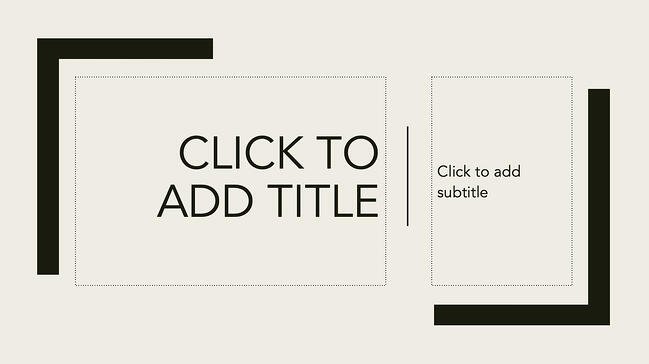 This PowerPoint design idea uses graphic elements such as lines and bars to give structure, contrast, and modern flair to your slides.
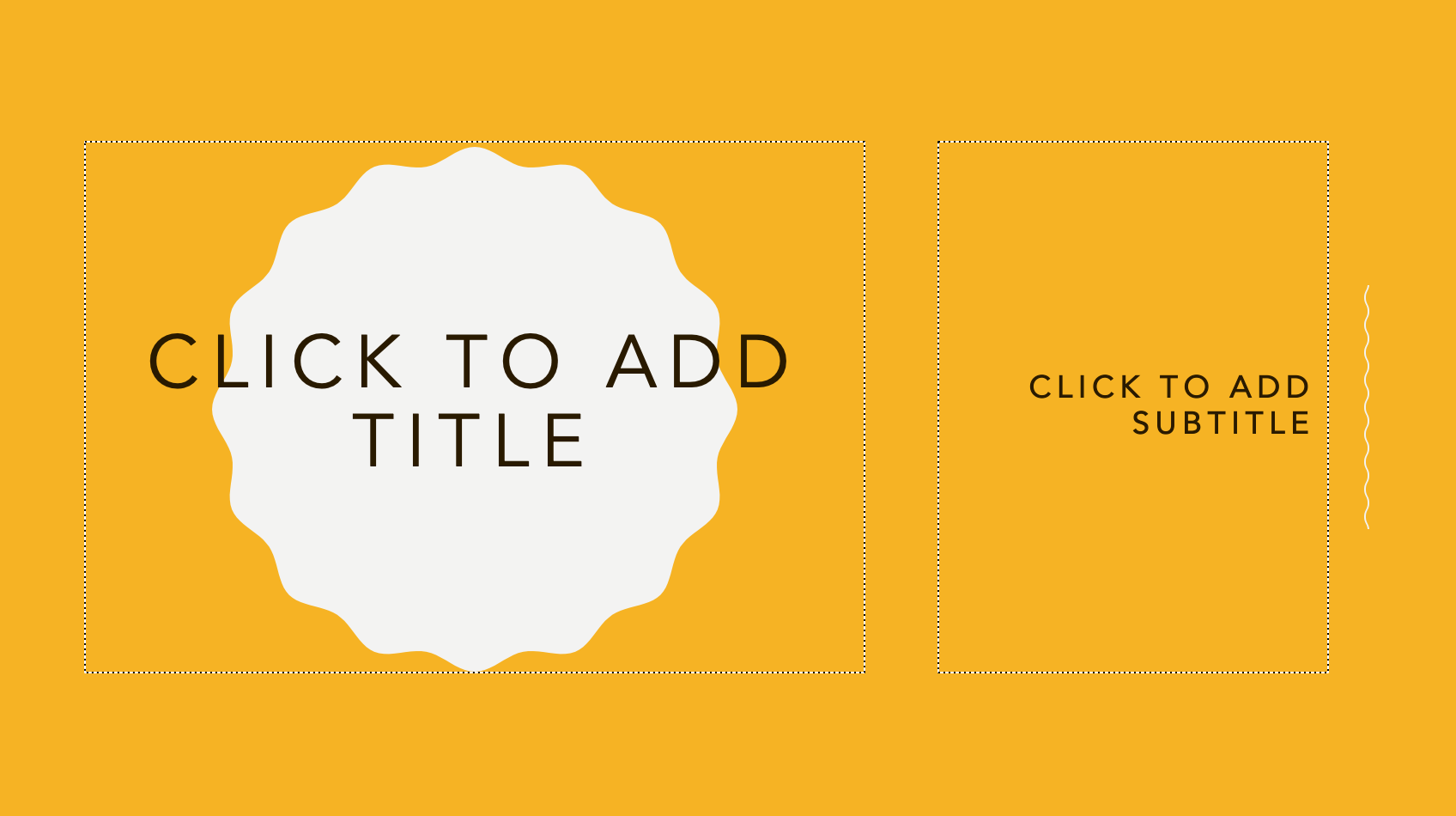 We’re particularly fond of this PowerPoint design style. By using lines and contrasting elements — like a burst, as shown above — you add depth to your slides. This can help your content capture and hold your audience’s attention more easily.



![→ Download Now: SEO Starter Pack [Free Kit]](https://i4lead.com/wp-content/uploads/2021/10/1d7211ac-7b1b-4405-b940-54b8acedb26e-2.png)