Categories B2B

7 Habits of a Highly Effective Landing Page

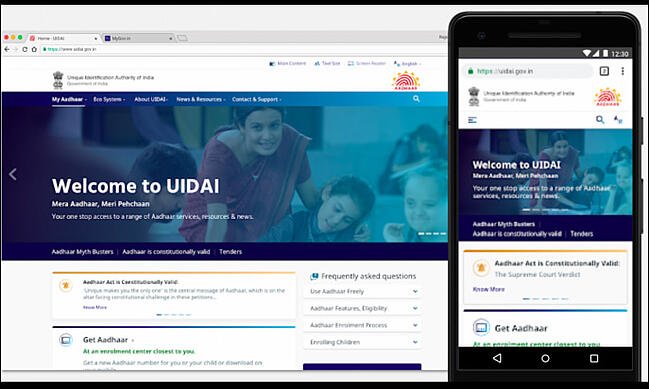
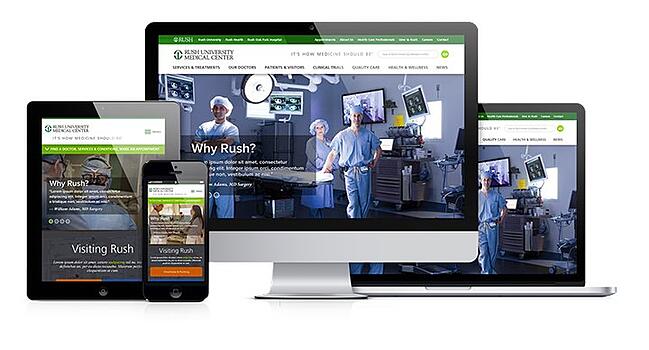
First impressions are everything, especially when it comes to web design. A landing page is a great way to get visitors to interact with your site by engaging with your calls-to-action, making a purchase, contacting you, or sharing your content.

A landing page should be informative and direct, but also attention-grabbing and welcoming. It may seem like the content of your landing page is the focus, but the design is equally as important.

Learn More About HubSpot's Free Landing Page Builder

Landing pages are critical to converting your visitors into customers. They broker the exchange of information between you and your audience. Combining an eye-catching offer button with an effective landing page design can turn what was once just web traffic into a steady stream of leads for your sales team.

What makes a good landing page?

A strong website is essential for reaching your business goals. And the landing page provides important information for your audience along with a clear call to action. These seven elements will help your landing page be as effective as possible.

1. Structure & Design

Unfortunately, not every visitor will make it to the bottom of every page. So, keep the important features, such as lead intake forms and calls-to-action, above the fold to ensure that they’ll be seen. Additionally, remove the navigation from the page to avoid distractions in the form of other links.

2. Compelling Headline

The largest text on your landing page should be something that makes your visitor want to learn more. Saying “We are Georgia’s largest marketing agency” isn’t as captivating as “We helped businesses earn $10 million in profit this year.” Any additional copy on your landing page should maintain the momentum of interest initiated by the headline.

3. Call-to-Action (CTA)

What do you want visitors to do when they come to your site? Your design and copy should inspire them to take action. You have their attention, so strike while the iron is hot and put a Contact Us Now or Join the Family button right on the landing page.

4. Testimonials and Case Studies

A first-time visitor to your site may not have done any business with you before. They will be more encouraged to take action by seeing what you’ve been able to accomplish for a similar client and not just a general description of what you do.

5. Trust Symbols

A well-designed website isn’t enough to prove to visitors that you’re a credible organization, especially in today’s world. Social proof builds credibility, while elements like trust seals and a privacy policy create trust with your visitors.

6. Media

A headline can be a powerful motivator, but a photo or video can also communicate your desired message. Choose a media that promotes either what you do or what you want your audience to feel when they land on your page.

7. Quick Loading Pages

Be sure to optimize any images or videos on your landing page to avoid slowing down your page speed. If your page takes too long to load, visitors may abandon ship before even seeing the whole page.

7 Landing Page Best Practices

Follow these landing page best practices to ensure a high-converting, easy-to-navigate webpage.

1. Pass the blink test.

Visitors to your site will often make the decision of whether or not they’re going to fill out your form before the page even finishes loading. Make sure where you’re sending folks appears immediately professional and easy to fill out. In other words, make sure they can understand the offer and what you’re asking for in the time it takes them to blink.

2. Keep it simple. 

Every visitor to your landing page clicked on something to get there, like a CTA button for a free trial, webinar, or other offer. So, theoretically, you already know something key about these folks. If they clicked to download a whitepaper on blue widgets, for instance, then you will know they are interested in blue widgets. Armed with that information, you should be able to plan your page layout accordingly. Use that knowledge to your advantage and keep everything about this page simple.

3. Keep it concise. 

Pinpoint the most important things you want to communicate with your landing page. Avoid including a long company history or elaborate explanations that can go on a different page. A visitor should be able to take a quick look at your landing page and receive your desired message.

4. Graphics and endorsements matter. 

Remember, you’ll be asking people to submit information they may consider sensitive. Before doing so, building credibility will be key. Make sure you have all of your trust-building material — like testimonials, social proof, and privacy promises — placed prominently on the page.

5. Go naked. 

Your landing page visitors are a few keystrokes and a click away from becoming a bonafide lead. In other words, you’ve got them right where you want them! The last thing you would want to happen is for them to get distracted. “Going naked” refers to the practice of making your landing page deliberately sparse. Customize the page so that it has zero navigation, that is, no menu, no link back to the homepage, and no other places to click. This page needs to be devoid of any and all hyperlinked distractions. Let the form and “submit” button be their singular point of focus, and usher them through to completion.

6. Restate value. 

The landing page will be hyperlinked to the CTA button on your website, but make sure the two are also logically linked. Use a simple, bulleted list near the top of the page to restate what you’re offering and why it’s valuable. Doing so will ensure your prospect knows exactly what they’re getting and will ensure a qualified lead for your sales team.

7. Eat your own dog food. 

Before publishing the page, ask yourself a few questions, like: Would I fill out this form? Would I find this page confusing? Would I feel comfortable sharing my information with this site? Use these questions to ultimately perfect the look and feel of your landing page before going live. And of course, test, test, test!

The Landing Page is the Takeoff Point

The warm welcome that your landing page provides is the jumpstart to your visitor’s interactions with the rest of your site and your organization. Establish a few precise goals for your landing page, and then take action to publish the elements necessary to accomplish them. Ask yourself, what do you want a visitor to understand and feel in the first few seconds of landing on your page? The answer will lead you in the right direction for personalizing your page for the optimal user experience.

Editor’s note: This post was originally published in May 2010 and has been updated for comprehensiveness.

New Call-to-action

Categories B2B

You Don’t Have to Be a Great Writer to Write a Great Blog

When I started HubSpot, I was a trained engineer with little writing experience. In the early days of the company, I could not create software. Instead, I spent a lot of time writing articles for our Marketing Blog. As an inexperienced writer, I was pleasantly surprised by how well it performed. Today, the blog has over 500,000 subscribers and over 10M new visitors each month.

The success of the blog convinced me that I suppressed brilliant writing skills for the last 20 years! My excitement led me to send a Thank You note to my eighth-grade teacher, Tom Brown, who helped me learn to write.→ Download Now: 6 Free Blog Post Templates

Emboldened with my newfound writing confidence, I wrote the Inbound Marketing Book with my co-founder Dharmesh Shah. When we submitted the final draft to a professional editor, I was confident she would send it back with minimal edits and high praise. Wrong. The document she returned had more red lines than anything I had ever seen in my life.

After many weeks of language crafting, we got it close to perfect. Upon its release in 2014, it was ranked #200 out of the 8 million books currently available on Amazon — a list led by notable writers such as Dan Brown and Stephen King.

I learned that you do not have to be a great writer to have a great book. The same goes for blogs. Non-writers can develop new skills and practices that turn your words and message from mediocre to excellent, and in this post, I’ll tell you how.

Blogging Tips for Non-Writers

Non-writers and great blogs are not mutually exclusive. If you have no formal writing education or experience, join the club. English is not the most popular Bachelor’s degree. There has been a 26% decrease in English degrees conferred by postsecondary institutions since 2011 while blogging has seen a 12% growth since 2015.

With the number of professional writers decreasing and the number of blogs increasing, we can deduce that the number of non-writers who blog is likely increasing.

Formal education, or the lack thereof, won’t stop you from running a successful blog. You’ll just need a few skills in your toolbelt.

When writing your blog, you need to:

  • Select your audience and topics.
  • Have a conversation.
  • Include links to reputable websites (including your own).
  • Make your content easy to digest.
  • Use online writing assistants.

Let’s cover each of these in-depth.

1. Select your audience and topics.

Who is your audience? It is significantly easier to speak to someone when you know who they are, but it’s impossible to know every person who reads your blog posts. This is where your buyer persona comes in. A buyer persona is a representation of your ideal customer. Once you establish your audience and their needs, you can figure out your topics of conversation.

Keyword research should determine the content you share with your readers. Keywords are words and phrases people type or speak into search engines. There are multiple ways to conduct keyword research, but a typical place to start is by evaluating monthly search volume (MSV) for industry-related terms.

Monthly search volume is the total number of searches performed for a particular keyword in a month. An easy example could be the keyword research of a greeting card store. November searches would unsurprisingly tell you that the search volume for the keyword “Thanksgiving cards” is higher than the keyword “Easter cards.” These results, combined with research on keyword difficulty, will lead you to your target keywords for the month.

Once you establish your buyer persona and keywords, you can begin a conversation with our audience.

2. Have a conversation.

Your blog is not an opportunity to bring your high school English term paper to life. Trust me, you do not need to reference a thesaurus and pull out the longest words in the dictionary to get your point across. Been there, done that. Instead, imagine you are talking to a friend when you write a post. Be knowledgeable yet personable. Be authoritative yet relatable. Your readers don’t want to be talked down to. They want quality information they can understand from a credible source, and it is you’ve been granted the responsibility to provide it.

3. Include links to reputable websites (including your own).

As you can tell, there’s no one rule for writing a great blog. Most of the rules about blogging aren’t even associated with writing. One example of this is link building.

Link building can boost the quality of your content and the credibility of your blog. Focus on interlinks and backlinks.

Interlinks

Interlinks are links that guide readers back to the content on your website. This gives your other content more exposure in a relevant way, plus it helps search engine site crawlers index more pages on your site. That’s great news for your SEO efforts! Another rewarding benefit is extending the time readers spend on your website. When you use interlinks, you provide your readers with relevant resources to increase their knowledge on the subject. It boosts your credibility as a source, and the more credible your visitors find your blog, the more successful it will be.

Backlinks

There are endless amounts of information on the internet, but not all of it is credible and accurate. You can help readers find other great content by giving backlinks to reputable sites.

A backlink is a link from one website to another. If your blog links to another website, they have a backlink from you. If a website links to your content, you have one from them. But you might be wondering, why would you want to take traffic away from your blog?

In short, search engines like to see websites giving credit where it’s due. Backlinks are a great way to substantiate your blog article so that the reader can learn more about your point of view.

The key to a strong backlink strategy is to prioritize quality over quantity. Build your content around information from reliable sources. Getting backlinks from other websites is not guaranteed, but you can increase your chances by creating quality content with the tips on this page.

4. Make your content easy to digest.

What you write is valuable — we know that. You also need to pay attention to how you write and present your information. No one wants to open a webpage to a sea of never-ending words trickling down the page. The important information will easily get lost. So will your reader. The amount of time spent on your blog is limited. Your goal is to keep their attention while giving them the information they want as easily as possible. To accomplish this, use:

Headings and Subheadings

Many readers do a visual scan of a webpage before they decide to dive deeper into the content. Here is where you will see the importance of headings and subheadings. Treat them as an outline or summary of your blog post. Use them to make your most significant points so readers can quickly determine the value of your information.

Lists

When presenting information to your readers, use lists wherever possible. Elaborate on your main points, and break up your text to make your content easier to comprehend and retain. Vary between using numbered lists and bullet points. Use numbered lists to prioritize the order and bullet points when there is no order of importance.

Visuals

If your content allows it, use tables and charts. There are reasons for commonly adding these visuals to presentations. One, you can present the same information in a different, more exciting way. Two, you’re able to accommodate visual learners. Hundreds of words could be necessary to build your point, but a table will either supplement or summarize your information and break up the monotony of your text.

5. Use online writing assistants.

Fifteen years ago, the most writing assistance we received was from the red and green lines appearing in a Microsoft Word document. Now, there are plenty of tools to help improve your writing. Available options for free writing assistant software include Writefull, 1Checker, and Grammarly.

Grammarly, a popular spelling and grammar check tool, offers suggestions based on correctness, clarity, engagement, and delivery. The platform breaks your writing down into overall performance, readability, and vocabulary. Are you constantly confusing ‘than’ with ‘then?’ Do you need to double-check your use of ‘affect’ and ‘effect?’ Tools like Grammarly easily catch these minor mistakes to elevate your content.

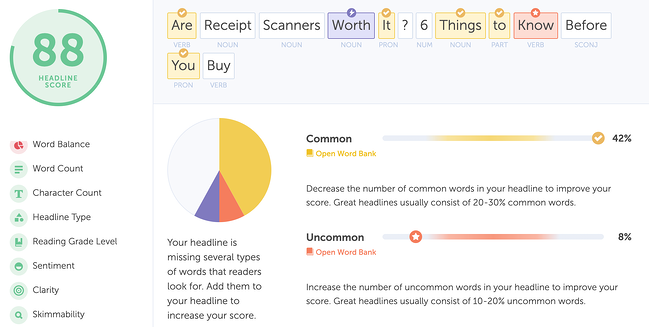
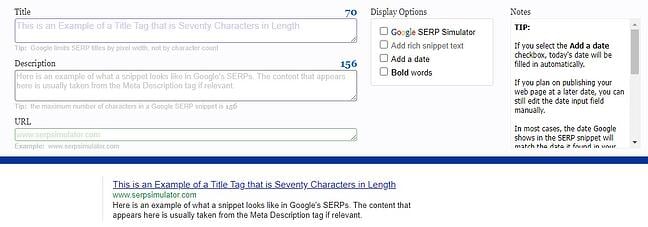
The content written on your blog is not the only help you might need. Your blog content is strategic but so is optimizing your blog for SEO. While SEO is a long conversation that needs to take place for all content you put on the internet, another aspect where you can get help with your writing is your SEO title tag. The title tag appears as the name of your webpage on a search engine results page (SERPs) and is clickable to the link destination. CoSchedule, a marketing resource, offers its Headline Analyzer as a tool for creating better headlines that can result in increased SEO value, traffic, and social shares.

Great blogs don’t need great writers.

You don’t need a degree in English or creative writing to have a successful blog. You need identity and value. Establish who you’re writing to and what you have to say. Identify yourself as a knowledgeable and reliable source who brings value with your content and relevant content on the internet. Boost your blogs with visuals when necessary, and if you can’t proofread your content, have someone (or something) else do it for you.

Blogs need to be written with strategy. Use these tips to create yours.


Categories B2B

What Is a Direct Response Ad?

What led you to make your most recent purchase? Were you wishing for something for a while and decided to just go for it? Were you casually browsing a store and saw something you liked? Or were you browsing and an advertisement from a business convinced you that you need to buy it right then and there?

If it was the latter, the business used a form of outbound marketing to convince you to take an immediate action after seeing one of their marketing materials. It can be a very effective strategy, especially if done correctly.  

In this post, learn how businesses can use direct response marketing to drive conversions, best practices for creating these types of campaigns, and examples from real companies to use as inspiration.

→ Download Now: Free Marketing Plan Template

What is direct response marketing?

Direct response marketing, sometimes called push marketing, is when you present your target audience with an offer in an attempt to persuade them to take immediate action, like completing a lead gen form, downloading an ebook, or making a purchase.

This strategy is popular with marketers because it can drive quick results for time-sensitive campaigns.

What distinguishes direct response marketing from traditional marketing is that it desires an immediate response for immediate ROI rather than traditional brand awareness. Below we’ll discuss more elements of these ad campaigns.

Direct Response Marketing Strategies

Direct response marketing strategies are customer-centric, targeted, offer-centric, and urgent. Here’s what that means for your campaigns:

Customer-centric

To elicit a response, your direct response ads must be customer-centric and directly related to the value you can provide them if they follow through with your desired action. If your audiences can’t tell why your offer matters to them, they won’t take action.

Targeted

Not all of your customers have the same needs, so your ads must be hyper-targeted to specific audiences with personalized messages that speak to their pain points. Statistics show that this practice is worth it, as Epsilon found that 80% of consumers were more likely to purchase a brand that offers personalized experiences.

Offer-centric

Direct response ads prompt users to do something, so they usually feature an offer or CTA that tells the user what your desired action is, whether it’s signing up for your newsletter or making a purchase. When creating these offers, mind copywriting best practices to ensure they’re clear and concise, focused on one specific outcome, and personalized.

Urgent

These ads all present a sense of urgency in addition to a CTA to entice quick action, so leveraging language like “As supplies last” or “Buy one get one free” is common. For example, maybe you’ll send a direct response ad to remind consumers about an event before it happens, so they quickly decide to sign up for it instead of missing it.

Active voice and power words are well suited to direct response ads.

Direct Response Campaigns

Below we’ll go over some common direct response campaigns businesses use.

  • Social Media Ads: Social media is a powerful tool for running direct response campaigns due to the sheer number of users and the targeting options that many platforms offer marketers. On this platform, ads need to use short and to-the-point copy that displays urgency and a CTA that directs the action you want your audience to take.
  • Referral Programs: Referral programs are an excellent tool for direct marketing, especially since you can easily track their effectiveness. Consider giving your current users a promo code or URL and ask them to share it with a friend or family member in exchange for something, like a 10% discount. If they successfully refer someone, you’ll be able to track it through the unique code.
  • Email: Direct response campaigns run over email typically make users aware of flash sales, upcoming events filling up, or things like abandoned cart reminders. We’ll cover an example of a direct response email below.
  • Display Ads: Display ads, like banners, are in an area on a website or channel dedicated to paid ads. They usually contain short copy that shows a sense of urgency and a CTA to inspire action.
  • Direct Mail: While it may seem outdated, direct mail is a popular channel for direct advertisements. Things like brochures, coupons, digests, or newsletters are used for direct marketing, but be mindful of not having your assets seem like junk mail.  

Direct Response Marketing Examples

Let’s go over some high-quality examples of direct response marketing that you can use to guide your own strategy.

New York Times

The New York Times, a newspaper, used Instagram to run a direct ad campaign to promote a limited discount for unlimited access to the newspaper.

direct response marketing example: new york times instagram ad

Grailed

Grailed is an online marketplace where individual users can resell different products, from clothing to collectible items. Their form of direct response marketing is via email, where they notify users when an item they have favorited has dropped in price.

direct response marketing example: grailed price drop email notification

Scribd

Scribd is an online ebook and audiobook subscription platform. Like The New York Times, it uses social media, Facebook specifically, to run direct marketing campaigns to notify audiences about a limited-time discount offer.

direct response marketing example: scribd facebook ad

UberEats

UberEats is an online food delivery service that uses email for direct marketing campaigns to prompt users to follow through with a purchase after they have abandoned their cart.

direct response marketing example: ubereats abandoned cart email

Direct Response Marketing Metrics and Tools

Below we’ll discuss critical metrics that will help you understand your direct response marketing success and the tools that help you collect this data.

Conversion Rate

Conversion rate is an essential marketing metric for direct response ads as it tracks the number of users that have taken the action you want them to take, a.k.a converted.

You’ll get a sense of how successful you were, helping you learn about the effectiveness of your copy and the content you offer when it comes to providing value and prompting action. Let’s go over some specific tools that will help you track these conversions.

1. Promotional Codes

Promo codes can be unique per user or unique per campaign, so you can see how specific ads successfully prompt action. Make sure that you track the number of codes you give out so you can get an exact sense of how many people converted based on how many you gave out.

2. QR Codes

QR codes are similar to promotional codes as they’re unique to the specific campaign you use them on, helping you see how many users actually converted from that specific ad. QR codes also typically lead to landing pages, so you can further track if customers took action on your landing pages or simply landed on them and bounced.

3. UTM Codes

UTM (Urchin Tracking Module) codes are snippets of text placed at the end of a URL that helps you track where website traffic comes from. For direct response marketing, you can attribute your specific site traffic to your direct ads, like those who visited your site and made a purchase after receiving a promo code.

Here’s what a sample UTM code could look like for this use case: utm_campaign=20percentpromocode.

All-in-all, direct response ads have similar outcomes as regular marketing ads, but they want a user to take action right now. Be mindful of being customer-centric and use concise, urgent, and compelling copy, and you’ll find ads driving conversions.

Marketing Plan Template

Categories B2B

10 Benefits of Consistent, High-Quality Content Marketing

In this competitive B2B marketing landscape, businesses make substantial investments in building content marketing programs.Why? Content marketing has been proven to deliver resounding success.

As one of the most effective methods of growing audience engagement, developing your brand presence, and driving sales, content marketing is a mission-critical growth method for most businesses.

Below, let’s review content marketing — the benefits of producing consistent, high-quality content, and how to measure success.

Download Now: Free Content Marketing Mapping Template

According to the State of Inbound report, content creation is a top priority for 80% of marketers. Moreover, on average, content marketing accounts for26% of B2B marketing budgets.

Consistent, high-quality, and engaging content impacts audience decision-making more than any other technique.

Consistency in brand messaging is one of the many factors that determine the growth and success of your business. Big brands know how to portray their brand consistently and at every customer touchpoint.

The same reasoning applies to content marketing — your content needs to carry a unique and identifiable voice, style, and pitch across all distribution channels.

Content consistency establishes your credibility, builds trust, and strengthens your reputation.

So, we know the content you create has to be consistent. However, why is content marketing so beneficial in the first place? Here are the top benefits of content marketing.

Benefits of Content Marketing

benefits of using content marketing

1. Your audience will stick around longer.

Great content is an important asset. It has the ability to create positive experiences for your potential customers and compel them to come back for more. It’s your ticket to capturing your audience’s attention and continually reinforcing a positive brand impression.

2. You’ll have better traction on social media.

It’s one thing to increase your social media followers across channels, but it’s quite another to create trendy content. If you’re one of those businesses that doesn’t see much traction despite having a huge following, it’s time to use content marketing to your advantage. Quality content can help your business gain traction on social media.

Track the performance of your content campaigns using HubSpot’s analytics software.

3. Your audience will trust you.

Creating content helps your business build a relationship with your audience. You can answer their questions and interact with customers. When you create value without taking anything in return, your audience is more likely to trust your advice and recommendations.

Ultimately, when your content shows up at the right place and at the right time with the right audience, it’ll improve your brand’s reputation. The more quality content customers see, the more likely they will have a positive association with your company.

4. You’ll generate more and better leads.

Content marketing can also generate leads. When your audience views your content, they’re more likely to purchase from you in the future. Additionally, calls-to-action (CTA) placed directly in your content can generate new leads for your sales team.

So, how can content generate leads?

According to Lindsay Kolowich, the team manager of the HubSpot Academy Acquisition Content Team, “content is a great way to guide users to a landing page. Typically, you create content to provide visitors with useful, free information. You can include CTAs anywhere in your content — inline, bottom-of-post, in the hero, or even on the side panel. The more delighted a visitor is with your content, the more likely they are to click your call-to-action and move onto your landing page.”

5. Original content can improve conversions.

The content you post influences conversions. It helps your audience connect with you and gives them the information needed to make educated purchases.

Even more, if you’re using blog content to bring in traffic, consider using original graphics rather than stock photos, as marketers report the former as least effective in helping them meet their goals. 

Additionally, your content should always include a CTA and guide your reader on what they should do next.

6. Your business will become more visible thanks to SEO.

The more consistent, high-quality content you produce, the better it’ll be for your SEO efforts.

For example, your content should help your business become visible online and build trust and authority with your audience. In addition, with a developed content strategy, such as the pillar/cluster model, your content should help you rank higher in search engines.

7. Great content can position your company as an authority in your industry.

Creating quality content will also help build your authority online. If your business is established as a credible place to get information, you’re more likely to rank higher in search engines.

Plus, your customers are more inclined to trust you if they view you as an industry expert. Your content should demonstrate your expertise in your field and provide valuable answers to your audience’s questions.

Overall, content marketing is important. But, how can you be successful at it?

One way to tell is to assess the quality of your content. One particularly beneficial assessment of quality is content scoring.

As more businesses increase their content marketing budget, there’s never been a better time to incorporate content scoring metrics into your marketing campaign.

With the help of content scoring, you can measure and improve your content marketing performance and offer great value to your audience.

8. Quality content can build brand awareness.

Sure, anything can build brand awareness, but content marketing can do it in a unique way.

Our HubSpot marketing experts have written about something called Surround Sound strategy.

In a nutshell, this content strategy does more than just rank your blog article on page one. It makes your content (and therefore your brand) appear everywhere your potential customers are looking for your product.

To execute this strategy, write about topics your customers are interested in so they begin to associate your great content with your brand.

9. You’ll cultivate loyal brand fans.

Taking brand awareness a step further, all the people who raved about your content and associated all those great feelings with your brand are very likely to become brand advocates before ever purchasing your product.

Wait, what?

It’s true; brand fans can be just as loyal and influence their friends and family’s buying decisions as potential consumers see that a business provides value to its current audience. One of the more successful ways companies can do this is through content marketing.

For example, while I may not be in the market for children’s meal plans because I don’t have children yet, I am obsessed with the Kids Eat In Color blog and Instagram content. I recommend it to my friends and family who have children with picky eating habits. See how well that can work?

10. You’ll save money on your marketing strategy.

Since HubSpot first assessed the cost of content marketing ten years ago, the practice has remained the most cost-effective marketing strategy available.

Upfront costs for content appear steep, and that’s a fair point.

Estimates for blog content range from $150 a post to $3,000 for a freelance writer, but you could go the route of hiring a full-time staff writer to create content for you on a regular basis.

In the long term, when compared to paid advertisements, video marketing, and traditional marketing, content wins the battle with Frank from finance every time.

What is content scoring?

Content scoring is the process of assessing and quantifying the true potential of content by tracking how individual content pieces perform in generating and converting leads.

As an innovative content marketing metric, content scoring helps marketers prioritize only the assets that have a higher probability of generating and converting leads.

In addition to delivering a scientific method of assessment to writing, content scoring is a reliable and predictive method of evaluating the engagement potential of an individual piece of content before it’s published.

Improving the quality of your content is pivotal to the success of your marketing campaigns.

The quality of your content is relative to your audience’s profile. With a better understanding of your customer’s needs, you can offer content with higher resonance. But improving your content is a gradual process, and you need to continually measure and analyze your audience’s responses to understand and improve on the elements that matter most.

How to Score Your Content

Writers and content creators often find it difficult to quantify what recipe works for their content and their audience. By scoring your content, you’re able to objectify that process and use the same recipe repeatedly to create similarly successful content.

Here’s how to score your content:

  • Establish scoring criteria. To develop an effective content scoring system, you need to establish a foundation built on whichever engagement metric has the greatest impact on your content. For some, it may be page views, for others it could be shares on social media.
  • Create a campaign. Once you’ve identified which metric matters to you most, create a campaign and add the successful content that meets your threshold. For example, if you decide that 1,000 page views is high performing, include all the content assets that meet said criteria.
  • Monitor content performance. Measure how each new piece of content you create is performing. As certain content assets meet your success metric — 1,000 page views, for example — add them to the campaign. Continue adding content to build a small sample size of high-performing content. Use HubSpot Analytics to track the performance of this content.
  • Evaluate what works. Now that your high-performing content is segregated, you can further analyze what makes your content perform. Although it’s difficult to quantify, you can discover patterns within your content that you can then replicate.
  • Rinse and repeat. Although these patterns are always changing, this manual process is an effective way to score your content and take action on your insights in the future.

This can be a tedious process, and it only scrapes the surface of a true content scoring system, but it’s a thorough and important process to implement. For more effective and efficient results, you can use an automated tool like Atomic AI to help you score your content in more granular patterns.

Content scoring helps your brand set a benchmark for itself, moving you closer to understanding customer’s buying stages and expectations. When you’ve established the content types that work for a specific customer segment, you can easily replicate your success over and over again.

Start Creating Consistent Content

Creating a content marketing strategy is one of the most important steps you can take for your marketing team. To do so, take an audit of your current content and figure out what works for your business.

Editor’s note: This post was originally published in November 2017 and has been updated for comprehensiveness.

Blog - Content Mapping Template

Categories B2B

Why Marketers Should Leverage Subject Matter Experts for Audience Growth

No matter the format, message, or style of online content, everyone’s striving to reach the largest possible audience with the best possible content.

Making that a reality requires companies to create something that answers an audience’s most pertinent questions, is presented in an engaging way, and maybe even offers some new ideas no one’s hit on before.

As content marketers aim for these goals, one ingredient can distinguish popular content from something that barely gets noticed: the input of a subject matter expert (SME). Partnering with an SME can strengthen content’s credibility and value, in turn helping audience growth.

In this post, we’ll review what a subject matter expert is, how to become one, and why your company should leverage SMEs in your content marketing strategy.

→ Click here to download leadership lessons from HubSpot founder, Dharmesh  Shah [Free Guide].

Businesses might leverage an SME to integrate new software, fix technical issues, design their website, extract and format data, and provide insight. Additionally, a company may hire a subject matter expert to have on retainer as an ongoing consultant. When that’s the case, you might be wondering what that job looks like. Let’s dive in below.

Subject Matter Expert Job Description

While people can become SMEs no matter what their official job title and description are if you’re a subject matter expert looking for a job, you might find a job that reads something like this:

At ‘Company X’, we are looking for a subject matter expert in social media to help us develop an end-to-end social media strategy. This person will be responsible for creating our social media strategy and managing it on a daily basis.

As the social media subject matter expert, your duties will include evaluating our current social media content and recommending new strategies and trends to lean into. To ensure success, our social media subject matter expert should possess an exceptional track record of increasing engagement and pioneering multiple successful social media campaigns.

Job requirements:

  • Master in Social Media Management
  • Demonstrable credentials as a leading social media Subject Matter Expert.
  • 10-15 years of experience working in a relevant area of expertise.
  • Advanced knowledge of project management and social media management.
  • Advanced ability to recommend and implement social media campaigns.
  • Exceptional leadership and mentorship abilities to introduce and implement new strategies.
  • Excellent written and verbal communication skills.

Now that we’ve looked at an example of a subject matter expert job description, let’s review what the roles and responsibilities of this individual might be.

Subject Matter Expert Roles and Responsibilities

The typical roles and responsibilities of a subject matter expert will vary greatly depending on the type of position you’re applying for. You could be an in-house manager or a hired consultant to specialize in helping a company grow in a certain area.

Going along with our social media subject matter expert example above, typical roles and responsibilities might look something like this:

Roles and responsibilities for a social media subject matter expert:

  • Analyzing the company’s current social media content and activities to identify areas where new solutions would improve performance
  • Providing a new strategy for each platform that you find is most important and appropriate for our audience
  • Creating a process for content creation and scheduling content
  • Making recommendations for social media platforms, content, and hashtag ideas
  • Validate requirements and deliverables required for our social media team
  • Consulting and collaborating across teams to create useful content

At this point, you might be thinking, “This is great. How can I become a subject matter expert in my field?” To become a subject matter expert, you’ll need to develop your expertise in your discipline over a long period of time. Below we’ve outlined some good steps to take.

1. Obtain advanced degrees in the area of specialization.

The first step to becoming a subject matter expert is studying the area that you want to specialize in. You can obtain advanced degrees and spend time writing dissertations in your field. This will require years to obtain degrees, certifications, and study your industry.

2. Maintain current knowledge in your area of expertise by continuing education.

Once you’ve obtained your degrees and been studying in your field, it’s important to continue your education. As the world continues, your industry will evolve and you should be consistently maintaining your current knowledge by reading current news and trends.

3. Consistently consume and create content and remain up-to-date on current industry trends.

Another great way to become a subject matter expert is to consume and create your own content in your field. Write about what’s going on with current industry trends and be an active part of the conversation.

4. Experiment with your own ideas.

Besides participating in the conversation, you should be working on projects and experiments in your field as well. This will continue your education and develop your skills even further. Plus, you might find new learnings and be able to write and discuss what you’ve found.

5. Participate in social media community forums.

To participate in your community, you should be active on social media and community forums where your industry discusses industry news. Interact and engage with other subject matter experts and don’t be afraid to share your opinion — bringing me to my next point.

6. Share your expertise.

When you’ve experimented and been studying, it’s important to come to your own conclusions and test your hypothesis. Then, share that news and your findings with others in your community by participating in speaking engagements, participating in social media, etc.

7. Remain credible and value your reputation.

To truly be considered a subject matter expert, your reputation and credibility are of the utmost importance. To hold on to this, try to remain neutral and seriously consider other people’s thoughts and opinions.

8. Become a person of authority in your space.

The last step of being a subject matter expert is becoming a person of authority. Whether that means working your way up at a company and holding a position of leadership, or running a freelance consulting business.

Now that we’ve learned how to become a subject matter expert, let’s look at some examples of what this looks like in action.

Examples of Brands That Use Subject Matter Experts

1. HubSpot

A great example of a brand that uses subject matter experts is HubSpot itself. On our blog, we work with thought leaders and subject matter experts to grow our audience and provide as much value as we can in our content.

For example, review some of our thought leadership blog posts below:

2. Backlinko

Backlinko is the brand from subject matter expert, Brian Dean. As Brian Dean has become an SEO expert, he decided to share his thoughts and research experiences on a blog called Backlinko.

A few great examples of thought leadership posts that are written from the SME perspective include:

1. More attention will lead to better results.

It’s not a stretch to say an SME will offer immense benefits to a content project. When a well-known name is attached to a project, whether it’s a downloadable ebook, video, or series of articles, attention will inevitably result. Just as a popular novelist can earn pre-sales purchases months before a book is even published, name recognition can lead to an automatic buy-in from a community of enthusiasts.

2. Know and understand current industry trends and challenges.

An expert can also serve as a source for up-to-date knowledge and news on an industry. He or she will be able to convey the biggest challenges, the latest breakthroughs, and future concerns around a particular subject. This kind of information will allow you to shape the direction, message, and format of your project.

3. Spread the news and reach more people.

Then once you’ve completed a project, an SME can also play an important role in helping spread the news about it with his or her social media followers. With a well-known expert, your content promotion efforts have the potential to reach a huge community of enthusiasts, fellow experts, and industry leaders. Awareness of your content, and your brand, can reach an unprecedented level of exposure when you take advantage of the social channels an SME can bring to the table.

Leveraging a Subject Matter Expert in Your Content

A subject matter expert’s insights and perspective can take a piece of content from being one-dimensional to a complete and nuanced portrait of a topic or event. Taking on some of the fundamental tactics of a journalist entails researching who would be the best choice of experts, reaching out to them, scheduling a time to speak, devising some effective questions, and then conducting the interview itself.

As any journalist could tell you, conducting an interview is much more than just asking questions. The best interviews require thorough planning and shouldn’t be done in a lockstep Q&A fashion. Being able to ask spontaneous questions or ask an interviewee to elaborate on a statement can help ensure the discussion is a meaningful one.

New Call-to-action

Categories B2B

What Is Content Intelligence?

All marketers want a content marketing strategy that helps them generate influence and a large audience. Case in point — “how to develop a content marketing strategy” was the fifth most searched question about content marketing in 2020.

Unfortunately, no concrete formula will help you generate incredible content with consistent results, yet it is essential to create incredible content with consistent results. Competitive intelligence poses a solution to this issue, yet only 23% of marketers leverage it in their content creation strategy.

In this post, discover what content intelligence is, and the benefits that it will bring to marketers leveraging it as a tool to create their own content marketing strategy.

It is essentially a GPS that leads you to a high-quality content strategy that drives leads, conversions, and revenue. You don’t have to guess what will be of interest to your audience because the data shows you what performs well with your audience based on market and competitor analysis.

Why is content intelligence important?

benefits of content intelligence

Many marketers use content marketing to communicate with their audiences and draw them in, and content intelligence helps them do so effectively. Some additional benefits include:

  • Generating a deep understanding of your target audience and the type of content they enjoy based on competitor data and analysis.
  • Data from market research helps you create content that is entirely centered around your users and what they enjoy.
  • Gain insight into various content types and how they should be created, like video content intelligence that lets you know actions within videos that drive results.
  • AI analyzes content for style, tone of voice, and other important metrics to eliminate guesswork and the trial and error that often goes into creating content.
  • Ability to predict the effectiveness of your content based on the historical performance of your competitors.
  • Generate authority in your niche through high-quality, informative content that helps you get more visitors, increase conversion rates, and gain visibility in search results.


Content Intelligence Software

While it’s possible to conduct competitive intelligence on your own, software automates the process and generates results quickly. Let’s go over some high-quality tools you can leverage in your process.
1. BuzzSumo

BuzzSumo uses a strategy of research and discovery to obtain insights about the content created by your market and industry competitors to help you understand what performs best with your audience.

The tool analyzes a variety of social media feeds and web content to provide you with viral trends to leverage, business-related content you should consider covering, and target keywords to use when you begin creating.

content intelligence software: buzzsumo

Image Source


2. Contently

Contently uses StoryBook™, its proprietary technology, to analyze and predict the content that will have the most significant impact on your business. This data will then help you create a content strategy that aligns with your audience interest — SEO, voice and tone, and your brand guidelines are all considered in every recommendation. Then, when you create your content, you’ll get analytics to show what performs and drives ROI to further focus your efforts.

content intelligence software example: contently

Image Source

3. Curata

Curata’s self-learning engine helps you discover the best performing content and understand why audiences like it and how you can create your own top-performing content. You’ll also get SEO assistance to help you curate your content and share it in the most relevant and impactful channels.

content intelligence software example: curata

Image Source


4. Crayon

Crayon’s software provides you with competitive intelligence that will help you use actionable insights to create a high-quality content strategy. You’ll gain an understanding of what works for your competitors, from social channels to review sites, and discover key messaging that performs best that you can adapt to your content strategy.

content intelligence software example: crayon

Image Source


Over To You

The content strategy you choose to create should depend entirely upon your business needs, but it can become even stronger if it’s made using content intelligence tools. Pick a software option that’s right for you, and begin generating your influence.

Blog - Content Mapping Template

Categories B2B

What Responsive Display Ads Are + How to Create Them [Step-by-Step]

Imagine spending time and resources to create an ad campaign just to get meager results. It’s can be discouraging but also difficult to assess.

Wouldn’t it be great if you could mix and match different ad components and see which one performs the best without dishing out more time and resources?

Free Guide, Template & Planner: How to Use Google Ads for Business

With responsive display ads, you can.

Discover how they work, what you need to get started, and the steps to launch one in Google Ads.

Benefits of Using Responsive Display Ads

One of the biggest advantages of using responsive display ads is that it can help you reach a broader audience.

Because you can adjust various elements in your ad, you can maximize where it can be seen by your target audience.

Additional benefits include the following:

  • You can use video – When you use responsible display ads, you can add video and use that in place of images when appropriate.
  • It’s a time-saver – Don’t have to keep creating new ads, can let Google Ads create combinations based on its algorithm and what can produce the best results.

It’s great for small businesses that may not have the in-house team or the resources to create multiple ad images, sizes, etc. With responsive display ads, the work is done for you.

The major downside to using responsive display ads is that you lose some control. Google chooses the ad combination and it may not represent your brand to its fullest potential.

For instance, your ad may have little to no branding and seem generic, which also means it may be harder for it to stand out and get clicks.

What You Need to Create a Responsive Ad on Google Ads

Before you can run your responsive ad, you must first upload your assets: your visual elements and your text. Let’s get into the specifics of each.

1. Visuals

With responsive display ads, you can have up to 15 images in your ads.

Google Ads recommends having at least five images, as that can lead to higher conversions. Here are a few more tips on image ads:

  • Have high-definition sizes.
  • Use the most popular sizes:
    • 300 x 250
    • 728 x 90
    • 160 x 600
    • 320 x 50
    • 300 x 600
  • To create interactive or animated images, use HTML5.

If you do not add upload a logo (you can add up to five), Google Ads will provide a neutral one, which can be an icon or the first letter of your brand name. As for the aspect ratio, upload 1:1 and 4:1 versions with transparent backgrounds.

If you don’t upload a video, you can choose the advanced format option in which Google generates a video based on the visual and text assets you have on file.

responsive display ads

Image Source

2. Text

  1. Headlines – For your ad, you can have up to five short headlines of 30 characters or fewer. You can also have a long headline up to 90 characters long. One thing to note is that your headline will not always show up with your description, so it should be compelling enough to attract clicks.
  2. Descriptions – You can create up to five descriptions that will be shown based on what Google believes will perform best.
  3. Call-to-actionYour CTA should be action-oriented (ex: Join Now) or value-oriented (ex: Start Learning Today).
  4. A business name – This should be the name of your brand, spelled and capitalized correctly.
  5. A URL – This is where users will land after clicking on your ad. Google Ads allows you to add tracking or custom parameters to your URL for better reporting.

If your ad is dynamic, you can also add promotion text and a price prefix to potentially increase conversions.

Your ad may get rejected if:

  • You have text that covers more than 20% of the image.
  • You have content that is:
    • Irrelevant
    • Misleading
    • Sexual
  • Your images are low-quality.
  • You don’t follow trademark use policies.

Responsive ads are a great opportunity to diversify your ads in a cost-efficient way. Whether you’re a small business with limited resources or a larger brand with low ROAS, it’s a strategy worth considering. 

New Call-to-action

Categories B2B

How to Create a Comprehensive How to Guide [+Examples]

The irony doesn’t escape me that I’m currently writing a how-to guide on … how-to guides.

Fortunately, I’ve had my fair share of experiences writing how-to guides for HubSpot over the years — some of my favorites include How to Give a Persuasive Presentation, How to Develop a Content Strategy: A Start-to-Finish Guide, and How to Write a Request for Proposal.

Here, we’ll explore the right structure to use when making a how-to guide and how to write a comprehensive how-to guide. We’ll also take a look at some impressive examples of how-to guides for inspiration. Let’s dive in.

Download Now: 150+ Content Creation Templates [Free Kit]

Benefits of Creating a How-To Guide

How-to guides are valuable opportunities to reach new audiences with useful, high-quality content. For both B2B and B2C businesses, how-to guides are often necessary for a healthy lead generation strategy.

For instance, consider how many people search “How to [fill in the blank]” on Google each day:

someone searching "how to" on Google

These search queries demonstrate one of the primary reasons people turn to the internet: to learn how to do something.

If your business can reach those consumers with informative, relevant answers to their questions, those users will begin to see your brand as an authority on the topic.

Down the road, those same readers you first attracted with a how-to guide could become customers and loyal brand advocates who spread the word about your products or services.

Suffice to say: How-to guides are worth adding to your content arsenal.

How to Make a How-To Guide

how to make a how to guide in 4 steps

1. Conduct research to ensure your guide is the most comprehensive piece on the topic.

Depending on the topic, you want to write something that caters to the specific audience you’re targeting. For instance, if you’re writing a how-to guide targeted toward mechanics, there are certain terms and descriptions you can forgo, as you assume a mechanic is already well versed in this.

However, if you were targeting the average vehicle owner, your content will have to be jargon-free and descriptive enough to resonate with that audience.

As such, it’s important that your first step in how to make a how-to guide is making sure your content is comprehensive. Here’s how to do it:

For instance, let’s say you’re writing a blog post, “How to Make an Omelette.” Upon conducting research, you find Simply Recipe’s post is at the top of Google.

Diving into the post, you’ll see Simply Recipe has covered sections including “French Verses American Omelettes,” “The Best Pan for Making Omelettes,” and even “Ideas for Omelette Fillings.”

If you want to create your own how-to guide on omelettes, then, you’ll want to cover all – if not more – of the sections Simply Recipe has in its post.

Even if you know a topic incredibly well, research isn’t a step you should skip. In fact, knowing a topic well can make it more difficult to write a how-to guide on the topic, as you might make assumptions about what should be covered.

For that reason, rely on your research to ensure you’re including all relevant information.

2. Understand your target audience’s concerns and challenges.

For this step, leverage online community forums like Quora or internal, historical data to identify the concerns or challenges your target audience might have. That information will help you identify content to include in your guide.

If you’re writing “How to Create a Content Marketing Strategy,” for instance, you could follow these steps:

  1. Start by looking at responses to “What is content marketing?” on Quora. These user-generated responses can help you identify common themes, misconceptions, or confusion around content marketing.
  2. Reach out to your research marketing team to identify common pain points or questions they’ve seen in surveys or focus groups regarding “content marketing.” For instance, you might find that most of your audience says content marketing is a priority for them — but they don’t know how to do it on a budget.

Conducting qualitative research like this arms you with the information necessary to ensure your how-to guide addresses all relevant concerns on a given topic.

3. Structure your steps in the correct order for your reader, and when possible, use screenshots.

Your readers will bounce from your page if it’s too difficult for them to quickly find the answer to their question. With this in mind, deliver it as quickly as possible — and in the right order.

Many readers will use your how-to guide as a list of instructions. For instance, if you’re writing, “How to Take a Screenshot on a Mac,” you’ll want to write down each specific action necessary to take a screenshot. When possible, use visuals like GIFs, images, screenshots, and videos to supplement your instructions.

For less tactical, more ambiguous topics, use bullet points and examples for easy readability and understanding

4. Tell the reader why it matters.

The last step in writing a how-to guide is asking yourself: “Why do my readers need, or want to know, this?”

Understanding the high-level purpose behind a topic can encourage you to write with empathy. Additionally, it will help you create content that accurately meets your reader’s expectations and needs.

For instance, when writing “How to Create a Facebook Group for Your Business,” I took some time to identify that readers might search this topic if a) they are seeking out new ways to connect with customers or want to create a stronger sense of brand community, or b) they want to raise awareness about their products or services.

As a result, I wrote:

“A group is a good idea if you’re interested in connecting your customers or leads to one another, you want to facilitate a sense of community surrounding your brand, or you’re hoping to showcase your brand as a thought leader in the industry. However, a group is not a good idea if you want to use it to raise awareness about your products or services, or simply use it to post company announcements.”

In the example above, you can see I targeted a few different segments of readers with diverse purposes to help readers determine whether this how-to guide would even help them meet their own goals.

Ultimately, understanding the purpose behind your how-to guide is critical for ensuring you target all the various components or angles of the topic at hand.

How to Write a How-To Guide

Once you’re ready to start writing your how-to guide, you might wonder if your tone or writing style should differ, compared to other types of posts.

In short: Yes, it should.

When people search “How to …” they’re often in a rush to find the information they need, which means it’s critical you write in short, concise sentences to provide an answer quickly.

Additionally, how-to guides need to offer tactical, actionable advice on a topic so readers can begin implementing the steps immediately.

There’s a world of difference between readers who search “What is an RFP?”, and those who search “How to write an RFP.”

While the former group is looking for a definition of RFPs and maybe an example or two, the latter group likely already has a fair understanding of RFPs and needs to create one ASAP.

When writing a how-to guide, here are some best practices to keep in mind:

  • Use verbs when writing out steps. Say, “Write a company background” rather than “Your RFP should start with a brief background on your company.”
  • Use numbered lists, headers, and bullet points to break up the text and make your content as easy to skim as possible.
  • Use both screenshots and written text for readers who can’t load the image on their screen or don’t understand what you’re trying to tell them from the image itself.
  • Link out to other relevant blog posts, pillar pages, or ebooks so readers can find follow-up information on certain topics mentioned in your how-to guide.
  • Provide examples to show your readers what you mean.
  • Write with empathy, acknowledging it can be frustrating when learning or refining a new skill.

How-to guides often attract a wide range of readers, all with varying levels of expertise.

“How to Create a YouTube Channel,” for instance, likely attracts YouTube beginners who are simply interested in creating a channel to watch and comment on friends’ posts.

However, it probably also attracts professional marketers who need to create a channel for their business to attract and convert leads.

With such a diverse audience, it’s critical you write clearly, but not condescendingly, to ensure you retain readers regardless of skill level or background experience.

Is there a difference in how you would write a tutorial vs. a how-to guide?

Tutorials and guides are often used interchangeably to define content that explains how to complete a particular task. While some argue that one is more descriptive than the other, you’ll find that it varies from one brand to the next.

Perhaps the most distinctive difference is between a how-to guide and a user manual. A how-to guide is typically a top-of-the-funnel piece of content meant to attract users and generate leads.

A user manual is typically created for someone who has already purchased a product or service and needs step-by-step instructions on how to use it.

While one falls under marketing materials, the other relates more to the product.

How-To Guide Examples

1. The Recipe How-To Guide

the recipe how-to guide

McCormick’s “How to recipe guide on french toast” is neatly organized so readers can quickly determine a) how long the recipe will take, b) the ingredients they’ll need, and c) how to find the recipe.

If a reader already knows the ingredients necessary for french toast, they can click on “Instructions” to get started right away.

Alternatively, say a reader prefers viewing instructions rather than reading, they can click on “Watch How-To Video.” This offers a good variety for visitors who consume content differently.

Takeaway: as you’re structuring your own how-to guide, consider how you can best organize it so readers can jump straight to what they need. In addition, account for the medium that your target audience will prefer.

2. The B2B How-To Guide

90 day plan how to guide on Atlassian

Atlassian’s “How to Write the Perfect 90-Day Plan” provides important contextual details to the 90-day plan, including “What is a 90-day plan?” and “What should be included in a 90-day plan?” The piece is well-researched and written with empathy.

Best of all, the guide provides a downloadable 90-day plan PDF, so readers can immediately download and use Atlassian’s plan with their own team.

Takeaway: Consider what ebooks, PDFs, charts, Canva designs, or Google Sheets you can create internally and offer to readers to download. Readers will appreciate the option to immediately apply what they’ve learned.

3. The B2C How-To Guide

b2c how-to guide on how to become a freelancer

This “How to Become a Freelancer” guide from FlexJobs does a good job providing relevant links and data to create a comprehensive overview of what freelancing is.

Additionally, the post uses action verbs to inspire the reader.

Under “How to Start a Freelance Business.” you’ll see tips such as “Do Your Homework,” “Create a Brand,” and “Plan Ahead.” The language used in this post goes a long way toward encouraging readers to get started immediately.

Takeaway: Use action verbs and concise language to keep a reader engaged. When possible, start with a verb instead of a noun when listing out steps.

4. The Product-Related How-To Guide

product how-to guide example

This article by How-To Geek, titled “How to Find Data in Google Sheets with VLOOKUP,” isn’t necessarily the most interesting topic.

However, the brand effectively keeps the content engaging with empathetic statements like, “VLOOKUP might sound confusing, but it’s pretty simple once you understand how it works.”

Additionally, How-To Geek includes useful, original images to demonstrate each tip they’re describing.

These images don’t have to be state-of-the-art visuals created by a professional design team, either — as this post proves, a few simple screenshots go a long way toward helping readers understand a complex topic.

Takeaway: When possible, create your own visuals/screenshots to walk readers through each step-by-step instruction.

5. The Lifestyle How-To Guide

lifestyle how-to guide

I recently saw this post in Medium titled, “11 Ways to Quickly Stop Stress in Your Life.”

I clicked on it expecting a few quick, easy tips for stopping stress. Instead, I was engrossed in the first section of the post, “The Effects of Stress in Your Life.”

While I previously mentioned the importance of starting with a quick answer to the searcher’s how-to question, there are exceptions to that rule.

In this case, it’s important readers understand the why before the how.

Takeaway: Play around with structure. Consider what your readers need to know in order for the rest of the post to matter to them. For instance, you might start with a section, “What is XYZ?” and “Why XYZ matters” before diving into, “How to do XYZ.” This way, your readers are fully invested in finding out how these tips can improve their lives in some small (or big) way.

Editor’s note: This post was originally published in March 2021. It has been updated for freshness and accuracy.

content templates

Categories B2B

What Is CPM and Why Your Marketing Team Should Care

As an advertiser and marketer, it’s important to understand the impact of your campaigns and content on your target audience.

It’s also important to know how much money you need to invest to ensure those campaigns and content are actually seen by your audience.

You may have heard of CPM before — it’s a formula and metric that tells you exactly that.

Get Started with HubSpot's Ads Management Software for Free

In this article, we’ll review what CPM is, how to calculate it, and tips on how you can get the best CPM.

CPM Meaning

CPM in marketing is cost per thousand, also known as cost per thousand impressions or cost per mile. It’s a formula that calculates the total ad spend per 1,000 impressions on a web page.

How does CPM work?

CPM is often used in advertising, marketing campaigns, social media, and digital marketing. It tells you the total ad spend for every 1,000 impressions. An impression in CPM is how many views/ engagements an ad receives — it’s when an ad is successfully displayed to a visitor or audience member on a web page.

Impressions are small units of measure in marketing which is why they’re calculated by the 1,000 — this gives advertisers and marketers a better idea of the impact their work is having on audience members.

CPM is an effective top-of-funnel strategy because it helps advertisers garner a lot of attention from a large audience on one piece of content, all on a pre-determined budget.

As a result, you’ll increase brand awareness and recognition as well as develop an understanding of which ads and content types are most successful among your audience so you can improve upon

CPM Advertising

Advertisers often use CPM. They select an ad publisher to work with based on where they want their ads published and the specific audience they want to get those ads in front of. Then, advertisers pay the ad publisher, often $1-$10+, for every 1,000 ads that are displayed to viewers.

This method of advertising allows advertisers to stick to a set budget while ensuring their target audience is seeing their ads and campaigns on a large scale. Especially when used on mobile — CPM ads are an effective way for advertisers to determine the impact of their in-app ads.

How to Calculate CPM

To calculate CPM, you need to use the following formula which states CPM is equal to the total amount spent/ total ad spend divided by total impressions multiplied by 1,000.

CPM Formula

cpm formula

How to Get the Best CPM

There are a number of tips and techniques you can apply to help you get the best CPM possible — here are some examples.

1. Choose an ad network.

There are several networks and publishers available for your CPM ads. Here are five popular options:

  • Google AdSense: Video ads, mobile ads, display ads, text, in-feed ads, in-article ads, matched content ads, games ads
  • Criteo: Digital ads, contextual ads, mobile app ads, dynamic ads, video ads, self-service ads
  • BuySellAds: Native ads, sponsored content, podcast ads, display ads
  • Media.net: Contextual ads, display ads, native ads,
  • SmartyAds: Rewarded videos, native ads, banners

2. Pick an ad tool.

You’ll also want to identify a CPM and ad tool to help you plan, run, monitor, and analyze your campaigns.

CPM Software

CPM software is typically ad software — meaning it can help create, publish, and report on your ads.

For instance, you might choose to use HubSpot Ads Software to support your CPM strategy.

CPM software: hubspot ads software

Get Started with HubSpot’s Ads Management for Free

HubSpot is unique because it enables CRM-powered marketing — meaning, you can use the data from your CRM to create personalized and targeted ad campaigns and report on the ads that are turning prospects into customers.

With HubSpot Ads Software, you can also…

  • Segment audiences.
  • Personalize ads.
  • Report on leads and ROI generated by every Facebook, LinkedIn, or Google ad.
  • Understand attribution of revenue from specific ad campaigns and platforms.
  • Log lead information into your CRM automatically.
  • Create journey-based advertising campaigns for Facebook audiences.
How to Apply CPM Software to CPM Ads:

Here are some specific examples of how you could apply a tool like HubSpot Ads Software to your CPM strategy and ads.

  • Refer to your contact data to effectively target your audience.
  • Apply the results of past campaigns to create ads that you know will resonate with your audience.
  • Use the knowledge you’ve gathered from your CPM campaigns about what works best among your audience to create and share more specific campaigns through HubSpot (since CPM campaigns are broad — more on this below).
  • Review your CPM results alongside your attribution of revenue from your other ads and campaigns in HubSpot to determine overall ad spend versus your budget.
  • Input contact data gathered from CPM ads in HubSpot so all contact and customer data across the entire business are organized in a single platform.

3. Use CPM in broad ad and marketing campaigns.

CPM campaigns are best for broad marketing ads and campaigns. That’s because their main function is raising brand awareness and recognition. They offer the insight and data businesses need to then get more specific with follow-up ads and who they’re targeting with those ads.

4. Highlight your point of difference.

Since your CPM ads are bound to be broad, be sure to highlight your product’s point of difference.

For instance, if you’re running a CPM ad on a training sneaker, ensure your ad makes the training shoe’s unique feature(s) (e.g. it’s ideal for all CrossFit athletes for X reason).

5. Think about ad format and placement.

When it comes to your CPM ads, it’s critical you consider ad format and placement.

Perform research on your buyer personas and target audience as well as competitive intelligence— this will provide an understanding of what will work best among your audience as well as what’s working well for your competitors.

This research will also help you decide which ad publisher you’ll use to share your CPM ads based on the audience you can target via that publisher as well as the format in which you can publish your ads (e.g. display ads, mobile ads, etc.). 

6. Consistently analyze your results.

Similar to all strategies in business, you need to analyze your results. Be sure to track the success of your CPM ads and campaigns — report on what’s working and what isn’t hitting the mark.

You can do this by calculating your CPM regularly (while ads are live and once campaigns end), sharing that information with team members, and iterating as needed. Most ad software also has reporting capabilities that can help you track, record, store, and share CPM results.

You can also log this information in your marketing software and/or your CRM so all things related to your marketing work and your customers are stored in a single platform.

Start Calculating CPM

CPM is a valuable metric for marketers and advertisers — it gives you an accurate understanding of your impressions.

As a result, you’ll gain insight into your level of brand awareness, which of your content and campaigns are being viewed the most, and what’s working well among your audience.

advertising tool

Categories B2B

7 Steps to Create a Complete Marketing Strategy in 2021

How many times have you seen a killer marketing strategy and thought to yourself, “Wow, I wish I would’ve thought of that!”

(Glossier, I’m looking at you.)

We’ve all been there. The truth is, when you’re just starting out, it can be tough to know whether your strategy is as comprehensive and powerful as it can be.

→ Download Now: Free Marketing Plan Template

To help ease some of that uncertainty, we’ve created this guide that’ll show you step-by-step how to create a marketing strategy that leaves no stone unturned.

Let’s dive into the critical components of a complete marketing strategy in 2021, followed by some examples for further inspiration.

The Importance of Customer-Driven Marketing Strategy Steps

A robust marketing strategy will reach your target audience – this includes those who have never heard of your brand all the way to those who have purchased from you before.

Without a defined strategy, you’ll essentially be throwing things to the wall to see what sticks. And it’s costing you cost, time, and resources.

A marketing strategy will:

  • Align your team to specific goals.
  • Help you tie your efforts to business objectives.
  • Allow you to identify and test what resonates with your target audience.

There are seven key steps to crafting a successful marketing strategy: Build your marketing plan, create your buyer personas, identify your goals, select the tools, review your existing resources, audit and plan media campaign, and lastly, execute your strategy.

Let’s get into the details of each step in the next section. Or you can jump to the section you’re most interested in.

1. Build a marketing plan.

Wait, I have to make a plan for my strategy? What’s the difference?

Your marketing strategy provides an overview of the reasons why your marketing team will need certain resources, take certain actions, and set certain goals over the year. Your marketing plan is the specific actions you’ll take to achieve that strategy.

Not sure where to start? This free marketing plan template can help.

how to create a marketing plan

Image Source

The right template can help you build a marketing plan that identifies your budget for the year, the initiatives your marketing organization needs to tackle, and the marketing channels you’ll use to implement those initiatives.

Plus, it’ll tie everything back to a business summary, to keep you aligned with overarching company goals.

2. Create buyer personas.

If you can’t define who your audience is in one sentence, now’s your chance to do it. A buyer persona is an example of your ideal customer.

For example, a store like Macy’s could define a buyer persona as Budgeting Belinda, a stylish working-class woman in her 30’s living in a suburb, looking to fill her closet with designer deals at low prices.

With this description, Macy’s Marketing department can picture Budgeting Belinda and work with a clear definition in mind.

Buyer personas have critical demographic and psychographic information, including age, job title, income, location, interests, and challenges. Notice how Belinda has all of those attributes in her description.

You don’t have to create your buyer persona with a pen and paper. In fact, HubSpot offers a free template you can use to make your own (and it’s really fun).

Buyer personas should be at the core of building your strategy.

You can also use a platform like Versium, which helps you identify, understand and reach your target audience through data and artificial intelligence.

3. Identify your goals.

Your marketing strategy goals should reflect your business goals.

For example, if one of your business goals is to have 300 people attend your annual conference in three months, your goal as a marketer should be along the lines of boosting online registration by 10% at the end of the month to stay on track.

Other marketing goals might be to increase brand awareness or generate high-quality leads. You might also want to grow or maintain thought leadership in your industry or increase customer value.

Whatever your goals, identify what they are and how your marketing organization can work to achieve them over the next year.

4. Select the appropriate tools.

Once you have your goals identified, make sure you have the right tools to measure the success of those goals.

Online software like social media schedulers gives you analytics to help you keep track of what your audience likes and doesn’t. Alternatively, you might consider Google Analytics to measure blog and web page performance.

Additionally, make your goals SMART – to do so, take a look at How to Write a SMART Goal [+ Free SMART Goal Template].

Here are a few tools that can help you track and measure the success of your marketing goals:

HubSpot Marketing Hub

The Marketing Hub allows you to consolidate all of your marketing tools into one centralized platform.

hubspot marketing hub dashboard

Too often, you’ll find a tool that’s powerful but not very easy to use. With this tool, you can attract users with blogs, SEO, and live chat tools. You can then convert and nurture those leads through marketing automation, the landing page builder, and lead tracking features.

With custom reporting and built-in analytics, you can analyze your data and plan out your next move. Plus, HubSpot Marketing Hub integrates with over 500 tools.

Pricing: Free; Starter, $45/month; Professional, $800/month; Enterprise, $3,200/month.

Trello

trello-for-marketing-planning

Trello keeps your marketing team on track and openly communicating about the projects they’re working on. Create boards for individual campaigns, editorial calendars, or quarterly goals.

Built-in workflows and automation capabilities keep communication streamlined, and simplicity keeps your marketing team focused on the work that matters.

Pricing: Free; Business Class, $9.99/user/month; Enterprise, $17.50/user/month for 100 users.

Monday.com

monday.com hubspot integrationEverything on Monday.com starts with a board or visually driven table. Create and customize workflows for your team and keep groups, items, sub-items, and updates synced in real-time.

You can also transform data pulled from timeline and Gantt views to track your projects on Monday.com and ensure deadlines have been met. Plus, with more than 40 integrations — from SurveyMonkey to Mailchimp and, of course, HubSpot — you can visualize your data and ensure your whole company is collaborating.

Pricing: Basic, $8/month/seat; Standard, $10/month/seat; Pro, $16/month/seat; Enterprise, contact for pricing.

SEMrush

semrush dashboardSEO continues to be a huge factor in the successful ranking of your website.

SEMrush allows you to run a technical SEO audit, track daily rankings, analyze your competitor’s SEO strategy, research millions of keywords, and even source ideas for earning more organic traffic.

But the benefits don’t stop at SEO. Use SEMRush for PPC, building and measuring an effective social media strategy, content planning, and even market research.

Pricing: Pro, $99.95/month; Guru, $199.95/month; Business, $399.95/month.

Buzzsumo

buzzsumo marketing strategy tool

BuzzSumo allows you to analyze data to enhance and lead your marketing strategy, all while exploring high-performing content in your industry.

Use the platform to identify influencers who may help your brand reach, monitor comments, and find trends to make the most of every turn.

As your needs evolve, you can also leverage their crisis management and video marketing tools.

Pricing: Pro, $99/month; Plus, $179/month; Large, $299/month; Enterprise, $499+/month.

Crazy Egg

crazyegg website optimizationNeed to optimize your website this year? Consider getting started with Crazy Egg. You’ll be able to identify “attention hotspots” on your product pages, track ad campaign traffic on your site, and understand if shoppers are clicking where you want them to.

You can even make sure your “Buy Now” buttons are in the best place.

Crazy Egg also offers recordings, A/B testing, and more to help ensure your website is offering the best user experience.

Pricing: Basic, $24/month; Standard, $49/month; Plus, $99/month; Pro, $249/month; Custom options available upon request.

5. Review your media.

Decide what you already have in your arsenal that can help you create your strategy. To streamline this process, think of your assets in three categories – paid, owned, and earned media.

  • Paid media means any channel you spend money on to attract your target audience. This includes offline channels like television, direct mail, and billboard to online channels like social media, search engines, and websites.
  • Owned Media refers to any of the media your marketing team has to create: pictures, videos, podcasts, ebooks, infographics, etc.
  • Earned media is another way to say user-generated content. Shares on social media, tweets about your business, and photos posted on Instagram mentioning your brand are all examples of earned media.

Gather your materials in each media type and consolidate them in one location to have a clear vision of what you have and how you can integrate them to maximize your strategy.

For example, if you already have a blog that’s rolling out weekly content in your niche (owned media), you might consider promoting your blog posts on Twitter (paid media), which customers might then reTweet (earned media). Ultimately, that will help you create a better, more well-rounded marketing strategy.

If you have resources that don’t fit into your goals, nix them. This is a great time to clean house and identify gaps in your materials.

6. Audit and plan media campaigns.

Cleaning house segues straight into this step. Now, you must decide which content is going to help you.

Focus on your owned media and marketing goals. For instance, will updating the CTAs at the end of your blog posts help you increase RSVPs to your event?

Next, look at your buyer personas. Let’s say you work for a video editing software company. If one of your persona’s challenges is adding clean sound effects to their videos but you don’t have any content that reflects that, make a 15-second demo video for Instagram to show how great your product is at solving that challenge.

Finally, create a content creation plan. The plan should include topic clusters, goals, format, and channel for each piece of content. Be sure to include which challenge it’s solving for your buyer persona.

For ideas on content creation or a more in-depth look at how to create a content plan, check out our post, The Ultimate Guide to Content Creation.

7. Bring it to fruition.

At this point, your market research and planning should help you visualize how your strategy will be executed – and by which teams.

The final step is to bring that all together and assign actions to your plans.

Create a document that maps out the steps you need to take to execute your campaign. In other words, define your strategy.

Think long-term when creating this document. A standard strategy document is 12 months. This structured timeline should be the home base for your strategic marketing efforts.

To paint an example, let’s go back to the video software company.

Maybe in January, you will launch a software update that improves the exportation process for users. In April, you want to publish an ebook that explains editing terms to your buyer personas, and in September, you plan to launch an integration with other software.

Remember, your digital strategy is unique to your business, so the document should be as well. As long as the strategy includes the pertinent details outlined in previous sections, you’ll be set.

Now that we’ve explored the critical steps of a complete marketing strategy, let’s look at some “Why didn’t I think of that?” strategies to inspire your own.

Examples of Successful Marketing Strategies

1. Regal Movies

Digital strategy: Owned media

Regal Movies took the Halloween spirit to a new level, even renaming its Twitter account to reflect the spirit of the season. This “Monster Madness” poll is a fun, interactive way to get followers invested in Regal’s content:

regal movies' owned media

Image Source

Regal’s tweet is an example of owned media because the company was in full control of the answers followers gave (and, apparently, American Werewolf didn’t stand a chance).

Regal effectively kept true to their brand by using only classic movies in their poll while still putting a modern spin on it.

This is also a good example of how retweets don’t necessarily equal success. While four retweets aren’t that big of a deal, check out the votes: 461. That means there were over 400 interactions with a single tweet.

2. Pipsnacks

Digital strategy: User-generated content, earned media

User-generated content is one of the best ways to gain traction in your strategy.

It demonstrates your appreciation for loyal customers and also incentivizes other users’ to promote your products for the chance at a similar shout-out.

Plus, sometimes the content your brand loyalists create is really, really good.

pipcorn marketing strategy example

Image Source

In this case, the consumer is praising the brand’s product. Doesn’t get better than a fantastic review like that.

3. Small Girls PR

Digital strategy: Event marketing

Wait, is that Keke Palmer?

small girls pr twitter

Image Source

Small Girls PR is a boutique PR company based in New York, and one of the company’s talents is throwing amazing events for their clients, like Olay. This event recap carousel on Instagram is an effective event marketing example, as it boosts awareness for your brand and offers social proof by featuring a public figure.

4. Superside

Digital strategy: Paid media

Design agency Superside launched an Instagram ad to promote a lead magnet: Their digital ad design guide. While the brand may have created the guide specifically for paid promotions, it’s also possible that they repurposed a high-performing blog post into a downloadable ebook.

marketing strategy paid media example

In this case, all they had to do was repackage their current content, build an ad around it with creative assets, and run it.

In previous sections, we discussed the power of leveraging multiple forms of media in your marketing strategy. This is a great example of it.

5. Target

Digital strategy: Paid media, Twitter cards

If you’ve got the budget for paid media, take full advantage of it.

Paid media is when you pay social channels, like Twitter, to promote your content on their site. By doing this, your content reaches new audiences you might not be able to reach organically:

target marketing strategy example

Image Source

This inclusive ad from Target about fall shopping uses Twitter cards to promote the brand and make shopping easy with the click of a button.

More social channels are offering ways for shoppers to purchase in-app or close to it, driving sales and boosting exposure for brands.

What to Expect After Following Your Marketing Process Steps

Ultimately, creating a complete marketing strategy isn’t something that can happen overnight. It takes time, hard work, and dedication to ensure you’re reaching your ideal audience, whenever and wherever they want to be reached.

Stick with it (and use some of the resources we’ve included in this post), and over time, research and customer feedback will help you refine your strategy to ensure you’re spending most of your time on the marketing channels your audience cares most about.

Editor’s note: This post was originally published in October 2019. It has been updated for freshness and accuracy.

Marketing Plan Template