Categories B2B

21 of the Best Landing Page Design Examples You Need to See in 2022

How do you convince visitors your website is worth their time? There are so many elements that a top-notch landing page needs, and making those elements the “best” they can be often depends on what your landing page goals are.

Free Guide: How to Build & Optimize Landing Pages

If you’re looking to up your landing page game, it’s helpful to know what goes into a great one. We’ve compiled a list of landing pages we love so you can see these impressive designs in action and implement their tactics into your own landing pages.

Sign-Up Landing Pages

1. Shopify

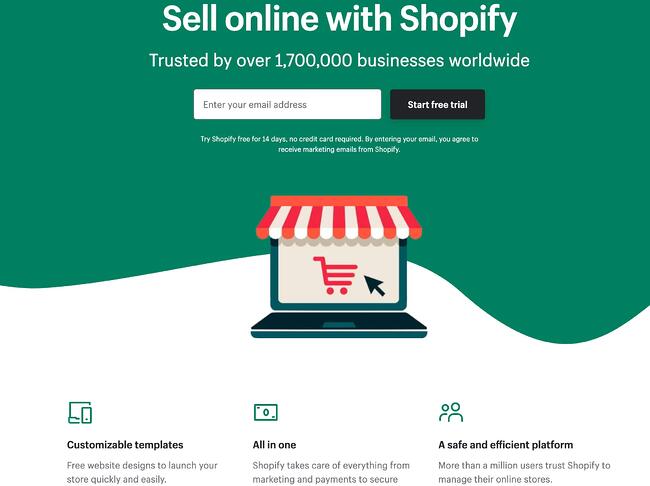
Shopify sign up landing page example

Like many of the other landing pages in this post, Shopify’s trial landing page for sellers keeps it simple. It’s not too text-heavy, but still manages to persuade users by noting a few key points about its top-notch product. Visitors come away knowing that Shopify is an all-in-one platform that is easy to use and trusted by many.

Why This Landing Page Works:

  • Clean Interface: The user-oriented headline is just a few words, for example, and the page relies on simple graphics and short paragraphs to communicate the trial’s details and benefits.
  • Concise CTA: There are only a few fields you need to fill out before you get started. All of this makes it easier for you to quickly get started selling online with their tool.

What Could Be Improved:

  • Emphasize Security: The last column states that the platform is safe, but doesn’t explain why. Instead, it mentions that over a million businesses use it. A few words that speak to site security would improve this section since the number of vendors is already stated at the top of the page. Additionally, it would eliminate friction for visitors with security concerns.

2. Great Jones

Great Jones landing page example

Many of us have been doing a lot more cooking during the pandemic and looking to upgrade our gear. Great Jones offers up a landing page that’s as beautiful as its Dutch Ovens. It’s very aspirational and taps into all of our ideal kitchen dreams.

Why This Landing Page Works:

  • Use of Color: Great Jones’ site is colorful just like its cookware. The use of bold colors quickly draws visitors in and makes the cookware stand out.
  • Prominent CTA: You can’t miss this giant yellow CTA and bold font $100 Off coupon. Who wouldn’t want $100 off these gorgeous pots?

What Could Be Improved:

  • Rollover Descriptions: With so many pans and utensils pictured at once, it would be great if users had the ability to view the name of the item. That way they could find it easier on the site when they’re ready to buy.

3. Muzzle

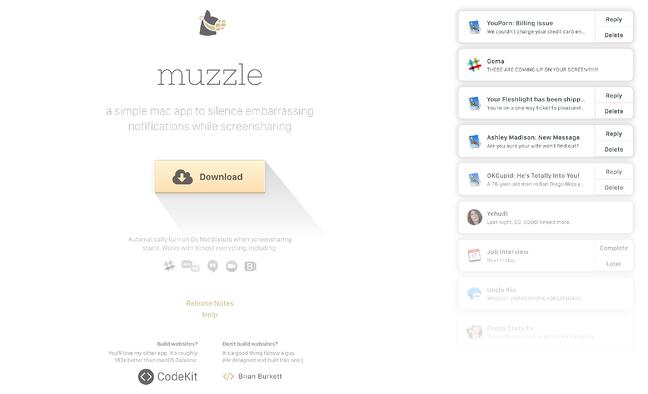
Muzzle sign-up landing page with yellow download button

Muzzle, a Mac app that silences on-screen notifications, fully embraces this show don’t tell mentality on their otherwise minimal landing page. Landing pages help users decide whether or not your product or service is actually worth their precious time and energy. What better way to clearly and straightforwardly communicate your value proposition than by confronting visitors with the very problem your app solves?

Why This Landing Page Works:

  • Show Rather Than Tell: Visitors to the page are greeted with a rapid-fire onslaught of embarrassing notifications in the upper left of the screen. Not only is the animation hilarious, it also manages to compellingly convey the app’s usefulness without lengthy descriptions.
  • Cohesive Visual Experience: Even the text on the page is a muted gray color, mirroring the function of the product.

What Could Be Improved:

  • Could Be Difficult to Read: While the light gray text on white background is great at mimicking the product’s function, it may be harder to read for some.

4. DoorDash

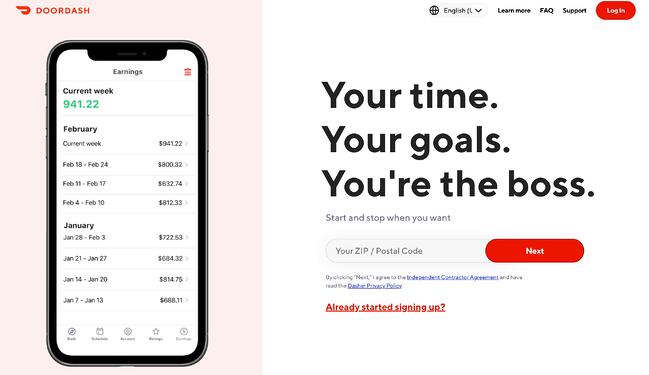
DoorDash landing page example

Takeout enthusiasts are no doubt familiar with DoorDash, the app that lets you order food from a variety of restaurants from your phone. Well, instead of customers, this landing page is geared towards recruiting Dashers who make the deliveries.

Why This Landing Page Works:

  • Emphasizes Dasher Autonomy: This landing page really plays up that Dashers are independent and free to work when they want.
  • Highlights Potential Earnings: While there’s no way to prove these earnings are typical, they are certainly enticing for anyone who wants to make extra cash on the side.

What Could Be Improved:

  • Advantage Over Competitors: DoorDash is not the only delivery game in town. They could highlight what sets them apart from a competitor like UberEats.

5. Wise

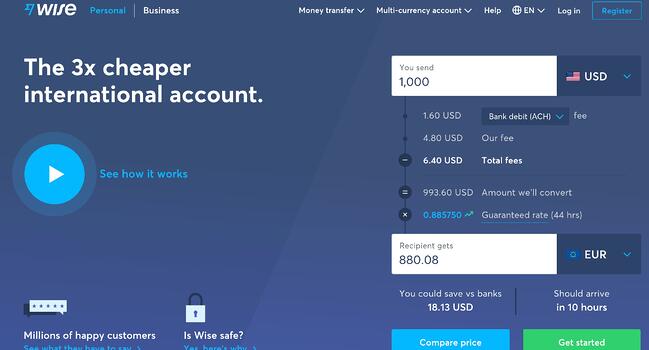
Wise sign-up landing page with CTAs for sending money, receiving money, and debit card

Wise allows you to send or receive money in different currencies and countries, and its landing page separates customers into two categories of either Business or Personal so you’re not distracted by options that don’t apply to you. There’s even a short video to show visitors how the service works before they try it. Since they’re dealing with money, it’s important to get the customer experience right the first time.

Why This Landing Page Works:

  • Highlights Safety: The security information is out front and center on this page, helping to ease any hesitancy a potential customer might have and assures them that Wise is a safe service to use to send money and receive .
  • Emphasizes Value: In several places on the page, in both text and video, Wise reiterates that it’s less expensive than transferring money through a traditional bank.

What Could Be Improved:

  • Interface is a Little Busy: While it’s great that customers have access to a wealth of information about the service, there’s a lot going on. There’s video, menus that appear when you scroll and multiple buttons — all within the top half of the page.

6. Airbnb

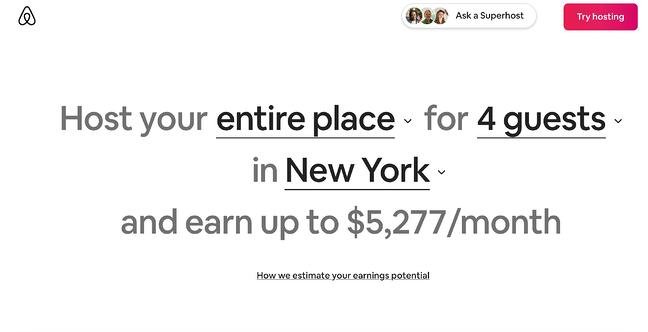
Airbnb Landing PageTo help convert visitors into hosts, Airbnb offers some enticing personalization: an estimated weekly average earnings projection based on your location and home size. You can enter additional information about your potential accommodations into the fields to get an even more customized estimation.

Airbnb 2nd landing page exampleIf you visit the page already convinced, the clear call-to-action at the top of the page makes it easy to convert on the spot.

Why This Landing Page Works:

  • Personalization: Airbnb shows you right at the start what you could potentially earn based on your area and the size of your home. This is useful for potential new hosts who may still be figuring out how much they should charge and what they can expect to earn.
  • Leverages Community: Further down on the page, those curious about hosting have the option to contact a seasoned Superhost to answer any questions they may have.

What Could Be Improved:

  • Nothing: The page is clear, concise, reassures potential hosts Airbnb is safe to use, and offers a personalized experience.

7. Wag!

Wag landing sign up page example

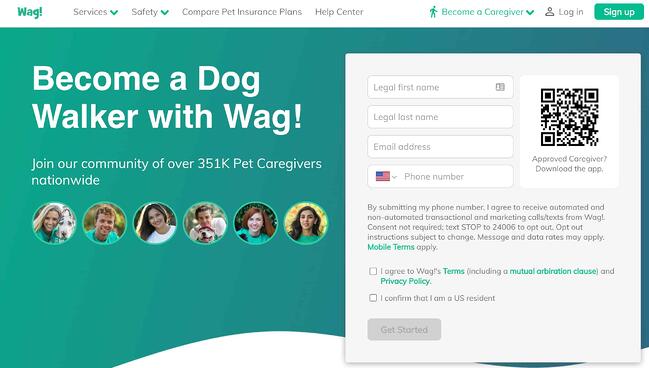
Wag! is a service that connects dog owners with dog walkers and sitters. This page gets right to the point with a large font encouraging prospects to join, and puts the sign-up form prominently on the right half of the page. The green background color makes the white font and other elements on the page pop. The addition of a QR code on the form is also a nice touch, enabling visitors to scan it, quickly download the app, and sign-up.

Why This Landing Page Works:

  • Efficient Form: Leaving the form field open on the page means visitors don’t even have to click on a CTA to access it. The QR code further expedites the process.
  • Emphasizes Credibility: Including caretaker photos and that more than 351,000 caretakers currently use the service nationwide makes Wag more trustworthy.

What Could Be Improved:

  • It’s Not Compelling: Unlike DoorDash mentioned earlier, Wag! makes no mention of why people should join. What are the perks? Are the hours flexible?

8. Wistia

Wistia Landing Page Example

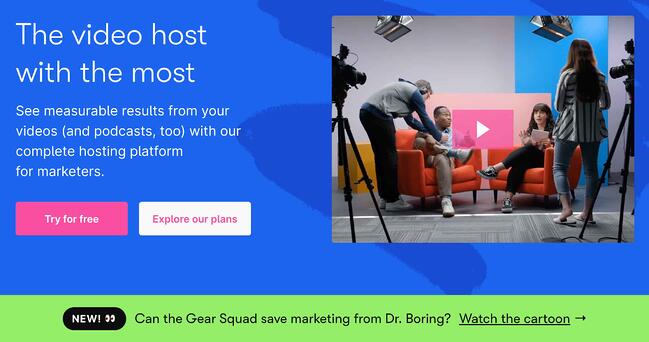
Right off the bat, you notice the blue background with the pop of pink in the form of a “Try for free” button. The page gets right into the action with a video showcasing all the cool content you can create. If you’re having doubts, you can always scroll below to read testimonials from some of Wistia’s 375,000 happy customers.

Why This Landing Page Works:

  • Ease of Use: The form itself allows users to quickly fill it out by linking to their Google account. Doing so enables the autofill feature, which cuts down on friction for the user.
  • Capitalizes on Visuals: As a video host, Wista does a great job of showcasing its capabilities using a variety of mediums. There’s colorful graphics, videos and even a link to marketing focused cartoons.

What Could Be Improved:

  • Include an FAQ: Testimonials are great, but sometimes customers have a few concerns that could be answered quickly with an FAQ section. That way they can decide whether or not to sign up without having to leave the page to search for answers.

9. Webflow

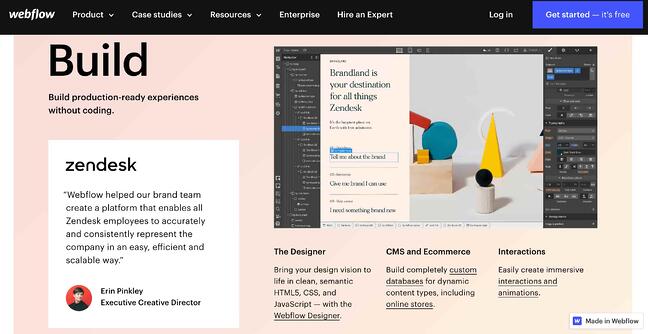
Webflow Landing Page ExampleWebflow, a design tool for web developers, packs a lot of information into just one GIF. As with Muzzle, Webflow also gets right to the point and demonstrates what their tool can do, rather than just talking about it. The animated GIF is visible in the same frame on the website, so users can see how the product works and sign up without scrolling.

Why This Landing Page Works:

  • Show Rather Than Tell: Being able to view Webflow’s tool in action gives potential customers a clear idea of not only what it does, but how their user experience will be.
  • Removes Risk: In several places on the landing page, visitors are reminded that the service is free. There’s no trial to sign up for. They can build their site for free and decide whether or not to sign up for a plan when they’re ready to launch.

What Could Be Improved:

  • Nothing: This landing page is the perfect balance of information, usability, and visuals.

10. Talkspace

Talkspace Landing page example

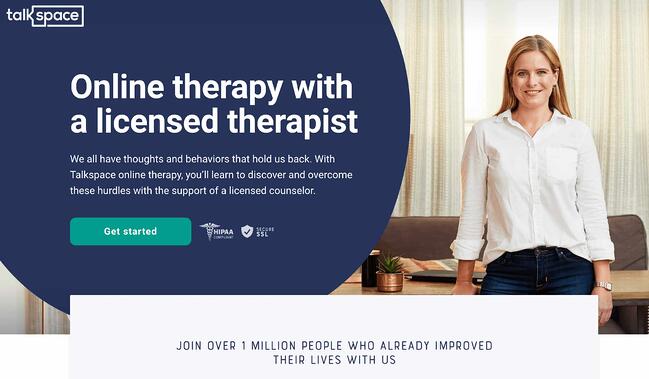
Talkspace, an online therapy service, really focuses on trustworthiness with this landing page. All of the information on this page emphasizes that customers will have access to licensed therapists, and drives home that the service is secure and confidential. It’s a great way to reassure those who may be hesitant to participate. The use of shapes is also a clever idea. Pages are often filled with squares and boxes, so putting the CTA inside a large circle immediately draws the viewer in. Overall, the layout is clean, inviting, and informative.

Why This Landing Page Works:

  • Builds Trust: The focus on customer security works in their favor, especially noting that they are HIPPA compliant.
  • Provides Value: In addition to providing details about how Talkspace works, this page also provides several mental health resources and articles.

What Could Be Improved:

Nothing: This page has a great user interface and serves as a great starting point for mental health resources.

Ebook Landing Pages

11. Nauto

nauto-ebook-landing-page

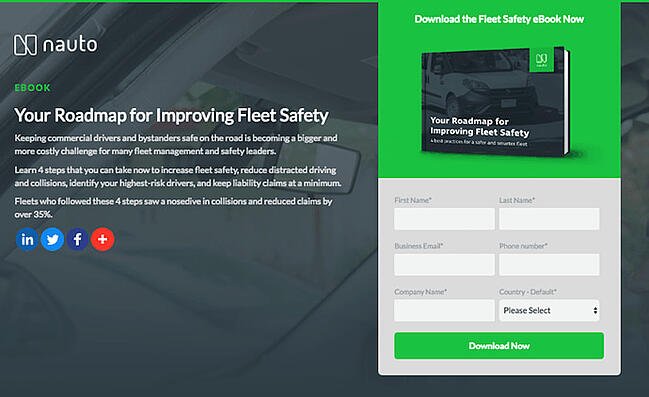
Nauto, a data platform for self-driving cars, helps make autonomous driving safer for companies who manage fleets of self-driving vehicles. Naturally, its customers would need all kinds of information to sell them on this platform. Nauto has it, packaged into a super-simple ebook whose landing page gives you both a brief contact form and some preview statistics to prove why this resource is so important.

At the top of the page, shown above, a warm photo of a car’s exterior r hugs the lead-capture form. The green “Download Now” button might’ve even been on purpose (on the road, green means go, after all).

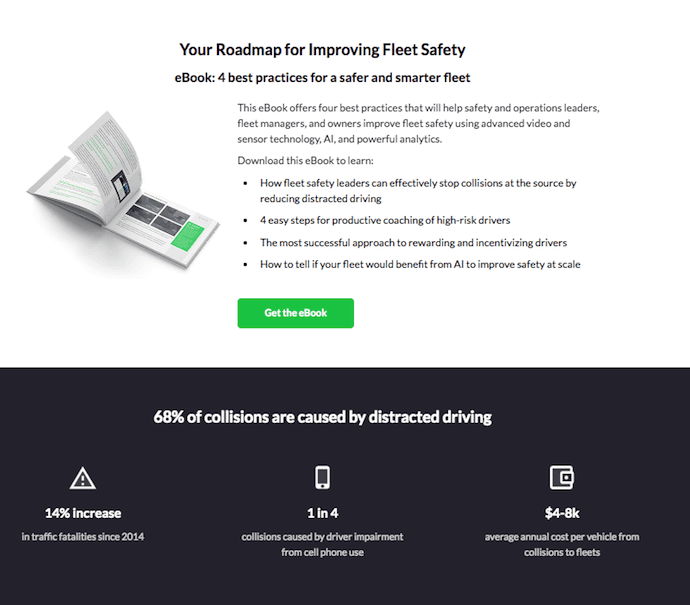
Scroll down, and you’ll see another “Get the eBook” CTA to remind users what’s waiting for them. You’ll also see three jarring statistics about car accidents to entice users to learn more. Check it out below.

nauto-ebook-landing-page-CTA-1

Why This Landing Page Works:

  • Simplicity: There’s no distractions on this landing page, which is perfect given the company’s focus on safe, self-driving vehicles.
  • Great Use of Comparison: Further down the page, Nauto offers up side by side footage of a distracted driver vs. a self-driving vehicle. It’s an excellent way to drive the point home that A.I. is a safer bet.

What Could Be Improved:

  • Graphics: The warm photo at the top is really difficult to see. Slightly more definition would have helped visitors easily recognize the image as cars.

12. Industrial Strength Marketing

industrial-strength-marketing-landing-page-example.png

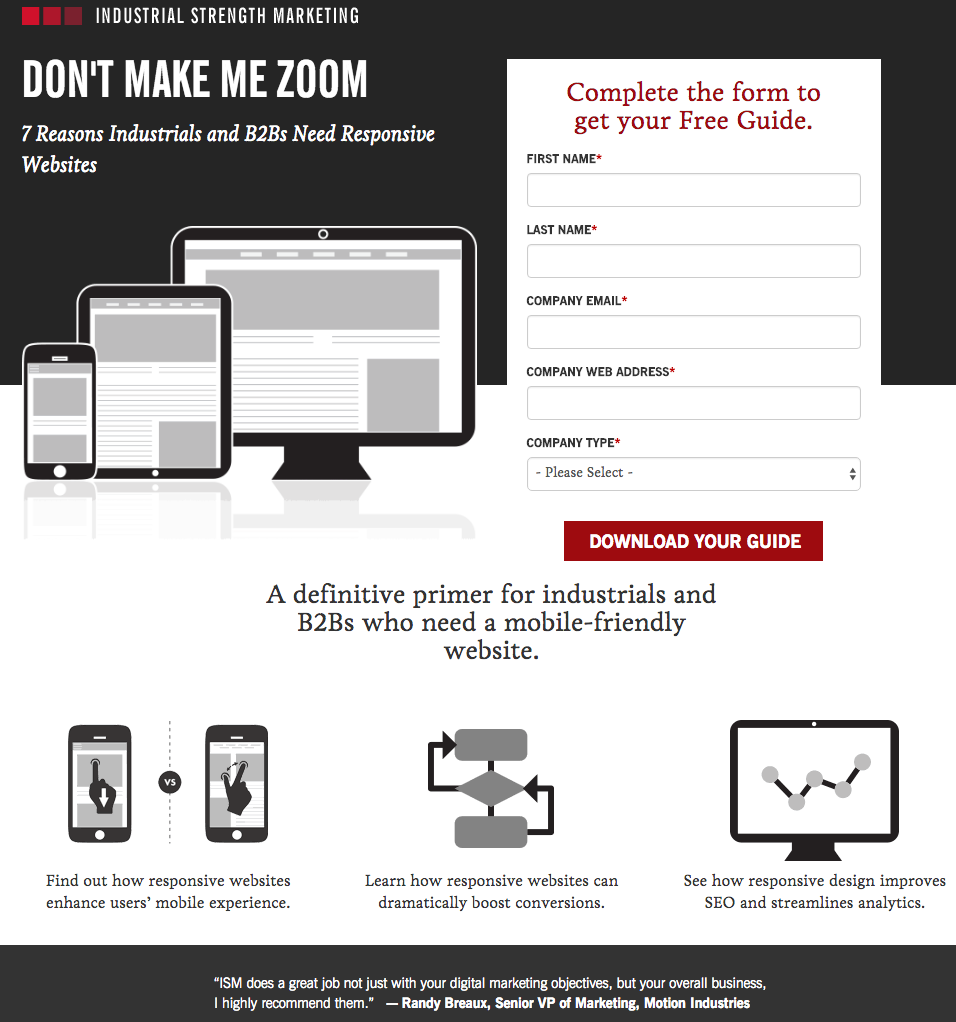
Right off the bat, this landing page pulls me in with a compelling, punchy header: “Don’t Make Me Zoom.” It directly speaks to a common experience most of us have had when we’re browsing on our phones or tablets — and it’s a little sassy, too.

But that’s not the only thing keeping me interested in this landing page. Notice how the color red is strategically placed: It’s right at the top and bottom of the form, drawing you even closer to the conversion event.

industrial-strength-marketing-mobile-landing-page-1.jpg

industrial-strength-marketing-mobile-landing-page-2.jpg

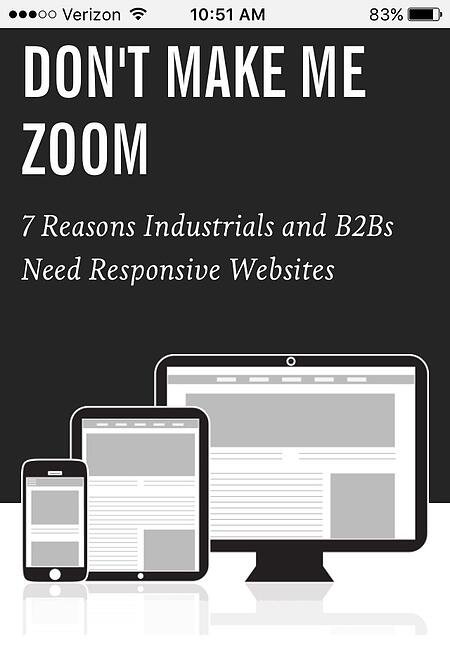
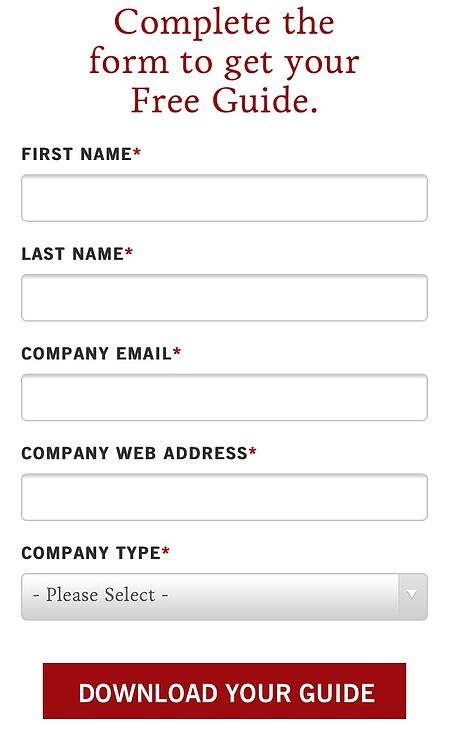
Plus, this design is meta to boot: It looks and works great on mobile, too (pictured above) Keep in mind that a lot of visitors will be accessing your landing pages on their smartphones or tablets, and if the design of your website doesn’t work well for them, they might give up and leave your page.

The folks at Industrial Strength Marketing made the fonts and form field big enough so that visitors don’t have to pinch-to-zoom to read and interact with the content, for example.

Why This Landing Page Works:

  • Voice: The language is punchy and relatable, quickly drawing the reader in.
  • Minimalist: The black and white color scheme with just a few pops of red really make the sign up sheet stand out. Additionally the minimalist design works beautifully on mobile and desktop, no pinching required.

What Could Be Improved:

Nothing: Both the mobile and desktop versions illustrate the perfect execution of a

13. Inbound Emotion

Inbound Emotion Spanish language landing page example

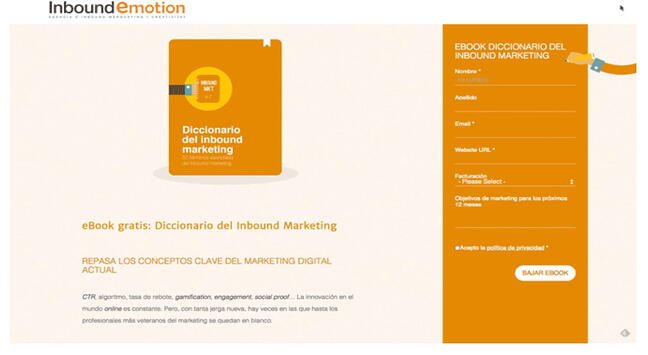
Even if you don’t speak Spanish, you can still appreciate the conversion capabilities of this HubSpot partner site. My favorite feature of the page? The form stays in a fixed, prominent position as you scroll through the site. I also love the simple layout and warm colors.

Why This Landing Page Works:

  • Fixed Form: Having access to the form while scrolling provides a better user experience. No need to scroll back up to the top of the page to find it.
  • Simple Interface: The layout is simple, but effective. The use of only two shades of orange give a monochrome feel and keeps the focus on the benefits of the ebook.

What Could Be Improved:

  • Make the Form Brief: There were six items to fill out, not including the check boxes option at the end. Longer forms could be a turnoff for some visitors.

14. IMPACT Branding & Design

Impact Branding landing page example with creative CTA

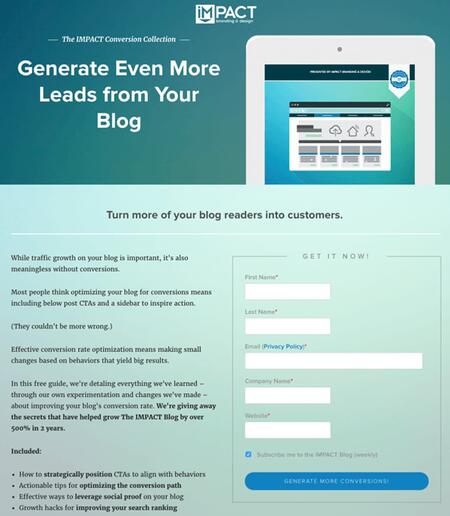
Full disclosure: IMPACT is a HubSpot partner — but that’s not why they’re included here. IMPACT’s landing pages have long been a source of design inspiration. I love the simple layout of the page, from the large headline copy and detailed featured image, to the outline that surrounds the form, to the colors and fonts that are very pleasing to the eye.

The free guide IMPACT is offering for download here also doesn’t emphasize the download itself in the blue button that allows you to submit your filled-out form. Rather, IMPACT is inviting you to “generate more conversions” — putting the focus on what you stand to gain as a result of reading the guide.

Why This Landing Page Works:

  • Clever Messaging: You’re not downloading an ebook, you’re learning how to “generate more conversations.” This rephrasing is far more enticing than simply putting a regular download button.
  • Simple Use of Color and Fonts: The blue tones work really well on this landing page, giving it variety while keeping the look cohesive. Since there’s lots of text on the page, a simple font is perfect.

What Could Be Improved:

  • Nothing: This page encourages downloads in a clever way using a simple layout and colors.

Landing Pages to Learn More

15. Unbounce

Unbounce Landing Page Example

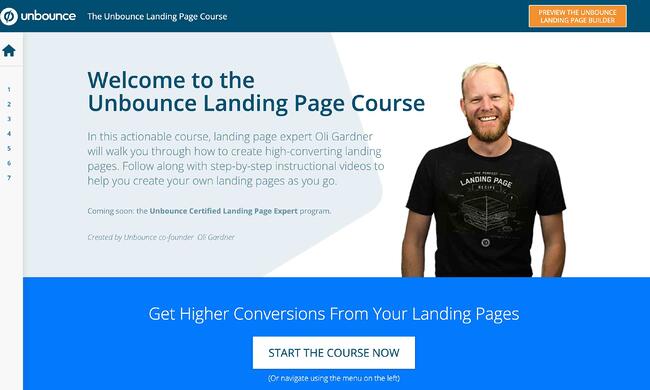
It’s no surprise Unbounce made this list —they’ve actually written the book on creating high-converting landing pages. Although there are lots of amazing things about this landing page, the two that I absolutely love are: the multiple ways to access the course, and additional industry-specific report offerings. Unbounce is really skilled at providing visitors the information they need, but also what they didn’t know they needed until they landed on the site.

Why This Landing Page Works:

  • Gives Visitors Options: When it comes to accessing the course, users can either click the main button above the upper half of the page, or if they’ve been scrolling, click on the course from the sidebar on the left. Eliminating the need to scroll back up to the top of the page.
  • Sometimes More is More: In addition to the course, Unbounce provides visitors with industry-specific reports and answers to other landing page-related topics. Providing even more useful information sets Unbounce up as a trusted authority in their field.

What Could Be Improved:

  • Descriptions: The course offers several modules and it would be helpful if some offered a brief description. The sidebar menu offers a course list, but a short sentence summarizing what visitors can expect to learn would be helpful.

16. Bills.com

bills-dot-com-landing-page-example.png

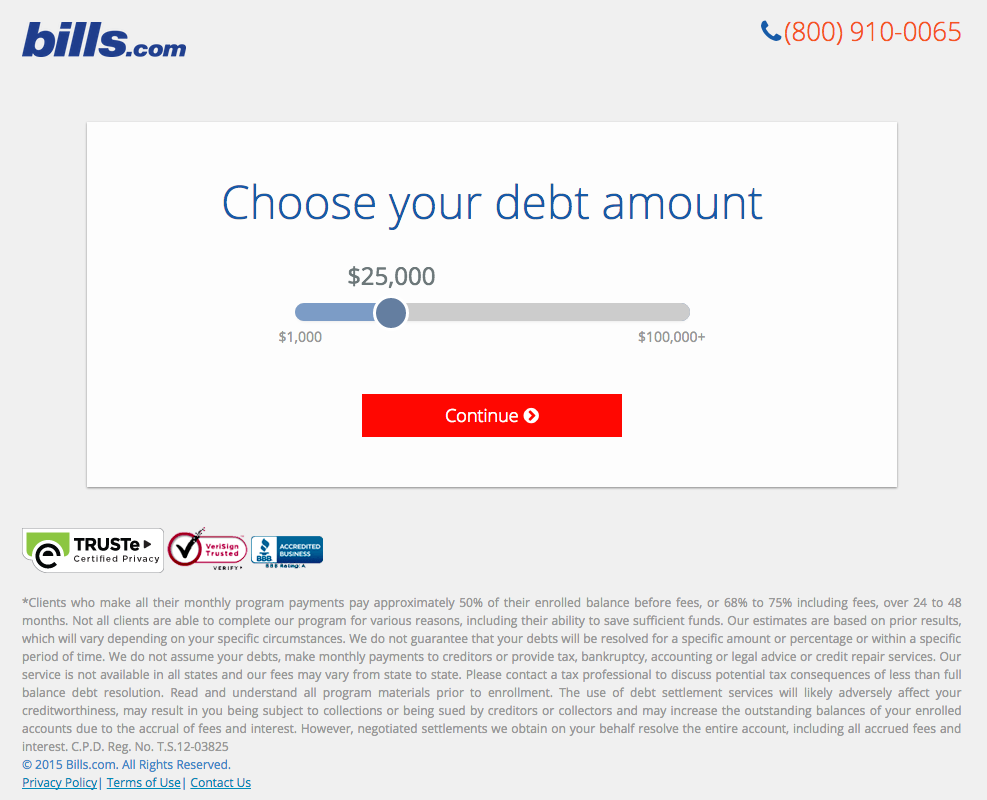
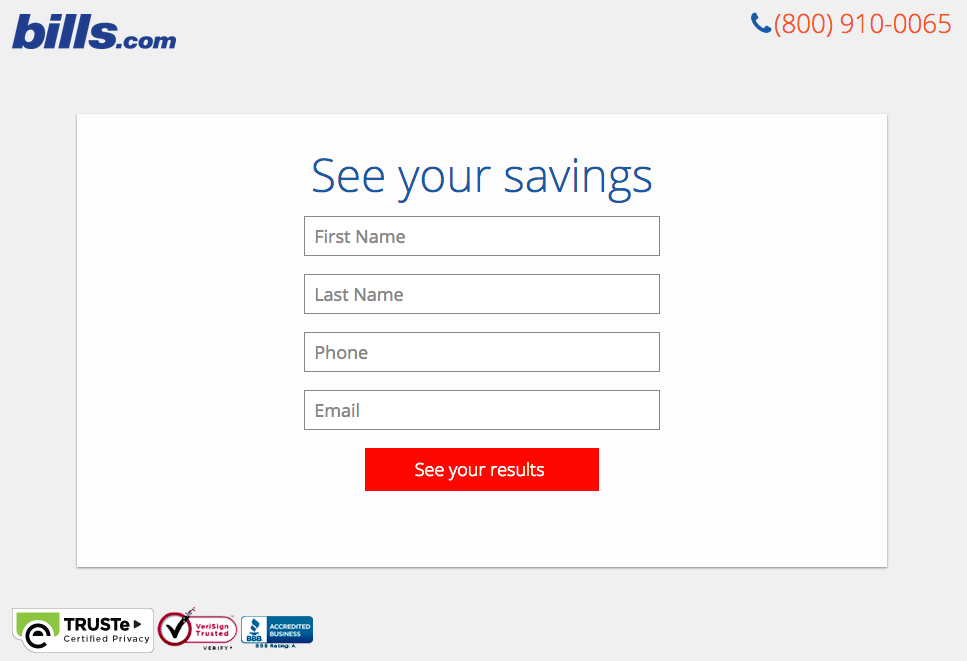
Often, people think landing pages are static pages on your website. But with the right tools, you can make them interactive and personalized.

Take the example above from Bills.com. To see if you’d benefit from their consultation, you answer three questions before you are shown a form.

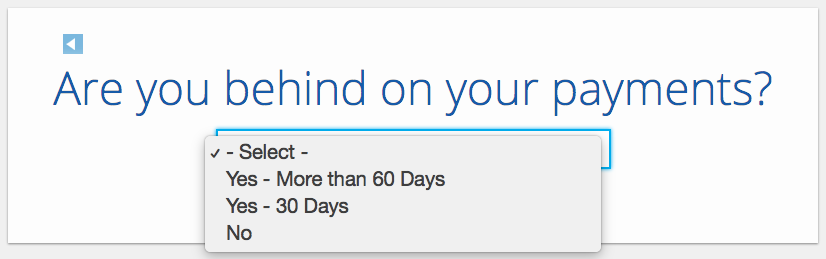
Then, you answer two more questions, like the one below:

bills-dot-com-landing-page-2.png

And here’s the final landing page form where you fill out your information:

bills-dot-com-landing-page-3.png

I’m not sure how the algorithm works (or if there’s one at all), but while I was filling it out, I had some anxiety about not qualifying. Once I found out I did, I was excited to fill out the form, which I’m sure most people who are in debt and using this tool are. By making this offer seem more exclusive before the form appeared on the landing page, I’d bet that Bills.com increased conversions pretty significantly.

Why This Landing Page Works:

  • Exclusivity: Everyone likes to feel special, which is why exclusivity works so well. The page gives the impression that the offer isn’t given to just anyone, you have to qualify first.
  • Interactivity: Anytime you can get users to interact with the page, even if it’s something as simple as using a form with a sliding bar question.

What Could Be Improved:

  • More Color: While the site is geared to not so fun topics like bills and debt, it doesn’t mean it has to be boring. The gray leaves much to be desired.

17. Zillow

Zillow Landing Page Example

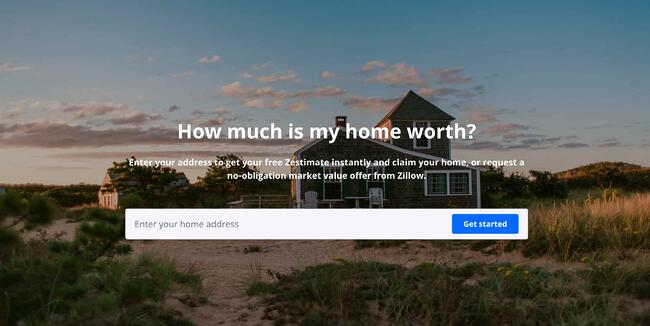
Zillow did something very similar to Bills.com with their landing page. It starts with a simple form asking for “your home address” ( sounds creepy, but don’t worry. This form field is set on top of a hero image featuring a quaint home at dusk followed by a handy FAQ section.

Of course, the address itself won’t be enough to get a true appraisal value of a home. It just denotes the home’s neighborhood. It’s a bit like playing The Price is Right. You can guess how much homes in the area are worth and then type in an address to see how close you got. If you want to learn more info about a property, Zillow then prompts users to sign-up to continue.

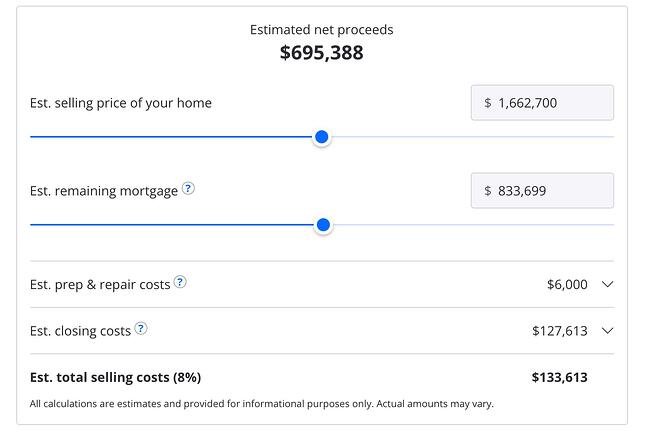
Zestimate landing page exampleOnce you hand over your email, you’ll have access to more data like comparable homes in the area, mortgage tools, and the estimated net profits should you decide to sell.

Why This Landing Page Works:

  • Games are Fun: Anytime you can make filling out a form feel like a game, it’s a win.
  • Establishes Authority on the Topic: Zillow has access to so much housing and neighborhood data, it’s no wonder they are one of the top home search sites in the nation.

What Could Be Improved:

  • Nothing: The Zestimate page is simple, but effective. Those with concerns about what a Zestimate is and how it’s calculated have easy access to the homebuying FAQ on the second half of the page.

18. Landbot

Landbot Landing Page Example

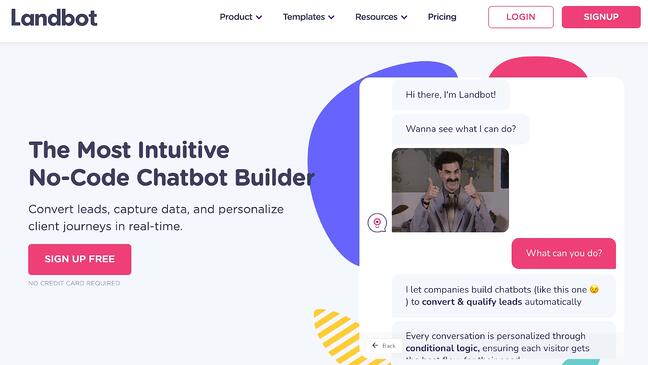
Landbot, a service that creates chatbot-based landing pages, puts their own product front and center on their chat-fueled landing page. Visitors are greeted by a friendly bot —complete with emojis and GIFs —who encourages them to provide information in a conversational format instead of via a traditional form.

Why This Landing Page Works:

  • It’s Fun: From the bright colors to the GIFs, this page keeps visitors engaged and entertained.
  • Show, Not Tell: By having the chatbot right on the page, doing its thing, potential customers can see exactly what they’re getting. The whole experience simulates what it’s like to use Landbot’s product.

What Could Be Improved:

  • Nothing: Landbot’s use of a live demo, testimonials, highlighted integration features and detailed breakdown of how the product works leaves new customers ready to sign up at first glance.

19. Webprofits

Webprofits landing page example

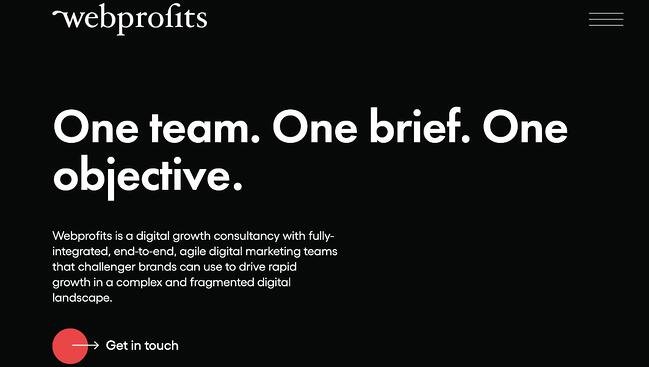
Like Industrial Strength Marketing mentioned earlier, Webprofits also makes great use of a predominantly black, white and red color scheme. The result is a clean layout that makes great use of the pops of color on the page. It’s a testament to the organization’s expertise in digital marketing and UX design.

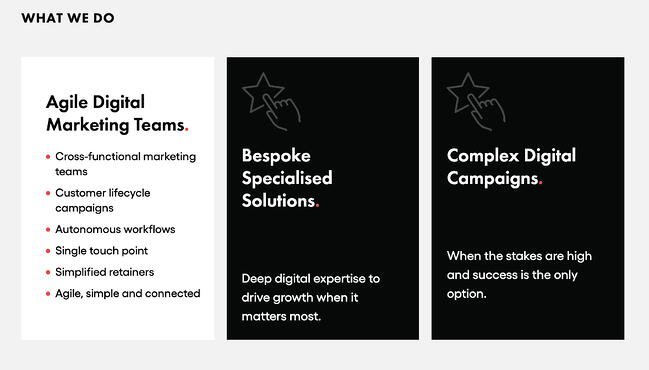
The rollover description feature throughout the “What We Do” section, while black and white, uses movement to draw the reader’s attention to the content. Each section changes color and rolls down like a shade to reveal more in depth features.

Webprofits landing page example

They also make it easy for you to figure out what Webprofits actually does. The rest of the page offers detailed information about what you’ll get when you give over your information. Plus, it includes strategic CTAs throughout, like “Get in Touch”

Why This Landing Page Works:

  • Informative, But Not Overwhelming: There’s a lot of information and text on this page, but the use of well-placed graphics and videos help break things up.
  • Multiple CTAs: Placing the same CTA throughout the page makes it so visitors don’t have to scroll all the way to the top to “Get in Touch.”

What Could Be Improved:

  • Nothing: Webprofit makes great use of the long landing page format, packing in all the pertinent information visitors would need in one place with a visually appealing experience.

20. Native Poppy

Native Poppy Landing Page example

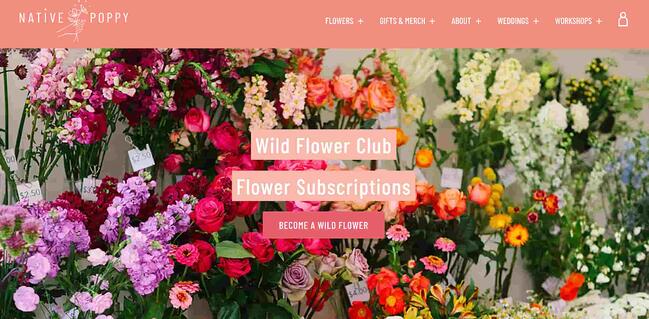
Sometimes, you’ve just got to stop and admire a landing page for being beautiful. Using high-resolution photography and lots of white space, Native Poppy’s landing page is a pleasure to look at.

Aside from its beauty, the page has some great elements: a clear and delightfully pink CTA, an informative “How It Works” section, plus an FAQ at the bottom. Best of all, it plays with language, ditching the phrase “become a subscriber” for “become a wild flower.” I don’t know about you, but I’d much rather be a “wild flower” over a subscriber any day.

Why This Landing Page Works:

  • Captures Brand Voice: The layout of Wild Poppy mirrors the whimsical vibe of the brand. From the photos, font choice, and “wild flower” subscription, all the messaging works in harmony.
  • Persuasive: By highlighting all the perks and discounts of being part of the subscription program, it entices customers to join.

What Could Be Improved:

  • Form Visibility: While there are multiple CTAs, it would have been nice to have the form fields on the page for faster sign-up, or as a pop up after clicking, instead of having to click the CTA and then be taken to another series of prompts.

21. Conversion Lab

Conversion Lab Landing Page example

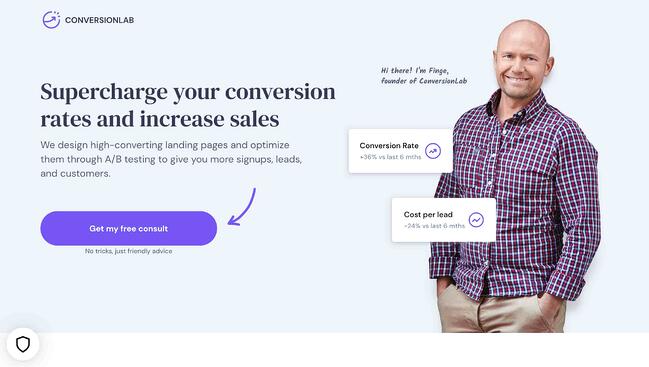
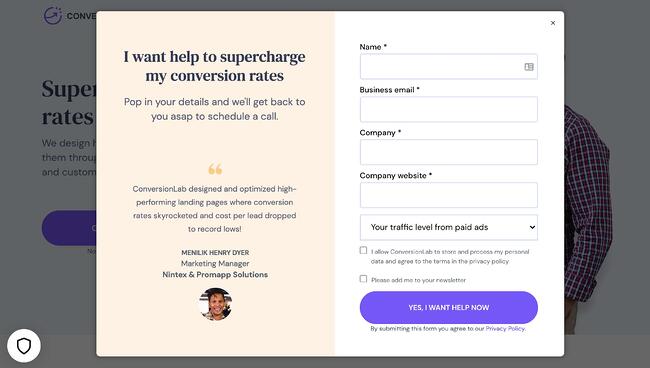
While I wouldn’t typically include an example of a homepage with a form on it in a post about landing pages, this website is special. The homepage is the entire website — the navigation links just take you to the information below.

When you click “Get My Free Consult,” the entire page darkens to highlight the form. See what it looks like before you click in the photo above.

And, when you click that CTA, check out how the form appears:

Conversion Lab landing page example CTA

It’s a similar function when clicking on any of the headings on the page. Instead of taking you to a different page, it simply jumps to the corresponding section on the homepage.

I love how you don’t have to leave the page to fill out the form, or view any of the features, creating a seamless user experience.

Why This Landing Page Works:

  • Creative: Having a homepage that also functions as various landing pages makes Conversion Lab unique. Best of all, it still provides a pleasant user experience.
  • Organized Layout: Despite having the homepage and landing pages as one, the page doesn’t feel cluttered or busy at all.

What Could Be Improved:

  • Form Placement: It would be nice if the form maybe opened up on one side so visitors could still read the content on the rest of the page.

Landing Page Ideas

A well-optimized landing page can transform prospects into leads by gathering information that can help you better understand, market to, and delight visitors. Since landing pages are crucial for conversions, it’s important to make sure they’re well planned, designed, and executed.

Here are a few things to keep in mind when creating landing pages:

  • Appealing aesthetics: Giving your landing page color and a clean UI can only help. Visitors will want to learn more about your products and see evidence of the value you’re offering. Take a look at #18 on our list — Landbot for a great example of a stunning web page.
  • Less is more: Let the offer or images do most of the talking, but be sure to include any and all descriptive headlines and supporting text to make your landing page clear and compelling. This goes for just about all the components on the page: try white space, simple copy, and shorter forms.
  • Keep visitors on the page: By removing the main navigation or any distracting backlinks, it’s less likely there will be any lead generation friction that could cause visitors to abandon your page.
  • Social Sharing: A simple way of getting visitors to engage with your landing page is including social media sharing buttons so that they can spread your content to their social followings. After all, customers are the center of your marketing flywheel.
  • A/B testing: Landing pages are important to get right, and since consumer psychology can sometimes be surprising, it’s always better to experiment with different versions of your pages to see which has the highest conversion rate (CVR). Test the positioning of the offer, kinds of CTAs, or even the color scheme.
  • Call-To-Action: The CTA is where the meat of the landing page is, or the tipping point where prospects become contacts. CTAs could ask visitors to subscribe, download, fill out a form, share on social media, and more — but, overall, CTAs are necessary for getting your audiences more engaged with your offering. To generate leads, CTAs should be bold and eye-catching, but most importantly, they need to effectively communicate value.

Creating Landing Pages That Shine

Landing pages aid in growing your customer base and increasing conversions. Create a page that delights customers with a user interface so great, they continue to come back for more.

This article was originally published April 2, 2020 and has been updated for comprehensiveness.
optimize landing pages


Categories B2B

How to Do Keyword Research for SEO: A Beginner’s Guide

While Google keeps us on our toes with all the algorithm updates they keep rollin’ out, one thing has stayed pretty consistent for inbound marketers looking to optimize their websites for search: keyword research.

In this post, we’ll define what keyword research is, why it’s important, how to conduct your research for your SEO strategy, and choose the right keywords for your website.

→ Download Now: SEO Starter Pack [Free Kit]

Why is keyword research important?

Keyword research provides valuable insight into the queries that your target audience is actually searching on Google. The insight that you can get into these actual search terms can help inform content strategy as well as your larger marketing strategy.

People use keywords to find solutions when conducting research online. So if your content is successful in getting in front of our audience as they conduct searches, you stand to gain more traffic. Therefore, you should be targeting those searches.

In addition, in the inbound methodology, we don’t create content around what we want to tell people; we should be creating content around what people want to discover. In other words, our audience is coming to us.

This all starts with keyword research.

For an inside look into how Arel=”noopener” target=”_blank” hrefs can aid you in your SEO keyword research, check out our case study and exclusive interview here.

Conducting keyword research has many benefits, the most popular reasons being:

Marketing Trend Insight

Conducting effective keyword research can provide you with insights into current marketing trends, and help you center your content on relevant topics and keywords your audience is in search of.

Traffic Growth

When you identify the best fitting keywords for the content you publish, the higher ranking the it is in search engine results — the more traffic you’ll attract to your website.

Customer Acquisition

If your business has content that other business professionals are looking for, you can meet there need and provide them with a call to action that will lead them into the buyer journey from the awareness stage to the point of purchase.

By researching keywords for their popularity, search volume, and general intent, you can tackle the questions that most people in your audience want answers to.

However, keywords themselves because Google has evolved beyond exact-match algorithms.

Keywords vs. Topics

More and more, we hear how much SEO has evolved over just the last 10 years, and how unimportant keywords themselves have become to our ability to rank well for the searches people make every day.

And to some extent, this is true, but in the eyes of an SEO professional it’s a different approach. Rather, it’s the intent behind that keyword, and whether or not a piece of content solves for that intent (we’ll talk more about intent in just a minute).

But that doesn’t mean keyword research is an outdated process. Let me explain:

Keyword research tells you what topics people care about and, assuming you use the right SEO tool, how popular those topics actually are among your audience. The operative term here is topics — by researching keywords that are getting a high volume of searches per month, you can identify and sort your content into topics that you want to create content on. Then, you can use these topics to dictate which keywords you look for and target.

Elements of Keyword Research

There are three main elements to pay attention to when conducting keyword research.

1. Relevance

Google ranks content for relevance. This is where the concept of search intent comes in. Your content will only rank for a keyword if it meets the searchers’ needs. In addition, your content must be the best resource out there for the query. After all, why would Google rank your content higher if it provides less value than other content that exists on the web?

2. Authority

Google will provide more weight to sources it deems authoritative. That means you must do all you can to become an authoritative source by enriching your site with helpful, information content and promoting that content to earn social signals and backlinks. If you’re not seen as authoritative in the space, or if a keyword’s SERPs are loaded with heavy sources you can’t compete with (like Forbes or The Mayo Clinic), you have a lower chance of ranking unless your content is exceptional.

3. Volume

You may end up ranking on the first page for a specific keyword, but if no one ever searches for it, it will not result in traffic to your site. Kind of like setting up shop in a ghost town.

Volume is measured by MSV (monthly search volume), which means the number of times the keyword is searched per month across all audiences.

How to Research Keywords for Your SEO Strategy

I’m going to lay out a keyword research process you can follow to help you come up with a list of terms you should be targeting. That way, you’ll be able to establish and execute a strong keyword strategy that helps you get found for the search terms you actually care about.

Step 1: Make a list of important, relevant topics based on what you know about your business.

To kick off this process, think about the topics you want to rank for in terms of generic buckets. You’ll come up with about 5-10 topic buckets you think are important to your business, and then you’ll use those topic buckets to help come up with some specific keywords later in the process.

If you’re a regular blogger, these are probably the topics you blog about most frequently. Or perhaps they’re the topics that come up the most in sales conversations. Put yourself in the shoes of your buyer personas — what types of topics would your target audience search that you’d want your business to get found for? If you were a company like HubSpot, for example — selling marketing software (which happens to have some awesome SEO tools… but I digress), you might have general topic buckets like:

  • “inbound marketing” (21K)
  • “blogging” (19K)
  • “email marketing” (30K)
  • “lead generation” (17K)
  • “SEO” (214K)
  • “social media marketing” (71K)
  • “marketing analytics” (6.2K)
  • “marketing automation” (8.5K)

See those numbers in parentheses to the right of each keyword? That’s their monthly search volume. This data allows you to gauge how important these topics are to your audience, and how many different sub-topics you might need to create content on to be successful with that keyword. To learn more about these sub-topics, we move on to step 2 …

Step 2: Fill in those topic buckets with keywords.

Now that you have a few topic buckets you want to focus on, it’s time to identify some keywords that fall into those buckets. These are keyword phrases you think are important to rank for in the SERPs (search engine results pages) because your target customer is probably conducting searches for those specific terms.

For instance, if I took that last topic bucket for an inbound marketing software company — “marketing automation” — I’d brainstorm some keyword phrases that I think people would type in related to that topic. Those might include:

  • marketing automation tools
  • how to use marketing automation software
  • what is marketing automation?
  • how to tell if I need marketing automation software
  • lead nurturing
  • email marketing automation
  • top automation tools

And so on and so on. The point of this step isn’t to come up with your final list of keyword phrases. You just want to end up with a brain dump of phrases you think potential customers might use to search for content related to that particular topic bucket. We’ll narrow the lists down later in the process so you don’t have something too unwieldy.

Although more and more keywords are getting encrypted by Google every day, another smart way to come up with keyword ideas is to figure out which keywords your website is already getting found for. To do this, you’ll need website analytics software like Google Analytics or HubSpot’s Sources report, available in the Traffic Analytics tool. Drill down into your website’s traffic sources, and sift through your organic search traffic bucket to identify the keywords people are using to arrive at your site.

Repeat this exercise for as many topic buckets as you have. And remember, if you’re having trouble coming up with relevant search terms, you can always head on over to your customer-facing colleagues — those who are in Sales or Service and ask them what types of terms their prospects and customers use, or common questions they have. Those are often great starting points for keyword research.

Here at HubSpot, we use the Search Insights Report in this part of the process. This template is designed to help you do the same and bucket your keywords into topic clusters, analyze MSV, and inform your editorial calendar and strategy.

Featured Resource: Search Insights Report Template

search insights report

Download the Template

Step 3: Understand How Intent Affects Keyword Research and Analyze Accordingly.

Like I said in the previous section, user intent is now one of the most pivotal factors in your ability to rank well on search engines like Google. Today, it’s more important that your web page addresses the problem a searcher intended to solve than simply carries the keyword the searcher used. So, how does this affect the keyword research you do?

It’s easy to take keywords for face value, and unfortunately, keywords can have many different meanings beneath the surface. Because the intent behind a search is so important to your ranking potential, you need to be extra-careful about how you interpret the keywords you target.

Let’s say, for example, you’re researching the keyword “how to start a blog” for an article you want to create. “Blog” can mean a blog post or the blog website itself, and what a searcher’s intent is behind that keyword will influence the direction of your article. Does the searcher want to learn how to start an individual blog post? Or do they want to know how to actually launch a website domain for the purposes of blogging? If your content strategy is only targeting people interested in the latter, you’ll need to make sure of the keyword’s intent before committing to it.

To verify what a user’s intent is in a keyword, it’s a good idea to simply enter this keyword into a search engine yourself, and see what types of results come up. Make sure the type of content Google is closely related to what you’d intend to create for the keyword.

Step 4: Research related search terms.

This is a creative step you may have already thought of when doing keyword research. If not, it’s a great way to fill out those lists.

If you’re struggling to think of more keywords people might be searching about a specific topic, take a look at the related search terms that appear when you plug in a keyword into Google. When you type in your phrase and scroll to the bottom of Google’s results, you’ll notice some suggestions for searches related to your original input. These keywords can spark ideas for other keywords you may want to take into consideration.

Related searches at the bottom of Google SERP that reads "searches related to cute puppies" along with keyword suggestions

Want a bonus? Type in some of those related search terms and look at their related search terms.

Step 5: Use keyword research tools to your advantage.

Keyword research and SEO tools can help you come up with more keyword ideas based on exact match keywords and phrase match keywords based on the ideas you’ve generated up to this point. Some of the most popular ones include:

How to Find and Choose Keywords for Your Website

Once you have an idea of the keywords that you want to rank for, now it’s time to refine your list based on the best ones for your strategy. Here’s how:

Step 1. Use Google Keyword Planner to cut down your keyword list.

In Google’s Keyword Planner, you can get search volume and traffic estimates for keywords you’re considering. Then, take the information you learn from Keyword Planner and use Google Trends to fill in some blanks.

Use the Keyword Planner to flag any terms on your list that have way too little (or way too much) search volume, and don’t help you maintain a healthy mix like we talked about above. But before you delete anything, check out their trend history and projections in Google Trends. You can see whether, say, some low-volume terms might actually be something you should invest in now — and reap the benefits for later.

Or perhaps you’re just looking at a list of terms that is way too unwieldy, and you have to narrow it down somehow … Google Trends can help you determine which terms are trending upward, and are therefore worth more of your focus.

Step 2: Prioritize low-hanging fruit.

What we mean by prioritizing low-hanging fruit is to prioritize keywords that you have a chance of ranking for based on your website’s authority.

Large companies typically go after high search volume keywords, and since these brands are well established already, Google typically rewards them with authority over many topics.

You can also consider keywords that have little competition. Keywords that don’t already have multiple articles battling for the highest rank can afford you the spot by default — if there’s no one else trying to claim it.

Step 3: Check the monthly search volume (MSV) for keywords you’ve chosen.

You want to write content around what people want to discover, and checking MSV can help you do just that.

Monthly search volume is the number of times a search query or keyword is entered into search engines each monthly. Tools like searchvolume.io or Google Trends can help you find out the most searched keywords over related keyword clusters for free.

Step 4: Factor in SERP features as you choose keywords.

There’s several SERP feature snippets that Google will highlight if used correctly. An easy way to find out about them is to look up the keywords of your choosing and see what the first result looks like. But for a quick overview of the types of SERP featured snippets, we’ll summarize what they are here.

Image Packs

Image packs are search results displayed as a horizontal row of images that appear in an organic position. If there’s an image pack, you should write an image-heavy post to win placement in it.

SERP features for keyword research: image packs

Paragraph Snippets

Featured snippets, or paragraph snippets, are short snippets of text that appear at the top of Google search results for quick answers to common search queries. Understanding the searcher’s intent and providing succinct, concise answers can help in winning the placement.

SERP features for keyword research: paragraph snippets

List Snippets

List snippets, or listicles, are snippets made for posts outlining steps to do something from start to finish — often for “How To” searches. Making posts with direct, clear instructions and formatting can assist in winning this placement.

SERP features for keyword research: list snippets

Video Snippets

Video snippets are short videos that Google will display at the top of a search query page in place of text featured snippets. Posting a video on both YouTube and your website can help you win this placement if tagged in the targeted keywords people are searching for.

SERP features for keyword research: video snippets

Step 5: Check for a mix of head terms and long-tail keywords in each bucket.

Head terms are keyword phrases that are generally shorter and more generic — they’re typically just one to three words in length, depending on who you talk to. Long-tail keywords, on the other hand, are longer keyword phrases usually containing three or more words.

It’s important to check that you have a mix of head terms and long-tail terms because it’ll give you a keyword strategy that’s well balanced with long-term goals and short-term wins. That’s because head terms are generally searched more frequently, making them often (not always, but often) much more competitive and harder to rank for than long-tail terms. Think about it: Without even looking up search volume or difficulty, which of the following terms do you think would be harder to rank for?

  1. how to write a great blog post
  2. blogging

If you answered #2, you’re absolutely right. But don’t get discouraged. While head terms generally boast the most search volume (meaning greater potential to send you traffic), frankly, the traffic you’ll get from the term “how to write a great blog post” is usually more desirable.

Why?

Because someone who is looking for something that specific is probably a much more qualified searcher for your product or service (presuming you’re in the blogging space) than someone looking for something really generic. And because long-tail keywords tend to be more specific, it’s usually easier to tell what people who search for those keywords are really looking for. Someone searching for the head term “blogging,” on the other hand, could be searching it for a whole host of reasons unrelated to your business.

So check your keyword lists to make sure you have a healthy mix of head terms and long-tail keywords. You definitely want some quick wins that long-tail keywords will afford you, but you should also try to chip away at more difficult head terms over the long haul.

Step 6: See how competitors are ranking for these keywords.

Just because your competitor is doing something doesn’t mean you need to. The same goes for keywords. Just because a keyword is important to your competitor, doesn’t mean it’s important to you. However, understanding what keywords your competitors are trying to rank for is a great way to help you give your list of keywords another evaluation.

If your competitor is ranking for certain keywords that are on your list, too, it definitely makes sense to work on improving your ranking for those. However, don’t ignore the ones your competitors don’t seem to care about. This could be a great opportunity for you to own market share on important terms, too.

Understanding the balance of terms that might be a little more difficult due to competition, versus those terms that are a little more realistic, will help you maintain a similar balance that the mix of long-tail and head terms allows. Remember, the goal is to end up with a list of keywords that provide some quick wins but also helps you make progress toward bigger, more challenging SEO goals.

How do you figure out what keywords your competitors are ranking for, you ask? Aside from manually searching for keywords in an incognito browser and seeing what positions your competitors are in, Arel=”noopener” target=”_blank” hrefs allows you to run a number of free reports that show you the top keywords for the domain you enter. This is a quick way to get a sense of the types of terms your competitors are ranking for.

Best Keywords for SEO

Understand that there’s no “best” keywords, just those that are highly searched by your audience. With this in mind, it’s up to you to craft a strategy that will help you rank pages and drive traffic.

The best keywords for your SEO strategy will take into account relevance, authority, and volume. You want to find highly searched keywords that you can reasonably compete for based on:

  1. The level of competition you’re up against.
  2. Your ability to produce content that exceeds in quality what’s currently ranking.

And You’ve Got the Right Keywords for Your Website SEO

You now have a list of keywords that’ll help you focus on the right topics for your business, and get you some short-term and long-term gains.

Be sure to re-evaluate these keywords every few months — once a quarter is a good benchmark, but some businesses like to do it even more often than that. As you gain even more authority in the SERPs, you’ll find that you can add more and more keywords to your lists to tackle as you work on maintaining your current presence, and then growing in new areas on top of that.

Editor’s note: This post was originally published in May 2019 and has been updated for comprehensiveness.

SEO Starter Pack

Categories B2B

71 Photoshop Shortcuts to Help You Edit Photos Like a Pro [+ PDF Cheatsheet]

Have you ever wasted an entire day in Photoshop?So have I. It’s not like you start out aimlessly. You have a simple goal in mind, like cropping a photo, improving the resolution, or changing the size of the canvas. But then, you see all the options. And before you know it, you’re attempting to solve The Riddle of the Sphinx.

Wouldn’t it be nice if you could just press a button, and magically, Photoshop would do what you wanted it to do? It turns out there are a wealth of Photoshop shortcuts that do exactly this.

Download Now: The Marketer's Guide to Photoshop

By pressing a few keys on your computer keyboard at the same time, you can select tools, manipulate images and layers, and even make adjustments to your project’s canvas. We’ll show you how to do all of that (and more) in this guide.

Save all of these shortcuts to your desktop by downloading the PDF version here.

Note: All of these shortcuts can be accessed on PC and Mac, but sometimes, they’re different on each operating system. We’ve included both types below, and in the cases where they might be different, Mac instructions appear in italicized parentheses. Also, in these formulas, the plus sign (+) is present only to represent the combination of key commands. On occasion, it might be part of the command itself, like when you press the plus sign to zoom into a part of an image. Otherwise, don’t press the plus sign between commands.

Getting Set Up

You’d think setting up your content in Photoshop would be second nature. But sometimes, the shortcuts to change the background size, or zoom into your project aren’t what you think. Here are some of the most crucial fundamental shortcuts to know:

Photoshop Shortcuts: Getting Set Up

1. Change image size

Control + Alt + i (Command + Option + i )

2. Change canvas size

Control + Alt + c (Command + Option + c )

3. Zoom in

Control + + (Command + + )

4. Zoom out

Control + – (Command + – )

5. Scale Proportionately

Hold the shift key while selecting the object

6. Scale in place (from center of the object)

Hold shift + option while selecting the object

7. Show Rulers

Control + r (Command + r)

8. Show or hide the grid (the automatically-generated horizontal and vertical lines that help align objects to the canvas.)

Control + ‘ (Command + ‘ )

Choosing the Right Tools

These shortcuts will activate different groups of tools, like “Lasso,” “Brush,” or “Spot Healing Brush.” Within these tools, though, there are different functions. Under the “Magic Wand” tool group, for example, you have the option to execute a new selection or add and subtract from a current one.

Each one of these tools has a keyboard shortcut, and we’ve outlined some of them below.

 Photoshop Shortcuts: Choosing the Right Tools

9. Pointer, a.k.a. Move Toolpointer-tool.png

v

10. Magic Wandmagic-wand-tool.png

w

11. Rectangular Marquee, a.k.a. the Select Toolmarquee-tool-1.png

m

12. Lassolasso-tool.png

l

13. Eyedroppereyedropper-tool.png

i

14. CropScreen Shot 2017-05-26 at 12.09.20 PM.png

c

15. EraserScreen Shot 2017-05-26 at 12.21.32 PM.png

e

16. Rectanglerectangle-tool.png

u

17. Horizontal Typetext-tool.png

t

18. BrushScreen Shot 2017-05-26 at 12.15.15 PM.png

b

19. History Brush

history-brush-tool.png

y

20. Spot Healing Brushspot-healing-tool.png

j

21. GradientScreen Shot 2017-05-26 at 12.14.32 PM.png

g

22. Path Selectionpath-selection-tool.png

a

23. Handhand-tool.png

h

24. Rotate Viewrotate-view-tool.png

r

25. Penpen-tool.png

p

26. Clone Stampclone-stamp-tool.png

s

27. DodgeScreen Shot 2017-05-26 at 12.16.48 PM.png

o

28. Zoom Toolzoom-tool.png

z

29. Default Foreground and Background ColorsScreen Shot 2017-05-26 at 12.23.24 PM.png

d

30. Switch Foreground and Background ColorsScreen Shot 2017-05-26 at 12.25.24 PM.png

x

31. Edit in Quick Mask ModeScreen Shot 2017-05-26 at 12.26.26 PM.png

q

32. Change Screen ModeScreen Shot 2017-05-26 at 12.27.48 PM.png

x

33. Full Screen

f

Using the Brush Tool

With the brush settings, you can change the size, shape, and transparency of your brush strokes to achieve a number of different visual effects. To use these keyboard shortcuts, first select the Brush tool by pressing b.brush-tool.png

Photoshop Shortcuts: Using the Brush Tool

34. Select previous or next brush style

, or .

35. Select the first or last brush style used

Shift + , or .

36. Display precise crosshair for brushes

Caps Lock or Shift + Caps Lock (Caps Lock)

37. Toggle airbrush option

Shift + Alt + p (Shift + Option + p)

Using the Marquee Tool (for Slicing/Selecting)
When used correctly, the marquee tool will let you select individual elements, entire graphics, and determine what is copied, cut, and pasted into your graphics. To use these keyboard shortcuts, first select the Marquee tool by pressing m.marquee-tool-2.png

Photoshop Shortcuts: Using the Marquee Tool

38. Toggle between Slice tool and Slice Selection tool

Control (Command)

39. Draw square slice

Shift + drag

40. Draw from center outward

Alt + drag (Option + drag)
41. Draw square slice from center outward

Shift + alt + drag (Shift + option + drag)
42. Reposition the slice while creating the slice

Spacebar + drag

Using Different Blending Options

Blending options include a number of features to enhance the look of your graphic. You can always choose a blending option by going to the top menu bar, under Layer > Layer Style > Blending Options. Or, you can double-click any layer to bring up the options for that particular layer.

Once you open blending options, you can use keyboard shortcuts to select them without moving your mouse. To use the shortcuts, select the Move tool (“v”), and then select the layer you’d like to use the blending options on. Below are some of the most popular modes.

Photoshop Shortcuts: Using Different Blending Options

43. Cycle through blending modes

Shift + + or –

44. Normal mode

Shift + Alt + n (Shift + Option + n)

45. Dissolve

Shift + Alt + i (Shift + Option + i)

46. Darken

Shift + Alt + k (Shift + Option + k)

47. Lighten

Shift + Alt + g (Shift + Option + g)

48. Multiply

Shift + Alt + m (Shift + Option + m)

49. Overlay

Shift + Alt + o (Shift + Option + o)

50. Hue

Shift + Alt + u (Shift + Option + u)

51. Saturation

Shift + Alt + t (Shift + Option + t)

52. Luminosity

Shift + Alt + y (Shift + Option + y)

For more niche blending shortcuts, check out these tips from Adobe.

Manipulating Layers & Objects

If you want to modify an object or get complex with multiple layers, here are some shortcuts you might like to know:

Photoshop Shortcuts: Manipulating Layers and Objects


Click to Enlarge

53. Select all objects

Control + a (Command + a )

54. Deselect all objects

Control + d (Command + d )

55. Select the inverse of the selected objects

Shift + Control + i (Shift + Command + i )

56. Select all layers

Control + Alt + a (Command + Option + a)

57. Merge all layers

Control + Shift + E (Command + Shift + e)

58. Select top layer

Alt + . (Option + .)

59. Select bottom layer

Alt + , (Option + ,)

Note: In shortcuts 55-57, the brackets ([ ]) are the keystrokes in the command, and “OR” refers to the actual word — as in, press one bracket OR the other, not the letters “o” and “r.”

60. Select next layer down or up

Alt + [ OR ] (Option + [ OR ])

61. Move target layer down or up

Control + [ OR ] (Command + [ OR ])

62. Move layer to the bottom or top

Control + Shift + [ OR ] (Command + Shift + [ OR ])

63. Create a new layer

Shift + Control + n (Shift + Command + n)

64. Group selected layers

Control + g (Command + g)

65. Ungroup selected layers

Control + Shift + g (Command + Shift + g)

66. Merge and flatten selected layers

Control + e (Command + e)

67. Combine all layers into a new layer on top of the other layers

Control + Shift + Alt + e (Command + Shift + Option + e)

Note: This step gets you one, combined layer, with all elements of that layer in separate layers below — which is different from a traditional merge-and-flatten layers command.

68. Transform your object (includes resizing and rotating)

Control + t (Command + t)

69. Multiple Undos

Control + Alt + z (Command + Option + z)

And Finally — Save Your Work for Later

Congratulations — you’ve finished working on your project, and now, you’re ready to share it with the world. Save time-saving your project by using these simple shortcuts:

Photoshop Shortcuts: Save For Later

70. Save as

Control + Shift + s (Command + Shift + s)

71. Save for web and devices

Control + Shift + Alt + s (Command + Shift + Option + s)

Marketer's Guide to Photoshop

Categories B2B

What are Google Discovery Ads? Examples + a Campaign Tutorial

With every campaign comes specific goals advertisers want to achieve. For some, it’s brand awareness. For others, it’s increased website traffic.

Free Guide, Template & Planner: How to Use Google Ads for Business

But what if your goal is to reach audiences who are already prime to take action? With Google Discover ads, you can reach them – up to 3 billion of them to be exact.

Let’s dive into what Google Discovery ads are, how they work, and how to set one up today.

Using customer intent signals, Google uses machine learning to determine when users are most likely to engage with a brand. According to Google, brands should use it to:

  • Scale their conversions.
  • Reach new customers.
  • Reconnect with previous customers.

Another thing that sets Google Discovery ads apart from other campaigns is the limited campaign settings. Advertisers cannot adjust:

  • Ad rotation
  • Frequency capping
  • Delivery method
  • Device targeting
  • Placement targeting
  • Contextual targeting
  • Manual bid strategies

This campaign type offers automated campaign settings for bidding and targeting so that advertisers can focus on optimizing campaign performance.

Discovery Ads vs. Display Ads

The key difference in these ads is who they’re reaching and where.

Discovery ads reach those exhibiting high-intent behavior, as determined by Google’s algorithms. For instance, they’re great for ecommerce businesses looking to acquire new consumers and introduce their audiences to products and/or services.

Display ads, on the other hand, are not always meant to drive this type of action. In addition, display ads deliver ads in the Google Display Network whereas Discovery ads are only on Google feeds.

To launch a Discovery campaign, you first have to gather your creative assets, such as your copy, images, and logo. Next, you need a daily budget high enough to cover at least 10 times your target CPA bid.

Then, you’ll need to enable sitewide tagging in your ad account along with conversion tracking. Lastly, you must review and ensure you comply with Google’s personalized ad policies.

Once you’ve completed these key steps, you can start setting up your campaign.

Step 1: Set up a Google Discover ad campaign.

  1. Sign in to your Google Ads account.

  2. Click ‘Campaigns’ located on the left of the page menu.

  3. Click the ‘+’ button, then select ‘New campaign.’

  4. Choose your marketing objective.

  5. Click on the ‘Discovery campaign’ type.

  6. Select ‘Continue.’

  7. Pick your geographic and language targeting for this campaign.

  8. Select your audiences.

    1. You can choose between customer intent, your data (i.e. remarketing list), and in-market audiences.

  9. Set your bidding strategy and average daily budget.

  10. Click ‘Save and continue.’

  11. Click ‘Save.’

After setting up your campaign, the next step is setting up your single-image ad and multi-image carousel ad.

Step 2: Upload your creative assets.

There are two formats available for Discovery campaigns: single-image ads and multi-image carousel ads.

For this campaign, you must upload multiple versions of some assets, as Google will create different combinations to optimize your campaigns, such as:

  • Headlines – You must upload between three to five headlines up to 40 characters each.
  • Description – You can have anywhere from one to five descriptions up to 90 characters.
  • Business name, CTA, and Final URL – You can only have one of each.
  • Images – You must have at least one landscape image, one square image, and a square logo, with a maximum file size of 5MB.

For additional information on asset requirements for Discovery ads, click here.

Here are the steps to upload your creative assets:

  1. Log into your Google Ads account.

  2. Click on “Campaigns” and select your Discovery campaign.

  3. On the left page menu, click on “Ads & Extensions.”

  4. Click on the “+” icon then select “Discovery ad” or “Discovery Carousel ad.”

  5. Upload.

Step 3: Undergo the “Learning” period.

Once your campaign goes live, you must allow two weeks for Google Ads to optimize your bids.

During this time frame, you may see the label “Learning” next to your bid strategy status. This is an indication that you should avoid making any bidding changes and assess once that time expires.

Google Discovery Ad Examples

Gmail Feed

One place Discovery ads will show up is in Gmail. When you navigate to the “Promotions” or “Social” tabs, you may see ads like this:

Once you click on one of the ads, it will open up like an email and show details on the offer from the brand – as shown below.

google discovery ad: gmail feed

YouTube Home Feed

Another place you’ll find Discovery ads is in the YouTube app.

As you scroll down the “Home” tab, you will likely see ads like these with the yellow “Ad” indicator.

google discovery ad: youtube home feed

Google App Discover

Have the Google app downloaded on your device? You may see Discovery ads if you have the “Discover” feature turned on.

The Discover feeds offers personalized content to users based on their web history, interests, and saved items. Here’s an example of an ad on the app:

google discovery ad: google app discover feed

One thing to note about the Discover feed is that it’s unavailable to consumers in Germany, Australia, and France. As a result, those consumers also won’t see ads like these in their Google App.

Google Discovery Ads is Google’s latest tool to help advertisers reach their target audience. As always, be sure to experiment and optimize your campaigns.

New Call-to-action

Categories B2B

46 Best Free Online Courses For Whatever You Want to Learn

Whether you want that job promotion or to sidestep into a new field, you’ll need to commit to learning new skills. One of the best ways you can do that is by taking free online courses.

Blog posts and podcasts are great starting points for exploring a particular topic. But online business courses will provide you with the time and space you need to explore a topic in depth and truly master a new skill. Plus, most courses are made up of on-demand videos and exercises that you can progress through at your own pace.

Access all of HubSpot's free tools and training to grow your business, and  your career.

Below, we’ve gathered the best free online business courses. These cover the main business skills you’ll need to advance in today’s rapidly changing workplace — from digital marketing and coding to selling, managing conflicts, and more. Keep reading to become an expert in whatever subject you feel can best help you succeed.

If you’d prefer, click on one of the following topics to jump straight to courses regarding that topic in particular:

Free Online Courses

Learning new skills can be both time-consuming and challenging. In fact, according to Josh Kaufman, international bestselling author of The Personal MBA, it takes 20 hours to go from knowing nothing about a particular subject to being pretty good at it. Of course, if you want to become an expert, that takes even longer.

Online courses allow you to get a head-start on the fundamental skills you need to grow in your career or switch to a new field. Here are the absolute best ones:

Ready to start developing your skills? Let’s take a look at the best courses below.

Free Fundamental Marketing Courses

1. Inbound Marketing Certification by HubSpot Academy

free online courses: inbound marketing certification

Length: 4-5 Hours

From attracting leads to engaging prospects and delighting customers, this course covers the fundamentals of what inbound marketing is all about. It’s ideal for new graduates who’d like to go into marketing or for any experienced professional who’s considering shifting into a marketing career. It will give you the foundational knowledge you need to move into any marketing job.

Recommended for:

  • New marketing professionals
  • Experienced non-marketing professionals shifting into marketing

2. Build Your Web Presence by Google Digital Garage

Length: 30-60 Minutes

Learn the basics of websites, local business listings, review sites, social media, mobile apps, and more. This course is a helpful introduction to making your business visible online without delving too deeply into the specifics. We recommend it for small business owners and marketers just starting out in their careers.

Recommended for:

  • Small business owners
  • New marketing professionals at small businesses

3. Google Analytics for Beginners by Google Analytics Academy

Length: 4-6 Hours

This course shows new Google Analytics users how to create an account, implement a tracking code, and set up data filters. You’ll learn how to navigate the Google Analytics interface and reports, and set up dashboards and shortcuts. We recommend this course for both beginner and advanced marketers who need a refresher on Google Analytics or need more advanced instruction.

Recommended for:

  • Marketing professionals at every level

Free Content Marketing Courses

4. Content Marketing Certification by HubSpot Academy

free online courses: content marketing certification

Length: 6-7 Hours

Power your business with remarkable content. This course will teach you how storytelling, content creation, repurposing, and promotion come together to build a content marketing machine that grows your business, and your career. While every professional will benefit from taking the content marketing certification course, it’s especially recommended for new content writers and content managers.

Recommended for:

  • New content marketers, content writers, and content managers
  • Experienced non-marketing professionals moving into a content marketing role

5. Viral Marketing and How to Create Contagious Content by Coursera

Length: 4-5 Hours

Ever wondered why some things become popular, while other things don’t? This course explains how things catch on, and can help you apply those ideas to become a more effective marketer. This is a good course to take if you feel your marketing efforts aren’t yielding the results you want or aren’t becoming as widespread as you’d like.

While individual contributors would benefit from taking this course, marketing managers who have a hand on ideation and strategy would most benefit from the knowledge they gain.

Recommended for:

  • Mid- and senior-level marketers with a hand on strategy and ideation
  • Brand managers of all levels

6. Online Video Marketing Course by HubSpot Academy

Length: 2 Hours

This online video marketing training will teach you how to get started with online video marketing to better attract, engage, and delight your audience. It’s an excellent course for individual contributors with a hand on video creation and content creation. Managers would also benefit from taking the first course, “How to Create a Successful Video Marketing Strategy,” if they’ve not yet established a video marketing strategy.

Recommended for:

  • Video and content marketers getting started with video marketing
  • Marketing managers who want to start a video marketing strategy

Free Social Media Marketing Courses

7. Social Media Marketing Course by HubSpot Academy

free online courses: social media marketing

Length: 4-5 Hours

This course provides you with everything you need to build a social media strategy — including tools to help you attract new customers, build loyalty, and shape a positive conversation around your business. It’s a great fit for marketers of all levels who need a strong foundation on social media marketing.

Recommended for:

  • Marketers of all levels delving into social media marketing
  • Business owners who want to create a social media marketing strategy

Once you’ve completed this overarching social media marketing course, you can then jump into the following channel-specific courses.

  • Facebook Marketing (~1.5 Hours): Facebook is a huge platform, ripe with marketing opportunity. Learn how to develop an effective marketing strategy using Facebook that covers all the bases.
  • Twitter for Business Marketing (~2 Hours): You know Twitter beyond the basics, and now it’s time to bump it up a notch. In this course, you’ll learn the advancements in building and launching a successful Twitter marketing strategy.
  • Instagram Marketing (~2.5 Hours): An Instagram marketing and advertising strategy is one of the most powerful ways to connect with customers and drive marketing impact. This course takes you from the beginning to the end of planning an Instagram marketing strategy.
  • YouTube Marketing (1.5-2 Hours): HubSpot’s course in YouTube Marketing is an in-depth, expansive set of tools and lessons that offer successful strategies to grow a monetized, optimized YouTube channel. It’s ideal for social media managers and anyone who would be creating videos for your company’s YouTube channel.

8. Introduction to Social Media Strategy by Skillshare

Length: 30-60 Minutes

Whether you’re looking to foster brand awareness, increase website traffic, or drive sales, this course can teach you how to craft a social media strategy to achieve your goals on Facebook and Twitter. From finding your voice to buying paid advertising, this course walks you through a proven process for creating custom social strategies. It’s ideal for new marketers who need a quick refresher or overview.

Note: Skillshare offers community members free access to its courses for 14 days — you’ll need to sign up as a member to access the class for free.

Recommended for:

  • Marketers of all levels delving into social media marketing
  • Business owners who want to create a social media marketing strategy

9. Video Storytelling for Social Media by Social Creators

Length: 5 Days

This crash course is set up like a challenge. The goal? Help you make high-quality videos with your iPhone or Android device so you can start vlogging and share engaging videos on your social media accounts. It’s ideal if you’re planning to market your brand or business over video-based channels such as Instagram or TikTok, and it’s specially a good fit if you don’t want to spend money on expensive video gear.

Recommended for:

  • Video marketers and content creators wanting to create storytelling videos
  • Freelance bloggers and content creators wanting to create more videos

10. How to Create an Instagram Content Plan by Later

Length: 1-1.5 Hours

This video series is a great introduction to the Instagram world. You’ll learn how to gain more followers, build a community, and create content that drives true engagement. It’s ideal for you if you’re interested in finding influencer partners on Instagram and build a visual identity.

Recommended for:

  • Marketers at small businesses without an Instagram strategy
  • Freelance bloggers and online content creators

11. Free Social Media Analytics Course for Beginners by Quintly

Length: 10-11 Hours

This class will cover the basic principles of social media analytics, and is helpful both for beginners and for marketers who want to refresh their knowledge. It aims to help anybody involved in social media analytics, whether you’re working for a brand, an agency, or the media. We highly recommend this course for new social media marketing managers who don’t know how to measure analytics for their company’s social channels.

Recommended for:

  • New social media marketing managers who are unfamiliar with social media analytics
  • Any marketer who’s interested in specializing in social media marketing

12. Twitter Flight School by Twitter

Length: Various

Twitter Flight School isn’t so much as a course as it is a school for both advanced and beginner Twitter marketers. Whether you’re a social media coordinator or the director of social media marketing at an enterprise firm, Twitter Flight School’s courses will help you build the knowledge and skills you need to scale and improve your Twitter marketing strategy.

The courses have been designed to help you level up your expertise with advertising on Twitter, so that you can succeed. We don’t recommend it if you’re not planning to extensively use Twitter as a marketing channel.

Recommended for:

  • New and experienced social media professionals who are planning to use Twitter extensively
  • Any marketer or professional who wants to specialize in Twitter marketing

Free Email Marketing Courses

13. Cold Email Masterclass by Mailshake

free online courses: cold emailing

Length: Self-Paced

Whether you use cold emails to connect with influencers, build your personal brand, find mentors, or grow your network, there’s no underestimating their power. Sujan Patel reveals eight lessons that will show you how to turn theory into practice, tapping into existing cold email best practices and deploying them in a way that’s both efficient and effective.

It’s not applicable just to cold emails, either. You can use the course to learn email writing best practices that will serve you as you market to leads and prospects who’ve subscribed to your email list.

Recommended for:

  • Any marketer or professional who’s planning to email leads or other professionals in their network
  • Any professional who wants to improve their cold emailing skills

14. Email Marketing Certification by HubSpot Academy

Length: ~3.5 Hours

Email marketing is a necessity to learn. By completing HubSpot’s course, you’ll walk away with expansive knowledge in all things email marketing, from templates to testing, as well as a certification to add to your resume. This is an excellent follow-up to the Cold Email Masterclass, allowing you to specialize specifically in email marketing. You’ll learn to segment your user base and optimize email deliverability rates.

Recommended for:

  • Marketers of all levels who are planning to do email marketing

Free SEM Courses

15. Google Ads by Google Skillshop

free online courses: google ads

Length: Various

If you don’t know where to start with Google’s ad products, Google’s Skillshop for Google Ads may be for you. You’ll figure out where to get started in mini, bite-sized lessons or jump straight into the certification process. Topics include programmatic ads, search ads, discovery ads, and video ads. If you already have experience with Google Ads, you can forgo taking the courses and instead apply your existing knowledge using a series of exercises.

Recommended for:

  • Marketers of all levels who want to further their knowledge or practice their existing Google Ads knowledge
  • Business owners who want to learn how to set up Google Ads

16. SEO Certification Course by HubSpot Academy

Length: 2-3 Hours

Interested in building traffic, but unsure about a successful strategy? Our SEO crash course eliminates the pains of navigating a concrete SEO strategy and provides you with the tools to implement a winning one. Because it starts from a basic starting point, we recommend it for beginner marketers only. If you’ve been in a digital marketing role for a few years, chances are you’re familiar with most of this information.

Recommended for:

  • New marketers who want to learn the basics of SEO and improve their SEO skills
  • Experienced non-marketing professionals who want to learn SEO

Free Sales Courses

17. Inbound Sales Certification by HubSpot Academy

free online courses: inbound sales certification

Length: 2-2.5 Hours

In this certification course, you’ll learn how to grow your sales pipeline, close more leads, and grow your career. It’s ideal for new sales professionals or experienced salespeople who need a refresher or formal training in core sales skills.

Recommended for:

  • New and aspiring salespeople
  • Experienced sales professionals who need a refresher in sales fundamentals

Once you complete this initial certification, you can then dive into more specific topics such as sales enablement and management training.

  • Sales Enablement Certification (Length: 4-5 Hours): In this self-paced online course and exam, you’ll learn how to align marketing and sales for optimal efficiency. You’ll learn to bridge the gap between marketing and sales teams with strategies and tactics from sales leaders.
  • Sales Management Training (Length: 3 Hours): Learn how to define your target market, create a scalable sales process, and build training, coaching, hiring, and on-boarding programs to help your sales team grow.

18. The Art of Sales: Mastering the Selling Process Specialization by Northwestern University

Length: 6 Months

This course is designed to make you more effective and efficient as you pursue your sales goals. Understand how to stand out in the crowd, attract customers, and build support for initiatives within your company. Plus, the most important art in sales is knowing how to get a “yes.” This course teaches this, as well as methods to improve efficiency as a salesperson.

Recommended for:

  • Sales managers who want to improve the performance of their sales team
  • Experienced salespeople looking to level-up their skills

19. The SMART Sales System by SalesScripter

Length: 16-18 Hours

This program is designed to give you a strategy-backed process. It covers building a value proposition, asking the right questions, closing more effectively, and more. You’ll sell more, and even better — selling will become more fun. After you’ve watched all of the videos in the training course, you’ll have an overview of the most important topics in sales.

Recommended for:

  • New sales professionals trying to get a high-level overview of the most important sales topics
  • Sales managers who want to level-up their team

Free Ecommerce Courses

20. How to Start a Dropshipping Business by Shopify Academy

free online courses: dropshipping

Length: 1.5-2 Hours

Dropshipping is a business model where you don’t keep any products in stock at your own warehouses, but rather ship them directly from the manufacturers’ or suppliers’ warehouses. It’s one of the best ways to start an ecommerce business with few overhead and startup costs. In this course, Corey Ferreira shares his methods for finding a product to sell, testing its popularity, and building an unforgettable brand.

Recommended for:

  • Anyone who’d like to start an ecommerce business with a dropshipping model

21. Product Photography for Ecommerce by Shopify Academy

Length: 2 Hours

In this course, you’ll learn how to set up your own home studio and take product photos with your smartphone or digital SLR. This is an ideal course for anyone who’s planning to sell the products they make in their online store. If you’re starting a dropshipping business, you can skip taking this course.

Recommended for:

  • Ecommerce sellers who need photos of the products they sell
  • Marketers at small ecommerce businesses

22. Ecommerce Marketing Training by HubSpot Academy

Length: 30-60 Minutes

If you work for an ecommerce business and want to implement an inbound marketing strategy, this is a good course for you. In this short crash course, you’ll learn the basics of selling more online, and how that fits into an inbound strategy. We recommend taking this course once you’ve got the basics down, such as how to run a dropshipping business.

Recommended for:

  • Ecommerce sellers who want to grow their business

23. Email Marketing for Ecommerce by MailChimp

Length: ~30 Minutes

Learn how to use automation, optimization, and personalization to boost your business through email. Once you’ve got the leads from your ecommerce website, it’s time to nurture them through email marketing. This course will run through the entire process. Due to its inclusion of advanced marketing topics such as A/B testing and segmentation, we recommend it for experienced marketers at an ecommerce retailer.

Recommended for:

  • Experienced marketers working at ecommerce businesses
  • Freelance marketers with ecommerce clients

Free Coding & Developer Courses

24. Intro to HTML and CSS by Udacity

free online courses: intro to html and css

Length: ~3 Weeks

In this course, you’ll learn the fundamentals of HTML and CSS, two core web development languages, along with best practices and professional problem-solving techniques using Developer Tools. This online coding lesson offers easy-to-follow instructions, interactive quizzes, and a tested curriculum that can help anyone learn how to code.

Recommended for:

  • Marketers, salespeople, and freelancers wanting to learn HTML and CSS

Udacity offers a variety of other courses that can teach you to code. Once you’ve covered HTML and CSS, you can then dive into:

  • Intro to JavaScript (Length: ~2 Weeks): After HTML and CSS, JavaScript is an essential language to learn if you’re planning to create high-performing websites. Udacity’s Intro to JavaScript course will cover all the basics you need to know.
  • Intro to Python Programming (Length: ~5 Weeks): Get to grips with key computer science concepts in this introductory Python course. You’ll learn by doing, and will build your own search engine and social network.
  • Self-Driving Fundamentals: Featuring Apollo (Length: ~4 Weeks): Through this course, you’ll be able to identify key parts of self-driving cars and get to know Apollo architecture. You’ll be able to utilize Apollo HD Map, localization, perception, prediction, planning, and control, and start the learning path of building a self-driving car. We recommend taking this course for fun.

25. Learn Java by Codecademy

Length: 25 Hours

Codecademy offers an excellent repository of coding courses. If you didn’t like Udemy’s HTML and CSS class, we highly recommend learning it from Codeacademy instead. One of the languages you can learn is Java, which can be used to create web applications, software-as-a-service products, and mobile apps.

Because it’s a more advanced programming topic, we only recommend it if you’re planning to start a computer science career or develop your own web app or SaaS.

Recommended for:

  • Any professional who’s interested in shifting into a developer role or code their own app

26. Introduction to iOS App Development, Xcode, and Interface Builder by Devslopes

Length: 10-15 Hours

This iPhone app development course will give you all you need to create your very own iOS app from the ground up. You’ll specifically learn how to create an app using XCode, Apple’s iOS app builder, and Interface Builder, which is a feature within Xcode. With clear video tutorials that are easy to follow, this course will get you up-to-date with the latest in iPhone app development trends.

Recommended for:

  • Any professional who’s interested in coding their own iOS app

27. Algorithms, Part I by Princeton University

Length: ~53 Hours

This course by Princeton University covers the essential information that every serious programmer needs to know about algorithms and data structures, with emphasis on applications and scientific performance analysis of Java implementations. Because algorithms are a more advanced coding topic, we only recommend it if you’re planning to shift into a programming career. If that doesn’t sound like you, start with Udemy’s HTML and CSS course instead.

Recommended for:

  • Any professional who’s interested in shifting into a programming career

28. Machine Learning by Stanford University

Length: ~60 Hours

The description of this course reads, “Machine learning is the science of getting computers to act without being explicitly programmed.” In other words, machine learning allows computers to act based on prior user input. Speech recognition and self-driving cars are examples of machine learning. If you want to create a web or mobile application that uses machine learning to improve the user experience, we recommend this course. This is an advanced coding topic that’s only recommended for current programmers.

Recommended for:

  • Programmers who want to get foundational knowledge in machine learning

Free Personal & Professional Development Courses

29. Conquering the Fear of Public Speaking by Udemy

free online courses: public speaking

Length: 30-60 Minutes

We all fear public speaking — or, at the very least, feel a measure of anxiety whenever we have to give a speech or a presentation. This course will teach you techniques to overcome the fear of public speaking, as well as how to avoid feeling nervous before speaking publicly. It’s a short course, too.

Recommended for:

  • Anyone who wants to overcome the fear of public speaking

30. Learning How to Learn: Powerful Mental Tools to Help You Master Tough Subjects by Deep Teaching Solutions

Length: ~15 Hours

Whether you’re a student or a young professional, learning how to digest and access information is a key skill to succeed at both school and work. This delightfully “meta” course teaches you how to learn new subjects and retain information.

Recommended for:

  • Students of all levels who want to get better at retaining information
  • Professionals of all levels who want to learn how to retain information

31. Successful Negotiation: Essential Strategies and Skills by University of Michigan

Length: ~17 Hours

In this course created by the University of Michigan, you’ll learn about and practice four key steps to a successful negotiation. While negotiation skills may be most often used at work, and specifically during a sales call or prior to signing an employment contract, it can also be used in your day-to-day and personal interactions.

Recommended for:

  • Professionals of all levels

32. The Manager’s Toolkit: A Practical Guide to Managing People at Work by University of London

Length: ~29 Hours

This course gives you a practical guide to managing people at work. It doesn’t matter whether you are a first-time manager in a shop or a middle manager in an office environment — the same skills apply to every workplace.

Recommended for:

  • Mid- to senior-level professionals moving into a managerial role

33. Career Success Specialization by University of California, Irvine

Length: ~2 Hours / Week (11 Months)

This series of courses will teach you project management skills, communication skills, time management skills, and financial skills — all of which are needed to succeed in today’s workforce. You’ll also learn business writing and negotiation skills. We recommend it for new graduates or anyone who’s still in college.

Recommended for:

  • New college grads or current college students

34. The Science of Happiness by University of California, Berkeley

Length: 4-5 Hours / Week (11 Weeks)

Feeling down because of the pandemic? We’re right there with you. This course by UC Berkeley will walk you through the concept of happiness from a scientific and psychological standpoint, and give you practical tips for boosting happiness when you’re feeling blue.

Recommended for:

  • Anyone who’d like to improve their happiness in work and life

35. The Science of Wellbeing by Yale University

Length: ~19 Hours

The purpose of this course is to not only learn what psychological research says about what makes us happy, but also to put those strategies into practice. It’s an excellent follow-up to UC Berkeley’s course above. It’ll help you rewire the way you think about happiness.

Recommended for:

  • Anyone who’d like to improve their happiness in work and life

Free Design Courses

36. Graphic Design Course by HubSpot Academy

free online courses: graphic design

Length: 30-60 Minutes

Need to become a graphic designer in less than an hour? This course by HubSpot Academy offers basic concepts in graphic design to create designs that accurately represent your brand. You can then translate these concepts to any tool of your choosing, including Adobe Illustrator, Canva, and even PowerPoint.

Recommended for:

  • Non-design professionals who need to learn the basics of graphic design

37. Learn Adobe Illustrator From Scratch by EduOnix

Length: 10-11 Hours

Adobe Illustrator is one of the best tools you can use for your graphic design projects. In this course by EduOnix, you’’ll learn how to master Adobe Illustrator with real world examples. We only recommend it if you have an active Adobe Creative Cloud subscription.

Recommended for:

  • Designers who need to learn how to use Adobe Illustrator quickly

Free Business & Finance Courses

38. The Fundamental of Business by Smartly

free online courses: fundamentals of business

Length: 2-3 Hours / Week (6-8 Weeks)

Designed with input from business professors, Smartly’s Fundamentals of Business course combines a self-guided software approach with collaborative online case studies and group projects. It’s a flexible yet structured course for the modern professional who wants to learn the basics of business.

Recommended for:

  • Early-career professionals who want to start a business or move into executive roles

31. Stock Market Investing for Beginners by Udemy

Length: 1.5-2 Hours

Learn the basics of the stock market through comprehensive, interesting, and fun lectures. This is an essential course for anyone who’d like to invest and diversify their portfolio.

Recommended for:

  • Anyone who wants to start investing

32. Corporate Finance by New York University

Length: Self-Paced

New York University’s Corporate Finance course is a big-picture class. It looks at the financial principles that govern how businesses raise funds, invest those funds in assets and projects, and return those funds to investors. This would be a helpful course for both entrepreneurs and professionals considering starting a career in corporate finance.

Recommended for:

  • Entrepreneurs
  • Professionals moving into executive roles
  • Professionals interested in shifting into corporate finance

Free Writing Online Courses

33. Good with Words: Writing and Editing by University of Michigan

Length: 18-20 Hours

Good with Words: Writing and Editing prepares you to write strong prose from a grammatical, technical, and syntactical standpoint. This is an excellent option for anyone who’d like to strengthen their writing skills without necessarily diving into additional topics such as marketing or essay writing. It’s a great foundational course for any type of writing discipline, including fiction writing.

To take this course for free, click the “Enroll for Free” button. In the pop-up, click “Audit the course.” This will give you the option to view the course materials without paying for the certificate.

Recommended for:

  • Any professional who writes emails, social posts, articles, and web pages in their role

34. Business Blogging by HubSpot Academy

Length: 2 Hours

Business blogging is more than just writing and publishing content in the hopes you’ll attract customers. In this course, you’ll learn how to craft a blogging strategy that drives business growth, create quality blog content that customers love, and build a guest blogging strategy that’s powered by SEO.

Recommended for:

  • Mid- to senior-level marketers who have a hand on their company’s marketing strategy

Free Communication Online Courses

35. Communication Skills – Persuasion and Motivation by NPTEL

Length: 1.5-3 Hours

This course will introduce you to essential communication skills that aid persuasion, guide you through the differences between persuasion and manipulation, and show you how to use strong communication to motivate the people around you. These abilities will be a great boost for both your professional and personal relationships.

Recommended for:

  • Anyone who’d like to improve their communication skills

36. Conflict Management Specialization by University of California, Irvine

Length: 4 Months

With this series of courses by the University of California Irvine, you’ll learn listening skills, verbal and non-verbal communication skills, and how to assemble a conflict management plan likely to yield positive resolutions. While anyone would benefit from taking this course, it’s specially recommended for professionals in people-management roles.

Recommended for:

  • Mid- to senior-level professionals who manage teams or other people
  • Anyone who’d like to improve their conflict management skills

Free Entrepreneurship Online Courses

37. How to Build a Startup by Udacity

free online courses: how to build a startupLength: ~1 Month

In this course, Steve Blank provides insight into the key steps needed to build a successful start-up. You’ll learn the various types of business models, the parts of a value proposition, the concept of customer segmentation, and more. This is a top-to-bottom course that will give you the foundations you need for starting a business.

Recommended for:

  • First-time entrepreneurs

38. Business Strategy Specialization by University of Virginia

Length: ~6 Months

Develop your ability to think strategically, analyze your competition, recommend a positioning strategy, and create value. In this course, you’ll explore the underlying theory and foundation of a successful business strategy, and gain the tools you need to understand that strategy.

Recommended for:

  • Entrepreneurs with an existing business they’d like to grow

39. Marketing Fundamentals: Who Is Your Customer? by Babson College

Length: 3-4 Weeks

Marketing Fundamentals: Who Is Your Customer? will help you discover how to acquire the right customers and grow your startup business. While it’s branded as a marketing course, it’s designed for entrepreneurs who don’t know how to begin marketing their new product or service, and who want to understand their target market. That said, it’s also a great course to take if you’re interested in going into marketing.

Recommended for:

  • Entrepreneurs without a marketing background
  • Professionals with an interest in marketing

Free Humanities Online Courses

40. Introduction to Digital Humanities by Harvard University

Length: ~7 Weeks

The term “humanities” encompasses a wide variety of disciplines and fields. Regardless of your favorite humanities subject, learning how to carry out research and visualize the subject using digital tools is essential if you’d like to progress in your career.

Recommended for:

  • Any professional who carries out research in the humanities

41. Modern Masterpieces of World Literature by Harvard University

Length: ~8 Weeks

Explore some of the world’s most salient literary masterpieces in Harvard’s Modern Masterpieces of World Literature course. You’ll get a taste not only of the English literary tradition, but of others around the globe, too.

Recommended for:

  • Any professional who’s interested in global literature

42. Global History Lab by Princeton University

Length: ~3 Months

If you’re in need of a history course, consider Princeton University’s Global History Lab. We recommend it for beginners who want an overview of history from the 14th century up until now. While the course is sometimes archived, you may be able to access it live and discuss the course materials with other current students.

Recommended for:

  • Any professional who’s interested in history

43. Gender and Sexuality: Applications in Society by the University of British Columbia

Length: ~6 Weeks

If you’re interested in studying gender from a theoretical and epistemological standpoint, Gender and Sexuality: Applications in Society is the course you need to take. It will give you an overarching overview of gender and sexuality through a variety of perspectives and lenses.

Recommended for:

  • Any professional who’s interested in gender and sexuality

Free Language Online Courses

44. Basic strongish 1: Getting Started by the Universidad Politécnica de Valencia

Length: ~7 Weeks

Learning a new language is always a worthwhile investment, especially if you’re a global marketer or salesperson. This basic strongish course by the Universidad Politécnica de Valencia will help you establish a foundation for further learning.

Recommended for:

  • Any professional who’s planning to use strongish at work or for leisure

45. Mandarin Chinese Level 1 by MandarinX

Length: ~6 Weeks

If you’re planning to expand your business into the Asian market, then learning Mandarin is key, given that Mandarin is the most spoken language in Asia. It’s also a popular language for business. Mandarin Chinese Level 1 will give you the foundation you need to take more advanced Mandarin courses.

Recommended for:

  • Any professional who’s planning to use Mandarin at work or for leisure

46. Getting Started with French 1 by The Open University

Length: ~6 Weeks

Have you been wanting to learn French? Getting Started with French 1 will teach you the basic phrases you need to interact with others in a French-speaking environment. We highly recommend taking all of the courses in this series as a precursor for more advanced language study.

Recommended for:

  • Any professional who’s planning to use French at work or for leisure

Learning is an investment that continues to pay.

Benjamin Franklin once said, “An investment in knowledge always pays the best interest.”

That’s never been truer than it is today. With new technologies emerging at breakneck speeds, there’s a palpable pressure to continuously upskill.

We hope you found the online business courses you need for the next step in your career — whether you’re looking for a promotion or a sidestep into an entirely new field.

Whatever your reason, learning new skills will give you a competitive advantage in today’s rapidly changing workplace. Plus, the more you invest in your learning, the better you’ll grow.

If you’re looking for one single place to learn how to take your career to the next level and/or grow your business, check out HubSpot Academy. It contains tons of free certified courses on everything from inbound and content marketing to social media and sales.

Editor’s note: This post was originally published in January 2020 and has been updated for comprehensiveness.

HubSpot Academy - Grow your business, and your career.

Categories B2B

18 Strategies to Increase Employee Retention

Sometimes employees stay at a company for many years, loving the work they do and feeling like they’re exactly where they’re meant to be. Conversely, some employees leave and pursue other opportunities.

Whatever the case is for your business, you likely want to retain all of your employees, whether they’ve been with you for ten years or just started last quarter.

In this post, learn what employee retention is and discover high-impact strategies that will help you satisfy your employees and keep a low retention rate.

Download Now: Free Company Culture Code Template 

What is employee retention?

Employee retention is a business’s ability to keep their employees and reduce employee turnover, which is when employees leave their jobs for other opportunities or reasons.

Increasing employee retention directly impacts business success, as having more employees or the right amount of employees makes it easier to reach business goals.

Employee retention is expressed as a percentage, and below we’ll discuss how it’s measured.

How to Calculate Employee Retention Rate

The formula to calculate your employee retention rate is rather straightforward. You simply divide your total number of remaining employees during a set period by the total number of employees you began with during that same period and multiply the number by 100.

employee retention rate formula

For example, let’s say you began Q1 with 43 employees and finished Q1 with 39 employees. Your equation would look like this:

(39 / 43) x 100

And your employee retention rate would be 90.69%, or 90.7% rounded to the nearest 10th.

Why is employee retention rate important?

Employee retention rate is important because it helps you understand how your business fares in keeping employees and whether or not there need to be improvements to your employee retention strategies.

If your rate tells you that you have lower retention, your business likely spends more money hiring new employees than helping existing employees succeed. In fact, according to Gallup, the cost of replacing employees can range from .5 to 2x times an employee’s annual salary.

How to Improve Employee Retention

Recent HubSpot Data found that marketers reported that they believed that the reasons for high employee turnover were a lack of work-life balance, lack of flexible schedule, or lack of career growth opportunities.

marketing turnover rate factors

Data Source

Improving employee retention means reducing employee turnover and continuing to meet overall business goals that contribute to success. It usually begins with hiring the right employee and additional strategies we’ll discuss below.

Employee Retention Strategies

1. Use comprehensive hiring practices.

As mentioned above, employee retention often begins by simply hiring the right people. And, the best way to hire the right people is to have a recruitment process that ensures you’re hiring the right people.

It’s best not to subject candidates to a long and drawn-out process as it may send them elsewhere. More so, going through interviewing in a way that helps you best understand the candidate and if they possess the right skills for the role or will be able to develop them on the job.

2. Strive to create supportive work environments.

Employees need to work in environments where they feel supported; a key to retaining employees. Therefore, strive to create an environment where employees flourish and perform to their best abilities.

Some of the best ways to do so are by providing adequate on-the-job training, practicing effective and clear communication, and offering benefits and perks.

3. Provide proper training and development.

Training and development are crucial to employee retention.

If employees aren’t adequately trained for their jobs, they may feel underprepared for their work or as if they aren’t performing well. If employees feel like they can’t do their job, they may pursue opportunities that offer comprehensive onboarding and on-the-job training.

4. Always communicate.

Communication is a pillar of employee retention. When people understand what is expected of them and there are open lines of communication, they’re more likely to feel prepared for their jobs and ask questions if they are confused.

For example, if you’re a people manager, saying “You need to improve next quarter” is less effective than saying, “Next quarter I’d like to see improvement in XYZ areas, and some ways to ensure you’re meeting targets in those areas is to do XYZ.”

Communication is also critical for higher-level executives, as employees want to hear from business leaders about how the business is faring and how their job duties relate to overall success.

5. Offer benefits and perks.  

Benefits and perks are a significant part of employee retention. Offering them shows employees that you genuinely care about their wellbeing, and it can give them a sense of security about their lives. For example, benefits like health insurance ensure employees can find adequate care if they get sick.

Added perks can be fitness discounts, access to corporate deals, or maybe even providing coffee in the workplace. If you’re hoping to include perks directly related to employee desires, ask employees for feedback about what they’re interested in having offered.

6. Create career development plans.

Working with employees to create a path for development at work is a great way to encourage retention. It gives people a goal to work towards and can be a significant motivating factor.

Quarterly, bi-annual, or annual career chats where managers sit down with employees and discuss where they want to be, how they can get there, and what opportunities are open to them is a great way to practice this.

7. Provide effective manager training.

Employees sometimes leave their jobs because they don’t feel supported by their managers. To combat this, ensure that your business invests in effective training for managers so they can effectively support employees and their development.

Effective training also ensures managers are equipped to have tough conversations with employees when necessary, like letting them know that they need to further develop specific skills or make changes to their job processes.

All in all, people want to feel that their managers care about them, and proper training can ensure that this happens.

8. Create internal recognition programs.

A great way for employees to feel seen and appreciated at work is to have internal award programs, where employees are recognized for their hard work. You’ll show employees that you value what they do for your business, and all of their coworkers can be aware of their impact.

In practice, this can look like a peer recognition program where coworkers nominate other team members or a manager nominated award.

9. Support employees in educational endeavors.

One reason employees leave companies is to go back to school and continue their education.

Instead of losing employees, you can consider supporting their educational development while they remain on the job. For example, some companies pay for or reimburse employees for academic courses they complete while still working for the company.

10. Encourage skill development.

You want employees to receive the training they need to succeed at their jobs. Still, you should also encourage employees to develop additional skills that will aid in their professional development. By doing so, employees can progress into new roles within your organization instead of seeking opportunities elsewhere.

For example, say an employee is stuck in a rut where they feel like they already know how to do their job but are desiring to do something more. If there are no opportunities at their current workplace to learn new skills, they may seek an opportunity at another company that will allow them to learn new skills.

Instead, if that employee can develop additional skills while remaining on the job, they may be more likely to stay. For example, employees can propose new projects within their team that will place them outside of their comfort zone and require new skills, or take on a workplace opportunity that requires new skills, like organizing a speaker series and learning about recruiting talent.

11. Show employees how their work affects customers.

A great way to help employees see that their job means something is to ensure they know how their work affects customers. This could look like highlighting customer success stories or case studies where employees can truly see the fruits of their efforts and how a customer has succeeded because of the work they’ve done.

Conversely, when employees don’t feel like their work means something, or they don’t understand how they can help the customer, they may be more likely to pursue an opportunity where they clearly see how they make an impact.

12. Offer fair compensation.

A significant reason employees leave is that they feel they aren’t adequately compensated for their work. Case in point — LinkedIn’s Global Talent Trends Report from 2020 found that companies rated highly in providing fair compensation had a 56% lower rate of attrition.

Therefore, a best practice for increasing employee retention is to ensure that you’re fairly compensating employees, starting with baseline salary. You can also consider offering raises, promotions, or taking on new responsibilities.

13. Always provide actionable feedback.

Employees want to understand their performance, so providing feedback is critical. They’ll know areas of high performance, as well as specific skills that need improvement.

Having this feedback shows employees that you care about their performance and how it affects the company. When feedback is actionable, you show that you care about their development and aren’t just instructing them to do better with no additional advice.

Employees that aren’t given feedback are left confused about their performance and unsure if they need to make changes, lacking guidance, and may go somewhere else where they understand more about how they’re fairing.

14. Encourage a proper work-life balance.

Employees who feel they’re expected to be in work mode 24/7 will be stressed and likely develop feelings of burnout. They may also decide to pursue work elsewhere, where they know that it is encouraged to live a life outside of work.

Instead, encourage people to have a work-life balance and set boundaries. For example, maybe you say that people should set time frames in which they will be doing work, and then times where they will put everything aside and pick it up tomorrow.

Promoting this balance can also look like encouraging employees to take time off when necessary or even taking breaks during the workday.

15. Practice effective change management.

All workplaces have to deal with change, and sometimes that change can be unexpected.

The COVID-19 pandemic is an excellent example of practicing effective change management. Millions of people worldwide were suddenly expected to pivot to different working styles, and change management was necessary to prepare workers for these changes and create a smooth transition.

Being able to reassure employees when changes are happening, both big and small, can help assuage any fears and anxieties they may have about doing their jobs. Without this, employees may feel they are being left behind and seek opportunities elsewhere.

16. Always emphasize teamwork.

Rarely do people work in silos, so you should always encourage employees to work together as a team so people feel as though they aren’t working independently to help solve company needs.

Encourage employees to get to know their coworkers, contribute in group settings, and collaborate when necessary. You can also encourage employees to turn to each other for advice and assistance before reaching out to a manager.

17. Offer flexible work options.

LinkedIn’s Global Talent Report names four P’s of employee experience: people, place, product, and process. Place, concerning employee retention, means where people work, whether physically in the office, are remote, or a combination of the two.

This means that a critical aspect of employee retention is offering employees to choose a preferred mode of work, whether that be entirely in-person at an office, a hybrid option between working at home and going into the office, or completely remote.

By doing this, employees can pick a mode of work that speaks best to their needs. For example, some people are caregivers to family and friends, so having the opportunity to work from home and continue to provide care can be the difference between retaining them or losing them to a company with more flexibility.

18. Create an inclusive work environment.

An inclusive workspace is critical to retention, as employees who feel safe and valued in the workplace are more likely to stay within your company.

This means that it’s important to champion diversity, inclusion, and belonging at work so that all individual employees feel recognized, seen, and cared for by your business. You can do things like:

  • Create diversity programming,
  • Create employee resource groups so employees can connect with others in the workplace that share similar identities,
  • Create an inclusive language guide for your business to refer to to ensure that writing is inclusive of everyone.

Companies that don’t practice diversity see its effects in their retention — for example, nearly 50% of people of color have quit a job because of experiencing or witnessing discrimination at work.

Retaining your employees often begins by hiring the right person. But even then, it’s essential to continuously work to make employees feel safe, comfortable, and able to succeed at their jobs.

If you’ve calculated your business’s business retention rate and found that you want to raise it, leverage the tips on this list to begin lowering your turnover rate.

company culture template

Categories B2B

10 Instagram Bio Ideas to Help You Write an Impactful Bio

When I discover a new brand and land on their Instagram profile, the first thing I do is read their bio.

When done right, it gives me a peek into the brand, what they stand for, and even what offers they may have going on.

→ Download Now: 80 Professional Bio Examples [Free Templates]

Want to learn how to keep social media users on your Instagram profile once they discover you? Let’s dive into what makes a good Instagram bio and see brand examples.

What should your Instagram bio include?

Every Instagram profile should have the following:

  • Name – This is your business name, which will help your current and prospective customers easily find you.
  • Profile picture Having your logo as your profile picture will help with brand recall and recognition. Just be sure to be consistent across all social networks.
  • Link – This could be a link to your website or a link tree leading to various pages.
  • Description This can be anything from your mission statement to your latest product feature. It tells users what your brand is about in just a few words.
  • Call to action – Want to direct social media users to your products and/or services? Use the “Shop Now” CTA. You could also have a “Contact Us” CTA to direct users to your phone or email.

Beyond the essentials, an Instagram bio can also have hashtags relevant to your brand or industry. Now that you know what to include, let’s see some examples from real brands.

7 Instagram Bio Ideas for Business

1. Funny

Social media is a place to engage and have fun with your audience. So, if you’re struggling to come up with a bio, stop overthinking and consider going the funny route.

Take Skittles.

instagram bio idea: skittles example

Image Source

As a household brand, there are so many routes they could have taken for their Instagram bio. They chose to keep it lighthearted and funny, a great reflection of their brand voice.

Cards Against Humanity is another great example.

instagram bio idea: cards against humanity example

Image Source

Their Instagram bio is hilarious and straightforward. It tells users what their product is and pokes fun at their target audience.

2. Mission-Focused

Want a sure-fire strategy for your Instagram bio? Share your brand’s mission and/or values.

Sabai Design, a sustainable furniture brand, did just that.

instagram bio idea: sabai design example

Image Source

When a user lands on this brand’s profile, they’ll know exactly what they sell and what the company stands for. In today’s world, consumers want brands that champion social responsibility and are transparent about their practices.

Another thing Sabai Design does is include branded hashtags in their bio and invite users to use them when sharing their content. More on hashtags in the next section.

3. Hashtag Heavy

Hashtags help Instagram users find you more easily, so if you have the space in your bio, you definitely want to add relevant hashtags.

instagram bio idea: diarra blu example

Image Source

Lifestyle brand Diarra Blu included multiple hashtags in its bio, such as #BlackOwned, #Conscious, and #SizeInclusive — telling users a lot in just a few words.

So, in addition to improving discoverability, using hashtags also helps brands tell their story in a quick and succinct way.

4. Tagline or Slogan

Adding your tagline or slogan can be incredibly effective in attracting your target audience.

Take Fe Noel.

instagram bio idea: fe noel example

Image Source

Their tagline reads, “Women’s collection designed…for the leading woman.”

Any user who identifies with that will be interested in learning more about the brand. And that’s exactly the effect you want an Instagram bio to have.

Another example of this comes from home goods brand, Black Like I Never Left. instagram bio idea: black like i never left example

Image Source

In their bio, they explain what their brand is about and include relevant hashtags.

5. Emoji Heavy

Are you using social media right if you don’t include emojis?

Many brands run away from emojis because they believe it hurts their brand’s credibility. However, when used appropriately, it’s an eye-catching tool that can help you attract users.

There are two routes you can take with emojis in your bio.

You can use several emojis to highlight multiple things, or you can limit your use to one emoji that relates to your brand.

instagram bio idea: the jungalow example

Image Source

For instance, The Jungalow, a home decor brand, uses multiple emojis to emphasize its copy. It stands out without being distracting.

Sharlene Robertson Designs takes the uniform look by using the same emoji throughout its bio and using the pin emoji to designate its location.

instagram bio idea: sharlene robertson designs  example

Image Source

Both methods are effective, it’s just a matter of finding what works for your brand.

6. Offer Focused

Another great way to utilize your Instagram bio is by highlighting ongoing product offers.

Say you have a big sale going on or it’s the holiday season and you know consumers are looking for deals. Well, you can use your bio to share those offers and lead users to your website.

instagram bio idea: luvme hair example

Image Source

Hair brand Luvme Hair effectively uses the bio section to direct users to its sales, even using emojis to draw attention to their link tree.

This works great during the holiday season when promotions and deals are top of mind.

7. Call to Action

Social media is a major discovery point for most brands and many users find brands through hashtags.

As such, brands like Lulu and Georgia, use their Instagram bios to use their hashtags to invite users to engage.

instagram bio idea: lulu and georgia example

Image Source

This not only invites users to explore the brand’s hashtag but it’s also a great way for Lulu and Georgia to collect user-generated content that they can reshare on their page. A win-win!

Short Instagram Bio Ideas

Your Instagram bio doesn’t need to be long.

In fact, in some cases, it’s best to keep it short and sweet. Here are examples of brands that did this well.

1. NPR

short instagram bio idea: npr example

Image Source

Media organization NPR tells you everything you need to know about its platform in less than 10 words. It gives the page a clean look and remains consistent across all social platforms, which helps with brand recognition..

2. Malenki Shoes

short instagram bio idea: malenki example

Image Source

This brand, which offers stylish shoes for petite women, gets straight to the point and tells users who its target audience is, what it offers, and where it’s located.

It tells a compelling story while including information that will promote easy discoverability.

3. Mangishi Doll

short instagram bio idea: mangishi example

Image Source

Here’s another great example of a short, but effective Instagram bio. When you read this bio, you know what the brand is about and what they offer.

At the end of the day, if your bio doesn’t do either of these, that’s when you’re in trouble and should reassess. Otherwise, longer isn’t always better.

What The Best Instagram Bio Ideas Have in Common

In this article, we’ve covered a wide range of Instagram bio ideas. So how do you choose one for your brand?

Well, as long as it meets these criteria, you are set:

  • It tells a story.
  • It reflects your brand voice.
  • It complements other elements on your page.

There isn’t a single right way to write your Instagram bio. You can try a combination of these tactics and or stick to one method and find great success with both.

In addition, don’t be afraid to switch up your strategy during different times of the year, based on your marketing goals.

New Call-to-action

Categories B2B

17 Email Marketing Best Practices That Actually Drive Results

While email marketing may not get the attention some newer marketing channels get, it’s still a terrific way for you to generate leads and convert more prospects for your business.

Click here to download our free beginner's guide to email marketing.

With that in mind, I want to share some email marketing best practices you can use to generate more leads for your business.


1. Don’t purchase contact lists.

This first tip should come as no surprise, but given the General Data Protection Regulation (GDPR), it bears repeating.

Email campaigns depend on a healthy open rate, and if you’re contacting people whose information you bought – rather than earned from a previous interaction – you’ll quickly see your emails’ performance drop.

The GDPR also requires each European recipient’s consent before you reach out to them, and purchased email lists usually do not come with that consent.

For help reaching your target audience, consider Versium Reach – a platform made for B2B marketers that allows you to own data on your target audience across multiple marketing channels.

2. Avoid using ‘No-Reply’ in the sender’s email address.

Have you heard of CAN-SPAM? This longstanding piece of legislation is a popular and important guideline for all email marketers in the U.S.

One major rule in CAN-SPAM is to never use the words “no reply,” or a similar phrase, as your email sender’s name (for example, “[email protected]”).

“No reply” in an email message prevents recipients from responding and even opting out of further emails, which CAN-SPAM protects their right to do so at any time.

Instead, have your automated emails come from a first name (for example, [email protected]). Your customers are much more likely to open emails if they know they were written by a human being and it keeps you compliant with email regulations.

3. Stick to fewer than three typefaces.

The less clutter you have in your email, the more conversions you’ll get.

Don’t junk up your email with more than two fonts or typefaces, as that can distract readers and ruin your email’s visual appeal.

In addition, you want to use web-safe fonts with sizes between 10-point and 12-point. This ensures your email will be legible on all readers and devices.

4. Optimize the email’s preview text.

If you subscribe to a newsletter, you’ve likely seen a message like this at the top of your email: “Email not displaying correctly? Click here.”

email marketing best practices: optimize the email's preview text

Don’t get me wrong – it’s a helpful warning but keeping it in the preview text of your email (also known as the preheader) can drastically impact your email’s open rate.

Firstly, because you’re telling recipients, “Hey, this email might not work.” Secondly, it doesn’t provide any insight into what the email is about.

Your preview text should supplement your subject line by adding in details to capture your audience’s attention and encourage them to open.

By default, preview text pulls in the first several words of the email body and displays it next to the subject line before the person opens it.

The problem is custom email templates often stick with conditional statements like “Can’t see images?” or “Not displaying correctly?” at the top banner, allowing it to slip right into the preview when it goes out.

As a rule of thumb, always write a custom preheader that teases what your email will offer.

Pro-tip: HubSpot users can fix this problem by customizing the preview text themselves in the backend of their email marketing newsletter.

5. Include an email signature.

Even if your newsletter is technically being sent to your contacts on behalf of the company, rather than an individual, the email should include the signature of a specific person.

In a 2019 State of Business Email Marketing study, 41% of marketers said they use email signatures for branding and visibility. The second most popular reason for its use was to maintain standard, cohesive sign-offs across all their companies.

Another reason you should include your email signature is that it’s a touch of personalization. People are naturally more inclined to read an email if they know it came from a human being, not just a collective marketing team. Your email signature is your ticket to their attention.

Want a quick way to make a beautiful email signature? Use HubSpot’s Email Signature Generator. We also have an Out-of-Office Email Generator to make your response to incoming messages just as delightful.

6. Clean your mailing list regularly.

Some of your email contacts might not opt-out of your email campaign, but will still never open your emails.

It’s tempting to email as many people as possible to reach more prospects, but keeping your least-engaged recipients on your mailing list can kill your open rate. People who never open emails make your campaign look worse since you’re not analyzing the campaign’s quality against your most loyal recipients.

Review your list of subscribers who haven’t engaged with your emails over a certain period of time, and remove them on a regular basis. This gives you a more accurate email open rate and keeps your email campaign clean of the people who are no longer interested in hearing from you.

You can also implement a workflow in which they’re gradually moved to a less frequent email list based on activity.

For instance, say you have a daily newsletter. You could implement a workflow in which subscribers who do not open your email in two consecutive weeks are moved to the weekly email. Then, those subscribers could be moved to the monthly newsletter if they don’t open 4 consecutive emails. And so on.

It keeps you from bombarding your subscribers with emails they’re not interested in while keeping your list clean.

7. Keep the main message and call-to-action above the fold.

Above the fold refers to the information that’s visible to the reader before they scroll down.

Even though recent research suggests that consumers scroll more than they used to – because of social media and vertical timelines – above the fold content still gets the most attention.

Eyetracking research from Neilsen Norman Group found that consumers spend 57% of their viewing time on above-the-fold content. That number drastically goes down to 17% of the second screenful and gradually decreases as they scroll.

With this in mind, place your message and CTA above the fold. It’s the first thing your recipients will see once they open your email, therefore increasing your conversion rate.

You can also run an A/B test first to validate the hypothesis and see if it works for your emails.

8. Personalize the email greeting.

How often do you read emails that begin, “Dear Member”?

You might segment your email audiences by the type of customer they are (member, subscriber, user, etc.), but it shouldn’t be the first thing recipients see in your company messages.

Personalizing the greeting of your emails with your contacts’ first names grabs the attention of each reader right away. For HubSpot users, this is called a personalization token, and creating one looks like this:

email marketing best practices: personalize the email token

Then, the address line of your email would automatically produce the contact’s first name by fetching this personalization token in the email’s HTML, like this: Hi, !

Don’t worry, personalizing an email’s greeting line with 50 recipients’ names doesn’t mean you’ll have to manually write and send 50 different emails from now on.

Many email marketing tools today allow you to configure the greeting of your email campaign so that it automatically sends with the name of the people on your contact list – so everyone is getting a personal version of the same message.

9. Keep your email around 500 to 650 pixels wide.

If your email template is wider than 650 pixels, your email won’t show up correctly and will require users to scroll horizontally to read the full email.

This is a pain, to say the least, and will likely affect your conversion.

Having your template fit within the standard format will make for easier readability, better conversions, and an overall better user experience.

10. Split test your subject lines and calls to action.

If you can’t seem to increase your email’s open and click-through rates, a couple of things might be wrong: You’re not emailing the right people (are you buying your contact list? See the first tip at the top of this blog post), or the content needs to be improved.

To start, focus on the latter, and conduct an A/B test.

A/B tests can be used to improve almost any of your digital marketing content. In an email, this test splits your recipients into two groups: Group A receives the regular newsletter, while Group B receives the newsletter with a specific variation.

This variation tests to see if your audience would be more or less likely to take an action based on that element.

HubSpot Marketing Hub users can conduct email A/B tests on anything from the subject line to the call-to-action (CTA) inside it.

For example, you might change the color of your CTA from red to green to see if your email’s clickthrough rate increases. If it does, the test indicates that you should change your emails’ CTA color to green from now on.

11. Include your logo.

Logos are a must when it comes to emails.

A 2020 study by Red Sift and Entrust found that logos positively impact email engagement as well as brand recall.

Brand recall increased by 18% after a five-second exposure when including a logo in the email. Purchase likelihood also went up by a whopping 34% in emails where logos were included.

With this in mind, add your logo to your email design to ensure that it’s always included.

12. Name the offer in your subject line.

When you include an incentive in your subject line, you can drastically increase your open rates.

“Free shipping when you spend $25 or more” and “Receive a free iPod with a demo” are examples of good, incentive-focused subject lines.

However, be careful not to overwhelm your readers with savings- or product-related emails.

Customer loyalty starts with casual industry insights – only after nurturing should you start introducing offers. Here’s an example of an email with an enticing subject line and warm, welcoming body copy:

email marketing best practices: name the offer in your subject line

13. Allow recipients to subscribe to your newsletter.

You might be thinking, “Wait, if they received the email to begin with, shouldn’t they have already subscribed?

Usually, yes, and therefore adding a “Subscribe” button to your email doesn’t help those who’ve already agreed to receive your emails. But great content is shareable content, and if your current subscribers are forwarding your emails to their friends and colleagues, you’ll want to help them subscribe, too.

Add a small but visible CTA that allows an email viewer to subscribe to the newsletter if they received this email from someone else.

But remember, because your newsletter should already be driving another action, such as downloading an ebook or becoming a community member, make sure this “Subscribe” button doesn’t distract or confuse users, weakening your main campaign goal in the process.

14. Write compelling (but concise) subject lines.

A good subject line should contain between 30 and 50 characters, including spaces. The reason why you do this is that email providers often cut off subject lines that go beyond this length.

Your email subject line should also create a sense of urgency while giving readers some indication of what to expect once they open the email.

15. Use auto-responders for opt-ins.

Be prepared for your readers to forget they opted in.

Set up an auto-responder that reminds people they opted into your email database. The auto-responder should be sent out one day, five days, and 10 days after the person registers.

Each auto-responder email should also include additional content or bonus material to reward the reader for opting into the newsletter– or your readers might not feel they have enough incentive to actually opt-in.

16. Closely tie emails to landing pages.

Your landing page should match the email in terms of headline, copy, and content. The look and feel of your landing page should also match the email as consistency goes a long way toward a customer’s trust.

Just make sure you’re using tracking tools to see which emails and landing pages performed the best so you can keep sending what’s working.

17. Conduct a five-second test.

Send a copy of the email to a friend or business associate. Can they quickly tell what your call-to-action is? If so, you’re golden. If not, keep working.

There are a lot of new tools at a marketer’s disposal that are getting attention these days. But email marketing has stood the test of time regarding its influence on your users. This old, reliable, and faithful tool can really ensure you get the most out of your marketing initiatives.

Editor’s Note: This post was originally published in June 2019 and has been updated for comprehensiveness.

New Call-to-action

Categories B2B

How to Repost on Instagram: 4 Ways to Reshare Content From Other Users

While most social media feeds are distractingly busy,Instagram is different — you can only look at one post at a time. This makes it a great medium for businesses looking to make the most of visual elements.

And while Instagram’s simple, clean interface makes it easy to focus on users’ beautiful photography and interesting videos, it also leaves something to be desired: the ability to easily repost other users’ content. This is a major roadblock when you want to share content your target audience could benefit from.

Access Now: 22 Free Business Instagram Templates

But fear not: for every problem, the internet has afforded a solution. We tested out four different ways to repost content on Instagram in a few simple steps. All of these methods are free, but some require you to download an app from the iOS App Store or Google Play first.

To repost someone else’s Instagram post, it’s best to obtain permission first to ensure you are not infringing on someone else’s copyright or license. Additionally, giving the creator credit for their work is recommended. Once permissions are squared away, repost using one of the methods below.

The screenshot method doesn’t require other websites to repost on Instagram. It’s worth nothing that this method only works for reposting photos, not videos. Here’s how to do it:

1. Find a photo on Instagram you’d like to repost, and take a screenshot with your phone.

repost on instagram with screenshots

  • For iOS: Press down on the home and lock buttons simultaneously until your screen flashes.
  • For Android: Press down on the sleep/wake and volume down buttons simultaneously until your screen flashes.

2. Tap the new post button.

Once you’ve got your screenshot, return to your Instagram account. Tap the “new post button” in the top right of your Instagram screen.

Repost on Instagram with screenshot

Then select post from the drop down menu.

repost on instagram with screenshot

3. Resize the photo in the app.

repost on instagram with screenshots

Keep in mind that your phone will take a screenshot of everything on your screen, not just the photo you want to repost. So, be prepared to crop the sides of the screenshot to capture just the image you want to share with your followers.

After you’ve cropped or resized the photo to your liking, click “next.”

4. Edit and add filters of your choice.

repost on instagram with screenshotsEdit and filter the post like you would any other Instagram post.

5. Add a citation.

The repost won’t include a citation, so we suggest adding one by typing “@ + [username]” to credit the original poster with the photo you’re reposting.

6. Add a caption.

repost on instagram with screenshots

At the top you’ll see a preview of your post along with space for a caption. You can choose to tag people or organizations, and a location.

7. Click share

Once you’ve finished customizing the post with the options above, click share at the top right corner. The post will be live.

Instagram Reposting Apps

In addition to using the screenshot method, you can also use a third party app. The options below are our favorite apps for reposting on Instagram.

Repost: For Instagram

1. Download Repost for Instagram.

Download Repost: For Instagram for iOS or Android. The app integrates directly with Instagram so you can share content from other Instagram users from your mobile device.

Repost for Insagram start page

2. Identify a photo or video to repost.

Open your Instagram app and find a photo or video you’d like to repost from your own Instagram account. Tap your chosen photo from the original poster’s photo gallery to see its full view, as shown below.

repost on instagram using repost for Instagram

(Psst — do you follow HubSpot on Instagram?)

3. Copy the post’s share URL to your clipboard.

Once you’re on the photo’s or video’s landing page, tap the “…” icon in the upper-righthand corner of the post. Then, tap “Copy Link.”

repost on instagram using Repost for Instagram

4. Open Repost: For Instagram.

Once the photo is copied to your phone’s clipboard, open Repost: For Instagram. The post you copied will automatically be on the app’s inbox, as shown below.repost on instagram using Repost for Instagram Tap the arrow on the right hand side of the post. There, you can edit how you want the repost icon to appear on Instagram.

repost on instagram using Repost for Instagram

You can choose to copy the original caption to your post or add a new one later.

Tap the arrow icon at the top or “share.” Then, tap the Instagram icon to edit your draft.

repost on instagram with Repost for instagram app

5. Edit the post’s caption and share your repost.

Write a caption and click “ok” when finished.

repost on instagram with Repost for Instagram app

When you’re ready to share the post, tap “share” as you would a regular Instagram post.

Using InstaRepost

1. Download InstaRepost.

Download InstaRepost for Android devices to share content from other Instagram users from your own Instagram account via your mobile device.

2. Give InstaRepost access to your Instagram account.

Open InstaRepost, log in using your Instagram credentials, and authorize it to access photos, friends, and similar content associated with your Instagram account.

Repost on Instagram with InstaPost app

3. Use InstaRepost to look up the original poster’s username.

InstaRepost will only show you a small selection from your Instagram feed. If you know what post you’re looking for, tap the magnifying glass icon on the bottom toolbar of the InstaRepost app to access the Explore tab. Enter the username of the person whose photo you want to repost.

Repost on Instagram with InstaPost app

Image Source

Repost on Instagram with InstaPost app

Image Source

4. Save the photo to your phone’s camera roll.

Once you’ve found a post you want to reshare, tap the arrow in the lower right hand corner. Then, tap “Repost,” then “Repost” again. This will first save the photo to your mobile device’s native camera roll, where you can retrieve it in the Instagram app.

Repost on Instagram with InstaPost app

Repost on Instagram with InstaPost app

Navigate to your Instagram app and tap “Library.” You’ll see the post saved to your phone’s camera roll. Tap the photo to pull it into Instagram.

repost on instagram using InstaRepost app

5. Add a filter and a citation, and share your repost.

Add a filter and edit the post as you would any other. Then, select “Next” and tap the caption field to paste the original caption. The repost won’t automatically include a citation, so we suggest adding one by typing “@ + [username]” to credit the content’s original poster. Then, press “Share.”

repost on instagram with InstaRepost app

repost on instagram with InstaRepost app

Here’s how the post appears on your Instagram profile:

repost on instagram with InstaRepost app

Using DownloadGram

DownloadGram lets Instagram users download high-resolution copies of Instagram photos and videos to repost from their own accounts. Luckily, there isn’t an app you need to download to repost using this process. Here’s how to do it:

1. Open Instagram and find a photo or video to repost.

Open your Instagram app and find the post you want to repost. Tap the “…” icon in the upper righthand corner of the post and click “Copy Share URL” (this button will be the same for both iOS and Android mobile devices).

Repost on Instagram with DownloadGram

Repost on Instagram with DownloadGram

2. Paste the post’s share URL into DownloadGram.

Open your mobile internet browser and navigate to DownloadGram — or simply, downloadgram.org. Paste the URL into the text box that appears on the website’s homepage. Then, tap “Download.”

Repost on Instagram with DownloadGram

Tap the “Download Image” button that appears further down DownloadGram’s homepage.

Repost on Instagram with DownloadGram

3. Download the post.

You’ll be directed to a new webpage with the content ready to download. Tap the download icon — the box with an upward-facing arrow, as shown below — then tap “save image.”

Repost on Instagram with DownloadGram

Repost on Instagram with DownloadGram

4. Open Instagram and find the photo or video in your camera roll.

Return to your Instagram app. The image will be saved to your phone’s native camera roll, so edit it as you would any other Instagram post.

Repost on Instagram with DownloadGram

5. Add a caption and share your repost.

The repost won’t include a citation, so we suggest adding one by typing “@ + [username]” to credit the original poster with the photo or video. Then, press “Share.” Here’s how the post appears on your Instagram profile:

Repost on Instagram with DownloadGram

1. Open the instagram app and find the photo or video you’d like to add to your story.

repost on instagram stories

2. Click the paper plane icon at the bottom of the post.

3. Click “add to your story.”

repost video to Instagram Story

4. Personalize the draft post with stickers or text.

repost Instagram stroriesYou should see a draft of your story. Use the icons at the top to modify text, color, stickers and other animations.

5. Click “your story” in the bottom left corner.

You also have the option to click “close friends” on the right, bottom corner (shown above) if you only want a select group to view your story. Then your new post should show up in your story like in the example below.

repost on instagram storiesWith stories, the same best practices should be followed as for sharing a post. If you don’t know the person and suspect the content you’d like to re-share might be licensed material, ask for permission first. Give credit to the original posters whenever possible.

Share Your Favorite Instagram Posts

Now that you’ve learned how to repost on Instagram, you can diversify your profile with content sourced from friends, family, and brands. Use the methods above — being sure to cite the source of the original post — to quickly and easily reshare your favorite content.

This article was originally published November 18, 2020 and has been updated for comprehensiveness.

New Call-to-action

Categories B2B

Are Brands Investing in Social Media Communities in 2022? We Asked 1,000+ Marketers

What’s better — 1,000 Instagram followers who engage with your brand, or 1 million followers who don’t?

Ultimately, the goal of social media is to generate revenue. If your followers don’t engage with your posts, they won’t engage with your business.

Download Now: Social Media Trends in 2022 [Free Report]

Communities are critical because they promote engagement. They’re incubators for brand awareness, loyalty, and trust. But they’re also a dime a dozen, so marketers need to refine their approach to building and leveraging them correctly.

Let’s explore more about social media communities, their benefits and challenges, and where brands will invest their resources in 2022.

Are Brands Investing in Social Media Communities?

The Hubspot Blog surveyed 1,067 global marketing professionals working in B2B and B2C companies to determine which trends they leverage, the channels they use, and their plans for 2022. Here’s what we found:

Social Media Community Trends

  • 64% of marketers plan to invest in social media communities in 2022.
  • More than half of respondents (51%) plan to build more social media communities in 2022.
  • The biggest challenge marketers face with social media communities is actively managing members.

Facebook

  • 89% of marketers who leverage Facebook plan to increase their investment in 2022.
  • 83% of marketers plan to increase their investment in Facebook Live Audio in 2022.
  • 44% of marketers plan to leverage Facebook Stories for the first time in 2022.

Instagram

  • More than half of marketers (58%) plan to increase their investment in Instagram Reels in 2022, closely followed by Instagram Live (57%).
  • Almost half of respondents (49%) plan to leverage Instagram Reels for the first time in 2022.
  • 73% of respondents rank Instagram as the best platform for influencer marketing.

Twitter

  • 79% of respondents plan to increase their investment in Twitter Spaces in 2022.
  • 65% of respondents report live audio chat rooms, like Twitter Space, as one of the most effective formats on social media.

YouTube

  • 44% of marketers plan to leverage YouTube for the first time in 2022.
  • 83% plan to increase their investment in YouTube Shorts in 2022.

TikTok

  • 66% of marketers report TikTok as the most effective social media platform for video.
  • More than half of respondents (52%) plan to increase their investment in TikTok in 2022.
  • 85% of marketers rank short-form videos, like those on TikTok, as the most effective type of social media content.

Social Media Community Benefits

As I mentioned, it’s not enough to have a large social media following — you also need an engaged community. Here are a few reasons why:

1. They are vehicles for personal recommendations.

In a sense, every member of a social media community is a micro-influencer, sharing real experiences and opinions that can influence other members. This is worth mentioning since nearly nine out of ten consumers read reviews before buying a product.

Customers who love your brand want to talk about it. They want to share reviews and pass on advice, and communities give them a place to do that.

But what about bad reviews? As an active participant in your community, you have a great opportunity to resolve any issues or complaints. And since members are already invested in your brand, they’re more apt to find solutions with you.

2. They can cut costs.

Active, self-sustaining communities can become hubs for customers to ask and answer questions, which alleviates pressure on customer support teams. They can also reduce support costs — one study found it was 72% cheaper to answer a question via a community than to submit a ticket to a support team.

Communities can also reduce your ad spending. Here’s a crazy stat — in 2022, ad spending in the US will likely cross the $200 billion mark. Brands with active communities can spend less on social media advertising because they can reach customers in an owned space for free.

3. They create active participation with your brand.

We’ve all heard the statistic — it’s cheaper (and arguably easier) to retain customers than to convert new ones. This is why brand advocacy and retention are critical to any marketing strategy.

Brands can strengthen relationships with members in their communities by encouraging active participation — with polls, surveys, contests, and user-generated content, to name a few. In essence, what was once a transactional relationship is now an active conversation. And every active engagement brings customers closer to your brand.

4. They offer insight into your consumers.

The most productive communities are strategically designed to spark conversations. You can take full advantage of these conversations by tracking common complaints, ideas for improvement, and unique ways they’re using your products to solve problems.

When you make a change based on member feedback, remember to let your community know. People love to know you’re listening and taking their suggestions seriously.

Building a Social Media Community

You’re probably familiar with the adage, “Rome wasn’t built in a day.” The same is true of social media communities. 

Here are a few tips for building a thriving community:

1. Remember that communication = community.

If you want to build a thriving community, you can’t expect your customers to always start the conversation. You have to do the heavy legwork to post content, ask questions, respond to comments, and keep communication lines open.

While you don’t need to be the center of the conversation, your members should know you’re there.

2. Focus on the audience first, brand second.

Social media communities are valuable tools for self-promotion — but if that’s all you’re using them for, you’ll eventually drive customers away.

Effective communities provide value. They educate, entertain, and solve problems for the audience. In other words, if you want to build a real sense of community, you need to provide value with the content you create or share.

Check out how Glow Recipe, a skincare brand, provides value by offering tips for healthy skin while subtly promoting their products:

(Image source)

4. Feature user-generated content.

A great way to boost engagement within a community is to encourage user-generated content. This is any content — like text, videos, or reviews — that your members create, which you can then share across your social communities.

Peloton does an excellent job featuring user-generated content by highlighting customer stories and fitness milestones. Not only does this give the audience a voice, but it also encourages members to share their stories and testimonials — effectively fueling word-of-mouth marketing.

4. Make your community findable.

It’s hard — almost impossible — to build a community if people aren’t aware it exists. Here are a few ways to spread the word:

  • Embed social icons on your website
  • Invite family, friends, and colleagues to follow and share your community
  • Use hashtags to expose your content to new audiences
  • Cross-promote your community on different channels
  • Run exclusive giveaways or discounts for community members

5. Don’t let your community collect dust.

Consistency is an important ingredient in successful social media communities. If you let your accounts collect dust, members will abandon ship. When planning ahead, it’s a good idea to create a content calendar and publishing schedule. And if your brand is juggling a variety of different platforms, check out HubSpot’s social media management tools.

Challenges of Building a Social Media Community

Running a social media community is similar to hosting a party — you’re in charge of the entertainment, creating a pleasant atmosphere, and keeping conversations friendly. That’s a lot of responsibility. Luckily, you’re also in control of the guest list.

When it comes to managing your members, start by establishing clear rules and guidelines for your community. This deters any troublemakers from joining and helps prevent future conflict.

For example, Facebook offers a variety of customizable rules that users have to accept before joining a Facebook Group. This is one way to pre-moderate a group without doing any work. Check out the rules below:

Facebook Group default rules

The next step is to follow through. When you see members veering from community guidelines, take appropriate action — whether that’s sending a private message to a user or removing them altogether. This alerts other members that you care about the culture in your group.

To help with this process, you may want to designate someone on your team to moderator your community. Or, hire a community manager or online moderation partner such as Hive Moderation or SupportNinja.

Another challenge is measuring the ROI from your community. In other words, are your community-building efforts paying off? For instance, you may have high engagement levels in your community, but your conversion rate is stuck at 0%.

Before doing anything else, ask yourself — how do I want my community to contribute to my businesses? Is it customer engagement? Retention? Product adoption?

Next, you’ll want to identify a few metrics that you can measure your goals against. They should be community-specific and directly related to community activities — such as click-through rates, sign-up rates, or engagement rates.

You can take this one step further by tracking the same KPIs for both community members and non-members, and then comparing the performance between the two. For instance, you may discover a 30% higher product adoption among community members than non-members.

Final Thoughts

By building a social media community, you can turn transactional relationships into meaningful ones, and offer a place for customers to share, collaborate, learn, and provide feedback. But building one is no easy feat, so determine your goals, develop a strategy, and get ready to start the conversation.

New call-to-action