Categories B2B

20 Social Media Marketing Myths to Leave Behind in 2022

Like any major marketing strategy of the past decade, social media has had plenty of time to accumulate some big myths.

And despite the fact that data has disproven a number of marketing myths today, some marketers will still hold onto a few, simply because it’s hard to keep up-to-date on what’s really going on with social media.

Download Now: Social Media Trends in 2022 [Free Report]

To help you separate fact from fiction, I put my MythBusters hat on and drudged up some of the most common social media myths out there. Let’s dive into some social media myths we’ve all probably heard from colleagues or friends and why you need to leave these old ways of thinking behind.

20 Social Media Myths to Leave Behind in 2022

1. My customers aren’t on social media.

In 2021, over 3.7 billion people worldwide are active on social media. Today, it seems like there’s a social platform for everything and everyone. While family and friends connect on sites like Facebook, Instagram, or Twitter, professionals are networking on LinkedIn.

Odds are, at least one social media platform has an audience that will align with your brand. Not sure which one is the best for you? Check out this blog post to explore which social platform(s) are best-suited for your brand — and which probably won’t work for your needs.

2. You should join every single social media network immediately.

Just because I can name a lot of social networks, it doesn’t mean I should set up a profile on all of them.

By all means, research other social networks. Set up a company profile or page and give ’em the old college try. But you may find that some aren’t really worth your time. If that’s the case, consider removing your profile and move on. You should only devote time and resources to the platforms that align most with your audience and marketing tactics.

The best marketers use data to identify which marketing activities yield the best results — if a social network isn’t helping you out, cut it loose.

3. Pinterest is only for B2C organizations.

Pinterest is totally awesome for B2C marketers, to be sure. But usually, when someone says a channel is only for B2C, the B2B marketer in me takes that as a challenge to prove it’s not so.

Turns out some of my colleagues feel the same way because one of them wrote an entire guide to using Pinterest for business. You can also check out the accounts of brands like GE, Microsoft, Econsultancy, and yours truly for some B2B Pinterest inspiration!

4. You should only try to get fans and followers that will become customers.

Quality is important, yes, but don’t underestimate the power of a large social reach. Remember some of these points next time you bemoan acquiring a fan or follower that lives outside of your sales territory or target demographic:

  • More fans and followers means you’re gaining access to their fans and followers.
  • If they’re an influencer, their clout transfers to you by association.
  • When they share your content, your SEO improves.
  • They may still refer business your way.

Of course, that doesn’t mean you shouldn’t also target a specific, high-converting audience on your social channels — to figure out your ideal target audience on social media, check out this post.

5. You should only schedule posts during the workweek.

While you shouldn’t force your social media manager to work on the weekends, you certainly can schedule posts or launch social media ads on the weekends ahead of time — and, depending on your audience, it might be a good idea.

Of course, you’ll need to identify when your audience uses certain social platforms the most. While pique social media engagement times occur around the middle of the week, most platforms also have high engagement times during the weekends and evenings as well.

6. You’ll have amazing social media engagement if you ask your friends and family “Like” every post.

You can’t just have your mom and uncle Like every post you put up on Facebook. Although it might feel like you see a lot of posts that your friends or family members like, Facebook and other social media algorithms are a bit more sophisticated than that when it comes to determining which posts get seen.

To get social media feeds to favor your content, you’ll need a variety of people interacting with your content — both to grow your reach, and to show up in users’ news feeds.

So, rather than encouraging just your friends or family members to Like or heart your posts, encourage your followers to Like, comment, or share to encourage further discussion and spread your brand awareness.

7. You have to respond to social activity immediately.

There’s no doubt a speedy response is appreciated, but it isn’t always required. People understand that you’re running a business. There are other things going on. If you get back in a timely manner, but not in mere seconds, it’s alright.

There are exceptions, of course. For instance, Verizon runs a few Twitter accounts. One is @VerizonSupport. While Verizon will share blog posts and educational marketing materials on this Twitter, it also uses it to respond to questions or concerns from prospects or customers.

Because Verizon’s support account is for customer service rather than marketing, reps who manage this channel should be responding immediately to inquiries.

Another example could be if you’re running a social media account that receives a complaint that is public to all users and could hurt your credibility. In that scenario, you should consult your service team as soon as possible and write a thoughtful reply that shows you’re taking the feedback seriously.

8. Social media is only about engaging conversation — and not a place to share branded content.

It’s not that conversations aren’t important. You can’t just ignore your fans. But, while it’s beneficial to stimulate conversations and discussions with your audience, it’s not the only point to social media marketing.

Aside from allowing you to virtually connect with people, social media is a lead generator, a non-organic traffic tool, and a great place to share your best content.

If you publish valuable posts, they might not always stimulate conversation, but they could lead people to your website and products.

9. Social media marketing tactics don’t drive bottom-line results.

Piggybacking off of the last myth, you can actually generate value beyond just “engagement” and “brand equity” from social media. Social media drives leads and customers, period.

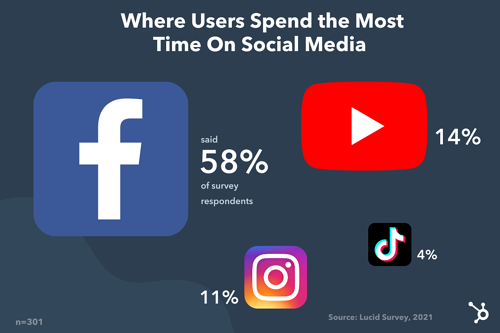
Don’t believe me? Here are a few stats you should know:

Ultimately, particularly through advertising or influencer marketing strategies, social media can be a viable opportunity for increasing sales. (Just check my bank account every time I scroll Instagram and “Swipe Up to Buy”.)

10. It looks tacky to seem relatable as a brand on social media.

The content you publish on social media should always keep your target audience in mind — but that doesn’t mean you can’t also publish content that shows your brand’s personality. Or, frankly, even your community manager’s personality.

There are people behind your company; don’t be afraid to show that with your own special brand of humor, pictures of people that work at your company, and links to news content that you find particularly entertaining … even if it’s not directly related to your industry.

11. Hashtags are essential for every post.

You know those tweets that look like this?

Love this article on #socialmedia #marketing that talks about #pinterest and has an image of a #puppy #lol

The point of hashtags is that they join together common conversation threads. So while it’s nice to have a hashtag for an event, like a webinar or a trade show, don’t lose your mind if it doesn’t become a trending topic. It’s not necessarily going to blow your leads goal out of the water if it does … think of hashtags as a way to be more user-friendly for those following the hashtag, not a way to make all your marketing dreams come true.

12. Social media monitoring takes forever.

One social media monitoring scenario: Glue your eyes to your computer screen, open five tabs for each of your social networks, chug three espressos, click between tabs, and hit refresh like a maniac.

Alternate social media monitoring scenario: Use social media monitoring software that alerts you when important terms are mentioned; check back to your accounts briefly every hour or two to see if you need to respond to anyone, follow someone back, etc.

That second one takes you, in aggregate, maybe 30 minutes a day. No big deal. Everybody breathe. Everything’s gonna be alright.

13. Social media managers should be new graduates or have years of experience.

This isn’t just a myth. It’s actually an ageist theory that should be completely abandoned — if it hasn’t been already.

Being good at social media marketing, or any job for that matter, has absolutely nothing to do with how young or old you are. You can learn the tools and strategies at any age, and make mistakes at any age, too.

Instead of considering a social media manager’s age range, look for the candidate who’s both creative and analytically-minded enough to manage your presence. To learn more about how to hire the best social media manager for your brand, check out this post.

14. Only young people use social media.

Think that the only people on social media are Gen Z and millennials? Think again.

Consider this: 40% of internet users age 46 to 55 are on LinkedIn by the end of 2020; roughly 55% of Facebook users are over the age of 35 as of 2021; and in 2020, over 70% of 45-64-year-old U.S. internet users watched videos on YouTube.

More than likely, your audience (at any age!) is on social media — the key is figuring out which one they prefer the most.

15. Newer platforms, like Snapchat and TikTok, aren’t worth taking seriously.

Snapchat and TikTok are both mobile social media apps that have pulled in millennials and Gen Z due to their unique platforms. While Snapchat thrives on ephemeral content, AR filters, and Bitmoji features, TikTok highlights goofy, fun, or musical 10 to 60-second videos similar to Vines.

Despite the fact that these platforms pull in odd content created by users, it doesn’t necessarily mean that brands can’t use the apps to gain credibility and awareness.

At this point, a plethora of brands — from publishers to B2C companies — have created profiles or ads for TikTok. One of the most surprising and oldest brands to build a TikTok strategy is The Washington Post. Although the publication has a very formal social media presence on other platforms, they use TikTok to highlight the funny, yet human, side of working in a newsroom.

Similarly, a number of larger businesses have also launched paid promotions or long-form Stories on Snapchat Discover. To learn more about these companies and the content they’ve launched, check out this blog post.

At this point, you can certainly take any popular social media platform seriously. But, as we noted when debunking previous myths in this post, you should identify which platforms best match your audience and your goals before spending time and money to build a strategy for them.

16. You don’t have enough content to have a social media channel.

The thing with social media is that it moves really fast. What’s posted today might very well be forgotten about tomorrow. It’s easy to think of this as a problem by saying, “I don’t have enough content to post.” But, alternatively, you could just repurpose content or re-share great content regularly.

According to HubSpot blog research, 91% of marketers surveyed say their company re-purposes content across various social media channels.

If the topic your post discusses is evergreen, it will almost always be useful, even if you repurpose or repost it later. This doesn’t mean you should share the exact same link and update commentary day after day, but if a few weeks go by and you want to re-promote something, go for it. Just do your loyal fans a favor and find a new interesting nugget of information to call out in your update.

17. Social media gives people a venue to publicly bash your company.

The truth is, angry customers already have plenty of venues: word of mouth, Google reviews, Yelp reviews, and many other places on the internet that will allow them to give feedback when they aren’t happy. Not creating a Facebook page simply for fear of negative feedback isn’t protecting you from an angry wrath.

Instead, get ahead of the conversation by being aware when negative reviews are taking place, reading them, responding to the customer, and coming up with solutions for their problems. Additionally, when customers are pleased, encourage them to share their positive stories.

18. Social media is too “fluffy” to have solid metrics around.

Again, social media isn’t about fluffy things we talked about earlier, like “brand equity” and “engaging conversation.”

Yes, those things happen, but it doesn’t mean you can’t measure the effectiveness of your social media activities.

With HubSpot marketing tools, you can identify exactly how much traffic social media drives to your website, how many leads social media generates, and how many of those leads become customers.

From there, you can even calculate things like the average cost-per-lead and customer — across individual social media networks, and in aggregate — just like you do with every other marketing channel (right?).

19. Social media is completely free marketing.

It’s free to join, but it’s still a resource investment. Even if you are posting for free, you’ll likely need to pay an employee to manage your channels and build strategies. And, as your social media strategy grows more successful, you might decide to up time and money investments.

Luckily, social media is still one of the most affordable ways to boost audiences, brand awareness, and ultimately leads. This makes the investment worth your while.

20. It’s best to stick with the same social media strategies that have worked in the past.

According to a survey of over 1,000 marketers for the HubSpot blog, 80% of respondents said their company’s social media strategy would be changing from 2021 to 2022 – and for good reason.

Social media platforms are constantly changing, and recycling the same goals over and over could be doing your company a disservice.

For example, in 2020, Instagram launched its Reels feature to give users a short-form video option reminiscent of TikTok. By mid-2021, the platform announced Reels would be prioritized in its infamous algorithm and would be pushed to wider audiences over static image posts.

Companies that were still relying on an early 2020 strategy that didn’t include Reels or short-form video may miss out on a good opportunity to get their content seen by a wider audience.

The social media strategies that worked in the past may not be effective today, and social media teams that can remain agile and ready to pivot may be in a better position to succeed in the ever-changing social media landscape.

Navigating Social Media Marketing

Now that you’ve learned about the falsehoods and myths behind social media, it’s time to start looking at the actual research-back tactics that could make your brand successful on a given network.

For more data that backs why you need a social media marketing strategy in 2022, check out this list of stats. For tactical advice on various social media tactics and platforms, read our Ultimate Guide to Social Media Marketing.

Editor’s Note: This post was originally published in October 2012 but was updated for comprehensiveness and freshness.

New call-to-action

Categories B2B

The Quick & Easy Guide To Freezing Rows in Excel

Without freezing rows or columns in your Excel spreadsheet, everything moves when you scroll through the page, as shown in the gif below.

freeze rows in excelThis can be frustrating if you can’t always see key data markers that explain what data is what, like column headers or row titles.

As with many things on Excel, there are tricks that help you make your spreadsheets easier to read, like the freeze function. In this post, learn how to freeze rows and columns in Excel to ensure that, when you scroll around, you’ll always be able to view the key data points that matter most.

Download 10 Excel Templates for Marketers [Free Kit]

How to Freeze a Top Row in Excel

The image below is the sample data set I’ll use to run through the explanations in this piece.

sample data set

1. To freeze the top row in an Excel spreadsheet, navigate to the header toolbar and select
View, as shown in the image below.

freeze top row in excel steps: select view

2. When the
View menu options appear, Click
Freeze Top Row, outlined in red in the image below.  

freeze top row in excel steps: select freeze top row

Once selected, everything in the top row of your Excel spreadsheet (row 1) will be frozen, and you can scroll up and down in your spreadsheet, but the top rows won’t move, as shown in the gif below.

freeze top row in excel steps: frozen top row in excel

How to Freeze a Specific Row in Excel

While excel has native functions for freezing the top row of a data set and the first column of a data set, there are additional steps to take to freeze other elements of your data set that aren’t those two things.

1. To freeze a specific row in Excel, select the row number immediately underneath the one you want frozen. For this example, I’m selecting row number three to freeze row number two.

freeze specific row in excel steps: select row below row you want to freeze

2. After selecting your row, navigate to View in the header toolbar and select Freeze Panes.

freeze specific row in excel steps: select freeze panesOnce selected, you’ll be able to scroll up and down through your spreadsheet and always see row two.

freeze specific row in excelNote that using the Freeze Panes function to freeze rows also freezes every row above the row you initially selected. For example, in the gif below, I selected row five which also freeze rows four, three, two, and one.

gif 4-Jan-06-2022-08-27-21-59-PM

How to Freeze the First Column in Excel

1. To freeze the first column of your Excel spreadsheet (column A), navigate to the Excel header toolbar, select View, and click Freeze First Column.

Once selected, you’ll be able to scroll side to side within your sheet, and the first column of your data set will always be visible, as shown in the image below.

freeze first column in excel

How to Freeze a Specific Column in Excel

1. If you want to freeze a specific column in excel, select the column letter that is immediately next to the column you want frozen and click Freeze Panes in the View header menu.

Once selected, you can scroll side to side through your entire data set and continue to see those columns. In the gif below, I’ve frozen columns A and B.

freeze specific column in excelUsing the freeze function in Excel makes your spreadsheets easier to understand, as you can ensure that critical rows and columns are always visible as you scroll through your data.

excel marketing templates

Categories B2B

The Ultimate Guide to Performance Management: 5-Step Process and Best Practices

Peter Drucker once described customers as the “most important stakeholders.” While this may be true, your customers are dependent on one thing.

No, it’s not your product (though that’s definitely important). It’s actually your employees. Without your employees, products won’t get made, customers won’t learn about those products, and there will be no one there to sell or deliver those products, or provide customer service to them after they’ve purchased.

Download Now: Free Performance Review Template

While your customers may be your most important stakeholders, in a business or organization, your employees are your biggest asset. Their performance, mindset, attitude, and loyalty can make or break your company’s performance and determine whether or not you will have any customers to sell to.

Because of this, you will want to ensure that your employees are meeting expectations, and improving in necessary areas. Performance management aims to foster the best possible employees so your organization can thrive well into the future.

What is performance management?

Performance management is a process that allows managers to assess their employees’ work and support of business objectives. The goal of performance management is to track and improve the skills employees need to perform their necessary job duties.

Elements of performance management include giving performance appraisals, utilizing key performance indicators (KPIs) and management dashboards, peer review, 360-degree feedback (multiple individuals from managers to subordinates assist), and the use of employee management software.

A similar term, performance appraisal, also focuses on goals and self-improvement, but is focused on the individual and does not take the strategic goals of the organization into account.

Performance management is not only important to the organization, it’s essential for the individual as many growth opportunities including bonuses, promotions, and ultimately dismissals, are tied to this process.

Effective Performance Management

Effective performance management will look different depending on your specific industry and your organizational goals. However, there are two approaches you can take to get started.

Behavioral Approach

This works well when your employees work (and achieve) as part of a team and measuring individual results is difficult to do. In this approach, you evaluate your employees based on their behaviors and effort. Feedback looks like identifying current behaviors, communicating desired future behaviors, and providing training or coaching to bridge the gap between where they are and where you would like them to be.

Results-oriented Approach

This approach is ideal when performance metrics are easy to quantify such as meeting a sales quota, clocking billable hours, or reaching certain call statistics. In this approach, you focus on the quality and quantity of the end result.

Performance Management Process

A performance management plan consists of a five-step process. Let’s take a closer look at the five steps.

performance management: 5-step process

1. Plan

While employees’ goals and responsibilities are outlined in the job description when they come on board, it’s essential to review this information with them regularly. Clearly set and communicated goals will help your employees understand what is expected of them and when they are falling behind.

2. Monitor

Management should be monitoring their employees’ performance continuously. If you only check in once or twice a year, a slight veer off the prescribed path could have lasting impacts on one’s performance. That’s why staying in constant communication with your employees, and keeping an open environment for feedback is essential all year long.

3. Develop

If you have identified areas of improvement for your employee, you can work with them to provide training, mentoring, educational courses, or other materials that can help them get back on track or fill any skill gaps.

4. Rate

Without a rating scale, it can be difficult to recognize whether employees are improving from their development plan. Additionally, with a rating scale that is communicated to employees, they know where they currently stand, and what is needed to move them to the next level of performance.

5. Reward

While every step of the process is necessary, the reward may be the most important. Positively reinforce employees who are hitting their goals or working towards them. Recognize them for their hard work and for striving to be better and do better for the organization.

This can be in the form of bonuses, thank you cards with token gifts, public recognition, or through an employee rewards program. It not only inspires the employee who is being recognized but motivates others who may need an extra incentive.

Remember that the performance management process is a cycle that must be continuously employed throughout an individual’s time at your organization.

You’re never “done” with performance management and this should be conveyed to your employees when they join the company, and then communicated to them throughout their employment. Without open communication throughout the process, employees may become complacent in their lackluster job performance or disengaged.

Performance Management Best Practices

This concept and process have been around for years and thankfully, there’s no need to reinvent the wheel. There are a number of performance management best practices that you can incorporate into your plan.

  1. Re-evaluate goals regularly. If there’s anything the COVID-19 pandemic has taught us, it’s that societal shifts can demand a new approach to business. Goals may need to change and clinging to old decisions in a new world could cause you to penalize (and lose) good employees.
  2. Employ SMART goals. In order to be achievable, goals must be clearly defined and communicated, and Specific, Measurable, Actionable, Relevant, and Time-bound. Employees will be more likely to achieve goals when they are properly crafted.
  3. Utilize the objectives and key results methodology. The OKR methodology can help your team set, communicate, and track organizational goals. This will foster accountability among your employees.
  4. Have performance conversations throughout the year. Performance management conversations should not reveal any surprising information to the employee or manager. Ideally, managers are having open conversations with their team members about performance throughout the year, and performance reviews should serve as a check-in documenting performance over a specified time period. When you communicate regularly with each of your employees, they learn to expect constructive feedback and look forward to these encounters.
  5. Standardize and automate your process. All employees should follow the same performance management process, and be held to an even standard. In addition to making the process fair, there comes a tipping point when you may have too many employees to manage throughout a continuous cycle, and having a set process and automated software solution to manage performance reviews can be a helpful asset.

While creating a performance management plan in your organization will take some time and effort, it’s a necessary process for a thriving organization. Knowing which employees are excelling in their roles and reaching (or exceeding) goals, which employees need more support is priceless information.

New Call-to-Action

Categories B2B

What is the LinkedIn Pixel — and How Does it Work?

Social media platform LinkedIn has more than 800 million members, and has carved out a niche for itself among giants like Facebook and Twitter for its ability to connect job seekers and employers across the globe.

Less talked about, however, is the potential of this work-focused networking site for marketing, advertising, and sales opportunities. While it’s true that the primary purpose of LinkedIn is streamlining employment and recruitment efforts, the platform also supports more social connections and in turn, opens the door for targeted campaigns that speak to the needs of its specific user base.Free Guide: How to Use LinkedIn for Business, Marketing, and Networking  [Download Now]

The challenge? Measuring the impact of these efforts. Sure, visitors might see your ads on LinkedIn, but what then? How do you know if they subsequently stopped by your website, signed up for your newsletter, or actually made a purchase?

This is the purpose of the LinkedIn Insight Tag, more commonly called the LinkedIn Pixel. Here’s what you need to know about what it is, what it does, how it works, and why it matters for your website.

Worth noting? This isn’t a piece of third-party code — it’s provided by LinkedIn directly and is designed to streamline the process of connecting ads campaign data with LinkedIn user information. According to the platform’s official LinkedIn Insight FAQ, the tag shouldn’t impact website performance since it’s both lightweight and designed to load asynchronously with other web elements to reduce resource demands.

In effect, the LinkedIn Pixel works like a beacon that lets the platform keep sight of users after they click through onto your website and then provides a detailed report to help you measure the impact of your campaigns.

Of course, it’s worth mentioning the obvious caveat here: Always make sure you’re up-front about the use of the LinkedIn Pixel on your site. While user agreements with LinkedIn provide the legal framework to make using this Pixel possible without users having to opt-in on every webpage, it’s a good idea to be straightforward about your policies around data collection and use.

Otherwise, post-Pixel contacts may not go as planned if visitors start asking questions about where you got their information — and don’t like the answers.

Part of this process comes from basic website engagement metrics. Overall statistics about how many unique visitors your site sees each day, how many newsletter or email signups occur, and how many users move from browsing to cart to purchase all impact your broader marketing approach.

When it comes to drilling down and pinpointing target market segments, meanwhile, tools such as the LinkedIn Pixel are critical. Here’s why: As noted above, the social nature of LinkedIn skews toward business and employment, which means that marketing campaigns must take this perspective into account when designing any ads or promotions. While general data about conversions and customer contacts offers a generalized view of success across all platforms, it doesn’t tell marketing teams if LinkedIn-specific ads are effective.

The LinkedIn Pixel makes it possible to segment traffic and determine where visitors are coming from, in turn allowing your teams to see how many click-throughs and referrals come from LinkedIn and how many are from the web at large.

Ready to get the LinkedIn Insight Tag up and running on your website? Follow this step-by-step guide.

Now, let’s explore each step in more detail.

1. Sign into your Campaign Manager.

How to install the linkedin insight tag on your website: LinkedIn profile visualFirst, sign into your Campaign Manager. To do this, head to your personal or company LinkedIn profile and look for Advertise in the upper right-hand corner. Click it, and you’ll be taken to the Campaign Manager page.

How to install the linkedin insight tag on your website: step 1 sign into campaign manager

2. Select Your Ad Account.

Now you need to select your ad account. In the example image below, there’s only one ad account but if you have more than one, make sure you’re selecting the one that’s associated with the right campaign and website.

How to install the linkedin insight tag on your website: step 2 select ad account

3. Click on the Account Assets dropdown.

Once you’ve selected your account, look for the Account Assets tab on the right-hand side of the top navigation menu. Click it to get the next dropdown menu and select Insight Tag.

How to install the linkedin insight tag on your website: step 3 select account assets

4. Select Install my Insight Tag.

If you don’t have any Insight Tags installed, click on the blue button that says Install my Insight Tag.

How to install the linkedin insight tag on your website: step 4 select install my insight tag

5. Decide how you’ll install the tag.

You have three options when it comes to installing your tag: You can do it yourself, send the tag to a developer or use a tag manager — such as Google, Adobe, or Tealium — to install the tag.

How to install the linkedin insight tag on your website: step 5 decide how to install the tag

6. Copy the tag.

If you decide to do it yourself, click I will install the tag myself and then copy the code in the code box that appears.

7. Add the code to every page.

Now you need to paste the Insight Code tag on every page in your domain. LinkedIn recommends pasting it just above the closing HTML <body> tag in the global footer.

8. Check that the process worked.

Finally, head back to the Insight Tab page in your Campaign Manager and make sure your domains are listed. As noted by LinkedIn, this could take anywhere from a few minutes up to 24 hours.

Linking Outside the Box

The LinkedIn Pixel makes it possible to connect ad campaign performance with LinkedIn-referred traffic, in turn making it possible to better understand how your ads are performing and also allowing you to follow up with LinkedIn users to help drive increased conversions.

Ready to start linking outside the box? Opt for the LinkedIn Insight Tag.

New Call-to-action

Categories B2B

3 Types of Competitors to Watch (+ How to Find Them)

According to a 2020 survey, most businesses have an average of 29 competitors. Do you know who yours are?

Access Now: 10 Competitive Analysis Templates [Free Download]

All businesses have competition — and knowing yours is key for innovating your products, services, and marketing strategies. But identifying the competition isn’t always obvious. Some are direct, while others may take more time to uncover.

Here, we’ll cover the three types of competitors to watch, and five ways to identify them.

3 Types of Competitors in Business

1. Direct competitors.

A direct competitor probably comes to mind when you think of your competition. These are businesses offering similar (or identical) products or services in the same market. They also vye for the same customer base.

Some famous examples of direct competitors include Apple versus Android, Pepsi versus Coca-Cola, and Netflix versus Hulu. But direct competition isn’t exclusive to well-known national or international brands. Two shoe stores in a rural town are direct competitors. So are a handful of realtors servicing one area.

Digital companies also see direct competition. For example, after the success of Twitter’s Periscope app, Facebook pivoted its focus to live video to keep up.

Since direct competitors sell similar products in a similar manner, this type of competition is often a zero-sum game — meaning, a customer that buys a competitor’s product won’t buy yours. For example, if you buy a hamburger at McDonald’s, it’s not likely you’ll swing by Burger King to buy another one.

2. Indirect competitors.

Indirect competitors are businesses in the same category that sell different products or services to solve the same problem.

For example, Taco Bell and Subway fall under the same category — fast-food — but they offer entirely different menu options. While they both seek to solve the same problem (feed hungry people), they provide different products to solve it.

Here’s another example — residential painters experience indirect competition with home improvement chains like Home Depot or Lowes. Again, the category is the same but the product offerings differ.

Indirect competition isn’t necessarily a zero-sum game. Consider someone buying supplies from Lowe’s to re-paint their home —only to do a sloppy job. They may call a local painter to fix the mistakes.

3. Replacement competitors.

A replacement competitor offers an alternative to the product or service that you offer. You both seek to solve the same pain points, but the means are different.

For example, a restaurant and coffee shop in the same neighborhood could be replacement competitors. Walking down the street, some customers may choose to grab a to-go lunch from the coffee shop, while others prefer the restaurant.

The idea here is that customers are using the same resources to purchase the replacement that they could’ve used to buy your offerings.

These competitors are potentially dangerous if there’s more than one way to solve the same problem you seek to resolve. Additionally, these are the most challenging competitors to identify. After all, we can’t read people’s minds and understand all the choices that led them to us.

But we can find other ways to uncover this information — such as requesting feedback from customers or keeping an eye on their social media mentions. With this insight, you can better understand your audience and identify your replacement competitors.

As you work to identify your competitors, you may discover more than you anticipated. Don’t get overwhelmed. Remember that not all competitors are built the same — some are less of a threat than others.

Now let’s discuss ways to identify the players above, below, and next to you.

5 Ways to Identify the Competition

1. Check the first page of Google.

An easy starting point is doing a quick Google search. Think of a few keywords someone might search to find you, such as [service or product] + [location]. For example, general contractor Sacramento.

Then, note the top companies on the first page of your search results. You may notice your keywords return thousands of results, but you shouldn’t stress. The most relevant section is the first page and the competition directly above and below you on it. Those tend to be your direct competitors.

2. Research targeted keywords.

Check the keywords you are currently targeting to identify other businesses targeting the same ones.

This is a solid strategy for finding your indirect competition since they likely target the same keywords. For example, the keyword “fast-food” may reveal Subway and Taco Bell — both indirect competitors —as the top two results.

3. Monitor social media conversations.

Opinions are aplenty on social media — so it’s relatively easy to find what your customers are saying. To find relevant conversations, enter your businesses’ name in the search bar and check the results.

For instance, someone may post a question to Twitter asking what hair salon they should visit in your city. A follower may respond with the name of your business, along with a handful of others.

You can expand your search beyond social media to include community forums, such as Reddit or Quora — along with review sites like Yelp. Both of these resources can reveal helpful insight into your customers and why they chose your business over the competition.

4. Perform market research.

Check the market for your product or service and note any companies with a competing offer. Market research can be done a number of ways — whether that be with a Google search, by browsing through trade journals, or by talking with your sales team to see what other companies are commonly brought up by customers (to name a few).

5. Ask your customers.

Customers are crucial to identifying your competition — after all, they likely sifted through most of them before landing on you. There are many ways to solicit feedback from customers — both online and in-person. That could mean striking up conversations while cashing them out or sending an email survey after each sale. One way or another, try to find the best approach and regularly check the feedback for any trends.

Every business has competition, and it pays to know the top players. But remember, as your business grows and evolves, so too will the competition. A direct competitor may go out of business, or an indirect competitor may become a direct one. All this to say, make a habit of routinely checking those above, below, and next to you.

New Call-to-action

Categories B2B

Employee Experience: What It Is and How to Improve It

From the moment someone applies for a job, to the moment they send their resignation letter to leave the company, they’ll experience plenty of connections and moments that determine their employee experience.

Employee experience (EX) is not far from customer experience (CX). Just as a stellar CX drives loyalty and revenue, an excellent EX attracts top employees and increases employee engagement, commitment, and productivity.

Download Now: Free Company Culture Code Template 

Many employers know how important it is to improve the EX to adapt to a post-covid reality and to reduce employee turnover and address employee engagement challenges. But there’s still work to do in employee experience to ensure it becomes a critical part of every business’ strategy.

What is employee experience?

In short, employee experience includes all of the touchpoints people come across when they work for an organization. This includes hiring, onboarding, performance management, and day-to-day interactions.

Improving the EX is a top priority for employers. However, few have developed an EX strategy that tackles all of the challenges of working in a post-pandemic world. An article by the Harvard Business Review points out that 4 million Americans quit their jobs in July 2021 alone, and resignations have been abnormally high for the last several months.

As a result, 92% of companies say they will prioritize EX enhancements over the next three years in an effort to prevent further resignations. This figure is up from 52% before the pandemic.

Why Employee Experience Matters

The employee experience is the bread and butter of business performance. When you focus on creating an environment where employees can thrive before, during, and after their tenure, you’re essentially building a solid brand and improving your product.

EX is made of all the experiences, positive and negative, that people go through while working. These touchpoints influence how people cooperate, how much effort they put out, and whether they want to challenge themselves to succeed at work.

From an organization’s point of view, creating a better EX is a business imperative. One of Deloitte’s studies concluded that organizations with highly engaged workforces reported a three-year revenue growth rate that was 2.3 times greater than the average.

If you can offer an excellent experience for your teams, you’ll have a higher chance of retaining them in the long run. Research from Jacob Morgan suggests that companies that invest in employee experience are 4x more profitable than those that do not.

Milestones Of The Employee Experience

When thinking about the employee experience, picture a continuous circle: attraction, onboarding, engaging and developing, and exiting.

Here’s an overview of employee experience areas based on what a person learns, does, sees, and feels at each stage.

Attraction and Recruitment

The attraction phase of employee experience is crucial because it determines the first impression potential employees have. Things like the job description style (super formal, or more casual?), how long it takes to respond to candidates (or if you do at all!), and how smooth the interview process is all impact the quality of hires.

The candidate recruitment phase is also an opportunity to ensure people become advocates for your organization, even if they do not join your organization. A bad experience in this phase can damage your brand’s reputation.

Onboarding

The onboarding phase is your chance to impress and set your employee up for success long-term. This stage is about getting an employee up-to-speed as soon as possible and about sharing your company’s culture and vision. Of course, onboarding remote employees comes with its own set of challenges, so make sure you’ve prepared.

Engage and Develop

Now that hires know your company’s processes, tools, and systems, great EX creates a space for them to thrive. By fostering an environment where constructive feedback, commitment, and motivation are a part of the day-to-day, you’ll have a higher chance of retaining top talent.

The cost of replacing an individual employee can range from one-half to two times the employee’s annual salary, so you want to avoid people leaving as much as possible. During their tenure at a company, it’s crucial to offer employees the chance to grow with the role. In practice, that means, for example, offering training opportunities so that employees keep on being challenged.

Exit

Even with a great employee experience in place, you have to accept that most employees eventually change companies. They can retire, make a career change, or simply switch employers.

Don’t miss your chance to learn from exiting employees. The fact that they are on the way out typically means they’ll be sincere. It’s a precious opportunity to gather feedback you can then use to improve the retention stage.

How To Improve Your Employee Experience

By mapping the employee experience from start to finish, you can spot the areas that need more attention. You don’t need to focus on them all at once. Instead, prioritize the low-hanging fruit first.

Follow these tips to create a great employee experience:

1. Start with the priorities.

While you might be tempted to start with various projects simultaneously, it’s more efficient to think about which stage you want to focus on. By determining what’s essential for you as a company, you’ll be more efficient at improving the areas that will have the most impact first. For example, a company might focus on improving the onboarding process during hyper-growth. Use employee surveys to uncover possible areas of improvement.

Foster a healthy culture.

Company culture is a significant component for acquiring and retaining top employees. Needless to say, when you foster good company culture, you’ll have happier employees – and this, in turn, leads to more successful businesses.

A culture that attracts high talent can lead to 33% higher revenue. Ensuring a routine of giving and receiving constructive feedback is part of healthy company culture.

Design a great onboarding experience.

A stellar onboarding is crucial to get that new hire up to speed as soon as possible and increase the chance of them staying at the company. Studies have found that up to 20% of all new hires resign within the first 45 days of their role.

Make sure you create an onboarding process that focuses on giving employees the tools they need to work, including access to software, and clarifies the expectations on their first weeks and months. A great way to get people excited about your brand during this phase is to send them employee swag they can use, like hoodies or water bottles.

Invest in employee wellness.

A wellness strategy contributes to making employees happier, which improves your company’s performance. Having happy and healthy employees enhances productivity, lowers healthcare costs, and less turnover. While it can sound expensive, it doesn’t need to be. For example, you can offer wellness benefits such as flexible hours or organize lunchtime yoga sessions.

Offer career development schemes.

Career development is a win-win. A career development plan pays attention to the employee’s specific needs for growth and learning and offers the assistance they need to get there. Offering a training budget can be part of a career development plan.

On the one hand, you’re giving employees the tools they need to get even better at their job. On the other hand, they can learn new skills that make them more competitive in the job market. By offering employees the chance to improve, you demonstrate that you want them to grow personally and professionally.

Improving Employee Engagement With EX

The employee experience encapsulates all of the moments people go through during their work at an organization. Businesses that develop an EX strategy are more successful as it fosters engaged employees. This, in turn, means more revenue.

For your organization to master employee experience management, you need to listen to what employees say during each of those touchpoints of the employee lifecycle, paying particular attention to the areas they consider most important.

Fostering a great culture, developing an onboarding strategy, and listening to what employees on their way out have to say, are all part of a well-rounded EX strategy.

Sure, congratulating people on their birthday alone won’t improve the employee experience. However, this little gesture as part of a broader culture of recognizing the small things can mean a lot for employees.

For example, consider spending time during all-hands meetings to announce work anniversaries and promotions. Then, every person involved has the chance to speak to the entire company. This accessible approach sends a powerful message: everyone in the company matters. What better experience is there?

company culture template

Categories B2B

“Tell Me About a Time You Made a Mistake”: Best Answers and Examples

Behavioral-based interview questions can make anyone nervous, but proper preparation and understanding go a long way into acing the interview and securing the job.

By prepping for some of the most common behavioral interview questions, such as, “Tell me about a time you made a mistake,” you can answer transparently and confidently. The key? Use logic and problem-solving skills to navigate these tricky behavioral-based questions to impress your potential employer.

In this post, learn the best strategies for responding to behavioral questions that will help you nail the interview and leave a lasting impression.

Download Now: 100 Marketing Interview Questions [Free Access]

Why Interviewers Ask Behavioral Questions

A resume will tell an employer a lot about what you have achieved, but it’s not going to show how you think, how you act day to day, or how you respond to issues that arise at work. Behavioral questions help an interviewer see more into your thought processes.

Sure, it can feel vulnerable to share your biggest weaknesses or confess about a time you made a mistake. But the employer is human, too. We all slip up from time to time, and it isn’t the end of the world. What really matters is how you respond. Are you pointing fingers or taking the blame? Do you jump into problem-solving or sulk and complain?

There are many variations of “Tell me about a time you made a mistake” examples, with that exact phrasing being one of the most common interview questions.

It’s crucial to understand that the interviewer isn’t trying to trick you or confess all your wrongdoings. Instead, they just want to see how to respond to different situations. Here are some of the top behavioral-based interview questions and answers, plus tips on understanding the meaning behind the question and advice on what not to say.

1. The Question: Tell Me About a Time You Made a Mistake

What It Means:

Everyone makes mistakes. The employer wants to get an insight into why the mistake happened, but more importantly, how you followed up. Did you own up and take responsibility for the mistake? Are you blaming it on other coworkers? What logic did you follow to clean up the mistake and prevent it from happening again?

How to Respond:

Be honest, and generally, stick to smaller mistakes rather than something large and detrimental to the business.

Start by describing the situation. Explain how the mistake happened, how you identified the issue, and how you fixed the problem. Also, follow up with how you made sure the mistake wouldn’t be repeated by you or anyone else on the team. Did you make documentation explaining how to properly use new software? Did you start asking for help or delegating work when you noticed items slipping through the cracks?

What Not to Say:

It’s best not to outline huge mistakes that would keep you from doing a good job in the new position you are interviewing for.

For example, if you lost a major client, you wouldn’t want to focus on that mistake in a behavioral interview question. Still, be honest — don’t make up a story because it’s easy to get caught in a lie. Don’t say that nothing comes to mind because we all make mistakes from time to time. Also, take responsibility for the error rather than blaming it on your former manager or teammates.

2. The Question: Talk About a Time You Had To Prioritize Some Projects Over Others

What It Means:

Businesses are often working on multiple tasks, short-term goals, and long-term projects all at once. As a result, the employer wants to learn how you manage your time and if you do so wisely. This question can help you discuss your time management skills and how you meet deadlines.

How to Respond:

Outline a time when you were juggling multiple tasks, and share how you decided to work on them to ensure they were all completed by the deadline. Perhaps you delegated or automated some of the easier day-to-day tasks. Share how you chose which projects to focus on completing first.

What Not to Say:

Because this is not a question about weaknesses or mistakes, it’s best not to focus on a time when you had several responsibilities falling through the cracks.

Again, don’t blame others for pushing too much work on you or not upholding their own responsibilities. Instead, stay positive and share how you tackled an overwhelming to-do list. Another thing to remember is not to share times that you came in extra early, worked through lunch, or stayed late. While an employer might like to hear how dedicated you are, it could set you up against lofty expectations that lead to burnout if you get the job.

3. The Question: Tell Me About a Time You Disagreed With a Coworker or Boss

What It Means:

A workplace melds together a variety of minds, but that means disagreements and conflicts are bound to arise.

This question is meant to delve more into how you communicate. The employer hopes to know if you are strong and confident in communicating and working through different ideas or if you tend to either keep quiet or steamroll others with your own opinions.

How to Respond:

Share a time that you had a minor disagreement with someone at work. Perhaps your boss wanted to implement new software that you felt was inefficient, or a coworker created a slogan for a marketing campaign that you felt didn’t work for the audience. Did you speak up, and if so, how? Did you email your thoughts, call a meeting, or a combination?

Explain the situation and how the team compromised. Plus, share the outcome. For example, did you find different software with similar features that boosted team productivity? Did you tweak the slogan and end up with a collaborative and successful marketing campaign?

What Not to Say:

As with any interview question, there’s no need to put others down in your response. Instead, you want to show that you understood other points of view and wanted to communicate and collaborate to find the best solution as a team.

Avoid answering with a scenario where you decided to stay quiet, as this may show that you aren’t confident in your work or aren’t willing to communicate with your colleagues for the good of the business.

4. The Question: Discuss a Time You Received Criticism

What It Means:

Perhaps your boss gave you a negative yearly review, or a customer called and complained about you. You might have had an off day or made some mistakes on a project. It happens to everyone, but what matters to a potential employer is how you reacted and rectified your behaviors moving forward.

How to Respond:

Focus on more minor critiques, such as missing a deadline, not delegating work, or receiving a complaint from a customer. Share how you responded—did you apologize or show appreciation for the feedback? Then, outline how you decided to improve yourself.

For example, perhaps you received a critique for not being up to speed on SEO, so you decided to take a certification class and boosted that skill.

What Not to Say:

The answer should focus on a time you received criticism at work rather than outside of work. Don’t bash the person who gave you a negative critique; instead, show that you understand where the criticism was coming from and how you initially responded. Then, delve into what you did to improve your actions and turn the criticism into praise in the future.

5. The Question: Share a Time You Motivated Your Team

What It Means:

This is a question about your leadership style. The interviewer wants to know how you inspire your team to be productive and successful, even if you aren’t necessarily interviewing for a management position.

How to Respond:

Focus on a time that you motivated your team to hit a big goal, meet a tight deadline, or boost sales or productivity.

Did you offer rewards or words of encouragement? Did you jump in to lend a hand even when it wasn’t technically your job or responsibility? Discuss how you got your team to meet an important target, and share the specifics of how you met or exceeded that target without sacrificing quality work.

What Not to Say:

You don’t want to show that you are some malevolent leader that was unnecessarily strict to push coworkers to work harder. Of course, you also want to focus on motivators that were successful. You should have solid evidence that your leadership actions produced real results.

Answer behavioral questions thoughtfully, honestly, and confidently to impress interviewers.

Behavioral-based interview questions aren’t meant to leave you stumped or make you look bad. Instead, they’re a way for an interviewer to get to know how you communicate, respond to problems, and how you think.

It’s a great way to give depth to who you are outside of the resume, and you can really shine if you remain open, honest, and upbeat in your responses.

marketing questions

Categories B2B

Which Social Networks Should You Advertise on in 2022?

Whether you use it to supplement your existing inbound marketing efforts or to reinvigorate your entire strategy, social media is an effective tool to meet your marketing objectives.

There are various social media platforms to choose from, and each comes with an audience that brings different advertising potential. Even though there are so many platforms, HubSpot’s Senior Manager of Social Media, Kelly Hendrickson, doesn’t think that you should be using all of them.

Featured Resource: Digital Advertising Training Course

Hendrickson says, “When it comes to choosing which social platforms to invest in, there’s often not a one-size-fits-all answer.” This is because, based on your business’s buyer personas and marketing goals, certain channels will help your advertisements gain more traction, while others may not be as impactful.

Here, we’ll cover three different social media platforms to help you decide when you should and shouldn’t elect to use them in your social media advertising strategy.

→ Free Download: Social Media Calendar Template [Access Now]

Which social networks should you advertise on?

When deciding which social networks to use, it can be difficult to recommend one platform over another. Instead, it’s best to take a holistic view of your needs, research what each platform has to offer, and go from there.

That said, some social networks are better equipped for meeting overall marketing needs than others, and we’ll discuss those below.

1. Facebook

Facebook has almost 2 billion daily active users, making it one of the most popular social media platforms today. It’s no surprise that 62% of companies will leverage it for advertising and marketing in 2022.

“For better or for worse, every business needs a Facebook advertising presence,” says Hendrickson — and there are several reasons why.

The platform has the most powerful tools for optimizing and targeting, enabling marketers to create a true buyer’s journey within the platform. Hendrickson adds, “It’s also a lot of bang for your buck,” referencing the high conversion rates the platform (9.2% to be exact).

Whether you’re a software company or a clothing business, you’ll likely find success on Facebook, especially if you use their ad management tool and create a Facebook marketing strategy that carefully considers your target audiences.

You can think of it like this: 15% of Facebook users use the platform to find and shop for products. Suppose you’re an eCommerce business that has targeted the right audiences for your advertisements. In that case, the networks’ high conversion rates say that your target market, who are already using the platform to shop, are likely to make purchases based on your ads.

Should you choose to use Facebook, you can use automation software, like Perfect Audience, to ensure that you’re continuously nurturing leads and targeting the most qualified customers. Perfect Audience helps you generate lists of users on Facebook that are most likely to become customers and re-targets them for continuous influence.

If you’re a HubSpot user, the tool integrates with Marketing Hub, and you can analyze campaign success and track conversions. Once you understand who your most qualified customers are, Perfect Audience helps you continuously re-target those customers to maximize your influence.

When shouldn’t you advertise on Facebook?

Despite being useful for most businesses, there are still times where advertising on the platform is not as beneficial.

For example, if you don’t have a deep understanding of who your target audience is, it might be best to place Facebook on the back burner until you can gain a thorough understanding of who they are. While ad targeting on Facebook is specific, and the algorithm learns from your leads over time, the process begins with a pre-existing list of groups to target.

2. Instagram

Instagram has around 500 million daily active users, and 62.7% of its global users are between 18-34 years old. In terms of user activity, 70% of shopping enthusiasts report using the app for product discovery.

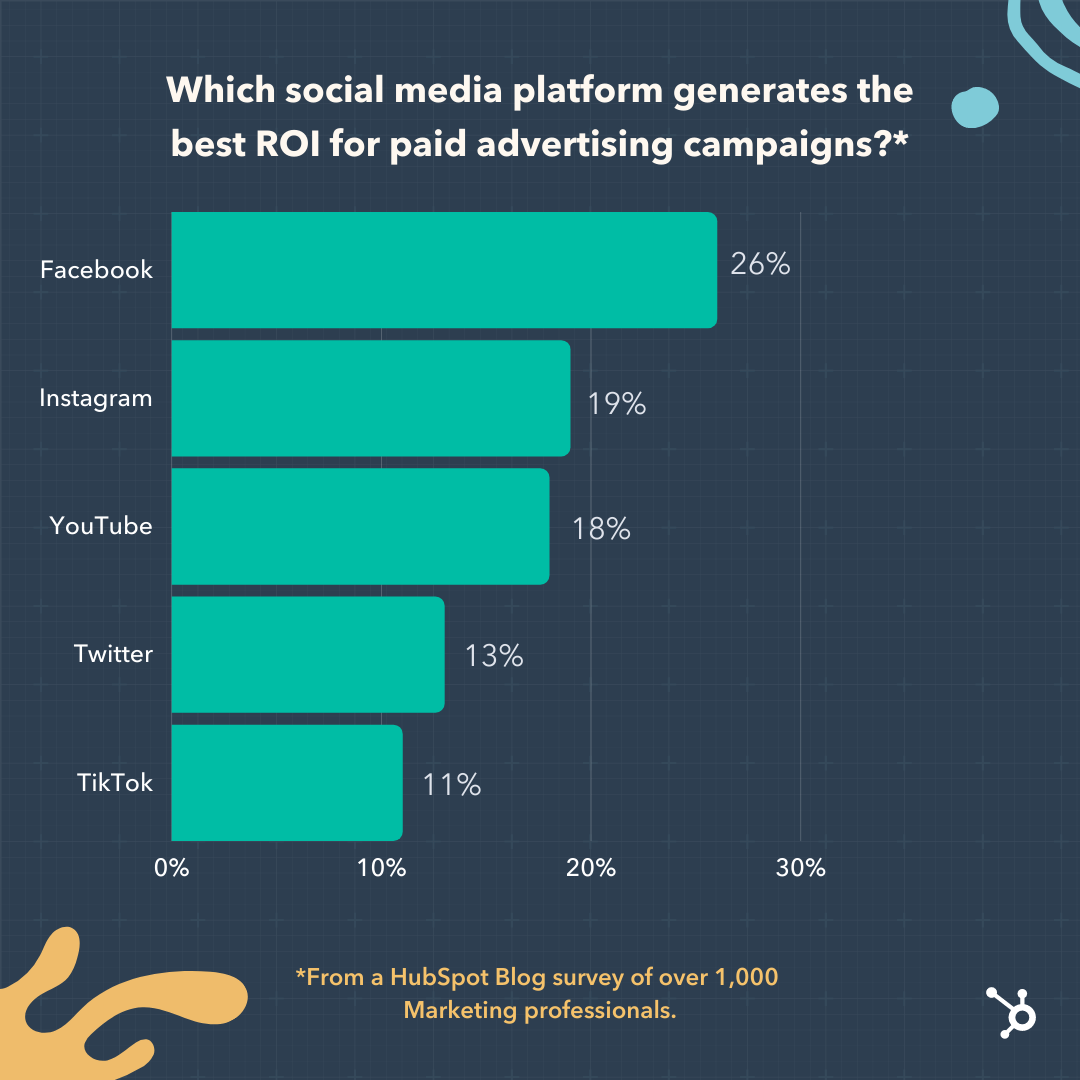
All this to say, Instagram can be very profitable for businesses. It’s more shopping focused than ever before, from adding new shopping features to dipping its toes into shopping live streams. These efforts aren’t for nothing — according to our survey of 1,000+ marketing professionals, Instagram came in second as the platform with the highest ROI in 2021.

Image source

Instagram is also the platform of choice for influencer marketing —which was ranked as the most popular and most effective trend with the biggest ROI in 2021. Thanks to the rise of micro-influencers, and the visual nature of the platform, Instagram is an effective hub for influencer marketing.

So, in sum, if you’re an eCommerce business that can produce high-quality visual content — or uses influencers in your marketing strategy — Instagram is worth considering.

When shouldn’t you advertise on Instagram?

Unlike Facebook, Instagram really only caters to B2C businesses. If you’re a more corporate business not focused on individual consumer purchases, you’ll likely have some trouble marketing on Instagram and cultivating engagement.

However, users on the app expect high-quality content, so producing these visuals is crucial, regardless of your business type. If you don’t have the time or the means, turning to a different platform will likely bring more success as you dedicate time to learn about Instagram and create high-quality visual content for future use.

3. YouTube

YouTube boasts an audience of over two billion monthly users. Not only is the platform gigantic, but it’s especially popular amongst younger audiences. Consider this staggering stat — YouTube reaches more adults aged 18 to 24 than any TV network.

Next year, video content is predicted to command more than half of all web traffic. If you haven’t started thinking about how video fits into your long-term marketing strategy, now’s the time to start. In fact, 30% of marketers plan to invest in video more than any other format in 2022.

While YouTube is the obvious platform for long-form video content, it’s also gearing up to compete with TikTok and Instagram in the short-form video game. In July 2021, it released YouTube Shorts, enabling users to create bite-sized, 60 seconds-or-less videos.

While we aren’t sure how Shorts will evolve, it’s a relatively low-stakes strategy to explore. In fact, 83% of marketers plan to increase their investment in Shorts next year.

When shouldn’t you advertise on YouTube?

Like Facebook, the possibilities for exposure on YouTube are incredibly high because of its massive user base. However, with millions of videos being uploaded per day, it’s valid to wonder if your ads will even make a mark.

For YouTube ads to “work,” you need a solid understanding of your audience — who they are, where they live, and their interests or pain points. Once you’ve done this homework, you’re in a better position to leverage YouTube’s sophisticated targeting options.

Which Social Platforms Provide the Highest ROI?

According to our survey of 1,000+ marketers, Facebook took the top spot as the highest ROI-generating platform of 2021. It should come as no surprise, then, that 25% of social media marketers are planning to invest in Facebook more than any other platform in 2022.

Instagram, YouTube, Twitter, and TikTok also made the list. Although these platforms serve different content to different audiences, they’re all shifting towards short-form videos. It’s clear that short-form video is here to stay — and many social media platforms are looking to prioritize it in the new year.

So, does this mean marketers should only invest in these five platforms? Not quite — says Hendrickson.

“Ask five social media marketers how they define ROI on social, and you’ll likely get five different answers. Is the return you’re looking for a more engaged audience? Leads? Brand awareness and affinity?”

Ultimately, your goals are the best indicators of which platforms you should leverage. For instance, are you trying to engage with a Gen-Z audience? You may have better results with TikTok (most of its users are between the ages of 10 and 19) than Facebook. Are you looking to build your reputation as a thought leader? Due to Twitter’s reach, it could become your best friend.

“The first step in establishing where you want to advertise from an ROI perspective, is to nail down what you are trying to achieve in your paid advertising,” advises Hendrickson.

But that doesn’t mean you can’t experiment with new platforms, so long as you have the resources.

“When it comes to newer or more experimental channels like TikTok, they’re worth trying if you have the resources. Beating the competition to a platform and succeeding is great, but if your other tried and true channels suffer because of it, it probably isn’t the right move for your brand in the long run.”

Making Your Final Decision

Choosing the “right” platforms to leverage for your marketing strategy depends on your overall business goals and business type. Some platforms will help your ads gain more traction, while others may not be as impactful.

If you analyze your campaign metrics and pay attention to the campaigns you run, you’ll get the information you need to make educated decisions about your marketing efforts. You can determine which platform offers the best results for your business and use that to inform future media placements.

social media content calendar

Categories B2B

How to Use Instagram: A Beginner’s Guide

Over the past few years, Instagram has seen exponential growth — from one million users at its inception to over one billion in 2022.

If you’re interested in getting an Instagram account, or just created one but aren’t sure how to use it, you’re in luck. Here, we’re going to cover all the basics, so you can learn why Instagram is the top social media platform for engagement today.

Download Now: Free Instagram for Business Kit + Templates

It’s hard to remember a time before Instagram. At one time, “Do it for the ‘gram” was a common saying, which meant, essentially, “Do something so we can take a picture and post it to Instagram.”

Since then, Instagram has placed a larger and heavier emphasis on video. So you no longer hear the phrase “Do it for the ‘gram.” I bet, though, that a second version of the phrase will soon follow. (Maybe “Do it for reel?”)

If you’re not part of the one billion users on Instagram, you might want to reconsider. The app is a great chance to engage with top brands and stay a part of friends’ lives. When I want to see how my college friends are doing, I don’t check Facebook, I check Instagram. Plus, you can follow your favorite celebrities or political figures to see candid photos of their everyday lives.

Additionally, it’s a phenomenal platform for investigating what other brands are doing — for instance, Nike uses the Instagram Stories’ feature to promote inspirational athlete stories you won’t find anywhere else.

If you’re ready to sign up for Instagram, follow these steps below:

  • Go to the Instagram site on your desktop, or download the Instagram app from the App Store (iPhone) or Google Play Store (Android).
  • If you’re on desktop, click “Log in with Facebook”, or fill in the form with your mobile number or email, name, username, and password. Then click “Sign up”.
  • On Android, click “Sign Up With Email or Phone Number”.
  • On iPhone, select “Sign Up”.
  • Enter your email address or phone number, then click “Next”. Alternatively, you can sign up with your Facebook account.
  • Once you’ve filled out your username and password, you will be instructed to fill out your profile info. Then, tap “Done”.
  • If you register with Facebook, you’ll need to log into your Facebook account if you’re currently logged out.

How Do Instagram Notifications Work?

When your account is created, you’ll want to adjust your notifications so you only receive the information you want. For instance, you can choose to receive notifications when you get likes from everyone — but, alternatively, you might decide to only receive notifications when you get a like from someone you follow. Or, you might turn off notifications for likes altogether.

You can adjust notifications to “Off”, “From People I Follow”, or “From Everyone”, for the following categories — Comments, Comment Likes, Likes and Comments on Photos of You, Follower Requests, Accepted Follow Requests, Friends on Instagram, Instagram Direct, Photos of You, Reminders, First Posts and Stories, Product Announcements, View Counts, Support Requests, Live Videos, Mentions in Bio, IGTV Video Updates, and Video Chats.

If you’re overwhelmed by that list, I get it — I am, too. If you’re unsure what notifications you want to receive, you might start with your notifications on “From Everyone”, and if certain notifications begin to annoy you, you can turn them off later.

To customize which notifications you receive, follow these steps:

1. Open up the Instagram app on your phone.

First up, open up the Instagram app on your mobile device. You can also access Instagram on desktop if you prefer. Then, head to your profile by clicking the image of your profile picture on the bottom right.

how to change instagram notification settings: access profile

2. Access “Settings.”

After you arrive at your profile, click the hamburger menu on the top right-hand corner.

how to change instagram notification settings: access settings

A popup menu will appear. Tap “Settings.”

how to change instagram notification settings: tap settings

3. Tap “Notifications.”

On the next screen, click “Notifications.” 

how to change instagram notification settings: enter notifications settings

There, you’ll be able to change the notification settings depending on category. These categories include:

  • Posts, Stories, and Comments
  • Following and Followers
  • Direct Messages and Calls
  • Live and Video
  • Fundraisers
  • From Instagram
  • Email and SMS
  • Shopping

how to change instagram notification settings: view all notification categories

You also have the ability to pause all notifications by toggling the Pause All option up top.

4. Check off the notifications you want to receive.

Access each category individually and choose the notifications you want to receive. Here are the options, for example, for “Posts, Stories, and Comments”:

how to change instagram notification settings: toggle notification settings

The options will vary depending on category.

And that’s it! Next, let’s explore how to connect your other social media accounts to your Instagram, so when you post an image to Instagram, you can share it with your other online audiences, as well.

Can you connect to Instagram to other social accounts?

Yes, you can connect Instagram to Twitter, Tumblr, and Facebook, but it’s no longer done through Settings, as it used to be.

Now, you do it on a per-post basis.

If you want to share a post to other platforms, you navigate to the actual post you want to cross-publish on Facebook, Tumblr, and Twitter, and then manually share it that way.

Here’s how:

1. Open up the Instagram app.

2. Navigate to your profile.

3. Tap on the post you’d like to cross-post.

4. Click the three dots on the top right-hand corner of the post.

how to link instagram to other social accounts: access post settings

5. On the pop-up menu, click “Share.”

how to link instagram to other social accounts: tap share on the post Note: Don’t click “Share to,” which will give you an option to AirDrop or share the post to your contacts.

6. Toggle the accounts you’d like to share the post to. If you’re not already signed in, you’ll need to do so right within the Instagram app.

how to link instagram to other social accounts: toggle the social accounts

Once you’ve connected your accounts for one post, you can then toggle the sharing options for any new posts without needing to sign in again.

If you connect Instagram to Facebook, you can share your Stories across both accounts. We talk more about how to do that below.

How to Connect Instagram to Facebook

Since Instagram and Facebook are owned by the same company, Meta, you can connect the two accounts for a more seamless experience. Connecting your Instagram and Facebook accounts allows you to:

  • Share Stories across both Instagram and Facebook
  • Login with Facebook into Instagram
  • Sync your profile name and picture across both profiles
  • Use Facebook Pay on both platforms
  • Access your shopping activity on both accounts

If you’re a frequent Facebook user, then connecting your account to your new Instagram profile is highly recommended. Here’s how:

1. Open up your Instagram app.

2. Click on your profile picture on the bottom right-hand corner.

3. Click the hamburger menu on the top right-hand corner.

4. Tap “Settings.”

5. Under the Meta logo, tap “Accounts Center.”

how to connect facebook to instagram: tap account center in settings

6. Tap “Set up Accounts Center.”

how to connect facebook to instagram: click set up accounts center

7. Follow the prompts to log in into Facebook.

Done! Your two accounts are now connected. Here’s how it’ll look like once you’re finished: 

how to connect facebook to instagram: final result

In the next section, I’ll show you when a linked account comes in handy.

Upload, Edit, and Post an Image

Now, for the most important part of Instagram — how to upload and post an image.

Instagram is an entirely visual platform. Unlike Facebook, which relies on both text and pictures, or Twitter, which relies on text alone, Instagram’s sole purpose is to enable users to share images or videos with their audience.

On Facebook, you might choose to post 100 photos on an album. On Instagram, you need to be choosier about which photos you post. There are a few reasons for this — first, you don’t want to post more than once a day (typically). And you don’t want to post too many similar photos.

For instance, it would be odd for you to post fifty photos from the same beach vacation on your Instagram profile. Instead, you might choose five or six, and place them all within the same post.

(These are called carousel posts, and they allow you to share multiple photos in one post only. Carousel posts are awesome for posting similar pictures in one package while keeping your overall profile aesthetic diverse.)

Curious about creating an aesthetic? To learn more about Instagram account themes and get inspiration, take a look at these Instagram themes. Additionally, if you want to embark on a deep-dive, you can take HubSpot’s Instagram Marketing Course.

Now that we’ve covered that, let’s explore how to upload, edit, and post an image.

1. Click the “+” icon at the top-right hand corner.

When you tap the “+” icon, you’ll be prompted to choose the type of post you want to share. Since we want to publish a post directly on our profile feed, tap “Post.”

how to upload an image to instagram: click the plus button

2. Choose your media file.

Here, you have three options. You can look through your Photos library on your phone, you can take a new picture from right within Instagram, or you can take a new video. For our purposes, I looked through my Photos library and found a picture of Boston I wanted to use. Then, I clicked “Next” in the top right.

how to upload an image to instagram: choose media

3. Add filters if desired.

There are two categories you can use to edit your image — “Filter” and “Edit”. Instagram automatically shows you filters first. You can scroll through the carousel and click any of the filters to apply it to your image.

Additionally, if you want to use a filter but you want to tone it down, double tap the filter and move the cursor to the left to lessen the intensity of the filter.

how to upload an image to instagram: add filters

4. Edit your image if desired.

Next, click “Edit”. Here, you can adjust contrast, brightness, structure, warmth, and more. When you’re happy with your edited image, or if you don’t want to edit it at all, click “Next” in the top right.

how to upload an image to instagram: edit image

5. Write a caption and toggle sharing settings.

Now, you can add a caption, tag people (you can only tag someone if they also have an Instagram account), and add a location. Additionally, click the button beside Facebook or another linked social media account to share your image on that platform, as well. When you’re ready to publish, click “Share” in the top right.

how to upload an image to instagram: add caption

If you don’t want to use your app to post on Instagram, you can also do so from your computer. Learn how to post to Instagram from a Mac or PC here.

Upload an Image or Video to Your Stories

Instagram Stories is a feature that allows you to post videos or images that disappear after 24-hours. Instagram’s Stories feature is similar to Snapchat in terms of content — users often post more casual and candid videos and images, offering glimpses into their every day lives.

For instance, on your normal feed, you might post a heavily-edited picture of yourself and friends at a baseball game. But you might post a more candid video to your Story of the stadium singing “Sweet Caroline”.

To learn how to upload an image or video to your Stories, follow these steps:

1. Tap your profile picture in the upper left-hand corner.

Alternatively, swipe right on your feed or tap the “+” button in the top navigation bar.

how to upload a story to instagram: access the story camera

2. Capture or add your media.

Once you’re within the Stories feature, you can take a picture or video right from within the app. Alternatively, if you have an image saved to your phone that you’d like to use, you can choose it from your media library.

how to upload a story to instagram: capture media

3. Add stickers or filters.

On the left-hand side, you have a few different editing features.

The “Create” button lets you add a location, hashtag, time, date, and other fun images or emojis to your picture.

how to upload a story to instagram: add stickers and filters

The “Boomerang” option allows you to create a looping video. And the “Aa” icon is your text button. Once you click “Aa”, you have the option to change your font.

If you click the smiley face icon, you’ll see the following screen. Simply click on one of the icons to add them to your image. If you don’t like it, drag it to the bottom, and a trash can will appear so you can delete it.

how to upload a story to instagram: add poll

For instance, I clicked the smiley face icon to add a poll to my image. You can also swipe to the left or right to add filters to your photo or video.

4. Publish your Story.

Once you’re happy with your content, you can either click the white arrow icon in the bottom right, which allows you to share your Story with everyone who follows you, or select “Close Friends” first, so that only your close friends see it.

Then you’re done! Your Story is immediately live.

How to Follow on Instagram

It’s incredibly easy to find and follow users. Using Instagram’s search feature, you can find celebrities, brands, and friends. Additionally, you can search “Tags” or “Places”. “Tags” is particularly useful if you know what type of content you want to find, but you’re not sure who posts about it.

For instance, you might search “#familyrecipes” under tags — your results will include any images with that hashtag. As you peruse, you might find someone who posts content you really like, and you can choose to follow them so their content appears on your feed.

To follow someone, follow these three easy steps.

1. Click on the search icon at the bottom of your screen.

It looks like a magnifying glass and will be right next to the “Home” button.

how to follow on instagram: click the search icon

2. Next, type in a person, topic, or brand.

For this example, I searched “architecture.”

how to follow on instagram: view results

Instagram allows you to either search all posts that contain the word “architecture,” or “See all results” and see tags and places.

how to follow on instagram: browse through the results

3. Tap the account you’re interested in following.

Once you’re on someone else’s account, you’ll see a blue “Follow” button at the top. For public profiles, you can click and immediately begin following that account. However, if the profile is private, you may need to wait for them to accept you first.

how to follow on instagram: follow an account you like

And that’s it! You’re on your way to becoming a pro. To take your account to the next level, plan out your next posts using an array of content ideas and templates.

Using Instagram is Key for Growing Your Personal Brand

If you want to grow both professionally and personally, then using Instagram is more important than ever. You can start by observing first, then begin posting as you learn your way around the user interface. With over one billion users, Instagram is an extremely worthwhile social media platform to join — and it’s only set to keep growing as time goes on.

Editor’s note: This post was originally published in November 2018 and has been updated for comprehensiveness.

New Call-to-action

Categories B2B

Everything You Need To Know About Performance Appraisals

As a manager, your ability to inform your teams about the successful high-impact behaviors they exhibit or skills that need further development is a critical practice in determining your business’ overall ability to reach its goals and find success.

In this post, learn how a performance appraisal will help you give employees direction, the different types of performance appraisals, and example comments to include when you schedule those 1:1 sessions.

Download Now: Free Performance Review Template

Businesses use performance appraisals to understand employee progress, give raises or promotions, create paths for further development, or, sometimes, discuss terminations.

These appraisals typically happen multiple times per year at different intervals, like quarterly, annually, or specific periods that make sense to your business. The goal, however, is for managers to conduct them regularly enough that employees always understand how they are doing.

Performance Appraisal Methods

There are different ways to conduct performance appraisals that can depend on your business’s individual needs, or on a manager-to-manager basis, depending on what you think is a best practice. Below we’ll go over the most popular types of performance appraisal methods.

1. Management by Objectives

Management by Objectives (MBO) is a popular sales management style that is also used for performance appraisals.

With this strategy, the manager and employee work together to set goals the employee will strive to meet during a specific period. During the performance appraisal session, they will review how the employee has or has not met the goals, and set new goals that will be evaluated during the next appraisal period.

2. 360-Degree Feedback

The 360-Degree Feedback method uses feedback from an employee’s self-evaluation, manager evaluation, peers, and if applicable, direct reports and customers.

This method is valuable as it provides employees with a big picture view of their performance across multiple perspectives and areas of business, rather than just a manager’s perspective. It also gives employees an understanding of how their actions affect various people at their place of work, not just how their job progress does or does not help the company meet its goals.

3. Self-Evaluation

The self-evaluation performance appraisal is when employees rate their performance based on a set list of criteria provided by management. When employees assess their own performance, they take a critical look at their progress to truly understand their efforts.

It’s important to note that, when using this method, employees may struggle to analyze their performance from an outside perspective and rate themselves too high or too low. Therefore, managers may find that this process is best supplemented by manager feedback, where you respond to employee evaluations with your insights into their performance.

4. Behavior Checklist

Using a behavior checklist for performance appraisals is when a manager has a list of traits required for the position (i.e., works well with others) and checks off those that an employee embodies and leaves blank the ones that need improvement.

This method is relatively straightforward as the checklist explicitly states desired behaviors, so those that aren’t checked off can be used to spark valuable conversation about further skill development.

5. Rating Scale

The Rating Scale performance appraisal uses a set of skills expected for a specific job that a manager uses to evaluate an employee, usually on a scale of 1-4 from meeting expectations to exceeding expectations.

At the end of the scale, the employee receives a total score calculated from each of the ratings.

Performance Appraisal Comments

Regardless of the appraisal method used, it’s essential to give feedback that is helpful to the employee and teaches them about their performance. Below we’ll go over some examples of comments that can be made during a performance appraisal session, whether written or spoken.

Organization Performance Appraisal Comment

Positive Comments

  • “You’re incredibly organized, which allows you to be efficient and timely in completing your tasks.”

Needs Improvement Comments

  • “You might benefit from spending more time organizing and planning for your tasks before you begin working on them.”

Time Management Performance Appraisal Comment

Positive Comments

  • “You always meet deadlines and prioritize your work in an organized manager.”

Needs Improvement Comments

  • “I’d like to see you pay careful attention to deadlines and develop a time management system that helps you meet due dates.”

Leadership Performance Appraisal Comments

  positive comments needs improvement comments
For someone with direct reports “You effectively manage your teams and are a fair and encouraging leader. Members of your team consistently refer to you as a role model.” “I’d like to see you spend more time working with employees that face roadblocks rather than encouraging them to find every solution on their own.”
For someone without direct reports “You’re always able to step up to the plate and take charge when the opportunity arises, and you work to be supportive of your teammates.” “I’d like to see you take the lead on projects that arise that are related to your expertise and skillset.”

Critical Thinking and Problem Solving Performance Appraisal Comments

Positive Comments

  • “You’re always able to think critically and review all of the facts of a situation before making decisions.”

Needs Improvement Comments

  • “Sometimes you act too quickly when problems arise, so I think you can benefit from spending more time analyzing a problem before jumping into a solution.”

Productivity Performance Appraisal Comments

Positive Comments

  • “You’re detail-oriented, which allows you to be productive at work and effectively organize and complete tasks on time.”

Needs Improvement Comments

  • “I’d like to see you be more productive at work, so improving your organization and time management skills may be helpful.”

Teamwork Performance Appraisal Comments

Positive Comments

  • “You work well with others and are supportive of your team members’ needs. You’re always ready to help when asked and respectful of others and their positions.”

Needs Improvement Comments

  • “I’d like to see you devote more time to collaborating with your teammates and being more open to working with them and learning from their experiences.”

Communication Performance Appraisal Comments

Positive Comments

  • “You’re able to effectively communicate all the time, regardless of the situation. I consistently hear from others that they always understand what you’re saying.”

Needs Improvement Comments

  • “I would like to see you practice active listening with your peers and communicating when you feel as though you need help.”

Creativity Performance Appraisal Comments

Positive Comments

  • “You always find unique and creative approaches to your work duties and find solutions to issues that arise.”

Needs Improvement Comments

  • “You tend to focus on traditional processes for solving problems, and I would like to see you branch out and find creative solutions to issues that may come up.”

Performance Appraisal Example

The image below is an example of a performance appraisal using a rating scale. In the template, there is a list of behaviors that the employee is expected to have and use at work, like attention to detail and communication skills.

performance appraisal example: ratings scale performance review

Download This Template Now

The manager or person providing feedback rates the employee on a scale of 1 to 4 based on how they express the skill, from Does Not Meet Expectations to Exceeds Expectations. The employee then receives a total numerical rating that you can use to drive discussions about further development.

When it comes down to your business’s bottom line, employees are direct contributors. Use performance appraisals to help your employees understand their job performance, so they know exactly which behaviors to continue practicing and which areas of opportunity to seek out additional development.

New Call-to-Action