Categories B2B

2022 CPL and CAC Benchmarks [HubSpot Research]

As a marketer, you know you have to spend money to make money. This is particularly true when you’re trying to generate leads and acquire new customers. However, if there are ways to cut the cost of lead generation and customer acquisition without undercutting either metric.

To help refine your marketing strategy to lower the costs of acquiring leads and customers, here are some helpful CPL and CAC benchmarks from a recent HubSpot survey of hundreds of marketers.

Download Now: Free State of Marketing Report [Updated for 2022]

Most Effective Strategies for Lowering CAC

Customer acquisition cost (CAC) is how much a company has to spend to get a new customer. In our survey we found that CAC varies a lot between companies and industries — that said, almost half (48.9%) of the marketers we surveyed said CAC has increased in the past year. Another 48.9% reported their CAC has stayed about the same, and only 2.2% said CAC has decreased.

When we asked marketers what they found to be the most effective strategies in lowering CAC, the majority (67.6%) reported improving customer retention among the most effective. Other strategies reported to be effective are:

  • Implementing a customer referral/affiliate program (62.5%)
  • Optimizing sales funnel (57.6%)
  • Conducting market research to better understand the target audience (55.8%)
  • Using a CRM (Customer Relationship Management Software) to streamline their sales cycle (53.8%)

Marketing Channels with the Highest and Lowest CAC

Being mindful of the channels you’re using and how much those channels cost is another way to lower the cost of acquiring customers.

Marketing Channels with the Lowest CAC

In our survey, 59.8% of marketers listed social media as one of the channels with the lowest customer acquisition costs. 55.8% said the same about email marketing, 41.4% listed experiential marketing, and 40.8% said websites and blogs.

Marketing Channels with the Highest CAC

When asked what are the marketing channels with the highest CAC, 47.4% of marketers mentioned paid social, which is the practice of showing sponsored advertising content on third-party social media platforms. 46.2% said physical events and trade shows are the most expensive, 42.1% said physical ads, and 42.9% said print advertising.

Most Effective Strategies for Lowering CPL

Cost-per-lead (CPL) is how much money it takes to generate a new lead. Unlike with CAC, the majority of marketers we surveyed (56.2%) reported CPL has stayed about the same in the past year — only 37.7% said CPL has increased.

However, almost 70% of marketers still said their company is working to reduce CPL.

60% of marketers told us optimizing their website to convert leads into customers is among the most effective strategies for lowering CPL — that generally means taking strides like adapting websites for mobile devices or reducing page load times

Other effective strategies listed by marketers are:

  • Analyzing advertisement campaign performance data (55.9%)
  • A/B testing (52%)
  • Leveraging organic search traffic by investing in SEO (52.8%)
  • Conducting market research to better understand target audience (51%)

Marketing Channels with the Highest and Lowest Quality of Leads

Not every lead is a good lead — they don’t all have the need or desire to buy a product or service from your company. To ensure you’re reaching your target audience, here is a breakdown of channels marketers said attract the highest and lowest quality of leads.

Marketing channels resulting in highest quality of leads

In our survey, 44.7% of marketers mentioned social media as being a channel attracting the highest quality of leads. This could have to do with social media apps relying on targeted algorithms that point users in the direction of the content they like to consume.

41.1% of marketers also Search Engine Optimization (SEO) as a source for high quality leads, along with content marketing (37.1%), influencer marketing (37.1%), and virtual events, webinars, and conferences (38.1%)

Marketing Channels Resulting in the Lowest Quality of Leads

Our survey found 38.3% of marketers reported direct mail resulted in the lowest quality of leads. 37.8% also reported the same for email marketing, and 35% answered with experiential marketing.

Marketing Channels with Lowest and Highest CPL

Similar to CAC, another way to lower the cost of generating leads is to look to channels with the lowest costs.

Marketing Channels with the Lowest CPL

45.6% of marketers reported in our survey that email marketing boasts particularly low CPL. About 40% said the same about websites and blogs and 42.6% said the same about social media. Percentages overlap because respondents were allowed to choose up to three answers.

Marketing channels with highest cost per lead

Half the marketers we surveyed mentioned influencer marketing as having the highest cost per lead — a trend that stems from the fact that influencers with large followings tend to have high rates.

44% of marketers reported print advertising to have the highest cost, and 42.5% of marketers said physical ads. Virtual events, webinars, and conferences were said to have the highest costs by 40.5% of marketers.

Now that you know which strategies and channels are the most effective for lowering CAC and CPL, you can confidently refine your marketing strategy to attract new customers and leads while also saving money.

New Call-to-action

Categories B2B

9 VR Marketing Examples to Inspire You in 2022

I won’t lecture you on the importance of incorporating virtual reality (VR) into your marketing strategy.

What I will do, however, is share a few fun facts about VR and show you nine examples of this technology used for marketing a product or a brand.

  • Consumer and enterprise VR market revenue is expected to reach $6.71 billion by the end of 2022, and $12.9 billion by 2024. 
  • Augmented reality, virtual reality, and mixed reality market size worldwide is expected to jump by more than 220 billion dollars between 2021 and 2028.
  • By the end of 2022, it is estimated that virtual reality hardware and software sales will generate more than $6.4 billion dollars in revenue.
  • By the end of 2020, the number of VR headsets sold is predicted to reach 82 million — a 1,507% increase from 2017 predicted totals.

VR is growing in its adoption, and it’s worth considering adding it to your marketing channels in the coming year.→ Download Now: Free Marketing Plan Template

What Is VR?

VR, short for virtual reality, is software that immerses users in a three-dimensional, virtual interactive environment — usually by headset with special lenses — to simulate a real-life experience. Many VR experiences take place in 360 degrees. 

While movies, for example, allow audiences to experience the film as if they are a character in the scene, businesses use VR to demonstrate and promote their products to potential customers. In fact, many industries have found a use of VR to transport people to places they might otherwise have to travel to or simply imagine. 

Before we dive into some examples of businesses that have used VR for marketing, it’s worth noting that virtual reality has a few key differences from another term you might’ve heard before in the same sphere: augmented reality. The video below runs through the key differences. 


Seeking inspiration for your own VR marketing campaign? Look no further. Below are nine of our favorite VR marketing campaigns and how they served the company’s marketing strategy.

1. Gucci Town

High-end fashion house Gucci recently launched Gucci Town, a virtual world within the Roblox metaverse. Players can explore the town, learn about the house’s history, and connect with other people in the game. 


The interactive elements of Gucci Town are the mini-games, the browsable art exhibitions, and the Gucci store where people can purchase clothes for their Roblox avatars. When users wear the clothing they’ve purchased, they can spark conversations with others that are curious about the unique items and, as a result, are inspired to visit and discover what the town has to offer. 

2. Sephora Try-on Kiosk

Beauty retailer Sephora has kiosks where visitors can virtually test makeup products on their face to ensure they’re satisfied with how it looks before making a purchase. These kiosks are a high-value marketing tool, providing a unique hybrid experience to help customers get the most out of their in-store visit. 

While Sephora does allow physical testing of its products, not everyone might want to do so, so the kiosks are an additional option. It’s also beneficial for customer satisfaction, as people can see exactly what the products look like ahead of time to ensure they spend money on one that works best for them and their needs.

3. Wendy’s and VMLY&R: Keeping Fortnite Fresh

Wendy’s created an engaging VR marketing experience within Fortnite’s virtual world, leveraging native gameplay related to its business: beef. Fortnite players would transport beef to freezers at nearby restaurants and earn coins when they were successful. 

To make it a more brand-relevant experience, Wendy’s tasked its marketing agency, VMLY&R, to create an avatar that resembled its mascot, Wendy. The firm then streamed on Twitch, where viewers could watch the new Wendy’s avatar break into restaurants and destroy freezers: 


During the stream, mentions of Wendy’s on social media went up by 119%, and it was viewed for a total of 1.52 million minutes by a quarter of a million viewers. Viewers also began smashing freezers within their games, tweeting about the stream, and commenting in the feed’s comment thread. 

Like a commercial or native ad, the campaign’s goal was to remind audiences that Wendy’s makes an effort to serve the freshest beef to its customers, which is why it was so relevant that users received coins the faster they were able to transport beef to the freezers. 

4. A Tribal Past: Bear River, a Nation: What Can Eeling Teach Us? 

In partnership with Oculus, Jessica Cantrell created a 360° film project where tribal members shared their stories and reconnected young people with their community’s past. 


It was a form of community storytelling that leveraged an emerging VR tool to market the story and to help members of a historically marginalized community learn more about their culture. 

5. Lowe’s: Holoroom How-To

Anyone who’s gone through the angst of being a first-time buyer knows the unfathomable power of paperwork and finances to undermine the fun of designing or decorating a new home.

That’s why Lowe’s decided to step in and help out homeowners — or recreational DIY enthusiasts — with a virtual skills-training clinic that uses HTC Vive headsets to guide participants through a visual, educational experience on the how-to of home improvement.


Now, customers can embark on their do-it-yourself renovation dreams without needing to pay for a professional and with the education, they need to succeed on their own. 

6. Boursin: The Sensorium

Cheese brand Boursin created a VR experience to take users on a multi-sensory journey through a refrigerator to shed light on its products’ flavor profiles, food pairings, and recipe ideas.

The goal? To raise awareness among U.K. consumers of Boursin’s distinct taste and product selection.


While the VR installment was part of a live experiential marketing campaign, the rest of us can get a taste — pun intended — of the virtual experience via this YouTube video.

7. Adidas: Delicatessen

Adidas partnered with Somewhere Else, an emerging tech marketing agency, to follow the mountain-climbing journey of two extreme athletes sponsored by TERREX (a division of Adidas).

And what good is mountain climbing to an audience if you can’t give them a 360-degree view of the journey?

Viewers could follow the climbers, Ben Rueck and Delaney Miller, literally rock for rock and climb along with them. You heard that right — using a VR headset and holding two sensory remote controls in each hand, viewers could scale the mountain of Delicatessen right alongside Rueck and Miller.

According to Somewhere Else, this VR campaign served to “find an unforgettable way to market TERREX, [Adidas’s] line of outdoor apparel & accessories.” What the company also did, however, was introduce viewers to an activity they might have never tried otherwise and instill an interest in the experience.

Check out the campaign’s trailer below.

8. Toms: Virtual Giving Trip

Toms, a popular shoe company, is well known for donating one pair of shoes to a child in need every time a customer buys a pair. This charitable developer found a new way to inspire its customers to give — wearing a VR headset.

Blake Mycoskie, the founder and Chief Shoe Giver of Toms, narrates Tom’s Virtual Giving Trip with one of his colleagues.

As they describe the story of Toms’ founding, their VR experience takes viewers on a trip through Peru, where Blake and the shoe-giving team visit a school of children who are about to receive the shoes they need for the first time.

What Toms’ VR campaign does so well is something cause-driven organizations worldwide struggle to do: Show donors exactly where their money is going. Even without a VR headset, the video below gives you an intimate experience to put Toms on your list for your next shoe purchase.

9. DP World: Caucedo Facilities Tour

DP World is a global trade company that helps businesses transport goods worldwide. As the company opens new terminals, however, they need a way to show their customers what DP World’s property has to offer.

DP World’s Caucedo facility in the Dominican Republic is just one of several DP World properties using VR to promote its large and often mysterious ships and land masses as they suddenly appear in a community.

Trade logistics is not an exciting industry for everyone, but that’s exactly why a 360-degree tour of DP World’s terminal is so valuable here. Show people just how efficient, safe, and crucial these properties are to certain businesses — without making them put on a hardhat and walk through the port itself — and you can gain massive community support.

Navigating VR in Marketing

As you read this, you might be thinking, “Why should a small-business marketer like myself be learning about high-priced VR campaigns?” 

Well, although VR might be too costly for many. marketing budgets, it’s getting more and more abundant in society, As it grows, we’re seeing a handful of brands leverage it for product promotion and virtual storytelling. And, while you might not be able to create a VR-based campaign, you can gather some great takeaways related to marketing innovation, content marketing, or visual storytelling which can give you other ideas of how to better interact with your digital audience.

Want to see how other emerging technologies will impact your marketing? Check out A Practical Approach to Emerging Tech for SMBs: AI, Blockchain, Cryptocurrencies, IoT, and AR/VR.

New Call-to-action

Categories B2B

The Top Channels Consumers Use to Learn About Products [New Data]

Imagine you’re scrolling through Instagram and see an ad for a product you might be interested in.

While your first thought might be that ad targeting is getting too advanced, you still want to find out more about the product and the company that makes it. So where do you look next?

Are you going straight to their Instagram page, visiting their website, searching for online reviews, or watching a YouTube unboxing video?

These are the questions we asked 1,000 consumers in our 2022 State of Consumer Trends Survey to find out how people behave after discovering a product they might want.

Of course, this will vary drastically by generation, so we’ll include some insights split by age group as we go. You can also check out our full report on consumer shopping habits by generation for more age-specific info.

Download Now: Free State of Marketing Report [Updated for 2022]

How Do Consumers Want to Learn About Products in 2022?

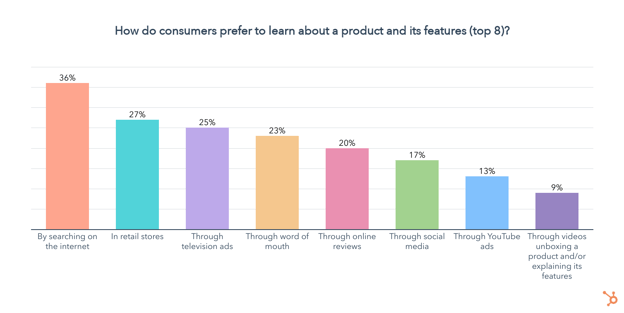
Consumers are learning about products and their features through a wide variety of channels. Among the most popular are searching the web, going to retail stores, TV ads, word of mouth, and online reviews.

how consumers prefer to learn about products

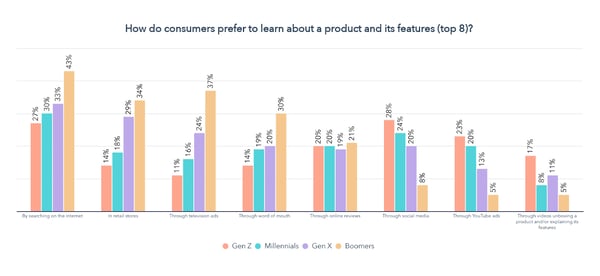
While social media, YouTube ads, unboxing videos, and streaming services are less popular when we look at all generations combined, splitting this up by age group paints a very different picture.

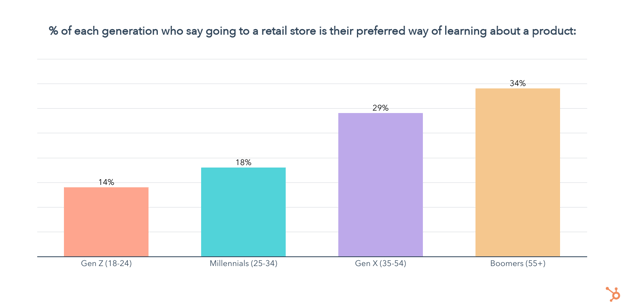
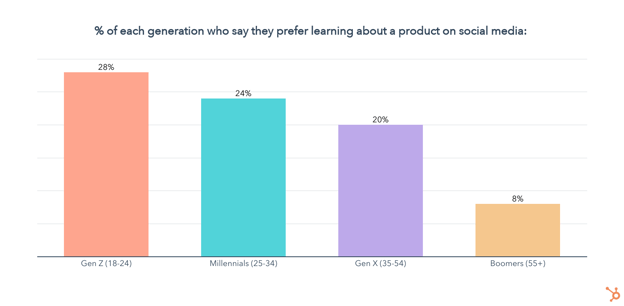
how consumers prefer to learn about productsGen Z, Millennials, and Gen X set themselves apart from Boomers through their preference for learning about products through social media and YouTube ads. Gen Z also favors unboxing videos more than any other generation.

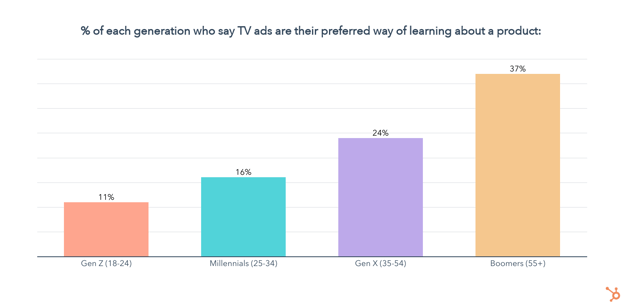
Meanwhile, Gen X and Boomers show a clear preference for learning about products through TV ads and in retail stores. Boomers also favor word of mouth more than any other generation.

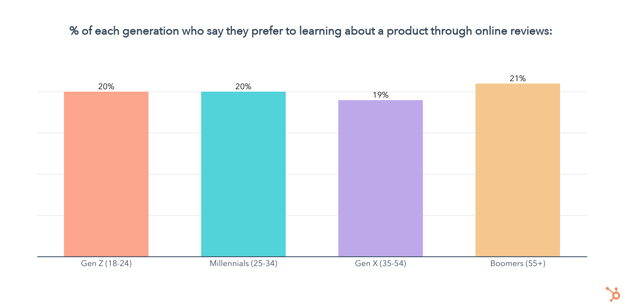
But there are also some similarities — learning about products by searching the internet and through online reviews is popular among all generations.

So let’s dive deeper into each of the most popular channels consumers are using to learn about products.

SEO is Key for Product Discovery

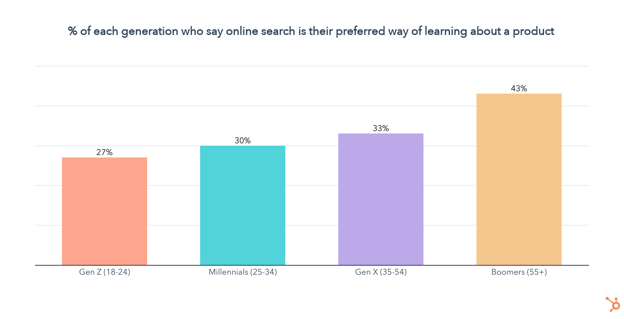
36% of consumers prefer to learn about products by searching the internet, highlighting the importance of optimizing your website for SEO.

Searching the internet is the number one way to learn about products among all age groups, except for Gen Z, who prefer to use social media by just 1 percentage point. While online search is extremely popular among all age groups, it progressively gets more favor with each older generation.

which percent  of each generation uses internet to learn about a product

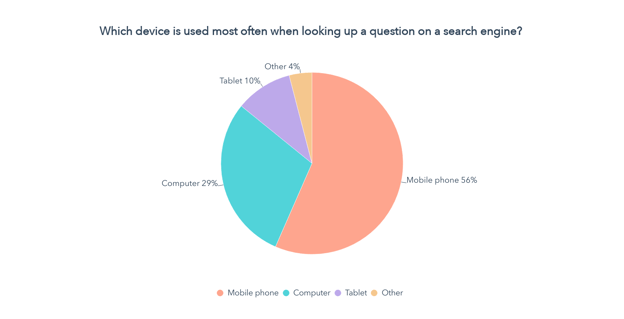
Since we know consumers are searching the web to better understand products and their features, it’s also key to get a sense of which devices they are using to create the best user experience.which device is used most often for search queries

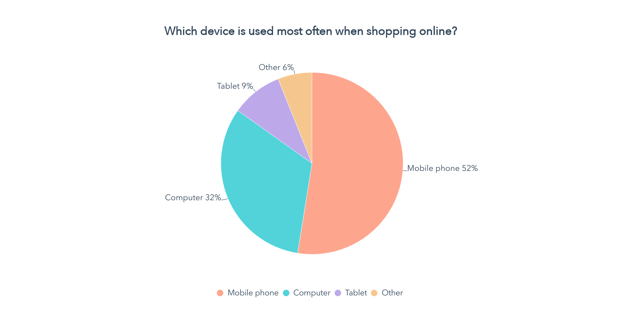
Not only are mobile phones the device of choice for over 50% of consumers when searching up a question online, but they are also the most used device when they shop online.

which device is used most often when shopping online

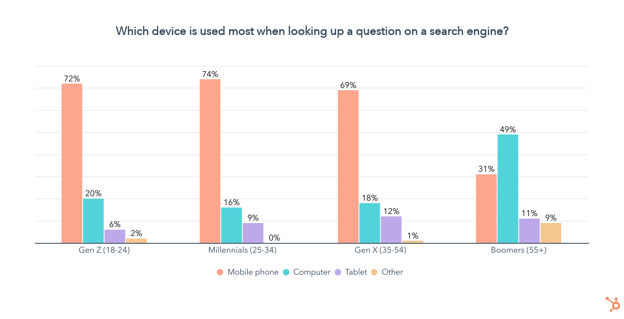
Especially when it comes to younger generations, the use of mobile devices for search dwarfs searching on a computer, meaning you should optimize your website to be mobile-first.

search query device by generation

Retail Is Still Relevant, Especially for Older Generations

Coming in second place, 27% of consumers say they prefer to learn about products in retail stores. Unsurprisingly, the in-person approach is most popular among older age groups, though it isn’t completely lost on Gen Z and is still favored by almost one in five Millennials.

TV Ads Are Key for Boomers and Gen X

One in four consumers say TV ads are their preferred way of learning more about a product and its features. TV ads rank in the top three most preferred channels to learn about products for Gen X and Baby Boomers, but lose favor with Gen Z and Millennials who strongly prefer other digital channels like social media.

percent of age groups that use retail stores to learn about products

Word of Mouth Is Relevant, But Gen Z Looks to Influencers Instead

23% of consumers say they prefer to learn about products through word of mouth. Interestingly, word of mouth ranks in the top 5 channels for learning about products for every generation except Gen Z. Our Consumer Shopping Report 2022 even found that Gen Z places more importance on recommendations from influencers than their friends and family.

Online Reviews Are Sought By All Generations

One in five consumers say they prefer to learn about products through online reviews, regardless of generation. Of course, whether they go to YouTube, Amazon reviews, or a dedicated blog to get those insights will depend on their age.

percent of people who want to learn about products through reviews

Social Media Is Key For Gen Z and Millennials

Overall, just 17% of consumers say social media is their preferred channel for learning about products and their features. However, social media comes in at #1 for Gen Z, second for Millennials, and fourth for Gen X.

what percentage of age groups prefer to learn about products on social media

Next, let’s take a look at how consumers want to learn about products on social media.

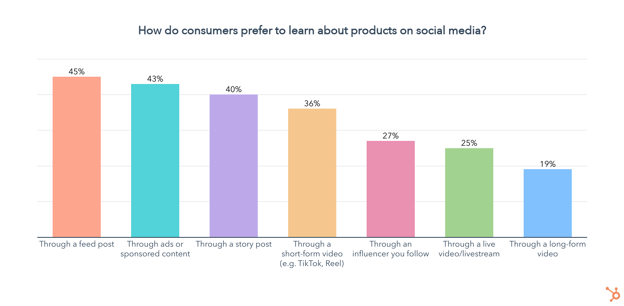
how consumers learn about products on social media

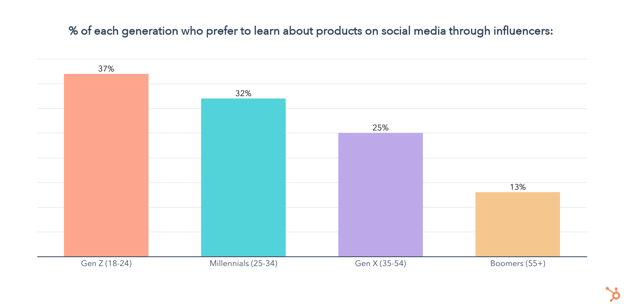
Feed posts, ads, and stories are the top three formats for learning about products on social media. 36% of consumers want to learn about products through short-form videos like TikToks or Reels, and another 27% prefer to go through influencers, which is especially popular among younger generations.

how people learn about products from influencers

You might also be wondering what kind of content consumers want to see from brands on social media.

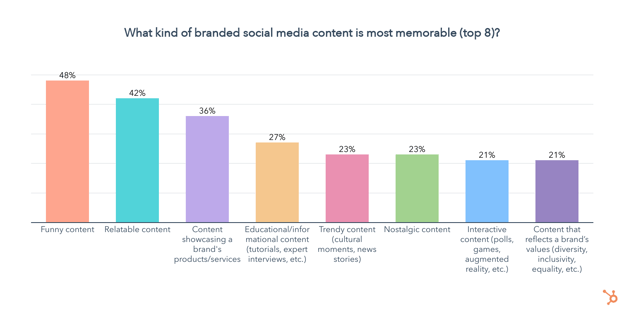
what kind of branded social media is most memorable

Almost half of consumers say funny content is the most memorable, followed by content they can relate to. Making content that showcases your product or service is also highly memorable to 36% of consumers.

YouTube Ads are Key For Gen Z and Millennials

Overall, just 13% of consumers say they prefer learning about a product and its features through YouTube ads, but the video platform ranks among the top channels for Gen Z and Millennials.

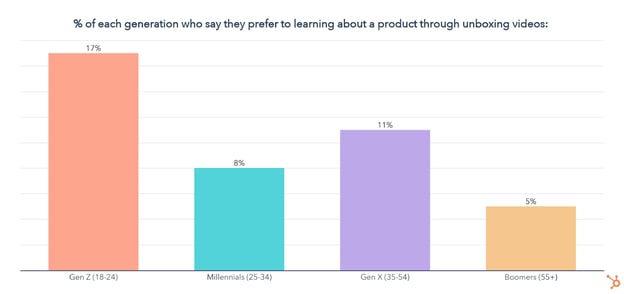
Unboxing Videos are a Gen Z Thing

While just 9% of consumers prefer to learn about a product and its features through unboxing videos, they are uniquely popular with Gen Z.

percentage of generations that use unboxing videos to learn about products

Making Sense of Consumer Data

Want to learn more about the latest trends and shopping habits consumers are navigating, and how your brand can leverage them to better meet your targets in 2022?

Check out our consumer shopping report as well as our State of Consumer Trends Report, coming in late July.

In the meantime, see how marketers are navigating 2022 with our State of Marketing Trends Report below.

New Call-to-action

Categories B2B

How to Plan Your Instagram Posts [+22 Free Instagram Planning Templates]

When you’re not following a plan on social media, it’s easy to forget to post regularly.

Additionally, creating image and video-based content meant to drive revenue for your business can seem far from your bottom line.

However, 90% of people on Instagram follow at least one business nowadays. To compete with other companies in your industry, you must have a solid Instagram strategy, especially if your intended audience uses the app.

Fortunately, once you have an ideal plan for your Instagram content, you can create content more intentionally and ultimately drive more results for your team and organization.

Download Now: Free Instagram for Business Kit + Templates

In this post, we’ll cover everything from determining what kind of content you want to post to picking a content theme. Then, we’ll get into the details of planning individual posts.

HubSpot, AdobeSpark, and Iconosquare teamed up to create a 30-day planning guide for business Instagram planning.

We’ve also thrown in 30 templates to help you get started. Click here to get the planning guide.

Your Instagram’s Visual Theme

Once you’ve decided on the type of content you want to post, you’ll want to select a visual theme for your posts.

Aesthetic consistency will help you in several ways:

  • When an Instagram user finds your business’ account, the images will appear coordinated and well-thought-out.
  • Your followers will begin to sense patterns in your content and pause when they see your post as they scroll because they recognize that pattern.
  • When you’ve pre-selected a go-to font and color scheme, it takes away some of the pressure of planning because there are fewer decisions to make for each new post.

If you use Adobe Spark, you can download our free Adobe Spark Instagram templates to create a new post with a template rather than starting from scratch. You’ll also get access to the previously-mentioned calendar of content ideas.

To establish visual consistency across your posts, pay attention to the colors in your photos, the filters you use, the fonts you use in your images, and, if you’d like, the pattern of content types you’re posting.

  • Colors – Keep your brand colors top of mind when creating Instagram posts. Pick a few colors that complement your primary brand color and ensure that the most prominent color appears in your posts.
  • Filters – When using filters, do so lightly, as over-editing can dilute the quality of your photos. If you decide to use filters, use the same one or two across all posts.
  • Fonts – Select one font to use whenever you want to overlay text on photos or videos and use one of your brand colors for the font. Since Instagram is a friendly platform, aim to use an easy-to-read, sans-serif font and keep it the same across all posts.
  • Content Pattern – To create a visual pattern for your overall feed, ensure that every third post has a specific background color. Since Instagram has three columns in the grid view, you’ll end up with a column that shows you thoughtfully planned your posts. You might consider using a white background with the same font style and color to share an industry tip for every third post.

Once you’ve decided on the content type and visual theme you’ll use on your brand’s Instagram account, it’s time to start planning posts.

Create a spreadsheet with the following columns (or download our free, pre-made spreadsheet along with planning templates for all of your other social media channels, too):

  • Date of publication
  • Time of publication
  • Image caption
  • Image file name or a link (if it has been uploaded to the web)
  • The link that you’ll add to your bio when the post goes live (or add to a Linktree-type multiple links tool)
  • Campaign/Goal: What is the goal for this post? Are you trying to amass more followers? Drive sign-ups for your product, a free trial, a consultation, or another next step toward becoming a customer? A well-articulated goal will help you ensure that each post exists for a purpose. You won’t be creating a dead-end for your followers but rather an opportunity for continued engagement with your account, brand, or product.

When you’re done, it should look like this:

Social media spreadsheet example

Download This Template

Pro Tip: Duplicate the spreadsheet tab for Instagram Stories, as well, to leverage Instagram’s other avenue for engaging with your followers. Stories are best used for interactive content like polls and quizzes, sharing photos or videos from live events, and more casual, friendly updates.

Once you have your spreadsheet ready to go, decide on your frequency. We recommend ramping up to posting around three times per week.

1. Define Your Content Posting Schedule

Post at least once a week to establish a reliable posting pattern for your followers. You’ll risk losing followers if people feel that they’re not consistently seeing interesting or helpful content from your account.

To establish that consistent pattern, set dates and times for posting first. For example, if you decide to post every Monday, Wednesday, and Friday, fill in the date and time column with the next month’s Mondays, Wednesdays, and Fridays.

Then, add a recurring event to your calendar for post planning for the following two to four weeks. Set a recurring 10-minute calendar invitation at your selected posting times to reference your spreadsheet and quickly post what you’ve planned if you’re not using an automated scheduling tool. With the planning sheet handy, you’ll be able to copy and paste captions and links and locate the images for your posts easily.

When slotting specific posts into your spreadsheet, begin in whichever column you’d like. For example, you could start by evenly splitting the rows into separate campaigns and filling in the caption or image link for each post later.

2. Add Visuals

If you already have a repository of photos that you can post, you might start pasting the links into the Image File Name/Link column and fill in the other columns afterward.

You’ll also want to start creating more visual content for future posts. For example, consider repurposing event images that your company has taken, soliciting photos of your employees or customers using your product, or simply creating visually-appealing text graphics like this one on a tool like Canva or Photoshop.

Upload each photo to a centralized folder and use a standardized naming convention so that it’s easy to find the file you’re looking for. If you’re not using a post-scheduling tool, you’ll likely have to post directly from your phone.

To easily access photos with their file names from your phone, you can upload photos to a Google Photos album on your computer and then use the Google Photos app to download the content before posting directly.

3. Write Engaging Captions

Finally, decide on your caption for each post. The ideal caption style depends on your audience and the type of content you’re sharing. For example, aesthetics-focused content may perform best with a quirky, short, and clever caption. In contrast, education-focused content may be most likely shared and liked if the caption includes a couple of concise, straightforward tips.

How to Plan Instagram Posts: Write Engaging Captions, example of a two toned orange on Instagram

Image Source

4. Choose Hashtags

Make sure to include three to five thoughtfully planned hashtags in your caption or in a comment on your post to ensure it gets in front of new audiences. You’ll want to include a mix of branded hashtags (e.g., #HubSpotAcademy or #OnlineLearning) and trending hashtags so that more people see your post.

You can research the hashtags you might want to use by typing them into Instagram (head to the ‘Search’ tab and then tap ‘Tags’) to see how much volume they get. Prioritize the higher-volume ones.

Types of Content to Post on Instagram

Regardless of which kind of content you decide to post, it should always be content that attracts your ideal audience. Think beyond your product, service, or office. What does your ideal customer actually care about, and what motivates them to follow a business account on Instagram?

Bite-Sized Education Instagram Content

If you know your audience is interested in consuming bite-sized education on social media, you might use Instagram to share industry tips and tricks.

Types of Content to Post on Instagram: Bite Sized Educational content

Image Source

Videos or well-organized captions can be useful vehicles for providing your audience with well-researched information for their benefit rather than the benefit of your business.

Showcasing Products Instagram Content

If your product or service lends itself to being photographed, consider sharing photos or videos of real customers using it. You can lighten your content creation load by relying on user-generated content. Have your customers send in photos of your product in action.

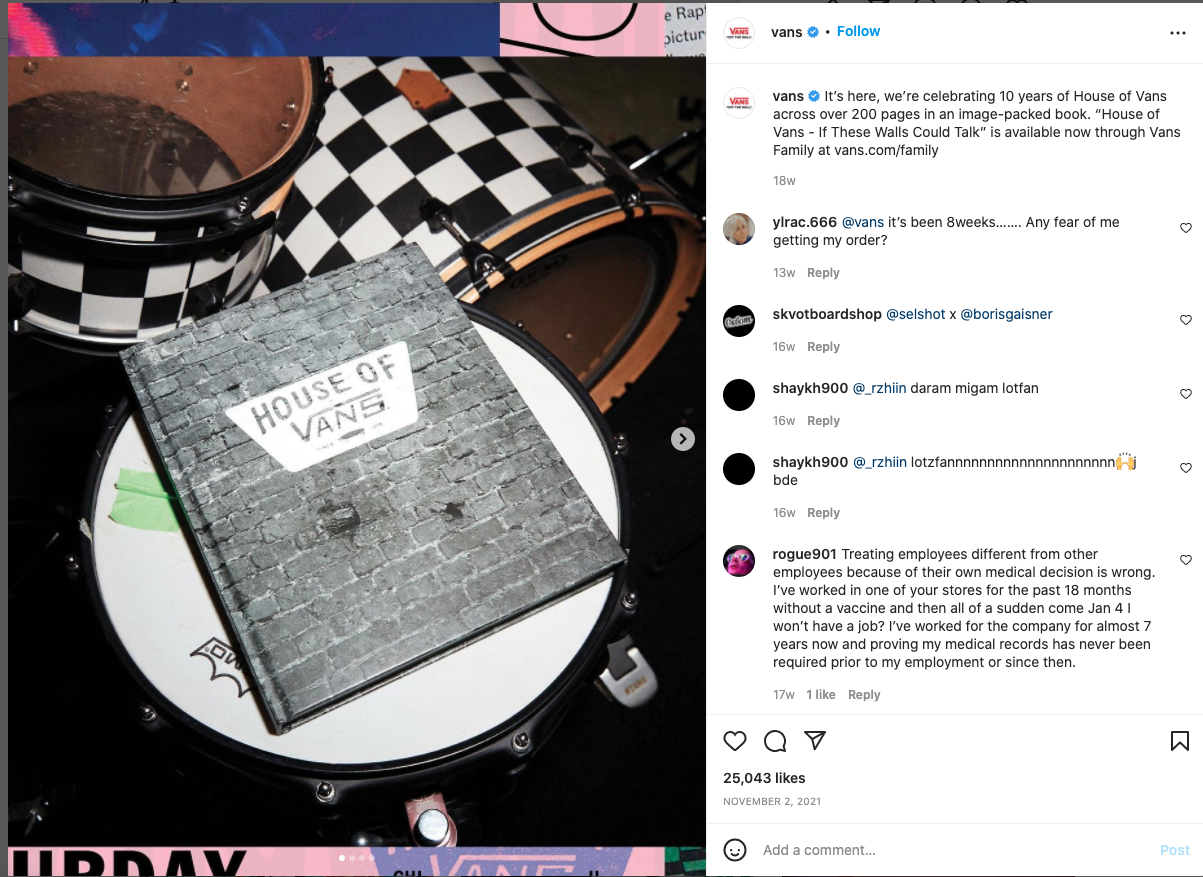
Here’s an example of how Beats by Dre uses Instagram to showcase customers using their products:

Types of Content to Post on Instagram: Beats by Dre portable pill speaker

Image Source

Still, there’s no need to make these product or service posts promotional. Instead, the value for your Instagram following would come from drawing personal connections with real stories about how others have successfully used your product.

Inspiring Imagery Instagram Content

However, if your audience isn’t consuming education on Instagram and your product or service isn’t easily photographed, you can take a more aesthetically-focused route, posting images and videos that people would simply love to consume. These may not drive a significant number of conversions, but a visual-first Instagram can amass a large number of followers.

Types of Content to Post on Instagram: Designboom shows a home on the outskirts of Vienna that was completed in 1971

Image Source

The key to the aesthetically-pleasing route is to check in frequently to ensure your posts are driving actual value (perhaps in the form of brand awareness or community among your followers) for your business.

Experiment With Content

If you’re unsure of the type of content you want to post or the kind that will succeed for your brand, pick the one you believe your audience will be most interested in seeing. That can include product-agnostic education, product-centric content, usage-focused content, or aesthetically pleasing content. Try it consistently for a month.

Types of Content to Post on Instagram: Casetify Instagram page

Image Source

Then, try another type for the following month and compare engagement rates. How many people are liking and commenting on your content? How many followers did you gain each month? What other business outcomes, if any, were impacted by your Instagram posts?

In addition to deciding the general topics you’ll post on Instagram, you’ll want to experiment and determine which content formats you’ll post. For example, if you take an educational approach, experiment with videos versus text-focused images and various lengths of captions.

Alternatively, if your educational content lives on your blog, knowledge base, or in another library, consider using Instagram posts to point people to those resources rather than squeezing too much information into one Instagram.

For example, HubSpot Academy’s Instagram often promotes in-depth courses that HubSpot Academy produces rather than trying to dive into the details in the caption, image, or video itself. The account keeps followers interested by sharing short clips and tips from the courses, too:

Types of Content to Post on Instagram: HubSpot Instagram post

Image Source

Additionally, we’ve put together this downloadable calendar of creative content ideas if you’re not sure what type of content to try first.

Instagram Planning Apps

Who has time to come up with every post at a moment’s notice? It takes time to create compelling content, and that timing won’t always line up with your content calendar. Using planning apps to schedule Instagram content in advance makes the most efficient use of time and sparks creativity. It can also allow you and your marketing team to become more informed marketers.

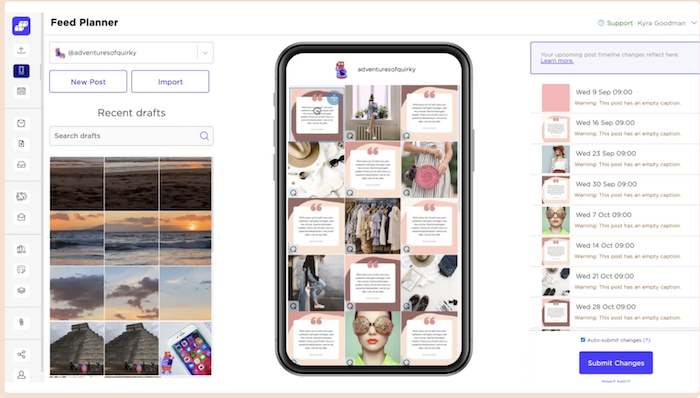
1. Preview

Instagram planning App: Preview app

Image Source

Preview allows users to design, edit, and analyze their Instagram business page. With Preview, you can create a calendar to schedule photos, videos, albums, and stories for your business’ Instagram page. Preview lets you plan reels and IGTVs and access a suite of editing and analytical tools, including hashtag testing, engagement rates, and interactive charts. Preview also allows your entire social media team to plan your Instagram page together without sharing your Instagram password.

Pricing: Free Plan, free for 1 user; Pro Plan, $6.67/month for 1 user; Premium Plan, $12.50/month for an unlimited number of users.

2. Later

Instagram planning App: Later Instagram scheduler.

Image Source

Later’s Instagram scheduler can be used on your desktop or mobile devices. The scheduling tool offers a calendar with drag-and-drop functionality, hashtag tools, personalized scheduling insights, analytics, a stock photo library, and many more features to help you make the most of your business’ Instagram presence.

Pricing: Starter Plan, $15/month for 1 user; Growth Plan, $40/month for 3 users with an additional $5/month for each additional user; Advanced Plan, $80/month for 6 users with an additional $5/month for each additional user. Later offers a 14-day free trial of all of its plans.

3. Sked Social

Instagram planning App: Sked Social

Image Source

Sked Social makes it easy to edit your photos, queue posts, create a linked landing page for your business’ bio, and quickly add hashtags and mentions to your posts using templates. Sked Social also features a robust content calendar pre-filled with holidays from around the world, so you can plan content that celebrates and commemorates the special days that matter to your audience.

With Sked Social’s Essentials and Professional plans, you can collaborate with your team to manage your business’ Instagram marketing, no matter how many team members you have.

Pricing: Fundamentals Plan, $25/month for 1 user; Essentials Plan, $75/month for an unlimited number of users; Advanced Plan, $135/month for an unlimited number of users. Sked Social offers a 7-day free trial of all of its plans.

4. Planoly

Instagram planning App: Planoly Instagram scheduler.

Image Source

Planoly’s Instagram post planner and Reels planner allow users to plan, design, and schedule their business’ Instagram posts and Reels.

Planoly lets users analyze post metrics and add to their content with stock photos and photos from Canva. Users can also create a linked landing page and respond to Instagram comments from within Planoly.

Planoly’s scheduling tools include a content calendar that sends users reminder emails and push notifications when it is time to post content.

Pricing: Starter Plan, $11.25/month for 1 user; Growth Plan, $19.50/month for 3 users; Professional Plan, $36.50/month for 6 users. Planoly offers a 7-day free trial of all of its plans.

The right kinds of content planners ensure that your business’ Instagram posts are well thought out and draw consumers to your product or services. The following tools provide visual support as well as ideas that can transform content from dull to engaging:

1. HopperHQ

Instagram Content Planner: HopperHQ

Image Source

HopperHQ claims to be the number one Instagram tool. It goes beyond crafting posts, giving users the ability to access analytics that help determine the best time to post.

HopperHQ’s Instagram planning tools include a drag-and-drop content calendar, automated posting features, an Instagram grid planner, and a team manager that allows you to collaborate with your business’ social media team and customize each member’s posting permissions.

Pricing: $19/month. HopperHQ offers a 14-day free trial.

2. Brandwatch

Instagram Content Planner: brandwatch

Image Source

Brandwatch is a platform devoted to creating strategies to help you plan your next Instagram campaign with progressive insights. Brandwatch helps you monitor your business’ brand and benchmark it against your competitors.

With Brandwatch, you can monitor social media trends, convert your Instagram posts to ads, and create workflows that repurpose assets to help your business save time and money.

Pricing: Brandwatch offers a $108/month plan for small businesses of 1 – 2 users. Larger teams can access Brandwatch’s full suite of products by booking a demo.

3. Content Scheduler in Adobe Express

Instagram Content Planner: Content Scheduler in Adobe Express

Adobe Express’ Content Scheduler, previously known as ContentCal, allows Instagram users to plan and schedule content. With features such as snippets, pinboards, and a web clipper, Adobe Express’ Content Scheduler makes planning for Instagram campaigns more organized.

Adobe Express’ Content Scheduler offers free downloadable tools and templates, including content calendars, an engagement rate calculator, and a marketing plan template that help you plan and execute your business’ Instagram strategy.

Pricing: Free plan with limited features; Premium Plan, $9.99/month with a 30-day free trial.

Tools for Making the Most of Your Instagram

To stay organized, we recommend using two types of tools — a post-scheduling tool and a tool that allows you to link to several different places from your Instagram bio.

By using a post-scheduling tool, you’ll be able to plan out as far in advance as you’d like, ensuring you have a steady stream of content ready to be posted even when other projects pop up in your day-to-day work. Posting consistently is important for follower retention and will give you more opportunities to experiment and figure out which posts get the most engagement.

Scheduling your posts allows you to visualize which types of posts you have coming out and swap posts if needed. You can see the weeks you’ve planned enough content and those during which there are still empty slots.

You can also use a spreadsheet like this one (download for free here):

Instagram post-scheduling calendar from Hubspot

Download the Calendar

Examples of post-scheduling tools include HubSpot Social Tools, Later, Buffer, and Hopper.

Expanding Bio

An Instagram bio can either entice a potential customer, make them laugh, or make them keep scrolling past a page. Unfortunately, writing an eye-catching bio with an enticing call-to-action that tells visitors everything they need to know about your business can be tough because of Instagram’s limiting structure for bios.

Since Instagram only allows you to place one hyperlink in your bio at the top of your profile, we recommend investing a few dollars per month in a tool that creates one landing page that links out to several other pages.

Then, in individual posts, you can reference clickable links available at the link in your bio, which provides a much more user-friendly experience than having your followers copy a URL manually into their browser, toggling between apps. MilkShake is a tool that allows you to create a mini-website with links and videos that users can access through a link in your business’ Instagram bio.

HubSpot Academy coursesImage Source

Examples of post-scheduling tools include Linktree, Lnk.Bio, and Link In Profile.

Enhance Your Instagram Experience

By taking a thoughtful approach to planning your Instagram content, you can ensure that your posts deliver value to your followers, convert those followers into leads or product users, and expand the reach of your brand’s messaging to new audiences.

Using tools such as schedulers and links to help carry out your Instagram journey can improve your business’ social media presence and extend its reach. It takes time to determine what resonates with your audience, so be patient as you experiment and evaluate your strategy.

Editor’s note: This post was originally published in October 2019 and has been updated for comprehensiveness.

New Call-to-action

Categories B2B

How to Write a SMART Goal [+ Free SMART Goal Template]

Work can feel like a never-ending grind when you’re not chasing a clear goal. A SMART goal template can help you clarify your motivations, set a clear direction for you and your team members, and ensure you’re able to celebrate the wins when they come along.

But what exactly is a SMART goal, and how does it differ from a regular goal?

To help you write SMART goals, we’ve created a free template with all the tools you need to get started.

Download your free marketing goal-setting template here. 

What is a SMART goal?

The letters of SMART stand for:

  • Specific
  • Measurable
  • Attainable
  • Relevant
  • Time-Bound

The SMART acronym is a framework that will enable you to write goals that drive greater impact. Write goals with each of these aspects in mind, and you’ll be able to quantify how far you’ve come and how far you have left to go against your goal.

When you reach the milestone you articulated in your SMART goal, you’ll be able to celebrate knowing that you achieved something tangible and impactful.

To make setting a SMART goal simple, we’ve created a free, downloadable SMART goal setting template.
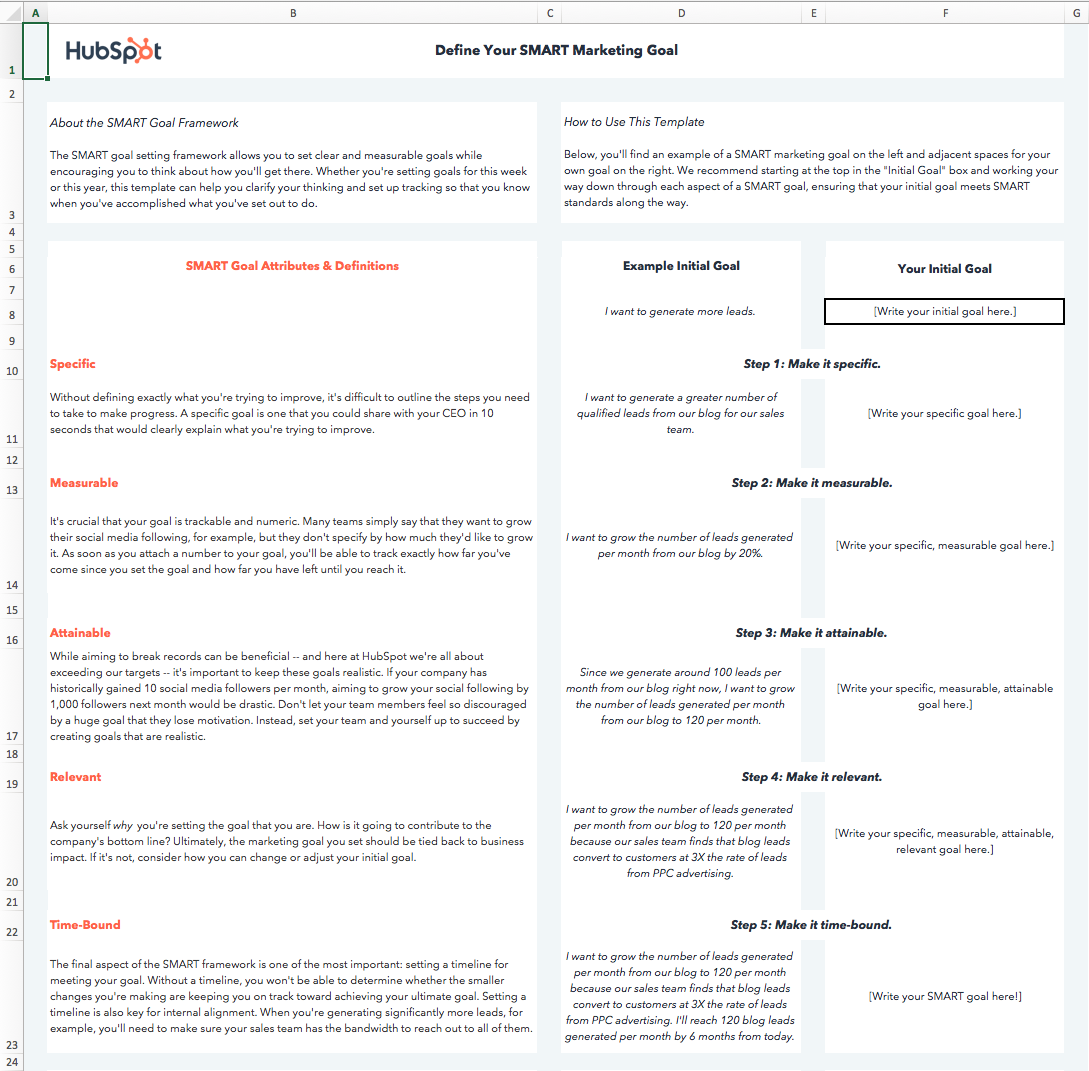
smart goal worksheet: filled out example

I’ll walk through the template below as we discuss each aspect of a SMART goal.

I’d suggest downloading the template yourself to follow along with this blog post. However, before anything else, let’s dive into the importance of each aspect of the SMART acronym.

What does each aspect of the SMART acronym mean?

While we run through the definition of each aspect of the SMART goal framework, we’ll apply the framework to a real-world example.

Let’s start with a basic, non-SMART goal as our example — “I want to get fitter.”

1. Specific

Goal setting is often associated with striving toward our highest aspirations, and reaching those aspirations can seem daunting. Specificity helps us determine the path between where we are and where we want to be.

  • Ambiguous goal: “I want to get fitter.”

There are innumerable ways to get fitter, and everyone has their own definition of fitness. For instance, do you want to lose weight? Do you want to perform more push-ups? Or do you want to cut a minute off your mile time?

When a goal isn’t specific, there is no way to tell whether your actions will help you achieve that goal or not. If your specific fitness goal is to increase the number of push-ups you can do, then following a running plan will not be very helpful in getting you to your true goal.

  • Specific goal: “I want to be able to do more push-ups.”

A specific goal makes your next steps clearer or, at the very least, narrows down the next steps you are going to take.

Make your goal more specific and type it into the cell under Step 1.
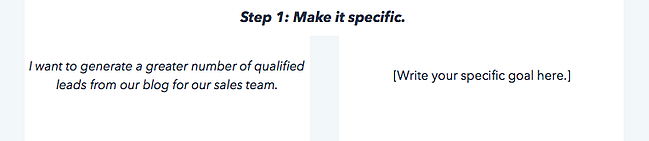
smart goal worksheet: example

2. Measurable

When a goal is measurable, you can easily track your progress. Typically, this means that a number will be attached to your goal.

  • Immeasurable goal: “I want to be able to do more push-ups.”
  • Measurable goal: “I want to be able to do 25 push-ups in a row.”

A numerical goal is valuable for many reasons. In addition to giving you something to strive toward, you’ll be able to celebrate a victory when you reach the final benchmark.

If you say that you just “want to do more push-ups,” does that mean that you want to complete just one more push-up per session, or that you want to double the number of push-ups you can do overall? One goal will take a lot more time and dedication than the other.

Let’s say I can do 10 push-ups in a row right now. To measure our progress against our final goal and to determine whether we’ve reached a milestone, we’ll edit our push-ups goal to read, “I want to be able to do 25 push-ups in a row.”

3. Attainable

Big aspirations are admirable, but it’s important to balance long-term goals with more achievable, short-term goals.

Setting attainable goals is all about looking at what you’ve done so far and adjusting your goals to be more realistic in relation to those benchmarks.

To consider the point in more concrete terms, think about business growth rates if your company has been selling 2% more product each month for the past 12 months:

  • Unattainable goal: Sell 15% more product next month.
  • Attainable goal: Sell 3% or 4% more product next month.
  • Unattainable goal: 25 push-ups.
  • Attainable goal: 20 push-ups.

Keep in mind that 2% growth is the status quo. Selling 4% more product would still be doubling your month-over-month growth.

Attainable goals are useful because they help you maintain momentum. It can be discouraging to miss huge targets, but consistently making small gains will encourage you to continue delivering wins.

Each month, you’ll be aiming for the familiar satisfaction of hitting your target rather than dreading another seemingly major miss.

Of course, there’s still a significant amount of work required to get to where I want to be, but I’ll be able to celebrate a huge achievement like doubling the number of push-ups I can do, and use that momentum to drive me in setting a goal of doing 25 push-ups soon after I achieve my goal of 20.

Consider what you’ve done in the past in relation to the goal you’re in the process of setting, and adjust it accordingly.

4. Relevant

Relevant goals will help you move in the direction you truly desire. You can allocate your time to an infinite amount of activities, but which activities will push you closest to your ultimate goals?

It’s a common trap to feel like we’re being productive when we’re busy, even if our action isn’t creating a meaningful impact.

In the beginning, our example goal was to “get fitter.” To ensure our goal is relevant, we need to ask ourselves if following through on this goal will help us get to where we want to be.

In the case of our push-up goal, the answer is yes.

  • Irrelevant goal: “I want to be able to do 20 push-ups in a row,”
  • Relevant goal: “I want to be able to do 20 push-ups in a row to improve my overall muscular fitness.”

Push-ups engage several muscle groups, including your back, arms, shoulders, and core, and consecutively doing a significant number can elevate your heart rate.

Executing this goal will improve my muscular strength and perhaps even my cardiovascular strength, which are key elements to overall fitness.

Ask yourself if the goal you’ve set will create a real impact on your overarching targets, then adapt it or identify a way to track its impact if the answer is currently no.

5. Time-bound

The final letter of the SMART acronym stands for time-bound. You should always aim to accomplish your goal within a specific time period. Adding a time frame will motivate you to take consistent steps every day toward your goal. In addition, setting a timeline or time boundaries allows you to track how much progress you’ve made toward your goal based on the amount of time that’s passed.

  • Goal that isn’t time-bound: “I want to be able to do 20 push-ups in a row to improve my overall muscular fitness.”
  • Time-bound goal: “I want to be able to do 20 consecutive push-ups two months from now to improve my overall muscular fitness.”

If I aim to increase the number of push-ups I can do from 10 to 20 in two months, I can set a midpoint milestone of adding five more push-ups in the first month. However, if a month passes and I’ve only increased the number by three, I’ll know I need to ramp up my efforts, re-evaluate my strategy, or perhaps adjust the time frame I initially chose.

A time frame can help you chart your progress. Now, I have a goal that clarifies the path to where I want to be.

In the final tab of the SMART goals template, you’ll be able to document the roadblocks to achieving your goal that you anticipate and make an action plan for overcoming those roadblocks to set yourself off on the right foot.
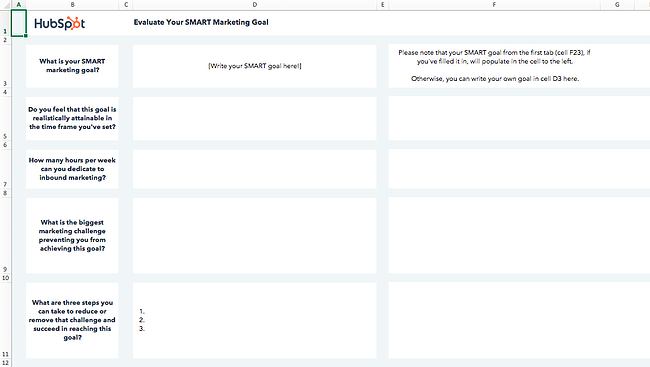
smart goal worksheet: blank example

Download the Template

Before I made my goal SMART, it would’ve been easy for me to make excuses. It wasn’t clear how I’d measure my progress or keep myself on track toward my goal.

Still need some help creating your SMART goals? You have a variety of worksheets at your disposal to help you establish SMART objectives. We’ve listed our favorite ones below.
1. Hubspot’s SMART Goal Template

smart goal worksheet template: hubspot

HubSpots’ SMART goal template will help you design effective marketing goals with measurable, time-bound results. It’s particularly useful if your key objectives are related to increasing traffic and conversions across your online properties.

We’ll teach you how to fill it out below, but remember: You can adjust it and customize it as you see fit. If you work for a customer service organization, for instance, you could change “Monthly visits” to “Incoming customer service calls,” then aim to increase first call resolution rate.

Because it lives on a Google Sheets file, HubSpot’s worksheet is ideal for collaborative SMART goal setting. Everyone in your team can access, comment, and edit the file with a Google Workspace account.

Step 1: Define your SMART goal.

Start by defining your SMART goal using the Define your SMART goal sheet.

  • Write your goal next to the example goal in Your Initial Goal section.
  • Make your goal specific by defining exactly what you want to accomplish. Write the specific goal next to the example goal in the Make it specific section.
  • After specifying your goal, make it measurable by including quantifiable KPIs that you would like to reach. Write your new specific, measurable goal next to the example in the Make it measurable section.
  • After making your goal measurable, make it attainable by setting realistic expectations. Write your new specific, measurable, attainable goal next to the example in the Make it attainable section.
  • After making your goal attainable, make it relevant by asking yourself why you are setting the goal. Determine the impact that achieving the goal will have on your business. Write your specific, measurable, attainable, relevant goal next to the example in the Make it relevant section.
  • Lastly, make your goal SMART by making it time-bound. Set a timeline that will keep you on track to achieve the goal.

Step 2: Calculate your SMART goal.

After defining your SMART goal, you can calculate recommended target metrics for site visits, leads, and customers using the Calculate your SMART goal sheet.

Visits

  • Enter your current number of monthly site visits in the cell to the right of Current.
  • Enter your month-over-month % increase goal in the cell to the right of Month-over-month % increase goal.
  • Enter the number of months you have to achieve your goal in the cell to the right of How many months out is your goal?
  • The template will calculate a recommended monthly traffic goal.

Leads

  • In the cell to the right of Current in the Average number of monthly website visits column, enter your current number of monthly site visits.
  • In the cell to the right of By what % would you like to increase your visitor-to-lead conversion rate each month?, enter your desired % increase of your monthly visitor-to-lead conversion rate.
  • Enter the number of months you have to achieve your goal in the cell to the right of How many months out is your goal?
  • In the cell in the Visitor-to-lead conversion rate column and Current row, enter your current visitor-to-lead CVR.
  • The template will estimate the number of leads your website generates a month. The template will also calculate a recommended visitor-to-lead CVR goal and monthly lead goal.

Customers

  • In the cell to the right of Current in the Average number of monthly website visits column, enter your current number of monthly leads.
  • In the cell to the right of By what % would you like to increase your lead-to-customer conversion rate each month?, enter your desired % increase of your monthly lead-to-customer conversion rate.
  • Enter the number of months you have to achieve your goal in the cell to the right of How many months out is your goal?
  • In the cell in the Lead-to-customer conversion rate column and Current row, enter your current lead-to-customer CVR.
  • The template will estimate the number of customers your website generates a month. The template will also calculate a recommended lead-to-customer CVR goal and monthly new customer goal.

Step 3: Evaluate your SMART goal.

After calculating the recommended target metrics for your SMART goal, you can evaluate your goal using the questions on the Evaluate your SMART goal sheet. This sheet will prompt you to think critically about your goal, identify challenges that may make it difficult to achieve the goal, and brainstorm steps that you can take to remove the challenges and achieve your goal.

  • Write your SMART goal in the cell next to What is your SMART marketing goal? If you have defined a SMART goal using the first sheet, the goal will populate this cell.
  • In the cell below your SMART goal, answer the question, “Do you feel that this goal is realistically attainable in the time frame you’ve set?”
  • In the next cell, enter the number of hours you can dedicate to inbound marketing.
  • In the next cell, enter the biggest marketing challenge preventing you from achieving the goal.
  • In the last cell, enter 3 steps you can take to reduce or remove the challenge and succeed in reaching your goal.
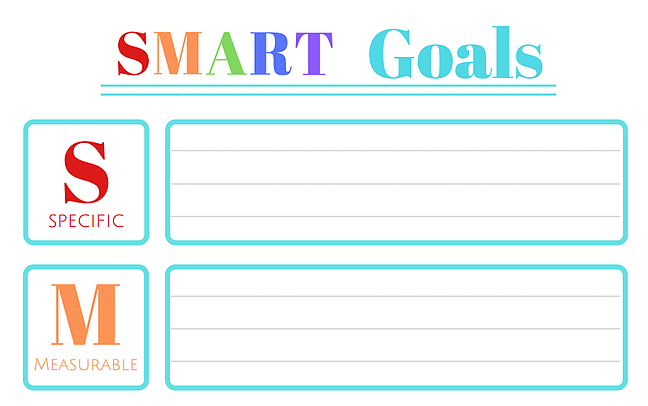
2. Organized 31’s SMART Goals Template

smart goal worksheet template: organized 31

This simple SMART goal worksheet by Organized 31 is a great fit for you if you’d like to create your SMART goals as quickly as possible. It provides five boxes to fill out, each one dedicated to a letter of the SMART acronym. A big plus? It can be used both at work and at home.

Here’s how to fill it out:

Specific

In this section, clearly define your goal. Determine what you will accomplish, the resources you have available, why the goal is important, who will do the work to accomplish the goal, and where the goal will be accomplished.

Sample scenario: Instead of setting a goal to get rich, set a specific goal of having enough money to buy a house.

Measurable

In this section, determine how you will measure your progress toward the goal. Use questions such as “How much?” and “How long?” to make your goal measurable.

Sample scenario: Instead of setting a goal to gain more social media followers, set a measurable goal of gaining 1,000 new followers.

Achievable

In this section, determine how you will achieve the goal. Determine the resources you will need and the amount of time you can allot to achieve the goal. Also, consider whether you have the necessary skills to achieve the goal.

Sample scenario: Instead of setting a goal of gaining 10,000 followers in the first six months, a social media team may set a more achievable goal of gaining 500 followers by the end of the year.

Relevant

In this section, determine if your goal is meaningful and relevant to your other goals. Determine if the goal supports your mission and if it’s the right time to pursue the goal.

Sample scenario: Instead of an online retailer setting a goal of increasing foot traffic, they may set a more relevant goal of increasing their leads by 15% in the first quarter.

Time-Bound

In this section, determine the deadline for your goal. In addition, consider what you can do in the coming days, weeks, or months to progress toward your goal.

For instance, rather than simply writing a novel, set a more time-bound goal of writing a 100,000-word novel in a year by writing 300 words a day.
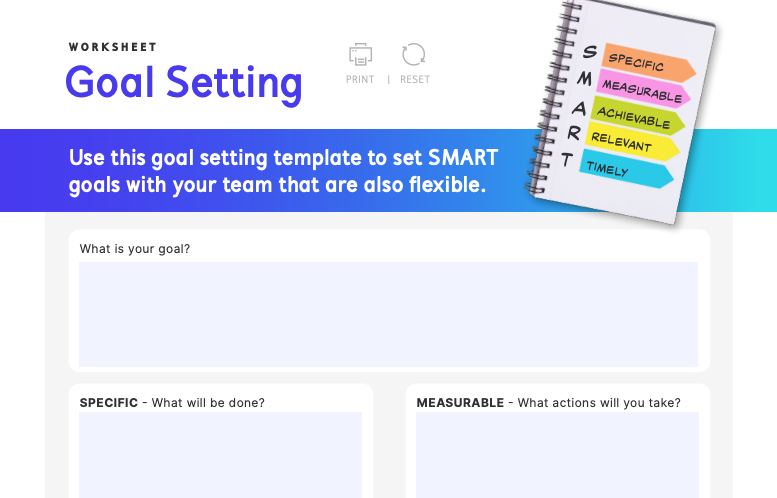
3. IntelliHR’s Goal-Setting Template

smart goal worksheet template: intellihr

IntelliHR’s goal setting worksheet is ideal for managers who want to establish SMART goals with or for their teams. It’s an online fillable PDF file, making it easy to distribute among your team members.

Here’s how to fill out each section:

What is your goal?

The first step to completing IntelliHR’s goal-setting template is to define your team’s goal. For instance, your team’s goal may be to bring more traffic to your website. At this stage, your goal doesn’t have to be too focused. Write your goal in the What is your goal? box.

Specific

After determining your goal, make it specific — detail exactly what your team has to do for the goal to be met. For instance, your team’s specific goal may be to increase website traffic by 10% in the next year.

Measurable

After making your goal specific, make it measurable. List the actions you will take to meet your goal. For instance, your team’s measurable goal may be to increase website traffic by 10% by posting ads and sponsored content on social media that will lead more of your target audience to visit your site and improve your CTR.

Achievable

After making your goal measurable, make it achievable. List the resources you will need to meet your goal. For example, to increase website traffic by 10% by posting ads and sponsored content on social media, your team will need to launch advertising campaigns and reach out to celebrities who may be interested in endorsing your brand and participating in sponsored content.

Relevant

After making your goal achievable, make it relevant. Consider how your goal contributes to your business’ overall goals. For instance, increasing website traffic by 10% by posting ads and sponsored content may be beneficial for businesses with a strong social media presence, but for businesses with little or no social media presence, the goal of increasing website traffic may not align with their other goals.

Timely

After making your goal relevant, the last step is to make it timely. Consider the amount of time you can allot to this goal every week. This template also factors in your workload, as a busy schedule may limit the amount of time you have to complete your goal.
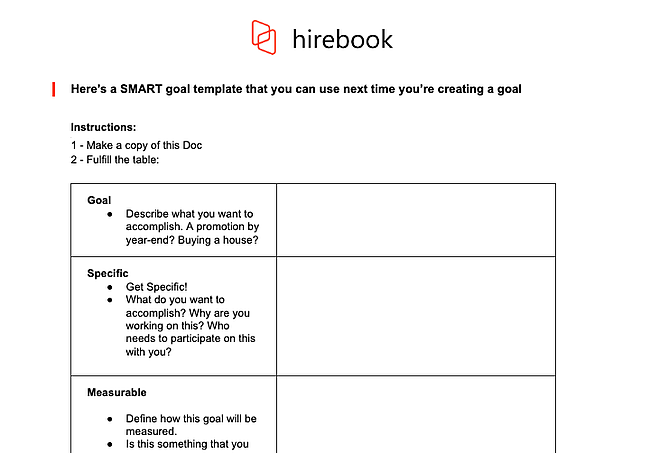
4. Hirebook’s SMART Goals Template

smart goal worksheet template: hirebook's smart goals template

This SMART goal worksheet from Hirebook lives on a Google Docs file, making it an excellent choice if you want your team to collaborate on one documents. It also offers the simplicity of Organized 31’s template with a more workplace-friendly color palette.

Here’s how to fill it out:

Goal

The first step to completing Hirebook’s SMART Goals Template is identifying your goal. The template gives you a few examples, such as “Buying a house,” to help you brainstorm ideas for goals. Write your goal here.

Specific

The next step is to make your goal specific. The template includes a few questions, such as, “What do you want to accomplish?” and “Who needs to participate in this with you?” to help you narrow the focus of your goal as much as possible. Write a more specific version of your goal here.

Measurable

After making your goal specific, make it measurable. Determine how you will quantify the goal. How much do you need to increase or decrease a metric to reach your goal? How will you know that the goal has been met? Write the answers to these questions here.

Achievable

After making your goal measurable, make it achievable. How do you know that you can fulfill the goal? What past experiences have you had that make you capable of achieving the goal? Do you have access to the resources you need to accomplish the goal? Is this goal realistic when you consider time and financial limitations? Write the answers to these questions here.

Relevant

After making your goal achievable, make it relevant. Define how the goal is relevant to you, your business, and your long-term needs. Is this the right time to focus on this goal? Write about the relevance of the goal here.

Time-Bound

After making your goal relevant, the last step is making it time-bound. To keep yourself and your team accountable, you need to set a deadline for accomplishing this goal. When should this goal be completed? What can you do today to work towards completing your goal? What can you do in the next 6 weeks? The next 6 months? Establish a timeline and write it here.
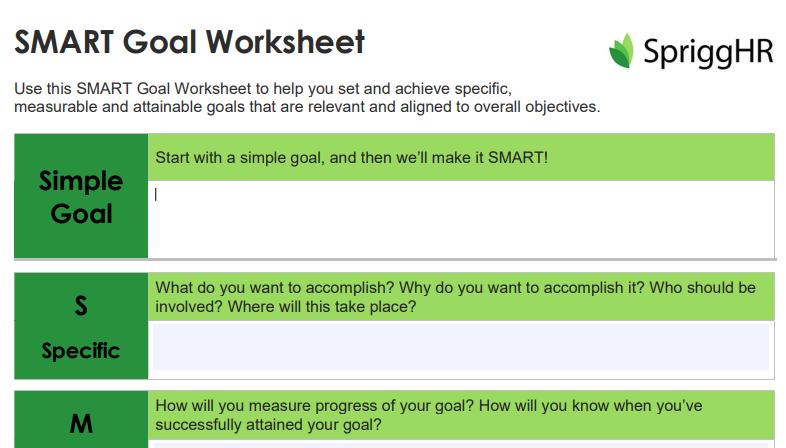
5. SpriggHR’s SMART Goals Worksheet

smart goal worksheet template: sprigghr

SpriggHR’s goal setting worksheet is available in three file types: A fillable online PDF file, an Excel spreadsheet, and a Word document. Because it offers three flexible options, it’s a great choice if you don’t want to use a Google Doc document or force your team to use a certain file type. You and your team members can choose what works best on an individual basis.

Here’s how to fill it out:

Simple Goal

The first step to completing SpriggHR’s SMART Goals Worksheet is coming up with a simple goal. This goal will be the basis of your SMART goal.

Specific

After creating a simple goal, the next step is making it specific. What exactly do you want to accomplish, and why? Who should be involved in this process? Where will the process take place? Write the answers to these questions here.

Measurable

After making your goal specific, the next step is making it measurable. How will you measure your goal’s progress? How will you know when you’ve successfully attained your goal? Write the answers to these questions here.

Attainable

After making your goal measurable, the next step is making it attainable. Is the goal attainable with your current skills and resources? If not, can you obtain new skills and resources to help you attain the goal? Write the answers to these questions here.

Relevant

After making your goal attainable, the next step is making it relevant. Is this goal a priority? How does it align with your team’s overall objectives? Write the answers to these questions here.

Timely

After making your goal relevant, the next step is making it timely. What is the deadline to achieve this goal?

SMART GOAL

The last step of this worksheet is taking your answers from the previous sections and rewriting them in a sentence or two to turn your simple goal into a SMART goal.

Start practicing smarter goal setting. Download a SMART goal template today.

Whether your goals are personal or professional, working toward them will never feel like a grind when you set SMART goals. Make sure every goal you set is specific, measurable, attainable, relevant, and time-bound by downloading one of these SMART goal templates today.

Editor’s note: This post was originally published in September 2019 and has been updated for comprehension.
New Call to action

Categories B2B

SEO Step-by-Step Tutorial: 8 Easy Basics for Beginners to Master

If you’re just getting started with search engine optimization (SEO), then a step-by-step SEO tutorial is in order. By this point, you’ve likely heard of a few basic terms, such as keyword research and on-page optimization. But how do you apply all the knowledge you’ve gathered thus far?

We’ll walk you through it step-by-step. No matter how new you are to SEO, anyone can get started with the below SEO tips and get their website to rank in no time. Well — some time. Maybe a year or more. SEO, you should know, is a long game.

By the end of this tutorial, you’ll be able to walk away with a list of actionable steps to get your SEO strategy off the ground.

→ Download Now: SEO Starter Pack [Free Kit]

1. Find keywords.

Keyword research is as simple as picking a list of words and phrases relevant to your business. Think about which words are most likely to get people to do what you want them to do (visit your website and submit a form) and focus on those words.
You can use a dedicated keyword research tool, but as a beginner, it’s wise to choose your keywords intuitively at first. For instance, if you sell roasted coffee, you might opt for “roasted coffee,” “Colombian coffee,” and “local coffee roaster.”

List these keywords out in a spreadsheet or document for you to keep track of. Then, pick one word or phrase to use on one page of your site. In other words, you don’t want to target different keywords on one page. You want to target one keyword, as well as any keywords it’s semantically related to.

For instance, you might write a page for “local coffee roaster.” In this page, you can target semantically related terms such as “local coffee,” “coffee roaster near me,” “coffee roaster [city name],” and “locally roasted coffee.”

Here’s an example of what that looks like:seo step-by-step tutorial: keyword variants

Image Source

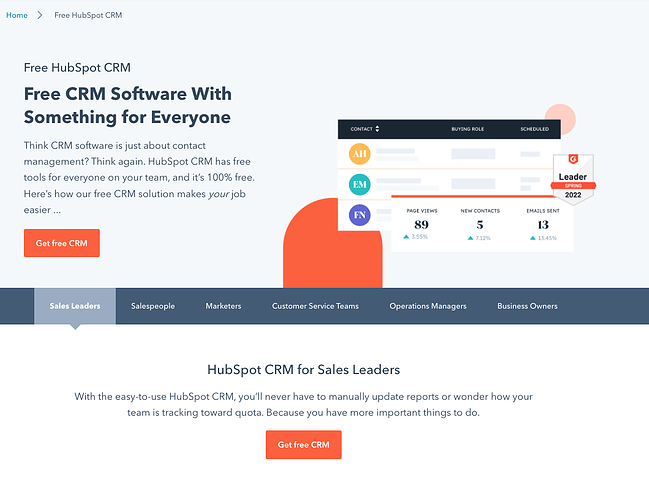
You can see a few keyword variants: “CRM software,” ”CRM solution,” and “free CRM.”

2. Put keywords in the page title.

Once you’ve chosen a keyword, it’s time to put it into action. First up, you want to put in your web page’s title.

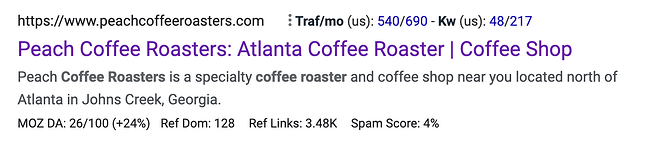
The page title is one of the most important things that Google and other search engines evaluate to determine what is on a web page. It’s what appears on top of your web page’s result in the search engine results pages (SERPs). Notice how the following brand put its keyword, “Atlanta Coffee Roaster,” on its page title:

seo step-by-step tutorial: keyword in page title

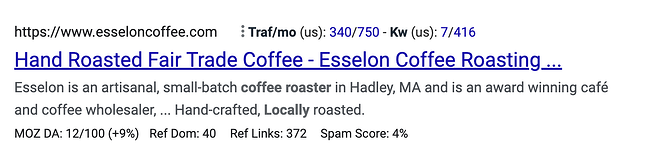
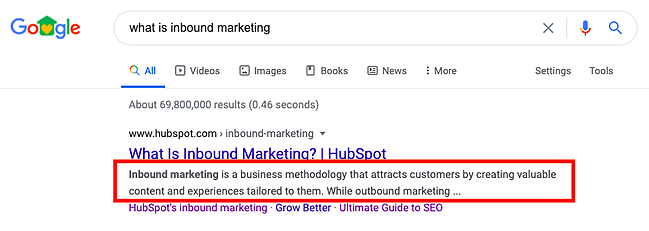
Don’t forget to keep it short. We recommend 65 characters or fewer to ensure that search engines don’t trim your title, like in this search result:

seo step-by-step tutorial: truncated page title

Keep in mind that your brand name is part of the character count of your website’s title.

3. Put keywords in the page URL.

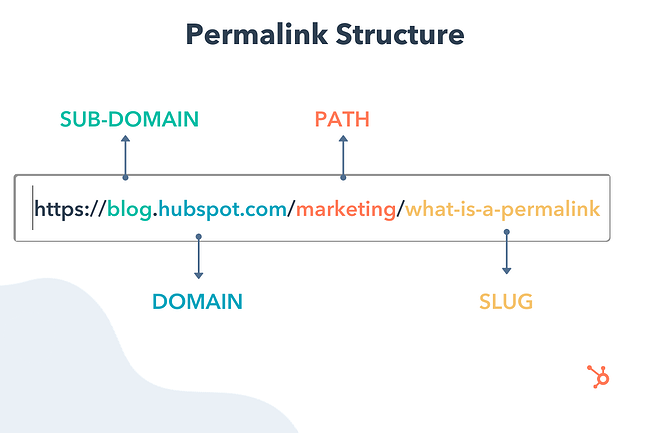
Google and other search engines also use the text of the URL of the page to determine the content of the web page. You should use your keyword or phrase specifically in the slug.

seo step-by-step tutorial: url slug

Image Source

Don’t overdo it, though. If you sell coffee, for instance, don’t create a slug as follows:

mycoffeecompany.com/coffee-atlanta-near-me-fulton-county-greater-atlanta-area-coffee

Keep it short, descriptive, and simple. One effective example would be:

mycoffeecompany.com/atlanta-coffee-roaster

If you’re using WordPress, here’s how to change your web pages’ slugs in the backend.

4. Put keywords in your meta description.

Your page’s meta description can further tell search engines and users what your page is about.

seo step-by-step tutorial: meta description

While metadata is not nearly as important as it used to be, it still counts. Take advantage by putting your keyword or phrase there. The description should be readable by a person and make sense, and the keyword metadata should focus on your keyword or phrase. Don’t make it long — less is often more.

5. Put keywords in your H1 text.

The H1 text is usually the title of an article or some larger bold text at the top of your page. Google and other search engines can see this, and they put extra importance on the words in the H1 text. Make sure your keyword or phrase is there.

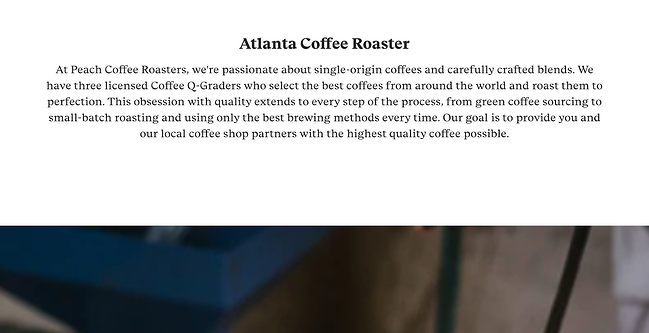
Here’s an example from a local coffee roaster company:

seo step-by-step tutorial: h1 heading example

Image Source

6. Use keywords in the page’s content.

Using your target keywords in your content is an essential part of your on-page SEO strategy.

Why? Because doing that signals to search engines that the page is actually about the keyword and should show up in search results. I have heard from “experts” that you should use your keyword anywhere from 4-6 times to 10-12 times. My advice is to just write naturally, but to carefully avoid black-hat practices such as keyword stuffing.

In other words, don’t write something like this:

“We are Atlanta Coffee Roasters, the best coffee roasting company in Atlanta, GA, where you can find Atlanta locally roasted coffee roasted by hand in our coffee shop serving the greater Atlanta area.”

That’s simply unreadable. Compare that with the content from the local coffee roaster company:

“At Peach Coffee Roasters, we’re passionate about single-origin coffees and carefully crafted blends. We have three licensed Coffee Q-Graders who select the best coffees from around the world and roast them to perfection. This obsession with quality extends to every step of the process, from green coffee sourcing to small-batch roasting and using only the best brewing methods every time. “

7. Build links to your website.

Once you signal relevancy to search engines via your keywords, it’s time for the hard work to start: building inbound links to your website from authoritative sites in your industry or niche.

This is arguably one of the most important SEO steps you have to take. The number and quality of links pointing to your website are quite important to Google and other search engines to evaluate your rank on different terms. If people are linking to you, then that means that your site offers authoritative, trustworthy information on a certain topic.

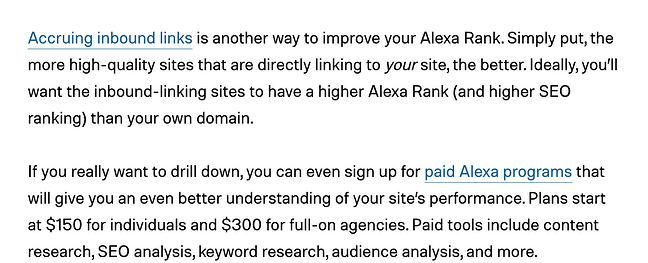
For instance, check out the backlink HubSpot received in this Digital Trends article (anchor text: “Accruing inbound links”):

seo step-by-step tutorial: backlink example

You should also externally link to websites related to your industry, which further demonstrates your relevance for that keyword.

8. Monitor your rank.

Last but not least, it’s time to check on the results from your efforts. Give the search engines some time to do their thing (from a couple of weeks to a few months), and then keep checking your rank to see what happened and track your progress.

If you’re just getting started with SEO, you can check this rank manually by searching for your target keyword in Google. We also recommend using Google Search Console to see your rankings for free. Since GSC can be limited in some respects, you can upgrade to an official SEO monitoring tool to track the most relevant keywords and consistently come up with strategies to improve your performance.

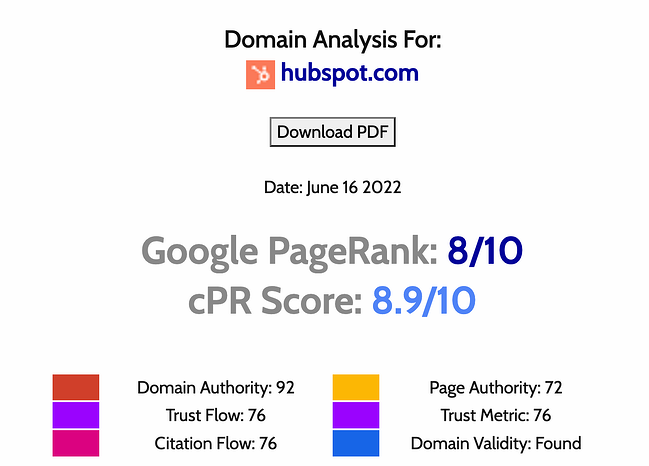
On that same vein, you should monitor your Google PageRank. Google uses your Page Rank as a measure of how “important” your website is on the web. Having a higher Page Rank means you have a better shot at being one of the top results for search terms.

Use a free tool such as Check Page Rank to get an estimate.

seo step-by-step tutorial: page rank analysis

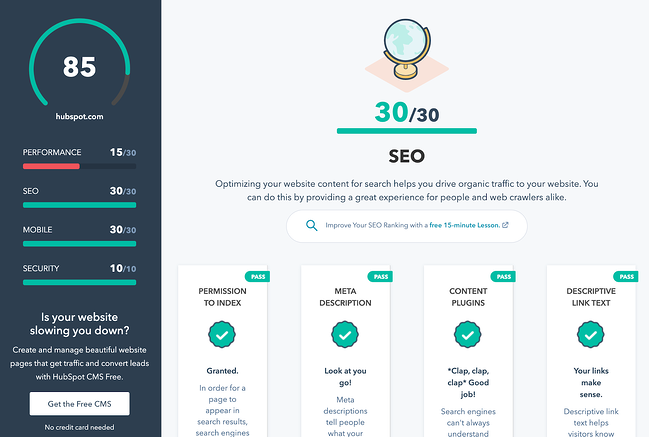
During the monitoring process, you should also grade your website. Use a free tool such as Website Grader to evaluate the SEO effectiveness of your site.

seo step-by-step tutorial: website grader

This SEO Step-by-Step Tutorial is Just the Beginning

Don’t let your learning to stop here. With the above steps, you can get started creating an effective search engine optimization strategy, but keep in mind that SEO has countless moving parts that warrant care, attention, and tenacity. That’s why some companies have entire teams dedicated to their SEO efforts.

The good news is that you don’t have to guess about your next steps. Use our starter pack to ramp up your SEO plans and boost the likelihood of your website ranking on the first page of the SERPs.

Editor’s note: This post was originally published in May 2007 and has been updated for comprehensiveness.

marketing

Categories B2B

MBO (Management by Objectives): Everything You Need to Know

As a leader, you have expectations for your team. You want to see a specific level of performance and efficiency, and using a management by objectives (MBO) approach can help you manage your team effectively.

When organizational goals are not communicated to employees, they can’t meet expectations. This leads to micromanaging and instills the belief in your employees that you don’t trust them or their ability to achieve results. Over time, this breeds resentment, erodes job satisfaction, and increases the rate of turnover as employees go off in search of greener pastures.

If you’ve seen this situation occur multiple times throughout your organization, it’s time to look at your leadership style. Do you provide your employees with the knowledge they need, and clearly communicate what you want to see? Are you providing opportunities to help them strengthen their skills? If not, shift your mindset and company culture to management by objectives and watch your employees step up to the challenge.

To help you better navigate to the information you need, we’ve links to different parts of this story:

What is MBO?

What is the purpose of MBO?

MBO Examples

MBO Advantages and Disadvantages

How to Incorporate MBO Into Your Organization

Download Now: 5 Free Skill Development Templates

What is MBO?

The term “management by objectives” refers to creating tangible goals for an employee to accomplish for the betterment of the organization.

example of management by objectives

Image Source

What is the purpose of MBO?

MBO ensures that employees receive clear communication regarding their roles and responsibilities, and they understand the role they play in the overall health of the organization. It not only helps them get clear on what’s expected of them, but also gives them a sense of purpose as they take ownership of how they impact the rest of the organization and help meet its mission.

In businesses that operate in silos where from one department to another, people don’t know what anyone else is working on, have a lower chance of succeeding. Employees can easily become disheartened when they can’t see the larger picture. Management by objectives aims to break down these walls for great transparency across organizations.


MBO Examples

If this sounds like something you’d like to try, you may be wondering what are some examples of objectives that you could set.

While specific objectives may differ depending on your industry, product, and specific company, there are some blanket objectives that you can begin with. While any department can use MBO, we’ll take a look at three specific instances.

Sales MBO Examples

  • Decrease the sales cycle from four to two months
  • Increase the average sales to $10,000
  • Bring in 15 new customers during a specific time period

Marketing MBO Examples

  • Increase social media likes by 40%
  • Increase time spent on the website by five minutes
  • Generate 500 new leads per month
  • Get five media placements

Customer Service BMO Examples

  • Decrease call time to under five minutes
  • Increase customer satisfaction by 30%
  • Reduce manager call intervention by 10%

Human Resources MBO Examples

  • Improve retention rate by 15%
  • Implement a leadership training program for remarkable employees
  • Increase employee satisfaction by 30%


MBO Advantages and Disadvantages

Just like any management style, there are pros and cons to management by objectives. Let’s take a closer look:

Advantages

  • Employees can understand and appreciate their individual impact on the company as a whole.
  • Expectations are clearly communicated and based on Key Result Areas (KRAs) tailored to each employee.
  • Employees understand what success looks like and what they have to accomplish to reach it.
  • Teamwork improves and finger-pointing decreases.
  • Employees know their responsibilities and tasks are less likely to fall through the cracks.

Disadvantages

  • It’s possible for managers to rely too much on MBO and a management style. While it can revolutionize your organization, it has its limitations and is not always appropriate.
  • With goals and objectives overemphasized, non-measurable aspects of the work environment (like teamwork, positive customer interactions, etc.) may become less practiced and valued.
  • With a constant focus on numbers and metrics, employees may feel anxious about their performance which could make things worse.

As you can see, management by objectives can help your organization move in the right direction. However, it is not a cure-all for every challenge your organization may face. Let’s take a closer look at how to utilize this leadership style for optimum effectiveness.

How To Incorporate MBO Into Your Organization

It helps to strategize MBO before diving in, so let’s review how to implement MBO in your own company.

MBO Steps

Define Your Goals

What do you want the company to achieve and during what time period? These goals should be shared with everyone in your organization.

Create and Communicate Employee Goals

How do your employee’s responsibilities play into the goals of the organization? This will allow you to create specific goals and objectives for them to meet.

Monitor Their Performance and Progress

Review your employees’ performance regularly. Are they hitting whatever numbers you’ve assigned them? Are they steadily working towards a larger goal?

Assess Their Performance

Without regular performance reviews, your employees can’t gauge how they are performing and if changes need to be made.

Provide Feedback

If employees are doing well, let them know. You can do this privately or publicly to inspire others. If they are not meeting your expectations, provide this feedback privately so as not to demean them in front of their colleagues. You will also need to give them steps to take to improve their performance.

If they’re not reaching their goals, this may be because those goals have not been properly communicated, or because they don’t have the right tools to do what’s expected. Have a conversation to assess if either of these factors is at play, and then do whatever is necessary to remedy the situation.

When you follow these steps, you can implement a successful culture of management by objectives and see an improvement in your team’s performance. This works for a sales environment, as well as customer service, or any other department in an organization.

When it’s time to inspire your team and breathe new life into your organization, consider incorporating management by objectives into your company culture. You may be surprised how well your employees take to this new system. Once they understand your expectations, they’re in a better position to meet or exceed them.

New Call-to-action

Categories B2B

The 15 Best Autoresponder Software in 2022 (Plus Free Autoresponders)

Nowadays, email marketing is an integral component of any marketing strategy. In fact, 59% of marketers say email is their biggest source of ROI.

When it comes to email marketing, the autoresponder sequence is a commonly used but often under-appreciated part of the process.

Autoresponders are a way to dip your toes into email automation. They’re typically the simplest form of marketing automation to execute when setting up your campaigns — but, when done well, they can be incredibly powerful for bringing in additional customers and revenue.

Here, we’ll cover what autoresponders are, and which autoresponder software solutions you might consider implementing for your own business.

Download Now: Email Marketing Planning Template 

You can choose the number of messages that appear in an autoresponder sequence, and you can choose when they’re delivered. For instance, some autoresponder sequences only have one follow-up message, which is sometimes just a “Thank you” message for subscribing to the email list:

Image Source

In other cases, the autoresponder can be quite robust, and deliver a series of on-boarding emails that escalate in persuasion, sometimes culminating in a sales pitch. This is typical in digital industries, where your email list is the primary sales channel to launch your products.

For example, Ramit Sethi starts his autoresponder sequence with a friendly and informational email message:

Over the course of several emails, the reader will eventually receive a sales pitch (or a few email sales pitches). This allows the reader to warm up to your brand, and your content. By the time you’re offering your product or service, you should’ve already provided a ton of informational value, like this:

Sometimes, an autoresponder can act as the actual lead magnet used to get someone to sign up for your list. A good example of this is gated email courses.

CXL, for instance, uses a gated “enterprise conversion optimization” email course to get people to sign up for their list. The deliverable is just a time-based sequence of email lessons — in other words, an autoresponder.

While the execution can be quite different depending on your business, your industry, and your goals, all autoresponders allow you to automate email sequences based on timing and email sign-up form.

Next, let’s dive into some of the best solutions on the market.

1. HubSpot

HubSpot offers one of the most powerful autoresponder capabilities on the market. Particularly if you’re using other tools in HubSpot’s Marketing Hub, such as our form builder and popup forms, you can easily set up auto-response emails upon form submission.

At a high level, there are two ways to send an email response to contacts who submit a form on your page:

  • Set up a follow-up email in the form options on your HubSpot page
  • Send an automated email through a workflow (Marketing Hub Professional and Enterprise only)

For the former option, it’s quite a simple setup. You simply set up a follow-up email to be delivered upon form submission (full instructions here).

However, through HubSpot’s workflows you can get quite robust with your targeting and follow-up email assignment. For instance, you can break things down by contact property data you’ve collected, like company size or which service the subscriber is interested in. This allows you to tailor your follow-up emails to ensure they’re more helpful and personalized for the user.

In addition, you can set a sequence of several autoresponder emails, and can also include behaviorally triggered messages — the options are pretty much endless.

If you’re just using HubSpot’s form builder, you can still easily integrate with another autoresponder solution in this list to get a simple setup working.

2. GetResponse

GetResponse is a full-suite marketing platform that offers tools including landing pages, webinars, and forms, but their most powerful tool is likely their email automation functionality.

Like others in this list, GetResponse can trigger emails based on multiple criteria, such as behavioral triggers, contact property triggers, and time-based triggers (i.e. autoresponders).

Their autoresponder feature is actually quite flexible. You can build email follow-up sequences with the following features:

  • Unlimited messages per day
  • Advanced timing control
  • Simple cycle management
  • Day-of-the-week selection
  • Drag-and-drop message management
  • Quick message edits

Sometimes I’ve found the usability of GetResponse to feel complicated when trying to do advanced automation, but building time-based autoresponders is incredibly simple to accomplish.

It depends on your list size and requisite features, but GetResponse pricing starts around $10 per month (which includes basic autoresponders, and a list size of 1,000).

3. Moosend

Moosend is an email marketing and marketing automation platform, ideal for eCommerce businesses, agencies, publishers, and more. The software offers a variety of lead generation tools like subscription forms and landing pages to expand your mailing lists. 

Through Moosend’s autoresponder feature, you can create and run a welcome series to greet new subscribers and offer exclusive deals. You can also target cart abandoners with abandoned cart sequences to restore your lost revenue.

Moosend’s advanced features include:

  • Powerful segmentation and personalization
  • Scalable automation workflows
  • Easy-to-use campaign editor
  • Weather-based condition filters
  • Action triggered messages

This email platform also has powerful reporting and analytics tools, advanced marketing automation tools, and a variety of automation recipes to help you scale your business.

Moosend offers a free plan that includes autoresponder and automation features. Paid plans start at $9 per month for 500 subscribers and gives you access to the landing page builder and more.

moosend-automation

4. Aweber

Aweber built one of the first well-known autoresponder softwares, and it’s still widely used and loved.

Aweber is a bit more expensive to start out ($19 per month for up to 500 subscribers), but the tool gives you all the critical features you need to implement an impressive autoresponder email system. This includes segmenting, analytics, sign-up forms, templates, and even stock photos.

If you want a straightforward solution for a relatively small email list (anything over 25,000 emails gets quite a bit pricier), Aweber is a good solution.

5. Klaviyo

Klaviyo is well-known and loved in the e-commerce world, and they have some of the coolest email automation features, particularly for behaviorally triggered emails.

With Klaviyo, you can trigger an autoresponder email sequence for basically any event you can measure (as long as you have the contact’s email address). This opens up all kinds of possibilities, such as abandoned cart emails, thank you emails after a purchase, customer satisfaction surveys after a time window after a purchase, and cross-sell emails given a certain item purchased.

It’s important to note, Klaviyo is built for e-commerce, so it’s relatively stock built for things such as abandoned cart emails. If you’re in e-commerce this is a plus, but in other industries, the feature set can be a bit complicated for what you want to accomplish.

Of course, if you just want to build a simple four-email sequence after an email list sign up, it’s easy enough to do.

Klaviyo offers a free tier (up to 250 email addresses). Once you hit that threshold, it starts at $25 per month and goes up quickly from there (for instance, it’s around $1000/month for 78,000 contacts).

Image Source

6. Mailchimp

Mailchimp is one of the world’s most popular email marketing tools, and they have a great (albeit simple) autoresponder functionality.

I like two things about Mailchimp:

  1. It’s simple to use.
  2. It’s free to start.

For those two reasons, the barrier to entry is incredibly low. So, for businesses with fewer than one thousand email addresses, it’s a good solution.

However, I’ve found that, as you scale and your automation becomes more complicated, Mailchimp becomes a bit too difficult to manage. It’s hard to know which email is going to whom, and when.

Again, you can begin for free, but after that the cost starts at $20 per month.

Image Source

7. ConvertKit

ConvertKit is an email marketing platform built for creators (i.e. bloggers, podcasters, designers, etc.). It’s incredibly useful for marketers who focus on inbound marketing.

ConvertKit platform’s is simple and easy to use, although it does include other features to help build your inbound marketing program — including forms, analytics, and their newer automation feature set.

Image Source

Pricing starts at $29 per month and that tier goes up to 1,000 email subscribers.

8. Autopilot

Autopilot is an email marketing, messaging, and automation platform that has billed itself as the easiest marketing automation platform to use. They have a visual editor that is quite clear and easy to understand (even without being a master automation nerd).

Of course, their platform allows for quite sophisticated messaging and targeting, although you can surely create a simple autoresponder based on a time-sequence as well.

Pricing starts at one dollar per month for up to 500 contacts, and then begins at $25 per month for more than 500 contacts. They include a 30-day free trial, as well.

9. Constant Contact

Constant Contact is a simple, easy to use, and popular email marketing tool. It includes basic features, such as templates, list building tools, a drag-and-drop editor, and autoresponder sequences.

It’s been a few years since I’ve used Constant Contact, but it’s the platform on which I initially learned email marketing. I enjoyed it somewhat, but found it to be frustrating when trying to edit templates, and also for any advanced email targeting. Although it may have changed, I think Constant Contact is best for relatively simple cases.

Their most basic package starts at $20 per month, which goes up to 500 contacts.

10. Omnisend

Omnisend is a popular tool in the e-commerce industry, with thousands of 5-star reviews across the Shopify App store, G2Crowd, and Capterra. They have advanced autoresponder features, allowing you to create interesting marketing automation workflows that include several channels: email, SMS, web push notifications, Facebook Messenger, WhatsApp, Viber, and more.

This allows you not only to set up an autoresponders via email, but via any channel your customer has consented to using with your brand.

Omnisend, like Klaviyo, is geared towards e-commerce. However, if you’re not in the e-commerce industry, many of their e-commerce-friendly features might be lost on you. Regardless, Omnisend is a powerful autoresponder platform that’s definitely worth checking out.

They offer a free plan that has basic email functions and is limited to 15,000 emails per month. Their Standard plan starts at $16 per month and includes automation features.

omnisend-workflowImage Source

The 8 Best Free Autoresponder Software Tools

Some of the tools listed above have free or incredibly cheap plans, such as Klaviyo and Autopilot ($1 per month). However, if you’re looking for a full list of the best free autoresponders that offer incredible value, we’d recommend the following six.

Ultimately, choosing the best autoresponder is difficult. It’s not as straightforward as asking, “How much does this cost?” or “What features does this tool have?”

Instead, it’s also about asking, “Which autoresponder software is best for my particular business?”

This question leads you to reflect on what your current tech setup is (which CRM you use, for instance), and how you plan on growing and using marketing automation in the months and years to come.

For what it’s worth, HubSpot has an affordable introductory plan and we’ve structured our email automation plans to help you grow. So you can expect powerful and simple-to-use features at the startup level, and then as you grow, our autoresponders will still support you, even at the enterprise level.

New Call-to-action

Categories B2B

Podcast Equipment You Need to Take Your Show from Good to Great in 2022

Want to start podcasting, but feel intimidated by the podcast equipment you’ll need? Don’t be! Professional-sounding podcast equipment is more accessible than ever. 

With 26% of adults listening to podcasts weekly, the production quality of your show is important. In order to build a successful podcast, you need the right tools and services at your disposal.

Let’s review the top podcast tools and services to make your production more efficient and professional.

➝ Free Guide: How to Start a Podcast

Below, we’ll break down the tools and services into four categories: podcast recording equipment, podcast recording software, podcast editing software, and podcast hosting sites.

Podcast Equipment

To take your podcast show from good to great this year, you need to have the right equipment.

1. USB or XLR Microphone

The first thing you need to record your podcast is a microphone. The two most popular options are USB microphones and XLR microphones. 

USB microphones can connect directly to your computer via a USB cable. They are easy to use and require minimal setup. 

If you’re looking to have a bit more control over your audio, you can opt for an XLR microphone and cable for higher sound quality. A popular podcasting microphone that allows for both USB and XLR connection is the Audiotechnica ATR2100 microphone.

The RODE PodMic is a cost-effective XLR microphone that gives studio-quality sound.

2. Audio Interface

For those who opt to use an XLR connection, you’ll need an audio mixer to connect your microphone to your computer. Not only does a mixer or audio interface connect directly to your computer, but it also gives you more flexibility in terms of volume control and editing.

A simple audio mixer is the Focusrite Scarlette 2i2 which connects XLR microphones to your computer via a USB-C cable. This mixer offers simple volume control for up to two microphones.

For more studio controls, you can opt for the RODECaster which can connect up to four microphones, has eight programmable settings, and has Bluetooth capability so you can interview guests via telephone. 

3. Windscreen or Pop Filter

Once you select your microphone, make sure you get a corresponding windscreen or pop filter to minimize popping sounds and record higher-quality audio that needs less editing to sound great.

4. Studio-Quality Headphones

Headphones are a must for podcasters, especially those who record interviews remotely. Wearing headphones while recording allows you to hear how the recorded audio will sound in real-time so you can make adjustments as needed to have the highest quality recording.

If you record virtual interviews on your computer, you’ll want to make sure both you and your guests use headphones to avoid having the mic pick up any sound that may come from your computer’s speaker causing an unpleasant echo.

5. Adjustable Microphone Arm Stand

Once you have a microphone, headphones, and audio interface, you’ll want to consider getting a microphone arm stand. A microphone stand will make it easier for you to record your podcast, so you aren’t chained to your desk or have to sit in an awkward position.

Most microphones will come with an adapter that’ll connect with any microphone arm stand. Before you buy a new stand, make sure you have that adapter.

Podcast Recording Software

Now that you have all the equipment to make your podcast the best it can be, you’ll need to make sure you’re using the right recording software.

6. Skype

Price: Free

With Skype, you can record video and audio right in the program. When you’re on a call, you can click the three dots on the bottom right and then hit “Start Recording.”

Skype is a great option for podcasters because it’s free and easy to use. There are also other options, if you want better audio quality. For instance, you can download recording software on your computer or buy an external digital recorder.

best podcast equipment: Skype recording a podcast interview.

Image Source

7. Zoom

Price: Free+

Zoom is another excellent free option (for calls up to 40 minutes long). You can easily record right in the program, by clicking the “Record” button and choosing where you’d like to save your audio file.

Skype and Zoom are fairly similar options, however, the recording files differ. Skype will give you a mono file, which means both your and your interviewee’s side of the conversation is on one audio track. However, Zoom splits both sides of the call, giving you two separate audio tracks. This is helpful when it comes to cutting and editing in post-production.

best podcast equipment: Zoom recording a podcast interview.

Image Source

8. Ringr

Price: $8/month+

Ringr is a long-distance podcasting and broadcast interview recording program. Although this option isn’t free, it has excellent sound quality. If you’re focused on bringing higher-quality sound to your interviews, Ringr is a good choice.

Additionally, they have three different plans you can choose from. With the basic plan, you’ll get a mono audio file, and unlimited calls and storage. If you decide to go with the premium or enterprise plan, you’ll get a split-track audio file, plus better sound quality and the option to use conference calling.

9. Squadcast

Price: $5/hour or $20/month+

Squadcast is an easy-to-use podcast recording software. Once you sign up, all you have to do is set up a meeting, click “Record,” and you’re set.

One unique element of this software is that you can pay by the hour, if you don’t think you need a monthly plan. Even with the hourly plan, you can host up to three guests and will receive a high-quality WAV or MP3 file.

Additionally, Squadcast plans to add video recording and transcription, which will help with your show notes and posting your podcast to YouTube.

One of the top reasons to use a podcast recording software like Squadcast, as opposed to Skype or Zoom, is that you’ll have a library of all your recordings in one place, online, where you can access them at any time, any place.

10. Riverside

Price: Free+

If you’re looking for multimedia recording, Riverside could be a good fit for you.

This tool offers local recording of audio and video with up to 4K video quality. One of the most notable features is “Clips” which creates AI-generated video and audio clips of your recording that can be easily customized and shared on social media. 

Additional features include transcriptions, sharable links for guests, producer mode and controls, live streaming, one-click scheduling, and screen share recording.

11. Pro Tools

Price: $30/year+

If you’re ready to move beyond the beginner recording software above, Pro Tools is an excellent option.

Pro Tools is an advanced recording and editing software. You can record, edit, and mix numerous audio tracks. However, this is for the more advanced audio recorders/editors. The user interface (UI) isn’t as intuitive for beginners and may seem overwhelming at first.

Although, because it’s advanced, it also offers much more robust features. For example, since Pro Tools is known in the music industry, it has virtual instrumentation available, which can be helpful in creating the music to put in your podcast. Additionally, it offers plugins, collaboration, and hands-on audio mixing.

best podcast equipment: Pro Tools audio track editing software.

Image Source

12. Reaper

Price: $60 one time payment+

Reaper is another advanced recording, editing, and mixing software. This type of program provides higher-quality recordings and more capabilities when it comes to editing and mixing.

The UI isn’t as intuitive as programs like Zoom or Squadcast, but it offers higher-quality sound. With your audio interface and microphone attached, you can record directly into the program, with as many audio tracks as you’d like.

The recording feature is more robust, offering simultaneous recording inputs, a dozen audio formats, and recording tracks.

Additionally, it also has strong editing capabilities as well.

Reaper editing software.

Image Source

13. Logic Pro

Price: $200 one time payment+

Logic Pro is the advanced version of Garage Band for Mac users. It’s a higher-quality recording program offering an easy-to-use UI.

Recording is as simple as setting up your microphone and USB audio interface and pressing record.

Logic Pro offers up to 1,000 audio tracks, software instrument tracks, and hundreds of plugins to complete any project.

Additionally, it has advanced editing capabilities.

best podcast equipment: Logic Pro editing software for podcasts.

Image Source

14. Whereby

Price: $10/month+

Whereby is another option for recording remote interviews. It’s excellent for beginners and is easy to use.

Although there is a free plan, recording is only available in the Pro or Business plan. Recording is as easy as hitting the “Record” button, once you’re on a call. This will record both video and audio, so it’s easy to post to YouTube if you want.

While this is an easy option, it isn’t the highest quality recording.

best podcast equipment: Whereby records remote interviews.

Image Source

15. Zencastr

Price: Free+

Zencastr is a web browser-based recording software that offers live sound editing, automatic postproduction, and automatic cloud backup of recordings. 

The app recently launched a beta HD video recording feature and also has built-in chat and footnote features that make sharing information with guests and producers a breeze.

Podcast Editing Software

Once you record your podcast, it’s time to edit it. As you’ve read above, many software includes both recording and editing capabilities. Below are some tools known for editing, rather than recording.

16. Adobe Audition

Price: $20/month+

Adobe Audition is an excellent mid-level audio editing software. You can create, record, mix, edit, and restore audio content.

It offers high-quality sound, plus comprehensive tools to deliver polished sound. For example, Adobe Audition comes with a podcast template, which helps you set up a multi-track recording so you can mix and edit different audio tracks and voices. Plus, you can work in both waveform and multi-track editors, for more well-rounded editing.

basic podcast equipment: Adobe Audition editing software for podcasts.

Image Source

17. Audacity

Price: Free

Audacity is an excellent free option for editing your podcast. It’s especially easy if you plan to use only one take, with few cuts. The UI is easy to use and beginner-friendly. However, if you have to make a lot of cuts or move audio around, it’s a little more difficult because of the simplicity of the program.

This option is great for beginners because of the simple cut, copy, and paste functionality. It isn’t the highest quality sound, but it gets the job done.

Audacity editing software for podcasts.

Image Source

18. Garage Band

Price: Free

Garage Band is a free editing software that is available on and comes with most Mac computers.

It’s mostly used as a beginner editing program, but is capable of mixing up to 255 audio tracks. It comes with basic editing features including volume levels, cut, copy, and paste. You can use plugins to finish off your track and use audio effects such as compression.

Additionally, it features a sound library with effects that you can include in your podcast.

podcast equipment for beginners: Garage Band for Macs editing podcasts.

Image Source

19. Descript

Price: Free+

If you can edit a Google Doc, you can edit a podcast. That’s the premise of Descript, a text-based audio, and video editing tool.

To use Descript, upload your file to the tool to get an AI-generated transcription. You can then review the transcription to make changes in real-time. Descript also has a feature that uses an AI-created version of your voice, so you can add words to your audio simply by typing. 

Descript is incredibly easy to use for new podcasters and those who don’t have audio editing experience.

podcast equipment for beginners: Descript Editing SoftwareImage Source

Podcast Hosting Sites/Services

Now that you’ve bought your equipment, recorded, and editing your podcast, you may be wondering what’s next? After you’ve produced your podcast, it’s time to find the right hosting site and service to publish it on.

20. BuzzSprout

Price: Free+

BuzzSprout is an excellent hosting option, because it gets your podcast listed in all the top podcast directories including Apple Podcasts, Spotify, Google Podcasts, and Stitcher.

Additionally, it offers advanced metrics, so you can track the progress of your podcast. You can see statistics about your listeners, total plays over time, and where people listen to your podcast. Plus, you can transcribe your podcast in BuzzSprout.

With paid plans, you’ll have unlimited storage and episodes hosted indefinitely.

basic podcast equipment: BuzzSprout is a podcasting hosting service.

Image Source

21. Libsyn

Price: $5/month+

Libsyn is a hosting service that will get your podcast published on your audience’s favorite apps and platforms.

A unique feature is its monetization options. For example, it offers premium content subscriptions and opt-in advertising. These options keep you in control and allow you to customize your monetization.

You’ll also have access to detailed audience statistics, so you can also see what’s working and what isn’t.

Libsyn is a podcasting hosting service.

Image Source

22. Anchor

Price: Free

Anchor, owned by Spotify, is an easy-to-use platform that allows you to create, publish, and monetize in one place. 

One standout feature of Anchor is its robust analytics system. Powered by Spotify, podcasts hosted on Anchor have access to powerful metrics allowing you to see exactly what the listening behavior of your audience looks like. This level of detail can help you tailor your content toward what your audience likes to hear. 

Anchor also offers monetization options such as host-read ads, paid subscriptions, and dynamically inserted ad spots.

podcast equipment for beginners: Anchor Image Source

How to Set Up a Podcast Studio

Once you have your equipment, recording and editing software, and hosting services, it’s time to figure out where you’re going to record your podcast.

You’ll want to set up a podcast studio. This can be as basic as having the right equipment in any room or as advanced as creating a dedicated space for recording.

To set up a podcast studio, follow these steps:

Step 1: Buy the equipment — Before you can get your studio set up, you need the equipment. You’ll need a microphone, microphone arm, headphones, audio interface, desks, and chairs. You’ll also want to consider buying more than one of these items, in case you decide to bring people in for interviews.

Step 2: Set up room for sound conditioning — In order to achieve the best sound, consider buying soundproof foam wall panels to attach to the walls. This will stop the sound from bouncing off the walls. Additionally, you can buy pop filters for the microphones to reduce popping sounds.

Step 3: Set up lighting and cameras — Many podcasters choose to film their podcasts so they can post to YouTube or other social media. If you want to do this, you’ll need to set up lighting and cameras.

Anyone can start a podcast. That’s why you want your podcast to stand out among the rest. To take your podcast from good to great, make sure you purchase the right equipment, software, and studio setup.

New Call-to-action

Categories B2B

Instagram Questions: 16 Ways to Boost Story Engagement

Instagram is a powerful channel for businesses to reach a larger audience — in fact, approximately 80% of the platform’s one billion users follow at least one business on Instagram.

If your brand is on Instagram, you need to be communicating and engaging with your audience, and Instagram Questions can help you do just that.

Download Now: Free Instagram for Business Kit + Templates

Introduced in 2018, Questions Sticker found within Instagram stories is a feature that makes it easier than ever to engage with, and receive feedback from, your followers. Here, we’re going to explore 15 creative ways to use Instagram’s Questions Sticker to engage with your followers. But first, let’s review how to use it.

Table of Contents:

How to Use Instagram’s Questions Sticker

1. Go to your Stories feature, and either upload a photo or take one (I took one within the Stories feature of my pizza box). Then, click the square smiley face in the top right of your screen.

Instagram Questions: how to upload an Instagram Story

2. Click the “Questions” module.

how to use Instagram Questions

3. The default for the Questions Sticker is “Ask me a question” but you can click the text to type a customized question — for instance, I typed “I love this pizza place! What’s everyone’s favorite pizza toppings?” Once you’re done, add filters or any other features you’d like to include.

When you’re ready to post, click “Send To” in the bottom right.

Posting Instagram Questions

4. Finally, click “Share” beside “Your Story” to post your question to your Story.

Share Questions to Instagram Stories

5. When you’re ready to see your followers’ answers to your question, open your Story and click the images of the profiles in the bottom left (these are the people who’ve seen your Story).

See Answers to Instagram Questions

6. You’ll see “Responses” above the list of people who’ve seen your post. To individually share one to your Story, click on it.

7. Click “Share Response” to share an individual response to your Story for your other followers to see.

Share Instagram Questions response

8. Next, take a photo or upload one, and the follower’s response you chose will appear on top of the image. When you’re ready to post, click “Send To” in the bottom right.

How to post a response to Instagram Questions on your Instagram Story

It’s important to note — your followers will become tired of constantly answering questions on your Story, so use the Questions feature sparingly. You don’t want to overuse the Questions Sticker and risk answer-fatigue from participants.

Additionally, you have a “Poll” feature if you want to ask your followers a binary question, like “Which pizza topping is better, cheese or pepperoni?” Save your Questions feature for more complex questions — and try to make them fun. Remember, your followers are on Instagram for entertainment, so they don’t want to feel quizzed by tough questions.

Lastly, consider what types of questions might actually help you know more about your audience. This will take some trial-and-error, since every brand’s audience is unique, so test a few different formats. For instance, if your brand is in the tech industry, perhaps you want to post a Question asking your followers’ their feedback on an innovative new tech product.

Alternatively, if your brand is in the retail industry, maybe you want to ask more generic questions like, “Do you still follow the no-white after Labor Day rule? If so, tell me why.”

For more inspiration, let’s explore some creative ways influencers, celebrities, and brands use the Questions Sticker.

Instagram Story Questions Ideas

1. Conduct a Q&A with your followers.

Influencers and celebrities often use Instagram Story Questions to conduct Q&As with their fans. For instance, Ali Fedotowsky, a blogger and former Bachelorette, will typically tell her followers to “Ask me stuff :)” at the end of the day.

Her responses are usually fun, casual, and friendly — like “Today? The wine” in response to “Best part of being a mom?”. These Q&A’s enable Ali’s followers to feel like they’re having a casual conversation with a friend. Additionally, the Q&A’s help Ali create stronger relationships with her fans and gear content towards what they want to know.

Instagram Questions: hosting an ask-me-anything seriesInstagram Questions: responding to Q&A Story

2. Showcase your brand’s values.

Away, a luggage company with 577K followers on Instagram, used the Questions Sticker to show support for Pride week while engaging meaningfully with followers. In the first post, they wrote “Happy #Pride from all of us at Away”, and followed the post with a question — “How are you celebrating?” to further engage with followers.

Instagram Questions: Away Pride StoriesInstagram Questions: Away uses Questions Sticker to share values

3. Conduct a pop quiz.

Companies can use the Questions Sticker to test the audience’s knowledge or ask fun questions related to the brand. Pattern, a company that sells products specifically for curly hair, is expanding its product distribution and asked its audience to guess what the first international retailer will be. 

Instagram Questions: Pattern Beauty

This approach gets the audience involved in the distribution conversation and helps potential customers in that geographic location get excited about picking up the product at a retailer near them. 

4. Ask followers their thoughts on a new product or service launch.

If done wisely, you might consider using the Questions Sticker to ask your followers what they think about a new product or service — but conduct these Questions sparingly, since they might seem too self-promotional.

Beardbrand, a line of high-quality grooming products for men, effectively used the Questions Sticker to ask their niche audience how they felt about Beardbrand’s new shampoo and conditioner products. Beardbrand also posted their followers’ answers, and used it as an opportunity to demonstrate the brand’s sense of humor — for instance, in response to a follower’s “Crafted by the gods” answer, Beardbrand posted “If you say so” with a side-eye emoji.

If you do decide to ask followers about their thoughts on your product or service, consider posting their answers with funny or unique responses as well.

Beardband uses Instagram Questions

Beardband responds to Instagram Questions

5. Share information from a thought leader or expert.

Your Questions feature doesn’t just have to feature your own brand — you might also use it to post useful content from other experts in the field, as long as you believe your followers would still be interested in it.

For instance, Eva Chen, an author and influencer with 2 million followers on Instagram, knows a good portion of her followers are mothers as well — which is why she featured her sleep trainer, @thebabycoachofficial, on her Story to answer some of her followers’ biggest sleep-related questions. This partnership helps @thebabycoachofficial reach a new audience and grow her following, while providing Eva Chen’s followers with free, useful tips — a win, win.

Thought Leader Instagram Questions

Instagram Questions Thought Leader Response

6. Use Questions as a lead generation strategy.

Megan Gilmore is a best-selling author and creator of the Instagram account @Detoxinista, which posts healthy recipes as well as Instant Pot tips-and-tricks. When Gilmore conducts “Ask me anything” Q&A’s, her followers typically ask recipe-related questions, which allows Gilmore to organically link to recipes on her blog — for instance, in response to “A good vegetable soup recipe”, Gilmore links to her vegetable soup recipe.

However, it’s important to note Gilmore doesn’t just link externally in her Q&A’s — she also provides useful tips and content from within the Story itself. When followers ask her about an Instant Pot, for instance, she posted the answer right within the Story for other followers to see.

Simply put, you can use Questions as an opportunity to link to your website, blog posts, or other helpful content, but do so sparingly, and ensure some of your responses to your followers’ questions can be found within the Story itself. This can help drive traffic to other content, but doesn’t require your followers to be ready to click-away from your Instagram page if they don’t want to.

How to use Instagram Questions for lead generation

Answering Instagram Questions to generate leads

7. Share tips from within the industry.

On Instagram, HubSpot’s followers are often other marketers — which is why it’s helpful for @HubSpot to post “What are some of your favorite marketing tips?” and share the responses of some of its followers, so other marketers within the industry can collect tips from a myriad of sources.

Ultimately, you might use Questions as an opportunity to connect with your followers and learn from them, as well. Rather than asking questions directly related to your product or service, consider how you might ask a question that helps your followers learn more about the state of the industry, including tips, trends, and new ideas to improve their own business strategy. Show them their voice is valuable, too.

Using Instagram Questions to share expert tips

8. Have fun with your followers!

Reese Witherspoon is an exceptional example of someone who uses Stories and the Questions Sticker, to have fun with her fans.

For instance, during the press tour for Big Little Lies, Witherspoon used the Questions feature to ask her fans for theme song recommendations for the tour. Later, she posted some of her favorites.

Ultimately, the Questions Sticker is a chance to have fun with followers and post lighter, more entertaining content. If your brand is heading to a conference, you might use Witherspoon’s tactic to ask followers a good “theme song for the conference” or “favorite ice breakers to use at a conference”. Plus, posting their responses shows them you’re listening, and might make other followers more willing to partake in future Questions you post.

Howo to use Instagram Questions to have fun with your followers

Answering Instagram Questions to have fun with followers

9. Announce new releases.

Starbucks playfully quizzed their followers with a question that added up fire, chocolate, and sun emojis, and said “The __ _____ is coming back…”. Starbucks then posted followers responses throughout the day, before finally posting one page with the “correct” answer — “S’mores Frappuccino”.

By building suspense (and showcasing some funny followers’ responses), Starbucks successfully created excitement around their new product while quickly (and cost-efficiently) spreading the word. You might consider using a similar strategy when announcing an upcoming new product or event.

Instagram Questions new product launch

Starbucks uses Instagram Questions to announce product return

10. Survey your followers.

Want to know how your followers feel about a particular topic, or what their preferences are? You can use the Questions Sticker as a feedback form. 

Whether you ask your audience their opinion on a recent event or ask an open-ended question they can provide the answer to, using Instagram Questions can provide insightful qualitative data about what matters most to your online community.

Luggage company Beis used a Q&A session about their newest product to survey their audience about what product they’d like to see next.

11. Play “caption this.”

Want to get a little silly? Post a fun image on your Instagram Story and use a Questions Sticker titled “Caption This” to boost engagement. Share the funniest or best responses you get to your story to keep the conversation going. 

12. Generate new content ideas.

It’s a good idea to use the Questions Sticker as an opportunity to ask followers what they want to see more or less of on your feed — it can help your team brainstorm more content while ensuring you’re making viewers feel like their opinion is valuable to your brand.

Use the Sticker and ask your audience “What content would you like to see more of?” to help guide your content strategy for Instagram, your company blog, or even a podcast.

13. Have your followers submit questions for an upcoming Livestream.

Is Instagram Live part of your content plan? Generate excitement and buzz for an upcoming live by using the Questions Sticker to collect questions ahead of time.

Not only will this boost engagement on your stories, but it could help viewers tune into your live in hopes of getting their questions answered.

14. Ask for recommendations.

You can also use the question sticker to ask your audience for recommendations. Content creator Carissa Stanton hosts monthly book clubs on her Instagram account and uses the Questions Sticker to ask her audience for book recommendations.

Instagram Questions: RecommendationsIf your company is opening a location in a new city, you can use the Instagram Questions Sticker to ask your community what their favorite hot spots are in that city. Or if you host a podcast or YouTube channel, ask your community who they’d like to see featured on your next episode.;


15. Use the questions sticker to facilitate an Instagram takeover.

Instagram takeovers typically involve having a guest post Stories from their perspective for a set period of time. Using the Questions Sticker allows your audience to get to know the guest better and provides a bit more structure to the takeover.

Instagram Questions: Summer Fridays Ask a Derm SeriesInstagram Questions: dermatologist answers questions for Summer FridaysSkincare brand Summer Fridays does this via its “Ask a Derm” Instagram Story segment, where a professional dermatologist will take over the account to answer skincare-related questions from the audience.

Your Instagram takeover guest can use the Questions Sticker to take questions for an “ask-me-anything” session or ask them about their favorite products or offerings related to your brand.

16. Create a weekly content series.

Looking for more consistent content ideas? Use the Questions Sticker as part of a weekly content offering on your Instagram account. Choose a day each week to post the Questions Sticker, with a standing prompt to build engagement and loyalty.

Instagram Questions: Content SeriesEach week on her Instagram Stories, creator Olivia Noceda hosts a series called “Worth the Hype” where her followers will put a brand or product in the sticker and she’ll share her thoughts on whether the product is worth checking out or not.
Implementing a similar strategy can build a sense of trust with your audience, and gives them a reason to keep coming back to your Stories on a regular basis.

The Instagram Questions feature is a great way to encourage conversation with the people who follow your account, creating a more engaging social media experience.

New Call-to-action