Categories B2B

What is Business Casual in 2023? Give Your Office Outfit a Gut Check

I remember my first internship — more specifically, its dress code, which left me googling, “What does business casual mean?” Then, I took a shopping trip for blouses, comfortable slacks, and sensible flats to replace my sneakers.

During the tech boom in 1990, many tech companies opted for more laid-back, innovative workwear. This led to the origin of what’s known as “business casual attire.” Soon, other industries and businesses followed, acknowledging the importance of employee comfort over the traditional formality of office wear.

Download Now: Free Company Culture Code Template

But what exactly is business casual attire? Though the term is mostly ambiguously defined, there are some commonly accepted guidelines across the board. In this blog post, I set out to deconstruct “business casual” to help you understand and dress accordingly.

Table of Contents

What is business casual attire?

Business casual (or smart casual) strikes a balance between formal and informal.

It’s less formal than traditional business wear but maintains the level of professionalism suitable for a workplace. Business casual outfits combine comfort with elements of both professional and casual attire.

For example, I could pair a pleated skirt with a short-sleeved blouse for my jaunt to the office. If the air conditioner was blasting, I might grab a cardigan or colored blazer to stay warm.

The look is class, yet comfortable. If you saw the outfit on Pinterest, you’d picture a cozy office in the background.

A business casual approach to dressing not only provides employees with more comfort and flexibility but also allows them to express their personal preferences and style. The more relaxed you are at work, the better your performance will be.

A recent study by Adzuna, which analyzed over 27 million job postings across various industries, suggests that workplaces are becoming more casual.

A significant 56.8% of job ads specified a “casual” dress code, while 42.4% of job ads followed a “business casual” dress code.

Though business casual office wear is on the rise, outfits differ from city to city. For example, 68% of job postings in the Los Angeles area mention a casual dress code. In this scenario, jeans, a work-appropriate t-shirt, and comfortable sneakers may be in vogue.

Now, let’s turn to the D.C. metropolitan area. Over 70% of job postings require business casual attire. It’s time to buy slacks and button-ups if you don’t have them already.
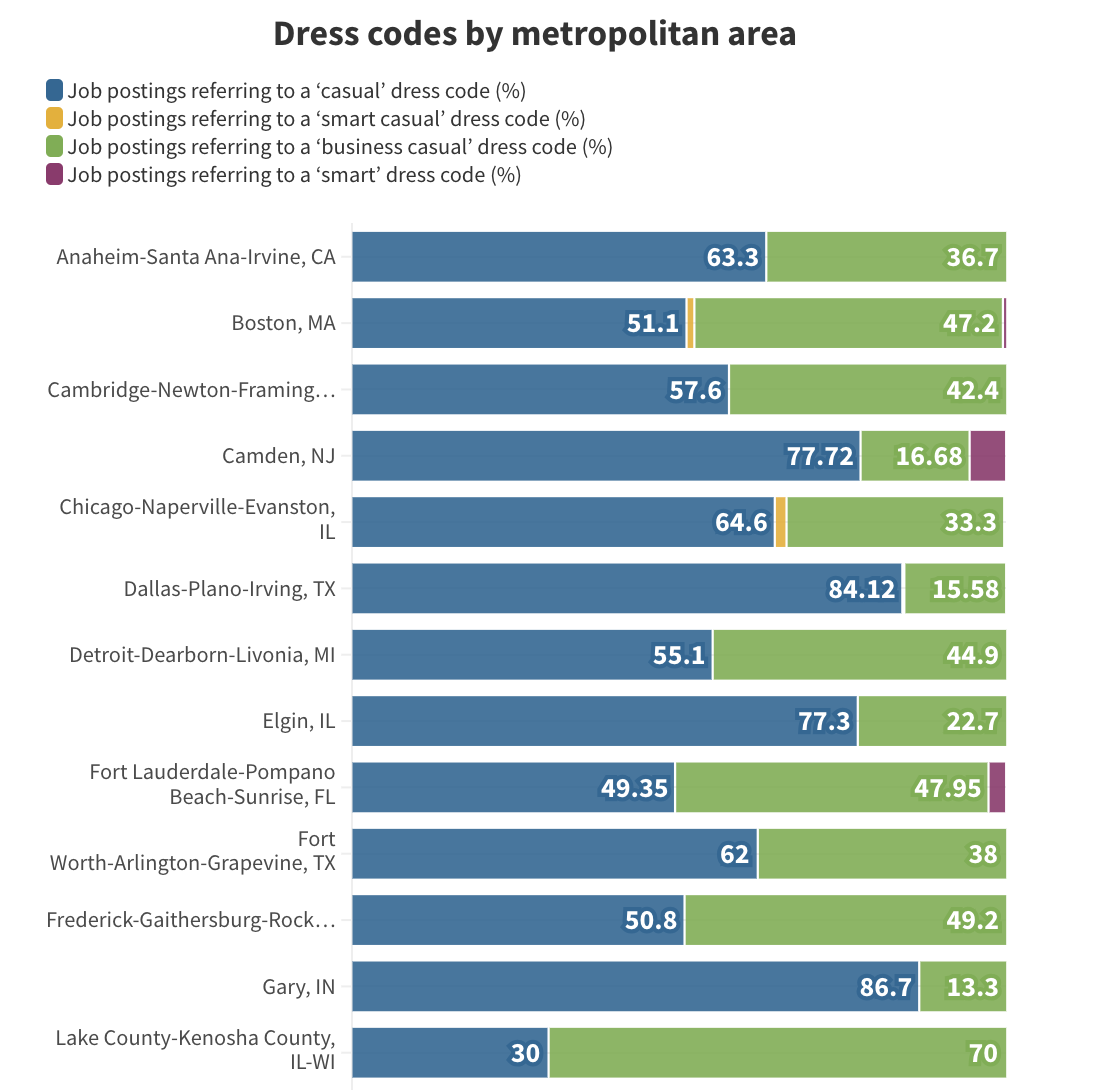
Image Source

While interpretations of “business casual” may vary across industries and professions, here are some best practices that are universally agreed upon.

11 Best Practices for Dressing Business Casual

1. Wear your size.

The difference between a frumpy blouse and an outfit that looks modern is often tailoring. Even a simple blazer will look better if it properly fits the wearer.

Choose clothing that fits you well and flatters your body shape. Avoid wearing excessively loose or tight-fitting clothes.

2. Footwear matters.

Shoes play an important role in completing your look. Select shoes that compliment your ensemble — high heels, espadrilles, loafers, or classic sneakers.

Leave open-toe shoes such as sandals or flip-flops for the beach.

Personally, I like a pair of comfortable flats, Mary Janes, or plain sneakers in a neutral tone. Whether I’m walking the hallways or grabbing lunch, I always feel comfortable.

Pro tip: Do you have a walking-intensive commute? Consider leaving a pair of dress shoes in the office, so you can swap into your work wear once you get to your desk.

3. Accessorize appropriately.

A good accessory can make an outfit.

However, when it comes to jewelry, less is more. If you have one statement piece, like earrings or a necklace, consider keeping the rest of your accessories simple.

Don’t let them overpower your outfit.

A watch can also be a helpful accessory with a clear function. If you like to keep track of the time, a watch allows you to do so without pulling out your phone.

4. Keep it neat.

On laundry day, it’s tempting to let your clothes sit in the dryer.

However, pulling them out can be the difference between wearing a wrinkle-free outfit and looking rumpled. Ensure your clothes are ironed, clean, and free from tears or holes. Make sure all seams are finished.

Ironing is one of my least favorite chores. Instead, I use a steamer or look for options that don’t require ironing. You don’t need to take hours to look presentable; you just need the right wardrobe.

5. Consider the occasion.

Before a party, I often find myself texting a friend to ask what I should wear. I may even ask for a picture of their outfit, just to confirm that I’m dressed for success.

Work events are no different.

You’ll want to dress appropriately for any meetings, conferences, speaking events, or presentations on your agenda. It never hurts to seek advice from a colleague or a work friend to gut-check your outfit.

6. Layer up.

At one of my office jobs, the building cranked up the heat in the winter and blasted the AC in the summer.

Knowing exactly what the temperature would be inside was unpredictable. The temperature outside the building was at least 10 degrees different than the temperature inside.

To prepare, I always had a sweater at my desk, a blazer, and a pair of flats that didn’t need socks. I could then throw on more clothes if our office was too cold or change into cooler shoes during the warm months.

In the hot summer months, be prepared for outdoor heat and indoor air conditioning by wearing easily removable layers to adjust your comfort level.

7. Overdressing is better than underdressing.

During my first job interview, I walked through the door in a full suit. However, my interviewer was dressed more casually, wearing slacks and a button-up.

Once I had the job, I found out that dressing more formally made me look more prepared than other applicants who arrived in jeans.

The point of this short anecdote? When in doubt, err on the side of formal. Blazers and jackets are always a nice addition.

8. Dress modestly.

When scrolling TikTok, I’ll see an outfit of the day video. Here, users show off what they plan on wearing to the office.

The best outfits are tailored and paired with tasteful accessories. They may be sleeveless or have knee-length dresses. The most confusing outfits are crop tops and mini-skirts, especially for business casual workplaces.

Avoid wearing clothes that reveal too much skin. Backless, low-cut tops or crop tops are a huge no.

9. Avoid athleisure.

You won’t wear office attire to the gym, so don’t wear your gym attire in the office.

We all love to be comfortable, but athleisure isn’t appropriate for the business casual office. Instead, invest in a pair of slacks that are comfortable and stretch.

You can even look for a pair of business-casual plants that feel like yoga pants when you wear them.

10. Avoid graphic designs.

I can definitely wear HubSpot swag during a day in the office. However, if I’m going to a business casual event, I’ll opt for smaller or embroidered logos.

Large graphic designs can be distracting. Further, not every message on a graphic tee shirt is appropriate for the office. Steer clear of provocative prints or clothing with inappropriate logos or text.

11. Create a capsule wardrobe.

Getting dressed in the morning doesn’t have to be a lengthy process.

This is especially true if you have a capsule wardrobe, or a closet of basic workwear that you can mix and match. That may include slacks that match with a variety of shirts.

I have a wide range of skirts in different colors that I can pair with different plain tops. This allows me to express my personality, keep my wardrobe visually interesting, and still stay business casual.

Plus, getting dressed in the morning takes minutes — no contemplation required.

Pro tip: Familiarize yourself with your company’s dress code policy and consult with your HR department regarding what’s appropriate and what’s not.

Image Source

Getting Business Casual Right

The Masculine Guide to Business Casual Dressing

No matter your gender, you may want to achieve a masculine look that fits with your office’s business casual dress code. Here are some options of what to wear that can help you stock your closet.

Blazers

Blazers are a timeless classic for all genders. Opt for professional colors like black, gray, blue, and other dark shades to add a business touch to your outfit.

In most business casual settings, you can wear a fitted tee shirt or sweater so long as you put a blazer on top.

Keeping one formal blazer at the office can come in handy for presentations and impromptu meetings.

Looking to add some more color to your outfit? You can add a blazer in one of your favorite shades to create variety in your wardrobe.

Image Source

Shirts

Long-sleeved, button-down collared shirts are the perfect choice. Choose tasteful patterns like checks, stripes, or microprints. You may go for polo shirts, but that depends on your company culture and occasion.

Pick either classic darks or light neutral colors. Avoid bright or flashy colors and loud patterns.

The best part? You don’t need a tie in a business casual setting.

Pants

Nice trousers, slacks, or pressed khakis are a safe choice. Pants should be cotton or linen. Although wool is fine, silk and rayon are no-no’s.

Choose dark or neutral-toned colors that compliment your shirt. Again, avoid bright colors and loud patterns. And remember to wear a belt.

The length of your pants should reach to the top of your shoe or a little longer — but not so much that they’re bunching at your feet.

Shoes

In the business casual office, formal dress shoes are always safe. You can also opt for loafers or ankle boots in leather or suede if you’re super in-vogue.

Even if you love sailing in your free time, no boat shoes. Avoid athletic socks.

Some offices include classic, plain sneakers in their dress codes. Be sure to ask your HR department or manager before you wear sneakers to work.

Accessories

Accessories are a great way to personalize your outfit. Always wear a belt. Wristwatches are a nice touch. You don’t have to wear cufflinks (phew!)

If you love suspenders, you can add them to your outfit. If you like socks with patterns, that can help you personalize the look.

Just remember, with accessories, less is more. Don’t experiment with every bell and whistle. Once you find your personal style, you can include a set rotation of your favorite accessories.

Outerwear

Your outerwear should match the seasons in your area. While we always recommend having a backup blazer in the office, you’ll also want to have a v-neck sweater, a nice jacket, or a peacoat for the winter.

Image Source

How is this different from business formal?

Business formal requires a full suit every day. Your blazer and slacks must be made out of the same material and have the same shade.

You’re also limited to neutral, dark colors. You’ll often find matching black, dark gray, or dark blue suits paired with light-colored shirts. A tie is also required every day.

Business casual wear can incorporate more variety. You can wear lighter-colored blazers and pants. There’s an opportunity to experiment with prints and a wider range of colors. For business casual, these guys have it down.

Image Source

Feminine Business Casual Dressing

Perhaps you’re going for a more feminine look for your office wear. No matter your gender, we recommend using the following guidelines when building your business casual wardrobe.

Tops

With my own wardrobe, I have a number of clean, plain shirts that I can wear to the office. They vary by season.

I have short-sleeve blouses, turtlenecks, sweaters, and sleeveless tops that I can wear during any season. I also have blazers and cardigans to mix and match.

Neutral or solid-colored blouses, plain shirts, sweaters, turtlenecks, vests, blazers, dressy tops, or sleeveless shirts with collars are universally safe choices. It’s standard to wear a monotone shirt.

Patterns are acceptable if they aren’t outrageous. Tuck your shirt in or leave it untucked, depending on your style. Add a belt if it compliments your outfit. Try to keep logos to a minimum.

Pants

When it comes to pants, you can take two approaches. You can find something in a solid color that you can pair with different tops. This allows your blouse to pop with color or experiment with patterns.

Conversely, you can find bottoms with a pattern, like tasteful plaid or houndstooth, to pair with a plain top.

Dress pants, khakis, trousers, or corduroy pants are the way to go. Neutral colors and dark tones are preferred.

Skirts and Dresses

My favorite skirts are pleated and end at the ankles. Meanwhile, I have dresses of various lengths below the knee. I know all of these options are business casual safe choices, which makes getting ready in the morning easy.

Knee-length or longer lengths are professional choices for the office. No sundresses or skintight dresses.

You can experiment with colors and accessories while maintaining a professional look. Adding a blazer, cardigan, or belt can give your outfit a business casual look.

Study the example below — while the second outfit is more relaxed and for a party, add some tops, and you look professional.

Image Source

Shoes

Closed-toed flats or small heels are the best option. Leather shoes, formal open-toed shoes, and heels are okay too — but absolutely no sandals, flip-flops, rarely sneakers, or casual boots.

My personal favorite business casual shoes? Boots and Oxfords. I can wear something that looks office-appropriate with and without heels.

Accessories

When I get ready in the morning, I have my favorite jewelry on my nightstand, ready to go. On most days, that’s a simple tear-drop-shaped gold earring.

Sometimes, I’ll add a neutral necklace and bracelet to complete the look.

Light jewelry, belts, and simple purses add a professional touch to any outfit.

Outerwear

Whether it’s cold in the office or outside, you’ll want to have business casual outerwear. A nice sweater, jacket, trench coat, or peacoat is appropriate. No athletic jackets or sweatshirts.

Consider a quarter zip or vest on those crisp fall days that don’t require a full jacket.
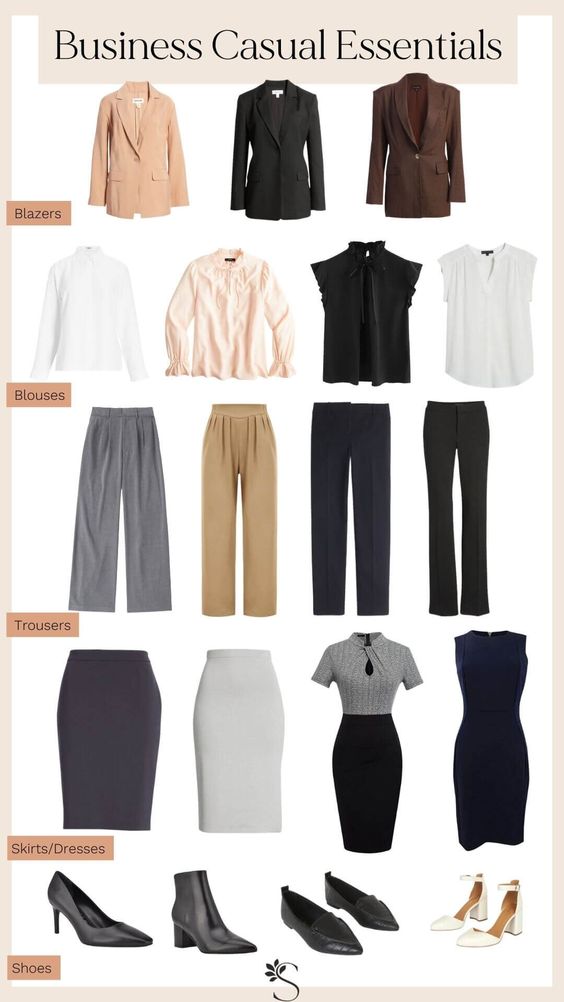
Image Source

How is this different from business formal?

Business casual allows for a more relaxed style, with options like separates, tasteful blouses, and slightly shorter skirts. You can also wear a wider range of shoes, like flats and oxfords. No pantyhose or tights are required.

Business formal is more conservative, requiring tailored suits or dresses and closed-toe heels.

For business casual attire, the woman below knows what’s up.

Image Source

Jeans or no jeans?

The decision to wear jeans in the office hinges entirely on your company’s policy and guidelines. If allowed, pick dark-toned, straight-fit jeans paired with a polo or dress shirt. Avoid ripped, baggy, or faded jeans to avoid looking too casual.

Ready to dress business casual?

When it comes to dressing for work, it’s all about striking the perfect balance between formal and casual.

You’ll also want to look for options that make you feel comfortable. You’re still going to the office, so err on the side of caution to appear polished and professional.

Embrace your personal style, feel confident, and dress in a way that makes you feel great in your own skin.
company culture template
 

Categories B2B

X Creator Pay: Is X’s Ad Revenue Pay Worth it for Content Creators?

Creators and users on the app formerly known as Twitter can now earn money thanks to a new program rollout.

X’s new ad revenue-sharing feature is the latest change to come to the platform after the social media site was acquired by Elon Musk and rebranded as X.

To access the program, users must subscribe to X Premium, previously known as Twitter Blue. So, is X‘s take on creator pay worth paying for X Premium? How much are creators earning with the new ad revenue-sharing program?

Let’s dive in.

What is X’s Ad Revenue-Sharing program?

What do creators think of X’s Ad Revenue Sharing Program?

Should creators subscribe to X Premium?

Download Now: The 2023 State of Social Media Trends [Free Report]

What is X’s Ad Revenue-Sharing program?

X‘s ad revenue-sharing feature allows users to share in the earnings generated by ads displayed in the replies of the user’s content.

For instance, if I post content on X and there is an ad in the replies of my post, I can get a cut of the money earned through the organic impressions of that ad placement so long as I’m a subscriber.

“The ad money will otherwise be kept by X if you are not an X Premium (Blue) subscriber,” he said.

X’s Help Center says users can also opt to purchase a subscription to Verified Organizations to be eligible.

Users must also have at least 5 million organic impressions on their cumulative posts within the last three months, and they need at least 500 followers.

Once eligible, users must open an account with Stripe, the site’s payment processor, to receive their payouts.

What do creators think of X’s Ad Revenue Sharing Program?

Payouts for X content creators started rolling out in August, and reactions I saw from creators ranged from pleasantly surprised to optimistic.

Robert Freund is a lawyer with over 8,300 followers on X and received about $291 as his first payout from the platform.

Freund joked, “They say making your first $291.8136984 is the hardest.”

In a message to Mashable, Freund said the payout was a pleasant surprise considering the size of his audience, though it won’t “meaningfully supplement” his income.

Freund also doesn’t expect to receive as large a payout in the future since he believes most of the earnings are from a “uniquely viral” tweet that received 19 million impressions in July.

Ben, a gaming news content creator, received his payout of £129 (equal to $152.55).

“Wild payout from Twitter/X!” Ben said in a post. “I’m extremely thankful to everyone who allows me to pursue this job in the Rockstar community. I’ve learned so much over the last four years. This first payout is incredible.”

Content creator Okami Games says his first X payout is “nothing to write home about but definitely a nice surprise.”

“Glad they’re finally letting creators earn directly on the platform now,” he said. “Thank you all for the support!”

Roberto Blake is a YouTuber who received a little over $307 as his first X payout. Blake says he easily sees his earnings surpassing $ 1,000 monthly on the platform with some experimentation.

When asked by another user about subscribing to X and his payout, Blake responded, “$8 [per month] to make $370 is a fantastic ROI for something I do anyway.”

However, some creators disagree.

Content creator Chris Dillon says, “You shouldn’t have to pay to get paid.”

Dillon also says the ad revenue-sharing program hurts the creator landscape on the platform.

“Now, everyone doesn’t post for the sake of posting for creativity, but they do it for engagement,” he explains. “So, they try to farm engagement to earn money on X, which kills the creative side of being a creator.”

According to Dillon, the program‘s design doesn’t always benefit creators. In other words, only some on the platform identify as content creators but can get paid by simply subscribing to X Premium and meeting other requirements.

“Anybody can post, but not everyone is a creator — and that’s the issue,” he says. “People are getting paid, but those people aren’t always creators. And we need to put money in creators’ pockets.”

Should creators subscribe to X Premium?

In addition to paid opportunities, X Premium also offers subscribers the following perks:

  • The ability to edit posts
  • Prioritized rankings in conversations and search results
  • The ability to write longer posts
  • Two-factor authentication
  • The ability to hide their blue checkmark
  • And much more

But, with all these features and a chance to get paid, is it worth subscribing to premium as a creator?

Goofywise, a content creator and streamer, says it depends on the creative.

“It honestly depends on your goals as a content creator,” he explains. “I have seen creators who made X a huge priority over the years not get Premium and still have great numbers … I don’t think it is mandatory.”

As many of the creators I mentioned above stated, the payouts from X may not be enough to live off of; however, it can be a simple and effective way to generate another stream of revenue.

So, if having multiple income streams is important to you as a content creator, I see no reason to avoid Premium. But it’s not a must-have for every creator or influencer.

For instance, I am a podcaster, blogger, and YouTuber in my spare time, and my choice not to pay for X has not hindered my content creation journey.

My content lives off the app in the form of YouTube videos, my blog posts on WordPress, and my podcast on platforms like Spotify and Apple Podcast.

In my experience, so long as I keep creating content consistently, I will always gain subscribers on those platforms, which matters to me.

I use X to connect with my followers and keep up with trending topics, things I can always do on that app for free.

New call-to-action

Categories B2B

Was it Written by AI? How You Can Tell, According to HubSpotters

In school, I learned the basics of good writing — keep it short, concise, and grammatically correct. 

By that definition, AI-written content should be good, right? Yet, when I play around with tools like ChatGPT, I notice a few red flags. 

Sure, it’s grammatically correct, but it gives off serious “corporate speak” vibes. It follows a logical sequence, but it often goes on lengthy tangents. And while its responses may be accurate, it often lacks a unique perspective.

This isn’t to suggest AI-written content is inherently bad. But if you plan to leverage AI for content creation, it’s important to know where it falls short, and how to fix it.

Free Report: The State of Artificial Intelligence in 2023

4 Signs It Was Written by AI

1. It isn’t skimmable.

As a writer, it’s nice to imagine that people hang on to every word I write. The reality, however, is far different.

Gone are the days of leisurely reading the newspaper at the breakfast table. In the digital age, people want information, and they want it quickly. 

But if you’ve ever tinkered with an AI-writing tool, you may notice it hasn’t mastered the art of brevity. For example, when I ask ChatGPT to write an intro for an article on how to write better headlines, it generates the following:

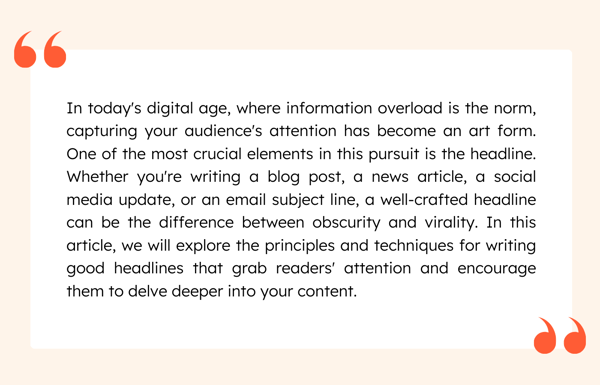
ChatGPT Intro

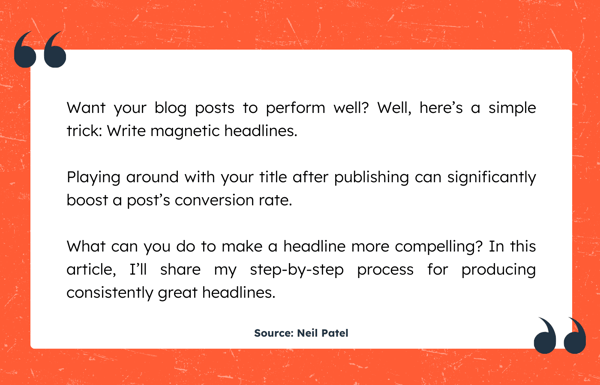
This intro isn’t necessarily bad, but it’s a tad wordy and far too long. Now compare it to a blog post from Neil Patel on the same topic:

Neil Patel Intro (1)

See the difference?

Patel starts with an engaging question, immediately piquing our curiosity. He also writes in short, one or two-sentence paragraphs. Both these strategies make content easier to skim and absorb.

2. It’s missing expertise.

Which article would you rather read: “How to Go Viral on TikTok” or “How To Go Viral on TikTok, From 3 Creators Who’ve Done It”?

I’m willing to bet the latter. That’s the power of expertise — it instantly elevates any piece of content with real-world experience.

The problem? AI doesn’t have any experience. 

As Kaitlin Milliken, HubSpot Blog’s Program Manager & Content Editor, puts it, “AI chatbots repackage information that we’ve heard a million times before. If you’re looking for a fresh perspective, you’ll want to reach out to a human expert.”

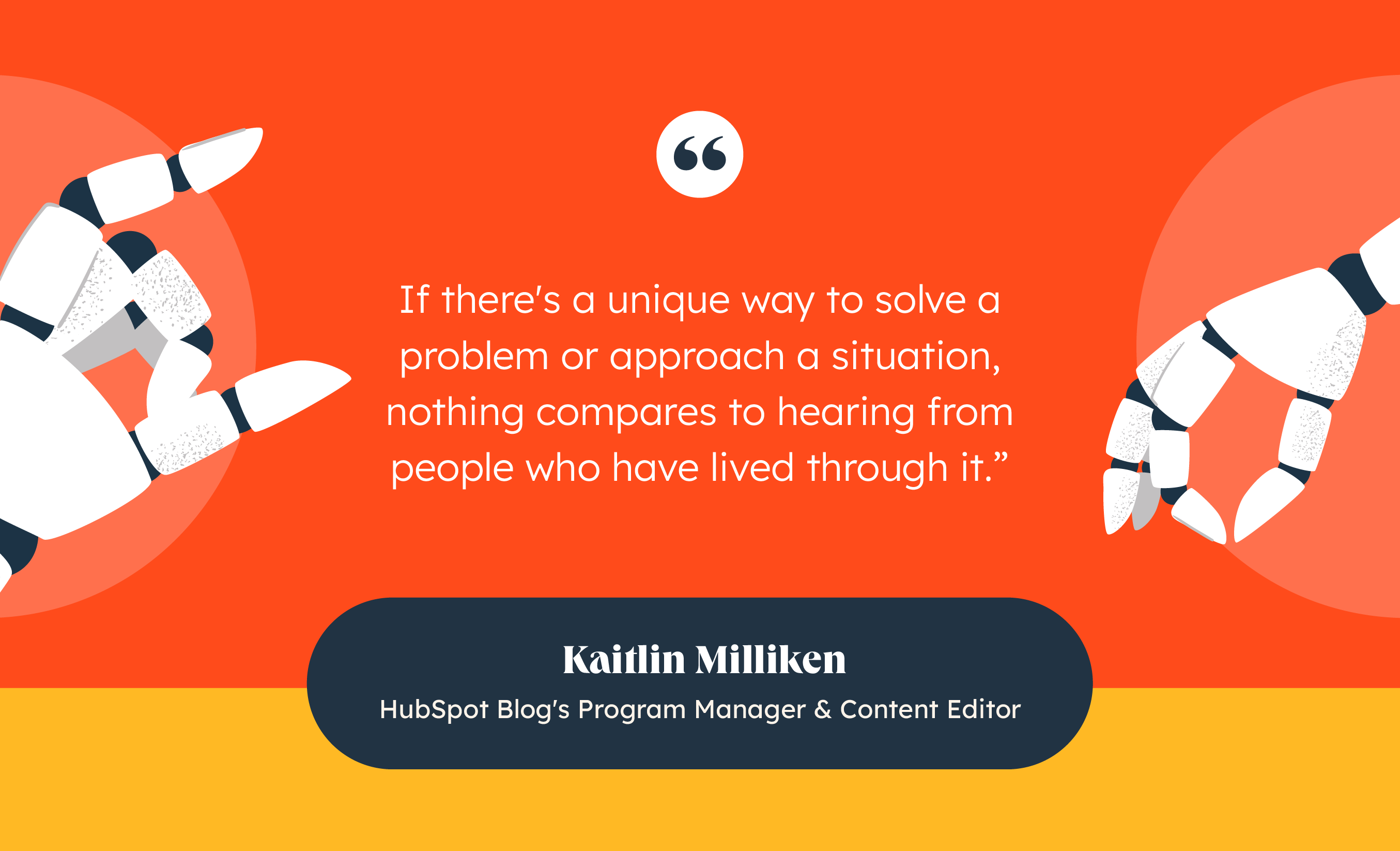
She adds, “Experts have access to the latest trends and more recent data than AI. Plus, they can pull from their real-world experience. If there’s a unique way to solve a problem or approach a situation, nothing compares to hearing from people who have lived through it.”

Kaitlin Milliken: Was it Written By AI?

Besides being an expert (or consulting one), you can weave expertise into your content in other ways.

For instance, here at HubSpot, many of our articles include real-world examples, original data, and “pro tips.” These elements not only enhance the credibility of our content but also pack more value for the reader.

3. It’s outdated.

When I asked ChatGPT to write an article about BeReal, a popular photo-sharing app that launched in late 2021, here was its response:

This isn’t just a ChatGPT problem; all AI chatbots have knowledge cut-offs. If you use AI to write about topics outside its scope, you risk generating outdated or irrelevant content. 

Plus, when you consider that only 45% of professionals believe they would be able to tell if ChatGPT gave them wrong information, it creates plenty of room for error.

For Clint Fontanella, HubSpot Blog Manager, one workaround is to use AI to summarize research, not seek it out. 

He told me, “When you want AI to write about data that is outside its database, my recommendation is to copy content from an existing online source and ask it to summarize and rewrite in the style of your choosing.”

As for Milliken, she adds a fact-checking step into her editing process. In her own words: “Before you publish anything written with AI, fact-checking is essential. If AI references a certain business or person, be sure to double-check and see if they still exist. ChatGPT can get these details wrong.”

4. It sounds generic or bland.

“The first time I ask AI to write anything for me, it usually gives me the most corporate, templated response you can think of. Something that’s super neutral and sounds like a robot wrote it,” Fontanella told me.

This is relatable for many AI users, myself included. For example, when I ask ChatGPT to “sound more engaging,” it often writes in its signature corporate-y style, but with double the exclamation points.

For Fontanella, the key is tinkering with different styling prompts until you land on an output you like (e.g., “Sound more lighthearted” or “Write in the tone of a HubSpot writer”). However, as he also points out, this isn’t always a perfect solution. You still need to do some editorial heavy lifting before taking your content across the finish line.

This could mean adding humor, injecting personal anecdotes, referencing pop culture, forming a unique opinion, or adopting a certain perspective. In this way, you’re using AI as a foundation to build upon.

In Fontanella’s own words: “In general, AI can’t write a piece that’s on par with our standard of content. However, it can definitely write a few good sentences here and there that can be the foundation of your argument or paragraph. I highly recommend cherry-picking sentences from paragraphs that you like and then rewriting the paragraph around that sentence.”

Clint Fontanella: Was it Written By AI?

Back to You

AI offers an entirely new way to create content, but it isn’t without its limitations. This doesn’t mean you should stay clear of these tools. However, it’s best to leverage them as writing assistants, not as actual writers.

As a writing assistant, AI can propose new ideas and angles, collect and summarize information, rephrase content, and generate basic outlines, which you can then elevate with your creativity, expertise, and perspective.

New Call-to-action

Categories B2B

Social Media for Nonprofits: Top Tips From BGCGW’s Director of Donor Relations

“Whether you have a full-time staff member responsible for social media or someone that posts occasionally, I highly recommend having some kind of social presence — whatever that looks like.”

This advice comes from Terri Johnson, Director of Donor Relations & Special Events at the Boys & Girls Clubs of Greater Washington (BGCGW). 

Johnson’s team wears many hats (as many nonprofit employees do), and that includes managing BGCGW’s social media strategy.

Download Now: Nonprofit Marketing & Fundraising  Trends for 2022 [Free Report]

I thought she’d be the perfect person to ask how nonprofit organizations can tap into the power of social. Let’s take a look at her top tips.

Table of Contents

Why Social Media Matters for Nonprofits

Before we dive into the how, let’s talk about the why — why is it important for your nonprofit organization to be on social media?

Social media is a free resource that allows you to get your brand, mission, and story in front of millions of people you may not otherwise reach

For starters, we can look at the data: 55% of people who engage with nonprofits on social media end up taking some sort of action. This includes donating money, volunteering, or participating in community events.

I can actually speak to this personally.

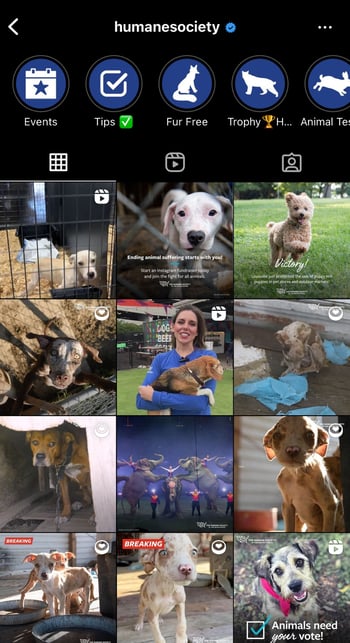
I’m a big animal lover. I recently came across a post from The Humane Society on Instagram, and started scrolling through their feed.

the humane society, instagram feed, social media for nonprofits

Image Source

Wow, they really do such great work for all types of animals, I thought to myself. So great in fact, it prompted me to make a donation to the cause.

Social media gives you the platform to:

  • Generate awareness of your cause — Quickly meet your target audience where they are with information about your mission.
  • Showcase your impact — Use this as an opportunity to highlight the meaningful work your organization does.
  • Expand your fundraising efforts — Maximize the reach of your campaigns, and collect donations directly from the platforms.

It also doesn’t hurt that it’s free to get started. And when you do, here are 10 tips you should keep in mind.

Social Media Best Practices for Nonprofits

In an interview with Terri Johnson, BGCGW’s Director of Donor Relations & Special Events, we discussed some of her favorite social media best practices for nonprofits.

I highly recommend developing a social media strategy to help identify your goals, your audience, what you post and when, and how you measure your performance toward your goals

Let’s take a closer look at what she shared.

1. Figure out your social media goals.

Terri says, “It’s hard to measure success if you have nothing to compare it to.”

That’s why it’s important to set benchmarks for your social media activities. And from experience, I can confirm that this is true for all marketing efforts.

She adds “You can always map these goals back to your broader strategic objectives if you’re having trouble.” For example, use social media to support a larger fundraising or brand awareness target.

Bottom line: Set clear goals so you can quantify your social media work. That way you can assess whether the “juice really is worth the squeeze” (as they say).

2. Choose the right platforms.

As a nonprofit, your resources may be limited. Terri can “totally relate to this” as it wasn’t long ago that BGCGW had a similar challenge.

The good news is you don’t need to post on all platforms to make an impression.

In fact, Johnson suggests the following: “Make sure you understand which platforms are more popular with your target demographic.”

She continues, “At BGCGW, we use Instagram to appeal to our teen members and young professionals.”

bgcgw, teen instagram post, social media for non profits

Image Source

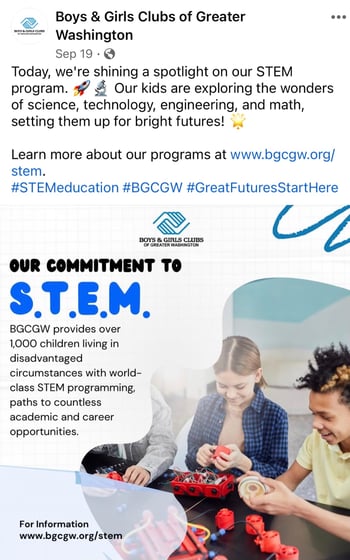
“On Facebook, we like to focus on content that’s more relevant to parents and adults.”

bgcgw, facebook, stem

Image Source

And it’s true. Data says that 31% of Instagram users are ages 18-24. And 49% of Facebook users are ages 25-44.

Bottom line: Don’t feel like you need to be on every single channel as long as you’re meeting your audiences on the right ones.

3. Use visuals to tell your story.

For mission-driven organizations like nonprofits, a picture can certainly be worth a thousand words.

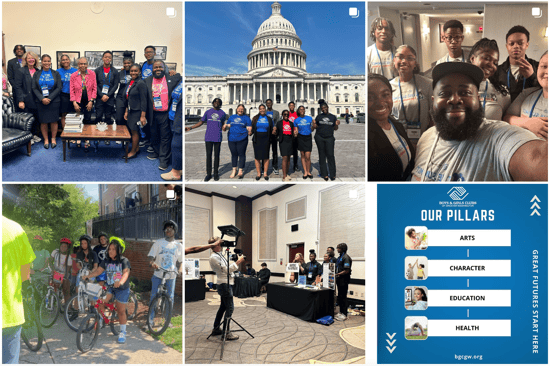
“Tell your story through imagery,” Terri suggests. “That’s what we do. Our mission is driven by the young people we support, so we like to highlight them on social media every chance we get.”

These are a few of my favorites from their Instagram feed:

bgcgw instagram feed

Image Source

Bottom line: Show people what your organization is all about and why they should invest in you. 

4. Be genuine and use an authentic voice.

“Social media is a great way to show and tell — to give your target audience an inside view of your organization,” says Terri. 

Authenticity is key if you want to tell your brand story in a compelling way and draw more supporters to your mission.

Johnson adds, “It allows you to showcase what makes you unique and can help separate you from the noise.”

Bottom line: Be honest, be real, and believe in what you say. If you can inspire trust, people are more likely to listen.

5. Build a community around your brand.

Your community on social media is more than just the audience you’re trying to reach. It includes your organization’s support system, too.

Terri says, “We like to mention our partners and sponsors as a way to shout them out while building brand recognition.”

“It also allows these companies and individuals to showcase their commitment to supporting our communities,” she adds.

Bottom line: Social media is meant to be social. Start conversations, interact with your followers, and give props to keep people engaged with your mission.

6. Leverage social media perks for nonprofits.

There are a number of social media resources to make it easy for nonprofits to promote their brand and meet their goals.

Here are two examples:

  • Google Ad Grants for Nonprofits: Google offers free and discounted search ad credits for nonprofits. Terri noted that her team has tapped into this opportunity “multiple times” and seen positive results.
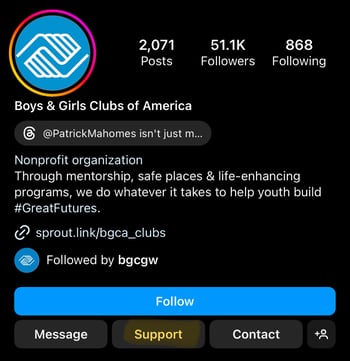
  • Platform-Specific Tools: Most channels, including Facebook and Instagram, offer built-in fundraising tools for nonprofits. For example, you can easily add a “Support” button to your profile or a clickable “Donate” sticker to your Story.

support button on instagram

Image Source

Bottom line: Do the research to see what perks your brand can leverage, so you’re getting the most social media bang for your buck.

Alana’s Bonus Tip: Take advantage of AI writing tools.

AI isn’t perfect, but it can still save you time when it comes to content creation.

I’ve tried it out a few times, and it’s a great source of inspiration for me as a marketer.

I like to use conversational AI (e.g., ChatGPT) to generate topic and title ideas for blog posts and summarize long-form information into bite-sized nuggets for social.

These are a few social media writing prompts you can try out:

  • “Create a post for Instagram promoting [insert event name and description] in [insert number] words or less.”
  • “Write a Facebook post summarizing our new initiative [insert initiative description].”
  • “Draft a tweet asking for support for [insert cause description].”

HubSpot also has free AI tools available to help you draft compelling social copy.

Start Crushing Your Social Media Goals

Now is an excellent time to be social, especially for nonprofits.

Even if your strategy isn’t perfect or your resources are limited, you can always start small and refine things as you go.

In time, you’ll be well on your way to social media success.

nonprofit trends

Categories B2B

30 of the Best Free WordPress Blog Themes in 2023

If you‘ve got an opinion to share, you’ll need a blog to reach the right audience. However, choosing the right free WordPress blog theme can be a challenge. I’ve chosen the wrong theme in the past. That decision left me frustrated, searching for support so I could create the blog of my dreams.

Let’s help you avoid the same mistake.

In this post, you’ll find 30 of the best free WordPress blog themes. Before we dive in, let’s explore what you should expect from free WordPress blog themes.

Grow Your Business With HubSpot's Tools for WordPress Websites

Table of Contents

Characteristics of Great WordPress Themes

If you aren’t a coder like me, then you need to choose your WordPress blog theme carefully. Why? Your theme determines the appearance of your website.

However, beautiful design isn’t the only characteristic of the best WordPress themes. When considering a WordPress theme, look out for these properties.

Site Security

Once you’re online, your web property is vulnerable to attack. Brands like Facebook and LinkedIn have had their fair share of data breaches. To combat ongoing threats to your WordPress website, use a theme that is as secure as possible.

While no WordPress theme is 100% secure, choosing one that’s regularly updated ensures your theme code is protected from new security vulnerabilities.

Responsive Design

With 54% of website traffic coming from mobile devices, using WordPress blog themes that are mobile-friendly becomes vital. Mobile-friendly themes improve user experience. They automatically resize your website content to fit different screens.

Flexible Customization

Great WordPress blog themes offer multiple customization options. This makes it easy for non-coders to design a unique site. Some blog themes even have demo sites you can import, edit, and turn into yours.

Detailed Documentation

Choosing a WordPress blog theme that has great documentation is important. Armed with tutorials and resources, you can fix any challenge with the theme without waiting for customer or tech support.

Plugin Compatibility

WordPress plugins prevent you from writing code if you need added website functionalities. That said, some plugins may not be compatible with some themes. A qualitative way to access a theme’s plugin compatibility is by checking the number of theme downloads.

If a blog theme has many downloads, it’s a good sign that it may be compatible with the plugins you aim to use.

Now that you know the characteristics of great WordPress blog themes, let’s look at some themes that fit these criteria.

1. Astra

Free WordPress blog theme: Astra

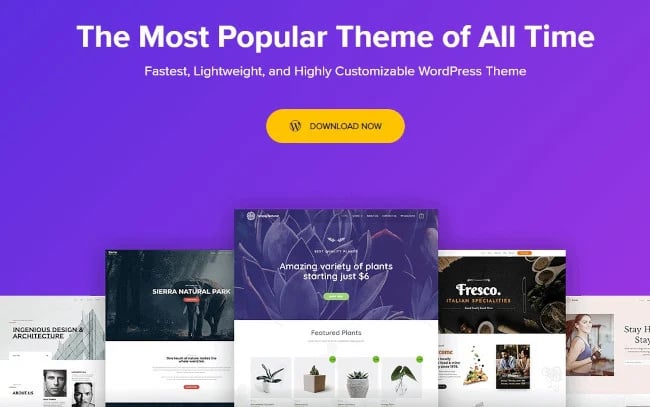
Astra is a fast and free WordPress blog theme that’s suitable for a variety of use cases. Its lightweight also makes Astra a quality option to consider when building a blog. The theme comes with several ready-to-use blog websites you can import, modify, and use.

Many bloggers are fine with the limited customization options for backgrounds, typography, and spacing in the free version of Astra. Astra’s Pro or Agency plan lets you access features like auto-loading previous posts, adding author sections, and removing featured image padding.

What we like: Astra’s compatibility with major page builders like Elementor, Beaver, and Brizy makes it one of the best WordPress themes for bloggers.

2. Kadence

Free WordPress blog theme: Kadence

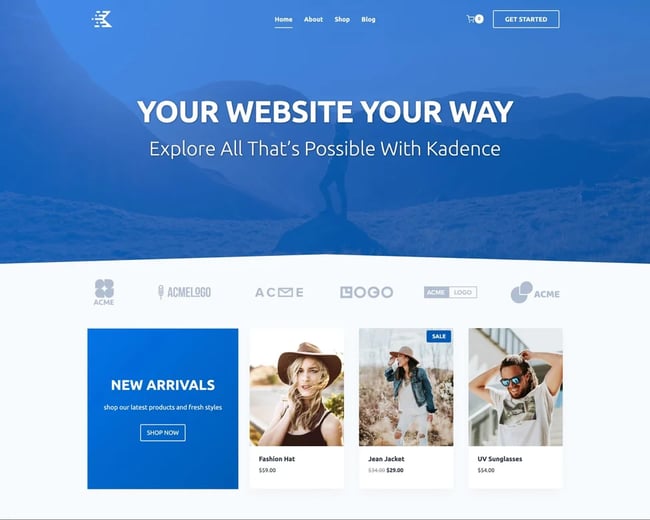
Kadence is a lightweight WordPress blog theme that makes creating beautiful, fast-loading, and accessible websites a breeze. It features an easy-to-use, drag-and-drop header and footer builder to build any type of header in minutes.

What we like: Kadence stands out because of its clean blog styling, including featured image placements and sticky sidebar options. Plus, Kadence has a deep integration with the core block editor, so your content will match what you see in the admin panel.

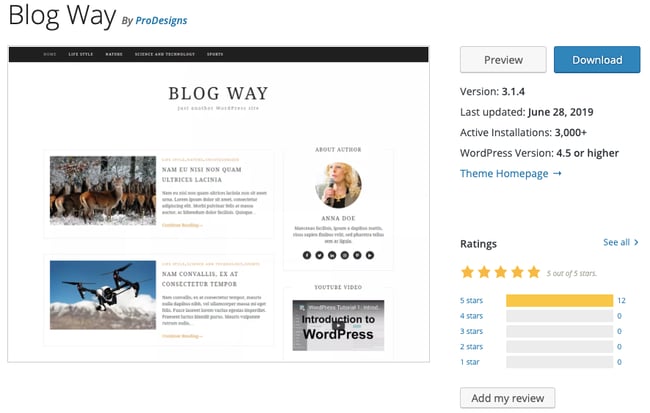
3. Blog Way

Free WordPress theme: Blog Way

Blog Way is a simple and professional WordPress blog theme. It’s clean, well-coded, and has a modern layout. Blog Way is especially great for blogs, news sites, and travel sites. It has multiple customizable features and ensures high-quality performance to help boost your site traffic.

What we like: Blog Way comes with an option to change the color of your entire site and offers social links for you to connect your site with your social accounts.

4. OceanWP

Free WordPress theme: OceanWP

OceanWP is a popular multipurpose WordPress theme.

It offers a lightweight, SEO-friendly, and responsive foundation for blog building. Unlike Astra, OceanWP offers more customization options and gives you greater control over your blog’s design. This is one reason for its popularity among users.

OceanWP offers only 15 free responsive pre-made theme demos, which is fewer than what Astra offers. To get more, you’d have to upgrade to the premium version.

What we like: This WordPress blog theme is compatible with popular page builders, including Elementor, Beaver Builder, and Divi. It also supports several third-party plugins to help extend your site’s functionality.

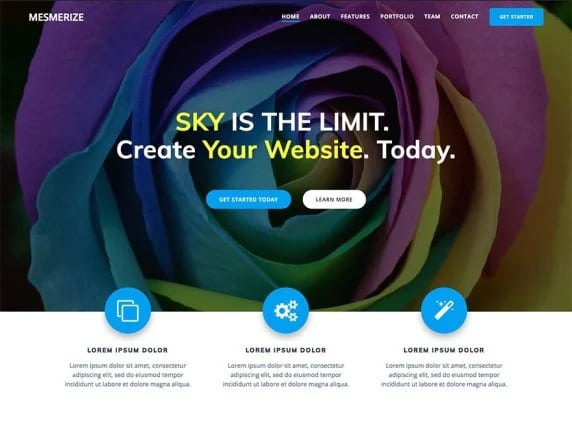
5. Mesmerize

Free blog theme: Mesmerize

Mesmerize is a free blog theme that lets you customize your site without hassle. Start with a pre-built homepage and use the five header designs, slideshow capabilities, gradient overlays, and more to make the look and feel your own.

In addition, there are 30 ready-to-use content sections for you to build pages quickly and easily. Not to mention, there are helpful drag-and-drop features.

What we like: Mesmerize is mobile-responsive, and it works well with WooCommerce should you ever need to set up a store.

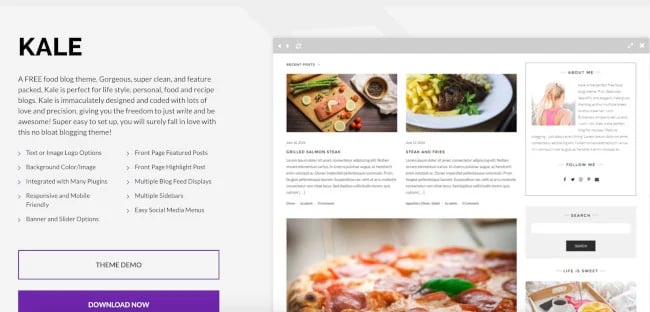
6. Kale

Kale WordPress blog theme for food bloggers

Kale is a free WordPress blog theme for food bloggers. You can choose from several feed displays to organize your written content and images of the dishes you’re featuring. The built-in social media sidebar menus and icons make it easy for visitors to locate, view, and follow your accounts.

What we like: This theme comes with a special front page that includes featured posts and a large highlight post. You can also show a banner or a post slider in the header.

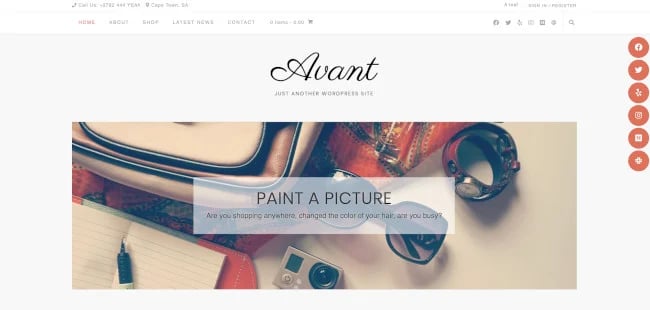
7. Avant

Free WordPress blog theme: Avant

The Avant blog theme comes with seven different header styles, three footer styles, five blog layout templates, full site color settings, and much more built into the WordPress Customizer. Avant integrates seamlessly with WooCommerce and page builders like Elementor and SiteOrigin.

What we like: Avant comes with seven header layouts, five blog layouts, three footer layouts, and full-site color settings.

8. Blossom Feminine

Free WordPress blog theme: Blossom Feminine

Blossom Feminine is a free WordPress theme for creating a fashion, lifestyle, journal, travel, beauty, or food blog. The blog theme is mobile-friendly, search engine optimized, and fast. In addition, the theme is WooCommerce compatible, translation-ready, and comes with regular updates.

What we like: Have a newsletter you want to promote? The well-placed Newsletter section can help you to grow your email list. Keeping in touch with your visitors is a breeze.

9. Blossom Fashion

WordPress blog theme free: Blossom Fashion

Blossom Fashion is perfect for building a stylish blog without spending a penny. While free, the theme offers premium features like WooCommerce compatibility, font options, an advertisement widget, an Instagram section, and more.

What we like: The theme is easy to use and comes with extensive documentation. There’s also support if you need help.

10. Blossom Travel

WordPress blog theme free: Blossom Travel

Blossom Travel is a fast-loading and mobile-friendly WordPress theme for travel blogs. The free blog theme blends accessible design with extensive features like social media integrations, theme color options, and lightbox image styling.

Blossom Travel has an Instagram section, email subscription section, and social media widgets so visitors can easily connect with you.

What we like: Blossom Travel’s HTML map section lets your visitors visualize where you’ve traveled.

11. Blossom Pin

WordPress blog theme free: Blossom Pin

The Blossom Pin theme features a Pinterest-style design, using a vibrant masonry layout with three posts/page layout options. Its infinite scroll lets visitors browse without distraction. The free WordPress blog theme is SEO-optimized and easily customizable.

What we like: You can choose from its different colors and hundreds of Google fonts.

12. Elegant Pink by Rara Business

WordPress blog theme: Elegant Pink

Another dynamic Pinterest-like layout, Elegant Pink is a free and beautifully designed WordPress theme that combines soft colors with a clean layout to present your blog to the world. Elegant Pink also has a slider section above the masonry-design post on the homepage.

What we like: Elegant Pink is a responsive theme, so it’ll look great on every device.

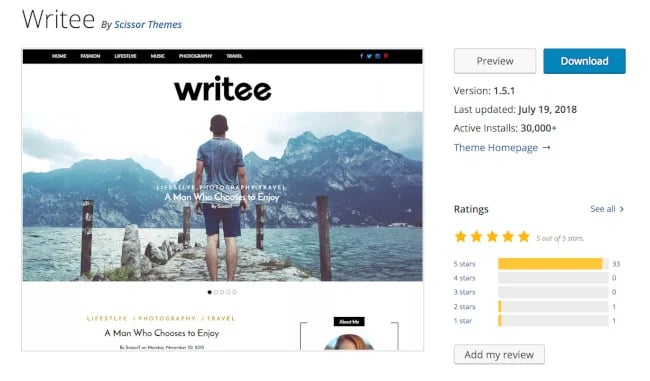
13. Writee

Free WordPress theme: Writee

Writee is WordPress theme for photography or image-heavy blogs — the theme has a slider hero image feature, which allows you to include several full-width images. Writee also makes managing an online store simple with its WooCommerce integration.

What we like: If you have beautiful images on your site, Writee can help you showcase them. There are full-width or boxed sliders that can show off your images with style.

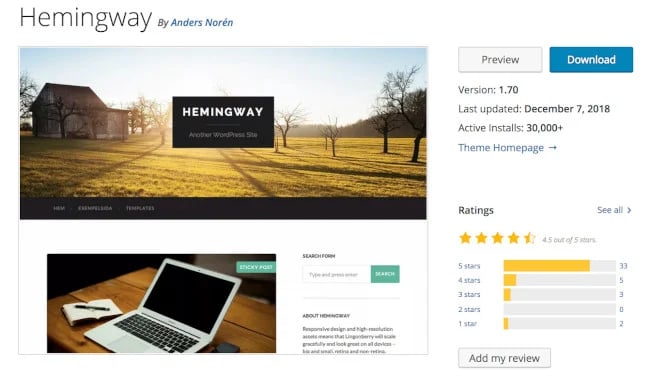
14. Hemingway

Free WordPress theme: Hemingway

Hemingway is a simple two-column blogging theme that keeps your content organized and easy to read. It includes a parallax scrolling feature, which adds an interactive, video-like experience to your blog pages.

Hemingway’s translation-ready feature comes with pre-made language files. Your website can be automatically translated into several other languages with just a click.

Best for: Bloggers who want a minimalist theme. If you want to upload images, change accent colors, and start writing, this theme is for you.

15. Ashe

Free WordPress theme: Ashe

Title: Ashe

Ashe is an elegant, customizable, and beginner-friendly WordPress theme built specifically for bloggers. It provides 14 image-heavy pre-made templates, and you can adapt it to any blog niche.

Its default shop page is one of its notable features. Pair this with the compatible WooCommerce integration, and you’ll have an ecommerce store running easily. The featured content slider and Instagram slider widget are other notable features. These help you showcase recent or popular content from your blog or Instagram page.

What we like: Ashe has a “promo boxes” feature for displaying ads and linked images. This WordPress theme is translation-ready, SEO-optimized, and works well with page builders such as Elementor and Beaver.

16. Neve

A best free WordPress theme: Neve

Neve is a powerful, free WordPress blog theme from ThemeIsle. It offers a fully responsive mobile-first design and extensive customization options to tailor your blog to your brand image.

What we like: Neve frequently updates its theme to guarantee the best security and access to new features. Its theme options panel will help you get started quickly.

17. GeneratePress

A best free WordPress theme: GeneratePress

GeneratePress is an optimized, super lightweight theme that focuses on speed and usability. By using only 30KB of resources, this theme gives you a quick-loading site.

The WordPress blog theme is also customizable. It’s compatible with page builders, such as the Gutenberg block editor, Beaver, and Elementor.

Unfortunately, you do not get starter sites on the free version of this theme. So you’ll have to build from scratch.

What we like: GeneratePress is famous for its over-the-top customer service — even the theme’s developer, Tom Usborne, would sometimes answer questions in the support forum.

18. Total

Total WordPress free theme

Total is a blogging theme with a masonry-style layout, which places your latest three, six, or nine blog posts in a grid format. There’s also a portfolio section if you want to share some of your artistic work.

What we like: Total is SEO-friendly, compatible with the most popular page builder plugins, and has a one-click demo import to get you up and running fast.

19. Spacious

Spacious WordPress free theme

Spacious offers four page layouts, two templates, four blog layouts, and several custom widgets and widget areas to choose from. Building your site with Spacious is easy because their downloadable demo sites are available for inspiration and support.

What we like: Spacious is built with speed in mind. Sites built with spacious load in one second.

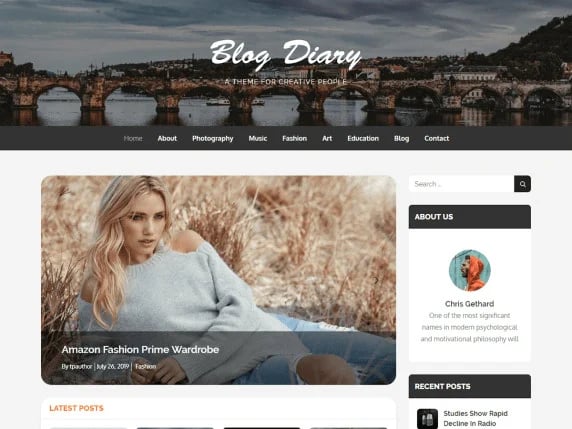
20. Blog Diary

Blog Diary WordPress theme

Blog Diary is a lightweight and minimalistic WordPress theme for trendy food or travel blogs. It comes with slider functionality and color-picking options, and it is easy to get up and running on the fly. In addition, it’s mobile-responsive and compatible with the Gutenberg editor.

Best for: Writers who want to focus on content. This theme is designed to be set up quickly, without trial and error or experimentation.

21. Zakra

Zakra WordPress theme

Zakra is another fast and lightweight multipurpose theme. It includes 10+ free starter sites, some of which are designed specifically for blogs. The designs are clean and pleasing to the eyes.

This theme’s Gutenberg compatibility is one of its selling points. It also works well with other page builders, including Elementor and Brizy. So the templates are easy to customize.

What we like: This theme is also SEO-friendly, translation-ready, and frequently updated to ensure your site is as secure as humanly possible.

22. Editorial

Editorial WordPress theme

The Editorial blog theme is visually engaging, simple to use, and flexible enough to organize large amounts of editorial content in a way that won’t overwhelm readers. Editorial also comes with a variety of convenient widgets that let you easily customize your page sections, no coding needed.

What we like: Editorial comes with a customizer that allows you to change most of the theme settings easily with live previews.

23. Brilliant

Brilliant WordPress blog theme

Brilliant is a blog and online magazine theme that allows you to artistically pair your blog posts with photo or video content. You can add or edit your own custom logo on your homepage, as well as customize your theme’s accent colors to match your branding.

What we like: Brilliant is translation-ready, so visitors can read your content in different languages.

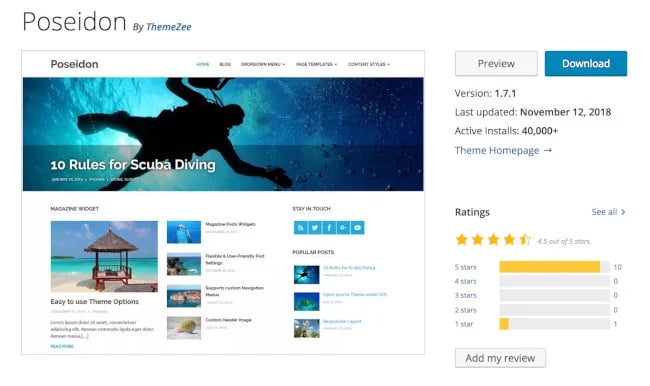
24. Poseidon

Poseidon WordPress theme

If you’re looking to include large, professional-looking photographs on your blog, Poseidon is the WordPress theme for you — this theme offers a full-width image slideshow on the homepage. The layout is mainly white to create a spacious, organized look.

What we like: Poseidon includes completely customizable navigation bars to enhance user experience and improve your site’s configuration.

25. Author

Author WordPress theme for blogging

Author is a straightforward theme suitable for all blog types, from business to photography to ecommerce. Its minimalist look helps readers to focus on your content easily. What’s unique about this theme is its design, which is not just for readability but for accessibility.

What we like: Author comes with WooCommerce support for eCommerce stores.

26. ColorMag

Free WordPress theme for bloggers: ColorMag

ColorMag is an elegant WordPress theme that suits news blogs and magazine sites. Its 8+ free pre-built demos are neatly ordered, visually appealing, and have a professional feel.

Each demo includes multiple ad spaces, so you can monetize your site. Additionally, ColorMag supports the sticky menus. This makes it easy for users to navigate your site, especially on pages with long-form content.

What we like: ColorMag is compatible with major page builders, such as Elementor, Gutenberg, and Beaver Builder. It works seamlessly with WooCommerce, too.

27. Go

Free WordPress theme for bloggers: Go

Go is a WordPress blog theme that’s minimalist and compatible with the Gutenberg builder. Its simple interface makes it suitable for code-averse people who want to set up their websites quickly.

What we like: This WordPress theme also has great fonts, making your web content readable and offering users a great experience.

28. SiteOrigin Unwind

Free WordPress theme for bloggers: SiteOrigin

SiteOrigin Unwind is a free WordPress blog theme that’s customizable with its page builder plugin. This WordPress theme is excellent if you want a website with a simplified blogging layout.

What we like: Unwind also has great code, which means your website loads faster. Your chances of ranking high in search engines increase with load time. Plus, this theme lets you build custom headers and backgrounds.

29. Sydney

Free WordPress theme for bloggers: Sydney

Whether you are a business owner or freelancer, the Sydney WordPress blog theme lets you create an awesome website with drag-and-drop page builders like Elementor. Its free version has six starter websites that you can import and modify to fit your brand.

What we like: Design and customizing this WordPress theme is easy. You can use its sticky navigation menu, upload your logo, access all Google Fonts, set your header, and more.

30. Maxwell

Free WordPress theme for bloggers: Maxwell

If you need a WordPress blog theme that’s simple yet elegant, Maxwell might be a good fit. This WordPress theme has great typography and a magazine-style layout that’s easy to customize.

What we like: Maxwell has several post layouts and features like a dropdown menu, post slider, full width, content styles, social share buttons, and more. This blog theme is also responsive, and you can update it from your WordPress dashboard with just one click.

Benefits of Excellent WordPress Themes

Great WordPress themes offer a lot of benefits. Here are three of them.

You can set up your site quickly.

Free WordPress blog themes with demo sites will help you design a unique website in a few hours. Even if you don’t like the demo websites, you can use them to get design inspiration.

Themes are easy to use.

Every good WordPress blog theme is easy to use. Most of them have their own in-built website builders. But if you prefer another builder, you can use Gutenberg, Elementor, Beaver, etc.

You’ll have improved website visibility

A good WordPress theme ensures your site is responsive, easy to navigate, and compatible with multiple browsers. These features make your site load fast. And fast loading time is a positive signal that improves your site’s SEO.

Using a Free WordPress Blog Theme

A free blogging WordPress theme will help you create a unique, functional, and eye-catching place for your content. Each theme offers features, layouts, and styling that set them apart. So consider the overall blog design you’re going for when picking your ideal theme.

Afterward, install your theme, add content, and customize your site to create a great user experience that keeps readers returning for more.

Editor’s note: We originally published this post in December 2018 and we’ve updated it for comprehensiveness.

Use HubSpot tools on your WordPress website and connect the two platforms  without dealing with code. Click here to learn more.

Categories B2B

49 Essential Small Business Stats You Need to Know

Small businesses are the lifeblood of any economy. Mom-and-pop restaurants, corner stores, family-owned shops, boutique tech firms, and other ventures drive economic growth, foster innovation, and generate employment opportunities.

These businesses are the beating heart of the community. They provide essential services and goods, adding a unique flavor to local markets.

2023 continues to illustrate the importance of small businesses as they navigate through challenges and seize new opportunities.

In this article, we delve into the nitty-gritty of small business statistics for 2023 and provide insights into their triumphs, tribulations, and trends.

Free Download: Scale Your Business with Email Newsletters

General Small Business Statistics

Small Business Owner Statistics

Industry-Wise Small Business Statistics

Financial Small Business Statistics

Jobs in Small Businesses Statistics

Small Business Marketing Statistics

Small Business Technology Statistics

Small Business Challenges Statistics

General Small Business Statistics

  • Most businesses are small — 99.9% of American businesses. (SBA, 2023)
  • Small businesses pay 39.4% of the private sector payroll. (SBA, 2023)
  • There are 33 million small businesses in the United States. (SBA, 2023)
  • From 1995 to 2021, small businesses created 17.3 million net new jobs, accounting for 62.7% of net jobs created since 1995. (SBA, 2023)
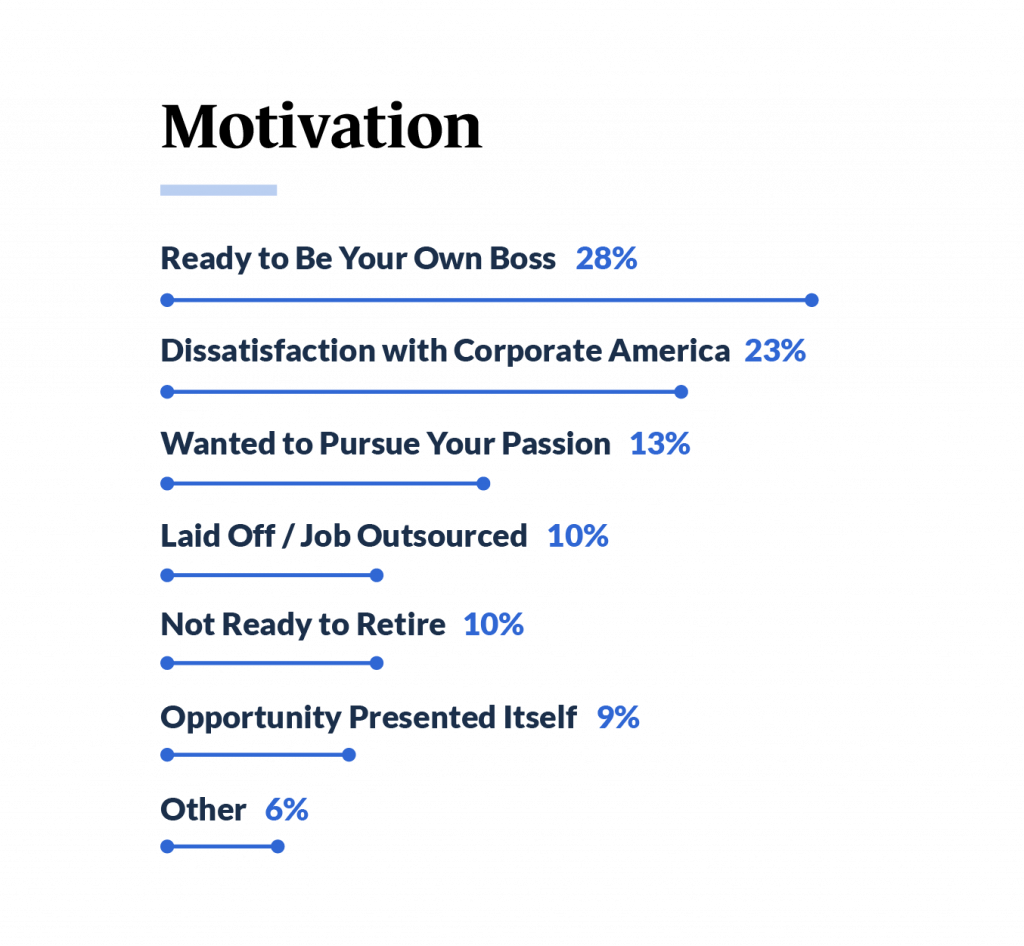
  • Business owners primarily go into business because they are “ready to be their own boss” (28%) and overall dissatisfaction with corporate America (23%). (Guidant Financial, 2023)
  • Small businesses generate 32.6% of known export value. (SBA, 2023)
  • Small businesses employ 61.7 million Americans, which equals 46.4% of private sector employees. (SBA, 2023)
  • About 38% of small businesses use specialized software in their business operations. (SBA, 2023)

small business stats, motivation

Image Source

Small Business Owner Statistics

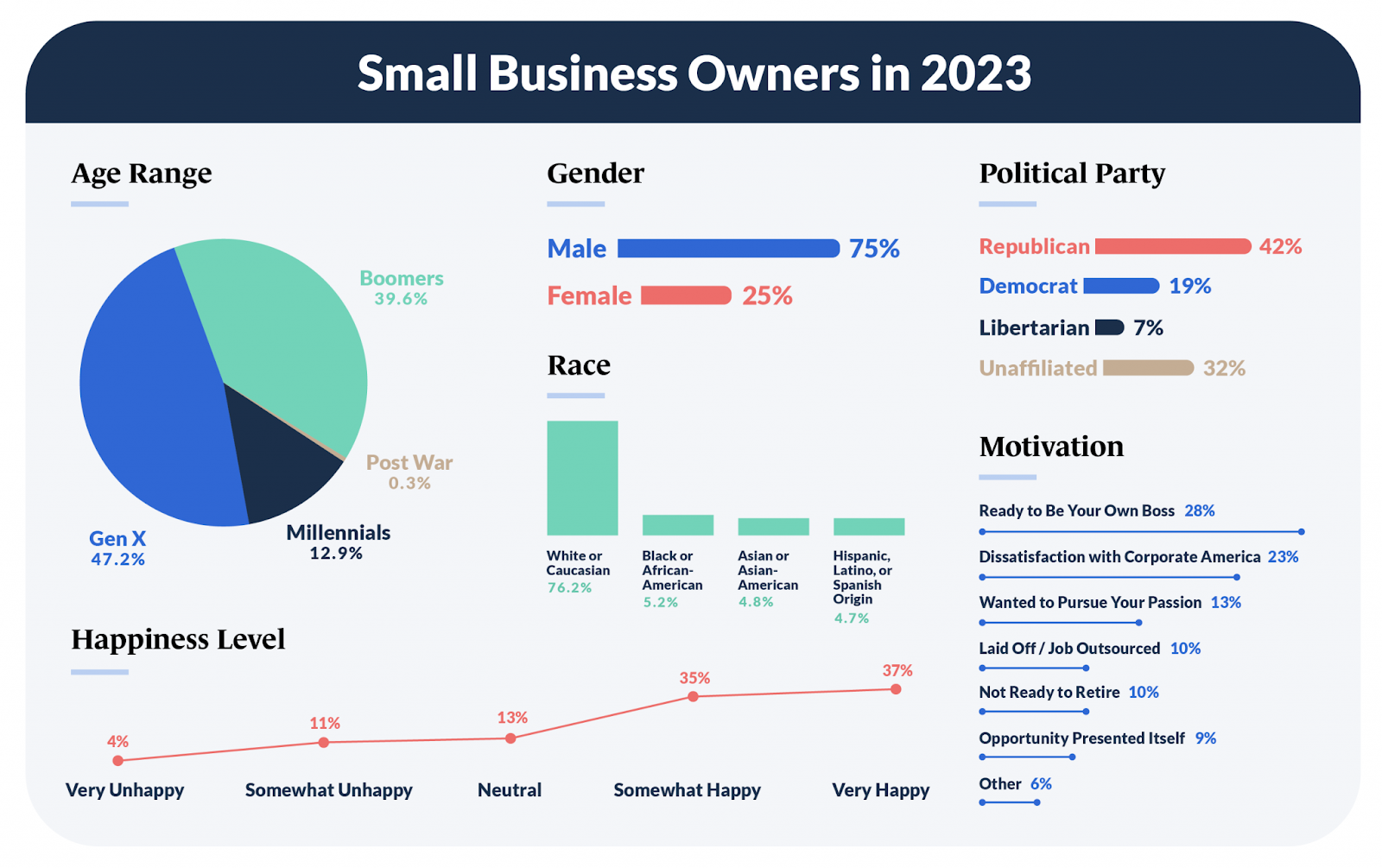
  • Baby Boomers (39.63%) and Gen X (47.20%) make up the majority of small business owners. (Guidant Financial, 2023)

small business statistics, small business owner stats

Image Source

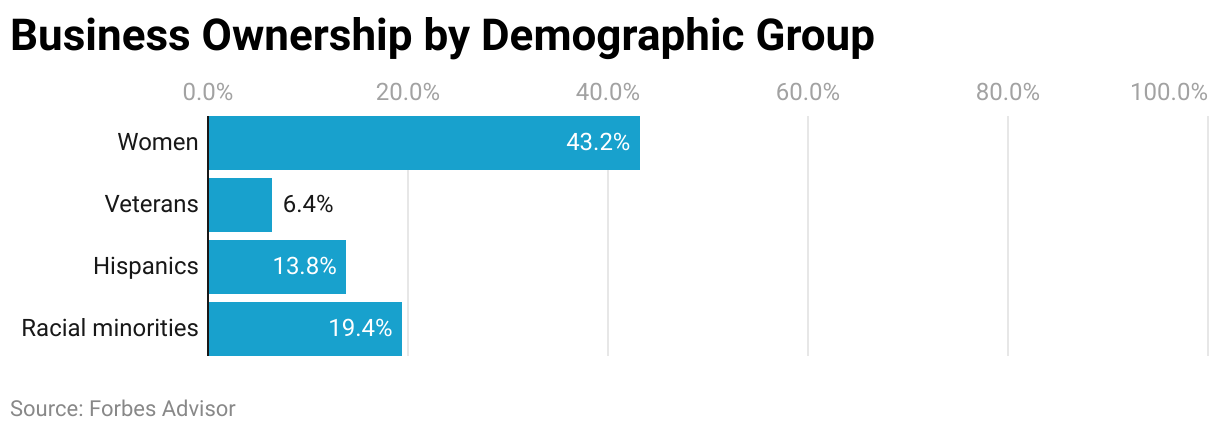
  • Females only own 43.2% of small businesses. Racial minorities own 19.4% of small businesses. (Forbes, 2023)

small business statistics, business ownership by demographic bar graph

Image Source

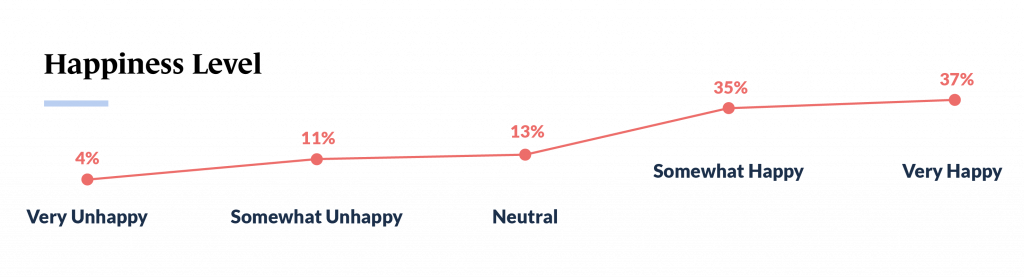
  • Over 70% of small business owners feel satisfied as business owners, with 37% feeling “very happy” and 35% feeling “somewhat happy.” (Guidant Financial, 2023)

Industry-Wise Small Business Statistics

  • The fastest-growing industries are healthcare and social assistance. (Forbes, 2023)

small business statistics, happiness

Image Source

  • The largest decrease in closures was observed in the transportation and storage sector, where the rate of closure fell by 8% from 21% to 13% in 2022, pointing to a progression toward business as usual or at least a new normal. (Meta, 2022)
  • Of small and midsize businesses (SMBs) in the hotels, cafes, and restaurants sector, 35% reported increasing their number of workers. (Meta, 2022)
  • Respondents in more traditional face-to-face industries like food & beverage, restaurant & bar, and retail are more worried than those in other industries about maintaining inventory/fulfillment, bouncing back to pre-COVID business levels with a more cost-conscious public and cash flow disruptions. (Verizon, 2022)

Financial Small Business Statistics

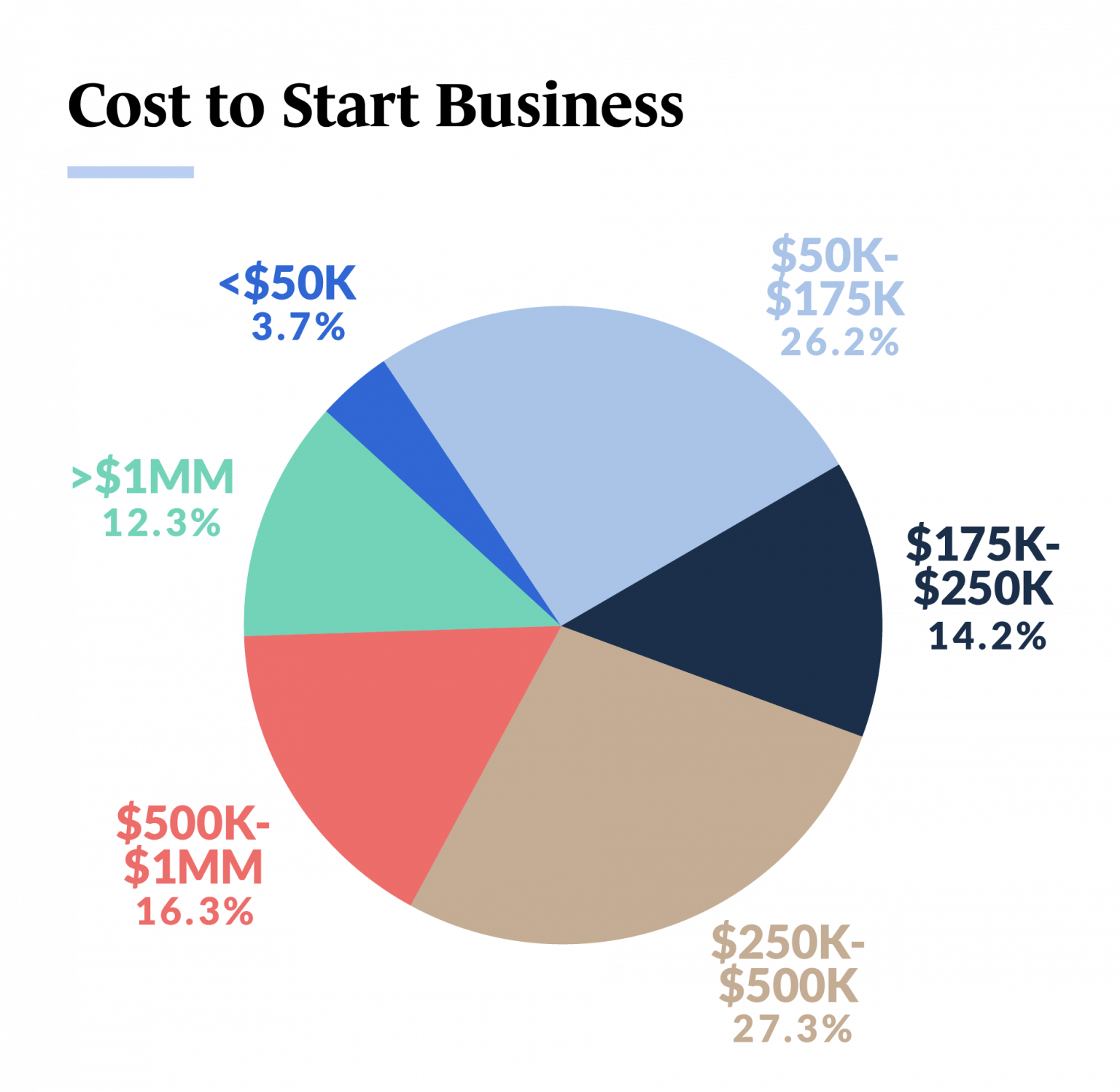
  • Startup costs for most small businesses are between $250k to $500k (27.3%). The second-highest reported startup costs are between $500k to $1 million (16%). (Guidant Financial, 2023)

small business statistics pie chart of cost to start a small business

Image Source

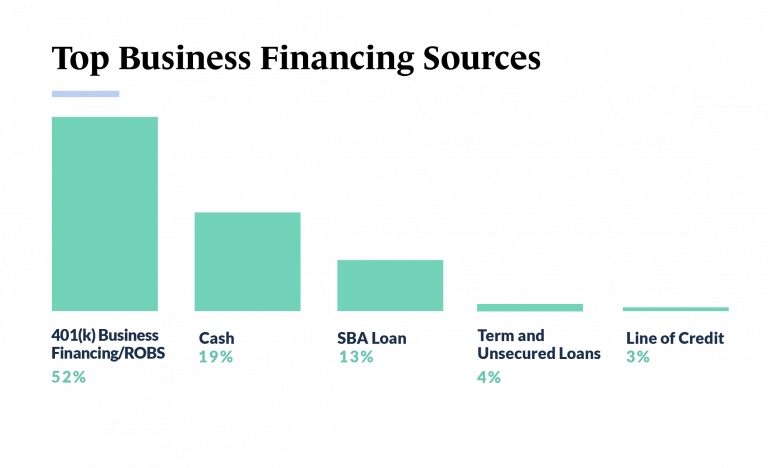
  • Almost half of small business owners use 401(k) business financing to start their ventures. Others also use cash, SBA loans, lines of credit, and term and unsecured loans. (Guidant Financial, 2023)
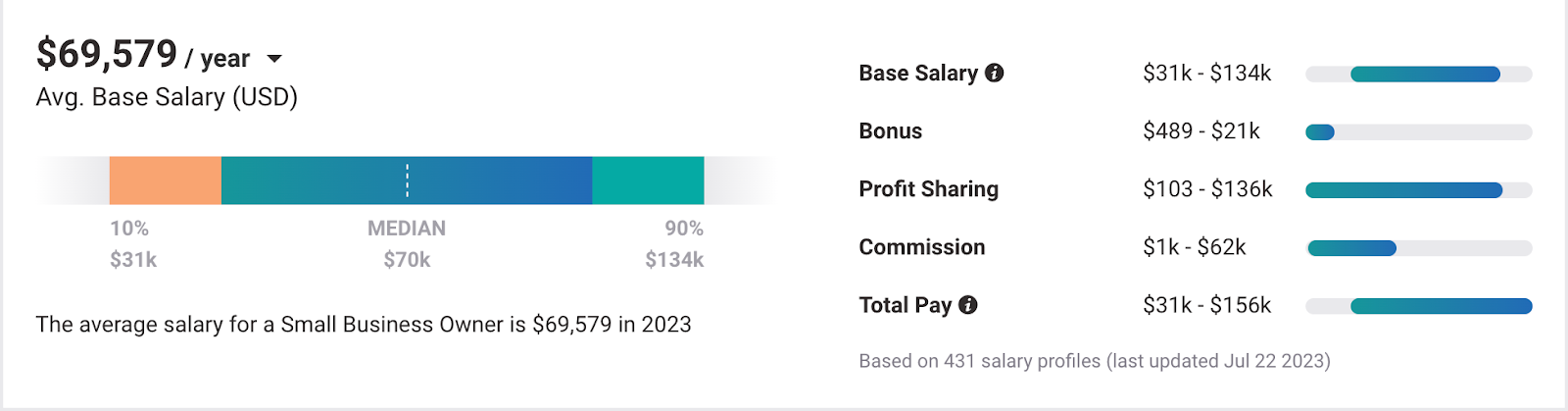
  • The average small business owner’s salary is $69,579 per year. (Payscale, 2023)

small business statistics average annual salary of small business owners

Image Source

  • Of SMBs globally, 24% reported increasing their prices by 20% or more in the first half of 2022. (Meta, 2022)
  • Of SMBs reporting increases, those that reported at least a 10% increase in price were also likely to report an increase in costs of at least 10%. (Meta, 2022)

small business statistics, financing Image Source

Jobs in Small Businesses Statistics

  • Small businesses have added over 12.9 million jobs in the last 25 years. (Forbes, 2023)
  • The industry with the most job openings is the education and health services industry. (Forbes, 2023)
  • Approximately 20% of women-led SMBs reported increasing their number of employees in the first half of 2022, and 13% reported decreasing their number of employees, compared to 25% and 17% of men-led SMBs, respectively. (Meta, 2022)
  • Over 80% of US SMBs reported their workforce either increased or remained the same in the first half of 2022. (Meta, 2022)
  • US minority-led SMBs were more likely to report increasing their number of workers (20%) than other SMBs (16%). (Meta, 2022)

Small Business Marketing Statistics

  • Of small businesses in the US, 55% were advertising on social media in 2021. (Meta, 2022)
  • Of those small businesses advertising on social media, 66% used Facebook, while 42% used YouTube. (Meta, 2022)
  • Of all small businesses, 28% don’t have a website. (Top Design, 2021)
  • Almost half of small businesses (46%) have in-house employees managing their websites, and 32% use DIY website builder software. (Top Design, 2021)

Small Business Technology Statistics

  • Women-led SMBs reported higher proportions of sales made digitally than men-led SMBs at a global level. (Meta, 2022)
  • Women-led SMBs used digital tools accordingly for marketing-led purposes (advertising, communicating directly with customers, and selling goods and services) more often than men-led SMBs. (Meta, 2022)
  • Nearly two-thirds of SMBs (63%) on the Facebook app generated some proportion of their sales in the past 30 days through digital channels. (Meta, 2022)
  • Sub-Saharan Africa stands out as the region where the highest proportion of SMBs reported digital sales of over 50% (32%). (Meta, 2022)
  • Over a third of U.S. Black-led SMBs reported that over half of their sales were made digitally (39% of respondents), leading all minority groups. (Meta, 2022)
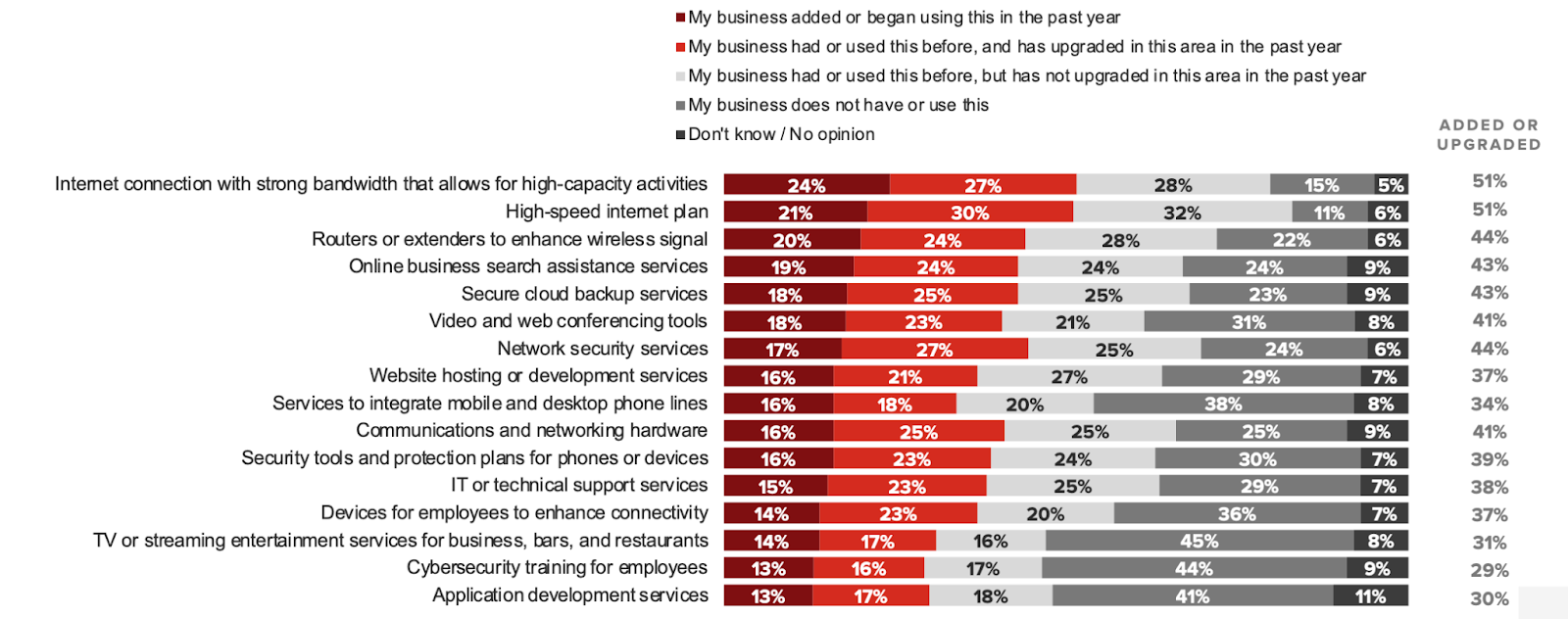
  • Most respondents say their business has added or upgraded its internet connection to a high-speed or high-capacity plan in the past year. (Verizon, 2022)

small business statistics, bar graph of internet services and cybersecurity

Image Source

  • 44% have added or upgraded network security services, and 29% have invested in employee cybersecurity training. (Verizon, 2022)
  • Respondents most commonly say their business has added connectivity technology in the past year to streamline operations (78%). About half say they added technologies to connect with existing customers (53%) or acquire new ones (48%). (Verizon, 2022)

Small Business Challenges Statistics

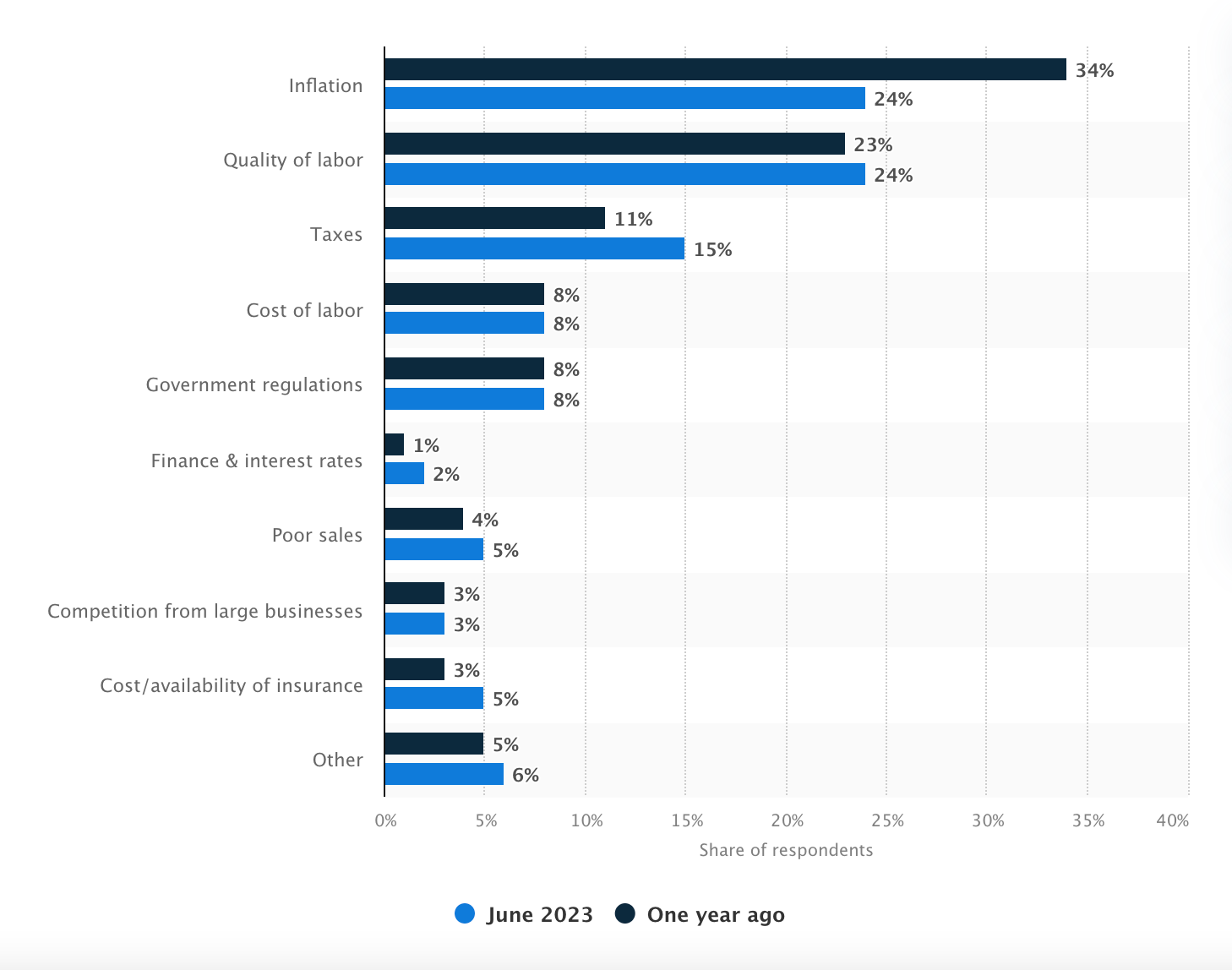
  • Inflation and quality of labor are the most important problems for small businesses in the United States. (Statista, 2023)

small business statistics, top concerns for small businesses

Image Source

  • Women-led SMBs reported higher proportions of business closures at 23%, versus 17% of men-led SMBs. (Meta, 2022)
  • Despite higher closure rates, women-led SMBs reported better sales performance compared to men-led SMBs. Approximately 33% of women-led SMBs reported decreasing sales in the past 30 days, relative to 39% of men-led SMBs. (Meta, 2022)
  • In the US, 20% of SMBs reported that they were closed in October 2022. (Meta, 2022)
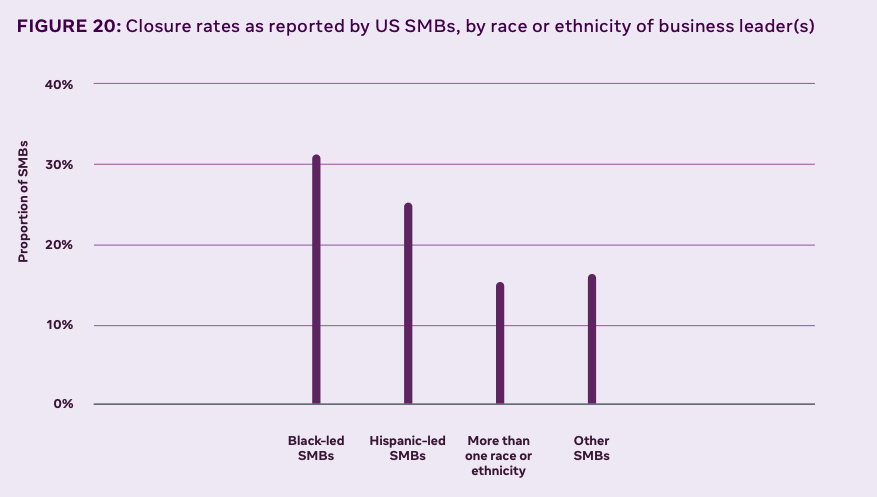
  • US minority-led SMBs were 8% more likely to report closure than other SMBs. (Meta, 2022)
  • 31% of US Black-led SMBs reported being closed. (Meta, 2022)

small business statistics, diversity

Image Source

  • Nearly 9 in 10 respondents (89%) say they’re concerned about the state of the US economy, and more than 4 in 5 say they’re concerned about small businesses in the US and the global economy. (Verizon, 2022)
  • Nearly 4 in 5 respondents (78%) say their business has experienced increased costs in 2021, far exceeding other financial and personnel challenges. Along with increased costs, nearly half (46%) report declining sales, and more than a quarter (27%) withdrew from cash reserves. (Verizon, 2022)
  • More than half of respondents (53%) say their business has experienced operational issues sourcing materials due to supply chain disruptions in the past year. (Verizon, 2022)
  • Interest in resources for SMBs is generally highest among respondents in the construction & contracting and food & beverage industries and lowest among those in entertainment & recreation. (Verizon, 2022)
  • Nearly 3 in 5 respondents (58%) say they’d find an online network of SMB leaders helpful as they carry their business forward for the rest of the year. (Verizon, 2022)
  • Respondents are broadly interested in programs supporting small businesses, particularly free self-paced courses in social media marketing and finance. (Verizon, 2022)

The Role of Small Business Statistics in Strategic Decision-Making

Small business statistics are pivotal in strategic decision-making and help entrepreneurs understand market trends and economic health.

These data-driven insights guide critical decisions related to investment, marketing strategies, and policy formulation. You can recognize the patterns and projections these stats offer to make more informed, future-proof decisions.

New call-to-action

Categories B2B

How to Create a How-to Guide: 21 Tips [+Examples]

The irony doesn‘t escape me that I’m currently writing a how-to guide on … how-to guides. Fortunately, I’ve had my fair share of experiences writing how-to guides for HubSpot over the years.

Some of my favorites include How to Give a Persuasive Presentation, How to Develop a Content Strategy: A Start-to-Finish Guide, and How to Write a Request for Proposal.

Download Now: 150+ Content Creation Templates [Free Kit]

Here, we‘ll explore the right structure to use when making a how-to guide and how to write a comprehensive how-to guide. We’ll also look at some impressive examples of how-to guides for inspiration. Let’s dive in.

You can keep reading or click one of the links below to jump to the section you’re looking for:

If you still need assistance creating a how-to guide, you‘ll enjoy HubSpot’s Guide Creator — a new tool providing a simple, quick-to-use solution for creating how-to guides.

The Guide Creator is excellent for documenting your business’s products, systems, and processes.

Why Creating a How-to Guide Is Important

How-to guides make it simple for people to learn new skills and understand how things work. They’re also helpful when getting to know a new tool, app, or device.

Today, people have more access to information than ever before. That can have a significant impact on businesses. Customers want self-service options that are easy to use and understand. A well-crafted how-to guide can:

  • Support curious and frustrated customers
  • Offer 24/7 access to help
  • Engage readers
  • Anticipate user needs

How-to guides are valuable opportunities to reach new audiences with applicable, high-quality content. For B2B and B2C businesses, how-to guides are often necessary for a healthy lead-generation strategy.

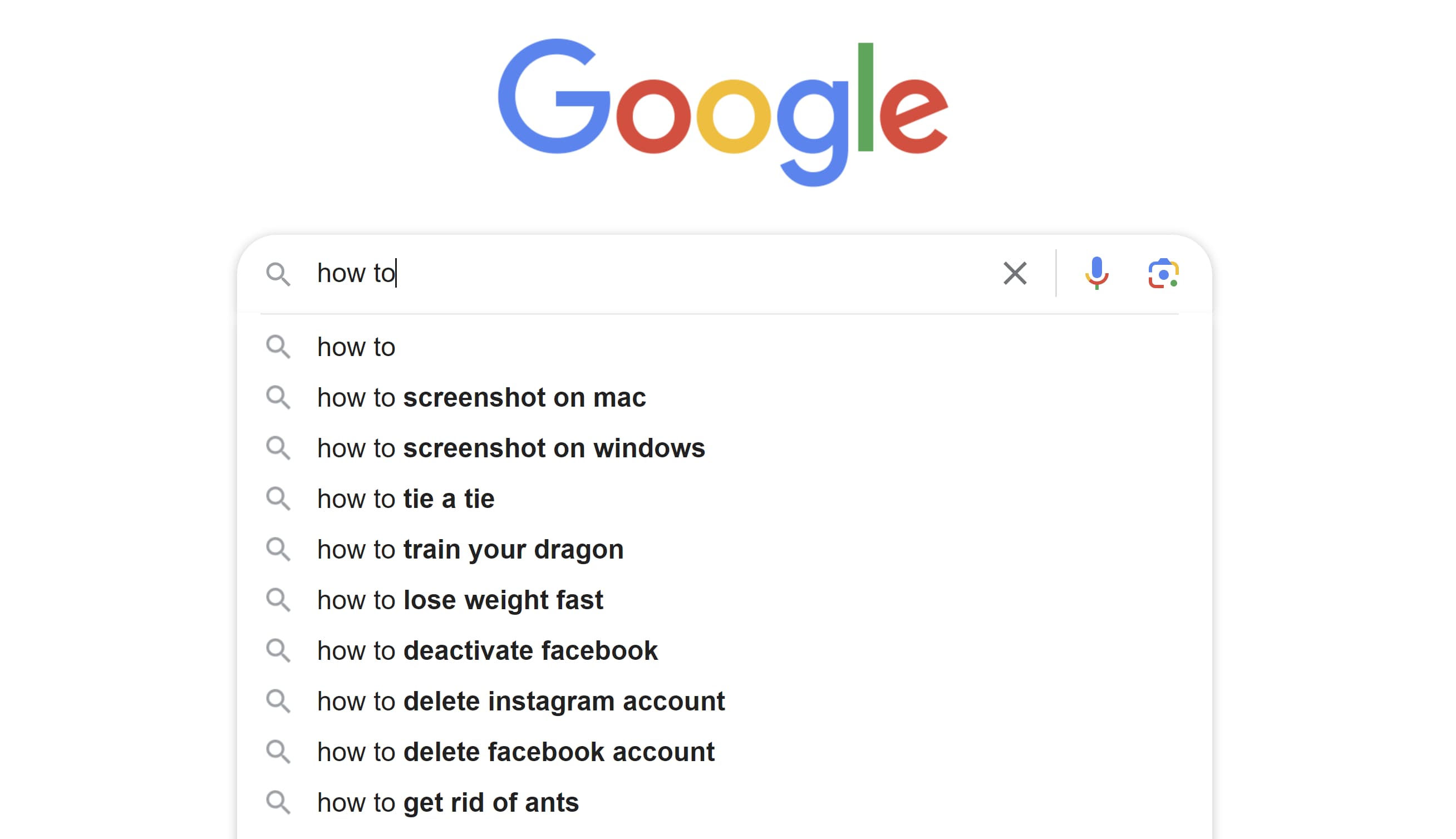
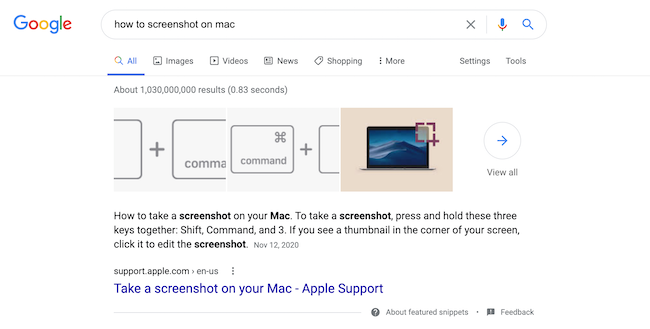
For instance, consider how many people search “How to …” on Google each day:

These search queries demonstrate one of the primary reasons people turn to the internet: to learn how to do something.

If your business can reach those consumers with informative, relevant answers to their questions, those users will begin to see your brand as an authority on the topic.

Down the road, those same readers you first attracted with a how-to guide could become customers and loyal brand advocates who spread the word about your products or services.

These search queries demonstrate one of the primary reasons people turn to the internet: to learn how to do something.
If your business can reach those consumers with informative, relevant answers to their questions, those users will begin to see your brand as an authority on the topic.

Down the road, those readers you first attracted with a how-to guide could become customers and loyal brand advocates who spread the word about your products or services.

How-to guides make it easy to meet high expectations while sharing valuable information. But it takes work to make a great how-to.

1. Understand your target audience.

Most people seeking how-to guides are beginners, so you must be an expert when writing the content. At the same time, you should also see the subject from a beginner’s perspective.

Most how-to guides choose a starting point, which means you’ll have to make an educated guess about where to start.

For example, if you‘re writing instructions on using a specific app, you probably wouldn’t make your first step turning on the computer. Instead, you would begin from the most logical place your average user should start.

Deciding on that first step will be easier once you know your target audience. Your target audience is a group of your ideal users. They will have similar habits and ideas that connect them.

And the better you get to know this audience, the easier it will be to make a how-to guide they’ll love.

For this tip, start with online community forums like Quora or feedback from your community to figure out the top concerns or challenges your target audience might have.

That information will help you determine what content to include in your guide.

For instance, if you’re writing “How to Create a Content Marketing Strategy,” for example, you could follow these steps:

  • Start by looking at responses to “What is content marketing?” on Quora and other online forums. These user-generated responses can help you identify common themes, misconceptions, or confusion around content marketing.
  • Contact your network for common pain points about content marketing. For example, you might find that most of your audience says content marketing is their priority — but they don’t know how to do it on a budget.

This research will give you the information you need to create a how-to guide that addresses relevant concerns about your topic. The video below is an example of a how-to guide for content marketing that addresses specific audience pain points:

2. Research your topic thoroughly.

Even if you know a topic incredibly well, research isn’t a step you should skip. Understanding a topic well can make writing a how-to guide on the subject more difficult, as you might make assumptions about what to cover.

So, follow this complete list of steps for your research.

  • If you‘re already familiar with the process you’re talking about, write down your best recall of the steps from memory.
  • Follow your instructions, and take notes as you follow the steps. This will help you fill in the steps you missed.
  • Conduct keyword research to see the words people who want to learn this skill use to search for instructions.
  • Use Ahrefs, SEMrush, or another SEO tool to find more similar keywords and queries. This can help you create a well-rounded piece that will answer all your readers’ questions and help you rank on Google.
  • Look at your competitors to see how they write their guides.
  • Seek out expert opinions, popular books, and other resources that can give you details to make your how-to guide stand out.

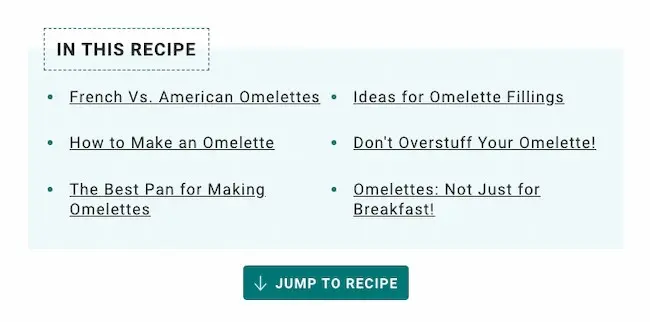
For instance, you’re writing a blog post, “How to Make an Omelette.” Upon researching, you find Simply Recipe’s post at the top of your Google search.

Diving into the post, you’ll see Simply Recipe has sections including:

  • French Vs. American Omelettes
  • The Best Pan for Making Omelettes
  • Ideas for Omelette Fillings

If you want to create your how-to guide on omelets, then you’ll want to cover all – if not more – than what Simply Recipe has in its post.

As you research, don’t forget to fact-check your sources. You want to ensure your guide is trustworthy and won’t cause legal or other challenges for you later.

3. Create a step-by-step outline.

Now that you‘ve researched, it’s time to organize your ideas. First, combine your initial list of steps with any new ideas you learned during your research.

Next, create a step-by-step outline for your guide. This will mean making decisions that can impact how well the reader understands each step.

For instance, if you‘re writing “How to Take a Screenshot on a Mac,” you’ll write down each specific action necessary to take a screenshot.

However, according to this how-to guide, you can create a screenshot on a Mac in four ways. So, the proper instructions for the user will depend on their computer and operating system.

You must decide when to introduce that extra information to your readers. Your readers will only bounce from your page if it’s easy to find the answer to their question.

So, your outline can help you deliver your steps as quickly as possible — and in the correct order.

Many readers will also use your how-to guide as a list of instructions. You may need to revise your outline several times to ensure that each step in your strategy is straightforward.

4. Add valuable images, videos, and descriptions.

Use visuals like GIFs, images, screenshots, and videos to supplement your instructions.

While it can be fun to add pictures just for fun, the best images to include will be helpful and make your instructions more straightforward and quicker to understand.

If you’re unsure what images to include, follow the instructions in your outline. Does it make sense to take a screenshot for each step? Are there specific materials you want your reader to use?

Is there a process that isn’t easy to understand without seeing it happen?

For example, in the Great British Bake Off technical competitions, bakers are often asked to bake recipes they’ve never seen before. If a baker isn’t sure what the final product should look like, they must rely on the instructions to get it right.

They often must correct it if they read too fast, or the instructions can be interpreted differently. This is an excellent example of what can happen when users can’t picture what they should do.

You can use images and videos to help avoid this confusion.

Try to gather images and videos as you research so that you have more than you need when it’s time to start putting together your how-to guide.

5. Review your outline and research from the reader’s point of view.

Ask yourself: “Why do my readers need, or want to know, this?”

Understanding the high-level purpose behind a topic can encourage you to write with empathy. Additionally, it will help you create content that accurately meets your reader’s expectations and needs.

For instance, when writing “How to Create a Facebook Group for Your Business,” I took some time to learn that readers might search this topic if:

  • They are seeking out new ways to connect with customers
  • They want to create a stronger sense of brand community
  • They want to raise awareness about their products or services

As a result, I wrote:

“A group is a good idea if you’re interested in connecting your customers or leads to one another, you want to facilitate a sense of community surrounding your brand, or you’re hoping to showcase your brand as a thought leader in the industry.

However, a group is not a good idea if you want to use it to raise awareness about your products or services or simply use it to post company announcements.”

In the example above, I targeted a few different segments of readers with diverse purposes to help them determine whether this how-to guide would even help them meet their goals.

Ultimately, understanding the purpose behind your how-to guide is critical for ensuring you target all the various components or angles of the topic.

6. Link to other resources.

It’s also a good idea to point readers to other valuable resources if they want to learn more. Link to other relevant blog posts, pillar pages, or ebooks so readers can find follow-up information on topics mentioned in your how-to guide.

As you link resources, cite the source whenever you can. This is another way to build trust and authority with your audience.

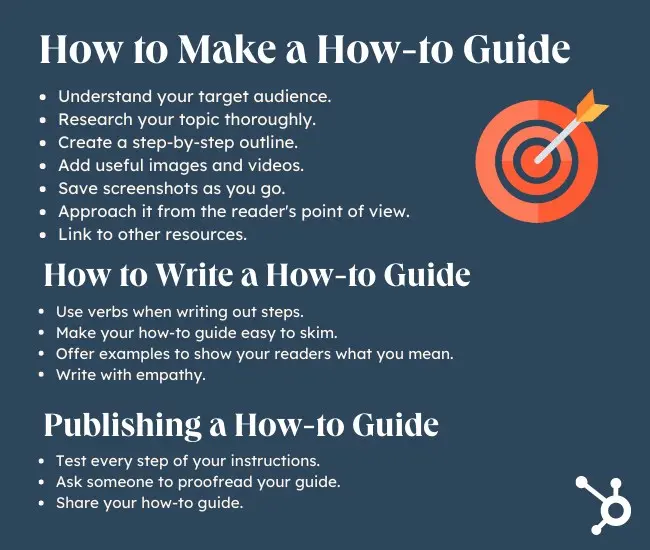
5 Tips for Writing a How-to Guide

Once you’re ready to start writing your how-to guide, you might wonder if your tone or style should differ from other kinds of writing.

In short: Yes, it should.

How-to guides should offer tactical, actionable advice on a topic so readers can start following the steps immediately.

When people search “How to …” they often rush to find the information they need; this means you must write in short, concise sentences to provide an answer quickly.

Here are some more tips and best practices to keep in mind when writing a how-to guide:

1. Use verbs when writing out steps.

Verbs put your instructions in motion. Active verbs can help your readers visualize themselves doing the task as you teach them how to do it.

For example, say, “Write a company background” rather than “Your RFP should start with a brief background on your company.”

As you write, you’ll also want to avoid passive verbs like the examples below:

  • “Flour and water were stirred together.”
  • “The page tab has been opened so we can click the box at the top.”

If you often slip into passive voice as you write, use a grammar-checking tool to catch and fix your errors.

2. Make your how-to guide easy to skim.

Many people skim instructions. This means they quickly skip text that includes stories, data, or more extended details.

People who look may pay more attention to introductions, summaries, or text’s first and last sentences. Bolded, underlined, or highlighted text can also get their attention.

Use numbered lists, headers, and bullet points to summarize the text. These tactics make for easy readability and understanding.

3. Offer examples to show your readers what you mean.

Show readers what you mean by bringing your instructions to life. First, use sensory details and action to create a picture in their head as you write your how-to guide.

Pair images with written text for readers who can‘t load the image on their screen or need help to understand what you’re trying to tell them from the picture itself.

4. Write with empathy.

How-to guides often attract a wide range of readers with varying levels of expertise. So, be sure to acknowledge that it can be frustrating when learning or refining a new skill.

For example, the guide “How to Create a YouTube Channel” likely attracts YouTube beginners who want to create a channel to watch and comment on friends’ YouTube posts.

But it also attracts professional marketers who must create a channel for their business to attract and convert leads.

With such a diverse audience, you must write clearly but not condescendingly. This can help you retain readers regardless of skill level or background experience.

5. Know the difference between a tutorial and a how-to guide.

Tutorials and guides are often used interchangeably to define content that explains how to complete a particular task. While some argue that one is more descriptive, you’ll find that it varies from brand to brand.

The most distinctive difference is between a how-to guide and a user manual. A how-to guide is typically top-of-the-funnel content to attract users and generate leads.

A user manual is typically created for someone who has already purchased a product or service and needs step-by-step instructions on using it.

While one falls under marketing materials, the other relates more to the product.

3 Tips to Publishing a How-to Guide

Here’s some advice to remember before publishing your how-to guide.

1. Test every step of your instructions.

Once you‘ve finished writing your guide, it’s time to test it out. As you test your instructions, take careful notes. If you have to scan an education more than once, add context or an image for clarity.

2. Ask someone to proofread your guide.

It‘s always a good idea to get different viewpoints when proofreading a how-to guide. You never know how a word choice or set of instructions will impact another person, so it’s wise to test it with a small group of friends or colleagues.

A polite ask for help goes a long way. It‘s also a good idea to make proofreading easy for your helpers.

Clearly state what you’re looking for, expect questions and critical feedback, and connect with a diverse group of people for the most valuable insights.

3. Share your how-to guide.

Whether offering a QR code or promoting by word-of-mouth, your next step is to share your guide with your audience.

Other popular ways to share your guide include:

How-to guides are also great for repurposing content.

1. Simple is best.

Simplicity will make your guide easy to find, use, and understand. To ensure your how-to guide is straightforward, closely examine your topic.

Your guide should focus on the one thing your reader should be able to begin and complete after reading your guide. If you look at your guide and it doesn‘t meet that benchmark, it’s time to simplify.

A few quick ways to simplify your how-to include:

  • Breaking your topic into smaller and more specific topics
  • Narrow down your target audience
  • Scan your guide for extra content that could be distracting and edit

2. Keep it short.

Writing concise copy takes a lot of practice. If your guide is longer than it needs to be and you’re not sure how to cut the extra text, these tips can help:

  • Cut “the” and “that” when it makes sense
  • Limit adverbs and adjectives like very, really, and literally
  • Replace three and four-syllable words with shorter alternatives

3. Start with an overview.

A great how-to guide begins with a clear overview. This overview should include:

  • A quick summary of your guide
  • What your audience will need to use it
  • What they’ll achieve once they follow the directions
  • Why it’s worth doing

It’s usually easier to write the first paragraph last. This way, all the details are complete; you just need a few quick attention-grabbing sentences to attract your readers. Check out this post if you need help writing introductions.

4. Help the reader prepare for each step.

Many step-by-step are great at the beginning or accessible at the end, but they can get murky somewhere in the middle. This can frustrate users, especially when they get to a step they aren’t prepared for.

To avoid this, anticipate a reader‘s questions at each step. For example, offer more than just an overview of the materials they’ll need for the project as a whole.

Talk about what materials they’ll need, when, and how to store them if you think it will be helpful.

Add resources that help your users understand how all the different pieces will fit together.

Repetition can get annoying for some readers. But it’s essential for a how-to guide. Repetition is crucial during learning because it can help readers become more comfortable with new information.

5. Write instructions at a consistent level.

If you’re a subject expert, you might combine beginner and advanced terms in your writing without realizing it. This can confuse your audience and make your guide tough to understand.

It also creates a lack of consistency, making your instructions more difficult to follow.

If this could be a concern, scan your how-to guide for jargon as you proofread. You can also ask proofreaders from other niches and industries to check that your vocabulary is beginner-appropriate.

6. Tell an exciting story.

The best how-to guides are more than just practical and fun to read. To keep your focus engaging, remember to tell a story.

Ensure you have a clear message throughout the guide, add personal experiences, and use conflict to add interest.

For example, say you‘re writing a how-to guide about adding software to a computer. A potential point of conflict is when there’s not enough disk space to finish installing.

That doesn‘t sound like a big deal, but it can be frustrating if you’ve ever experienced it. If you can paint that picture vividly for your audience, they’ll be more likely to follow your directions.

7. Stay positive.

Anyone seeking a how-to guide is trying to expand their knowledge about the world. That seems straightforward, but it‘s also a considerable risk.

Many people stop trying new things because they don’t want to look foolish. So, as you write, remember that learning is exciting, but it’s often uncomfortable, too.

Keeping your writing positive can help make your readers feel more at ease as they venture into the unknown. Uplifting stories, word choices, and tone can make complex instructions seem more manageable. They can inspire and motivate.

You can also add some positivity by softening negative information. For example, instead of saying, “You’ll probably fail at this the first time,” try saying something like, “This skill may take some practice before you’re an expert.”

How-to Guide Examples

How-to Guide Example: B2B

How to Write the Perfect 90-Day Plan.”

We like this example: This B2B how-to guide offers important contextual details to the 90-day plan, including “What is a 90-day plan?” and “What should be included in a 90-day plan?” The piece is well-researched and written with empathy.

The guide provides a downloadable 90-day plan PDF so that readers can immediately download and use Atlassian’s program with their team.

Takeaway: Consider what ebooks, PDFs, charts, Canva designs, or Google Sheets you can create internally and offer to readers to download. Readers will appreciate the option to apply what they’ve learned immediately.

More B2B How-to Examples

How to Build Brand Consistency

Why we like this how-to guide example: Partnering with complementary businesses and services can add depth and perspective to your how-to guide.

This example is comprehensive and packed with valuable resources from HubSpot and Brandfolder. It also uses relevant data to highlight key sections.

Takeaway: Look for creative ways to add value to your how-to guide, especially when writing about a topic your audience already knows.

How To Drive More High-Quality Leads With Google Ads

Why we like this how-to guide example: When creating guides for more advanced topics, creating a foundation for your readers is essential.

This guide begins with a detailed introduction to the case that cites current statistics and trends. Then, it covers relevant topics at each stage in the buyer journey.

Next, it offers a helpful checklist, links, and resources to implement this learning.

Takeaway: A clear structure makes challenging topics easier to understand. So, consider the ideal start and end points for your expert readers when writing about specific and advanced topics.

How-to Guide Example: B2C

How to Become a Freelancer

Why we like this how-to guide example: This guide does an excellent job of providing relevant links and data to create a comprehensive overview of what freelancing is.

Additionally, the post uses action verbs to inspire the reader.

Under “How to Start a Freelance Business.” you’ll see tips such as “Do Your Homework,” “Create a Brand,” and “Plan Ahead.” The language used in this post goes a long way toward encouraging readers to get started quickly.

Takeaway: Use action verbs and concise language to keep a reader engaged. Start with a verb instead of a noun when listing out steps.

More B2C How-to Examples

How to Start a Successful Blog

Why we like this how-to guide example: This is an excellent guide for beginners because it includes resources that offer multiple ways to take in the material.

This guide is packed with checklists, links to courses, templates, and tools that can help anyone start a blog.

Takeaway: There are many different learning styles. The more choices you give your students to take in the information you share, the more likely they will get value from your guide.

How to Be a Leader

Why we like this how-to guide example: This example offers a personal perspective on leadership that goes beyond typical advice.

It also uses creative headers like “Beyond the Paycheck: What We Wish For,” “Doubtliers: Dangers Learning From the Exceptional,” and “Great companies don’t always make great decisions” to engage the reader in the content.

Takeaway: Teach broad how-to topics from a unique perspective and add interest with relevant stories.

How-to Guide Example: Lifestyle

11 Ways to Quickly Stop Stress in Your Life

Why we like this how-to guide example: I clicked on this post expecting a few quick, easy tips for stopping stress. Instead, I was engrossed in the first section of the post, “The Effects of Stress in Your Life.”

While I previously mentioned the importance of starting with a quick answer to the searcher’s how-to question, there are exceptions to that rule.

In this case, readers must understand the why before the how.

Takeaway: Play around with structure. Consider what your readers need to know for the rest of the post to matter to them.

For instance, you might start with a section, “What is XYZ?” and “Why XYZ matters” before diving into “How to do XYZ.”

This way, your readers are fully invested in discovering how these tips can improve their lives in some small (or big) way.

More Lifestyle How-to Examples

How To Make Honey Pie

Why we like this how-to guide example: This guide is neatly organized so readers can quickly determine a) what makes this recipe unique, b) the ingredients they’ll need, and c) how to make it.

If a reader already knows the ingredients necessary for honey pie, they can click “Jump to Recipe” immediately.

Takeaway: As you’re structuring your how-to guide, consider best organizing it so readers can jump straight to what they need.

How to Be More Productive

Why we like this example: How-to guides are more than written instructions. Useful images, break-out pages highlighting external links, and infographics are potent additions to this example.

It has an outstanding balance of features and white space, making this guide easy on the eyes and quick to skim.

Takeaway: It doesn’t matter how great your how-to guide writing is if it needs to be well-designed. Take a look at how-to guide examples to get inspiration for the look and feel of your guide design.

Create a How-to Guide That’s Worth Sharing Today

The right how-to guide can change someone’s life. It can also significantly boost your business, improve the customer experience, and more.

Creating a great step-by-step guide takes some planning, research, and know-how. Your experience can help someone make a difference; just create a direction that makes your knowledge worth sharing.

Editor’s note: This post was originally published in March 2021. It has been updated for freshness and accuracy.

content templates

Categories B2B

The Best LinkedIn Articles + Expert Insights

With LinkedIn Pulse discontinued, it can be difficult to find the best articles on the platform now that they are no longer available in one place.

Download Now: Free Marketing Plan Template [Get Your Copy]

However, there is still plenty of great content on LinkedIn written by some of the top experts in their fields. Below we’ve compiled a list of our favorite LinkedIn articles from past to present as well as some insights from our favorite authors to inspire your own.

Best LinkedIn Articles to Read Now

1. How ChatGPT is Changing the Game in 2023, Gary Vaynerchuk

Entrepreneur, CEO, author, and media mogul Gary Vaynerchuk is no stranger to embracing technology. Capitalizing on the internet in the early aughts making his family’s wine business one of the first ecommerce sites for alcohol in the country, catipulted him to success. He’s always on the cutting edge of what’s new in tech and how users should embrace it. Here, he has a similar take on AI.

Excerpt

“You can have any opinion you want on AI, but here’s the truth: technology doesn’t care about your opinion. It’s not gonna stop advancing. So, if you’re doing a job that AI is capable of doing soon, it’s time to think about that and prepare yourself for change and/or use it as a tool… meaning, many people who create copy or do design work who are scared of losing their job actually don’t realize that the “architect” of the “AI input” to the create copy or design is about to be a new job — one that might even pay you more. Use the tool, don’t fear the tool.”

Read the rest here.

2. Now Is the Time to Build the Workplace of the Future, Arianna Huffington

Founder of Thrive Global and former editor-in-chief at The Huffington Post, Arianna Huffington knows quite a bit about running a company. In the article below she discusses the delicate balance of bringing employees back to office while offering some flexibility to work from home.

Excerpt

“While those of us lucky enough to even have the option to work at home value the flexibility, we’re now deep enough into this global experiment to be able to see that it doesn’t come without costs. For instance, anyone who’s spent time in wall-to-wall virtual meetings is familiar with virtual fatigue. Research by Microsoft’s Human Factors Lab found that it begins to set in around 30 minutes into a meeting. And as Adam Grant wrote, “even before Covid, many people reported spending the majority of their work time in meetings and on emails. Once everyone was reachable around the clock, collaboration overload only got worse.”

Read the rest here.

3. 17 Of the Best Tools For Any Entrepreneur Looking to Scale Their Business, Morgan DeBaun

CEO of Blavity Inc and founder of AfroTech Morgan DeBaun gives her best tips for working smarter and shares some of her favorite productivity tools.

Excerpt

“One of the most important things about working smart is learning how to automate and delegate to increase your efficiency.

Choosing the right tools and apps can be critical to scaling your team and saving you time.”

Read the rest here.

4. 20 CEO Lessons Learned at HubSpot on the Journey from $0 to $20 Billion, Brian Halligan

HubSpot Co-Founder Brian Halligan shares the important lessons he’s learned along his journey with HubSpot.

Excerpt

“Your greatest strength turns into your greatest weakness: Like a lot of founder/CEO types, I like to make decisions and control things. This tendency works great when you are 10 people and can work up to 50 people, but after that, it turns into a giant disaster for your organization and yourself. Every year you need to delegate more and more – this was very unnatural for me and I suspect for many scaling CEOs. …This lack of delegation had lots of frequent flier miles on my previously mentioned annual reviews.”

Read more here.

5. Impostor Syndrome – Its Prevalence In Professional Women And How To Overcome It, Kathy Caprino

Kathy Caprino, M.A. is an international career and leadership coach, writer, speaker and executive trainer helping professional women advance their careers. In the article below she explores imposter syndrome, its causes, and how women can overcome it.

Excerpt

“Our study found that 75% of executive women identified having experienced impostor syndrome at various points during their careers—and 85% believe it is commonly experienced by women across corporate America. Women can experience impostor syndrome in key moments of an existing role, or at specific milestones such as a career change or promotion.”

Read the rest here.

When it comes to writing content that’s engaging Caprino advises to always be of service first. In her piece How To Write Articles That Become The Most Popular In Your Field Caprino says “Be a generous giver and don’t publish articles with your hand out asking “What’s in this for me?” Follow what your community cares about, and give them potent info that will move them forward. Brainstorm new ways that your expertise will help people thrive, grow, enjoy life, make more money, build healthier habits — whatever it is that you want to help with.”

6. The Truth on Authentic Inclusive Marketing and How to Make It Happen, Lola Bakare

Author and founder of be/co Lola Bakare enables marketing executives to do their best work and generate the most impact. Here, she explains how authentic inclusivity and purpose-driven marketing pays off.

Excerpt

“Authentic, inclusive marketing maximizes value at the intersection of measurable societal impact and every marketer’s most important jobs to be done: elevating brand reputation, and achieving commercial goals. Let’s refer to these three kinds of value as the marketing ”triple top-line”.

Read the rest here.

7. 10 Ways Smart People Neutralize Toxic People, Dr. Travis Bradberry

Dr. Travis Bradberry, author of Emotional Intelligence Habits, explains that managing your emotions is the key to a more enjoyable life. In the article below, he explains how to neutralize the effects of toxic people and mitigate stress.

Excerpt

“Studies have long shown that stress can have a lasting, negative impact on the brain. Exposure to even a few days of stress compromises the effectiveness of neurons in the hippocampus—an important brain area responsible for reasoning and memory. Weeks of stress cause reversible damage to neuronal dendrites (the small “arms” that brain cells use to communicate with each other), and months of stress can permanently destroy neurons. Stress is a formidable threat to your success—when stress gets out of control, your brain and your performance suffer.”

Read the rest here.

When it comes to writing and researching topics, Dr. Bradberry advises to “Do a lot of reading to see what topics people are most interested in. When you’re writing informational articles it’s a must you are covering the topics that people are looking for.”

8. The “3 Truths”​ of Idea Generation, Todd Kaplan

Pepsi’s Chief Marketing Officer Todd Kaplan wrote this piece explaining his “3 Truths” framework to create the #BetterWithPepsi campaign and how marketers can apply the framework to their own projects.

Excerpt

“Good creative doesn’t just come from “divine inspiration” — it’s the output of a process that starts with a brief about a particular problem or opportunity. But more times than not, clients and agencies alike don’t put in the time up front to truly identify the right insights that create the richest creative tension. The big idea should be born from the intersection of real consumer behaviors, facts about the brand or product, and the cultural context that surrounds it all.”

Read the rest here.

LinkedIn Pulse Favorites That Still Resonate

1. Three Things I’ve Learned From Warren Buffet, Bill Gates

Excertpt

“He says a shareholder has to act as if he owns the entire business, looking at the future profit stream and deciding what it’s worth. And you have to be willing to ignore the market rather than follow it, because you want to take advantage of the market’s mistakes — the companies that have been underpriced.”

Read the rest here.

2. 9 Qualities of Truly Confident People, Dharmesh Shah

Excerpt

“First things first: Confidence is not bravado, or swagger, or an overt pretense of bravery. Confidence is not some bold or brash air of self-belief directed at others. Confidence is quiet: It’s a natural expression of ability, expertise, and self-regard.”

Read the rest here.

3. The No. 1 Career Mistake Capable People Make, Greg McKeown

Excerpt

“Capable people end up doing lots of projects well but are distracted from what would otherwise be their highest point of contribution, which I define as the intersection of talent, passion and market (see more on this in the Harvard Business Review article ”The Disciplined Pursuit of Less“). Then, both the company and the employee lose out.”

Read the rest here.

4. 11 Simple Concepts to Become a Better Leader, Dave Kerpen

Excerpt

“The world is more complex than ever before, and yet what customers often respond to best is simplicity — in design, form, and function. Taking complex projects, challenges, and ideas and distilling them to their simplest components allows customers, staff, and other stakeholders to better understand and buy into your vision. We humans all crave simplicity, and so today’s leader must be focused and deliver simplicity.”

Read the rest here.

5. 10 Things to Do Every Workday, J.T. O’Donnell

Excerpt

“You don’t wait to do the work until you get the dream job — you do the work in order to get the dream job.”

Read the rest here.

6. The One Thing Successful People Never Do, Bernard Marr

Excerpt

“You could argue that every experience of failure increases the hunger for success. The truly successful won’t be beaten — they take responsibility for failure, learn from it, and start all over from a stronger position.”

Read the rest here.

7. Stop Using These 16 Terms to Describe Yourself, Jeff Haden

Excerpt

“Do you describe yourself differently — on your website, promotional materials, or especially on social media — than you do in person? Do you use cheesy clichés and overblown superlatives and breathless adjectives? Do you write things about yourself you would never have the nerve to actually say?”

Read the rest here.

8. 8 Things Productive People Do During the Workday, Ilya Pozin

Excerpt

“While no one likes admitting it, sheer laziness is the No. 1 contributor to lost productivity. In fact, a number of time-saving methods — take meetings and emails for example — are actually just ways to get out of doing real work.”

Read the rest here.

9. How I Hire: Focus On Personality, Richard Branson

Excerpt

“Some managers get hung up on qualifications. I only look at them after everything else. If somebody has five degrees and more A grades than you can fit on one side of paper, it doesn’t necessarily mean they are the right person for the job. Great grades count for nothing if they aren’t partnered with broad-ranging experience and a winning personality.”

Read the rest here.

10. The 3 Questions People Always Forget to Ask in an Interview, James Caan

Excerpt

“It is important to show any prospective employee that you are the type of person who is ambitious and is looking to move their career forward. No one wants to take on an individual who is going to be content to coast and you need to show that you are not coming along just for an easy ride. Any ambitious and forward-thinking company will be looking for like minded individuals.”

Read the rest here.

Editor’s note: This article was originally published in November 2014 and has been updated for comprehensiveness.

New Call-to-action

Categories B2B

SEO Writing: 13 Tips on Writing Blog Posts That Rank on Google

If you’ve ever written a blog post before, you know how much time it can take.

From topic selection and gathering research to writing the post and pressing “Publish,” the process often demands hours. That‘s why, if your post doesn’t earn the traffic you expected, it can be a major letdown.

→ Download Now: SEO Starter Pack [Free Kit]

Fortunately, there’s a way to combat low traffic: search engine optimization. As marketers, we‘re always aiming to write content that’ll rank highly on Google, and SEO is the bridge that’ll help you get there. That begs the question: How do you incorporate that into your content?

Don‘t worry — we’ve got you covered. In this post, we’re going to dive into 12 ways to master SEO writing.

With higher rankings, your website increases its overall visibility. The ultimate goal is to drive organic traffic, increase conversions, and achieve business objectives through effective optimization.

If you don’t optimize your content for search engines, your website may suffer from low visibility and poor rankings on search engine results pages (SERPs). As a result, the potential reach and exposure of your content may be significantly reduced.

Why is SEO content writing important?

Without SEO, your content is less likely to rank highly on search engines. Ranking lower may hinder your ability to attract and engage with your target audience. It may also make your content seem less credible and authoritative.

A 2020 Search Engine Journal study found that the clickthrough rate for websites in position one on the SERP is 25%. This number drops drastically to 15% for websites in position two and then down to 2.5% for websites in position 10. When you get to page two of Google, that number gets even lower.

This means that if your website is not on the first page, there’s a small chance consumers will find your website organically. Fewer visits to your site mean fewer opportunities to generate leads, and ultimately, revenue.

Your next best option is investing in advertising to get those users to your site. But that costs money, and if you’re on a tight budget, why not invest time in SEO writing? It’s free and will likely bring you traffic for much longer than a campaign would.

The Basics of SEO Content Writing

When getting started with SEO content writing, it’s important to understand the basics. Here are some fundamental principles to follow when incorporating SEO into your writing.

Keyword Optimization

Keyword optimization is all about strategically using relevant keywords and phrases in your content to boost its visibility and ranking. This aspect of SEO is super important because it helps search engines better understand your content, thereby increasing the chances of it appearing in relevant search queries and attracting organic traffic.

To select the best keywords, you’ll need to research and identify what exactly your target audience is looking for and align it with your content’s topic. Finding the right balance between incorporating keywords in a way that makes sense to readers and satisfies search engine algorithms is key.

We’ll go more in-depth about how to find keywords and how to disperse them throughout your content in the tips section.

User Intent

User intent refers to the motivation or purpose behind a user’s search query. It’s all about figuring out what they really want to discover when typing something into a search engine.

There are generally four types of user intent:

  • Informational intent: When someone is seeking information or answers to their questions. They may be looking for definitions, explanations, how-to guides, or research materials.
  • Navigational intent: When someone is searching for a specific website or brand. They already know what they want to find and are using a search engine to navigate to a particular webpage.
  • Transactional intent: When someone is ready to take action, such as making a purchase, subscribing to a service, or booking an appointment.
  • Commercial intent: When someone is researching products or services with the intention to buy later. They are comparing products, reading reviews, and looking for the best deals before making a decision.

By understanding user intent, you can create content that aligns with what people are looking for and boost your chances of showing up in search results. It’s all about giving people what they need and providing them with a good search experience.

Readability

Writing for SEO isn’t just about what you write, it’s also about how you write. It isn’t enough to just place keywords into your content and call it a day. You need to consider how your audience’s experience will be when they read it.

This is where readability comes in.

Readability is all about striking the right balance between optimizing for search engines and ensuring that your content is enjoyable and valuable to human readers.

In addition to optimizing your content with keywords and internal links, you’ll want to focus on user experience. Write in a reader-friendly manner by using clear and concise language and avoiding jargon. You’ll also want to utilize headings and make your content more scannable (more on that below).

When writing and editing your content ask yourself: Is this easy to understand? Does this have a logical flow? Is this engaging? If the answer to any of these questions is “no,” you may need to make some changes.

Historical Optimization

Every SEO writer knows that an evergreen blog post will never be completely finished, even after it’s been published. Thanks to algorithm updates and competitors targeting the same keywords, search results are always changing.

That’s why it’s important to have a content update strategy in place to ensure your older web content remains fresh and relevant in search engine rankings. This practice is called historical optimization.

To figure out which blog posts you need to update, assess your older content by conducting a content audit to find underperforming or outdated pieces. Then, determine how to improve the piece. This usually involves refreshing the content by adding new information, removing outdated information, optimizing keywords, and improving formatting and readability.

1. Start with keyword research.

It’s estimated that Google processes over 70,000 search queries a second. Staggering, right?

If you want to cut through SERP clutter and outrank your competitors, you need to target the specific keywords and phrases your potential customers are searching for. Otherwise, how else will they find your content and website?

Start with a keyword research tool. Sites like Ahrefs and Google Keyword Planner give you details on what users are searching for and how popular those queries are.

For an inside look into how Ahrefs can aid you in your SEO keyword research and beyond, check out our case study and exclusive interview here.

Google Trends can also give you a feel for what keywords are popular at any given time. If you see searches are steadily declining over time for a specific keyword, you know that’s probably not the right keyword to target for your marketing. The opposite is true for rising trends.

If you’re ever running low on keyword ideas, get inspiration from your competition. Use competitive intelligence tools to see what keywords their domains currently rank for. If these keywords are relevant to your business, consider using them too.

However, keep in mind that the most obvious keywords don’t always align with your strategy. Additionally, your focus keywords will evolve over time as trends shift, terminology changes or your product/service line grows.

Be sure to conduct keyword research periodically to ensure you’re still focusing on the right keywords for your target audience and not missing out on vital ranking opportunities.

2. Use headings to your benefit.

Headers help Google’s web crawlers understand your blog post and the sections within it.

Think of the crawlers as readers who are skimming your blog. They want an overview of what your article will cover, that’s your H1. Then your H2s, H3s, H4s break down the subtopics within the piece.

So, your subheaders should reflect the content in the body and include high-intent keywords. When you use the right keywords, meaning the ones your target audience is using, you have a much higher chance of ranking on the SERP.

3. Optimize your content for featured snippets.

Featured snippets on Google are the most direct answers to search queries. For instance, if I were to search, “How do you write a blog post?” Google might use a featured snippet to show the best answer.

featured snippet on Google search engines results page (SERP)

To earn a featured snippet on Google, you’ll need to answer the question thoroughly and succinctly.

For instance, if the search term is “How to screenshot on mac,” you can put “How to Take a Screenshot on a MacBook Computer” as your H1 or H2, followed by the steps in a numbered or bulleted list.

Once you’ve done that, be sure to include part of the question in your answer. Using the example above, you would start the paragraph with the following: “To take a screenshot on your MacBook, here are the steps…”

Additionally, start each sentence with an actionable verb, like “click” and “select.”

If the keyword for which you want to capture the featured snippet requires a definition, write an answer that’s no more than 58 words.

4. Write for humans, not search engines.

With all these SEO guidelines, it can be easy to forget that when a user searches on Google, they are looking for an answer. The best way for you to improve your chances of ranking is by writing high-quality blog posts.

What does that look like? Thorough answers, scannable sections, organized subheaders, and visual aids.

Keep your buyer personas, their motivations, challenges, and interests in mind. It’s also important to choose topics that will resonate with your potential customers and address their pain points.

While some SEO tools can help on the technical side of your site, you can also opt to use content writing SEO tools to help you to write correct, concise, and human-friendly content that will rank well and engage readers. Different tools also measure content engagement, allowing you to see how long people are spending on a page, whether or not they’re visiting multiple pages, or how far people are scrolling down your site.

Pro tip: Writing can be difficult when keeping all of these variables in mind. One way to simplify the process is to organize your main thoughts, and then use them as a prompt for an AI tool, like HubSpot’s free AI blog writer.

You can then go through that draft and add the personal touches and optimizations that make it fun for humans to read.

5. Optimize your title.

Even with a great, SEO-friendly post body, a bad headline could hurt you in the SERP.

To title your post with SEO in mind, write something compelling that also incorporates your main keyword. Here are a few tips:

  • Incorporate numbers. E.g.: “5 Ways to Rock a Matte Lipstick.”
  • Include your offer in the title. E.g.: “How to Write a Cover Letter [+ Free Template]”
  • Add a teaser. E.g.: “We Tried the New [Insert App Name] App: Here’s What Happened”

6. Include keywords in your meta description.

Are you adding meta descriptions to your post? If your answer is “no,” then you‘re probably not getting as much traffic as you could. Let’s get into why they’re important.

By now, we‘ve talked about a couple of the ways a blog post can communicate with Google: subheaders, keywords, and snippets. However, that’s not an exhaustive list.

Meta descriptions are another area Google crawls to determine search rankings. Meta descriptions are the one- to three-sentence descriptions, you’ll find underneath the title of a result.

example how to include keywords in a meta description

Use meta descriptions to sum up what your post is about, and remember to:

  • Keep it short.
  • Use one to two keywords.
  • Make it compelling. After all, there are going to be other posts similar to yours so you’ll want your description to stand out above the rest.

Most content management systems (CMS) have meta description boxes built-in, so you likely won’t have to look far to use the function.

7. Add alt text to images.

With any image you add to your post – featured or body images – you’ll want to add alt text.

Alt text describes what’s happening in the photo and it helps Google (as well as those who are visually impaired) understand why the photo is in your post.

For instance, let’s say your article is about virtual events and you include the following image:

Business man attending a virtual event sits at a desk while holding a pen.

Image Source

The alt text should read something like, “Business man attending a virtual event sits at a desk while holding a pen.”

This sentence is descriptive and includes the main keyword “virtual event.” So, even if the reality is that this is a stock image, you can create a narrative that aligns with your blog post.

8. Resist the urge to keyword stuff.

The goal is to make your page fully optimized, not overbearing. Find natural fits for keyword additions, but don’t force them to the point where your content is illegible.

For example, if your keywords are “account-based marketing,” “startups,” and “sales,” avoid a meta description like this: “Sales for account-based marketing startups.”

Instead, try focusing on one or two keywords to make the description more natural: “Are you looking for killer strategies to boost your account-based marketing game? Discover our research-backed techniques in this post.”

With this approach, you‘re still using keywords, but you’re not oversaturating the post. Remember, your goal is to solve for your audience. If your users have a poor reading experience, that will signal to Google that your post may not be meeting their needs.

9. Link to high-authority websites.

As you build out your blog post, don’t be afraid to link externally.

Linking to reputable websites not only offers blog readers additional reading material to expand their knowledge, but it also shows search engines that you’ve done your research.

Nothing strengthens a blog post like research-backed statistics from influential websites. Compelling stats help you build a more convincing and concrete argument that will help you gain trust from your readers.

10. Aim for scannable, longer posts.

In an age of short attention spans, you would think shorter blog posts are the way to go. But in fact, search engines like Google actually prefer longer, in-depth blog posts.

Think about it: the more content on the page, the more clues search engines have to figure out what your blog is about. At HubSpot, we’ve found that the ideal length is between 2,100 and 2,400 words.

The downside to longer blogs is that they may overwhelm your readers. One way to combat that is by breaking down your content into bite-size, scannable chunks.

Turn a long-winded sentence into two and keep your paragraphs to three sentences or less.

Don’t forget about bullet points – they’re great attention grabbers and easily digestible, especially on mobile devices.

11. Link to other posts on your site.

Linking to other pages or blog posts on your website helps search engines create an accurate sitemap. It also helps your audience discover more of your content and get to know you as a trustworthy, credible source of information.

On the user side, Internal links to other valuable content keep readers on your site longer, reducing bounce rate and increasing your potential for a conversion. Isn’t that what it’s all about?

When linking to any pages on your website, or even outside sources, use natural language for your anchor text. Avoid using spammy or generic calls to action, such as “top-rated cheap laptops” or “click here.”

Instead, use descriptive keywords that give readers a sense of what they will find when they click on the hyperlink, like “Download your SEO guide.”

Never force-feed links to your top webpages, featured products, or discounted items. Include links that enhance the points made in your posts and naturally tie in with the subject matter.

12. Compress images for fast page load speed.

Google rewards pages with fast loading speeds, as it improves the user experience.

One of the leading culprits of page lag is large, heavy images. If you have several images in your post and each one is over 100KB, that can drastically impact your page speed.

Luckily, there are free apps, like Squoosh.app, that compress images without sacrificing quality.

If you suspect that your low ranking is due to slow page speeds, head over to Google’s PageSpeed site for a free analysis and recommendations.

13. Design a link-building strategy.

Link building is crucial to your search ranking.

Why? Think of search results like a competition where the winners get the most votes. Each webpage that links back to you is considered a vote for your website, which makes your content more trustworthy in the eyes of Google. In turn, this will make you rise further up in ranking.

So, it’s good to write posts that other websites or publications will want to hyperlink within their own posts. To make your website’s blog post more linkable, include high-value assets in your posts, such as original data and thought leadership.

Conducting interviews with experts is another effective way of leading traffic back to your website.

Get Started with SEO Writing

You know how to write content audiences will love. Now, it’s time to include elements that Google will love too. It can sound tricky at first, with these SEO tips, you’ll be on the first page of Google in no time.

Editor’s note: This post was originally published in March 2021 and has been updated for comprehensiveness.

marketing

Categories B2B

Why Lifestyle Brands Are the New Media Companies

Success in the media space is a moving target. While prior media conglomerates focused heavily on amassing large audiences and monetizing through advertising, emerging media brands are finding success by creating their own lifestyle brands to generate growth and engagement.

Media Companies That Are Spinning Success

Reese Witherspoon’s Hello Sunshine is rewriting the playbook for how production companies can rise to the top. Hello Sunshine first started generating popularity with audiences through a modern book club model, reminiscent of Oprah’s book picks in the 90s.

Witherspoon started a book club in 2017 offering a monthly book recommendation to her fans. The book club became its own lifestyle brand that generated interest in the content created by Witherspoon’s production company Hello Sunshine.

Essentially, Witherspoon’s media-lifestyle hybrid looks something like this:

  • A book is chosen for Reese’s Book Club
  • Her production company Hello Sunshine acquires the on-screen rights to books that have veen featured by the book club
  • Hello Sunshine produces and publishes movies and television shows related to these books
  • The engaged community that has already connected with the books are eager to watch Hello Sunshine’s content

…And the cycle repeats. What Witherspoon has created is a unique hybrid of a lifestyle brand and production company, creating a built-in audience for content produced by the company. This strategy has paid off — in 2021 Hello Sunshine sold for $900M to an undisclosed buyer.

Podcast host Alex Cooper is following a similar model to expand her content empire beyond her popular podcast Call Her Daddy.

In 2021, Cooper made headlines after inking a $60 million deal with Spotify, giving the platform exclusive publishing rights to her podcast for three years. This year, Cooper launched her own production company with her fiance called Trending, aimed at engaging a younger audience.

The first offering is a podcast network called Unwell where she’s signed popular Gen Z creators Alix Earle and Madison Argy, helping them launch their own high-profile shows using her podcasting playbook.

In addition to podcasts, trending is also producing movies. The first, called Love at First Sight, premiered on Netflix last month with Cooper’s fans and listeners on deck generating excitement for the film. By creating an ecosystem of media spanning hyper-engaged audiences across various podcasts, movies, and in-person appearances, Cooper is generating interest in every major project she touches.

Both of these examples offer a new blueprint for modern media companies as the industry’s landscape continues to evolve.

New call-to-action